Skip to content

Instantly share code, notes, and snippets.

@lukewang1024
Created March 3, 2017 15:33
Show Gist options
  • Select an option

  • Save lukewang1024/37a072232eade1e98e135f8d2d97fd11 to your computer and use it in GitHub Desktop.

Select an option

Save lukewang1024/37a072232eade1e98e135f8d2d97fd11 to your computer and use it in GitHub Desktop.
Steps to enable the hidden Android Play Store in Chrome OS

Steps to enable the hidden Android Play Store in Chrome OS

  • Enable developer mode
  • Open a Crosh tab (CTRL + ALT + T), type shell, enter.
  • Run the following commands one by one.
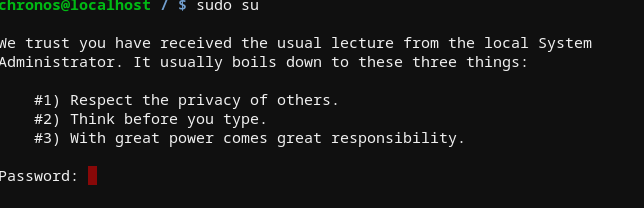
sudo su
cp /etc/chrome_dev.conf /usr/local
mount --bind /usr/local/chrome_dev.conf /etc/chrome_dev.conf
echo '--enable-arc ' >> /etc/chrome_dev.conf
  • Logout then login.
  • Note that poweroff will clear the changes.
@Blaine7845
Copy link

Screenshot 2022-12-03 3 07 35 PM
not valid commands

@rakolambski
Copy link

You need to have your Chromebook in developer mode before you can use these commands. Read about what that means (there are pros and cons to running in developer mode) before enabling it.

@liyo-droid
Copy link

cannot type anything after entering ´śudo su´. when it asks for password
Screenshot 2023-04-03 12 03 31 PM

Sign up for free to join this conversation on GitHub. Already have an account? Sign in to comment