
Bash on Ubuntu on Windows (installation instructions) is a Linux Subsystem for Windows.

To add it to the Windows right click context menu, perform the following steps:
-
Open
regeditfrom the run menuWin + R. -
Under
HKEY_CLASSES_ROOT\Directory\Background\shellcreate a key calledBash on Ubuntu on Windows. -
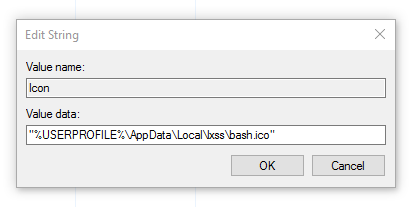
Now add a string value to this key called
Iconwith a path to the desired icon"%USERPROFILE%\AppData\Local\lxss\bash.ico"(including quotes). -
Create a new key called
CommandunderBash on Ubuntu on Windows. -
Change the default value to the path where your
bash.exeis, likeC:\Windows\System32\bash.exe.


Hi, is there anyway to create context menu when "right click on folder items"?
The current version is working when using windows explorer, but in some explorer alternatives (xyplorer) the current method is not working because it has its own context menu.