
Bash on Ubuntu on Windows (installation instructions) is a Linux Subsystem for Windows.

To add it to the Windows right click context menu, perform the following steps:
-
Open
regeditfrom the run menuWin + R. -
Under
HKEY_CLASSES_ROOT\Directory\Background\shellcreate a key calledBash on Ubuntu on Windows. -
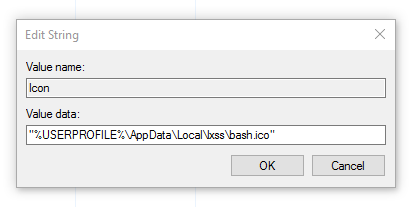
Now add a string value to this key called
Iconwith a path to the desired icon"%USERPROFILE%\AppData\Local\lxss\bash.ico"(including quotes). -
Create a new key called
CommandunderBash on Ubuntu on Windows. -
Change the default value to the path where your
bash.exeis, likeC:\Windows\System32\bash.exe.


Based on how Git Bash inserts the GUI and Bash into the context menu, you have the option to have the
HKEY_CLASSES_ROOT\Directory\Background\shellto have a more consistent name likeubuntu_bash(no spaces) and have the default value of the key have the [unquoted] displayed name.