
This is a guide for shader dev who want to make shader packs to work compatilble with shimmer
also, this will mention some principle about how shimmer works
Block/Fluid Bloom and colored Light, but all this shoud be done by you, the shader dev
shimmer which includes this ability is still work in progress
we can find a jar for test at github action on brach iris-comp
like here https://github.com/Low-Drag-MC/Shimmer/actions/runs/5726699796
this article will use glsl version at least 150 and will only show the basic way
I am just a modder dev, not a shader dev. I am not good at writting fantasy shader stuffs
for shader dev to make code can work both under shimmer and without shimmer, shimmer will make iris
insert another macro shimmer_installed, an example usage is like this
#ifdef shimmer_installed
//code when shimmer is installed
#else
//code when shimmer is not installed
#endifas we all known, minecraft intoduces a type of shader called core shader
In that kind of vertex shader, we can receive all available vertex information
when render by vanilla, shimmer will patch the vertex data transofrmed to shader
minecraft use in ivec2 UV2 to reperest light information, the core point is at there
minecraft only has both 16 differet light levels for block light and day light, only 8bit data is enough
so, shimmer use some unsed bit to indicate whether the vertex should be bloom or not
under sodium and iris, this works similary
gbuffers_terrain.vsh
#version 150
//in vsh
uniform mat4 modelViewMatrix;
uniform mat4 projectionMatrix;
uniform mat4 textureMatrix = mat4(1.0);
uniform vec3 chunkOffset;

in ivec2 vaUV2;
in vec2 vaUV0;
in vec3 vaPosition;
in vec4 vaColor;

out vec2 lmcoord;
out vec2 texcoord;
out vec4 tint;
#ifdef shimmer_installed
out float isBloom; // look at there
#endif

void main() {
	gl_Position = projectionMatrix * (modelViewMatrix * vec4(vaPosition + chunkOffset, 1.0));
	texcoord    = (textureMatrix * vec4(vaUV0, 0.0, 1.0)).xy;
	lmcoord     = vaUV2 * (1.0 / 256.0) + (1.0 / 32.0);
	tint        = vaColor;
	#ifdef shimmer_installed
	if((vaUV2.x & 0x100) != 0) {
		isBloom = 100.0;
	} else {
		isBloom = 0.0;
	}
	#endif
}
just make vaUV2.x & 0x100 !=0, we can nknow if this vertex should be bloom or not
just make a simple test usage fsh
gbuffers_terrain.fsh
#version 150
#extension GL_ARB_explicit_attrib_location : enable
uniform float alphaTestRef;
uniform sampler2D gtexture;
uniform sampler2D lightmap;
in vec2 lmcoord;
in vec2 texcoord;
in vec4 tint;
#ifdef shimmer_installed
in float isBloom;
#endif
/* DRAWBUFFERS:0 */
layout(location = 0) out vec4 colortex0Out;
void main() {
vec4 color = texture(gtexture, texcoord) * tint;
if (color.a < alphaTestRef) discard;
color *= texture(lightmap, lmcoord);
colortex0Out = color;
#ifdef shimmer_installed
if (isBloom > 99.0) {
colortex0Out *= vec4(1.0,0.0,0.0,0.0);
}
#endif
} under vanilla and sodium
 under simple test shader pack
though the visual effect is not good, we can find that all vertex should be blom is tinted red, as the code writes
the code example code is not so perfect, just a principle show.
For example we can try to use some build in glsl functiont to avoid if statemanet for better performance.
And if you just write code like my way. Please note that, in vsh we set 100.0 but in fsh we check > 99.0 this is import, don't use == 100
this is more complex, first of all, we need to use ShaderStorageBufferObject
in the shaders.properties file, we need to write things like this
iris.features.required = ssbo
bufferObject.0 = 65536
bufferObject.1 = 32
shimmer.config.lights = 0
shimmer.config.env = 1
the first three line is for iris, you can find their wiki for detailed explanation, just note that
you must use SSBO from 0 to the maximum you want to use, don't skip one of them, you can find detailed explanation here
Also, the size should at least the number written above
Than, the last two line will been read by shimmer, the content before = is fixed, and the content after = should be correspond with the SSBO index set before
from the buffer above, we can found that shimmer will provide two SSBO, on is called lights and another is env, code can explanation them more precisely
#ifdef shimmer_installed
struct Light {
  //formated in r g b a
  vec4 color;
  //the color's source's position, based on minecraft's world size
  //which means if the postion is easy to BlockPos, the same value you can see in f3 debug screen
  vec3 position;
  float radius;
};

//shimmer supprot at most 2048 light source
//note:don't read them arbitrarily, they are not initalized, we may read garbage data
layout (std140, binding = 0) buffer LightBuffer {
  Light lights[2048];     //64MB total
};

//indicates how many lights to use, use this as index to read lights safely
layout (std140, binding = 1) buffer EnvBuffer {
  //uv light is a concept in shimmer, we can not take care of them just use uvLightCout+nouvLightCout as index

  //this kind of light shoud take minecraft's original light level into consideration
  int uvLightCout;   //32 bytes total

  //this kind of light shoudn't take minecraft's original light level into consideration
  int nouvLightCout;

  //the camera's BlockPos, same in f3 debug screen, just for shimmer to work under vanilla and sodium
  //you can ignore this and use unifrom provided by iris
  vec3 camPos;
};
#endif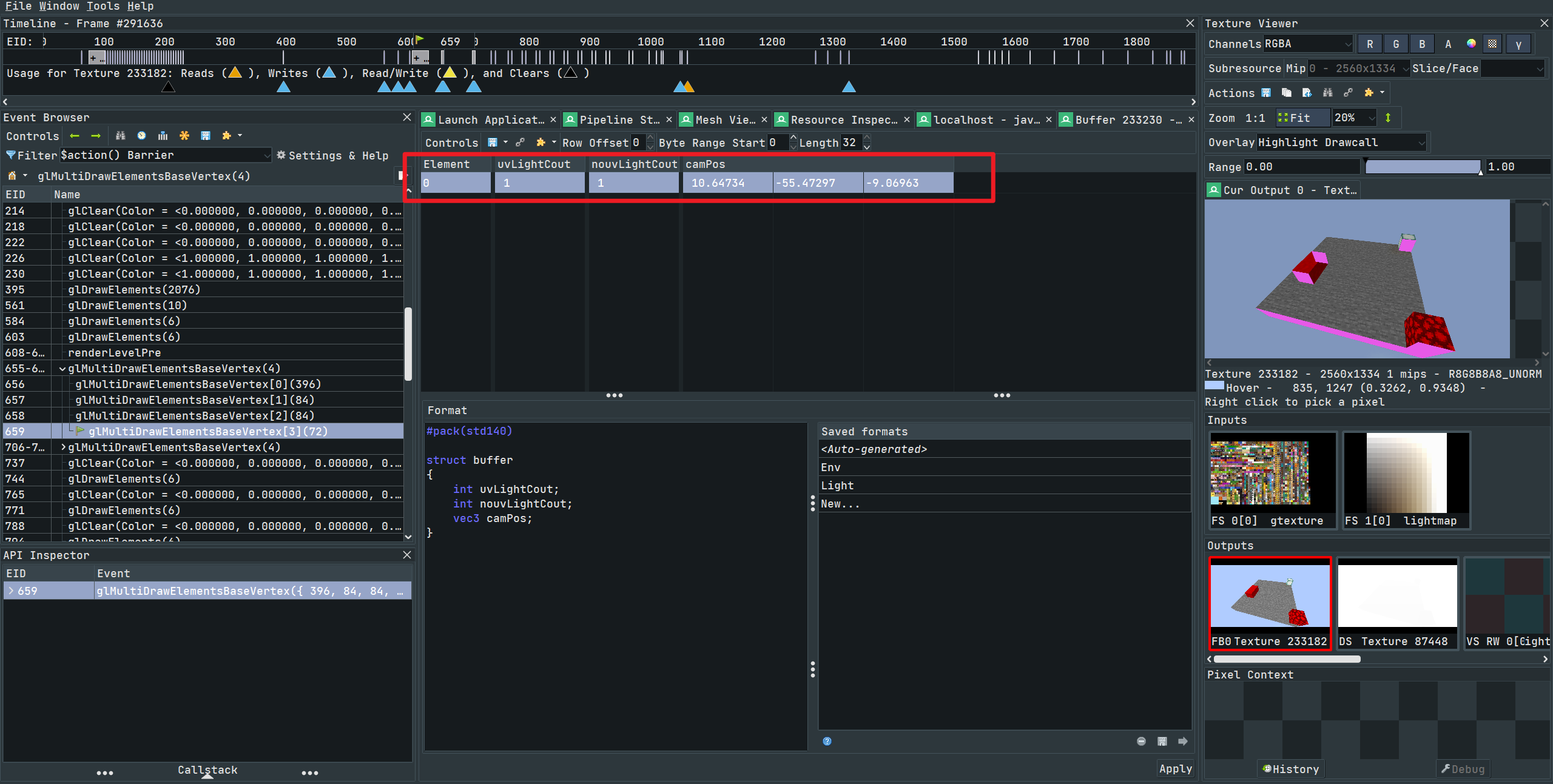 SSBO env info
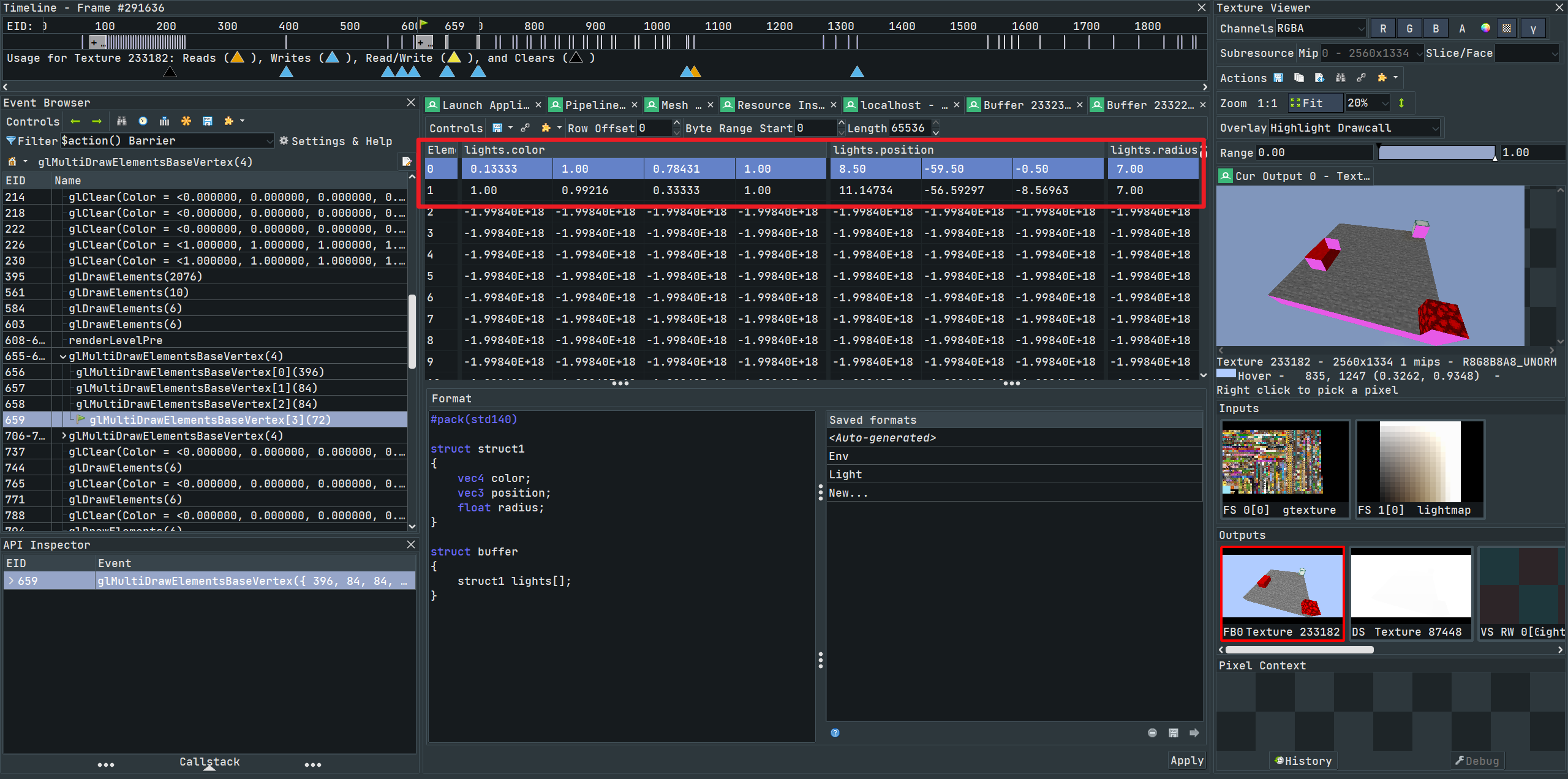 SSBO lights info