
Last active
April 5, 2025 08:22
-
-
Save zeyangxu/079372cf418e50148982beb18e2b9f27 to your computer and use it in GitHub Desktop.
Formily Ingest
This file contains hidden or bidirectional Unicode text that may be interpreted or compiled differently than what appears below. To review, open the file in an editor that reveals hidden Unicode characters.
Learn more about bidirectional Unicode characters
| └── packages | |
| └── core | |
| ├── LICENSE.md | |
| ├── README.md | |
| └── docs | |
| ├── api | |
| ├── entry | |
| │ ├── FieldEffectHooks.md | |
| │ ├── FieldEffectHooks.zh-CN.md | |
| │ ├── FormChecker.md | |
| │ ├── FormChecker.zh-CN.md | |
| │ ├── FormEffectHooks.md | |
| │ ├── FormEffectHooks.zh-CN.md | |
| │ ├── FormHooksAPI.md | |
| │ ├── FormHooksAPI.zh-CN.md | |
| │ ├── FormPath.md | |
| │ ├── FormPath.zh-CN.md | |
| │ ├── FormValidatorRegistry.md | |
| │ ├── FormValidatorRegistry.zh-CN.md | |
| │ ├── createForm.md | |
| │ └── createForm.zh-CN.md | |
| └── models | |
| │ ├── ArrayField.md | |
| │ ├── ArrayField.zh-CN.md | |
| │ ├── Field.md | |
| │ ├── Field.zh-CN.md | |
| │ ├── Form.md | |
| │ ├── Form.zh-CN.md | |
| │ ├── ObjectField.md | |
| │ ├── ObjectField.zh-CN.md | |
| │ ├── Query.md | |
| │ ├── Query.zh-CN.md | |
| │ ├── VoidField.md | |
| │ └── VoidField.zh-CN.md | |
| ├── guide | |
| ├── architecture.md | |
| ├── architecture.zh-CN.md | |
| ├── field.md | |
| ├── field.zh-CN.md | |
| ├── form.md | |
| ├── form.zh-CN.md | |
| ├── index.md | |
| ├── index.zh-CN.md | |
| ├── mvvm.md | |
| ├── mvvm.zh-CN.md | |
| ├── values.md | |
| └── values.zh-CN.md | |
| ├── index.md | |
| └── index.zh-CN.md | |
| /packages/core/LICENSE.md: | |
| -------------------------------------------------------------------------------- | |
| 1 | The MIT License (MIT) | |
| 2 | | |
| 3 | Copyright (c) 2015-present, Alibaba Group Holding Limited. All rights reserved. | |
| 4 | | |
| 5 | Permission is hereby granted, free of charge, to any person obtaining a copy of | |
| 6 | this software and associated documentation files (the "Software"), to deal in | |
| 7 | the Software without restriction, including without limitation the rights to | |
| 8 | use, copy, modify, merge, publish, distribute, sublicense, and/or sell copies of | |
| 9 | the Software, and to permit persons to whom the Software is furnished to do so, | |
| 10 | subject to the following conditions: | |
| 11 | | |
| 12 | The above copyright notice and this permission notice shall be included in all | |
| 13 | copies or substantial portions of the Software. | |
| 14 | | |
| 15 | THE SOFTWARE IS PROVIDED "AS IS", WITHOUT WARRANTY OF ANY KIND, EXPRESS OR | |
| 16 | IMPLIED, INCLUDING BUT NOT LIMITED TO THE WARRANTIES OF MERCHANTABILITY, FITNESS | |
| 17 | FOR A PARTICULAR PURPOSE AND NONINFRINGEMENT. IN NO EVENT SHALL THE AUTHORS OR | |
| 18 | COPYRIGHT HOLDERS BE LIABLE FOR ANY CLAIM, DAMAGES OR OTHER LIABILITY, WHETHER | |
| 19 | IN AN ACTION OF CONTRACT, TORT OR OTHERWISE, ARISING FROM, OUT OF OR IN | |
| 20 | CONNECTION WITH THE SOFTWARE OR THE USE OR OTHER DEALINGS IN THE SOFTWARE. | |
| -------------------------------------------------------------------------------- | |
| /packages/core/README.md: | |
| -------------------------------------------------------------------------------- | |
| 1 | # @formily/core | |
| 2 | | |
| -------------------------------------------------------------------------------- | |
| /packages/core/docs/api/entry/FieldEffectHooks.md: | |
| -------------------------------------------------------------------------------- | |
| 1 | --- | |
| 2 | order: 2 | |
| 3 | --- | |
| 4 | | |
| 5 | # Field Effect Hooks | |
| 6 | | |
| 7 | ## onFieldInit | |
| 8 | | |
| 9 | #### Description | |
| 10 | | |
| 11 | Used to monitor the side effect hook of a field initialization, we will trigger the field initialization event when we call createField | |
| 12 | | |
| 13 | #### Signature | |
| 14 | | |
| 15 | ```ts | |
| 16 | interface onFieldInit { | |
| 17 | (pattern: FormPathPattern, callback: (field: Field, form: Form) => void) | |
| 18 | } | |
| 19 | ``` | |
| 20 | | |
| 21 | <Alert> | |
| 22 | For the syntax format of FormPathPattern, please refer to <a href="/api/entry/form-path">FormPath</a> | |
| 23 | </Alert> | |
| 24 | | |
| 25 | #### Example | |
| 26 | | |
| 27 | ```tsx | |
| 28 | import React, { useMemo, useState } from 'react' | |
| 29 | import { createForm, onFieldInit } from '@formily/core' | |
| 30 | import { ActionResponse } from './ActionResponse' | |
| 31 | | |
| 32 | export default () => { | |
| 33 | const [response, setResponse] = useState('') | |
| 34 | const form = useMemo( | |
| 35 | () => | |
| 36 | createForm({ | |
| 37 | effects() { | |
| 38 | onFieldInit('target', () => { | |
| 39 | setResponse('target has been initialized') | |
| 40 | }) | |
| 41 | }, | |
| 42 | }), | |
| 43 | [] | |
| 44 | ) | |
| 45 | return ( | |
| 46 | <ActionResponse response={response}> | |
| 47 | <button | |
| 48 | onClick={() => { | |
| 49 | form.createField({ name: 'target' }) | |
| 50 | }} | |
| 51 | > | |
| 52 | Create field | |
| 53 | </button> | |
| 54 | </ActionResponse> | |
| 55 | ) | |
| 56 | } | |
| 57 | ``` | |
| 58 | | |
| 59 | ## onFieldMount | |
| 60 | | |
| 61 | #### Description | |
| 62 | | |
| 63 | Used to monitor the side-effect hook of a field that has been mounted, we will trigger the field mount event when we call onMount | |
| 64 | | |
| 65 | #### Signature | |
| 66 | | |
| 67 | ```ts | |
| 68 | interface onFieldMount { | |
| 69 | (pattern: FormPathPattern, callback: (field: Field, form: Form) => void) | |
| 70 | } | |
| 71 | ``` | |
| 72 | | |
| 73 | #### Example | |
| 74 | | |
| 75 | ```tsx | |
| 76 | import React, { useMemo, useState } from 'react' | |
| 77 | import { createForm, onFieldMount } from '@formily/core' | |
| 78 | import { ActionResponse } from './ActionResponse' | |
| 79 | | |
| 80 | export default () => { | |
| 81 | const [response, setResponse] = useState('') | |
| 82 | const form = useMemo( | |
| 83 | () => | |
| 84 | createForm({ | |
| 85 | effects() { | |
| 86 | onFieldMount('target', () => { | |
| 87 | setResponse('target is mounted') | |
| 88 | }) | |
| 89 | }, | |
| 90 | }), | |
| 91 | [] | |
| 92 | ) | |
| 93 | return ( | |
| 94 | <ActionResponse response={response}> | |
| 95 | <button | |
| 96 | onClick={() => { | |
| 97 | form.createField({ name: 'target' }).onMount() | |
| 98 | }} | |
| 99 | > | |
| 100 | Create and mount fields | |
| 101 | </button> | |
| 102 | </ActionResponse> | |
| 103 | ) | |
| 104 | } | |
| 105 | ``` | |
| 106 | | |
| 107 | ## onFieldUnmount | |
| 108 | | |
| 109 | #### Description | |
| 110 | | |
| 111 | It is used to monitor the side effect hook that a field has been unloaded. When we call onUnmount, the unmount event will be triggered | |
| 112 | | |
| 113 | #### Signature | |
| 114 | | |
| 115 | ```ts | |
| 116 | interface onFieldUnmount { | |
| 117 | (pattern: FormPathPattern, callback: (field: Field, form: Form) => void) | |
| 118 | } | |
| 119 | ``` | |
| 120 | | |
| 121 | #### Example | |
| 122 | | |
| 123 | ```tsx | |
| 124 | import React, { useMemo, useState } from 'react' | |
| 125 | import { createForm, onFieldMount, onFieldUnmount } from '@formily/core' | |
| 126 | import { ActionResponse } from './ActionResponse' | |
| 127 | | |
| 128 | export default () => { | |
| 129 | const [response, setResponse] = useState('') | |
| 130 | const form = useMemo( | |
| 131 | () => | |
| 132 | createForm({ | |
| 133 | effects() { | |
| 134 | onFieldMount('target', () => { | |
| 135 | setResponse('target is mounted') | |
| 136 | }) | |
| 137 | onFieldUnmount('target', () => { | |
| 138 | setResponse('target has been uninstalled') | |
| 139 | }) | |
| 140 | }, | |
| 141 | }), | |
| 142 | [] | |
| 143 | ) | |
| 144 | return ( | |
| 145 | <ActionResponse response={response}> | |
| 146 | <button | |
| 147 | onClick={() => { | |
| 148 | form.createField({ name: 'target' }).onMount() | |
| 149 | }} | |
| 150 | > | |
| 151 | Create and mount fields | |
| 152 | </button> | |
| 153 | <button | |
| 154 | onClick={() => { | |
| 155 | form.createField({ name: 'target' }).onUnmount() | |
| 156 | }} | |
| 157 | > | |
| 158 | Unload field | |
| 159 | </button> | |
| 160 | </ActionResponse> | |
| 161 | ) | |
| 162 | } | |
| 163 | ``` | |
| 164 | | |
| 165 | ## onFieldReact | |
| 166 | | |
| 167 | A side-effect hook used to implement field reactive logic. Its core principle is that the callback function will be executed when the field is initialized, and the dependency will be automatically tracked at the same time. The callback function will be executed repeatedly when the dependent data changes. | |
| 168 | | |
| 169 | #### Signature | |
| 170 | | |
| 171 | ```ts | |
| 172 | interface onFieldReact { | |
| 173 | (pattern: FormPathPattern, callback: (field: Field, form: Form) => void) | |
| 174 | } | |
| 175 | ``` | |
| 176 | | |
| 177 | #### Example | |
| 178 | | |
| 179 | ```tsx | |
| 180 | import React, { useMemo, useState } from 'react' | |
| 181 | import { createForm, onFieldReact } from '@formily/core' | |
| 182 | import { ActionResponse } from './ActionResponse' | |
| 183 | | |
| 184 | export default () => { | |
| 185 | const [response, setResponse] = useState('') | |
| 186 | const form = useMemo( | |
| 187 | () => | |
| 188 | createForm({ | |
| 189 | effects(form) { | |
| 190 | onFieldReact('target', () => { | |
| 191 | setResponse( | |
| 192 | 'target ' + (form.values.other === 123 ? 'display' : 'hide') | |
| 193 | ) | |
| 194 | }) | |
| 195 | }, | |
| 196 | }), | |
| 197 | [] | |
| 198 | ) | |
| 199 | return ( | |
| 200 | <ActionResponse response={response}> | |
| 201 | <button | |
| 202 | onClick={() => { | |
| 203 | form.createField({ name: 'target' }) | |
| 204 | }} | |
| 205 | > | |
| 206 | Initialize target | |
| 207 | </button> | |
| 208 | <button | |
| 209 | onClick={() => { | |
| 210 | const field = form.createField({ name: 'other' }) | |
| 211 | field.setValue(123) | |
| 212 | }} | |
| 213 | > | |
| 214 | Assign other = 123 | |
| 215 | </button> | |
| 216 | <button | |
| 217 | onClick={() => { | |
| 218 | const field = form.createField({ name: 'other' }) | |
| 219 | field.setValue(null) | |
| 220 | }} | |
| 221 | > | |
| 222 | Assign other = null | |
| 223 | </button> | |
| 224 | </ActionResponse> | |
| 225 | ) | |
| 226 | } | |
| 227 | ``` | |
| 228 | | |
| 229 | > This example will track the changes of values.other, if it is equal to 123, it will control the display of the target, otherwise it will be hidden | |
| 230 | | |
| 231 | ## onFieldChange | |
| 232 | | |
| 233 | #### Description | |
| 234 | | |
| 235 | Side effect hook used to monitor the property changes of a field | |
| 236 | | |
| 237 | #### Signature | |
| 238 | | |
| 239 | ```ts | |
| 240 | interface onFieldChange { | |
| 241 | ( | |
| 242 | pattern: FormPathPattern, | |
| 243 | watches?: string[], | |
| 244 | callback: (field: Field, form: Form) => void | |
| 245 | ) | |
| 246 | (pattern: FormPathPattern, callback: (field: Field, form: Form) => void) | |
| 247 | } | |
| 248 | ``` | |
| 249 | | |
| 250 | You can pass in the specific set of attributes you want to monitor, or you can leave it alone, the default is to monitor value changes | |
| 251 | | |
| 252 | #### Example | |
| 253 | | |
| 254 | ```tsx | |
| 255 | import React, { useMemo, useState } from 'react' | |
| 256 | import { createForm, onFieldChange } from '@formily/core' | |
| 257 | import { ActionResponse } from './ActionResponse' | |
| 258 | | |
| 259 | export default () => { | |
| 260 | const [response, setResponse] = useState('') | |
| 261 | const form = useMemo( | |
| 262 | () => | |
| 263 | createForm({ | |
| 264 | effects() { | |
| 265 | onFieldChange('target', (field) => { | |
| 266 | setResponse('target value change:' + field.value) | |
| 267 | }) | |
| 268 | onFieldChange('target', ['component'], () => { | |
| 269 | setResponse('target component change') | |
| 270 | }) | |
| 271 | }, | |
| 272 | }), | |
| 273 | [] | |
| 274 | ) | |
| 275 | return ( | |
| 276 | <ActionResponse response={response}> | |
| 277 | <button | |
| 278 | onClick={() => { | |
| 279 | const field = form.createField({ name: 'target' }) | |
| 280 | field.setValue(field.value ? field.value + 1 : 1) | |
| 281 | }} | |
| 282 | > | |
| 283 | Settings | |
| 284 | </button> | |
| 285 | <button | |
| 286 | onClick={() => { | |
| 287 | const field = form.createField({ name: 'target' }) | |
| 288 | field.setComponent('Input') | |
| 289 | }} | |
| 290 | > | |
| 291 | Set up components | |
| 292 | </button> | |
| 293 | </ActionResponse> | |
| 294 | ) | |
| 295 | } | |
| 296 | ``` | |
| 297 | | |
| 298 | ## onFieldValueChange | |
| 299 | | |
| 300 | Side effect hooks used to monitor changes in a field value | |
| 301 | | |
| 302 | #### Signature | |
| 303 | | |
| 304 | ```ts | |
| 305 | interface onFieldValueChange { | |
| 306 | (pattern: FormPathPattern, callback: (field: Field, form: Form) => void) | |
| 307 | } | |
| 308 | ``` | |
| 309 | | |
| 310 | #### Example | |
| 311 | | |
| 312 | ```tsx | |
| 313 | import React, { useMemo, useState } from 'react' | |
| 314 | import { createForm, onFieldValueChange } from '@formily/core' | |
| 315 | import { ActionResponse } from './ActionResponse' | |
| 316 | | |
| 317 | export default () => { | |
| 318 | const [response, setResponse] = useState('') | |
| 319 | const form = useMemo( | |
| 320 | () => | |
| 321 | createForm({ | |
| 322 | effects() { | |
| 323 | onFieldValueChange('target', (field) => { | |
| 324 | setResponse('target value change:' + field.value) | |
| 325 | }) | |
| 326 | }, | |
| 327 | }), | |
| 328 | [] | |
| 329 | ) | |
| 330 | return ( | |
| 331 | <ActionResponse response={response}> | |
| 332 | <button | |
| 333 | onClick={() => { | |
| 334 | const field = form.createField({ name: 'target' }) | |
| 335 | field.setValue(field.value ? field.value + 1 : 1) | |
| 336 | }} | |
| 337 | > | |
| 338 | Settings | |
| 339 | </button> | |
| 340 | </ActionResponse> | |
| 341 | ) | |
| 342 | } | |
| 343 | ``` | |
| 344 | | |
| 345 | ## onFieldInitialValueChange | |
| 346 | | |
| 347 | Side-effect hooks used to monitor changes in the default value of a field | |
| 348 | | |
| 349 | #### Signature | |
| 350 | | |
| 351 | ```ts | |
| 352 | interface onFieldInitialValueChange { | |
| 353 | (pattern: FormPathPattern, callback: (field: Field, form: Form) => void) | |
| 354 | } | |
| 355 | ``` | |
| 356 | | |
| 357 | #### Example | |
| 358 | | |
| 359 | ```tsx | |
| 360 | import React, { useMemo, useState } from 'react' | |
| 361 | import { createForm, onFieldInitialValueChange } from '@formily/core' | |
| 362 | import { ActionResponse } from './ActionResponse' | |
| 363 | | |
| 364 | export default () => { | |
| 365 | const [response, setResponse] = useState('') | |
| 366 | const form = useMemo( | |
| 367 | () => | |
| 368 | createForm({ | |
| 369 | effects() { | |
| 370 | onFieldInitialValueChange('target', (field) => { | |
| 371 | setResponse('target default value change:' + field.value) | |
| 372 | }) | |
| 373 | }, | |
| 374 | }), | |
| 375 | [] | |
| 376 | ) | |
| 377 | return ( | |
| 378 | <ActionResponse response={response}> | |
| 379 | <button | |
| 380 | onClick={() => { | |
| 381 | const field = form.createField({ name: 'target' }) | |
| 382 | field.setInitialValue(field.value ? field.value + 1 : 1) | |
| 383 | }} | |
| 384 | > | |
| 385 | Settings | |
| 386 | </button> | |
| 387 | </ActionResponse> | |
| 388 | ) | |
| 389 | } | |
| 390 | ``` | |
| 391 | | |
| 392 | ## onFieldInputValueChange | |
| 393 | | |
| 394 | Used to monitor the side effect hook triggered by a field onInput | |
| 395 | | |
| 396 | #### Signature | |
| 397 | | |
| 398 | ```ts | |
| 399 | interface onFieldInputValueChange { | |
| 400 | (pattern: FormPathPattern, callback: (field: Field, form: Form) => void) | |
| 401 | } | |
| 402 | ``` | |
| 403 | | |
| 404 | #### Example | |
| 405 | | |
| 406 | ```tsx | |
| 407 | import React, { useMemo, useState } from 'react' | |
| 408 | import { createForm, onFieldInputValueChange } from '@formily/core' | |
| 409 | import { ActionResponse } from './ActionResponse' | |
| 410 | | |
| 411 | export default () => { | |
| 412 | const [response, setResponse] = useState('') | |
| 413 | const form = useMemo( | |
| 414 | () => | |
| 415 | createForm({ | |
| 416 | effects() { | |
| 417 | onFieldInputValueChange('target', (field) => { | |
| 418 | setResponse('target value change:' + field.value) | |
| 419 | }) | |
| 420 | }, | |
| 421 | }), | |
| 422 | [] | |
| 423 | ) | |
| 424 | return ( | |
| 425 | <ActionResponse response={response}> | |
| 426 | <button | |
| 427 | onClick={() => { | |
| 428 | const field = form.createField({ name: 'target' }) | |
| 429 | field.onInput(field.value ? field.value + 1 : 1) | |
| 430 | }} | |
| 431 | > | |
| 432 | Call onInput | |
| 433 | </button> | |
| 434 | </ActionResponse> | |
| 435 | ) | |
| 436 | } | |
| 437 | ``` | |
| 438 | | |
| 439 | ## onFieldValidateStart | |
| 440 | | |
| 441 | #### Description | |
| 442 | | |
| 443 | Monitor the side effect hook that triggers the start of a certain field verification | |
| 444 | | |
| 445 | #### Signature | |
| 446 | | |
| 447 | ```ts | |
| 448 | interface onFieldValidateStart { | |
| 449 | (pattern: FormPathPattern, callback: (field: Field, form: Form) => void) | |
| 450 | } | |
| 451 | ``` | |
| 452 | | |
| 453 | #### Example | |
| 454 | | |
| 455 | ```tsx | |
| 456 | import React, { useMemo, useState } from 'react' | |
| 457 | import { createForm, onFieldValidateStart } from '@formily/core' | |
| 458 | import { ActionResponse } from './ActionResponse' | |
| 459 | | |
| 460 | export default () => { | |
| 461 | const [response, setResponse] = useState('') | |
| 462 | const form = useMemo( | |
| 463 | () => | |
| 464 | createForm({ | |
| 465 | effects() { | |
| 466 | onFieldValidateStart('target', () => { | |
| 467 | setResponse('target verification start') | |
| 468 | }) | |
| 469 | }, | |
| 470 | }), | |
| 471 | [] | |
| 472 | ) | |
| 473 | return ( | |
| 474 | <ActionResponse response={response}> | |
| 475 | <button | |
| 476 | onClick={() => { | |
| 477 | const field = form.createField({ name: 'target', required: true }) | |
| 478 | field.onInput('') | |
| 479 | }} | |
| 480 | > | |
| 481 | Trigger verification | |
| 482 | </button> | |
| 483 | </ActionResponse> | |
| 484 | ) | |
| 485 | } | |
| 486 | ``` | |
| 487 | | |
| 488 | ## onFieldValidateEnd | |
| 489 | | |
| 490 | #### Description | |
| 491 | | |
| 492 | Monitor the side effect hook that triggers the end of a certain field verification | |
| 493 | | |
| 494 | #### Signature | |
| 495 | | |
| 496 | ```ts | |
| 497 | interface onFieldValidateEnd { | |
| 498 | (pattern: FormPathPattern, callback: (field: Field, form: Form) => void) | |
| 499 | } | |
| 500 | ``` | |
| 501 | | |
| 502 | #### Example | |
| 503 | | |
| 504 | ```tsx | |
| 505 | import React, { useMemo, useState } from 'react' | |
| 506 | import { createForm, onFieldValidateEnd } from '@formily/core' | |
| 507 | import { ActionResponse } from './ActionResponse' | |
| 508 | | |
| 509 | export default () => { | |
| 510 | const [response, setResponse] = useState('') | |
| 511 | const form = useMemo( | |
| 512 | () => | |
| 513 | createForm({ | |
| 514 | effects() { | |
| 515 | onFieldValidateEnd('target', () => { | |
| 516 | setResponse('target verification is over') | |
| 517 | }) | |
| 518 | }, | |
| 519 | }), | |
| 520 | [] | |
| 521 | ) | |
| 522 | return ( | |
| 523 | <ActionResponse response={response}> | |
| 524 | <button | |
| 525 | onClick={() => { | |
| 526 | const field = form.createField({ name: 'target', required: true }) | |
| 527 | field.onInput('') | |
| 528 | }} | |
| 529 | > | |
| 530 | Trigger verification | |
| 531 | </button> | |
| 532 | </ActionResponse> | |
| 533 | ) | |
| 534 | } | |
| 535 | ``` | |
| 536 | | |
| 537 | ## onFieldValidateFailed | |
| 538 | | |
| 539 | #### Description | |
| 540 | | |
| 541 | Listen to the side-effect hook of a field verification trigger failure | |
| 542 | | |
| 543 | #### Signature | |
| 544 | | |
| 545 | ```ts | |
| 546 | interface onFieldValidateFailed { | |
| 547 | (pattern: FormPathPattern, callback: (field: Field, form: Form) => void) | |
| 548 | } | |
| 549 | ``` | |
| 550 | | |
| 551 | #### Example | |
| 552 | | |
| 553 | ```tsx | |
| 554 | import React, { useMemo, useState } from 'react' | |
| 555 | import { createForm, onFieldValidateFailed } from '@formily/core' | |
| 556 | import { ActionResponse } from './ActionResponse' | |
| 557 | | |
| 558 | export default () => { | |
| 559 | const [response, setResponse] = useState('') | |
| 560 | const form = useMemo( | |
| 561 | () => | |
| 562 | createForm({ | |
| 563 | effects() { | |
| 564 | onFieldValidateFailed('target', () => { | |
| 565 | setResponse('target verification failed') | |
| 566 | }) | |
| 567 | }, | |
| 568 | }), | |
| 569 | [] | |
| 570 | ) | |
| 571 | return ( | |
| 572 | <ActionResponse response={response}> | |
| 573 | <button | |
| 574 | onClick={() => { | |
| 575 | const field = form.createField({ name: 'target', required: true }) | |
| 576 | field.onInput('') | |
| 577 | }} | |
| 578 | > | |
| 579 | Trigger verification | |
| 580 | </button> | |
| 581 | </ActionResponse> | |
| 582 | ) | |
| 583 | } | |
| 584 | ``` | |
| 585 | | |
| 586 | ## onFieldValidateSuccess | |
| 587 | | |
| 588 | #### Description | |
| 589 | | |
| 590 | Monitor the side effect hook that triggers a successful verification of a certain field | |
| 591 | | |
| 592 | #### Signature | |
| 593 | | |
| 594 | ```ts | |
| 595 | interface onFieldValidateSuccess { | |
| 596 | (pattern: FormPathPattern, callback: (field: Field, form: Form) => void) | |
| 597 | } | |
| 598 | ``` | |
| 599 | | |
| 600 | #### Example | |
| 601 | | |
| 602 | ```tsx | |
| 603 | import React, { useMemo, useState } from 'react' | |
| 604 | import { | |
| 605 | createForm, | |
| 606 | onFieldValidateFailed, | |
| 607 | onFieldValidateSuccess, | |
| 608 | } from '@formily/core' | |
| 609 | import { ActionResponse } from './ActionResponse' | |
| 610 | | |
| 611 | export default () => { | |
| 612 | const [response, setResponse] = useState('') | |
| 613 | const form = useMemo( | |
| 614 | () => | |
| 615 | createForm({ | |
| 616 | effects() { | |
| 617 | onFieldValidateFailed('target', () => { | |
| 618 | setResponse('target verification failed') | |
| 619 | }) | |
| 620 | onFieldValidateSuccess('target', () => { | |
| 621 | setResponse('target verification succeeded') | |
| 622 | }) | |
| 623 | }, | |
| 624 | }), | |
| 625 | [] | |
| 626 | ) | |
| 627 | return ( | |
| 628 | <ActionResponse response={response}> | |
| 629 | <button | |
| 630 | onClick={() => { | |
| 631 | const field = form.createField({ name: 'target', required: true }) | |
| 632 | field.onInput('') | |
| 633 | }} | |
| 634 | > | |
| 635 | Trigger failed | |
| 636 | </button> | |
| 637 | <button | |
| 638 | onClick={() => { | |
| 639 | const field = form.createField({ name: 'target', required: true }) | |
| 640 | field.onInput('123') | |
| 641 | }} | |
| 642 | > | |
| 643 | Triggered successfully | |
| 644 | </button> | |
| 645 | </ActionResponse> | |
| 646 | ) | |
| 647 | } | |
| 648 | ``` | |
| 649 | | |
| -------------------------------------------------------------------------------- | |
| /packages/core/docs/api/entry/FieldEffectHooks.zh-CN.md: | |
| -------------------------------------------------------------------------------- | |
| 1 | --- | |
| 2 | order: 2 | |
| 3 | --- | |
| 4 | | |
| 5 | # Field Effect Hooks | |
| 6 | | |
| 7 | ## onFieldInit | |
| 8 | | |
| 9 | #### 描述 | |
| 10 | | |
| 11 | 用于监听某个字段初始化的副作用钩子,我们在调用 createField 的时候就会触发字段初始化事件 | |
| 12 | | |
| 13 | #### 签名 | |
| 14 | | |
| 15 | ```ts | |
| 16 | interface onFieldInit { | |
| 17 | (pattern: FormPathPattern, callback: (field: Field, form: Form) => void) | |
| 18 | } | |
| 19 | ``` | |
| 20 | | |
| 21 | <Alert> | |
| 22 | FormPathPattern的语法格式请参考 <a href="/api/entry/form-path">FormPath</a> | |
| 23 | </Alert> | |
| 24 | | |
| 25 | #### 用例 | |
| 26 | | |
| 27 | ```tsx | |
| 28 | import React, { useMemo, useState } from 'react' | |
| 29 | import { createForm, onFieldInit } from '@formily/core' | |
| 30 | import { ActionResponse } from './ActionResponse' | |
| 31 | | |
| 32 | export default () => { | |
| 33 | const [response, setResponse] = useState('') | |
| 34 | const form = useMemo( | |
| 35 | () => | |
| 36 | createForm({ | |
| 37 | effects() { | |
| 38 | onFieldInit('target', () => { | |
| 39 | setResponse('target已初始化') | |
| 40 | }) | |
| 41 | }, | |
| 42 | }), | |
| 43 | [] | |
| 44 | ) | |
| 45 | return ( | |
| 46 | <ActionResponse response={response}> | |
| 47 | <button | |
| 48 | onClick={() => { | |
| 49 | form.createField({ name: 'target' }) | |
| 50 | }} | |
| 51 | > | |
| 52 | 创建字段 | |
| 53 | </button> | |
| 54 | </ActionResponse> | |
| 55 | ) | |
| 56 | } | |
| 57 | ``` | |
| 58 | | |
| 59 | ## onFieldMount | |
| 60 | | |
| 61 | #### 描述 | |
| 62 | | |
| 63 | 用于监听某个字段已挂载的副作用钩子,我们在调用 onMount 的时候就会触发字段挂载事件 | |
| 64 | | |
| 65 | #### 签名 | |
| 66 | | |
| 67 | ```ts | |
| 68 | interface onFieldMount { | |
| 69 | (pattern: FormPathPattern, callback: (field: Field, form: Form) => void) | |
| 70 | } | |
| 71 | ``` | |
| 72 | | |
| 73 | #### 用例 | |
| 74 | | |
| 75 | ```tsx | |
| 76 | import React, { useMemo, useState } from 'react' | |
| 77 | import { createForm, onFieldMount } from '@formily/core' | |
| 78 | import { ActionResponse } from './ActionResponse' | |
| 79 | | |
| 80 | export default () => { | |
| 81 | const [response, setResponse] = useState('') | |
| 82 | const form = useMemo( | |
| 83 | () => | |
| 84 | createForm({ | |
| 85 | effects() { | |
| 86 | onFieldMount('target', () => { | |
| 87 | setResponse('target已挂载') | |
| 88 | }) | |
| 89 | }, | |
| 90 | }), | |
| 91 | [] | |
| 92 | ) | |
| 93 | return ( | |
| 94 | <ActionResponse response={response}> | |
| 95 | <button | |
| 96 | onClick={() => { | |
| 97 | form.createField({ name: 'target' }).onMount() | |
| 98 | }} | |
| 99 | > | |
| 100 | 创建并挂载字段 | |
| 101 | </button> | |
| 102 | </ActionResponse> | |
| 103 | ) | |
| 104 | } | |
| 105 | ``` | |
| 106 | | |
| 107 | ## onFieldUnmount | |
| 108 | | |
| 109 | #### 描述 | |
| 110 | | |
| 111 | 用于监听某个字段已卸载的副作用钩子,我们在调用 onUnmount 的时候就会触发卸载事件 | |
| 112 | | |
| 113 | #### 签名 | |
| 114 | | |
| 115 | ```ts | |
| 116 | interface onFieldUnmount { | |
| 117 | (pattern: FormPathPattern, callback: (field: Field, form: Form) => void) | |
| 118 | } | |
| 119 | ``` | |
| 120 | | |
| 121 | #### 用例 | |
| 122 | | |
| 123 | ```tsx | |
| 124 | import React, { useMemo, useState } from 'react' | |
| 125 | import { createForm, onFieldMount, onFieldUnmount } from '@formily/core' | |
| 126 | import { ActionResponse } from './ActionResponse' | |
| 127 | | |
| 128 | export default () => { | |
| 129 | const [response, setResponse] = useState('') | |
| 130 | const form = useMemo( | |
| 131 | () => | |
| 132 | createForm({ | |
| 133 | effects() { | |
| 134 | onFieldMount('target', () => { | |
| 135 | setResponse('target已挂载') | |
| 136 | }) | |
| 137 | onFieldUnmount('target', () => { | |
| 138 | setResponse('target已卸载') | |
| 139 | }) | |
| 140 | }, | |
| 141 | }), | |
| 142 | [] | |
| 143 | ) | |
| 144 | return ( | |
| 145 | <ActionResponse response={response}> | |
| 146 | <button | |
| 147 | onClick={() => { | |
| 148 | form.createField({ name: 'target' }).onMount() | |
| 149 | }} | |
| 150 | > | |
| 151 | 创建并挂载字段 | |
| 152 | </button> | |
| 153 | <button | |
| 154 | onClick={() => { | |
| 155 | form.createField({ name: 'target' }).onUnmount() | |
| 156 | }} | |
| 157 | > | |
| 158 | 卸载字段 | |
| 159 | </button> | |
| 160 | </ActionResponse> | |
| 161 | ) | |
| 162 | } | |
| 163 | ``` | |
| 164 | | |
| 165 | ## onFieldReact | |
| 166 | | |
| 167 | 用于实现字段响应式逻辑的副作用钩子,它的核心原理就是字段初始化的时候会执行回调函数,同时自动追踪依赖,依赖数据发生变化时回调函数会重复执行 | |
| 168 | | |
| 169 | #### 签名 | |
| 170 | | |
| 171 | ```ts | |
| 172 | interface onFieldReact { | |
| 173 | (pattern: FormPathPattern, callback: (field: Field, form: Form) => void) | |
| 174 | } | |
| 175 | ``` | |
| 176 | | |
| 177 | #### 用例 | |
| 178 | | |
| 179 | ```tsx | |
| 180 | import React, { useMemo, useState } from 'react' | |
| 181 | import { createForm, onFieldReact } from '@formily/core' | |
| 182 | import { ActionResponse } from './ActionResponse' | |
| 183 | | |
| 184 | export default () => { | |
| 185 | const [response, setResponse] = useState('') | |
| 186 | const form = useMemo( | |
| 187 | () => | |
| 188 | createForm({ | |
| 189 | effects(form) { | |
| 190 | onFieldReact('target', () => { | |
| 191 | setResponse( | |
| 192 | 'target ' + (form.values.other === 123 ? '显示' : '隐藏') | |
| 193 | ) | |
| 194 | }) | |
| 195 | }, | |
| 196 | }), | |
| 197 | [] | |
| 198 | ) | |
| 199 | return ( | |
| 200 | <ActionResponse response={response}> | |
| 201 | <button | |
| 202 | onClick={() => { | |
| 203 | form.createField({ name: 'target' }) | |
| 204 | }} | |
| 205 | > | |
| 206 | 初始化target | |
| 207 | </button> | |
| 208 | <button | |
| 209 | onClick={() => { | |
| 210 | const field = form.createField({ name: 'other' }) | |
| 211 | field.setValue(123) | |
| 212 | }} | |
| 213 | > | |
| 214 | 赋值other = 123 | |
| 215 | </button> | |
| 216 | <button | |
| 217 | onClick={() => { | |
| 218 | const field = form.createField({ name: 'other' }) | |
| 219 | field.setValue(null) | |
| 220 | }} | |
| 221 | > | |
| 222 | 赋值other = null | |
| 223 | </button> | |
| 224 | </ActionResponse> | |
| 225 | ) | |
| 226 | } | |
| 227 | ``` | |
| 228 | | |
| 229 | > 该示例会追踪 values.other 的变化,如果等于 123,就会控制 target 显示,否则隐藏 | |
| 230 | | |
| 231 | ## onFieldChange | |
| 232 | | |
| 233 | #### 描述 | |
| 234 | | |
| 235 | 用于监听某个字段的属性变化的副作用钩子 | |
| 236 | | |
| 237 | #### 签名 | |
| 238 | | |
| 239 | ```ts | |
| 240 | interface onFieldChange { | |
| 241 | ( | |
| 242 | pattern: FormPathPattern, | |
| 243 | watches?: string[], | |
| 244 | callback: (field: Field, form: Form) => void | |
| 245 | ) | |
| 246 | (pattern: FormPathPattern, callback: (field: Field, form: Form) => void) | |
| 247 | } | |
| 248 | ``` | |
| 249 | | |
| 250 | 可以传入具体要监听的的属性集合,也可以不传,默认是监听 value 变化 | |
| 251 | | |
| 252 | #### 用例 | |
| 253 | | |
| 254 | ```tsx | |
| 255 | import React, { useMemo, useState } from 'react' | |
| 256 | import { createForm, onFieldChange } from '@formily/core' | |
| 257 | import { ActionResponse } from './ActionResponse' | |
| 258 | | |
| 259 | export default () => { | |
| 260 | const [response, setResponse] = useState('') | |
| 261 | const form = useMemo( | |
| 262 | () => | |
| 263 | createForm({ | |
| 264 | effects() { | |
| 265 | onFieldChange('target', (field) => { | |
| 266 | setResponse('target值变化:' + field.value) | |
| 267 | }) | |
| 268 | onFieldChange('target', ['component'], () => { | |
| 269 | setResponse('target组件变化') | |
| 270 | }) | |
| 271 | }, | |
| 272 | }), | |
| 273 | [] | |
| 274 | ) | |
| 275 | return ( | |
| 276 | <ActionResponse response={response}> | |
| 277 | <button | |
| 278 | onClick={() => { | |
| 279 | const field = form.createField({ name: 'target' }) | |
| 280 | field.setValue(field.value ? field.value + 1 : 1) | |
| 281 | }} | |
| 282 | > | |
| 283 | 设置值 | |
| 284 | </button> | |
| 285 | <button | |
| 286 | onClick={() => { | |
| 287 | const field = form.createField({ name: 'target' }) | |
| 288 | field.setComponent('Input') | |
| 289 | }} | |
| 290 | > | |
| 291 | 设置组件 | |
| 292 | </button> | |
| 293 | </ActionResponse> | |
| 294 | ) | |
| 295 | } | |
| 296 | ``` | |
| 297 | | |
| 298 | ## onFieldValueChange | |
| 299 | | |
| 300 | 用于监听某个字段值变化的副作用钩子 | |
| 301 | | |
| 302 | #### 签名 | |
| 303 | | |
| 304 | ```ts | |
| 305 | interface onFieldValueChange { | |
| 306 | (pattern: FormPathPattern, callback: (field: Field, form: Form) => void) | |
| 307 | } | |
| 308 | ``` | |
| 309 | | |
| 310 | #### 用例 | |
| 311 | | |
| 312 | ```tsx | |
| 313 | import React, { useMemo, useState } from 'react' | |
| 314 | import { createForm, onFieldValueChange } from '@formily/core' | |
| 315 | import { ActionResponse } from './ActionResponse' | |
| 316 | | |
| 317 | export default () => { | |
| 318 | const [response, setResponse] = useState('') | |
| 319 | const form = useMemo( | |
| 320 | () => | |
| 321 | createForm({ | |
| 322 | effects() { | |
| 323 | onFieldValueChange('target', (field) => { | |
| 324 | setResponse('target值变化:' + field.value) | |
| 325 | }) | |
| 326 | }, | |
| 327 | }), | |
| 328 | [] | |
| 329 | ) | |
| 330 | return ( | |
| 331 | <ActionResponse response={response}> | |
| 332 | <button | |
| 333 | onClick={() => { | |
| 334 | const field = form.createField({ name: 'target' }) | |
| 335 | field.setValue(field.value ? field.value + 1 : 1) | |
| 336 | }} | |
| 337 | > | |
| 338 | 设置值 | |
| 339 | </button> | |
| 340 | </ActionResponse> | |
| 341 | ) | |
| 342 | } | |
| 343 | ``` | |
| 344 | | |
| 345 | ## onFieldInitialValueChange | |
| 346 | | |
| 347 | 用于监听某个字段默认值变化的副作用钩子 | |
| 348 | | |
| 349 | #### 签名 | |
| 350 | | |
| 351 | ```ts | |
| 352 | interface onFieldInitialValueChange { | |
| 353 | (pattern: FormPathPattern, callback: (field: Field, form: Form) => void) | |
| 354 | } | |
| 355 | ``` | |
| 356 | | |
| 357 | #### 用例 | |
| 358 | | |
| 359 | ```tsx | |
| 360 | import React, { useMemo, useState } from 'react' | |
| 361 | import { createForm, onFieldInitialValueChange } from '@formily/core' | |
| 362 | import { ActionResponse } from './ActionResponse' | |
| 363 | | |
| 364 | export default () => { | |
| 365 | const [response, setResponse] = useState('') | |
| 366 | const form = useMemo( | |
| 367 | () => | |
| 368 | createForm({ | |
| 369 | effects() { | |
| 370 | onFieldInitialValueChange('target', (field) => { | |
| 371 | setResponse('target默认值变化:' + field.value) | |
| 372 | }) | |
| 373 | }, | |
| 374 | }), | |
| 375 | [] | |
| 376 | ) | |
| 377 | return ( | |
| 378 | <ActionResponse response={response}> | |
| 379 | <button | |
| 380 | onClick={() => { | |
| 381 | const field = form.createField({ name: 'target' }) | |
| 382 | field.setInitialValue(field.value ? field.value + 1 : 1) | |
| 383 | }} | |
| 384 | > | |
| 385 | 设置值 | |
| 386 | </button> | |
| 387 | </ActionResponse> | |
| 388 | ) | |
| 389 | } | |
| 390 | ``` | |
| 391 | | |
| 392 | ## onFieldInputValueChange | |
| 393 | | |
| 394 | 用于监听某个字段 onInput 触发的副作用钩子 | |
| 395 | | |
| 396 | #### 签名 | |
| 397 | | |
| 398 | ```ts | |
| 399 | interface onFieldInputValueChange { | |
| 400 | (pattern: FormPathPattern, callback: (field: Field, form: Form) => void) | |
| 401 | } | |
| 402 | ``` | |
| 403 | | |
| 404 | #### 用例 | |
| 405 | | |
| 406 | ```tsx | |
| 407 | import React, { useMemo, useState } from 'react' | |
| 408 | import { createForm, onFieldInputValueChange } from '@formily/core' | |
| 409 | import { ActionResponse } from './ActionResponse' | |
| 410 | | |
| 411 | export default () => { | |
| 412 | const [response, setResponse] = useState('') | |
| 413 | const form = useMemo( | |
| 414 | () => | |
| 415 | createForm({ | |
| 416 | effects() { | |
| 417 | onFieldInputValueChange('target', (field) => { | |
| 418 | setResponse('target 值变化:' + field.value) | |
| 419 | }) | |
| 420 | }, | |
| 421 | }), | |
| 422 | [] | |
| 423 | ) | |
| 424 | return ( | |
| 425 | <ActionResponse response={response}> | |
| 426 | <button | |
| 427 | onClick={() => { | |
| 428 | const field = form.createField({ name: 'target' }) | |
| 429 | field.onInput(field.value ? field.value + 1 : 1) | |
| 430 | }} | |
| 431 | > | |
| 432 | 调用onInput | |
| 433 | </button> | |
| 434 | </ActionResponse> | |
| 435 | ) | |
| 436 | } | |
| 437 | ``` | |
| 438 | | |
| 439 | ## onFieldValidateStart | |
| 440 | | |
| 441 | #### 描述 | |
| 442 | | |
| 443 | 监听某个字段校验触发开始的副作用钩子 | |
| 444 | | |
| 445 | #### 签名 | |
| 446 | | |
| 447 | ```ts | |
| 448 | interface onFieldValidateStart { | |
| 449 | (pattern: FormPathPattern, callback: (field: Field, form: Form) => void) | |
| 450 | } | |
| 451 | ``` | |
| 452 | | |
| 453 | #### 用例 | |
| 454 | | |
| 455 | ```tsx | |
| 456 | import React, { useMemo, useState } from 'react' | |
| 457 | import { createForm, onFieldValidateStart } from '@formily/core' | |
| 458 | import { ActionResponse } from './ActionResponse' | |
| 459 | | |
| 460 | export default () => { | |
| 461 | const [response, setResponse] = useState('') | |
| 462 | const form = useMemo( | |
| 463 | () => | |
| 464 | createForm({ | |
| 465 | effects() { | |
| 466 | onFieldValidateStart('target', () => { | |
| 467 | setResponse('target校验开始') | |
| 468 | }) | |
| 469 | }, | |
| 470 | }), | |
| 471 | [] | |
| 472 | ) | |
| 473 | return ( | |
| 474 | <ActionResponse response={response}> | |
| 475 | <button | |
| 476 | onClick={() => { | |
| 477 | const field = form.createField({ name: 'target', required: true }) | |
| 478 | field.onInput('') | |
| 479 | }} | |
| 480 | > | |
| 481 | 触发校验 | |
| 482 | </button> | |
| 483 | </ActionResponse> | |
| 484 | ) | |
| 485 | } | |
| 486 | ``` | |
| 487 | | |
| 488 | ## onFieldValidateEnd | |
| 489 | | |
| 490 | #### 描述 | |
| 491 | | |
| 492 | 监听某个字段校验触发结束的副作用钩子 | |
| 493 | | |
| 494 | #### 签名 | |
| 495 | | |
| 496 | ```ts | |
| 497 | interface onFieldValidateEnd { | |
| 498 | (pattern: FormPathPattern, callback: (field: Field, form: Form) => void) | |
| 499 | } | |
| 500 | ``` | |
| 501 | | |
| 502 | #### 用例 | |
| 503 | | |
| 504 | ```tsx | |
| 505 | import React, { useMemo, useState } from 'react' | |
| 506 | import { createForm, onFieldValidateEnd } from '@formily/core' | |
| 507 | import { ActionResponse } from './ActionResponse' | |
| 508 | | |
| 509 | export default () => { | |
| 510 | const [response, setResponse] = useState('') | |
| 511 | const form = useMemo( | |
| 512 | () => | |
| 513 | createForm({ | |
| 514 | effects() { | |
| 515 | onFieldValidateEnd('target', () => { | |
| 516 | setResponse('target校验结束') | |
| 517 | }) | |
| 518 | }, | |
| 519 | }), | |
| 520 | [] | |
| 521 | ) | |
| 522 | return ( | |
| 523 | <ActionResponse response={response}> | |
| 524 | <button | |
| 525 | onClick={() => { | |
| 526 | const field = form.createField({ name: 'target', required: true }) | |
| 527 | field.onInput('') | |
| 528 | }} | |
| 529 | > | |
| 530 | 触发校验 | |
| 531 | </button> | |
| 532 | </ActionResponse> | |
| 533 | ) | |
| 534 | } | |
| 535 | ``` | |
| 536 | | |
| 537 | ## onFieldValidateFailed | |
| 538 | | |
| 539 | #### 描述 | |
| 540 | | |
| 541 | 监听某个字段校验触发失败的副作用钩子 | |
| 542 | | |
| 543 | #### 签名 | |
| 544 | | |
| 545 | ```ts | |
| 546 | interface onFieldValidateFailed { | |
| 547 | (pattern: FormPathPattern, callback: (field: Field, form: Form) => void) | |
| 548 | } | |
| 549 | ``` | |
| 550 | | |
| 551 | #### 用例 | |
| 552 | | |
| 553 | ```tsx | |
| 554 | import React, { useMemo, useState } from 'react' | |
| 555 | import { createForm, onFieldValidateFailed } from '@formily/core' | |
| 556 | import { ActionResponse } from './ActionResponse' | |
| 557 | | |
| 558 | export default () => { | |
| 559 | const [response, setResponse] = useState('') | |
| 560 | const form = useMemo( | |
| 561 | () => | |
| 562 | createForm({ | |
| 563 | effects() { | |
| 564 | onFieldValidateFailed('target', () => { | |
| 565 | setResponse('target校验失败') | |
| 566 | }) | |
| 567 | }, | |
| 568 | }), | |
| 569 | [] | |
| 570 | ) | |
| 571 | return ( | |
| 572 | <ActionResponse response={response}> | |
| 573 | <button | |
| 574 | onClick={() => { | |
| 575 | const field = form.createField({ name: 'target', required: true }) | |
| 576 | field.onInput('') | |
| 577 | }} | |
| 578 | > | |
| 579 | 触发校验 | |
| 580 | </button> | |
| 581 | </ActionResponse> | |
| 582 | ) | |
| 583 | } | |
| 584 | ``` | |
| 585 | | |
| 586 | ## onFieldValidateSuccess | |
| 587 | | |
| 588 | #### 描述 | |
| 589 | | |
| 590 | 监听某个字段校验触发成功的副作用钩子 | |
| 591 | | |
| 592 | #### 签名 | |
| 593 | | |
| 594 | ```ts | |
| 595 | interface onFieldValidateSuccess { | |
| 596 | (pattern: FormPathPattern, callback: (field: Field, form: Form) => void) | |
| 597 | } | |
| 598 | ``` | |
| 599 | | |
| 600 | #### 用例 | |
| 601 | | |
| 602 | ```tsx | |
| 603 | import React, { useMemo, useState } from 'react' | |
| 604 | import { | |
| 605 | createForm, | |
| 606 | onFieldValidateFailed, | |
| 607 | onFieldValidateSuccess, | |
| 608 | } from '@formily/core' | |
| 609 | import { ActionResponse } from './ActionResponse' | |
| 610 | | |
| 611 | export default () => { | |
| 612 | const [response, setResponse] = useState('') | |
| 613 | const form = useMemo( | |
| 614 | () => | |
| 615 | createForm({ | |
| 616 | effects() { | |
| 617 | onFieldValidateFailed('target', () => { | |
| 618 | setResponse('target校验失败') | |
| 619 | }) | |
| 620 | onFieldValidateSuccess('target', () => { | |
| 621 | setResponse('target校验成功') | |
| 622 | }) | |
| 623 | }, | |
| 624 | }), | |
| 625 | [] | |
| 626 | ) | |
| 627 | return ( | |
| 628 | <ActionResponse response={response}> | |
| 629 | <button | |
| 630 | onClick={() => { | |
| 631 | const field = form.createField({ name: 'target', required: true }) | |
| 632 | field.onInput('') | |
| 633 | }} | |
| 634 | > | |
| 635 | 触发失败 | |
| 636 | </button> | |
| 637 | <button | |
| 638 | onClick={() => { | |
| 639 | const field = form.createField({ name: 'target', required: true }) | |
| 640 | field.onInput('123') | |
| 641 | }} | |
| 642 | > | |
| 643 | 触发成功 | |
| 644 | </button> | |
| 645 | </ActionResponse> | |
| 646 | ) | |
| 647 | } | |
| 648 | ``` | |
| 649 | | |
| -------------------------------------------------------------------------------- | |
| /packages/core/docs/api/entry/FormChecker.md: | |
| -------------------------------------------------------------------------------- | |
| 1 | --- | |
| 2 | order: 4 | |
| 3 | --- | |
| 4 | | |
| 5 | # Form Checkers | |
| 6 | | |
| 7 | > The type checker is mainly used to determine the specific type of an object | |
| 8 | | |
| 9 | ## isForm | |
| 10 | | |
| 11 | #### Description | |
| 12 | | |
| 13 | Determine whether an object is a [Form](/api/models/form) object | |
| 14 | | |
| 15 | #### Signature | |
| 16 | | |
| 17 | ```ts | |
| 18 | interface isForm { | |
| 19 | (target: any): target is Form | |
| 20 | } | |
| 21 | ``` | |
| 22 | | |
| 23 | #### Example | |
| 24 | | |
| 25 | ```ts | |
| 26 | import { createForm, isForm } from '@formily/core' | |
| 27 | | |
| 28 | const form = createForm() | |
| 29 | | |
| 30 | console.log(isForm(form)) //true | |
| 31 | ``` | |
| 32 | | |
| 33 | ## isField | |
| 34 | | |
| 35 | #### Description | |
| 36 | | |
| 37 | Determine whether an object is a [Field](/api/models/field) object | |
| 38 | | |
| 39 | #### Signature | |
| 40 | | |
| 41 | ```ts | |
| 42 | interface isField { | |
| 43 | (target: any): target is Field | |
| 44 | } | |
| 45 | ``` | |
| 46 | | |
| 47 | #### Example | |
| 48 | | |
| 49 | ```ts | |
| 50 | import { createForm, isField } from '@formily/core' | |
| 51 | | |
| 52 | const form = createForm() | |
| 53 | | |
| 54 | const field = form.createField({ name: 'target' }) | |
| 55 | | |
| 56 | console.log(isField(field)) //true | |
| 57 | ``` | |
| 58 | | |
| 59 | ## isArrayField | |
| 60 | | |
| 61 | #### Description | |
| 62 | | |
| 63 | Determine whether an object is [ArrayField](/api/models/array-field) object | |
| 64 | | |
| 65 | #### Signature | |
| 66 | | |
| 67 | ```ts | |
| 68 | interface isArrayField { | |
| 69 | (target: any): target is ArrayField | |
| 70 | } | |
| 71 | ``` | |
| 72 | | |
| 73 | #### Example | |
| 74 | | |
| 75 | ```ts | |
| 76 | import { createForm, isArrayField } from '@formily/core' | |
| 77 | | |
| 78 | const form = createForm() | |
| 79 | | |
| 80 | const field = form.createArrayField({ name: 'target' }) | |
| 81 | | |
| 82 | console.log(isArrayField(field)) //true | |
| 83 | ``` | |
| 84 | | |
| 85 | ## isObjectField | |
| 86 | | |
| 87 | #### Description | |
| 88 | | |
| 89 | Determine whether an object is a [ObjectField](/api/models/object-field) object | |
| 90 | | |
| 91 | #### Signature | |
| 92 | | |
| 93 | ```ts | |
| 94 | interface isObjectField { | |
| 95 | (target: any): target is ObjectField | |
| 96 | } | |
| 97 | ``` | |
| 98 | | |
| 99 | #### Example | |
| 100 | | |
| 101 | ```ts | |
| 102 | import { createForm, isObjectField } from '@formily/core' | |
| 103 | | |
| 104 | const form = createForm() | |
| 105 | | |
| 106 | const field = form.createObjectField({ name: 'target' }) | |
| 107 | | |
| 108 | console.log(isObjectField(field)) //true | |
| 109 | ``` | |
| 110 | | |
| 111 | ## isVoidField | |
| 112 | | |
| 113 | #### Description | |
| 114 | | |
| 115 | Determine whether an object is a [VoidField](/api/models/void-field) object | |
| 116 | | |
| 117 | #### Signature | |
| 118 | | |
| 119 | ```ts | |
| 120 | interface isVoidField { | |
| 121 | (target: any): target is VoidField | |
| 122 | } | |
| 123 | ``` | |
| 124 | | |
| 125 | #### Example | |
| 126 | | |
| 127 | ```ts | |
| 128 | import { createForm, isVoidField } from '@formily/core' | |
| 129 | | |
| 130 | const form = createForm() | |
| 131 | | |
| 132 | const field = form.createVoidField({ name: 'target' }) | |
| 133 | | |
| 134 | console.log(isVoidField(field)) //true | |
| 135 | ``` | |
| 136 | | |
| 137 | ## isGeneralField | |
| 138 | | |
| 139 | #### Description | |
| 140 | | |
| 141 | Determine whether an object is a Field/ArrayField/ObjectField/VoidField object | |
| 142 | | |
| 143 | #### Signature | |
| 144 | | |
| 145 | ```ts | |
| 146 | interface isGeneralField { | |
| 147 | (target: any): target is Field | ArrayField | ObjectField | VoidField | |
| 148 | } | |
| 149 | ``` | |
| 150 | | |
| 151 | #### Example | |
| 152 | | |
| 153 | ```ts | |
| 154 | import { createForm, isGeneralField } from '@formily/core' | |
| 155 | | |
| 156 | const form = createForm() | |
| 157 | | |
| 158 | const field = form.createField({ name: 'target' }) | |
| 159 | const arr = form.createArrayField({ name: 'array' }) | |
| 160 | const obj = form.createObjectField({ name: 'object' }) | |
| 161 | const vod = form.createVoidField({ name: 'void' }) | |
| 162 | | |
| 163 | console.log(isGeneralField(field)) //true | |
| 164 | console.log(isGeneralField(arr)) //true | |
| 165 | console.log(isGeneralField(obj)) //true | |
| 166 | console.log(isGeneralField(vod)) //true | |
| 167 | console.log(isGeneralField({})) //false | |
| 168 | ``` | |
| 169 | | |
| 170 | ## isDataField | |
| 171 | | |
| 172 | #### Description | |
| 173 | | |
| 174 | Determine whether an object is a Field/ArrayField/ObjectField object | |
| 175 | | |
| 176 | #### Signature | |
| 177 | | |
| 178 | ```ts | |
| 179 | interface isDataField { | |
| 180 | (target: any): target is Field | ArrayField | ObjectField | |
| 181 | } | |
| 182 | ``` | |
| 183 | | |
| 184 | #### Example | |
| 185 | | |
| 186 | ```ts | |
| 187 | import { createForm, isDataField } from '@formily/core' | |
| 188 | | |
| 189 | const form = createForm() | |
| 190 | | |
| 191 | const field = form.createField({ name: 'target' }) | |
| 192 | const arr = form.createArrayField({ name: 'array' }) | |
| 193 | const obj = form.createObjectField({ name: 'object' }) | |
| 194 | const vod = form.createVoidField({ name: 'void' }) | |
| 195 | | |
| 196 | console.log(isDataField(field)) //true | |
| 197 | console.log(isDataField(arr)) //true | |
| 198 | console.log(isDataField(obj)) //true | |
| 199 | console.log(isDataField(vod)) //false | |
| 200 | console.log(isDataField({})) //false | |
| 201 | ``` | |
| 202 | | |
| 203 | ## isFormState | |
| 204 | | |
| 205 | #### Description | |
| 206 | | |
| 207 | Determine whether an object is [IFormState](/api/models/form#iformstate) object | |
| 208 | | |
| 209 | #### Signature | |
| 210 | | |
| 211 | ```ts | |
| 212 | interface isFormState { | |
| 213 | (target: any): target is IFormState | |
| 214 | } | |
| 215 | ``` | |
| 216 | | |
| 217 | #### Example | |
| 218 | | |
| 219 | ```ts | |
| 220 | import { createForm, isFormState } from '@formily/core' | |
| 221 | | |
| 222 | const form = createForm() | |
| 223 | | |
| 224 | console.log(isFormState(form)) //false | |
| 225 | console.log(isFormState(form.getState())) //true | |
| 226 | ``` | |
| 227 | | |
| 228 | ## isFieldState | |
| 229 | | |
| 230 | #### Description | |
| 231 | | |
| 232 | Determine whether an object is [IFieldState](/api/models/field#ifieldstate) object | |
| 233 | | |
| 234 | #### Signature | |
| 235 | | |
| 236 | ```ts | |
| 237 | interface isFieldState { | |
| 238 | (target: any): target is IFieldState | |
| 239 | } | |
| 240 | ``` | |
| 241 | | |
| 242 | #### Example | |
| 243 | | |
| 244 | ```ts | |
| 245 | import { createForm, isFieldState } from '@formily/core' | |
| 246 | | |
| 247 | const form = createForm() | |
| 248 | const field = form.createField({ | |
| 249 | name: 'target', | |
| 250 | }) | |
| 251 | | |
| 252 | console.log(isFieldState(field)) //false | |
| 253 | console.log(isFieldState(field.getState())) //true | |
| 254 | ``` | |
| 255 | | |
| 256 | ## isArrayFieldState | |
| 257 | | |
| 258 | #### Description | |
| 259 | | |
| 260 | Determine whether an object is [IArrayFieldState](/api/models/array-field#iarrayfieldstate) object | |
| 261 | | |
| 262 | #### Signature | |
| 263 | | |
| 264 | ```ts | |
| 265 | interface isArrayFieldState { | |
| 266 | (target: any): target is IArrayFieldState | |
| 267 | } | |
| 268 | ``` | |
| 269 | | |
| 270 | #### Example | |
| 271 | | |
| 272 | ```ts | |
| 273 | import { createForm, isArrayFieldState } from '@formily/core' | |
| 274 | | |
| 275 | const form = createForm() | |
| 276 | const field = form.createArrayField({ | |
| 277 | name: 'target', | |
| 278 | }) | |
| 279 | | |
| 280 | console.log(isArrayFieldState(field)) //false | |
| 281 | console.log(isArrayFieldState(field.getState())) //true | |
| 282 | ``` | |
| 283 | | |
| 284 | ## isObjectFieldState | |
| 285 | | |
| 286 | #### Description | |
| 287 | | |
| 288 | Determine whether an object is [IObjectFieldState](/api/models/object-field#iobjectfieldstate) object | |
| 289 | | |
| 290 | #### Signature | |
| 291 | | |
| 292 | ```ts | |
| 293 | interface isObjectFieldState { | |
| 294 | (target: any): target is IObjectFieldState | |
| 295 | } | |
| 296 | ``` | |
| 297 | | |
| 298 | #### Example | |
| 299 | | |
| 300 | ```ts | |
| 301 | import { createForm, isObjectFieldState } from '@formily/core' | |
| 302 | | |
| 303 | const form = createForm() | |
| 304 | const field = form.createObjectField({ | |
| 305 | name: 'target', | |
| 306 | }) | |
| 307 | | |
| 308 | console.log(isObjectFieldState(field)) //false | |
| 309 | console.log(isObjectFieldState(field.getState())) //true | |
| 310 | ``` | |
| 311 | | |
| 312 | ## isVoidFieldState | |
| 313 | | |
| 314 | #### Description | |
| 315 | | |
| 316 | Determine whether an object is [IVoidFieldState](/api/models/void-field#ivoidfieldstate) object | |
| 317 | | |
| 318 | #### Signature | |
| 319 | | |
| 320 | ```ts | |
| 321 | interface isVoidFieldState { | |
| 322 | (target: any): target is IVoidFieldState | |
| 323 | } | |
| 324 | ``` | |
| 325 | | |
| 326 | #### Example | |
| 327 | | |
| 328 | ```ts | |
| 329 | import { createForm, isVoidFieldState } from '@formily/core' | |
| 330 | | |
| 331 | const form = createForm() | |
| 332 | const field = form.createVoidField({ | |
| 333 | name: 'target', | |
| 334 | }) | |
| 335 | | |
| 336 | console.log(isVoidFieldState(field)) //false | |
| 337 | console.log(isVoidFieldState(field.getState())) //true | |
| 338 | ``` | |
| 339 | | |
| 340 | ## isGeneralFieldState | |
| 341 | | |
| 342 | #### Description | |
| 343 | | |
| 344 | Determine whether an object is an IFieldState/IArrayFieldState/IObjectFieldState/IVoidFieldState object | |
| 345 | | |
| 346 | #### Signature | |
| 347 | | |
| 348 | ```ts | |
| 349 | interface isGeneralFieldState { | |
| 350 | (target: any): target is | |
| 351 | | IFieldState | |
| 352 | | IArrayFieldState | |
| 353 | | IObjectFieldState | |
| 354 | | IVoidFieldState | |
| 355 | } | |
| 356 | ``` | |
| 357 | | |
| 358 | #### Example | |
| 359 | | |
| 360 | ```ts | |
| 361 | import { createForm, isGeneralFieldState } from '@formily/core' | |
| 362 | | |
| 363 | const form = createForm() | |
| 364 | | |
| 365 | const field = form.createField({ name: 'target' }) | |
| 366 | const arr = form.createArrayField({ name: 'array' }) | |
| 367 | const obj = form.createObjectField({ name: 'object' }) | |
| 368 | const vod = form.createVoidField({ name: 'void' }) | |
| 369 | | |
| 370 | console.log(isGeneralFieldState(field)) //false | |
| 371 | console.log(isGeneralFieldState(arr)) //false | |
| 372 | console.log(isGeneralFieldState(obj)) //false | |
| 373 | console.log(isGeneralFieldState(vod)) //false | |
| 374 | console.log(isGeneralFieldState(field.getState())) //true | |
| 375 | console.log(isGeneralFieldState(arr.getState())) //true | |
| 376 | console.log(isGeneralFieldState(obj.getState())) //true | |
| 377 | console.log(isGeneralFieldState(vod.getState())) //true | |
| 378 | console.log(isGeneralFieldState({})) //false | |
| 379 | ``` | |
| 380 | | |
| 381 | ## isDataFieldState | |
| 382 | | |
| 383 | #### Description | |
| 384 | | |
| 385 | Determine whether an object is an IFieldState/IArrayFieldState/IObjectFieldState object | |
| 386 | | |
| 387 | #### Signature | |
| 388 | | |
| 389 | ```ts | |
| 390 | interface isDataFieldState { | |
| 391 | (target: any): target is IFieldState | IArrayFieldState | IObjectFieldState | |
| 392 | } | |
| 393 | ``` | |
| 394 | | |
| 395 | #### Example | |
| 396 | | |
| 397 | ```ts | |
| 398 | import { createForm, isDataFieldState } from '@formily/core' | |
| 399 | | |
| 400 | const form = createForm() | |
| 401 | | |
| 402 | const field = form.createField({ name: 'target' }) | |
| 403 | const arr = form.createArrayField({ name: 'array' }) | |
| 404 | const obj = form.createObjectField({ name: 'object' }) | |
| 405 | const vod = form.createVoidField({ name: 'void' }) | |
| 406 | | |
| 407 | console.log(isDataFieldState(field)) //false | |
| 408 | console.log(isDataFieldState(arr)) //false | |
| 409 | console.log(isDataFieldState(obj)) //false | |
| 410 | console.log(isDataFieldState(vod)) //false | |
| 411 | console.log(isDataFieldState(field.getState())) //true | |
| 412 | console.log(isDataFieldState(arr.getState())) //true | |
| 413 | console.log(isDataFieldState(obj.getState())) //true | |
| 414 | console.log(isDataFieldState(vod.getState())) //false | |
| 415 | console.log(isDataFieldState({})) //false | |
| 416 | ``` | |
| 417 | | |
| 418 | ## isQuery | |
| 419 | | |
| 420 | #### Description | |
| 421 | | |
| 422 | Determine whether an object is a Query object | |
| 423 | | |
| 424 | #### Signature | |
| 425 | | |
| 426 | ```ts | |
| 427 | interface isQuery { | |
| 428 | (target: any): target is Query | |
| 429 | } | |
| 430 | ``` | |
| 431 | | |
| 432 | #### Example | |
| 433 | | |
| 434 | ```ts | |
| 435 | import { createForm, isQuery } from '@formily/core' | |
| 436 | | |
| 437 | const form = createForm() | |
| 438 | console.log(isQuery(form.query('target'))) //true | |
| 439 | ``` | |
| 440 | | |
| -------------------------------------------------------------------------------- | |
| /packages/core/docs/api/entry/FormChecker.zh-CN.md: | |
| -------------------------------------------------------------------------------- | |
| 1 | --- | |
| 2 | order: 4 | |
| 3 | --- | |
| 4 | | |
| 5 | # Form Checkers | |
| 6 | | |
| 7 | > 类型检查器主要用于判断某个对象具体是什么类型 | |
| 8 | | |
| 9 | ## isForm | |
| 10 | | |
| 11 | #### 描述 | |
| 12 | | |
| 13 | 判断一个对象是否为 [Form](/api/models/form) 对象 | |
| 14 | | |
| 15 | #### 签名 | |
| 16 | | |
| 17 | ```ts | |
| 18 | interface isForm { | |
| 19 | (target: any): target is Form | |
| 20 | } | |
| 21 | ``` | |
| 22 | | |
| 23 | #### 用例 | |
| 24 | | |
| 25 | ```ts | |
| 26 | import { createForm, isForm } from '@formily/core' | |
| 27 | | |
| 28 | const form = createForm() | |
| 29 | | |
| 30 | console.log(isForm(form)) //true | |
| 31 | ``` | |
| 32 | | |
| 33 | ## isField | |
| 34 | | |
| 35 | #### 描述 | |
| 36 | | |
| 37 | 判断一个对象是否为 [Field](/api/models/field) 对象 | |
| 38 | | |
| 39 | #### 签名 | |
| 40 | | |
| 41 | ```ts | |
| 42 | interface isField { | |
| 43 | (target: any): target is Field | |
| 44 | } | |
| 45 | ``` | |
| 46 | | |
| 47 | #### 用例 | |
| 48 | | |
| 49 | ```ts | |
| 50 | import { createForm, isField } from '@formily/core' | |
| 51 | | |
| 52 | const form = createForm() | |
| 53 | | |
| 54 | const field = form.createField({ name: 'target' }) | |
| 55 | | |
| 56 | console.log(isField(field)) //true | |
| 57 | ``` | |
| 58 | | |
| 59 | ## isArrayField | |
| 60 | | |
| 61 | #### 描述 | |
| 62 | | |
| 63 | 判断一个对象是否为 [ArrayField](/api/models/array-field) 对象 | |
| 64 | | |
| 65 | #### 签名 | |
| 66 | | |
| 67 | ```ts | |
| 68 | interface isArrayField { | |
| 69 | (target: any): target is ArrayField | |
| 70 | } | |
| 71 | ``` | |
| 72 | | |
| 73 | #### 用例 | |
| 74 | | |
| 75 | ```ts | |
| 76 | import { createForm, isArrayField } from '@formily/core' | |
| 77 | | |
| 78 | const form = createForm() | |
| 79 | | |
| 80 | const field = form.createArrayField({ name: 'target' }) | |
| 81 | | |
| 82 | console.log(isArrayField(field)) //true | |
| 83 | ``` | |
| 84 | | |
| 85 | ## isObjectField | |
| 86 | | |
| 87 | #### 描述 | |
| 88 | | |
| 89 | 判断一个对象是否为 [ObjectField](/api/models/object-field) 对象 | |
| 90 | | |
| 91 | #### 签名 | |
| 92 | | |
| 93 | ```ts | |
| 94 | interface isObjectField { | |
| 95 | (target: any): target is ObjectField | |
| 96 | } | |
| 97 | ``` | |
| 98 | | |
| 99 | #### 用例 | |
| 100 | | |
| 101 | ```ts | |
| 102 | import { createForm, isObjectField } from '@formily/core' | |
| 103 | | |
| 104 | const form = createForm() | |
| 105 | | |
| 106 | const field = form.createObjectField({ name: 'target' }) | |
| 107 | | |
| 108 | console.log(isObjectField(field)) //true | |
| 109 | ``` | |
| 110 | | |
| 111 | ## isVoidField | |
| 112 | | |
| 113 | #### 描述 | |
| 114 | | |
| 115 | 判断一个对象是否为 [VoidField](/api/models/void-field) 对象 | |
| 116 | | |
| 117 | #### 签名 | |
| 118 | | |
| 119 | ```ts | |
| 120 | interface isVoidField { | |
| 121 | (target: any): target is VoidField | |
| 122 | } | |
| 123 | ``` | |
| 124 | | |
| 125 | #### 用例 | |
| 126 | | |
| 127 | ```ts | |
| 128 | import { createForm, isVoidField } from '@formily/core' | |
| 129 | | |
| 130 | const form = createForm() | |
| 131 | | |
| 132 | const field = form.createVoidField({ name: 'target' }) | |
| 133 | | |
| 134 | console.log(isVoidField(field)) //true | |
| 135 | ``` | |
| 136 | | |
| 137 | ## isGeneralField | |
| 138 | | |
| 139 | #### 描述 | |
| 140 | | |
| 141 | 判断一个对象是否为 Field/ArrayField/ObjectField/VoidField 对象 | |
| 142 | | |
| 143 | #### 签名 | |
| 144 | | |
| 145 | ```ts | |
| 146 | interface isGeneralField { | |
| 147 | (target: any): target is Field | ArrayField | ObjectField | VoidField | |
| 148 | } | |
| 149 | ``` | |
| 150 | | |
| 151 | #### 用例 | |
| 152 | | |
| 153 | ```ts | |
| 154 | import { createForm, isGeneralField } from '@formily/core' | |
| 155 | | |
| 156 | const form = createForm() | |
| 157 | | |
| 158 | const field = form.createField({ name: 'target' }) | |
| 159 | const arr = form.createArrayField({ name: 'array' }) | |
| 160 | const obj = form.createObjectField({ name: 'object' }) | |
| 161 | const vod = form.createVoidField({ name: 'void' }) | |
| 162 | | |
| 163 | console.log(isGeneralField(field)) //true | |
| 164 | console.log(isGeneralField(arr)) //true | |
| 165 | console.log(isGeneralField(obj)) //true | |
| 166 | console.log(isGeneralField(vod)) //true | |
| 167 | console.log(isGeneralField({})) //false | |
| 168 | ``` | |
| 169 | | |
| 170 | ## isDataField | |
| 171 | | |
| 172 | #### 描述 | |
| 173 | | |
| 174 | 判断一个对象是否为 Field/ArrayField/ObjectField 对象 | |
| 175 | | |
| 176 | #### 签名 | |
| 177 | | |
| 178 | ```ts | |
| 179 | interface isDataField { | |
| 180 | (target: any): target is Field | ArrayField | ObjectField | |
| 181 | } | |
| 182 | ``` | |
| 183 | | |
| 184 | #### 用例 | |
| 185 | | |
| 186 | ```ts | |
| 187 | import { createForm, isDataField } from '@formily/core' | |
| 188 | | |
| 189 | const form = createForm() | |
| 190 | | |
| 191 | const field = form.createField({ name: 'target' }) | |
| 192 | const arr = form.createArrayField({ name: 'array' }) | |
| 193 | const obj = form.createObjectField({ name: 'object' }) | |
| 194 | const vod = form.createVoidField({ name: 'void' }) | |
| 195 | | |
| 196 | console.log(isDataField(field)) //true | |
| 197 | console.log(isDataField(arr)) //true | |
| 198 | console.log(isDataField(obj)) //true | |
| 199 | console.log(isDataField(vod)) //false | |
| 200 | console.log(isDataField({})) //false | |
| 201 | ``` | |
| 202 | | |
| 203 | ## isFormState | |
| 204 | | |
| 205 | #### 描述 | |
| 206 | | |
| 207 | 判断一个对象是否为 [IFormState](/api/models/form#iformstate) 对象 | |
| 208 | | |
| 209 | #### 签名 | |
| 210 | | |
| 211 | ```ts | |
| 212 | interface isFormState { | |
| 213 | (target: any): target is IFormState | |
| 214 | } | |
| 215 | ``` | |
| 216 | | |
| 217 | #### 用例 | |
| 218 | | |
| 219 | ```ts | |
| 220 | import { createForm, isFormState } from '@formily/core' | |
| 221 | | |
| 222 | const form = createForm() | |
| 223 | | |
| 224 | console.log(isFormState(form)) //false | |
| 225 | console.log(isFormState(form.getState())) //true | |
| 226 | ``` | |
| 227 | | |
| 228 | ## isFieldState | |
| 229 | | |
| 230 | #### 描述 | |
| 231 | | |
| 232 | 判断一个对象是否为 [IFieldState](/api/models/field#ifieldstate) 对象 | |
| 233 | | |
| 234 | #### 签名 | |
| 235 | | |
| 236 | ```ts | |
| 237 | interface isFieldState { | |
| 238 | (target: any): target is IFieldState | |
| 239 | } | |
| 240 | ``` | |
| 241 | | |
| 242 | #### 用例 | |
| 243 | | |
| 244 | ```ts | |
| 245 | import { createForm, isFieldState } from '@formily/core' | |
| 246 | | |
| 247 | const form = createForm() | |
| 248 | const field = form.createField({ | |
| 249 | name: 'target', | |
| 250 | }) | |
| 251 | | |
| 252 | console.log(isFieldState(field)) //false | |
| 253 | console.log(isFieldState(field.getState())) //true | |
| 254 | ``` | |
| 255 | | |
| 256 | ## isArrayFieldState | |
| 257 | | |
| 258 | #### 描述 | |
| 259 | | |
| 260 | 判断一个对象是否为 [IArrayFieldState](/api/models/array-field#iarrayfieldstate) 对象 | |
| 261 | | |
| 262 | #### 签名 | |
| 263 | | |
| 264 | ```ts | |
| 265 | interface isArrayFieldState { | |
| 266 | (target: any): target is IArrayFieldState | |
| 267 | } | |
| 268 | ``` | |
| 269 | | |
| 270 | #### 用例 | |
| 271 | | |
| 272 | ```ts | |
| 273 | import { createForm, isArrayFieldState } from '@formily/core' | |
| 274 | | |
| 275 | const form = createForm() | |
| 276 | const field = form.createArrayField({ | |
| 277 | name: 'target', | |
| 278 | }) | |
| 279 | | |
| 280 | console.log(isArrayFieldState(field)) //false | |
| 281 | console.log(isArrayFieldState(field.getState())) //true | |
| 282 | ``` | |
| 283 | | |
| 284 | ## isObjectFieldState | |
| 285 | | |
| 286 | #### 描述 | |
| 287 | | |
| 288 | 判断一个对象是否为 [IObjectFieldState](/api/models/object-field#iobjectfieldstate) 对象 | |
| 289 | | |
| 290 | #### 签名 | |
| 291 | | |
| 292 | ```ts | |
| 293 | interface isObjectFieldState { | |
| 294 | (target: any): target is IObjectFieldState | |
| 295 | } | |
| 296 | ``` | |
| 297 | | |
| 298 | #### 用例 | |
| 299 | | |
| 300 | ```ts | |
| 301 | import { createForm, isObjectFieldState } from '@formily/core' | |
| 302 | | |
| 303 | const form = createForm() | |
| 304 | const field = form.createObjectField({ | |
| 305 | name: 'target', | |
| 306 | }) | |
| 307 | | |
| 308 | console.log(isObjectFieldState(field)) //false | |
| 309 | console.log(isObjectFieldState(field.getState())) //true | |
| 310 | ``` | |
| 311 | | |
| 312 | ## isVoidFieldState | |
| 313 | | |
| 314 | #### 描述 | |
| 315 | | |
| 316 | 判断一个对象是否为 [IVoidFieldState](/api/models/void-field#ivoidfieldstate) 对象 | |
| 317 | | |
| 318 | #### 签名 | |
| 319 | | |
| 320 | ```ts | |
| 321 | interface isVoidFieldState { | |
| 322 | (target: any): target is IVoidFieldState | |
| 323 | } | |
| 324 | ``` | |
| 325 | | |
| 326 | #### 用例 | |
| 327 | | |
| 328 | ```ts | |
| 329 | import { createForm, isVoidFieldState } from '@formily/core' | |
| 330 | | |
| 331 | const form = createForm() | |
| 332 | const field = form.createVoidField({ | |
| 333 | name: 'target', | |
| 334 | }) | |
| 335 | | |
| 336 | console.log(isVoidFieldState(field)) //false | |
| 337 | console.log(isVoidFieldState(field.getState())) //true | |
| 338 | ``` | |
| 339 | | |
| 340 | ## isGeneralFieldState | |
| 341 | | |
| 342 | #### 描述 | |
| 343 | | |
| 344 | 判断一个对象是否为 IFieldState/IArrayFieldState/IObjectFieldState/IVoidFieldState 对象 | |
| 345 | | |
| 346 | #### 签名 | |
| 347 | | |
| 348 | ```ts | |
| 349 | interface isGeneralFieldState { | |
| 350 | (target: any): target is | |
| 351 | | IFieldState | |
| 352 | | IArrayFieldState | |
| 353 | | IObjectFieldState | |
| 354 | | IVoidFieldState | |
| 355 | } | |
| 356 | ``` | |
| 357 | | |
| 358 | #### 用例 | |
| 359 | | |
| 360 | ```ts | |
| 361 | import { createForm, isGeneralFieldState } from '@formily/core' | |
| 362 | | |
| 363 | const form = createForm() | |
| 364 | | |
| 365 | const field = form.createField({ name: 'target' }) | |
| 366 | const arr = form.createArrayField({ name: 'array' }) | |
| 367 | const obj = form.createObjectField({ name: 'object' }) | |
| 368 | const vod = form.createVoidField({ name: 'void' }) | |
| 369 | | |
| 370 | console.log(isGeneralFieldState(field)) //false | |
| 371 | console.log(isGeneralFieldState(arr)) //false | |
| 372 | console.log(isGeneralFieldState(obj)) //false | |
| 373 | console.log(isGeneralFieldState(vod)) //false | |
| 374 | console.log(isGeneralFieldState(field.getState())) //true | |
| 375 | console.log(isGeneralFieldState(arr.getState())) //true | |
| 376 | console.log(isGeneralFieldState(obj.getState())) //true | |
| 377 | console.log(isGeneralFieldState(vod.getState())) //true | |
| 378 | console.log(isGeneralFieldState({})) //false | |
| 379 | ``` | |
| 380 | | |
| 381 | ## isDataFieldState | |
| 382 | | |
| 383 | #### 描述 | |
| 384 | | |
| 385 | 判断一个对象是否为 IFieldState/IArrayFieldState/IObjectFieldState 对象 | |
| 386 | | |
| 387 | #### 签名 | |
| 388 | | |
| 389 | ```ts | |
| 390 | interface isDataFieldState { | |
| 391 | (target: any): target is IFieldState | IArrayFieldState | IObjectFieldState | |
| 392 | } | |
| 393 | ``` | |
| 394 | | |
| 395 | #### 用例 | |
| 396 | | |
| 397 | ```ts | |
| 398 | import { createForm, isDataFieldState } from '@formily/core' | |
| 399 | | |
| 400 | const form = createForm() | |
| 401 | | |
| 402 | const field = form.createField({ name: 'target' }) | |
| 403 | const arr = form.createArrayField({ name: 'array' }) | |
| 404 | const obj = form.createObjectField({ name: 'object' }) | |
| 405 | const vod = form.createVoidField({ name: 'void' }) | |
| 406 | | |
| 407 | console.log(isDataFieldState(field)) //false | |
| 408 | console.log(isDataFieldState(arr)) //false | |
| 409 | console.log(isDataFieldState(obj)) //false | |
| 410 | console.log(isDataFieldState(vod)) //false | |
| 411 | console.log(isDataFieldState(field.getState())) //true | |
| 412 | console.log(isDataFieldState(arr.getState())) //true | |
| 413 | console.log(isDataFieldState(obj.getState())) //true | |
| 414 | console.log(isDataFieldState(vod.getState())) //false | |
| 415 | console.log(isDataFieldState({})) //false | |
| 416 | ``` | |
| 417 | | |
| 418 | ## isQuery | |
| 419 | | |
| 420 | #### 描述 | |
| 421 | | |
| 422 | 判断一个对象是否为 Query 对象 | |
| 423 | | |
| 424 | #### 签名 | |
| 425 | | |
| 426 | ```ts | |
| 427 | interface isQuery { | |
| 428 | (target: any): target is Query | |
| 429 | } | |
| 430 | ``` | |
| 431 | | |
| 432 | #### 用例 | |
| 433 | | |
| 434 | ```ts | |
| 435 | import { createForm, isQuery } from '@formily/core' | |
| 436 | | |
| 437 | const form = createForm() | |
| 438 | console.log(isQuery(form.query('target'))) //true | |
| 439 | ``` | |
| 440 | | |
| -------------------------------------------------------------------------------- | |
| /packages/core/docs/api/entry/FormHooksAPI.md: | |
| -------------------------------------------------------------------------------- | |
| 1 | --- | |
| 2 | order: 3 | |
| 3 | --- | |
| 4 | | |
| 5 | # Form Hooks API | |
| 6 | | |
| 7 | ## createEffectHook | |
| 8 | | |
| 9 | #### Description | |
| 10 | | |
| 11 | Create a custom hook listener | |
| 12 | | |
| 13 | #### Signature | |
| 14 | | |
| 15 | ```ts | |
| 16 | interface createEffectHook { | |
| 17 | ( | |
| 18 | type: string, | |
| 19 | callback?: ( | |
| 20 | payload: any, | |
| 21 | form: Form, | |
| 22 | ...ctx: any[] //user-injected context | |
| 23 | ) => (...args: any[]) => void //High-level callbacks are used to process the encapsulation of the listener and help users achieve parameter customization capabilities | |
| 24 | ) | |
| 25 | } | |
| 26 | ``` | |
| 27 | | |
| 28 | #### Example | |
| 29 | | |
| 30 | ```tsx | |
| 31 | import React, { useMemo, useState } from 'react' | |
| 32 | import { createForm, createEffectHook } from '@formily/core' | |
| 33 | import { ActionResponse } from './ActionResponse' | |
| 34 | | |
| 35 | const onCustomEvent = createEffectHook( | |
| 36 | 'custom-event', | |
| 37 | (payload, form) => (listener) => { | |
| 38 | listener(payload, form) | |
| 39 | } | |
| 40 | ) | |
| 41 | | |
| 42 | export default () => { | |
| 43 | const [response, setResponse] = useState('') | |
| 44 | const form = useMemo( | |
| 45 | () => | |
| 46 | createForm({ | |
| 47 | effects() { | |
| 48 | onCustomEvent((payload, form) => { | |
| 49 | setResponse(payload + 'Form:' + form.id) | |
| 50 | }) | |
| 51 | }, | |
| 52 | }), | |
| 53 | [] | |
| 54 | ) | |
| 55 | return ( | |
| 56 | <ActionResponse response={response}> | |
| 57 | <button | |
| 58 | onClick={() => { | |
| 59 | form.notify('custom-event', 'This is Custom Event') | |
| 60 | }} | |
| 61 | > | |
| 62 | Notify | |
| 63 | </button> | |
| 64 | </ActionResponse> | |
| 65 | ) | |
| 66 | } | |
| 67 | ``` | |
| 68 | | |
| 69 | ## createEffectContext | |
| 70 | | |
| 71 | #### Description | |
| 72 | | |
| 73 | In the effects function, if we abstract a lot of fine-grained hooks, we need to pass it layer by layer if we want to read the top-level context data in hooks, which is obviously very inefficient, so formily provides createEffectContext to help users quickly obtain context data | |
| 74 | | |
| 75 | #### Signature | |
| 76 | | |
| 77 | ```ts | |
| 78 | interface createEffectContext<T> { | |
| 79 | (defaultValue: T): { | |
| 80 | provide(value: T): void | |
| 81 | consume(): T | |
| 82 | } | |
| 83 | } | |
| 84 | ``` | |
| 85 | | |
| 86 | #### Example | |
| 87 | | |
| 88 | ```tsx | |
| 89 | import React, { useMemo, useState } from 'react' | |
| 90 | import { createForm, onFormSubmit, createEffectContext } from '@formily/core' | |
| 91 | import { ActionResponse } from './ActionResponse' | |
| 92 | | |
| 93 | const { provide, consume } = createEffectContext() | |
| 94 | | |
| 95 | const useMyHook = () => { | |
| 96 | const setResponse = consume() | |
| 97 | onFormSubmit(() => { | |
| 98 | setResponse('Context communication succeeded') | |
| 99 | }) | |
| 100 | } | |
| 101 | | |
| 102 | export default () => { | |
| 103 | const [response, setResponse] = useState('') | |
| 104 | const form = useMemo( | |
| 105 | () => | |
| 106 | createForm({ | |
| 107 | effects() { | |
| 108 | provide(setResponse) | |
| 109 | useMyHook() | |
| 110 | }, | |
| 111 | }), | |
| 112 | [] | |
| 113 | ) | |
| 114 | return ( | |
| 115 | <ActionResponse response={response}> | |
| 116 | <button | |
| 117 | onClick={() => { | |
| 118 | form.submit() | |
| 119 | }} | |
| 120 | > | |
| 121 | submit | |
| 122 | </button> | |
| 123 | </ActionResponse> | |
| 124 | ) | |
| 125 | } | |
| 126 | ``` | |
| 127 | | |
| 128 | ## useEffectForm | |
| 129 | | |
| 130 | #### Description | |
| 131 | | |
| 132 | useEffectForm is actually a convenient usage of EffectContext, because most scene users will read Form instances, so there is no need to manually define an EffectFormContext | |
| 133 | | |
| 134 | #### Signature | |
| 135 | | |
| 136 | ```ts | |
| 137 | interface useEffectForm { | |
| 138 | (): Form | |
| 139 | } | |
| 140 | ``` | |
| 141 | | |
| 142 | #### Example | |
| 143 | | |
| 144 | ```tsx | |
| 145 | import React, { useMemo, useState } from 'react' | |
| 146 | import { createForm, useEffectForm, createEffectContext } from '@formily/core' | |
| 147 | import { ActionResponse } from './ActionResponse' | |
| 148 | | |
| 149 | const { provide, consume } = createEffectContext() | |
| 150 | | |
| 151 | const useMyHook = () => { | |
| 152 | const form = useEffectForm() | |
| 153 | const setResponse = consume() | |
| 154 | setResponse('Communication successful:' + form.id) | |
| 155 | } | |
| 156 | | |
| 157 | export default () => { | |
| 158 | const [response, setResponse] = useState('') | |
| 159 | useMemo( | |
| 160 | () => | |
| 161 | createForm({ | |
| 162 | effects() { | |
| 163 | provide(setResponse) | |
| 164 | useMyHook() | |
| 165 | }, | |
| 166 | }), | |
| 167 | [] | |
| 168 | ) | |
| 169 | return <ActionResponse response={response} /> | |
| 170 | } | |
| 171 | ``` | |
| 172 | | |
| -------------------------------------------------------------------------------- | |
| /packages/core/docs/api/entry/FormHooksAPI.zh-CN.md: | |
| -------------------------------------------------------------------------------- | |
| 1 | --- | |
| 2 | order: 3 | |
| 3 | --- | |
| 4 | | |
| 5 | # Form Hooks API | |
| 6 | | |
| 7 | ## createEffectHook | |
| 8 | | |
| 9 | #### 描述 | |
| 10 | | |
| 11 | 创建自定义钩子监听器 | |
| 12 | | |
| 13 | #### 签名 | |
| 14 | | |
| 15 | ```ts | |
| 16 | interface createEffectHook { | |
| 17 | ( | |
| 18 | type: string, | |
| 19 | callback?: ( | |
| 20 | payload: any, | |
| 21 | form: Form, | |
| 22 | ...ctx: any[] //用户注入的上下文 | |
| 23 | ) => (...args: any[]) => void //高阶回调用于处理监听器的封装,帮助用户实现参数定制能力 | |
| 24 | ) | |
| 25 | } | |
| 26 | ``` | |
| 27 | | |
| 28 | #### 用例 | |
| 29 | | |
| 30 | ```tsx | |
| 31 | import React, { useMemo, useState } from 'react' | |
| 32 | import { createForm, createEffectHook } from '@formily/core' | |
| 33 | import { ActionResponse } from './ActionResponse' | |
| 34 | | |
| 35 | const onCustomEvent = createEffectHook( | |
| 36 | 'custom-event', | |
| 37 | (payload, form) => (listener) => { | |
| 38 | listener(payload, form) | |
| 39 | } | |
| 40 | ) | |
| 41 | | |
| 42 | export default () => { | |
| 43 | const [response, setResponse] = useState('') | |
| 44 | const form = useMemo( | |
| 45 | () => | |
| 46 | createForm({ | |
| 47 | effects() { | |
| 48 | onCustomEvent((payload, form) => { | |
| 49 | setResponse(payload + ' Form: ' + form.id) | |
| 50 | }) | |
| 51 | }, | |
| 52 | }), | |
| 53 | [] | |
| 54 | ) | |
| 55 | return ( | |
| 56 | <ActionResponse response={response}> | |
| 57 | <button | |
| 58 | onClick={() => { | |
| 59 | form.notify('custom-event', 'This is Custom Event') | |
| 60 | }} | |
| 61 | > | |
| 62 | Notify | |
| 63 | </button> | |
| 64 | </ActionResponse> | |
| 65 | ) | |
| 66 | } | |
| 67 | ``` | |
| 68 | | |
| 69 | ## createEffectContext | |
| 70 | | |
| 71 | #### 描述 | |
| 72 | | |
| 73 | 在 effects 函数中如果我们抽象了很多细粒度的 hooks,想要在 hooks 里读到顶层上下文数据就需要层层传递,这样明显是很低效的事情,所以 formily 提供了 createEffectContext 帮助用户快速获取上下文数据 | |
| 74 | | |
| 75 | #### 签名 | |
| 76 | | |
| 77 | ```ts | |
| 78 | interface createEffectContext<T> { | |
| 79 | (defaultValue: T): { | |
| 80 | provide(value: T): void | |
| 81 | consume(): T | |
| 82 | } | |
| 83 | } | |
| 84 | ``` | |
| 85 | | |
| 86 | #### 用例 | |
| 87 | | |
| 88 | ```tsx | |
| 89 | import React, { useMemo, useState } from 'react' | |
| 90 | import { createForm, onFormSubmit, createEffectContext } from '@formily/core' | |
| 91 | import { ActionResponse } from './ActionResponse' | |
| 92 | | |
| 93 | const { provide, consume } = createEffectContext() | |
| 94 | | |
| 95 | const useMyHook = () => { | |
| 96 | const setResponse = consume() | |
| 97 | onFormSubmit(() => { | |
| 98 | setResponse('上下文通讯成功') | |
| 99 | }) | |
| 100 | } | |
| 101 | | |
| 102 | export default () => { | |
| 103 | const [response, setResponse] = useState('') | |
| 104 | const form = useMemo( | |
| 105 | () => | |
| 106 | createForm({ | |
| 107 | effects() { | |
| 108 | provide(setResponse) | |
| 109 | useMyHook() | |
| 110 | }, | |
| 111 | }), | |
| 112 | [] | |
| 113 | ) | |
| 114 | return ( | |
| 115 | <ActionResponse response={response}> | |
| 116 | <button | |
| 117 | onClick={() => { | |
| 118 | form.submit() | |
| 119 | }} | |
| 120 | > | |
| 121 | 提交 | |
| 122 | </button> | |
| 123 | </ActionResponse> | |
| 124 | ) | |
| 125 | } | |
| 126 | ``` | |
| 127 | | |
| 128 | ## useEffectForm | |
| 129 | | |
| 130 | #### 描述 | |
| 131 | | |
| 132 | useEffectForm 其实是 EffectContext 的便利用法,因为大多数场景用户都会读取 Form 实例,所以就不需要手动定义一个 EffectFormContext | |
| 133 | | |
| 134 | #### 签名 | |
| 135 | | |
| 136 | ```ts | |
| 137 | interface useEffectForm { | |
| 138 | (): Form | |
| 139 | } | |
| 140 | ``` | |
| 141 | | |
| 142 | #### 用例 | |
| 143 | | |
| 144 | ```tsx | |
| 145 | import React, { useMemo, useState } from 'react' | |
| 146 | import { createForm, useEffectForm, createEffectContext } from '@formily/core' | |
| 147 | import { ActionResponse } from './ActionResponse' | |
| 148 | | |
| 149 | const { provide, consume } = createEffectContext() | |
| 150 | | |
| 151 | const useMyHook = () => { | |
| 152 | const form = useEffectForm() | |
| 153 | const setResponse = consume() | |
| 154 | setResponse('通讯成功:' + form.id) | |
| 155 | } | |
| 156 | | |
| 157 | export default () => { | |
| 158 | const [response, setResponse] = useState('') | |
| 159 | useMemo( | |
| 160 | () => | |
| 161 | createForm({ | |
| 162 | effects() { | |
| 163 | provide(setResponse) | |
| 164 | useMyHook() | |
| 165 | }, | |
| 166 | }), | |
| 167 | [] | |
| 168 | ) | |
| 169 | return <ActionResponse response={response} /> | |
| 170 | } | |
| 171 | ``` | |
| 172 | | |
| -------------------------------------------------------------------------------- | |
| /packages/core/docs/api/entry/FormPath.md: | |
| -------------------------------------------------------------------------------- | |
| 1 | --- | |
| 2 | order: 5 | |
| 3 | --- | |
| 4 | | |
| 5 | # FormPath | |
| 6 | | |
| 7 | The core of FormPath in Formily is to solve 2 types of problems: | |
| 8 | | |
| 9 | - Path matching problem | |
| 10 | - Data manipulation issues | |
| 11 | | |
| 12 | Path matching requires that the given path must be a valid path matching syntax, such as `*(aa,bb,cc)`. | |
| 13 | | |
| 14 | Data operation requires that the given path must be a legal data operation path, that is, it must be in the form of `a.b.c` and cannot carry `*` | |
| 15 | | |
| 16 | ## Constructor | |
| 17 | | |
| 18 | ```ts | |
| 19 | class FormPath { | |
| 20 | constructor(pattern: FormPathPattern, base?: FormPathPattern) | |
| 21 | } | |
| 22 | ``` | |
| 23 | | |
| 24 | ## Attributes | |
| 25 | | |
| 26 | | Property | Description | Type | Default Value | | |
| 27 | | ------------------ | ------------------------------------------------------------------------------- | ------------------------- | ------------- | | |
| 28 | | length | If the path is a non-matching path, the length of the path can be read | Number | `0` | | |
| 29 | | entire | Path complete string, consistent with the input parameter data | String | | | |
| 30 | | segments | If the path is a non-matching path, you can read the complete path segmentation | `Array<String \| Number>` | `[]` | | |
| 31 | | isMatchPattern | Is the path a matching path | Boolean | | | |
| 32 | | isWildMatchPattern | Is the path a fully wildcarded path, such as `a.b.*` | Boolean | | | |
| 33 | | haveExcludePattern | Does the path have reverse matching, such as `*(!a.b.c)` | Boolean | | | |
| 34 | | tree | Parsed AST tree | Node | | | |
| 35 | | |
| 36 | ## FormPathPattern | |
| 37 | | |
| 38 | ### Signature | |
| 39 | | |
| 40 | ```ts | |
| 41 | type FormPathPattern = string | number | Array<string | number> | RegExp | |
| 42 | ``` | |
| 43 | | |
| 44 | ### Data path syntax | |
| 45 | | |
| 46 | #### Point path | |
| 47 | | |
| 48 | **description** | |
| 49 | | |
| 50 | It is our most commonly used `a.b.c` format, which uses dot notation to divide each path node, mainly used to read and write data | |
| 51 | | |
| 52 | **Example** | |
| 53 | | |
| 54 | ```ts | |
| 55 | import { FormPath } from '@formily/core' | |
| 56 | | |
| 57 | const target = {} | |
| 58 | | |
| 59 | FormPath.setIn(target, 'a.b.c', 'value') | |
| 60 | console.log(FormPath.getIn(target, 'a.b.c')) //'value' | |
| 61 | console.log(target) //{a:{b:{c:'value'}}} | |
| 62 | ``` | |
| 63 | | |
| 64 | #### Subscript path | |
| 65 | | |
| 66 | For array paths, there will be subscripts. Our subscripts can use dot syntax or square brackets. | |
| 67 | | |
| 68 | ```ts | |
| 69 | import { FormPath } from '@formily/core' | |
| 70 | | |
| 71 | const target = { | |
| 72 | array: [], | |
| 73 | } | |
| 74 | | |
| 75 | FormPath.setIn(target, 'array.0.aa', '000') | |
| 76 | console.log(FormPath.getIn(target, 'array.0.aa')) //000 | |
| 77 | console.log(target) //{array:[{aa:'000'}]} | |
| 78 | FormPath.setIn(target, 'array[1].aa', '111') | |
| 79 | console.log(FormPath.getIn(target, 'array.1.aa')) //111 | |
| 80 | console.log(target) //{array:[{aa:'000'},{aa:'111'}]} | |
| 81 | ``` | |
| 82 | | |
| 83 | #### Deconstruction expression | |
| 84 | | |
| 85 | The deconstruction expression is similar to the ES6 deconstruction grammar, except that it does not support `...` deconstruction. It is very suitable for scenarios where the front and back data is inconsistent. It has several characteristics: | |
| 86 | | |
| 87 | - The deconstruction expression will be regarded as a node of the point path, we can regard it as a normal string node, but it will take effect during data manipulation, so only the deconstruction expression needs to be matched as a normal node node in the matching grammar Can | |
| 88 | - Use the deconstruction path in setIn, the data will be deconstructed | |
| 89 | - Use the deconstruction path in getIn, the data will be reorganized | |
| 90 | | |
| 91 | ```ts | |
| 92 | import { FormPath } from '@formily/core' | |
| 93 | | |
| 94 | const target = {} | |
| 95 | | |
| 96 | FormPath.setIn(target, 'parent.[aa,bb]', [11, 22]) | |
| 97 | console.log(target) //{parent:{aa:11,bb:22}} | |
| 98 | console.log(FormPath.getIn(target, 'parent.[aa,bb]')) //[11,22] | |
| 99 | console.log(FormPath.parse('parent.[aa,bb]').toString()) //parent.[aa,bb] | |
| 100 | ``` | |
| 101 | | |
| 102 | #### relative path | |
| 103 | | |
| 104 | The relative path syntax is mainly expressed in dot syntax at the head of the data type path. It is very useful for calculating adjacent elements of the array. It has several characteristics: | |
| 105 | | |
| 106 | - A dot represents the current path | |
| 107 | - n dots represent n-1 steps forward | |
| 108 | - Subscripts can be used to calculate expressions in square brackets: `[+]` represents the current subscript +1, `[-]` represents the current subscript - 1, `[+n]` represents the current subscript +n, ` [-n]` represents the current subscript - n | |
| 109 | - When path matching, group matching and range matching cannot be used, such as `*(..[+1].aa,..[+2].bb)` | |
| 110 | | |
| 111 | ```ts | |
| 112 | import { FormPath } from '@formily/core' | |
| 113 | | |
| 114 | console.log(FormPath.parse('.dd', 'aa.bb.cc').toString()) //aa.bb.dd | |
| 115 | console.log(FormPath.parse('..[].dd', 'aa.1.cc').toString()) //aa.1.dd | |
| 116 | console.log(FormPath.parse('..[+].dd', 'aa.1.cc').toString()) //aa.2.dd | |
| 117 | console.log(FormPath.parse('..[+10].dd', 'aa.1.cc').toString()) //aa.11.dd | |
| 118 | ``` | |
| 119 | | |
| 120 | ### Match path syntax | |
| 121 | | |
| 122 | #### Full match | |
| 123 | | |
| 124 | Full match is equivalent to matching all paths, only a `*` identification is required | |
| 125 | | |
| 126 | ```ts | |
| 127 | import { FormPath } from '@formily/core' | |
| 128 | | |
| 129 | console.log(FormPath.parse('*').match('aa')) //true | |
| 130 | console.log(FormPath.parse('*').match('aa.bb')) //true | |
| 131 | console.log(FormPath.parse('*').match('cc')) //true | |
| 132 | ``` | |
| 133 | | |
| 134 | #### Partial match | |
| 135 | | |
| 136 | Local matching is equivalent to matching all paths of a node position, and also only needs to use a `*` mark | |
| 137 | | |
| 138 | ```ts | |
| 139 | import { FormPath } from '@formily/core' | |
| 140 | | |
| 141 | console.log(FormPath.parse('aa.*.cc').match('aa.bb.cc')) //true | |
| 142 | console.log(FormPath.parse('aa.*.cc').match('aa.kk.cc')) //true | |
| 143 | console.log(FormPath.parse('aa.*.cc').match('aa.dd.cc')) //true | |
| 144 | ``` | |
| 145 | | |
| 146 | #### Group Match | |
| 147 | | |
| 148 | Grouped matching can match multiple paths, and also supports nesting, syntax: `*(pattern1,pattern2,pattern3...)` | |
| 149 | | |
| 150 | ```ts | |
| 151 | import { FormPath } from '@formily/core' | |
| 152 | | |
| 153 | console.log( | |
| 154 | FormPath.parse('aa.*(bb,kk,dd,ee.*(oo,gg).gg).cc').match('aa.bb.cc') | |
| 155 | ) //true | |
| 156 | console.log( | |
| 157 | FormPath.parse('aa.*(bb,kk,dd,ee.*(oo,gg).gg).cc').match('aa.kk.cc') | |
| 158 | ) //true | |
| 159 | console.log( | |
| 160 | FormPath.parse('aa.*(bb,kk,dd,ee.*(oo,gg).gg).cc').match('aa.dd.cc') | |
| 161 | ) //true | |
| 162 | console.log( | |
| 163 | FormPath.parse('aa.*(bb,kk,dd,ee.*(oo,gg).gg).cc').match('aa.ee.oo.gg.cc') | |
| 164 | ) //true | |
| 165 | console.log( | |
| 166 | FormPath.parse('aa.*(bb,kk,dd,ee.*(oo,gg).gg).cc').match('aa.ee.gg.gg.cc') | |
| 167 | ) //true | |
| 168 | ``` | |
| 169 | | |
| 170 | #### Reverse match | |
| 171 | | |
| 172 | Reverse matching is mainly used to exclude the specified path, syntax: `*(!pattern1,pattern2,pattern3)` | |
| 173 | | |
| 174 | ```ts | |
| 175 | import { FormPath } from '@formily/core' | |
| 176 | | |
| 177 | console.log(FormPath.parse('*(!aa,bb,cc)').match('aa')) //false | |
| 178 | console.log(FormPath.parse('*(!aa,bb,cc)').match('kk')) //true | |
| 179 | ``` | |
| 180 | | |
| 181 | #### Extended matching | |
| 182 | | |
| 183 | Extended matching is mainly used to match the starting substring of the path, syntax: `pattern~` | |
| 184 | | |
| 185 | ```ts | |
| 186 | import { FormPath } from '@formily/core' | |
| 187 | | |
| 188 | console.log(FormPath.parse('test~').match('test_111')) //true | |
| 189 | console.log(FormPath.parse('test~').match('test_222')) //true | |
| 190 | ``` | |
| 191 | | |
| 192 | #### Range match | |
| 193 | | |
| 194 | Range matching is mainly used to match the array index range, syntax: `*[x:y]`, x and y can be empty, representing open range matching | |
| 195 | | |
| 196 | ```ts | |
| 197 | import { FormPath } from '@formily/core' | |
| 198 | | |
| 199 | console.log(FormPath.parse('aa.*[1:2].bb').match('aa.1.bb')) //true | |
| 200 | console.log(FormPath.parse('aa.*[1:2].bb').match('aa.2.bb')) //true | |
| 201 | console.log(FormPath.parse('aa.*[1:2].bb').match('aa.3.bb')) //false | |
| 202 | console.log(FormPath.parse('aa.*[1:].bb').match('aa.3.bb')) //true | |
| 203 | console.log(FormPath.parse('aa.*[:100].bb').match('aa.3.bb')) //true | |
| 204 | console.log(FormPath.parse('aa.*[:100].bb').match('aa.1000.bb')) //false | |
| 205 | ``` | |
| 206 | | |
| 207 | #### Escape match | |
| 208 | | |
| 209 | For path nodes that contain keywords, we can use escape syntax matching, the syntax is `\\` or `[[]]` | |
| 210 | | |
| 211 | ```ts | |
| 212 | import { FormPath } from '@formily/core' | |
| 213 | | |
| 214 | console.log( | |
| 215 | FormPath.parse('aa.\\,\\*\\{\\}\\.\\(\\).bb').match( | |
| 216 | 'aa.\\,\\*\\{\\}\\.\\(\\).bb' | |
| 217 | ) | |
| 218 | ) //true | |
| 219 | console.log(FormPath.parse('aa.[[,*{}.()]].bb').match('aa.[[,*{}.()]].bb')) // true | |
| 220 | ``` | |
| 221 | | |
| 222 | #### Destructuring matching | |
| 223 | | |
| 224 | For the path with deconstruction expression, if we match, we can directly match without escaping | |
| 225 | | |
| 226 | ```ts | |
| 227 | import { FormPath } from '@formily/core' | |
| 228 | | |
| 229 | console.log(FormPath.parse('target.[aa,bb]').match('target.[aa,bb]')) //true | |
| 230 | ``` | |
| 231 | | |
| 232 | ## Method | |
| 233 | | |
| 234 | ### toString | |
| 235 | | |
| 236 | #### Description | |
| 237 | | |
| 238 | The complete string of the output path, supporting matching paths and data manipulation paths | |
| 239 | | |
| 240 | #### Signature | |
| 241 | | |
| 242 | ```ts | |
| 243 | interface toString { | |
| 244 | (): string | |
| 245 | } | |
| 246 | ``` | |
| 247 | | |
| 248 | #### Example | |
| 249 | | |
| 250 | ```ts | |
| 251 | import { FormPath } from '@formily/core' | |
| 252 | | |
| 253 | console.log(FormPath.parse('aa.bb.cc').toString()) //aa.bb.cc | |
| 254 | console.log(FormPath.parse('aa.bb.*').toString()) //aa.bb.* | |
| 255 | console.log(FormPath.parse('*(aa,bb,cc)').toString()) //*(aa,bb,cc) | |
| 256 | ``` | |
| 257 | | |
| 258 | ### toArray | |
| 259 | | |
| 260 | #### Description | |
| 261 | | |
| 262 | Array fragment of output path, only supports data manipulation path | |
| 263 | | |
| 264 | #### Signature | |
| 265 | | |
| 266 | ```ts | |
| 267 | interface toArray { | |
| 268 | (): Array<string | number> | |
| 269 | } | |
| 270 | ``` | |
| 271 | | |
| 272 | #### Example | |
| 273 | | |
| 274 | ```ts | |
| 275 | import { FormPath } from '@formily/core' | |
| 276 | | |
| 277 | console.log(FormPath.parse('aa.bb.cc').toArray().join('--')) //aa-bb-cc | |
| 278 | console.log(FormPath.parse('aa.bb.*').toArray()) //[] | |
| 279 | console.log(FormPath.parse('*(aa,bb,cc)').toArray()) //[] | |
| 280 | ``` | |
| 281 | | |
| 282 | ### concat | |
| 283 | | |
| 284 | #### Description | |
| 285 | | |
| 286 | Connection data operation path | |
| 287 | | |
| 288 | #### Signature | |
| 289 | | |
| 290 | ```ts | |
| 291 | interface concat { | |
| 292 | (...args: FormPathPattern[]): FormPath | |
| 293 | } | |
| 294 | ``` | |
| 295 | | |
| 296 | #### Example | |
| 297 | | |
| 298 | ```ts | |
| 299 | import { FormPath } from '@formily/core' | |
| 300 | | |
| 301 | console.log(FormPath.parse('aa.bb.cc').concat('dd.ee.mm').toString()) //aa.bb.cc.dd.ee.mm | |
| 302 | console.log( | |
| 303 | FormPath.parse('aa.bb.cc').concat(['dd', 'ee', 'mm'], 'kk.oo').toString() | |
| 304 | ) //aa.bb.cc.dd.ee.mm.kk.oo | |
| 305 | ``` | |
| 306 | | |
| 307 | ### slice | |
| 308 | | |
| 309 | #### Description | |
| 310 | | |
| 311 | Select a segment of the data operation path | |
| 312 | | |
| 313 | #### Signature | |
| 314 | | |
| 315 | ```ts | |
| 316 | interface slice { | |
| 317 | (start?: number, end?: number): FormPath | |
| 318 | } | |
| 319 | ``` | |
| 320 | | |
| 321 | #### Example | |
| 322 | | |
| 323 | ```ts | |
| 324 | import { FormPath } from '@formily/core' | |
| 325 | | |
| 326 | console.log(FormPath.parse('aa.bb.cc').slice(1).toString()) //bb.cc | |
| 327 | ``` | |
| 328 | | |
| 329 | ### push | |
| 330 | | |
| 331 | #### Description | |
| 332 | | |
| 333 | Push a fragment path to the data operation path | |
| 334 | | |
| 335 | #### Signature | |
| 336 | | |
| 337 | ```ts | |
| 338 | interface push { | |
| 339 | (...args: FormPathPattern[]): FormPath | |
| 340 | } | |
| 341 | ``` | |
| 342 | | |
| 343 | #### Example | |
| 344 | | |
| 345 | ```ts | |
| 346 | import { FormPath } from '@formily/core' | |
| 347 | | |
| 348 | console.log(FormPath.parse('aa.bb.cc').push('dd.kk').toString()) //aa.bb.cc.dd.kk | |
| 349 | ``` | |
| 350 | | |
| 351 | ### pop | |
| 352 | | |
| 353 | #### Description | |
| 354 | | |
| 355 | Pop the last key from the data operation path | |
| 356 | | |
| 357 | #### Signature | |
| 358 | | |
| 359 | ```ts | |
| 360 | interface pop { | |
| 361 | (): FormPath | |
| 362 | } | |
| 363 | ``` | |
| 364 | | |
| 365 | #### Example | |
| 366 | | |
| 367 | ```ts | |
| 368 | import { FormPath } from '@formily/core' | |
| 369 | | |
| 370 | console.log(FormPath.parse('aa.bb.cc').pop().toString()) //aa.bb | |
| 371 | ``` | |
| 372 | | |
| 373 | ### splice | |
| 374 | | |
| 375 | #### Description | |
| 376 | | |
| 377 | Splice the data operation path | |
| 378 | | |
| 379 | #### Signature | |
| 380 | | |
| 381 | ```ts | |
| 382 | interface splice { | |
| 383 | ( | |
| 384 | startIndex: number, | |
| 385 | deleteCount?: number, | |
| 386 | ...inertItems: Array<string | number> | |
| 387 | ): FormPath | |
| 388 | } | |
| 389 | ``` | |
| 390 | | |
| 391 | #### Example | |
| 392 | | |
| 393 | ```ts | |
| 394 | import { FormPath } from '@formily/core' | |
| 395 | | |
| 396 | console.log(FormPath.parse('aa.bb.cc').splice(2, 1).toString()) //aa.bb | |
| 397 | console.log(FormPath.parse('aa.bb.cc').splice(2, 0, 'ee.gg').toString()) //aa.bb.ee.gg.cc | |
| 398 | console.log(FormPath.parse('aa.bb.cc').splice(2, 0, ['kk', 'mm']).toString()) //aa.bb.kk.mm.cc | |
| 399 | ``` | |
| 400 | | |
| 401 | ### forEach | |
| 402 | | |
| 403 | #### Description | |
| 404 | | |
| 405 | Traverse the data operation path | |
| 406 | | |
| 407 | #### Signature | |
| 408 | | |
| 409 | ```ts | |
| 410 | interface forEach { | |
| 411 | (eacher: (key: string | number, index: number) => void): void | |
| 412 | } | |
| 413 | ``` | |
| 414 | | |
| 415 | #### Example | |
| 416 | | |
| 417 | ```ts | |
| 418 | import { FormPath } from '@formily/core' | |
| 419 | | |
| 420 | const keys = [] | |
| 421 | | |
| 422 | FormPath.parse('aa.bb.cc').forEach((key) => { | |
| 423 | keys.push(key) | |
| 424 | }) | |
| 425 | | |
| 426 | console.log(keys) //['aa','bb','cc'] | |
| 427 | ``` | |
| 428 | | |
| 429 | ### map | |
| 430 | | |
| 431 | #### Description | |
| 432 | | |
| 433 | Loop mapping data operation path | |
| 434 | | |
| 435 | #### Signature | |
| 436 | | |
| 437 | ```ts | |
| 438 | interface map { | |
| 439 | (mapper: (key: string | number, index: number) => void): void | |
| 440 | } | |
| 441 | ``` | |
| 442 | | |
| 443 | #### Example | |
| 444 | | |
| 445 | ```ts | |
| 446 | import { FormPath } from '@formily/core' | |
| 447 | | |
| 448 | console.log( | |
| 449 | FormPath.parse('aa.bb.cc').map((key) => { | |
| 450 | return key + '~' | |
| 451 | }) //['aa~','bb~','cc~'] | |
| 452 | ) | |
| 453 | ``` | |
| 454 | | |
| 455 | ### reduce | |
| 456 | | |
| 457 | #### Description | |
| 458 | | |
| 459 | The reduce method executes a reducer function (executed in ascending order) provided by you on each element in the path, and aggregates the results into a single return value. | |
| 460 | | |
| 461 | #### Signature | |
| 462 | | |
| 463 | ```ts | |
| 464 | interface reduce<T> { | |
| 465 | (reducer: (value: T, key: string | number, index: number) => void): void | |
| 466 | accumulator: T | |
| 467 | } | |
| 468 | ``` | |
| 469 | | |
| 470 | #### Example | |
| 471 | | |
| 472 | ```ts | |
| 473 | import { FormPath } from '@formily/core' | |
| 474 | | |
| 475 | console.log( | |
| 476 | FormPath.parse('aa.bb.cc').reduce((count) => { | |
| 477 | return count + 1 | |
| 478 | }, 0) | |
| 479 | ) //3 | |
| 480 | ``` | |
| 481 | | |
| 482 | ### parent | |
| 483 | | |
| 484 | #### Description | |
| 485 | | |
| 486 | Get the parent path of the current data operation path | |
| 487 | | |
| 488 | #### Signature | |
| 489 | | |
| 490 | ```ts | |
| 491 | interface parent { | |
| 492 | (): FormPath | |
| 493 | } | |
| 494 | ``` | |
| 495 | | |
| 496 | #### Example | |
| 497 | | |
| 498 | ```ts | |
| 499 | import { FormPath } from '@formily/core' | |
| 500 | | |
| 501 | console.log(FormPath.parse('aa.bb.cc').parent().toString()) //aa.bb | |
| 502 | ``` | |
| 503 | | |
| 504 | ### includes | |
| 505 | | |
| 506 | #### Description | |
| 507 | | |
| 508 | Used to determine whether a given data operation path is a subpath of the current data operation path | |
| 509 | | |
| 510 | #### Signature | |
| 511 | | |
| 512 | ```ts | |
| 513 | interface includes { | |
| 514 | (pattern: FormPathPattern): boolean | |
| 515 | } | |
| 516 | ``` | |
| 517 | | |
| 518 | #### Example | |
| 519 | | |
| 520 | ```ts | |
| 521 | import { FormPath } from '@formily/core' | |
| 522 | | |
| 523 | console.log(FormPath.parse('aa.bb.cc').includes('aa.bb')) //true | |
| 524 | | |
| 525 | console.log(FormPath.parse('aa.bb.cc').includes('cc.bb')) //false | |
| 526 | ``` | |
| 527 | | |
| 528 | ### transform | |
| 529 | | |
| 530 | #### Description | |
| 531 | | |
| 532 | Based on regular extraction data to do path assembly | |
| 533 | | |
| 534 | #### Signature | |
| 535 | | |
| 536 | ```ts | |
| 537 | interface transform<T> { | |
| 538 | (regExp: RegExp, callback: (...matches: string[]) => T): T | |
| 539 | } | |
| 540 | ``` | |
| 541 | | |
| 542 | #### Example | |
| 543 | | |
| 544 | ```ts | |
| 545 | import { FormPath } from '@formily/core' | |
| 546 | | |
| 547 | console.log( | |
| 548 | FormPath.parse('aa.1.cc').transform( | |
| 549 | /\d+/, | |
| 550 | (index) => `aa.${parseInt(index) + 1}.cc` | |
| 551 | ) | |
| 552 | ) //aa.2.cc | |
| 553 | ``` | |
| 554 | | |
| 555 | ### match | |
| 556 | | |
| 557 | #### Description | |
| 558 | | |
| 559 | Use path matching syntax to match the current path | |
| 560 | | |
| 561 | #### Signature | |
| 562 | | |
| 563 | ```ts | |
| 564 | interface match { | |
| 565 | (pattern: FormPathPattern): boolean | |
| 566 | } | |
| 567 | ``` | |
| 568 | | |
| 569 | #### Example | |
| 570 | | |
| 571 | ```ts | |
| 572 | import { FormPath } from '@formily/core' | |
| 573 | | |
| 574 | console.log(FormPath.parse('aa.1.cc').match('aa.*.cc')) //true | |
| 575 | ``` | |
| 576 | | |
| 577 | ### matchAliasGroup | |
| 578 | | |
| 579 | #### Description | |
| 580 | | |
| 581 | Alias group matching, mainly used to match address and path in formily | |
| 582 | | |
| 583 | #### Signature | |
| 584 | | |
| 585 | ```ts | |
| 586 | interface matchAliasGroup { | |
| 587 | (pattern: FormPathPattern, alias: FormPathPattern): boolean | |
| 588 | } | |
| 589 | ``` | |
| 590 | | |
| 591 | #### Example | |
| 592 | | |
| 593 | ```ts | |
| 594 | import { FormPath } from '@formily/core' | |
| 595 | | |
| 596 | console.log(FormPath.parse('aa.bb.cc').matchAliasGroup('aa.bb.cc', 'aa.cc')) //true | |
| 597 | ``` | |
| 598 | | |
| 599 | ### existIn | |
| 600 | | |
| 601 | #### Description | |
| 602 | | |
| 603 | Determine whether the specified data exists based on the current path | |
| 604 | | |
| 605 | #### Signature | |
| 606 | | |
| 607 | ```ts | |
| 608 | interface existIn { | |
| 609 | (pattern: FormPathPattern): boolean | |
| 610 | } | |
| 611 | ``` | |
| 612 | | |
| 613 | #### Example | |
| 614 | | |
| 615 | ```ts | |
| 616 | import { FormPath } from '@formily/core' | |
| 617 | | |
| 618 | console.log(FormPath.parse('aa.bb.cc').existIn({})) //false | |
| 619 | ``` | |
| 620 | | |
| 621 | ### getIn | |
| 622 | | |
| 623 | #### Description | |
| 624 | | |
| 625 | Obtain the specified data based on the current path | |
| 626 | | |
| 627 | #### Signature | |
| 628 | | |
| 629 | ```ts | |
| 630 | interface getIn { | |
| 631 | (pattern: FormPathPattern): any | |
| 632 | } | |
| 633 | ``` | |
| 634 | | |
| 635 | #### Example | |
| 636 | | |
| 637 | ```ts | |
| 638 | import { FormPath } from '@formily/core' | |
| 639 | | |
| 640 | console.log(FormPath.parse('aa.bb.cc').getIn({ aa: { bb: { cc: 'value' } } })) //value | |
| 641 | ``` | |
| 642 | | |
| 643 | ### setIn | |
| 644 | | |
| 645 | #### Description | |
| 646 | | |
| 647 | Update the specified data based on the current path | |
| 648 | | |
| 649 | #### Signature | |
| 650 | | |
| 651 | ```ts | |
| 652 | interface setIn { | |
| 653 | (pattern: FormPathPattern, value: any): void | |
| 654 | } | |
| 655 | ``` | |
| 656 | | |
| 657 | #### Example | |
| 658 | | |
| 659 | ```ts | |
| 660 | import { FormPath } from '@formily/core' | |
| 661 | | |
| 662 | const target = {} | |
| 663 | | |
| 664 | FormPath.parse('aa.bb.cc').setIn(target, 'value') | |
| 665 | | |
| 666 | console.log(FormPath.parse('aa.bb.cc').getIn(target)) //value | |
| 667 | ``` | |
| 668 | | |
| 669 | ### deleteIn | |
| 670 | | |
| 671 | #### Description | |
| 672 | | |
| 673 | Delete the specified data based on the current path | |
| 674 | | |
| 675 | #### Signature | |
| 676 | | |
| 677 | ```ts | |
| 678 | interface deleteIn { | |
| 679 | (pattern: FormPathPattern): boolean | |
| 680 | } | |
| 681 | ``` | |
| 682 | | |
| 683 | #### Example | |
| 684 | | |
| 685 | ```ts | |
| 686 | import { FormPath } from '@formily/core' | |
| 687 | | |
| 688 | const target = { | |
| 689 | aa: { | |
| 690 | bb: { | |
| 691 | cc: 'value', | |
| 692 | }, | |
| 693 | }, | |
| 694 | } | |
| 695 | | |
| 696 | FormPath.parse('aa.bb.cc').deleteIn(target) | |
| 697 | console.log(FormPath.parse('aa.bb.cc').getIn(target)) //undefined | |
| 698 | ``` | |
| 699 | | |
| 700 | ### ensureIn | |
| 701 | | |
| 702 | #### Description | |
| 703 | | |
| 704 | Ensure that there must be data under a certain path, if not, create data | |
| 705 | | |
| 706 | #### Signature | |
| 707 | | |
| 708 | ```ts | |
| 709 | interface ensureIn { | |
| 710 | (pattern: FormPathPattern, value: any): any | |
| 711 | } | |
| 712 | ``` | |
| 713 | | |
| 714 | #### Example | |
| 715 | | |
| 716 | ```ts | |
| 717 | import { FormPath } from '@formily/core' | |
| 718 | | |
| 719 | const target = {} | |
| 720 | | |
| 721 | FormPath.parse('aa.bb.cc').ensureIn(target, 'value') | |
| 722 | | |
| 723 | console.log(FormPath.parse('aa.bb.cc').getIn(target)) //value | |
| 724 | ``` | |
| 725 | | |
| 726 | ## Static method | |
| 727 | | |
| 728 | ### match | |
| 729 | | |
| 730 | #### Description | |
| 731 | | |
| 732 | Generate a path matcher based on matching paths | |
| 733 | | |
| 734 | #### Signature | |
| 735 | | |
| 736 | ```ts | |
| 737 | interface match { | |
| 738 | (pattern: FormPathPattern): (pattern: FormPathPattern) => boolean | |
| 739 | } | |
| 740 | ``` | |
| 741 | | |
| 742 | #### Example | |
| 743 | | |
| 744 | ```ts | |
| 745 | import { FormPath } from '@formily/core' | |
| 746 | | |
| 747 | console.log(FormPath.match('aa.*.cc')('aa.bb.cc')) // true | |
| 748 | ``` | |
| 749 | | |
| 750 | ### transform | |
| 751 | | |
| 752 | #### Description | |
| 753 | | |
| 754 | Regular conversion path | |
| 755 | | |
| 756 | #### Signature | |
| 757 | | |
| 758 | ```ts | |
| 759 | interface transform<T> { | |
| 760 | ( | |
| 761 | pattern: FormPathPattern, | |
| 762 | regexp: RegExp, | |
| 763 | callback: (...matches: string[]) => T | |
| 764 | ): T | |
| 765 | } | |
| 766 | ``` | |
| 767 | | |
| 768 | #### Example | |
| 769 | | |
| 770 | ```ts | |
| 771 | import { FormPath } from '@formily/core' | |
| 772 | | |
| 773 | console.log( | |
| 774 | FormPath.transform( | |
| 775 | 'aa.0.bb', | |
| 776 | /\d+/, | |
| 777 | (index) => `aa.${parseInt(index) + 1}.bb` | |
| 778 | ) | |
| 779 | ) // `aa.1.bb` | |
| 780 | ``` | |
| 781 | | |
| 782 | ### parse | |
| 783 | | |
| 784 | #### Description | |
| 785 | | |
| 786 | Resolve path | |
| 787 | | |
| 788 | #### Signature | |
| 789 | | |
| 790 | ```ts | |
| 791 | interface parse { | |
| 792 | (pattern: FormPathPattern): FormPath | |
| 793 | } | |
| 794 | ``` | |
| 795 | | |
| 796 | #### Example | |
| 797 | | |
| 798 | ```ts | |
| 799 | import { FormPath } from '@formily/core' | |
| 800 | | |
| 801 | console.log(FormPath.parse('aa.0.bb')) | |
| 802 | ``` | |
| 803 | | |
| 804 | ### getIn | |
| 805 | | |
| 806 | Get data based on path | |
| 807 | | |
| 808 | #### Signature | |
| 809 | | |
| 810 | ```ts | |
| 811 | interface getIn { | |
| 812 | (target: any, pattern: FormPathPattern): any | |
| 813 | } | |
| 814 | ``` | |
| 815 | | |
| 816 | #### Example | |
| 817 | | |
| 818 | ```ts | |
| 819 | import { FormPath } from '@formily/core' | |
| 820 | | |
| 821 | console.log(FormPath.getIn({ aa: [{ bb: 'value' }] }, 'aa.0.bb')) | |
| 822 | ``` | |
| 823 | | |
| 824 | ### setIn | |
| 825 | | |
| 826 | Update data based on path | |
| 827 | | |
| 828 | #### Signature | |
| 829 | | |
| 830 | ```ts | |
| 831 | interface setIn { | |
| 832 | (target: any, pattern: FormPathPattern, value: any): void | |
| 833 | } | |
| 834 | ``` | |
| 835 | | |
| 836 | #### Example | |
| 837 | | |
| 838 | ```ts | |
| 839 | import { FormPath } from '@formily/core' | |
| 840 | | |
| 841 | const target = {} | |
| 842 | | |
| 843 | FormPath.setIn(target, 'aa.bb.cc', 'value') | |
| 844 | | |
| 845 | console.log(target) //{aa:{bb:{cc:'value'}}} | |
| 846 | ``` | |
| 847 | | |
| 848 | ### deleteIn | |
| 849 | | |
| 850 | Delete data based on path | |
| 851 | | |
| 852 | #### Signature | |
| 853 | | |
| 854 | ```ts | |
| 855 | interface deleteIn { | |
| 856 | (target: any, pattern: FormPathPattern): void | |
| 857 | } | |
| 858 | ``` | |
| 859 | | |
| 860 | #### Example | |
| 861 | | |
| 862 | ```ts | |
| 863 | import { FormPath } from '@formily/core' | |
| 864 | | |
| 865 | const target = { | |
| 866 | aa: { | |
| 867 | bb: { | |
| 868 | cc: 'value', | |
| 869 | }, | |
| 870 | }, | |
| 871 | } | |
| 872 | | |
| 873 | FormPath.deleteIn(target, 'aa.bb.cc') | |
| 874 | | |
| 875 | console.log(target) //{aa:{bb:{}}} | |
| 876 | ``` | |
| 877 | | |
| 878 | ### existIn | |
| 879 | | |
| 880 | #### Description | |
| 881 | | |
| 882 | Determine whether there is data in the specified path | |
| 883 | | |
| 884 | #### Signature | |
| 885 | | |
| 886 | ```ts | |
| 887 | interface existIn { | |
| 888 | (target: any, pattern: FormPathPattern): void | |
| 889 | } | |
| 890 | ``` | |
| 891 | | |
| 892 | #### Example | |
| 893 | | |
| 894 | ```ts | |
| 895 | import { FormPath } from '@formily/core' | |
| 896 | | |
| 897 | const target = { | |
| 898 | aa: { | |
| 899 | bb: { | |
| 900 | cc: 'value', | |
| 901 | }, | |
| 902 | }, | |
| 903 | } | |
| 904 | | |
| 905 | console.log(FormPath.existIn(target, 'aa.bb.cc')) //true | |
| 906 | console.log(FormPath.existIn(target, 'aa.bb.kk')) //false | |
| 907 | ``` | |
| 908 | | |
| 909 | ### ensureIn | |
| 910 | | |
| 911 | #### Description | |
| 912 | | |
| 913 | Ensure that there must be data under a certain path, if not, create data | |
| 914 | | |
| 915 | #### Signature | |
| 916 | | |
| 917 | ```ts | |
| 918 | interface ensureIn { | |
| 919 | (target: any, pattern: FormPathPattern, defaultValue: any): any | |
| 920 | } | |
| 921 | ``` | |
| 922 | | |
| 923 | #### Example | |
| 924 | | |
| 925 | ```ts | |
| 926 | import { FormPath } from '@formily/core' | |
| 927 | | |
| 928 | const target = {} | |
| 929 | | |
| 930 | FormPath.ensureIn(target, 'aa.bb.cc', 'value') | |
| 931 | | |
| 932 | console.log(FormPath.getIn(target, 'aa.bb.cc')) //value | |
| 933 | ``` | |
| 934 | | |
| -------------------------------------------------------------------------------- | |
| /packages/core/docs/api/entry/FormPath.zh-CN.md: | |
| -------------------------------------------------------------------------------- | |
| 1 | --- | |
| 2 | order: 5 | |
| 3 | --- | |
| 4 | | |
| 5 | # FormPath | |
| 6 | | |
| 7 | FormPath 在 Formily 中核心是解决 2 类问题: | |
| 8 | | |
| 9 | - 路径匹配问题 | |
| 10 | - 数据操作问题 | |
| 11 | | |
| 12 | 路径匹配是要求给定的路径必须是合法的路径匹配语法,比如`*(aa,bb,cc)`。 | |
| 13 | | |
| 14 | 数据操作则要求给定的路径必须是合法的数据操作路径,也就是必须为`a.b.c`这样的形式,不能带`*` | |
| 15 | | |
| 16 | ## 构造函数 | |
| 17 | | |
| 18 | ```ts | |
| 19 | class FormPath { | |
| 20 | constructor(pattern: FormPathPattern, base?: FormPathPattern) | |
| 21 | } | |
| 22 | ``` | |
| 23 | | |
| 24 | ## 属性 | |
| 25 | | |
| 26 | | 属性 | 描述 | 类型 | 默认值 | | |
| 27 | | ------------------ | ------------------------------------------------------ | ------------------------- | ------ | | |
| 28 | | length | 如果路径为非匹配型路径,则可以读取路径的长度 | Number | `0` | | |
| 29 | | entire | 路径完整字符串,与入参数据一致 | String | | | |
| 30 | | segments | 如果路径为非匹配型路径,则可以读取到完整的路径分割片段 | `Array<String \| Number>` | `[]` | | |
| 31 | | isMatchPattern | 该路径是否是匹配型路径 | Boolean | | | |
| 32 | | isWildMatchPattern | 该路径是否是全通配路径,比如`a.b.*` | Boolean | | | |
| 33 | | haveExcludePattern | 该路径是否存在反向匹配,比如`*(!a.b.c)` | Boolean | | | |
| 34 | | tree | 解析后的 AST 树 | Node | | | |
| 35 | | |
| 36 | ## FormPathPattern | |
| 37 | | |
| 38 | ### 签名 | |
| 39 | | |
| 40 | ```ts | |
| 41 | type FormPathPattern = string | number | Array<string | number> | RegExp | |
| 42 | ``` | |
| 43 | | |
| 44 | ### 数据路径语法 | |
| 45 | | |
| 46 | #### 点路径 | |
| 47 | | |
| 48 | **描述** | |
| 49 | | |
| 50 | 就是我们最常用的`a.b.c`格式,用点符号来分割每个路径节点,主要用来读写数据 | |
| 51 | | |
| 52 | **用例** | |
| 53 | | |
| 54 | ```ts | |
| 55 | import { FormPath } from '@formily/core' | |
| 56 | | |
| 57 | const target = {} | |
| 58 | | |
| 59 | FormPath.setIn(target, 'a.b.c', 'value') | |
| 60 | console.log(FormPath.getIn(target, 'a.b.c')) //'value' | |
| 61 | console.log(target) //{a:{b:{c:'value'}}} | |
| 62 | ``` | |
| 63 | | |
| 64 | #### 下标路径 | |
| 65 | | |
| 66 | 对于数组路径,都会有下标,我们的下标可以用点语法,也可以用中括号 | |
| 67 | | |
| 68 | ```ts | |
| 69 | import { FormPath } from '@formily/core' | |
| 70 | | |
| 71 | const target = { | |
| 72 | array: [], | |
| 73 | } | |
| 74 | | |
| 75 | FormPath.setIn(target, 'array.0.aa', '000') | |
| 76 | console.log(FormPath.getIn(target, 'array.0.aa')) //000 | |
| 77 | console.log(target) //{array:[{aa:'000'}]} | |
| 78 | FormPath.setIn(target, 'array[1].aa', '111') | |
| 79 | console.log(FormPath.getIn(target, 'array.1.aa')) //111 | |
| 80 | console.log(target) //{array:[{aa:'000'},{aa:'111'}]} | |
| 81 | ``` | |
| 82 | | |
| 83 | #### 解构表达式 | |
| 84 | | |
| 85 | 解构表达式类似于 ES6 的解构语法,只是它不支持`...`解构,在前后端数据不一致的场景非常适用,它主要有几个特点: | |
| 86 | | |
| 87 | - 解构表达式会作为点路径的某个节点,我们可以把它看做一个普通字符串节点,只是在数据操作时会生效,所以在匹配语法中只需要把解构表达式作为普通节点节点来匹配即可 | |
| 88 | - 在 setIn 中使用解构路径,数据会被解构 | |
| 89 | - 在 getIn 中使用解构路径,数据会被重组 | |
| 90 | | |
| 91 | ```ts | |
| 92 | import { FormPath } from '@formily/core' | |
| 93 | | |
| 94 | const target = {} | |
| 95 | | |
| 96 | FormPath.setIn(target, 'parent.[aa,bb]', [11, 22]) | |
| 97 | console.log(target) //{parent:{aa:11,bb:22}} | |
| 98 | console.log(FormPath.getIn(target, 'parent.[aa,bb]')) //[11,22] | |
| 99 | console.log(FormPath.parse('parent.[aa,bb]').toString()) //parent.[aa,bb] | |
| 100 | ``` | |
| 101 | | |
| 102 | #### 相对路径 | |
| 103 | | |
| 104 | 相对路径语法主要是在数据型路径头部用点语法表示,对于计算数组的相邻元素非常好用,它主要有几个特点: | |
| 105 | | |
| 106 | - 一个点代表当前路径 | |
| 107 | - n 个点代表往前 n-1 步 | |
| 108 | - 中括号中可以用下标计算表达式:`[+]`代表当前下标+1,`[-]`代表当前下标-1,`[+n]`代表当前下标+n,`[-n]`代表当前下标-n | |
| 109 | - 路径匹配的时候不能使用分组匹配和范围匹配,比如`*(..[+1].aa,..[+2].bb)`这样的形式 | |
| 110 | | |
| 111 | ```ts | |
| 112 | import { FormPath } from '@formily/core' | |
| 113 | | |
| 114 | console.log(FormPath.parse('.dd', 'aa.bb.cc').toString()) //aa.bb.dd | |
| 115 | console.log(FormPath.parse('..[].dd', 'aa.1.cc').toString()) //aa.1.dd | |
| 116 | console.log(FormPath.parse('..[+].dd', 'aa.1.cc').toString()) //aa.2.dd | |
| 117 | console.log(FormPath.parse('..[+10].dd', 'aa.1.cc').toString()) //aa.11.dd | |
| 118 | ``` | |
| 119 | | |
| 120 | ### 匹配路径语法 | |
| 121 | | |
| 122 | #### 全匹配 | |
| 123 | | |
| 124 | 全匹配相当于是匹配所有路径,只需要用一个`*`标识即可 | |
| 125 | | |
| 126 | ```ts | |
| 127 | import { FormPath } from '@formily/core' | |
| 128 | | |
| 129 | console.log(FormPath.parse('*').match('aa')) //true | |
| 130 | console.log(FormPath.parse('*').match('aa.bb')) //true | |
| 131 | console.log(FormPath.parse('*').match('cc')) //true | |
| 132 | ``` | |
| 133 | | |
| 134 | #### 局部匹配 | |
| 135 | | |
| 136 | 局部匹配相当于是匹配一个节点位置的所有路径,同样只需要用一个`*`标识即可 | |
| 137 | | |
| 138 | ```ts | |
| 139 | import { FormPath } from '@formily/core' | |
| 140 | | |
| 141 | console.log(FormPath.parse('aa.*.cc').match('aa.bb.cc')) //true | |
| 142 | console.log(FormPath.parse('aa.*.cc').match('aa.kk.cc')) //true | |
| 143 | console.log(FormPath.parse('aa.*.cc').match('aa.dd.cc')) //true | |
| 144 | ``` | |
| 145 | | |
| 146 | #### 分组匹配 | |
| 147 | | |
| 148 | 分组匹配可以匹配多个路径,同时还支持嵌套,语法:`*(pattern1,pattern2,pattern3...)` | |
| 149 | | |
| 150 | ```ts | |
| 151 | import { FormPath } from '@formily/core' | |
| 152 | | |
| 153 | console.log( | |
| 154 | FormPath.parse('aa.*(bb,kk,dd,ee.*(oo,gg).gg).cc').match('aa.bb.cc') | |
| 155 | ) //true | |
| 156 | console.log( | |
| 157 | FormPath.parse('aa.*(bb,kk,dd,ee.*(oo,gg).gg).cc').match('aa.kk.cc') | |
| 158 | ) //true | |
| 159 | console.log( | |
| 160 | FormPath.parse('aa.*(bb,kk,dd,ee.*(oo,gg).gg).cc').match('aa.dd.cc') | |
| 161 | ) //true | |
| 162 | console.log( | |
| 163 | FormPath.parse('aa.*(bb,kk,dd,ee.*(oo,gg).gg).cc').match('aa.ee.oo.gg.cc') | |
| 164 | ) //true | |
| 165 | console.log( | |
| 166 | FormPath.parse('aa.*(bb,kk,dd,ee.*(oo,gg).gg).cc').match('aa.ee.gg.gg.cc') | |
| 167 | ) //true | |
| 168 | ``` | |
| 169 | | |
| 170 | #### 反向匹配 | |
| 171 | | |
| 172 | 反向匹配主要用于排除指定路径,语法:`*(!pattern1,pattern2,pattern3)` | |
| 173 | | |
| 174 | ```ts | |
| 175 | import { FormPath } from '@formily/core' | |
| 176 | | |
| 177 | console.log(FormPath.parse('*(!aa,bb,cc)').match('aa')) //false | |
| 178 | console.log(FormPath.parse('*(!aa,bb,cc)').match('kk')) //true | |
| 179 | ``` | |
| 180 | | |
| 181 | #### 扩展匹配 | |
| 182 | | |
| 183 | 扩展匹配主要用于匹配路径起始子串,语法:`pattern~` | |
| 184 | | |
| 185 | ```ts | |
| 186 | import { FormPath } from '@formily/core' | |
| 187 | | |
| 188 | console.log(FormPath.parse('test~').match('test_111')) //true | |
| 189 | console.log(FormPath.parse('test~').match('test_222')) //true | |
| 190 | ``` | |
| 191 | | |
| 192 | #### 范围匹配 | |
| 193 | | |
| 194 | 范围匹配主要用于匹配数组索引范围,语法:`*[x:y]`,x 和 y 可以为空,代表开区间匹配 | |
| 195 | | |
| 196 | ```ts | |
| 197 | import { FormPath } from '@formily/core' | |
| 198 | | |
| 199 | console.log(FormPath.parse('aa.*[1:2].bb').match('aa.1.bb')) //true | |
| 200 | console.log(FormPath.parse('aa.*[1:2].bb').match('aa.2.bb')) //true | |
| 201 | console.log(FormPath.parse('aa.*[1:2].bb').match('aa.3.bb')) //false | |
| 202 | console.log(FormPath.parse('aa.*[1:].bb').match('aa.3.bb')) //true | |
| 203 | console.log(FormPath.parse('aa.*[:100].bb').match('aa.3.bb')) //true | |
| 204 | console.log(FormPath.parse('aa.*[:100].bb').match('aa.1000.bb')) //false | |
| 205 | ``` | |
| 206 | | |
| 207 | #### 转义匹配 | |
| 208 | | |
| 209 | 对于路径节点中包含关键字的,我们可以使用转义语法匹配,语法`\\`或者`[[]]` | |
| 210 | | |
| 211 | ```ts | |
| 212 | import { FormPath } from '@formily/core' | |
| 213 | | |
| 214 | console.log( | |
| 215 | FormPath.parse('aa.\\,\\*\\{\\}\\.\\(\\).bb').match( | |
| 216 | 'aa.\\,\\*\\{\\}\\.\\(\\).bb' | |
| 217 | ) | |
| 218 | ) //true | |
| 219 | console.log(FormPath.parse('aa.[[,*{}.()]].bb').match('aa.[[,*{}.()]].bb')) //true | |
| 220 | ``` | |
| 221 | | |
| 222 | #### 解构匹配 | |
| 223 | | |
| 224 | 对于携带解构表达式的路径,我们匹配的话,直接匹配即可,无需转义 | |
| 225 | | |
| 226 | ```ts | |
| 227 | import { FormPath } from '@formily/core' | |
| 228 | | |
| 229 | console.log(FormPath.parse('target.[aa,bb]').match('target.[aa,bb]')) //true | |
| 230 | ``` | |
| 231 | | |
| 232 | ## 方法 | |
| 233 | | |
| 234 | ### toString | |
| 235 | | |
| 236 | #### 描述 | |
| 237 | | |
| 238 | 输出路径的完整字符串,支持匹配型路径与数据操作型路径 | |
| 239 | | |
| 240 | #### 签名 | |
| 241 | | |
| 242 | ```ts | |
| 243 | interface toString { | |
| 244 | (): string | |
| 245 | } | |
| 246 | ``` | |
| 247 | | |
| 248 | #### 用例 | |
| 249 | | |
| 250 | ```ts | |
| 251 | import { FormPath } from '@formily/core' | |
| 252 | | |
| 253 | console.log(FormPath.parse('aa.bb.cc').toString()) //aa.bb.cc | |
| 254 | console.log(FormPath.parse('aa.bb.*').toString()) //aa.bb.* | |
| 255 | console.log(FormPath.parse('*(aa,bb,cc)').toString()) //*(aa,bb,cc) | |
| 256 | ``` | |
| 257 | | |
| 258 | ### toArray | |
| 259 | | |
| 260 | #### 描述 | |
| 261 | | |
| 262 | 输出路径的数组片段,仅支持数据操作型路径 | |
| 263 | | |
| 264 | #### 签名 | |
| 265 | | |
| 266 | ```ts | |
| 267 | interface toArray { | |
| 268 | (): Array<string | number> | |
| 269 | } | |
| 270 | ``` | |
| 271 | | |
| 272 | #### 用例 | |
| 273 | | |
| 274 | ```ts | |
| 275 | import { FormPath } from '@formily/core' | |
| 276 | | |
| 277 | console.log(FormPath.parse('aa.bb.cc').toArray().join('--')) //aa-bb-cc | |
| 278 | console.log(FormPath.parse('aa.bb.*').toArray()) //[] | |
| 279 | console.log(FormPath.parse('*(aa,bb,cc)').toArray()) //[] | |
| 280 | ``` | |
| 281 | | |
| 282 | ### concat | |
| 283 | | |
| 284 | #### 描述 | |
| 285 | | |
| 286 | 连接数据操作型路径 | |
| 287 | | |
| 288 | #### 签名 | |
| 289 | | |
| 290 | ```ts | |
| 291 | interface concat { | |
| 292 | (...args: FormPathPattern[]): FormPath | |
| 293 | } | |
| 294 | ``` | |
| 295 | | |
| 296 | #### 用例 | |
| 297 | | |
| 298 | ```ts | |
| 299 | import { FormPath } from '@formily/core' | |
| 300 | | |
| 301 | console.log(FormPath.parse('aa.bb.cc').concat('dd.ee.mm').toString()) //aa.bb.cc.dd.ee.mm | |
| 302 | console.log( | |
| 303 | FormPath.parse('aa.bb.cc').concat(['dd', 'ee', 'mm'], 'kk.oo').toString() | |
| 304 | ) //aa.bb.cc.dd.ee.mm.kk.oo | |
| 305 | ``` | |
| 306 | | |
| 307 | ### slice | |
| 308 | | |
| 309 | #### 描述 | |
| 310 | | |
| 311 | 选取数据操作路径的某个片段 | |
| 312 | | |
| 313 | #### 签名 | |
| 314 | | |
| 315 | ```ts | |
| 316 | interface slice { | |
| 317 | (start?: number, end?: number): FormPath | |
| 318 | } | |
| 319 | ``` | |
| 320 | | |
| 321 | #### 用例 | |
| 322 | | |
| 323 | ```ts | |
| 324 | import { FormPath } from '@formily/core' | |
| 325 | | |
| 326 | console.log(FormPath.parse('aa.bb.cc').slice(1).toString()) //bb.cc | |
| 327 | ``` | |
| 328 | | |
| 329 | ### push | |
| 330 | | |
| 331 | #### 描述 | |
| 332 | | |
| 333 | 往数据操作路径推入某个片段路径 | |
| 334 | | |
| 335 | #### 签名 | |
| 336 | | |
| 337 | ```ts | |
| 338 | interface push { | |
| 339 | (...args: FormPathPattern[]): FormPath | |
| 340 | } | |
| 341 | ``` | |
| 342 | | |
| 343 | #### 用例 | |
| 344 | | |
| 345 | ```ts | |
| 346 | import { FormPath } from '@formily/core' | |
| 347 | | |
| 348 | console.log(FormPath.parse('aa.bb.cc').push('dd.kk').toString()) //aa.bb.cc.dd.kk | |
| 349 | ``` | |
| 350 | | |
| 351 | ### pop | |
| 352 | | |
| 353 | #### 描述 | |
| 354 | | |
| 355 | 从数据操作路径中弹出最后一个 key | |
| 356 | | |
| 357 | #### 签名 | |
| 358 | | |
| 359 | ```ts | |
| 360 | interface pop { | |
| 361 | (): FormPath | |
| 362 | } | |
| 363 | ``` | |
| 364 | | |
| 365 | #### 用例 | |
| 366 | | |
| 367 | ```ts | |
| 368 | import { FormPath } from '@formily/core' | |
| 369 | | |
| 370 | console.log(FormPath.parse('aa.bb.cc').pop().toString()) //aa.bb | |
| 371 | ``` | |
| 372 | | |
| 373 | ### splice | |
| 374 | | |
| 375 | #### 描述 | |
| 376 | | |
| 377 | 对数据操作路径做 splice 操作 | |
| 378 | | |
| 379 | #### 签名 | |
| 380 | | |
| 381 | ```ts | |
| 382 | interface splice { | |
| 383 | ( | |
| 384 | startIndex: number, | |
| 385 | deleteCount?: number, | |
| 386 | ...inertItems: Array<string | number> | |
| 387 | ): FormPath | |
| 388 | } | |
| 389 | ``` | |
| 390 | | |
| 391 | #### 用例 | |
| 392 | | |
| 393 | ```ts | |
| 394 | import { FormPath } from '@formily/core' | |
| 395 | | |
| 396 | console.log(FormPath.parse('aa.bb.cc').splice(2, 1).toString()) //aa.bb | |
| 397 | console.log(FormPath.parse('aa.bb.cc').splice(2, 0, 'ee.gg').toString()) //aa.bb.ee.gg.cc | |
| 398 | console.log(FormPath.parse('aa.bb.cc').splice(2, 0, ['kk', 'mm']).toString()) //aa.bb.kk.mm.cc | |
| 399 | ``` | |
| 400 | | |
| 401 | ### forEach | |
| 402 | | |
| 403 | #### 描述 | |
| 404 | | |
| 405 | 遍历数据操作路径 | |
| 406 | | |
| 407 | #### 签名 | |
| 408 | | |
| 409 | ```ts | |
| 410 | interface forEach { | |
| 411 | (eacher: (key: string | number, index: number) => void): void | |
| 412 | } | |
| 413 | ``` | |
| 414 | | |
| 415 | #### 用例 | |
| 416 | | |
| 417 | ```ts | |
| 418 | import { FormPath } from '@formily/core' | |
| 419 | | |
| 420 | const keys = [] | |
| 421 | | |
| 422 | FormPath.parse('aa.bb.cc').forEach((key) => { | |
| 423 | keys.push(key) | |
| 424 | }) | |
| 425 | | |
| 426 | console.log(keys) //['aa','bb','cc'] | |
| 427 | ``` | |
| 428 | | |
| 429 | ### map | |
| 430 | | |
| 431 | #### 描述 | |
| 432 | | |
| 433 | 循环映射数据操作路径 | |
| 434 | | |
| 435 | #### 签名 | |
| 436 | | |
| 437 | ```ts | |
| 438 | interface map { | |
| 439 | (mapper: (key: string | number, index: number) => void): void | |
| 440 | } | |
| 441 | ``` | |
| 442 | | |
| 443 | #### 用例 | |
| 444 | | |
| 445 | ```ts | |
| 446 | import { FormPath } from '@formily/core' | |
| 447 | | |
| 448 | console.log( | |
| 449 | FormPath.parse('aa.bb.cc').map((key) => { | |
| 450 | return key + '~' | |
| 451 | }) //['aa~','bb~','cc~'] | |
| 452 | ) | |
| 453 | ``` | |
| 454 | | |
| 455 | ### reduce | |
| 456 | | |
| 457 | #### 描述 | |
| 458 | | |
| 459 | reduce 方法法对路径中的每个元素执行一个由您提供的 reducer 函数(升序执行),将其结果汇总为单个返回值。 | |
| 460 | | |
| 461 | #### 签名 | |
| 462 | | |
| 463 | ```ts | |
| 464 | interface reduce<T> { | |
| 465 | (reducer: (value: T, key: string | number, index: number) => void): void | |
| 466 | accumulator: T | |
| 467 | } | |
| 468 | ``` | |
| 469 | | |
| 470 | #### 用例 | |
| 471 | | |
| 472 | ```ts | |
| 473 | import { FormPath } from '@formily/core' | |
| 474 | | |
| 475 | console.log( | |
| 476 | FormPath.parse('aa.bb.cc').reduce((count) => { | |
| 477 | return count + 1 | |
| 478 | }, 0) | |
| 479 | ) //3 | |
| 480 | ``` | |
| 481 | | |
| 482 | ### parent | |
| 483 | | |
| 484 | #### 描述 | |
| 485 | | |
| 486 | 获取当前数据操作路径的父级路径 | |
| 487 | | |
| 488 | #### 签名 | |
| 489 | | |
| 490 | ```ts | |
| 491 | interface parent { | |
| 492 | (): FormPath | |
| 493 | } | |
| 494 | ``` | |
| 495 | | |
| 496 | #### 用例 | |
| 497 | | |
| 498 | ```ts | |
| 499 | import { FormPath } from '@formily/core' | |
| 500 | | |
| 501 | console.log(FormPath.parse('aa.bb.cc').parent().toString()) //aa.bb | |
| 502 | ``` | |
| 503 | | |
| 504 | ### includes | |
| 505 | | |
| 506 | #### 描述 | |
| 507 | | |
| 508 | 用于判断给定数据操作路径是否为当前数据操作路径的子路径 | |
| 509 | | |
| 510 | #### 签名 | |
| 511 | | |
| 512 | ```ts | |
| 513 | interface includes { | |
| 514 | (pattern: FormPathPattern): boolean | |
| 515 | } | |
| 516 | ``` | |
| 517 | | |
| 518 | #### 用例 | |
| 519 | | |
| 520 | ```ts | |
| 521 | import { FormPath } from '@formily/core' | |
| 522 | | |
| 523 | console.log(FormPath.parse('aa.bb.cc').includes('aa.bb')) //true | |
| 524 | | |
| 525 | console.log(FormPath.parse('aa.bb.cc').includes('cc.bb')) //false | |
| 526 | ``` | |
| 527 | | |
| 528 | ### transform | |
| 529 | | |
| 530 | #### 描述 | |
| 531 | | |
| 532 | 基于正则提取数据做路径拼装 | |
| 533 | | |
| 534 | #### 签名 | |
| 535 | | |
| 536 | ```ts | |
| 537 | interface transform<T> { | |
| 538 | (regExp: RegExp, callback: (...matches: string[]) => T): T | |
| 539 | } | |
| 540 | ``` | |
| 541 | | |
| 542 | #### 用例 | |
| 543 | | |
| 544 | ```ts | |
| 545 | import { FormPath } from '@formily/core' | |
| 546 | | |
| 547 | console.log( | |
| 548 | FormPath.parse('aa.1.cc').transform( | |
| 549 | /\d+/, | |
| 550 | (index) => `aa.${parseInt(index) + 1}.cc` | |
| 551 | ) | |
| 552 | ) //aa.2.cc | |
| 553 | ``` | |
| 554 | | |
| 555 | ### match | |
| 556 | | |
| 557 | #### 描述 | |
| 558 | | |
| 559 | 使用路径匹配语法匹配当前路径 | |
| 560 | | |
| 561 | #### 签名 | |
| 562 | | |
| 563 | ```ts | |
| 564 | interface match { | |
| 565 | (pattern: FormPathPattern): boolean | |
| 566 | } | |
| 567 | ``` | |
| 568 | | |
| 569 | #### 用例 | |
| 570 | | |
| 571 | ```ts | |
| 572 | import { FormPath } from '@formily/core' | |
| 573 | | |
| 574 | console.log(FormPath.parse('aa.1.cc').match('aa.*.cc')) //true | |
| 575 | ``` | |
| 576 | | |
| 577 | ### matchAliasGroup | |
| 578 | | |
| 579 | #### 描述 | |
| 580 | | |
| 581 | 别名组匹配,在 formily 中主要用来匹配 address 和 path | |
| 582 | | |
| 583 | #### 签名 | |
| 584 | | |
| 585 | ```ts | |
| 586 | interface matchAliasGroup { | |
| 587 | (pattern: FormPathPattern, alias: FormPathPattern): boolean | |
| 588 | } | |
| 589 | ``` | |
| 590 | | |
| 591 | #### 用例 | |
| 592 | | |
| 593 | ```ts | |
| 594 | import { FormPath } from '@formily/core' | |
| 595 | | |
| 596 | console.log(FormPath.parse('aa.bb.cc').matchAliasGroup('aa.bb.cc', 'aa.cc')) //true | |
| 597 | ``` | |
| 598 | | |
| 599 | ### existIn | |
| 600 | | |
| 601 | #### 描述 | |
| 602 | | |
| 603 | 基于当前路径判断指定数据是否存在 | |
| 604 | | |
| 605 | #### 签名 | |
| 606 | | |
| 607 | ```ts | |
| 608 | interface existIn { | |
| 609 | (pattern: FormPathPattern): boolean | |
| 610 | } | |
| 611 | ``` | |
| 612 | | |
| 613 | #### 用例 | |
| 614 | | |
| 615 | ```ts | |
| 616 | import { FormPath } from '@formily/core' | |
| 617 | | |
| 618 | console.log(FormPath.parse('aa.bb.cc').existIn({})) //false | |
| 619 | ``` | |
| 620 | | |
| 621 | ### getIn | |
| 622 | | |
| 623 | #### 描述 | |
| 624 | | |
| 625 | 基于当前路径获取指定数据 | |
| 626 | | |
| 627 | #### 签名 | |
| 628 | | |
| 629 | ```ts | |
| 630 | interface getIn { | |
| 631 | (pattern: FormPathPattern): any | |
| 632 | } | |
| 633 | ``` | |
| 634 | | |
| 635 | #### 用例 | |
| 636 | | |
| 637 | ```ts | |
| 638 | import { FormPath } from '@formily/core' | |
| 639 | | |
| 640 | console.log(FormPath.parse('aa.bb.cc').getIn({ aa: { bb: { cc: 'value' } } })) //value | |
| 641 | ``` | |
| 642 | | |
| 643 | ### setIn | |
| 644 | | |
| 645 | #### 描述 | |
| 646 | | |
| 647 | 基于当前路径更新指定数据 | |
| 648 | | |
| 649 | #### 签名 | |
| 650 | | |
| 651 | ```ts | |
| 652 | interface setIn { | |
| 653 | (pattern: FormPathPattern, value: any): void | |
| 654 | } | |
| 655 | ``` | |
| 656 | | |
| 657 | #### 用例 | |
| 658 | | |
| 659 | ```ts | |
| 660 | import { FormPath } from '@formily/core' | |
| 661 | | |
| 662 | const target = {} | |
| 663 | | |
| 664 | FormPath.parse('aa.bb.cc').setIn(target, 'value') | |
| 665 | | |
| 666 | console.log(FormPath.parse('aa.bb.cc').getIn(target)) //value | |
| 667 | ``` | |
| 668 | | |
| 669 | ### deleteIn | |
| 670 | | |
| 671 | #### 描述 | |
| 672 | | |
| 673 | 基于当前路径删除指定数据 | |
| 674 | | |
| 675 | #### 签名 | |
| 676 | | |
| 677 | ```ts | |
| 678 | interface deleteIn { | |
| 679 | (pattern: FormPathPattern): boolean | |
| 680 | } | |
| 681 | ``` | |
| 682 | | |
| 683 | #### 用例 | |
| 684 | | |
| 685 | ```ts | |
| 686 | import { FormPath } from '@formily/core' | |
| 687 | | |
| 688 | const target = { | |
| 689 | aa: { | |
| 690 | bb: { | |
| 691 | cc: 'value', | |
| 692 | }, | |
| 693 | }, | |
| 694 | } | |
| 695 | | |
| 696 | FormPath.parse('aa.bb.cc').deleteIn(target) | |
| 697 | console.log(FormPath.parse('aa.bb.cc').getIn(target)) //undefined | |
| 698 | ``` | |
| 699 | | |
| 700 | ### ensureIn | |
| 701 | | |
| 702 | #### 描述 | |
| 703 | | |
| 704 | 确保某个路径下必须有数据,如果没有则创建数据 | |
| 705 | | |
| 706 | #### 签名 | |
| 707 | | |
| 708 | ```ts | |
| 709 | interface ensureIn { | |
| 710 | (pattern: FormPathPattern, value: any): any | |
| 711 | } | |
| 712 | ``` | |
| 713 | | |
| 714 | #### 用例 | |
| 715 | | |
| 716 | ```ts | |
| 717 | import { FormPath } from '@formily/core' | |
| 718 | | |
| 719 | const target = {} | |
| 720 | | |
| 721 | FormPath.parse('aa.bb.cc').ensureIn(target, 'value') | |
| 722 | | |
| 723 | console.log(FormPath.parse('aa.bb.cc').getIn(target)) //value | |
| 724 | ``` | |
| 725 | | |
| 726 | ## 静态方法 | |
| 727 | | |
| 728 | ### match | |
| 729 | | |
| 730 | #### 描述 | |
| 731 | | |
| 732 | 基于匹配型路径生成一个路径匹配器 | |
| 733 | | |
| 734 | #### 签名 | |
| 735 | | |
| 736 | ```ts | |
| 737 | interface match { | |
| 738 | (pattern: FormPathPattern): (pattern: FormPathPattern) => boolean | |
| 739 | } | |
| 740 | ``` | |
| 741 | | |
| 742 | #### 用例 | |
| 743 | | |
| 744 | ```ts | |
| 745 | import { FormPath } from '@formily/core' | |
| 746 | | |
| 747 | console.log(FormPath.match('aa.*.cc')('aa.bb.cc')) // true | |
| 748 | ``` | |
| 749 | | |
| 750 | ### transform | |
| 751 | | |
| 752 | #### 描述 | |
| 753 | | |
| 754 | 正则转换路径 | |
| 755 | | |
| 756 | #### 签名 | |
| 757 | | |
| 758 | ```ts | |
| 759 | interface transform<T> { | |
| 760 | ( | |
| 761 | pattern: FormPathPattern, | |
| 762 | regexp: RegExp, | |
| 763 | callback: (...matches: string[]) => T | |
| 764 | ): T | |
| 765 | } | |
| 766 | ``` | |
| 767 | | |
| 768 | #### 用例 | |
| 769 | | |
| 770 | ```ts | |
| 771 | import { FormPath } from '@formily/core' | |
| 772 | | |
| 773 | console.log( | |
| 774 | FormPath.transform( | |
| 775 | 'aa.0.bb', | |
| 776 | /\d+/, | |
| 777 | (index) => `aa.${parseInt(index) + 1}.bb` | |
| 778 | ) | |
| 779 | ) // `aa.1.bb` | |
| 780 | ``` | |
| 781 | | |
| 782 | ### parse | |
| 783 | | |
| 784 | #### 描述 | |
| 785 | | |
| 786 | 解析路径 | |
| 787 | | |
| 788 | #### 签名 | |
| 789 | | |
| 790 | ```ts | |
| 791 | interface parse { | |
| 792 | (pattern: FormPathPattern): FormPath | |
| 793 | } | |
| 794 | ``` | |
| 795 | | |
| 796 | #### 用例 | |
| 797 | | |
| 798 | ```ts | |
| 799 | import { FormPath } from '@formily/core' | |
| 800 | | |
| 801 | console.log(FormPath.parse('aa.0.bb')) | |
| 802 | ``` | |
| 803 | | |
| 804 | ### getIn | |
| 805 | | |
| 806 | 基于路径获取数据 | |
| 807 | | |
| 808 | #### 签名 | |
| 809 | | |
| 810 | ```ts | |
| 811 | interface getIn { | |
| 812 | (target: any, pattern: FormPathPattern): any | |
| 813 | } | |
| 814 | ``` | |
| 815 | | |
| 816 | #### 用例 | |
| 817 | | |
| 818 | ```ts | |
| 819 | import { FormPath } from '@formily/core' | |
| 820 | | |
| 821 | console.log(FormPath.getIn({ aa: [{ bb: 'value' }] }, 'aa.0.bb')) | |
| 822 | ``` | |
| 823 | | |
| 824 | ### setIn | |
| 825 | | |
| 826 | 基于路径更新数据 | |
| 827 | | |
| 828 | #### 签名 | |
| 829 | | |
| 830 | ```ts | |
| 831 | interface setIn { | |
| 832 | (target: any, pattern: FormPathPattern, value: any): void | |
| 833 | } | |
| 834 | ``` | |
| 835 | | |
| 836 | #### 用例 | |
| 837 | | |
| 838 | ```ts | |
| 839 | import { FormPath } from '@formily/core' | |
| 840 | | |
| 841 | const target = {} | |
| 842 | | |
| 843 | FormPath.setIn(target, 'aa.bb.cc', 'value') | |
| 844 | | |
| 845 | console.log(target) //{aa:{bb:{cc:'value'}}} | |
| 846 | ``` | |
| 847 | | |
| 848 | ### deleteIn | |
| 849 | | |
| 850 | 基于路径删除数据 | |
| 851 | | |
| 852 | #### 签名 | |
| 853 | | |
| 854 | ```ts | |
| 855 | interface deleteIn { | |
| 856 | (target: any, pattern: FormPathPattern): void | |
| 857 | } | |
| 858 | ``` | |
| 859 | | |
| 860 | #### 用例 | |
| 861 | | |
| 862 | ```ts | |
| 863 | import { FormPath } from '@formily/core' | |
| 864 | | |
| 865 | const target = { | |
| 866 | aa: { | |
| 867 | bb: { | |
| 868 | cc: 'value', | |
| 869 | }, | |
| 870 | }, | |
| 871 | } | |
| 872 | | |
| 873 | FormPath.deleteIn(target, 'aa.bb.cc') | |
| 874 | | |
| 875 | console.log(target) //{aa:{bb:{}}} | |
| 876 | ``` | |
| 877 | | |
| 878 | ### existIn | |
| 879 | | |
| 880 | #### 描述 | |
| 881 | | |
| 882 | 判断指定路径是否存在数据 | |
| 883 | | |
| 884 | #### 签名 | |
| 885 | | |
| 886 | ```ts | |
| 887 | interface existIn { | |
| 888 | (target: any, pattern: FormPathPattern): void | |
| 889 | } | |
| 890 | ``` | |
| 891 | | |
| 892 | #### 用例 | |
| 893 | | |
| 894 | ```ts | |
| 895 | import { FormPath } from '@formily/core' | |
| 896 | | |
| 897 | const target = { | |
| 898 | aa: { | |
| 899 | bb: { | |
| 900 | cc: 'value', | |
| 901 | }, | |
| 902 | }, | |
| 903 | } | |
| 904 | | |
| 905 | console.log(FormPath.existIn(target, 'aa.bb.cc')) //true | |
| 906 | console.log(FormPath.existIn(target, 'aa.bb.kk')) //false | |
| 907 | ``` | |
| 908 | | |
| 909 | ### ensureIn | |
| 910 | | |
| 911 | #### 描述 | |
| 912 | | |
| 913 | 确保某个路径下必须有数据,如果没有则创建数据 | |
| 914 | | |
| 915 | #### 签名 | |
| 916 | | |
| 917 | ```ts | |
| 918 | interface ensureIn { | |
| 919 | (target: any, pattern: FormPathPattern, defaultValue: any): any | |
| 920 | } | |
| 921 | ``` | |
| 922 | | |
| 923 | #### 用例 | |
| 924 | | |
| 925 | ```ts | |
| 926 | import { FormPath } from '@formily/core' | |
| 927 | | |
| 928 | const target = {} | |
| 929 | | |
| 930 | FormPath.ensureIn(target, 'aa.bb.cc', 'value') | |
| 931 | | |
| 932 | console.log(FormPath.getIn(target, 'aa.bb.cc')) //value | |
| 933 | ``` | |
| 934 | | |
| -------------------------------------------------------------------------------- | |
| /packages/core/docs/api/entry/FormValidatorRegistry.md: | |
| -------------------------------------------------------------------------------- | |
| 1 | --- | |
| 2 | order: 6 | |
| 3 | --- | |
| 4 | | |
| 5 | # Form Validator Registry | |
| 6 | | |
| 7 | ## setValidateLanguage | |
| 8 | | |
| 9 | #### Description | |
| 10 | | |
| 11 | Set the built-in verification rule language | |
| 12 | | |
| 13 | #### Signature | |
| 14 | | |
| 15 | ```ts | |
| 16 | interface setValidateLanguage { | |
| 17 | (language: string): void | |
| 18 | } | |
| 19 | ``` | |
| 20 | | |
| 21 | #### Example | |
| 22 | | |
| 23 | ```ts | |
| 24 | import { setValidateLanguage } from '@formily/core' | |
| 25 | | |
| 26 | setValidateLanguage('en-US') | |
| 27 | | |
| 28 | setValidateLanguage('zh-CN') | |
| 29 | ``` | |
| 30 | | |
| 31 | ## registerValidateFormats | |
| 32 | | |
| 33 | #### Description | |
| 34 | | |
| 35 | Register general regular rules, the current built-in regular library reference: [formats.ts](https://github.com/alibaba/formily/blob/master/packages/validator/src/formats.ts) | |
| 36 | | |
| 37 | #### Signature | |
| 38 | | |
| 39 | ```ts | |
| 40 | interface registerValidateFormats { | |
| 41 | (rules: { [key: string]: RegExp }): void | |
| 42 | } | |
| 43 | ``` | |
| 44 | | |
| 45 | #### Example | |
| 46 | | |
| 47 | ```ts | |
| 48 | import { registerValidateFormats } from '@formily/core' | |
| 49 | | |
| 50 | registerValidateFormats({ | |
| 51 | integer: /^[+-]?\d+$/, | |
| 52 | }) | |
| 53 | ``` | |
| 54 | | |
| 55 | ## registerValidateLocale | |
| 56 | | |
| 57 | #### Description | |
| 58 | | |
| 59 | Global registration verification language package, the current built-in language package reference: [locale.ts](https://github.com/alibaba/formily/blob/master/packages/validator/src/locale.ts) | |
| 60 | | |
| 61 | #### Signature | |
| 62 | | |
| 63 | ```ts | |
| 64 | interface registerValidateLocale { | |
| 65 | (locales: { | |
| 66 | [key: string]: { | |
| 67 | key: string | |
| 68 | } | |
| 69 | }): void | |
| 70 | } | |
| 71 | ``` | |
| 72 | | |
| 73 | #### Example | |
| 74 | | |
| 75 | ```ts | |
| 76 | import { registerValidateLocale } from '@formily/core' | |
| 77 | | |
| 78 | registerValidateLocale({ | |
| 79 | ja: { | |
| 80 | required: 'このProjectは mustです', | |
| 81 | }, | |
| 82 | }) | |
| 83 | ``` | |
| 84 | | |
| 85 | ## registerValidateMessageTemplateEngine | |
| 86 | | |
| 87 | #### Description | |
| 88 | | |
| 89 | Globally register the verification message template engine. When we return the verification message in the validator, we can perform conversion based on the template engine syntax | |
| 90 | | |
| 91 | #### Signature | |
| 92 | | |
| 93 | ```ts | |
| 94 | interface registerValidateMessageTemplateEngine { | |
| 95 | (template: (message: ValidatorFunctionResponse, context: any) => any): void | |
| 96 | } | |
| 97 | ``` | |
| 98 | | |
| 99 | #### Example | |
| 100 | | |
| 101 | ```ts | |
| 102 | import { registerValidateMessageTemplateEngine } from '@formily/core' | |
| 103 | | |
| 104 | registerValidateMessageTemplateEngine((message, context) => { | |
| 105 | return message.replace(/\<\%\s*([\w.]+)\s*\%\>/g, (_, $0) => { | |
| 106 | return FormPath.getIn(context, $0) | |
| 107 | }) | |
| 108 | }) | |
| 109 | ``` | |
| 110 | | |
| 111 | ## registerValidateRules | |
| 112 | | |
| 113 | #### Description | |
| 114 | | |
| 115 | Register general verification rules, the current built-in rule library reference: [rules.ts](https://github.com/alibaba/formily/blob/master/packages/validator/src/rules.ts) | |
| 116 | | |
| 117 | #### Signature | |
| 118 | | |
| 119 | ```ts | |
| 120 | interface registerValidateRules { | |
| 121 | (rules: { | |
| 122 | [key: string]: ( | |
| 123 | value: any, | |
| 124 | rule: ValidatorRules, | |
| 125 | ctx: Context | |
| 126 | ) => ValidateResult | Promise<ValidateResult> | |
| 127 | }): void | |
| 128 | } | |
| 129 | ``` | |
| 130 | | |
| 131 | #### Example | |
| 132 | | |
| 133 | ```ts | |
| 134 | import { registerValidateRules } from '@formily/core' | |
| 135 | | |
| 136 | registerValidateRules({ | |
| 137 | custom(value) { | |
| 138 | return value > 100 ? 'error' : '' | |
| 139 | }, | |
| 140 | }) | |
| 141 | ``` | |
| 142 | | |
| 143 | ## getValidateLocaleIOSCode | |
| 144 | | |
| 145 | #### Description | |
| 146 | | |
| 147 | Get the built-in ISO Code | |
| 148 | | |
| 149 | #### Signature | |
| 150 | | |
| 151 | ```ts | |
| 152 | interface getValidateLocaleIOSCode { | |
| 153 | (language: string): string | undefined | |
| 154 | } | |
| 155 | ``` | |
| 156 | | |
| 157 | #### Example | |
| 158 | | |
| 159 | ```ts | |
| 160 | import { getValidateLocaleIOSCode } from '@formily/core' | |
| 161 | | |
| 162 | getValidateLocaleIOSCode('en') | |
| 163 | | |
| 164 | // ==> en_US | |
| 165 | ``` | |
| 166 | | |
| -------------------------------------------------------------------------------- | |
| /packages/core/docs/api/entry/FormValidatorRegistry.zh-CN.md: | |
| -------------------------------------------------------------------------------- | |
| 1 | --- | |
| 2 | order: 6 | |
| 3 | --- | |
| 4 | | |
| 5 | # Form Validator Registry | |
| 6 | | |
| 7 | ## setValidateLanguage | |
| 8 | | |
| 9 | #### 描述 | |
| 10 | | |
| 11 | 设置内置校验规则语言 | |
| 12 | | |
| 13 | #### 签名 | |
| 14 | | |
| 15 | ```ts | |
| 16 | interface setValidateLanguage { | |
| 17 | (language: string): void | |
| 18 | } | |
| 19 | ``` | |
| 20 | | |
| 21 | #### 用例 | |
| 22 | | |
| 23 | ```ts | |
| 24 | import { setValidateLanguage } from '@formily/core' | |
| 25 | | |
| 26 | setValidateLanguage('en-US') | |
| 27 | | |
| 28 | setValidateLanguage('zh-CN') | |
| 29 | ``` | |
| 30 | | |
| 31 | ## registerValidateFormats | |
| 32 | | |
| 33 | #### 描述 | |
| 34 | | |
| 35 | 注册通用正则规则,目前内置正则库参考:[formats.ts](https://github.com/alibaba/formily/blob/master/packages/validator/src/formats.ts) | |
| 36 | | |
| 37 | #### 签名 | |
| 38 | | |
| 39 | ```ts | |
| 40 | interface registerValidateFormats { | |
| 41 | (rules: { [key: string]: RegExp }): void | |
| 42 | } | |
| 43 | ``` | |
| 44 | | |
| 45 | #### 用例 | |
| 46 | | |
| 47 | ```ts | |
| 48 | import { registerValidateFormats } from '@formily/core' | |
| 49 | | |
| 50 | registerValidateFormats({ | |
| 51 | integer: /^[+-]?\d+$/, | |
| 52 | }) | |
| 53 | ``` | |
| 54 | | |
| 55 | ## registerValidateLocale | |
| 56 | | |
| 57 | #### 描述 | |
| 58 | | |
| 59 | 全局注册校验语言包,目前内置语言包参考:[locale.ts](https://github.com/alibaba/formily/blob/master/packages/validator/src/locale.ts) | |
| 60 | | |
| 61 | #### 签名 | |
| 62 | | |
| 63 | ```ts | |
| 64 | interface registerValidateLocale { | |
| 65 | (locales: { | |
| 66 | [key: string]: { | |
| 67 | key: string | |
| 68 | } | |
| 69 | }): void | |
| 70 | } | |
| 71 | ``` | |
| 72 | | |
| 73 | #### 用例 | |
| 74 | | |
| 75 | ```ts | |
| 76 | import { registerValidateLocale } from '@formily/core' | |
| 77 | | |
| 78 | registerValidateLocale({ | |
| 79 | ja: { | |
| 80 | required: 'この項目は必須です', | |
| 81 | }, | |
| 82 | }) | |
| 83 | ``` | |
| 84 | | |
| 85 | ## registerValidateMessageTemplateEngine | |
| 86 | | |
| 87 | #### 描述 | |
| 88 | | |
| 89 | 全局注册校验消息模板引擎,我们在校验器中返回校验消息的时候,可以基于模板引擎语法做转换 | |
| 90 | | |
| 91 | #### 签名 | |
| 92 | | |
| 93 | ```ts | |
| 94 | interface registerValidateMessageTemplateEngine { | |
| 95 | (template: (message: ValidatorFunctionResponse, context: any) => any): void | |
| 96 | } | |
| 97 | ``` | |
| 98 | | |
| 99 | #### 用例 | |
| 100 | | |
| 101 | ```ts | |
| 102 | import { registerValidateMessageTemplateEngine } from '@formily/core' | |
| 103 | | |
| 104 | registerValidateMessageTemplateEngine((message, context) => { | |
| 105 | return message.replace(/\<\%\s*([\w.]+)\s*\%\>/g, (_, $0) => { | |
| 106 | return FormPath.getIn(context, $0) | |
| 107 | }) | |
| 108 | }) | |
| 109 | ``` | |
| 110 | | |
| 111 | ## registerValidateRules | |
| 112 | | |
| 113 | #### 描述 | |
| 114 | | |
| 115 | 注册通用校验规则,目前内置规则库参考:[rules.ts](https://github.com/alibaba/formily/blob/master/packages/validator/src/rules.ts) | |
| 116 | | |
| 117 | #### 签名 | |
| 118 | | |
| 119 | ```ts | |
| 120 | interface registerValidateRules { | |
| 121 | (rules: { | |
| 122 | [key: string]: ( | |
| 123 | value: any, | |
| 124 | rule: ValidatorRules, | |
| 125 | ctx: Context | |
| 126 | ) => ValidateResult | Promise<ValidateResult> | |
| 127 | }): void | |
| 128 | } | |
| 129 | ``` | |
| 130 | | |
| 131 | #### 用例 | |
| 132 | | |
| 133 | ```ts | |
| 134 | import { registerValidateRules } from '@formily/core' | |
| 135 | | |
| 136 | registerValidateRules({ | |
| 137 | custom(value) { | |
| 138 | return value > 100 ? 'error' : '' | |
| 139 | }, | |
| 140 | }) | |
| 141 | ``` | |
| 142 | | |
| 143 | ## getValidateLocaleIOSCode | |
| 144 | | |
| 145 | #### 描述 | |
| 146 | | |
| 147 | 获取内置存在的 ISO Code | |
| 148 | | |
| 149 | #### 签名 | |
| 150 | | |
| 151 | ```ts | |
| 152 | interface getValidateLocaleIOSCode { | |
| 153 | (language: string): string | undefined | |
| 154 | } | |
| 155 | ``` | |
| 156 | | |
| 157 | #### 用例 | |
| 158 | | |
| 159 | ```ts | |
| 160 | import { getValidateLocaleIOSCode } from '@formily/core' | |
| 161 | | |
| 162 | getValidateLocaleIOSCode('en') | |
| 163 | | |
| 164 | // ==> en_US | |
| 165 | ``` | |
| 166 | | |
| -------------------------------------------------------------------------------- | |
| /packages/core/docs/api/entry/createForm.md: | |
| -------------------------------------------------------------------------------- | |
| 1 | --- | |
| 2 | order: 0 | |
| 3 | --- | |
| 4 | | |
| 5 | # createForm | |
| 6 | | |
| 7 | ## Description | |
| 8 | | |
| 9 | Create a Form instance as a ViewModel for consumption by the UI framework layer | |
| 10 | | |
| 11 | ## Signature | |
| 12 | | |
| 13 | ```ts | |
| 14 | interface createForm { | |
| 15 | (props: IFormProps): Form | |
| 16 | } | |
| 17 | ``` | |
| 18 | | |
| 19 | ## IFormProps | |
| 20 | | |
| 21 | | Property | Description | Type | Default Value | | |
| 22 | | ------------- | ---------------------------------------------------------- | -------------------------------------------------------- | ------------- | | |
| 23 | | values | form values | Object | `{}` | | |
| 24 | | initialValues | Form default values | Object | `{}` | | |
| 25 | | pattern | Form interaction mode | `"editable" \| "disabled" \| "readOnly" \| "readPretty"` | `"editable"` | | |
| 26 | | display | The form is visible and hidden | `"visible" \| "hidden" \| "none"` | `"visible` | | |
| 27 | | hidden | UI hidden | Boolean | `false` | | |
| 28 | | visible | show/hide (data hiding) | Boolean | `true` | | |
| 29 | | editable | Editable | Boolean | `true` | | |
| 30 | | disabled | Whether to disable | Boolean | `false` | | |
| 31 | | readOnly | Is it read-only | Boolean | `false` | | |
| 32 | | readPretty | Is it an elegant reading state | Boolean | `false` | | |
| 33 | | effects | Side effect logic, used to implement various linkage logic | `(form:Form)=>void` | | | |
| 34 | | validateFirst | Whether to validate only the first illegal rule | Boolean | `false` | | |
| 35 | | |
| 36 | ## Example | |
| 37 | | |
| 38 | ```ts | |
| 39 | import { createForm } from '@formily/core' | |
| 40 | | |
| 41 | const form = createForm({ | |
| 42 | initialValues: { | |
| 43 | say: 'hello', | |
| 44 | }, | |
| 45 | }) | |
| 46 | ``` | |
| 47 | | |
| -------------------------------------------------------------------------------- | |
| /packages/core/docs/api/entry/createForm.zh-CN.md: | |
| -------------------------------------------------------------------------------- | |
| 1 | --- | |
| 2 | order: 0 | |
| 3 | --- | |
| 4 | | |
| 5 | # createForm | |
| 6 | | |
| 7 | ## 描述 | |
| 8 | | |
| 9 | 创建一个 Form 实例,作为 ViewModel 给 UI 框架层消费 | |
| 10 | | |
| 11 | ## 签名 | |
| 12 | | |
| 13 | ```ts | |
| 14 | interface createForm { | |
| 15 | (props: IFormProps): Form | |
| 16 | } | |
| 17 | ``` | |
| 18 | | |
| 19 | ## IFormProps | |
| 20 | | |
| 21 | | 属性 | 描述 | 类型 | 默认值 | | |
| 22 | | ------------- | -------------------------------- | -------------------------------------------------------- | ------------ | | |
| 23 | | values | 表单值 | Object | `{}` | | |
| 24 | | initialValues | 表单默认值 | Object | `{}` | | |
| 25 | | pattern | 表单交互模式 | `"editable" \| "disabled" \| "readOnly" \| "readPretty"` | `"editable"` | | |
| 26 | | display | 表单显隐 | `"visible" \| "hidden" \| "none"` | `"visible` | | |
| 27 | | hidden | UI 隐藏 | Boolean | `false` | | |
| 28 | | visible | 显示/隐藏(数据隐藏) | Boolean | `true` | | |
| 29 | | editable | 是否可编辑 | Boolean | `true` | | |
| 30 | | disabled | 是否禁用 | Boolean | `false` | | |
| 31 | | readOnly | 是否只读 | Boolean | `false` | | |
| 32 | | readPretty | 是否是优雅阅读态 | Boolean | `false` | | |
| 33 | | effects | 副作用逻辑,用于实现各种联动逻辑 | `(form:Form)=>void` | | | |
| 34 | | validateFirst | 是否只校验第一个非法规则 | Boolean | `false` | | |
| 35 | | |
| 36 | ## 用例 | |
| 37 | | |
| 38 | ```ts | |
| 39 | import { createForm } from '@formily/core' | |
| 40 | | |
| 41 | const form = createForm({ | |
| 42 | initialValues: { | |
| 43 | say: 'hello', | |
| 44 | }, | |
| 45 | }) | |
| 46 | ``` | |
| 47 | | |
| -------------------------------------------------------------------------------- | |
| /packages/core/docs/api/models/ArrayField.md: | |
| -------------------------------------------------------------------------------- | |
| 1 | --- | |
| 2 | order: 2 | |
| 3 | --- | |
| 4 | | |
| 5 | # ArrayField | |
| 6 | | |
| 7 | Call the ArrayField model returned by [createArrayField](/api/models/form#createarrayfield). | |
| 8 | | |
| 9 | Because ArrayField is inherited from the [Field](/api/models/field) model, most APIs can refer to the Field model. This document only explains the extension method | |
| 10 | | |
| 11 | ## Method | |
| 12 | | |
| 13 | <Alert> | |
| 14 | | |
| 15 | Note: The following method not only updates the array data, but also transposes the state of the child nodes. If you don't want to automatically transpose the state, you can directly call the `setValue` method to overwrite the update value. | |
| 16 | | |
| 17 | </Alert> | |
| 18 | | |
| 19 | ### push | |
| 20 | | |
| 21 | #### Description | |
| 22 | | |
| 23 | Append an element to the end of the array and trigger onInput | |
| 24 | | |
| 25 | #### Signature | |
| 26 | | |
| 27 | ```ts | |
| 28 | interface push { | |
| 29 | (...items: any[]): Promise<void> | |
| 30 | } | |
| 31 | ``` | |
| 32 | | |
| 33 | ### pop | |
| 34 | | |
| 35 | #### Description | |
| 36 | | |
| 37 | Pop the last element of the array and trigger onInput | |
| 38 | | |
| 39 | #### Signature | |
| 40 | | |
| 41 | ```ts | |
| 42 | interface pop { | |
| 43 | (): Promise<void> | |
| 44 | } | |
| 45 | ``` | |
| 46 | | |
| 47 | ### insert | |
| 48 | | |
| 49 | #### Description | |
| 50 | | |
| 51 | Insert an element into the array and trigger onInput | |
| 52 | | |
| 53 | #### Signature | |
| 54 | | |
| 55 | ```ts | |
| 56 | interface insert { | |
| 57 | (index: number, ...items: any[]): Promise<void> | |
| 58 | } | |
| 59 | ``` | |
| 60 | | |
| 61 | ### remove | |
| 62 | | |
| 63 | #### Description | |
| 64 | | |
| 65 | Delete the array element and trigger onInput | |
| 66 | | |
| 67 | #### Signature | |
| 68 | | |
| 69 | ```ts | |
| 70 | interface remove { | |
| 71 | (index: number): Promise<void> | |
| 72 | } | |
| 73 | ``` | |
| 74 | | |
| 75 | ### shift | |
| 76 | | |
| 77 | #### Description | |
| 78 | | |
| 79 | Pop the first element of the array and trigger onInput | |
| 80 | | |
| 81 | #### Signature | |
| 82 | | |
| 83 | ```ts | |
| 84 | interface shift { | |
| 85 | (): Promise<void> | |
| 86 | } | |
| 87 | ``` | |
| 88 | | |
| 89 | ### unshift | |
| 90 | | |
| 91 | #### Description | |
| 92 | | |
| 93 | Append an element to the head of the array and trigger onInput | |
| 94 | | |
| 95 | #### Signature | |
| 96 | | |
| 97 | ```ts | |
| 98 | interface unshift { | |
| 99 | (...items: any[]): Promise<void> | |
| 100 | } | |
| 101 | ``` | |
| 102 | | |
| 103 | ### move | |
| 104 | | |
| 105 | #### Description | |
| 106 | | |
| 107 | Move the array element and trigger onInput | |
| 108 | | |
| 109 | #### Signature | |
| 110 | | |
| 111 | ```ts | |
| 112 | interface move { | |
| 113 | (fromIndex: number, toIndex: number): Promise<void> | |
| 114 | } | |
| 115 | ``` | |
| 116 | | |
| 117 | ### moveUp | |
| 118 | | |
| 119 | #### Description | |
| 120 | | |
| 121 | Move the array element up and trigger onInput | |
| 122 | | |
| 123 | #### Signature | |
| 124 | | |
| 125 | ```ts | |
| 126 | interface moveUp { | |
| 127 | (index: number): Promise<void> | |
| 128 | } | |
| 129 | ``` | |
| 130 | | |
| 131 | ### moveDown | |
| 132 | | |
| 133 | #### Description | |
| 134 | | |
| 135 | Move the array element down and trigger onInput | |
| 136 | | |
| 137 | #### Signature | |
| 138 | | |
| 139 | ```ts | |
| 140 | interface moveDown { | |
| 141 | (index: number): Promise<void> | |
| 142 | } | |
| 143 | ``` | |
| 144 | | |
| 145 | ## Types of | |
| 146 | | |
| 147 | ### IArrayFieldState | |
| 148 | | |
| 149 | The main attributes refer to [IFieldState](/api/models/field#ifieldstate), but the data type of value is required to be an array | |
| 150 | | |
| -------------------------------------------------------------------------------- | |
| /packages/core/docs/api/models/ArrayField.zh-CN.md: | |
| -------------------------------------------------------------------------------- | |
| 1 | --- | |
| 2 | order: 2 | |
| 3 | --- | |
| 4 | | |
| 5 | # ArrayField | |
| 6 | | |
| 7 | 调用[createArrayField](/api/models/form#createarrayfield)所返回的 ArrayField 模型。 | |
| 8 | | |
| 9 | 因为 ArrayField 是继承至 [Field](/api/models/field) 模型的,所以大部分 API 参考 Field 模型即可,该文档只讲解扩展方法 | |
| 10 | | |
| 11 | ## 方法 | |
| 12 | | |
| 13 | <Alert> | |
| 14 | | |
| 15 | 注意:以下方法不仅会对数组数据做更新,同时还会对子节点做状态转置,如果不希望自动转置状态,可以直接调用`setValue`方法覆盖式更新值即可。 | |
| 16 | | |
| 17 | </Alert> | |
| 18 | | |
| 19 | ### push | |
| 20 | | |
| 21 | #### 描述 | |
| 22 | | |
| 23 | 往数组尾部追加元素,并触发 onInput | |
| 24 | | |
| 25 | #### 签名 | |
| 26 | | |
| 27 | ```ts | |
| 28 | interface push { | |
| 29 | (...items: any[]): Promise<void> | |
| 30 | } | |
| 31 | ``` | |
| 32 | | |
| 33 | ### pop | |
| 34 | | |
| 35 | #### 描述 | |
| 36 | | |
| 37 | 弹出数组最后一个元素,并触发 onInput | |
| 38 | | |
| 39 | #### 签名 | |
| 40 | | |
| 41 | ```ts | |
| 42 | interface pop { | |
| 43 | (): Promise<void> | |
| 44 | } | |
| 45 | ``` | |
| 46 | | |
| 47 | ### insert | |
| 48 | | |
| 49 | #### 描述 | |
| 50 | | |
| 51 | 往数组中插入元素,并触发 onInput | |
| 52 | | |
| 53 | #### 签名 | |
| 54 | | |
| 55 | ```ts | |
| 56 | interface insert { | |
| 57 | (index: number, ...items: any[]): Promise<void> | |
| 58 | } | |
| 59 | ``` | |
| 60 | | |
| 61 | ### remove | |
| 62 | | |
| 63 | #### 描述 | |
| 64 | | |
| 65 | 删除数组元素,并触发 onInput | |
| 66 | | |
| 67 | #### 签名 | |
| 68 | | |
| 69 | ```ts | |
| 70 | interface remove { | |
| 71 | (index: number): Promise<void> | |
| 72 | } | |
| 73 | ``` | |
| 74 | | |
| 75 | ### shift | |
| 76 | | |
| 77 | #### 描述 | |
| 78 | | |
| 79 | 弹出数组第一个元素,并触发 onInput | |
| 80 | | |
| 81 | #### 签名 | |
| 82 | | |
| 83 | ```ts | |
| 84 | interface shift { | |
| 85 | (): Promise<void> | |
| 86 | } | |
| 87 | ``` | |
| 88 | | |
| 89 | ### unshift | |
| 90 | | |
| 91 | #### 描述 | |
| 92 | | |
| 93 | 往数组头部追加元素,并触发 onInput | |
| 94 | | |
| 95 | #### 签名 | |
| 96 | | |
| 97 | ```ts | |
| 98 | interface unshift { | |
| 99 | (...items: any[]): Promise<void> | |
| 100 | } | |
| 101 | ``` | |
| 102 | | |
| 103 | ### move | |
| 104 | | |
| 105 | #### 描述 | |
| 106 | | |
| 107 | 移动数组元素,并触发 onInput | |
| 108 | | |
| 109 | #### 签名 | |
| 110 | | |
| 111 | ```ts | |
| 112 | interface move { | |
| 113 | (fromIndex: number, toIndex: number): Promise<void> | |
| 114 | } | |
| 115 | ``` | |
| 116 | | |
| 117 | ### moveUp | |
| 118 | | |
| 119 | #### 描述 | |
| 120 | | |
| 121 | 上移数组元素,并触发 onInput | |
| 122 | | |
| 123 | #### 签名 | |
| 124 | | |
| 125 | ```ts | |
| 126 | interface moveUp { | |
| 127 | (index: number): Promise<void> | |
| 128 | } | |
| 129 | ``` | |
| 130 | | |
| 131 | ### moveDown | |
| 132 | | |
| 133 | #### 描述 | |
| 134 | | |
| 135 | 下移数组元素,并触发 onInput | |
| 136 | | |
| 137 | #### 签名 | |
| 138 | | |
| 139 | ```ts | |
| 140 | interface moveDown { | |
| 141 | (index: number): Promise<void> | |
| 142 | } | |
| 143 | ``` | |
| 144 | | |
| 145 | ## 类型 | |
| 146 | | |
| 147 | ### IArrayFieldState | |
| 148 | | |
| 149 | 主要属性参考[IFieldState](/api/models/field#ifieldstate),只是 value 的数据类型要求是数组 | |
| 150 | | |
| -------------------------------------------------------------------------------- | |
| /packages/core/docs/api/models/Form.zh-CN.md: | |
| -------------------------------------------------------------------------------- | |
| 1 | --- | |
| 2 | order: 0 | |
| 3 | --- | |
| 4 | | |
| 5 | # Form | |
| 6 | | |
| 7 | 调用[createForm](/zh-CN/api/entry/create-form)所返回的核心[表单模型](/zh-CN/guide/form) API,以下会列出所有模型属性,如果该属性是可写的,那么我们可以直接引用是修改该属性,@formily/reactive 便会响应从而触发 UI 更新。 | |
| 8 | | |
| 9 | ## 属性 | |
| 10 | | |
| 11 | | 属性 | 描述 | 类型 | 是否只读 | 默认值 | | |
| 12 | | ------------- | ---------------------- | ------------------------------------- | -------- | ----------------- | | |
| 13 | | initialized | 表单是否初始化 | Boolean | 否 | `false` | | |
| 14 | | validating | 表单是否正在校验 | Boolean | 否 | `false` | | |
| 15 | | submitting | 表单是否正在提交 | Boolean | 否 | `false` | | |
| 16 | | modified | 表单值是否已被手动修改 | Boolean | 否 | `false` | | |
| 17 | | pattern | 表单交互模式 | [FormPatternTypes](#formpatterntypes) | 否 | `"editable"` | | |
| 18 | | display | 表单展示形态 | [FormDisplayTypes](#formdisplaytypes) | 否 | `"visible"` | | |
| 19 | | mounted | 表单是否已挂载 | Boolean | 否 | `false` | | |
| 20 | | unmounted | 表单是否已卸载 | Boolean | 否 | `false` | | |
| 21 | | values | 表单值 | Object | 否 | `{}` | | |
| 22 | | initialValues | 表单默认值 | Object | 否 | `{}` | | |
| 23 | | valid | 表单是否合法 | Boolean | 是 | `true` | | |
| 24 | | invalid | 表单是否非法 | Boolean | 是 | `false` | | |
| 25 | | errors | 表单校验错误消息 | [IFormFeedback](#iformfeedback)[] | 是 | `[]` | | |
| 26 | | warnings | 表单校验警告消息 | [IFormFeedback](#iformfeedback)[] | 是 | `[]` | | |
| 27 | | successes | 表单校验成功消息 | [IFormFeedback](#iformfeedback)[] | 是 | `[]` | | |
| 28 | | hidden | 表单是否隐藏 | Boolean | 否 | `false` | | |
| 29 | | visible | 表单是否显示 | Boolean | 否 | `true` | | |
| 30 | | editable | 表单是否可编辑 | Boolean | 否 | `true` | | |
| 31 | | readOnly | 表单是否只读 | Boolean | 否 | `false` | | |
| 32 | | disabled | 表单是否禁用 | Boolean | 否 | `false` | | |
| 33 | | readPretty | 表单是否为阅读态 | Boolean | 否 | `false` | | |
| 34 | | id | 表单 ID | String | 否 | `{RANDOM_STRING}` | | |
| 35 | | displayName | 模型标签 | String | 否 | `"Form"` | | |
| 36 | | |
| 37 | ## 方法 | |
| 38 | | |
| 39 | ### createField | |
| 40 | | |
| 41 | #### 描述 | |
| 42 | | |
| 43 | 创建一个 Field 实例的工厂函数,如果路径相同,多次调用,会复用实例对象 | |
| 44 | | |
| 45 | #### 签名 | |
| 46 | | |
| 47 | ```ts | |
| 48 | interface createField { | |
| 49 | (props: IFieldFactoryProps): Field | |
| 50 | } | |
| 51 | ``` | |
| 52 | | |
| 53 | 函数入参请参考[IFieldFactoryProps](#ifieldfactoryprops) | |
| 54 | | |
| 55 | ### createArrayField | |
| 56 | | |
| 57 | #### 描述 | |
| 58 | | |
| 59 | 创建一个 ArrayField 实例的工厂函数,如果路径相同,多次调用,会复用实例对象 | |
| 60 | | |
| 61 | #### 签名 | |
| 62 | | |
| 63 | ```ts | |
| 64 | interface createArrayField { | |
| 65 | (props: IFieldFactoryProps): ArrayField | |
| 66 | } | |
| 67 | ``` | |
| 68 | | |
| 69 | 函数入参请参考[IFieldFactoryProps](#ifieldfactoryprops) | |
| 70 | | |
| 71 | ### createObjectField | |
| 72 | | |
| 73 | #### 描述 | |
| 74 | | |
| 75 | 创建一个 ObjectField 实例的工厂函数,如果路径相同,多次调用,会复用实例对象 | |
| 76 | | |
| 77 | #### 签名 | |
| 78 | | |
| 79 | ```ts | |
| 80 | interface createObjectField { | |
| 81 | (props: IFieldFactoryProps): ArrayField | |
| 82 | } | |
| 83 | ``` | |
| 84 | | |
| 85 | 函数入参请参考[IFieldFactoryProps](#ifieldfactoryprops) | |
| 86 | | |
| 87 | ### createVoidField | |
| 88 | | |
| 89 | #### 描述 | |
| 90 | | |
| 91 | 创建一个 VoidField 实例的工厂函数,如果路径相同,多次调用,会复用实例对象 | |
| 92 | | |
| 93 | #### 签名 | |
| 94 | | |
| 95 | ```ts | |
| 96 | interface createVoidField { | |
| 97 | (props: IVoidFieldFactoryProps): ArrayField | |
| 98 | } | |
| 99 | ``` | |
| 100 | | |
| 101 | 函数入参请参考[IVoidFieldFactoryProps](#ivoidfieldfactoryprops) | |
| 102 | | |
| 103 | ### setValues | |
| 104 | | |
| 105 | #### 描述 | |
| 106 | | |
| 107 | 设置表单值,可以设置合并策略 [IFormMergeStrategy](#iformmergestrategy) | |
| 108 | | |
| 109 | #### 签名 | |
| 110 | | |
| 111 | ```ts | |
| 112 | interface setValues { | |
| 113 | (values: object, strategy: IFormMergeStrategy = 'merge'): void | |
| 114 | } | |
| 115 | ``` | |
| 116 | | |
| 117 | ### setInitialValues | |
| 118 | | |
| 119 | #### 描述 | |
| 120 | | |
| 121 | 设置表单默认值,可以设置合并策略 | |
| 122 | | |
| 123 | #### 签名 | |
| 124 | | |
| 125 | ```ts | |
| 126 | interface setInitialValues { | |
| 127 | (initialValues: object, strategy: IFormMergeStrategy = 'merge'): void | |
| 128 | } | |
| 129 | ``` | |
| 130 | | |
| 131 | ### setValuesIn | |
| 132 | | |
| 133 | #### 描述 | |
| 134 | | |
| 135 | 精确设置表单值 | |
| 136 | | |
| 137 | #### 签名 | |
| 138 | | |
| 139 | ```ts | |
| 140 | interface setValuesIn { | |
| 141 | (path: FormPathPattern, value: any): void | |
| 142 | } | |
| 143 | ``` | |
| 144 | | |
| 145 | FormPathPattern API 参考 [FormPath](/zh-CN/api/entry/form-path#formpathpattern) | |
| 146 | | |
| 147 | ### setInitialValuesIn | |
| 148 | | |
| 149 | #### 描述 | |
| 150 | | |
| 151 | 精确设置表单默认值 | |
| 152 | | |
| 153 | #### 签名 | |
| 154 | | |
| 155 | ```ts | |
| 156 | interface setInitialValuesIn { | |
| 157 | (path: FormPathPattern, initialValue: any): void | |
| 158 | } | |
| 159 | ``` | |
| 160 | | |
| 161 | FormPathPattern API 参考 [FormPath](/zh-CN/api/entry/form-path#formpathpattern) | |
| 162 | | |
| 163 | ### existValuesIn | |
| 164 | | |
| 165 | #### 描述 | |
| 166 | | |
| 167 | 根据指定路径判断值是否存在 | |
| 168 | | |
| 169 | #### 签名 | |
| 170 | | |
| 171 | ```ts | |
| 172 | interface existValuesIn { | |
| 173 | (path: FormPathPattern): boolean | |
| 174 | } | |
| 175 | ``` | |
| 176 | | |
| 177 | FormPathPattern API 参考 [FormPath](/zh-CN/api/entry/form-path#formpathpattern) | |
| 178 | | |
| 179 | ### existInitialValuesIn | |
| 180 | | |
| 181 | #### 描述 | |
| 182 | | |
| 183 | 根据指定路径判断默认值是否存在 | |
| 184 | | |
| 185 | #### 签名 | |
| 186 | | |
| 187 | ```ts | |
| 188 | interface existInitialValuesIn { | |
| 189 | (path: FormPathPattern): boolean | |
| 190 | } | |
| 191 | ``` | |
| 192 | | |
| 193 | FormPathPattern API 参考 [FormPath](/zh-CN/api/entry/form-path#formpathpattern) | |
| 194 | | |
| 195 | ### getValuesIn | |
| 196 | | |
| 197 | #### 描述 | |
| 198 | | |
| 199 | 根据指定路径获取表单值 | |
| 200 | | |
| 201 | #### 签名 | |
| 202 | | |
| 203 | ```ts | |
| 204 | interface getValuesIn { | |
| 205 | (path: FormPathPattern): any | |
| 206 | } | |
| 207 | ``` | |
| 208 | | |
| 209 | FormPathPattern API 参考 [FormPath](/zh-CN/api/entry/form-path#formpathpattern) | |
| 210 | | |
| 211 | ### getInitialValuesIn | |
| 212 | | |
| 213 | #### 描述 | |
| 214 | | |
| 215 | 根据指定路径获取表单默认值 | |
| 216 | | |
| 217 | #### 签名 | |
| 218 | | |
| 219 | ```ts | |
| 220 | interface getInitialValuesIn { | |
| 221 | (path: FormPathPattern): any | |
| 222 | } | |
| 223 | ``` | |
| 224 | | |
| 225 | FormPathPattern API 参考 [FormPath](/zh-CN/api/entry/form-path#formpathpattern) | |
| 226 | | |
| 227 | ### deleteValuesIn | |
| 228 | | |
| 229 | #### 描述 | |
| 230 | | |
| 231 | 根据指定路径删除表单值 | |
| 232 | | |
| 233 | #### 签名 | |
| 234 | | |
| 235 | ```ts | |
| 236 | interface deleteValuesIn { | |
| 237 | (path: FormPathPattern): void | |
| 238 | } | |
| 239 | ``` | |
| 240 | | |
| 241 | FormPathPattern API 参考 [FormPath](/zh-CN/api/entry/form-path#formpathpattern) | |
| 242 | | |
| 243 | ### deleteInitialValuesIn | |
| 244 | | |
| 245 | #### 描述 | |
| 246 | | |
| 247 | 根据指定路径删除表单默认值 | |
| 248 | | |
| 249 | #### 签名 | |
| 250 | | |
| 251 | ```ts | |
| 252 | interface deleteInitialValuesIn { | |
| 253 | (path: FormPathPattern): void | |
| 254 | } | |
| 255 | ``` | |
| 256 | | |
| 257 | FormPathPattern API 参考 [FormPath](/zh-CN/api/entry/form-path#formpathpattern) | |
| 258 | | |
| 259 | ### setSubmitting | |
| 260 | | |
| 261 | #### 描述 | |
| 262 | | |
| 263 | 设置表单是否正在提交状态 | |
| 264 | | |
| 265 | #### 签名 | |
| 266 | | |
| 267 | ```ts | |
| 268 | interface setSubmitting { | |
| 269 | (submitting: boolean): void | |
| 270 | } | |
| 271 | ``` | |
| 272 | | |
| 273 | ### setValidating | |
| 274 | | |
| 275 | #### 描述 | |
| 276 | | |
| 277 | 设置表单是否正在校验状态 | |
| 278 | | |
| 279 | #### 签名 | |
| 280 | | |
| 281 | ```ts | |
| 282 | interface setValidating { | |
| 283 | (validating: boolean): void | |
| 284 | } | |
| 285 | ``` | |
| 286 | | |
| 287 | ### setDisplay | |
| 288 | | |
| 289 | #### 描述 | |
| 290 | | |
| 291 | 设置表单展示状态 | |
| 292 | | |
| 293 | #### 签名 | |
| 294 | | |
| 295 | ```ts | |
| 296 | interface setDisplay { | |
| 297 | (display: FormDisplayTypes): void | |
| 298 | } | |
| 299 | ``` | |
| 300 | | |
| 301 | 函数入参请参考[FormDisplayTypes](#formdisplaytypes) | |
| 302 | | |
| 303 | ### setPattern | |
| 304 | | |
| 305 | #### 描述 | |
| 306 | | |
| 307 | 设置表单交互模式 | |
| 308 | | |
| 309 | #### 签名 | |
| 310 | | |
| 311 | ```ts | |
| 312 | interface setPattern { | |
| 313 | (pattern: FormPatternTypes): void | |
| 314 | } | |
| 315 | ``` | |
| 316 | | |
| 317 | 函数入参请参考[FormPatternTypes](#formpatterntypes) | |
| 318 | | |
| 319 | ### addEffects | |
| 320 | | |
| 321 | #### 描述 | |
| 322 | | |
| 323 | 添加副作用 | |
| 324 | | |
| 325 | #### 签名 | |
| 326 | | |
| 327 | ```ts | |
| 328 | interface addEffects { | |
| 329 | (id: string, effects: (form: Form) => void): void | |
| 330 | } | |
| 331 | ``` | |
| 332 | | |
| 333 | ### removeEffects | |
| 334 | | |
| 335 | #### 描述 | |
| 336 | | |
| 337 | 移除副作用,id 与 addEffects 的 id 保持一致 | |
| 338 | | |
| 339 | #### 签名 | |
| 340 | | |
| 341 | ```ts | |
| 342 | interface removeEffects { | |
| 343 | (id: string): void | |
| 344 | } | |
| 345 | ``` | |
| 346 | | |
| 347 | ### setEffects | |
| 348 | | |
| 349 | #### 描述 | |
| 350 | | |
| 351 | 覆盖式更新副作用 | |
| 352 | | |
| 353 | #### 签名 | |
| 354 | | |
| 355 | ```ts | |
| 356 | interface setEffects { | |
| 357 | (effects: (form: Form) => void): void | |
| 358 | } | |
| 359 | ``` | |
| 360 | | |
| 361 | ### clearErrors | |
| 362 | | |
| 363 | #### 描述 | |
| 364 | | |
| 365 | 清空错误消息 | |
| 366 | | |
| 367 | #### 签名 | |
| 368 | | |
| 369 | ```ts | |
| 370 | interface clearErrors { | |
| 371 | (pattern?: FormPathPattern): void | |
| 372 | } | |
| 373 | ``` | |
| 374 | | |
| 375 | FormPathPattern API 参考 [FormPath](/zh-CN/api/entry/form-path#formpathpattern) | |
| 376 | | |
| 377 | ### clearWarnings | |
| 378 | | |
| 379 | #### 描述 | |
| 380 | | |
| 381 | 清空警告消息 | |
| 382 | | |
| 383 | #### 签名 | |
| 384 | | |
| 385 | ```ts | |
| 386 | interface clearWarnings { | |
| 387 | (pattern?: FormPathPattern): void | |
| 388 | } | |
| 389 | ``` | |
| 390 | | |
| 391 | FormPathPattern API 参考 [FormPath](/zh-CN/api/entry/form-path#formpathpattern) | |
| 392 | | |
| 393 | ### clearSuccesses | |
| 394 | | |
| 395 | #### 描述 | |
| 396 | | |
| 397 | 清空成功消息 | |
| 398 | | |
| 399 | #### 签名 | |
| 400 | | |
| 401 | ```ts | |
| 402 | interface clearSuccesses { | |
| 403 | (pattern?: FormPathPattern): void | |
| 404 | } | |
| 405 | ``` | |
| 406 | | |
| 407 | FormPathPattern API 参考 [FormPath](/zh-CN/api/entry/form-path#formpathpattern) | |
| 408 | | |
| 409 | ### query | |
| 410 | | |
| 411 | #### 描述 | |
| 412 | | |
| 413 | 查询字段节点 | |
| 414 | | |
| 415 | #### 签名 | |
| 416 | | |
| 417 | ```ts | |
| 418 | interface query { | |
| 419 | (pattern: FormPathPattern): Query | |
| 420 | } | |
| 421 | ``` | |
| 422 | | |
| 423 | FormPathPattern API 参考 [FormPath](/zh-CN/api/entry/form-path#formpathpattern) | |
| 424 | | |
| 425 | Query 对象 API 参考 [Query](/zh-CN/api/models/query) | |
| 426 | | |
| 427 | ### queryFeedbacks | |
| 428 | | |
| 429 | #### 描述 | |
| 430 | | |
| 431 | 查询消息反馈 | |
| 432 | | |
| 433 | #### 签名 | |
| 434 | | |
| 435 | ```ts | |
| 436 | interface queryFeedbacks { | |
| 437 | (search: ISearchFeedback): IFormFeedback[] | |
| 438 | } | |
| 439 | ``` | |
| 440 | | |
| 441 | ISearchFeedback 参考 [ISearchFeedback](/zh-CN/api/models/field#isearchfeedback) | |
| 442 | | |
| 443 | IFormFeedback 参考[IFormFeedback](#iformfeedback) | |
| 444 | | |
| 445 | ### notify | |
| 446 | | |
| 447 | #### 描述 | |
| 448 | | |
| 449 | 广播消息 | |
| 450 | | |
| 451 | #### 签名 | |
| 452 | | |
| 453 | ```ts | |
| 454 | interface notify<T> { | |
| 455 | (type?: string, payload: T): void | |
| 456 | } | |
| 457 | ``` | |
| 458 | | |
| 459 | ### subscribe | |
| 460 | | |
| 461 | #### 描述 | |
| 462 | | |
| 463 | 订阅消息 | |
| 464 | | |
| 465 | #### 签名 | |
| 466 | | |
| 467 | ```ts | |
| 468 | interface subscribe<T> { | |
| 469 | (callback: (payload: T) => void): number | |
| 470 | } | |
| 471 | ``` | |
| 472 | | |
| 473 | ### unsubscribe | |
| 474 | | |
| 475 | #### 描述 | |
| 476 | | |
| 477 | 取消订阅 | |
| 478 | | |
| 479 | #### 签名 | |
| 480 | | |
| 481 | ```ts | |
| 482 | interface unsubscribe { | |
| 483 | (id: number): void | |
| 484 | } | |
| 485 | ``` | |
| 486 | | |
| 487 | ### onInit | |
| 488 | | |
| 489 | #### 描述 | |
| 490 | | |
| 491 | 触发表单初始化,默认不需要手动调用 | |
| 492 | | |
| 493 | #### 签名 | |
| 494 | | |
| 495 | ```ts | |
| 496 | interface onInit { | |
| 497 | (): void | |
| 498 | } | |
| 499 | ``` | |
| 500 | | |
| 501 | ### onMount | |
| 502 | | |
| 503 | #### 描述 | |
| 504 | | |
| 505 | 触发挂载 | |
| 506 | | |
| 507 | #### 签名 | |
| 508 | | |
| 509 | ```ts | |
| 510 | interface onMount { | |
| 511 | (): void | |
| 512 | } | |
| 513 | ``` | |
| 514 | | |
| 515 | ### onUnmount | |
| 516 | | |
| 517 | #### 描述 | |
| 518 | | |
| 519 | 触发卸载 | |
| 520 | | |
| 521 | #### 签名 | |
| 522 | | |
| 523 | ```ts | |
| 524 | interface onUnmount { | |
| 525 | (): void | |
| 526 | } | |
| 527 | ``` | |
| 528 | | |
| 529 | ### setState | |
| 530 | | |
| 531 | #### 描述 | |
| 532 | | |
| 533 | 设置表单状态 | |
| 534 | | |
| 535 | #### 签名 | |
| 536 | | |
| 537 | ```ts | |
| 538 | interface setState { | |
| 539 | (callback: (state: IFormState) => void): void | |
| 540 | (state: IFormState): void | |
| 541 | } | |
| 542 | ``` | |
| 543 | | |
| 544 | IFormState 参考 [IFormState](#iformstate) | |
| 545 | | |
| 546 | ### getState | |
| 547 | | |
| 548 | #### 描述 | |
| 549 | | |
| 550 | 获取表单状态 | |
| 551 | | |
| 552 | #### 签名 | |
| 553 | | |
| 554 | ```ts | |
| 555 | interface getState<T> { | |
| 556 | (): IFormState | |
| 557 | (callback: (state: IFormState) => T): T | |
| 558 | } | |
| 559 | ``` | |
| 560 | | |
| 561 | IFormState 参考 [IFormState](#iformstate) | |
| 562 | | |
| 563 | ### setFormState | |
| 564 | | |
| 565 | 与 setState API 一致 | |
| 566 | | |
| 567 | ### getFormState | |
| 568 | | |
| 569 | 与 getState API 一致 | |
| 570 | | |
| 571 | ### setFieldState | |
| 572 | | |
| 573 | #### 描述 | |
| 574 | | |
| 575 | 设置字段状态 | |
| 576 | | |
| 577 | #### 签名 | |
| 578 | | |
| 579 | ```ts | |
| 580 | interface setFieldState { | |
| 581 | (pattern: FormPathPattern, setter: (state: IGeneralFieldState) => void): void | |
| 582 | (pattern: FormPathPattern, setter: IGeneralFieldState): void | |
| 583 | } | |
| 584 | ``` | |
| 585 | | |
| 586 | FormPathPattern API 参考 [FormPath](/zh-CN/api/entry/form-path#formpathpattern) | |
| 587 | | |
| 588 | IGeneralFieldState 参考 [IGeneralFieldState](/zh-CN/api/models/field/#igeneralfieldstate) | |
| 589 | | |
| 590 | ### getFieldState | |
| 591 | | |
| 592 | #### 描述 | |
| 593 | | |
| 594 | 获取字段状态 | |
| 595 | | |
| 596 | #### 签名 | |
| 597 | | |
| 598 | ```ts | |
| 599 | interface getFieldState<T> { | |
| 600 | (pattern: FormPathPattern): IGeneralFieldState | |
| 601 | (pattern: FormPathPattern, callback: (state: IGeneralFieldState) => T): T | |
| 602 | } | |
| 603 | ``` | |
| 604 | | |
| 605 | FormPathPattern API 参考 [FormPath](/zh-CN/api/entry/form-path#formpathpattern) | |
| 606 | | |
| 607 | IGeneralFieldState 参考 [IGeneralFieldState](/zh-CN/api/models/field/#igeneralfieldstate) | |
| 608 | | |
| 609 | ### getFormGraph | |
| 610 | | |
| 611 | #### 描述 | |
| 612 | | |
| 613 | 获取表单字段集 | |
| 614 | | |
| 615 | #### 签名 | |
| 616 | | |
| 617 | ```ts | |
| 618 | interface getFormGraph { | |
| 619 | (): { | |
| 620 | [key: string]: GeneralFieldState | FormState | |
| 621 | } | |
| 622 | } | |
| 623 | ``` | |
| 624 | | |
| 625 | ### setFormGraph | |
| 626 | | |
| 627 | #### 描述 | |
| 628 | | |
| 629 | 设置表单字段集 | |
| 630 | | |
| 631 | #### 签名 | |
| 632 | | |
| 633 | ```ts | |
| 634 | interface setFormGraph { | |
| 635 | (graph: { [key: string]: GeneralFieldState | FormState }): void | |
| 636 | } | |
| 637 | ``` | |
| 638 | | |
| 639 | ### clearFormGraph | |
| 640 | | |
| 641 | #### 描述 | |
| 642 | | |
| 643 | 清空字段集 | |
| 644 | | |
| 645 | #### 签名 | |
| 646 | | |
| 647 | ```ts | |
| 648 | interface clearFormGraph { | |
| 649 | (pattern: FormPathPattern): void | |
| 650 | } | |
| 651 | ``` | |
| 652 | | |
| 653 | ### validate | |
| 654 | | |
| 655 | #### 描述 | |
| 656 | | |
| 657 | 表单校验触发器,可以按照指定路径校验,如果校验成功是不会有任何返回,校验失败会在 promise reject 中返回[IFormFeedback](#iformfeedback)[] | |
| 658 | | |
| 659 | #### 签名 | |
| 660 | | |
| 661 | ```ts | |
| 662 | interface validate { | |
| 663 | (pattern: FormPathPattern): Promise<void> | |
| 664 | } | |
| 665 | ``` | |
| 666 | | |
| 667 | ### submit | |
| 668 | | |
| 669 | #### 描述 | |
| 670 | | |
| 671 | 表单提交方法,如果在 onSubmit 回调函数中返回 Promise,表单会在提交开始的时候设置 submitting 状态为 true,Promise resolve 的时候再设置为 false,视图层可以消费 submitting 状态来实现防重复提交 | |
| 672 | | |
| 673 | #### 签名 | |
| 674 | | |
| 675 | ```ts | |
| 676 | interface submit<T> { | |
| 677 | (): Promise<Form['values']> | |
| 678 | (onSubmit?: (values: Form['values']) => Promise<T> | void): Promise<T> | |
| 679 | } | |
| 680 | ``` | |
| 681 | | |
| 682 | ### reset | |
| 683 | | |
| 684 | #### 描述 | |
| 685 | | |
| 686 | 表单重置方法,可以指定重置具体字段,也可以指定重置时自动校验 | |
| 687 | | |
| 688 | #### 描述 | |
| 689 | | |
| 690 | ```ts | |
| 691 | interface reset { | |
| 692 | (pattern: FormPathPattern, options?: IFieldResetOptions): Promise<void> | |
| 693 | } | |
| 694 | ``` | |
| 695 | | |
| 696 | FormPathPattern API 参考 [FormPath](/zh-CN/api/entry/form-path#formpathpattern) | |
| 697 | | |
| 698 | IFieldResetOptions 参考 [IFieldResetOptions](/zh-CN/api/models/field/#ifieldresetoptions) | |
| 699 | | |
| 700 | ## 类型 | |
| 701 | | |
| 702 | <Alert> | |
| 703 | 注意:如果要手动消费类型,直接从包模块中导出即可 | |
| 704 | </Alert> | |
| 705 | | |
| 706 | ### FormPatternTypes | |
| 707 | | |
| 708 | ```ts | |
| 709 | type FormPatternTypes = 'editable' | 'disabled' | 'readOnly' | 'readPretty' | |
| 710 | ``` | |
| 711 | | |
| 712 | ### FormDisplayTypes | |
| 713 | | |
| 714 | ```ts | |
| 715 | type FormDisplayTypes = 'none' | 'hidden' | 'visible' | |
| 716 | ``` | |
| 717 | | |
| 718 | ### IFormFeedback | |
| 719 | | |
| 720 | ```ts | |
| 721 | interface IFormFeedback { | |
| 722 | path?: string //校验字段数据路径 | |
| 723 | address?: string //校验字段绝对路径 | |
| 724 | triggerType?: 'onInput' | 'onFocus' | 'onBlur' //校验触发类型 | |
| 725 | type?: 'error' | 'success' | 'warning' //反馈类型 | |
| 726 | code?: //反馈编码 | |
| 727 | | 'ValidateError' | |
| 728 | | 'ValidateSuccess' | |
| 729 | | 'ValidateWarning' | |
| 730 | | 'EffectError' | |
| 731 | | 'EffectSuccess' | |
| 732 | | 'EffectWarning' | |
| 733 | messages?: string[] //反馈消息 | |
| 734 | } | |
| 735 | ``` | |
| 736 | | |
| 737 | ### IFormState | |
| 738 | | |
| 739 | ```ts | |
| 740 | interface IFormState { | |
| 741 | editable?: boolean | |
| 742 | readOnly?: boolean | |
| 743 | disabled?: boolean | |
| 744 | readPretty?: boolean | |
| 745 | hidden?: boolean | |
| 746 | visible?: boolean | |
| 747 | initialized?: boolean | |
| 748 | validating?: boolean | |
| 749 | submitting?: boolean | |
| 750 | modified?: boolean | |
| 751 | pattern?: FormPatternTypes | |
| 752 | display?: FormDisplayTypes | |
| 753 | values?: any | |
| 754 | initialValues?: any | |
| 755 | mounted?: boolean | |
| 756 | unmounted?: boolean | |
| 757 | readonly valid?: boolean | |
| 758 | readonly invalid?: boolean | |
| 759 | readonly errors?: IFormFeedback[] | |
| 760 | readonly warnings?: IFormFeedback[] | |
| 761 | readonly successes?: IFormFeedback[] | |
| 762 | } | |
| 763 | ``` | |
| 764 | | |
| 765 | ### IFormMergeStrategy | |
| 766 | | |
| 767 | ```ts | |
| 768 | type IFormMergeStrategy = 'overwrite' | 'merge' | 'deepMerge' | 'shallowMerge' | |
| 769 | ``` | |
| 770 | | |
| 771 | ### IFieldFactoryProps | |
| 772 | | |
| 773 | ```ts | |
| 774 | interface IFieldFactoryProps { | |
| 775 | name: FormPathPattern //字段名称,当前节点的路径名称 | |
| 776 | basePath?: FormPathPattern //基础路径 | |
| 777 | title?: string | JSXElement //字段标题 | |
| 778 | description?: string | JSXElement //字段描述 | |
| 779 | value?: any //字段值 | |
| 780 | initialValue?: any //字段默认值 | |
| 781 | required?: boolean //字段是否必填 | |
| 782 | display?: 'none' | 'hidden' | 'visible' //字段展示形式 | |
| 783 | pattern?: 'editable' | 'disabled' | 'readOnly' | 'readPretty' //字段交互模式 | |
| 784 | hidden?: boolean //字段是否隐藏 | |
| 785 | visible?: boolean //字段是否显示 | |
| 786 | editable?: boolean //字段是否可编辑 | |
| 787 | disabled?: boolean //字段是否禁用 | |
| 788 | readOnly?: boolean //字段是否只读 | |
| 789 | readPretty?: boolean //字段是否为阅读态 | |
| 790 | dataSource?: any[] //字段数据源 | |
| 791 | validateFirst?: boolean //字段校验是否只校验第一个非法规则 | |
| 792 | validatePattern?: ('editable' | 'disabled' | 'readOnly' | 'readPretty')[] // validator 可以在哪些 pattern 下运行 | |
| 793 | validateDisplay?: ('none' | 'hidden' | 'visible')[] // validator 可以在哪些 display 下运行 | |
| 794 | validator?: FieldValidator //字段校验器 | |
| 795 | decorator?: any[] //字段装饰器,第一个元素代表组件引用,第二个元素代表组件属性 | |
| 796 | component?: any[] //字段组件,第一个元素代表组件引用,第二个元素代表组件属性 | |
| 797 | reactions?: FieldReaction[] | FieldReaction //字段响应器 | |
| 798 | } | |
| 799 | ``` | |
| 800 | | |
| 801 | FormPathPattern API 参考 [FormPath](/zh-CN/api/entry/form-path#formpathpattern) | |
| 802 | | |
| 803 | FieldValidator 参考 [FieldValidator](/zh-CN/api/models/field#fieldvalidator) | |
| 804 | | |
| 805 | FieldReaction 参考 [FieldReaction](/zh-CN/api/models/field#fieldreaction) | |
| 806 | | |
| 807 | ### IVoidFieldFactoryProps | |
| 808 | | |
| 809 | ```ts | |
| 810 | interface IFieldFactoryProps { | |
| 811 | name: FormPathPattern //字段名称,当前节点的路径名称 | |
| 812 | basePath?: FormPathPattern //基础路径 | |
| 813 | title?: string | JSXElement //字段标题 | |
| 814 | description?: string | JSXElement //字段描述 | |
| 815 | required?: boolean //字段是否必填 | |
| 816 | display?: 'none' | 'hidden' | 'visible' //字段展示形式 | |
| 817 | pattern?: 'editable' | 'disabled' | 'readOnly' | 'readPretty' //字段交互模式 | |
| 818 | hidden?: boolean //字段是否隐藏 | |
| 819 | visible?: boolean //字段是否显示 | |
| 820 | editable?: boolean //字段是否可编辑 | |
| 821 | disabled?: boolean //字段是否禁用 | |
| 822 | readOnly?: boolean //字段是否只读 | |
| 823 | readPretty?: boolean //字段是否为阅读态 | |
| 824 | decorator?: any[] //字段装饰器,第一个元素代表组件引用,第二个元素代表组件属性 | |
| 825 | component?: any[] //字段组件,第一个元素代表组件引用,第二个元素代表组件属性 | |
| 826 | reactions?: FieldReaction[] | FieldReaction //字段响应器 | |
| 827 | } | |
| 828 | ``` | |
| 829 | | |
| 830 | FormPathPattern API 参考 [FormPath](/zh-CN/api/entry/form-path#formpathpattern) | |
| 831 | | |
| 832 | FieldReaction 参考 [FieldReaction](/zh-CN/api/models/field#fieldreaction) | |
| 833 | | |
| 834 | > Formily Typescript 类型约定 | |
| 835 | > | |
| 836 | > - 简单非对象数据类型或 Union 数据类型用 type 定义类型,不能以大写`I`字符开头 | |
| 837 | > - 简单对象类型统一用 interface 定义类型,且以大写`I`字符开头,如果存在不同 interface 的组合(Intersection or Extends)使用 type 定义类型,同样以大写`I`字符开头 | |
| 838 | | |
| -------------------------------------------------------------------------------- | |
| /packages/core/docs/api/models/ObjectField.md: | |
| -------------------------------------------------------------------------------- | |
| 1 | --- | |
| 2 | order: 3 | |
| 3 | --- | |
| 4 | | |
| 5 | # ObjectField | |
| 6 | | |
| 7 | Call the ObjectField model returned by [createObjectField](/api/models/form#createobjectfield). | |
| 8 | | |
| 9 | Because ObjectField is inherited from the [Field](/api/models/field) model, most APIs can refer to the Field model. This document only explains the extension method | |
| 10 | | |
| 11 | ## Method | |
| 12 | | |
| 13 | ### addProperty | |
| 14 | | |
| 15 | #### Description | |
| 16 | | |
| 17 | Add attributes to the object and trigger onInput | |
| 18 | | |
| 19 | #### Signature | |
| 20 | | |
| 21 | ```ts | |
| 22 | interface addProperty { | |
| 23 | (key: FormPathPattern, value: any): Promise<void> | |
| 24 | } | |
| 25 | ``` | |
| 26 | | |
| 27 | ### removeProperty | |
| 28 | | |
| 29 | #### Description | |
| 30 | | |
| 31 | Remove object properties and trigger onInput | |
| 32 | | |
| 33 | #### Signature | |
| 34 | | |
| 35 | ```ts | |
| 36 | interface removeProperty { | |
| 37 | (key: FormPathPattern): Promise<void> | |
| 38 | } | |
| 39 | ``` | |
| 40 | | |
| 41 | ### existProperty | |
| 42 | | |
| 43 | #### Description | |
| 44 | | |
| 45 | Determine whether the attribute exists | |
| 46 | | |
| 47 | #### Signature | |
| 48 | | |
| 49 | ```ts | |
| 50 | interface existProperty { | |
| 51 | (key: FormPathPattern): boolean | |
| 52 | } | |
| 53 | ``` | |
| 54 | | |
| 55 | ## Types of | |
| 56 | | |
| 57 | ### IObjectFieldState | |
| 58 | | |
| 59 | The main attributes refer to [IFieldState](/api/models/field#ifieldstate), but the data type of value is required to be an object | |
| 60 | | |
| -------------------------------------------------------------------------------- | |
| /packages/core/docs/api/models/ObjectField.zh-CN.md: | |
| -------------------------------------------------------------------------------- | |
| 1 | --- | |
| 2 | order: 3 | |
| 3 | --- | |
| 4 | | |
| 5 | # ObjectField | |
| 6 | | |
| 7 | 调用[createObjectField](/api/models/form#createobjectfield)所返回的 ObjectField 模型。 | |
| 8 | | |
| 9 | 因为 ObjectField 是继承至 [Field](/api/models/field) 模型的,所以大部分 API 参考 Field 模型即可,该文档只讲解扩展方法 | |
| 10 | | |
| 11 | ## 方法 | |
| 12 | | |
| 13 | ### addProperty | |
| 14 | | |
| 15 | #### 描述 | |
| 16 | | |
| 17 | 给对象添加属性,并触发 onInput | |
| 18 | | |
| 19 | #### 签名 | |
| 20 | | |
| 21 | ```ts | |
| 22 | interface addProperty { | |
| 23 | (key: FormPathPattern, value: any): Promise<void> | |
| 24 | } | |
| 25 | ``` | |
| 26 | | |
| 27 | ### removeProperty | |
| 28 | | |
| 29 | #### 描述 | |
| 30 | | |
| 31 | 移除对象属性,并触发 onInput | |
| 32 | | |
| 33 | #### 签名 | |
| 34 | | |
| 35 | ```ts | |
| 36 | interface removeProperty { | |
| 37 | (key: FormPathPattern): Promise<void> | |
| 38 | } | |
| 39 | ``` | |
| 40 | | |
| 41 | ### existProperty | |
| 42 | | |
| 43 | #### 描述 | |
| 44 | | |
| 45 | 判断属性是否存在 | |
| 46 | | |
| 47 | #### 签名 | |
| 48 | | |
| 49 | ```ts | |
| 50 | interface existProperty { | |
| 51 | (key: FormPathPattern): boolean | |
| 52 | } | |
| 53 | ``` | |
| 54 | | |
| 55 | ## 类型 | |
| 56 | | |
| 57 | ### IObjectFieldState | |
| 58 | | |
| 59 | 主要属性参考[IFieldState](/api/models/field#ifieldstate),只是 value 的数据类型要求是对象 | |
| 60 | | |
| -------------------------------------------------------------------------------- | |
| /packages/core/docs/api/models/Query.md: | |
| -------------------------------------------------------------------------------- | |
| 1 | --- | |
| 2 | order: 5 | |
| 3 | --- | |
| 4 | | |
| 5 | # Query | |
| 6 | | |
| 7 | The Query object returned by calling the query method in the [Form](/api/models/form#query) or [Field](/api/models/field#query) instance | |
| 8 | | |
| 9 | ## Method | |
| 10 | | |
| 11 | ### take | |
| 12 | | |
| 13 | #### Description | |
| 14 | | |
| 15 | Extract the first result from the query result set | |
| 16 | | |
| 17 | Note that there must be a corresponding node to be able to read | |
| 18 | | |
| 19 | #### Signature | |
| 20 | | |
| 21 | ```ts | |
| 22 | interface take { | |
| 23 | (): GeneralField | |
| 24 | <Result>(getter: (field: GeneralField, address: FormPath) => Result): Result | |
| 25 | } | |
| 26 | ``` | |
| 27 | | |
| 28 | ### map | |
| 29 | | |
| 30 | #### Description | |
| 31 | | |
| 32 | Traverse and map the query result set | |
| 33 | | |
| 34 | Note that there must be a corresponding node to traverse | |
| 35 | | |
| 36 | #### Signature | |
| 37 | | |
| 38 | ```ts | |
| 39 | interface map { | |
| 40 | (): GeneralField[] | |
| 41 | <Result>( | |
| 42 | mapper?: (field: GeneralField, address: FormPath) => Result | |
| 43 | ): Result[] | |
| 44 | } | |
| 45 | ``` | |
| 46 | | |
| 47 | ### forEach | |
| 48 | | |
| 49 | #### Description | |
| 50 | | |
| 51 | Traverse the query result set | |
| 52 | | |
| 53 | Note that there must be a corresponding node to traverse | |
| 54 | | |
| 55 | #### Signature | |
| 56 | | |
| 57 | ```ts | |
| 58 | interface forEach { | |
| 59 | <Result>(eacher: (field: GeneralField, address: FormPath) => Result): void | |
| 60 | } | |
| 61 | ``` | |
| 62 | | |
| 63 | ### reduce | |
| 64 | | |
| 65 | #### Description | |
| 66 | | |
| 67 | Perform a reduce operation on the query result set | |
| 68 | | |
| 69 | Note that there must be a corresponding node to traverse | |
| 70 | | |
| 71 | #### Signature | |
| 72 | | |
| 73 | ```ts | |
| 74 | interface reduce { | |
| 75 | <Result>( | |
| 76 | reducer: (value: Result, field: GeneralField, address: FormPath) => Result, | |
| 77 | initial?: Result | |
| 78 | ): Result | |
| 79 | } | |
| 80 | ``` | |
| 81 | | |
| 82 | ### get | |
| 83 | | |
| 84 | #### Description | |
| 85 | | |
| 86 | Find the first result from the query result set and read its attributes | |
| 87 | | |
| 88 | Note that there must be a corresponding node to be able to read | |
| 89 | | |
| 90 | #### Signature | |
| 91 | | |
| 92 | ```ts | |
| 93 | interface get { | |
| 94 | <K extends keyof IGeneralFieldState>(key: K): IGeneralFieldState[K] | |
| 95 | } | |
| 96 | ``` | |
| 97 | | |
| 98 | ### getIn | |
| 99 | | |
| 100 | #### Description | |
| 101 | | |
| 102 | Find the first result from the query result set and read its attributes, support [FormPathPattern](/api/entry/form-path#formpathpattern) path syntax | |
| 103 | | |
| 104 | Note that there must be a corresponding node to be able to read | |
| 105 | | |
| 106 | #### Signature | |
| 107 | | |
| 108 | ```ts | |
| 109 | interface getIn { | |
| 110 | (pattern?: FormPathPattern): any | |
| 111 | } | |
| 112 | ``` | |
| 113 | | |
| 114 | ### value | |
| 115 | | |
| 116 | #### Description | |
| 117 | | |
| 118 | Query the specified path value, not limited to Field nodes | |
| 119 | | |
| 120 | #### Signature | |
| 121 | | |
| 122 | ```ts | |
| 123 | interface value { | |
| 124 | (): any | |
| 125 | } | |
| 126 | ``` | |
| 127 | | |
| 128 | ### initialValue | |
| 129 | | |
| 130 | #### Description | |
| 131 | | |
| 132 | Query the initial value of the specified path, not limited to the Field node | |
| 133 | | |
| 134 | #### Signature | |
| 135 | | |
| 136 | ```ts | |
| 137 | interface initialValue { | |
| 138 | (): any | |
| 139 | } | |
| 140 | ``` | |
| 141 | | |
| -------------------------------------------------------------------------------- | |
| /packages/core/docs/api/models/Query.zh-CN.md: | |
| -------------------------------------------------------------------------------- | |
| 1 | --- | |
| 2 | order: 5 | |
| 3 | --- | |
| 4 | | |
| 5 | # Query | |
| 6 | | |
| 7 | 调用[Form](/api/models/form#query)或[Field](/api/models/field#query)实例中的 query 方法所返回的 Query 对象 | |
| 8 | | |
| 9 | ## 方法 | |
| 10 | | |
| 11 | ### take | |
| 12 | | |
| 13 | #### 描述 | |
| 14 | | |
| 15 | 从查询结果集中提取第一个结果 | |
| 16 | | |
| 17 | 注意,必须要存在对应的节点才能读取 | |
| 18 | | |
| 19 | #### 签名 | |
| 20 | | |
| 21 | ```ts | |
| 22 | interface take { | |
| 23 | (): GeneralField | |
| 24 | <Result>(getter: (field: GeneralField, address: FormPath) => Result): Result | |
| 25 | } | |
| 26 | ``` | |
| 27 | | |
| 28 | ### map | |
| 29 | | |
| 30 | #### 描述 | |
| 31 | | |
| 32 | 遍历并映射查询结果集 | |
| 33 | | |
| 34 | 注意,必须要存在对应的节点才能遍历 | |
| 35 | | |
| 36 | #### 签名 | |
| 37 | | |
| 38 | ```ts | |
| 39 | interface map { | |
| 40 | (): GeneralField[] | |
| 41 | <Result>( | |
| 42 | mapper?: (field: GeneralField, address: FormPath) => Result | |
| 43 | ): Result[] | |
| 44 | } | |
| 45 | ``` | |
| 46 | | |
| 47 | ### forEach | |
| 48 | | |
| 49 | #### 描述 | |
| 50 | | |
| 51 | 遍历查询结果集 | |
| 52 | | |
| 53 | 注意,必须要存在对应的节点才能遍历 | |
| 54 | | |
| 55 | #### 签名 | |
| 56 | | |
| 57 | ```ts | |
| 58 | interface forEach { | |
| 59 | <Result>(eacher: (field: GeneralField, address: FormPath) => Result): void | |
| 60 | } | |
| 61 | ``` | |
| 62 | | |
| 63 | ### reduce | |
| 64 | | |
| 65 | #### 描述 | |
| 66 | | |
| 67 | 对查询结果集执行 reduce 操作 | |
| 68 | | |
| 69 | 注意,必须要存在对应的节点才能遍历 | |
| 70 | | |
| 71 | #### 签名 | |
| 72 | | |
| 73 | ```ts | |
| 74 | interface reduce { | |
| 75 | <Result>( | |
| 76 | reducer: (value: Result, field: GeneralField, address: FormPath) => Result, | |
| 77 | initial?: Result | |
| 78 | ): Result | |
| 79 | } | |
| 80 | ``` | |
| 81 | | |
| 82 | ### get | |
| 83 | | |
| 84 | #### 描述 | |
| 85 | | |
| 86 | 从查询结果集中找到第一个结果,并读取其属性 | |
| 87 | | |
| 88 | 注意,必须要存在对应的节点才能读取 | |
| 89 | | |
| 90 | #### 签名 | |
| 91 | | |
| 92 | ```ts | |
| 93 | interface get { | |
| 94 | <K extends keyof IGeneralFieldState>(key: K): IGeneralFieldState[K] | |
| 95 | } | |
| 96 | ``` | |
| 97 | | |
| 98 | ### getIn | |
| 99 | | |
| 100 | #### 描述 | |
| 101 | | |
| 102 | 从查询结果集中找到第一个结果,并读取其属性,支持 [FormPathPattern](/api/entry/form-path#formpathpattern) 路径语法 | |
| 103 | | |
| 104 | 注意,必须要存在对应的节点才能读取 | |
| 105 | | |
| 106 | #### 签名 | |
| 107 | | |
| 108 | ```ts | |
| 109 | interface getIn { | |
| 110 | (pattern?: FormPathPattern): any | |
| 111 | } | |
| 112 | ``` | |
| 113 | | |
| 114 | ### value | |
| 115 | | |
| 116 | #### 描述 | |
| 117 | | |
| 118 | 查询指定路径值,不局限于 Field 节点 | |
| 119 | | |
| 120 | #### 签名 | |
| 121 | | |
| 122 | ```ts | |
| 123 | interface value { | |
| 124 | (): any | |
| 125 | } | |
| 126 | ``` | |
| 127 | | |
| 128 | ### initialValue | |
| 129 | | |
| 130 | #### 描述 | |
| 131 | | |
| 132 | 查询指定路径初始值,不局限于 Field 节点 | |
| 133 | | |
| 134 | #### 签名 | |
| 135 | | |
| 136 | ```ts | |
| 137 | interface initialValue { | |
| 138 | (): any | |
| 139 | } | |
| 140 | ``` | |
| 141 | | |
| -------------------------------------------------------------------------------- | |
| /packages/core/docs/api/models/VoidField.md: | |
| -------------------------------------------------------------------------------- | |
| 1 | --- | |
| 2 | order: 4 | |
| 3 | --- | |
| 4 | | |
| 5 | # VoidField | |
| 6 | | |
| 7 | Call the VoidField model returned by [createVoidField](/api/models/form#createvoidfield). | |
| 8 | | |
| 9 | All model attributes are listed below. If the attribute is writable, then we can directly refer to it to modify the attribute, and @formily/reactive will respond to trigger the UI update. | |
| 10 | | |
| 11 | ## Attributes | |
| 12 | | |
| 13 | | Property | Description | Type | Read-only or not | Default value | | |
| 14 | | ----------- | ----------------------------------------- | --------------------------------------- | ---------------- | ------------- | | |
| 15 | | initialized | Whether the field has been initialized | Boolean | No | `false` | | |
| 16 | | mounted | Is the field mounted | Boolean | No | `false` | | |
| 17 | | unmounted | Is the field unmounted | Boolean | No | `false` | | |
| 18 | | address | Field node path | [FormPath](/api/entry/form-path) | Yes | | | |
| 19 | | path | Field data path | [FormPath](/api/entry/form-path) | Yes | | | |
| 20 | | title | Field Title | [FieldMessage](#fieldmessage) | No | `""` | | |
| 21 | | description | Field description | [FieldMessage](#fieldmessage) | No | `""` | | |
| 22 | | decorator | field decorator | Any[] | No | `null` | | |
| 23 | | component | Field component | Any[] | No | `null` | | |
| 24 | | parent | Parent field | [GeneralField](#generalfield) | yes | `null` | | |
| 25 | | display | Field display status | [FieldDisplayTypes](#fielddisplaytypes) | No | `"visible"` | | |
| 26 | | pattern | Field interaction mode | [FieldPatternTypes](#fieldpatterntypes) | No | `"editable"` | | |
| 27 | | hidden | Whether the field is hidden | Boolean | No | `false` | | |
| 28 | | visible | Whether the field is displayed | Boolean | No | `true` | | |
| 29 | | disabled | Whether the field is disabled | Boolean | No | `false` | | |
| 30 | | readOnly | Is the field read-only | Boolean | No | `false` | | |
| 31 | | readPretty | Whether the field is in the reading state | Boolean | No | `false` | | |
| 32 | | editable | Field is editable | Boolean | No | `true` | | |
| 33 | | |
| 34 | #### explain in detail | |
| 35 | | |
| 36 | **hidden** | |
| 37 | | |
| 38 | When true, display is hidden, when false, display is visible | |
| 39 | | |
| 40 | **visible** | |
| 41 | | |
| 42 | When true, display is visible, when false, display is none | |
| 43 | | |
| 44 | ## Method | |
| 45 | | |
| 46 | ### setTitle | |
| 47 | | |
| 48 | #### Description | |
| 49 | | |
| 50 | Set field title | |
| 51 | | |
| 52 | #### Signature | |
| 53 | | |
| 54 | ```ts | |
| 55 | interface setTitle { | |
| 56 | (title?: FieldMessage): void | |
| 57 | } | |
| 58 | ``` | |
| 59 | | |
| 60 | FieldMessage Reference [FieldMessage](#fieldmessage) | |
| 61 | | |
| 62 | ### setDescription | |
| 63 | | |
| 64 | #### Description | |
| 65 | | |
| 66 | Set field description information | |
| 67 | | |
| 68 | #### Signature | |
| 69 | | |
| 70 | ```ts | |
| 71 | interface setDescription { | |
| 72 | (title?: FieldMessage): void | |
| 73 | } | |
| 74 | ``` | |
| 75 | | |
| 76 | FieldMessage Reference [FieldMessage](#fieldmessage) | |
| 77 | | |
| 78 | ### setDisplay | |
| 79 | | |
| 80 | #### Description | |
| 81 | | |
| 82 | Set field display status | |
| 83 | | |
| 84 | #### Signature | |
| 85 | | |
| 86 | ```ts | |
| 87 | interface setDisplay { | |
| 88 | (display?: FieldDisplayTypes): void | |
| 89 | } | |
| 90 | ``` | |
| 91 | | |
| 92 | FieldDisplayTypes Reference [FieldDisplayTypes](#fielddisplaytypes) | |
| 93 | | |
| 94 | ### setPattern | |
| 95 | | |
| 96 | #### Description | |
| 97 | | |
| 98 | Set field interaction mode | |
| 99 | | |
| 100 | #### Signature | |
| 101 | | |
| 102 | ```ts | |
| 103 | interface setPattern { | |
| 104 | (pattern?: FieldPatternTypes): void | |
| 105 | } | |
| 106 | ``` | |
| 107 | | |
| 108 | FieldPatternTypes Reference [FieldPatternTypes](#fieldpatterntypes) | |
| 109 | | |
| 110 | ### setComponent | |
| 111 | | |
| 112 | #### Description | |
| 113 | | |
| 114 | Set field component | |
| 115 | | |
| 116 | #### Signature | |
| 117 | | |
| 118 | ```ts | |
| 119 | interface setComponent { | |
| 120 | (component?: FieldComponent, props?: any): void | |
| 121 | } | |
| 122 | ``` | |
| 123 | | |
| 124 | FieldComponent Reference [FieldComponent](#fieldcomponent) | |
| 125 | | |
| 126 | ### setComponentProps | |
| 127 | | |
| 128 | #### Description | |
| 129 | | |
| 130 | Set field component properties | |
| 131 | | |
| 132 | #### Signature | |
| 133 | | |
| 134 | ```ts | |
| 135 | interface setComponentProps { | |
| 136 | (props?: any): void | |
| 137 | } | |
| 138 | ``` | |
| 139 | | |
| 140 | ### setDecorator | |
| 141 | | |
| 142 | #### Description | |
| 143 | | |
| 144 | Set field decorator | |
| 145 | | |
| 146 | #### Signature | |
| 147 | | |
| 148 | ```ts | |
| 149 | interface setDecorator { | |
| 150 | (decorator?: FieldDecorator, props?: any): void | |
| 151 | } | |
| 152 | ``` | |
| 153 | | |
| 154 | FieldDecorator Reference [FieldDecorator](#fielddecorator) | |
| 155 | | |
| 156 | ### setDecoratorProps | |
| 157 | | |
| 158 | #### Description | |
| 159 | | |
| 160 | Set field decorator properties | |
| 161 | | |
| 162 | #### Signature | |
| 163 | | |
| 164 | ```ts | |
| 165 | interface setDecoratorProps { | |
| 166 | (props?: any): void | |
| 167 | } | |
| 168 | ``` | |
| 169 | | |
| 170 | ### setState | |
| 171 | | |
| 172 | #### Description | |
| 173 | | |
| 174 | Set field status | |
| 175 | | |
| 176 | #### Signature | |
| 177 | | |
| 178 | ```ts | |
| 179 | interface setState { | |
| 180 | (state: IVoidFieldState): void | |
| 181 | (callback: (state: IVoidFieldState) => void): void | |
| 182 | } | |
| 183 | ``` | |
| 184 | | |
| 185 | IVoidFieldState Reference [IVoidFieldState](#ifieldstate) | |
| 186 | | |
| 187 | ### getState | |
| 188 | | |
| 189 | #### Description | |
| 190 | | |
| 191 | Get field status | |
| 192 | | |
| 193 | #### Signature | |
| 194 | | |
| 195 | ```ts | |
| 196 | interface getState<T> { | |
| 197 | (): IVoidFieldState | |
| 198 | (callback: (state: IVoidFieldState) => T): T | |
| 199 | } | |
| 200 | ``` | |
| 201 | | |
| 202 | IVoidFieldState Reference [IVoidFieldState](#ifieldstate) | |
| 203 | | |
| 204 | ### setData | |
| 205 | | |
| 206 | #### Description | |
| 207 | | |
| 208 | set field data | |
| 209 | | |
| 210 | #### Signature | |
| 211 | | |
| 212 | ```ts | |
| 213 | interface setData { | |
| 214 | (data: any): void | |
| 215 | } | |
| 216 | ``` | |
| 217 | | |
| 218 | ### setContent | |
| 219 | | |
| 220 | #### Description | |
| 221 | | |
| 222 | set field content | |
| 223 | | |
| 224 | #### Signature | |
| 225 | | |
| 226 | ```ts | |
| 227 | interface setContent { | |
| 228 | (content: any): void | |
| 229 | } | |
| 230 | ``` | |
| 231 | | |
| 232 | ### onInit | |
| 233 | | |
| 234 | #### Description | |
| 235 | | |
| 236 | Trigger field initialization, no need to call manually | |
| 237 | | |
| 238 | #### Signature | |
| 239 | | |
| 240 | ```ts | |
| 241 | interface onInit { | |
| 242 | (): void | |
| 243 | } | |
| 244 | ``` | |
| 245 | | |
| 246 | ### onMount | |
| 247 | | |
| 248 | #### Description | |
| 249 | | |
| 250 | Trigger field mount | |
| 251 | | |
| 252 | #### Signature | |
| 253 | | |
| 254 | ```ts | |
| 255 | interface onMount { | |
| 256 | (): void | |
| 257 | } | |
| 258 | ``` | |
| 259 | | |
| 260 | ### onUnmount | |
| 261 | | |
| 262 | #### Description | |
| 263 | | |
| 264 | Trigger field unloading | |
| 265 | | |
| 266 | #### Signature | |
| 267 | | |
| 268 | ```ts | |
| 269 | interface onUnmount { | |
| 270 | (): void | |
| 271 | } | |
| 272 | ``` | |
| 273 | | |
| 274 | ### query | |
| 275 | | |
| 276 | #### Description | |
| 277 | | |
| 278 | Query field, you can query adjacent fields based on the current field | |
| 279 | | |
| 280 | #### Signature | |
| 281 | | |
| 282 | ```ts | |
| 283 | interface query { | |
| 284 | (pattern: FormPathPattern): Query | |
| 285 | } | |
| 286 | ``` | |
| 287 | | |
| 288 | FormPathPattern API Reference [FormPath](/api/entry/form-path#formpathpattern) | |
| 289 | | |
| 290 | Query object API reference [Query](/api/models/query) | |
| 291 | | |
| 292 | ### dispose | |
| 293 | | |
| 294 | #### Description | |
| 295 | | |
| 296 | Release observer, no need to release manually by default | |
| 297 | | |
| 298 | #### Signature | |
| 299 | | |
| 300 | ```ts | |
| 301 | interface dispose { | |
| 302 | (): void | |
| 303 | } | |
| 304 | ``` | |
| 305 | | |
| 306 | ### destroy | |
| 307 | | |
| 308 | #### Description | |
| 309 | | |
| 310 | Release observer, and remove current field model | |
| 311 | | |
| 312 | #### Signature | |
| 313 | | |
| 314 | ```ts | |
| 315 | interface destroy { | |
| 316 | (): void | |
| 317 | } | |
| 318 | ``` | |
| 319 | | |
| 320 | ### match | |
| 321 | | |
| 322 | #### Description | |
| 323 | | |
| 324 | Match fields based on path | |
| 325 | | |
| 326 | #### Signature | |
| 327 | | |
| 328 | ```ts | |
| 329 | interface match { | |
| 330 | (pattern: FormPathPattern): boolean | |
| 331 | } | |
| 332 | ``` | |
| 333 | | |
| 334 | FormPathPattern API Reference [FormPath](/api/entry/form-path#formpathpattern) | |
| 335 | | |
| 336 | ### inject | |
| 337 | | |
| 338 | #### Description | |
| 339 | | |
| 340 | Inject executable methods into field models | |
| 341 | | |
| 342 | #### Signature | |
| 343 | | |
| 344 | ```ts | |
| 345 | interface inject { | |
| 346 | (actions: Record<string, (...args: any[]) => any>): void | |
| 347 | } | |
| 348 | ``` | |
| 349 | | |
| 350 | ### invoke | |
| 351 | | |
| 352 | #### Description | |
| 353 | | |
| 354 | Invoke an executable method injected by the field model via inject | |
| 355 | | |
| 356 | #### Signature | |
| 357 | | |
| 358 | ```ts | |
| 359 | interface invoke { | |
| 360 | (name: string, ...args: any[]): any | |
| 361 | } | |
| 362 | ``` | |
| 363 | | |
| 364 | ## Types of | |
| 365 | | |
| 366 | <Alert> | |
| 367 | Note: If you want to manually consume the type, just export it directly from the package module | |
| 368 | </Alert> | |
| 369 | | |
| 370 | ### FieldMessage | |
| 371 | | |
| 372 | ```ts | |
| 373 | type FieldMessage = string | JSXElement | |
| 374 | ``` | |
| 375 | | |
| 376 | If under the UI framework that supports JSX, we can directly pass the Node of JSX, otherwise, we can only pass the string | |
| 377 | | |
| 378 | ### FieldComponent | |
| 379 | | |
| 380 | ```ts | |
| 381 | type FieldComponent = string | JSXComponentConstructor | |
| 382 | ``` | |
| 383 | | |
| 384 | Field component, if we use it in a framework that supports JSX, FieldComponent recommends to store the JSX component reference directly, otherwise it can store a component identification string and distribute it during actual rendering. | |
| 385 | | |
| 386 | ### FieldDecorator | |
| 387 | | |
| 388 | ```ts | |
| 389 | type FieldDecorator = string | JSXComponentConstructor | |
| 390 | ``` | |
| 391 | | |
| 392 | Field decorator, if we use it in a framework that supports JSX, FieldDecorator recommends to store the JSX component reference directly, otherwise it can store a component identification string and distribute it during actual rendering. | |
| 393 | | |
| 394 | ### FieldReaction | |
| 395 | | |
| 396 | ```ts | |
| 397 | type FieldReaction = (field: GeneralField) => void | |
| 398 | ``` | |
| 399 | | |
| 400 | ### FieldDisplayTypes | |
| 401 | | |
| 402 | ```ts | |
| 403 | type FieldDisplayTypes = 'none' | 'hidden' | 'visible' | |
| 404 | ``` | |
| 405 | | |
| 406 | ### FieldPatternTypes | |
| 407 | | |
| 408 | ```ts | |
| 409 | type FieldPatternTypes = 'editable' | 'disabled' | 'readOnly' | 'readPretty' | |
| 410 | ``` | |
| 411 | | |
| 412 | ### GeneralField | |
| 413 | | |
| 414 | ```ts | |
| 415 | type GeneralField = Field | VoidField | ArrayField | ObjectField | |
| 416 | ``` | |
| 417 | | |
| 418 | Field Reference [Field](/api/models/field) | |
| 419 | | |
| 420 | ArrayField Reference [ArrayField](/api/models/array-field) | |
| 421 | | |
| 422 | ObjectField Reference [ObjectField](/api/models/object-field) | |
| 423 | | |
| 424 | ### IVoidFieldState | |
| 425 | | |
| 426 | ```ts | |
| 427 | interface IVoidFieldState { | |
| 428 | hidden?: boolean | |
| 429 | visible?: boolean | |
| 430 | editable?: boolean | |
| 431 | readOnly?: boolean | |
| 432 | disabled?: boolean | |
| 433 | readPretty?: boolean | |
| 434 | title?: any | |
| 435 | description?: any | |
| 436 | modified?: boolean | |
| 437 | active?: boolean | |
| 438 | visited?: boolean | |
| 439 | initialized?: boolean | |
| 440 | mounted?: boolean | |
| 441 | unmounted?: boolean | |
| 442 | decorator?: FieldDecorator | |
| 443 | component?: FieldComponent | |
| 444 | readonly parent?: GeneralField | |
| 445 | display?: FieldDisplayTypes | |
| 446 | pattern?: FieldPatternTypes | |
| 447 | } | |
| 448 | ``` | |
| 449 | | |
| 450 | ### IGeneralFieldState | |
| 451 | | |
| 452 | ```ts | |
| 453 | type IGeneralFieldState = IVoidFieldState & IFieldState | |
| 454 | ``` | |
| 455 | | |
| 456 | IFieldState Reference [IFieldState](/api/models/field#ifieldstate) | |
| 457 | | |
| -------------------------------------------------------------------------------- | |
| /packages/core/docs/api/models/VoidField.zh-CN.md: | |
| -------------------------------------------------------------------------------- | |
| 1 | --- | |
| 2 | order: 4 | |
| 3 | --- | |
| 4 | | |
| 5 | # VoidField | |
| 6 | | |
| 7 | 调用[createVoidField](/api/models/form#createvoidfield)所返回的 VoidField 模型。 | |
| 8 | | |
| 9 | 以下会列出所有模型属性,如果该属性是可写的,那么我们可以直接引用是修改该属性,@formily/reactive 便会响应从而触发 UI 更新。 | |
| 10 | | |
| 11 | ## 属性 | |
| 12 | | |
| 13 | | 属性 | 描述 | 类型 | 是否只读 | 默认值 | | |
| 14 | | ----------- | ------------------ | --------------------------------------- | -------- | ------------ | | |
| 15 | | initialized | 字段是否已被初始化 | Boolean | 否 | `false` | | |
| 16 | | mounted | 字段是否已挂载 | Boolean | 否 | `false` | | |
| 17 | | unmounted | 字段是否已卸载 | Boolean | 否 | `false` | | |
| 18 | | address | 字段节点路径 | [FormPath](/api/entry/form-path) | 是 | | | |
| 19 | | path | 字段数据路径 | [FormPath](/api/entry/form-path) | 是 | | | |
| 20 | | title | 字段标题 | [FieldMessage](#fieldmessage) | 否 | `""` | | |
| 21 | | description | 字段描述 | [FieldMessage](#fieldmessage) | 否 | `""` | | |
| 22 | | decorator | 字段装饰器 | Any[] | 否 | `null` | | |
| 23 | | component | 字段组件 | Any[] | 否 | `null` | | |
| 24 | | parent | 父级字段 | [GeneralField](#generalfield) | 是 | `null` | | |
| 25 | | display | 字段展示状态 | [FieldDisplayTypes](#fielddisplaytypes) | 否 | `"visible"` | | |
| 26 | | pattern | 字段交互模式 | [FieldPatternTypes](#fieldpatterntypes) | 否 | `"editable"` | | |
| 27 | | hidden | 字段是否隐藏 | Boolean | 否 | `false` | | |
| 28 | | visible | 字段是否显示 | Boolean | 否 | `true` | | |
| 29 | | disabled | 字段是否禁用 | Boolean | 否 | `false` | | |
| 30 | | readOnly | 字段是否只读 | Boolean | 否 | `false` | | |
| 31 | | readPretty | 字段是否为阅读态 | Boolean | 否 | `false` | | |
| 32 | | editable | 字段是可编辑 | Boolean | 否 | `true` | | |
| 33 | | |
| 34 | #### 详细解释 | |
| 35 | | |
| 36 | **hidden** | |
| 37 | | |
| 38 | 为 true 时是 display 为 hidden,为 false 时是 display 为 visible | |
| 39 | | |
| 40 | **visible** | |
| 41 | | |
| 42 | 为 true 时是 display 为 visible,为 false 时是 display 为 none | |
| 43 | | |
| 44 | ## 方法 | |
| 45 | | |
| 46 | ### setTitle | |
| 47 | | |
| 48 | #### 描述 | |
| 49 | | |
| 50 | 设置字段标题 | |
| 51 | | |
| 52 | #### 签名 | |
| 53 | | |
| 54 | ```ts | |
| 55 | interface setTitle { | |
| 56 | (title?: FieldMessage): void | |
| 57 | } | |
| 58 | ``` | |
| 59 | | |
| 60 | FieldMessage 参考 [FieldMessage](#fieldmessage) | |
| 61 | | |
| 62 | ### setDescription | |
| 63 | | |
| 64 | #### 描述 | |
| 65 | | |
| 66 | 设置字段描述信息 | |
| 67 | | |
| 68 | #### 签名 | |
| 69 | | |
| 70 | ```ts | |
| 71 | interface setDescription { | |
| 72 | (title?: FieldMessage): void | |
| 73 | } | |
| 74 | ``` | |
| 75 | | |
| 76 | FieldMessage 参考 [FieldMessage](#fieldmessage) | |
| 77 | | |
| 78 | ### setDisplay | |
| 79 | | |
| 80 | #### 描述 | |
| 81 | | |
| 82 | 设置字段展示状态 | |
| 83 | | |
| 84 | #### 签名 | |
| 85 | | |
| 86 | ```ts | |
| 87 | interface setDisplay { | |
| 88 | (display?: FieldDisplayTypes): void | |
| 89 | } | |
| 90 | ``` | |
| 91 | | |
| 92 | FieldDisplayTypes 参考 [FieldDisplayTypes](#fielddisplaytypes) | |
| 93 | | |
| 94 | ### setPattern | |
| 95 | | |
| 96 | #### 描述 | |
| 97 | | |
| 98 | 设置字段交互模式 | |
| 99 | | |
| 100 | #### 签名 | |
| 101 | | |
| 102 | ```ts | |
| 103 | interface setPattern { | |
| 104 | (pattern?: FieldPatternTypes): void | |
| 105 | } | |
| 106 | ``` | |
| 107 | | |
| 108 | FieldPatternTypes 参考 [FieldPatternTypes](#fieldpatterntypes) | |
| 109 | | |
| 110 | ### setComponent | |
| 111 | | |
| 112 | #### 描述 | |
| 113 | | |
| 114 | 设置字段组件 | |
| 115 | | |
| 116 | #### 签名 | |
| 117 | | |
| 118 | ```ts | |
| 119 | interface setComponent { | |
| 120 | (component?: FieldComponent, props?: any): void | |
| 121 | } | |
| 122 | ``` | |
| 123 | | |
| 124 | FieldComponent 参考 [FieldComponent](#fieldcomponent) | |
| 125 | | |
| 126 | ### setComponentProps | |
| 127 | | |
| 128 | #### 描述 | |
| 129 | | |
| 130 | 设置字段组件属性 | |
| 131 | | |
| 132 | #### 签名 | |
| 133 | | |
| 134 | ```ts | |
| 135 | interface setComponentProps { | |
| 136 | (props?: any): void | |
| 137 | } | |
| 138 | ``` | |
| 139 | | |
| 140 | ### setDecorator | |
| 141 | | |
| 142 | #### 描述 | |
| 143 | | |
| 144 | 设置字段装饰器 | |
| 145 | | |
| 146 | #### 签名 | |
| 147 | | |
| 148 | ```ts | |
| 149 | interface setDecorator { | |
| 150 | (decorator?: FieldDecorator, props?: any): void | |
| 151 | } | |
| 152 | ``` | |
| 153 | | |
| 154 | FieldDecorator 参考 [FieldDecorator](#fielddecorator) | |
| 155 | | |
| 156 | ### setDecoratorProps | |
| 157 | | |
| 158 | #### 描述 | |
| 159 | | |
| 160 | 设置字段装饰器属性 | |
| 161 | | |
| 162 | #### 签名 | |
| 163 | | |
| 164 | ```ts | |
| 165 | interface setDecoratorProps { | |
| 166 | (props?: any): void | |
| 167 | } | |
| 168 | ``` | |
| 169 | | |
| 170 | ### setState | |
| 171 | | |
| 172 | #### 描述 | |
| 173 | | |
| 174 | 设置字段状态 | |
| 175 | | |
| 176 | #### 签名 | |
| 177 | | |
| 178 | ```ts | |
| 179 | interface setState { | |
| 180 | (state: IVoidFieldState): void | |
| 181 | (callback: (state: IVoidFieldState) => void): void | |
| 182 | } | |
| 183 | ``` | |
| 184 | | |
| 185 | IVoidFieldState 参考 [IVoidFieldState](#ifieldstate) | |
| 186 | | |
| 187 | ### getState | |
| 188 | | |
| 189 | #### 描述 | |
| 190 | | |
| 191 | 获取字段状态 | |
| 192 | | |
| 193 | #### 签名 | |
| 194 | | |
| 195 | ```ts | |
| 196 | interface getState<T> { | |
| 197 | (): IVoidFieldState | |
| 198 | (callback: (state: IVoidFieldState) => T): T | |
| 199 | } | |
| 200 | ``` | |
| 201 | | |
| 202 | IVoidFieldState 参考 [IVoidFieldState](#ifieldstate) | |
| 203 | | |
| 204 | ### setData | |
| 205 | | |
| 206 | #### 描述 | |
| 207 | | |
| 208 | 设置 Data 值 | |
| 209 | | |
| 210 | #### 签名 | |
| 211 | | |
| 212 | ```ts | |
| 213 | interface setData { | |
| 214 | (data: any): void | |
| 215 | } | |
| 216 | ``` | |
| 217 | | |
| 218 | ### setContent | |
| 219 | | |
| 220 | #### 描述 | |
| 221 | | |
| 222 | 设置 Content 值 | |
| 223 | | |
| 224 | #### 签名 | |
| 225 | | |
| 226 | ```ts | |
| 227 | interface setContent { | |
| 228 | (content: any): void | |
| 229 | } | |
| 230 | ``` | |
| 231 | | |
| 232 | ### onInit | |
| 233 | | |
| 234 | #### 描述 | |
| 235 | | |
| 236 | 触发字段初始化,默认不需要手动调用 | |
| 237 | | |
| 238 | #### 签名 | |
| 239 | | |
| 240 | ```ts | |
| 241 | interface onInit { | |
| 242 | (): void | |
| 243 | } | |
| 244 | ``` | |
| 245 | | |
| 246 | ### onMount | |
| 247 | | |
| 248 | #### 描述 | |
| 249 | | |
| 250 | 触发字段挂载 | |
| 251 | | |
| 252 | #### 签名 | |
| 253 | | |
| 254 | ```ts | |
| 255 | interface onMount { | |
| 256 | (): void | |
| 257 | } | |
| 258 | ``` | |
| 259 | | |
| 260 | ### onUnmount | |
| 261 | | |
| 262 | #### 描述 | |
| 263 | | |
| 264 | 触发字段卸载 | |
| 265 | | |
| 266 | #### 签名 | |
| 267 | | |
| 268 | ```ts | |
| 269 | interface onUnmount { | |
| 270 | (): void | |
| 271 | } | |
| 272 | ``` | |
| 273 | | |
| 274 | ### query | |
| 275 | | |
| 276 | #### 描述 | |
| 277 | | |
| 278 | 查询字段,可以基于当前字段查询相邻字段 | |
| 279 | | |
| 280 | #### 签名 | |
| 281 | | |
| 282 | ```ts | |
| 283 | interface query { | |
| 284 | (pattern: FormPathPattern): Query | |
| 285 | } | |
| 286 | ``` | |
| 287 | | |
| 288 | FormPathPattern API 参考 [FormPath](/api/entry/form-path#formpathpattern) | |
| 289 | | |
| 290 | Query 对象 API 参考 [Query](/api/models/query) | |
| 291 | | |
| 292 | ### dispose | |
| 293 | | |
| 294 | #### 描述 | |
| 295 | | |
| 296 | 释放 observer,默认不需要手动释放 | |
| 297 | | |
| 298 | #### 签名 | |
| 299 | | |
| 300 | ```ts | |
| 301 | interface dispose { | |
| 302 | (): void | |
| 303 | } | |
| 304 | ``` | |
| 305 | | |
| 306 | ### destroy | |
| 307 | | |
| 308 | #### 描述 | |
| 309 | | |
| 310 | 释放 observer,并删除字段模型 | |
| 311 | | |
| 312 | #### 签名 | |
| 313 | | |
| 314 | ```ts | |
| 315 | interface destroy { | |
| 316 | (): void | |
| 317 | } | |
| 318 | ``` | |
| 319 | | |
| 320 | ### match | |
| 321 | | |
| 322 | #### 描述 | |
| 323 | | |
| 324 | 基于路径匹配字段 | |
| 325 | | |
| 326 | #### 签名 | |
| 327 | | |
| 328 | ```ts | |
| 329 | interface match { | |
| 330 | (pattern: FormPathPattern): boolean | |
| 331 | } | |
| 332 | ``` | |
| 333 | | |
| 334 | FormPathPattern API 参考 [FormPath](/api/entry/form-path#formpathpattern) | |
| 335 | | |
| 336 | ### inject | |
| 337 | | |
| 338 | #### 描述 | |
| 339 | | |
| 340 | 给字段模型注入可执行方法 | |
| 341 | | |
| 342 | #### 签名 | |
| 343 | | |
| 344 | ```ts | |
| 345 | interface inject { | |
| 346 | (actions: Record<string, (...args: any[]) => any>): void | |
| 347 | } | |
| 348 | ``` | |
| 349 | | |
| 350 | ### invoke | |
| 351 | | |
| 352 | #### 描述 | |
| 353 | | |
| 354 | 调用字段模型通过 inject 注入的可执行方法 | |
| 355 | | |
| 356 | #### 签名 | |
| 357 | | |
| 358 | ```ts | |
| 359 | interface invoke { | |
| 360 | (name: string, ...args: any[]): any | |
| 361 | } | |
| 362 | ``` | |
| 363 | | |
| 364 | ## 类型 | |
| 365 | | |
| 366 | <Alert> | |
| 367 | 注意:如果要手动消费类型,直接从包模块中导出即可 | |
| 368 | </Alert> | |
| 369 | | |
| 370 | ### FieldMessage | |
| 371 | | |
| 372 | ```ts | |
| 373 | type FieldMessage = string | JSXElement | |
| 374 | ``` | |
| 375 | | |
| 376 | 如果在支持 JSX 的 UI 框架下,我们可以直接传 JSX 的 Node,否则,我们只能传字符串 | |
| 377 | | |
| 378 | ### FieldComponent | |
| 379 | | |
| 380 | ```ts | |
| 381 | type FieldComponent = string | JSXComponentConstructor | |
| 382 | ``` | |
| 383 | | |
| 384 | 字段组件,如果我们在支持 JSX 的框架中使用,FieldComponent 推荐直接存储 JSX 组件引用,否则可以存储一个组件标识字符串,在实际渲染的时候做一次分发。 | |
| 385 | | |
| 386 | ### FieldDecorator | |
| 387 | | |
| 388 | ```ts | |
| 389 | type FieldDecorator = string | JSXComponentConstructor | |
| 390 | ``` | |
| 391 | | |
| 392 | 字段装饰器,如果我们在支持 JSX 的框架中使用,FieldDecorator 推荐直接存储 JSX 组件引用,否则可以存储一个组件标识字符串,在实际渲染的时候做一次分发。 | |
| 393 | | |
| 394 | ### FieldReaction | |
| 395 | | |
| 396 | ```ts | |
| 397 | type FieldReaction = (field: GeneralField) => void | |
| 398 | ``` | |
| 399 | | |
| 400 | ### FieldDisplayTypes | |
| 401 | | |
| 402 | ```ts | |
| 403 | type FieldDisplayTypes = 'none' | 'hidden' | 'visible' | |
| 404 | ``` | |
| 405 | | |
| 406 | ### FieldPatternTypes | |
| 407 | | |
| 408 | ```ts | |
| 409 | type FieldPatternTypes = 'editable' | 'disabled' | 'readOnly' | 'readPretty' | |
| 410 | ``` | |
| 411 | | |
| 412 | ### GeneralField | |
| 413 | | |
| 414 | ```ts | |
| 415 | type GeneralField = Field | VoidField | ArrayField | ObjectField | |
| 416 | ``` | |
| 417 | | |
| 418 | Field 参考 [Field](/api/models/field) | |
| 419 | | |
| 420 | ArrayField 参考 [ArrayField](/api/models/array-field) | |
| 421 | | |
| 422 | ObjectField 参考 [ObjectField](/api/models/object-field) | |
| 423 | | |
| 424 | ### IVoidFieldState | |
| 425 | | |
| 426 | ```ts | |
| 427 | interface IVoidFieldState { | |
| 428 | hidden?: boolean | |
| 429 | visible?: boolean | |
| 430 | editable?: boolean | |
| 431 | readOnly?: boolean | |
| 432 | disabled?: boolean | |
| 433 | readPretty?: boolean | |
| 434 | title?: any | |
| 435 | description?: any | |
| 436 | modified?: boolean | |
| 437 | active?: boolean | |
| 438 | visited?: boolean | |
| 439 | initialized?: boolean | |
| 440 | mounted?: boolean | |
| 441 | unmounted?: boolean | |
| 442 | decorator?: FieldDecorator | |
| 443 | component?: FieldComponent | |
| 444 | readonly parent?: GeneralField | |
| 445 | display?: FieldDisplayTypes | |
| 446 | pattern?: FieldPatternTypes | |
| 447 | } | |
| 448 | ``` | |
| 449 | | |
| 450 | ### IGeneralFieldState | |
| 451 | | |
| 452 | ```ts | |
| 453 | type IGeneralFieldState = IVoidFieldState & IFieldState | |
| 454 | ``` | |
| 455 | | |
| 456 | IFieldState 参考 [IFieldState](/api/models/field#ifieldstate) | |
| 457 | | |
| -------------------------------------------------------------------------------- | |
| /packages/core/docs/guide/architecture.md: | |
| -------------------------------------------------------------------------------- | |
| 1 | # Core Architecture | |
| 2 | | |
| 3 | ## Domain Model | |
| 4 | | |
| 5 | Formily's kernel architecture is very complicated, because it is necessary to solve a domain-level problem, rather than a single point of specific problem, first go to the architecture diagram: | |
| 6 | | |
| 7 | 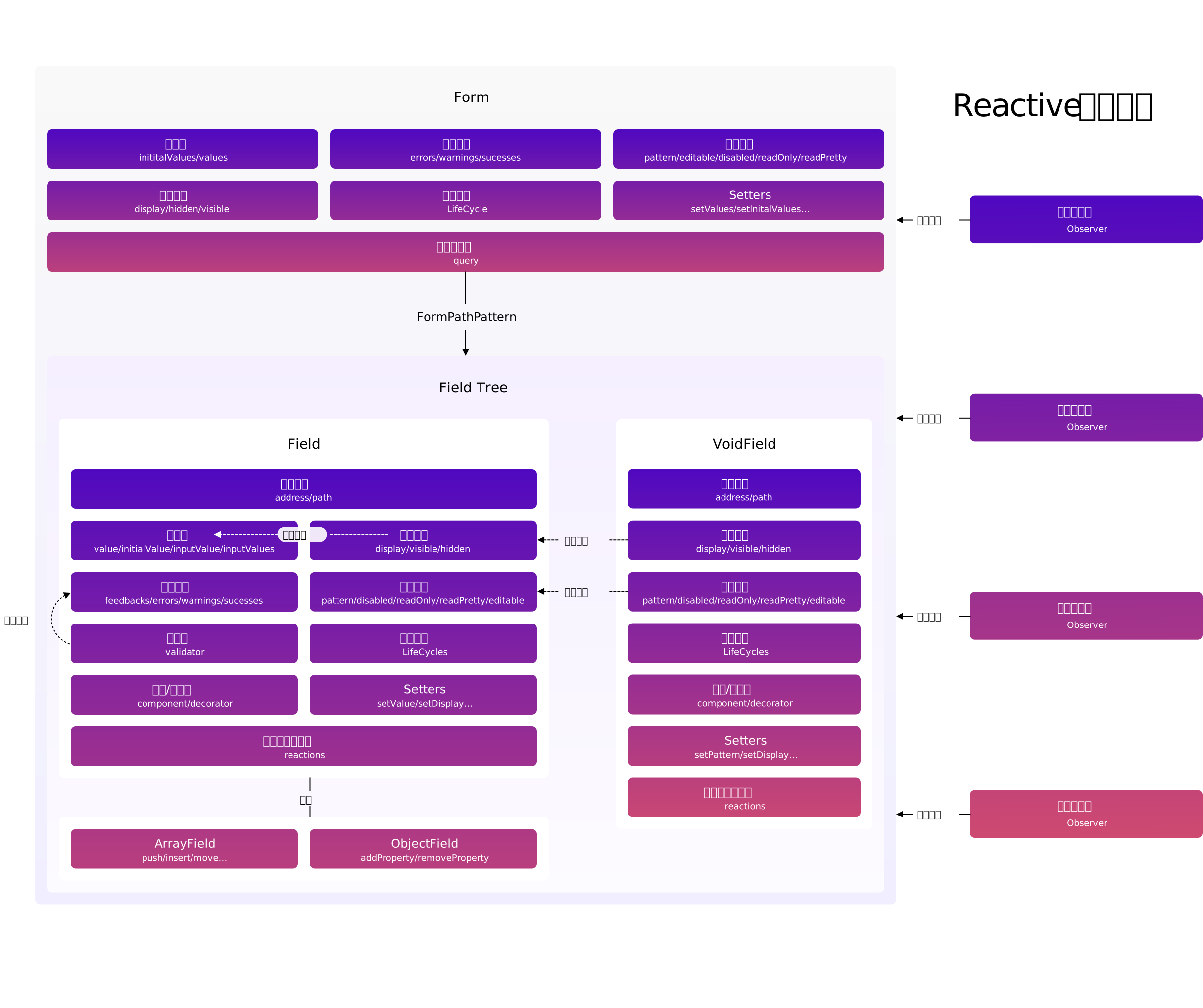 | |
| 8 | | |
| 9 | ## Description | |
| 10 | | |
| 11 | From the above figure, we can see that the Formily kernel is actually a @formily/reactive domain model. | |
| 12 | | |
| 13 | The actual consumption domain model mainly relies on the @formily/reactive responder mechanism for dependency tracking to consume. | |
| 14 | | |
| 15 | We can consume any attribute in the Form/Field/ArrayField/ObjectField/VoidField model in the responder (Reactions). When the dependent attribute changes, the responder will execute repeatedly. | |
| 16 | | |
| 17 | So as to realize the Reactive programming model at the form level. | |
| 18 | | |
| -------------------------------------------------------------------------------- | |
| /packages/core/docs/guide/architecture.zh-CN.md: | |
| -------------------------------------------------------------------------------- | |
| 1 | # 核心架构 | |
| 2 | | |
| 3 | ## 领域模型 | |
| 4 | | |
| 5 | Formily 内核架构非常复杂,因为要解决一个领域级的问题,而不是单点具体的问题,先上架构图: | |
| 6 | | |
| 7 |  | |
| 8 | | |
| 9 | ## 说明 | |
| 10 | | |
| 11 | 从上图中我们可以看到 Formily 内核其实是一个 @formily/reactive 领域模型。 | |
| 12 | | |
| 13 | 实际消费领域模型则主要是依赖 @formily/reactive 的 响应器 机制做依赖追踪来消费。 | |
| 14 | | |
| 15 | 我们可以在响应器(Reactions)中消费 Form/Field/ArrayField/ObjectField/VoidField 模型中的任意属性,依赖的属性发生变化,响应器就会重复执行。 | |
| 16 | | |
| 17 | 从而实现了表单层面的 Reactive 编程模型。 | |
| 18 | | |
| -------------------------------------------------------------------------------- | |
| /packages/core/docs/guide/field.md: | |
| -------------------------------------------------------------------------------- | |
| 1 | # Field model | |
| 2 | | |
| 3 | Formily's field model core contains two types of field models: | |
| 4 | | |
| 5 | - Data type field | |
| 6 | - Dummy data type field | |
| 7 | | |
| 8 | Data type field (Field), the core is responsible for maintaining the form data (the value when the form is submitted). | |
| 9 | | |
| 10 | VoidField, you can understand that it is a Field that has castrated data maintenance capabilities, so it is more of a UI form that maintains a batch of fields as a container. | |
| 11 | | |
| 12 | Let's analyze these two types of fields in detail. | |
| 13 | | |
| 14 | ## Data field | |
| 15 | | |
| 16 | There are 3 data type fields in the field model: | |
| 17 | | |
| 18 | - Field | |
| 19 | - ArrayField | |
| 20 | - ObjectField | |
| 21 | | |
| 22 | ArrayField and ObjectField are both inherited from Field. The positioning of Field is to maintain non-incremental data fields. Compared with ArrayField/Object, it does not mean that Field cannot store data of array type or object type. Field can store data of any data type. However, if the user expects to realize the interaction of adding, deleting, and moving arrays, they need to use ArrayField, and for the interaction of adding and deleting object properties, they need to use ObjectField. If there is no such requirement, all data types can be unified with Field. | |
| 23 | | |
| 24 | Then let's look at the specific Field rules: | |
| 25 | | |
| 26 | - Path rules | |
| 27 | - Explicit and implicit rules | |
| 28 | - Data read and write rules | |
| 29 | - Data source rules | |
| 30 | - Field component rules | |
| 31 | - Field decorator rules | |
| 32 | - Validation rules | |
| 33 | | |
| 34 | ### Path Rules | |
| 35 | | |
| 36 | Because the form structure of our actual business itself is a tree structure, in Formily, each field will have an absolute path in the form model. This absolute path roughly describes the position of the field in the form data (why use roughly, later I will talk about it), any field can be found through the absolute path, and at the same time the parent-child relationship between the fields can be expressed. Therefore, in the field model, we define the address attribute to express the absolute path of the field, which is mainly described by dot syntax, such as abc The path of represents that the father of field c is field b, and the father of field b is a. | |
| 37 | | |
| 38 | Of course, things are not that simple, because we also have a VoidField, which is a dummy data field, and it also has its own absolute path, because it can be the father of the data field. If we only have an absolute path, we cannot make a data field correct. Write field data to the form data. Reading data will also read the wrong position. | |
| 39 | | |
| 40 | Therefore, we actually need a data path as a dedicated data field for writing data and reading data. Here we use path to describe the data path of the field. You can look at this picture for general rules: | |
| 41 | | |
| 42 |  | |
| 43 | | |
| 44 | In summary, Address is always the absolute path representing the node, and Path is the node path that skips the VoidField, but if it is the Path of the VoidField, it will retain its own path position. | |
| 45 | | |
| 46 | Therefore, whether it is a Field or a VoidField, it will have its Address and Path, so when we use the query method to query the field, we can either use the Address rule to query, or use the Path rule to query, such as `query("bc")` The c field can be queried, and the c field can also be queried with `query("abc")`. | |
| 47 | | |
| 48 | ### Explicit and Implicit Rules | |
| 49 | | |
| 50 | The display and hiding of the fields are mainly expressed by the display attribute: | |
| 51 | | |
| 52 | - If display is none, it means that the field UI is hidden and the field data is not retained | |
| 53 | - display is hidden, which means that the field UI is hidden and the field data is preserved | |
| 54 | - display is visible, which means the field UI is displayed, and the field data is restored at the same time | |
| 55 | | |
| 56 | On top of the display property, we also provide two convenient properties | |
| 57 | | |
| 58 | 1. visible, if true, display is equal to visible, if false, display is equal to none | |
| 59 | 2. hidden, if true, display is equal to hidden, if false, display is equal to visible | |
| 60 | | |
| 61 | The above is about the writing rules of explicit and implicit attributes. The reading rules will be more complicated. Here is a default inheritance logic: | |
| 62 | | |
| 63 | If the parent node actively sets the display property, and the child node does not actively set the display property, then the child node will inherit the display of the parent node | |
| 64 | | |
| 65 | So what is the active setting of display? mainly includes: | |
| 66 | | |
| 67 | - Configure the initial attributes display/visible/hidden for the field | |
| 68 | - If there is no configuration during initialization, but display/visible/hidden is set to the field later | |
| 69 | | |
| 70 | So what if you want to change from no inheritance to inheritance? Just set display to null. | |
| 71 | | |
| 72 | ### Data read and write rules | |
| 73 | | |
| 74 | Because Field is a data-type field, it is responsible for maintaining the data of a certain node of the form data. The reading here is actually the form data read directly, which is addressed through the path attribute, which also guarantees the form data and field data. Absolutely idempotent, just read value/initialValue directly. | |
| 75 | | |
| 76 | The data writing rules are consistent with the reading rules. Field does not independently maintain a copy of data. It directly operates on the data of the specific form, which is addressed through the path attribute. The main writing methods are: | |
| 77 | | |
| 78 | - Modify the value/initialValue attribute directly | |
| 79 | - Calling onInput will write data, and at the same time, set the inputValue of the field as input parameter data, inputValues as multi-parameter data, and then set the modified attribute to true, which means that the field has been manually modified, and finally trigger the verification rule that triggerType is onInput | |
| 80 | - Call the setValue method | |
| 81 | | |
| 82 | ### Data source rules | |
| 83 | | |
| 84 | Considering that the value source of the field is not only input through the Input input box, but also selected from a data source, such as a drop-down box, the field model adds a data source attribute dataSource, which is dedicated to reading data source. Only a layer of mapping needs to be done on the component consumer side. The method of writing to the data source can directly modify the dataSource property, or call the setDataSource method | |
| 85 | | |
| 86 | ### Component Rules | |
| 87 | | |
| 88 | Field model, if there is no proxy UI component information, then more refined linkage control cannot be achieved. For example, if the value of A field changes to control the placeholder of B field, then the field attributes must be proxyed, so formily provides The component property is used to proxy UI component information. The component is an array `[Component,ComponentProps]`. The first element represents which component it is, and the second represents the properties of the component. Why use an array? This is convenient for type prompting, and the writing method is relatively simple. | |
| 89 | | |
| 90 | The way to read component information is to read the component property directly. | |
| 91 | | |
| 92 | The main ways to write component information are: | |
| 93 | | |
| 94 | - Modify the component property directly and pass in the array | |
| 95 | - Call the setComponent method, the first parameter is the component, the second is the component property | |
| 96 | - Call the setComponentProps method to directly set the component properties | |
| 97 | | |
| 98 | ### Decorator rules | |
| 99 | | |
| 100 | Similar to the field component rules, the field decorator is mainly used to maintain the package container of the field, such as FormItem, which is more partial to the control of the UI layout. Here we use the decorator attribute to describe the field decorator. | |
| 101 | | |
| 102 | The way to read the decorator information is to directly read the decorator attribute. | |
| 103 | | |
| 104 | The main ways to write decorator information are: | |
| 105 | | |
| 106 | - Modify the decorator property directly and pass in an array | |
| 107 | - Call the setDecorator method, the first parameter is the component, and the second is the component property | |
| 108 | - Call the setDecoratorProps method to directly set the component properties | |
| 109 | | |
| 110 | ### Validation rules | |
| 111 | | |
| 112 | The verification rules mainly include: | |
| 113 | | |
| 114 | - Verifier | |
| 115 | - Timing of calibration | |
| 116 | - Verification strategy | |
| 117 | - Verification result | |
| 118 | | |
| 119 | #### Validator | |
| 120 | | |
| 121 | The validator in the field model is mainly described by the validator attribute. The validator can be passed to the field when the field is initialized, and the validator can be modified again after initialization. | |
| 122 | | |
| 123 | A validator mainly has the following forms: | |
| 124 | | |
| 125 | - Pure string format verification, such as `"phone" | validator = "url" | validator= "email"`. This format verification is a short form of regular rules. Formily provides some standard regular rules. Of course Users can also manually create rules through registerValidateFormats to facilitate reuse | |
| 126 | - Custom function verification, there are 3 return value modes: | |
| 127 | - `(value)=>"message"`, a string returned means there is an error, and no string means no error | |
| 128 | - `(value)=>({type:"error",message:"message"})`, return object form, you can specify type as error or warning or success | |
| 129 | - `{validator:()=>false,message:"message"}`, returns a boolean form, the error message will reuse the message field of the object structure | |
| 130 | - Object structure verification is a more complete expression, such as: | |
| 131 | - `{format:"url"}` This can specify the regular format | |
| 132 | - `{required:true}` This can specify required fields | |
| 133 | - There are more rule attributes can refer to the API documentation, and we can also register similar validation rules through registerValidateRules | |
| 134 | - Object array structure verification is a combination of the previous three types. In fact, the first three types will all be converted into object array structures, such as: | |
| 135 | - `["url",{required:true},(value)=>"message"]` is actually equivalent to `[{format:"url"},{required:true},{validator:(value)=> "message"}]` | |
| 136 | | |
| 137 | #### Check timing | |
| 138 | | |
| 139 | Sometimes, we want certain verification rules to be triggered only when focusing or out of focus. We can add a triggerType to each verification rule object, such as `{validator:(value)=>"message",triggerType: "onBlur"}` In this way, you can precisely control a verification rule to perform verification only in a certain event. The triggerType here mainly includes `"onInput" | "onBlur" | "onFocus"`, if you call `form. validate` is a rule that verifies all triggerTypes at once. If you manually call `field.validate`, you can specify the triggerType in the input parameters, and all triggerTypes will be verified if you don’t pass them. | |
| 140 | | |
| 141 | #### Verification Strategy | |
| 142 | | |
| 143 | Sometimes, we hope that the verification strategy of a certain field is that when all the verification rules are executed, if a verification rule fails, the result will be returned immediately. We only need to pass the parameter validateFirst to true when the field is initialized. That is, the default is false, that is, the verification will continue if the verification fails, and the verification result obtained is an array. | |
| 144 | | |
| 145 | #### Read the verification result | |
| 146 | | |
| 147 | The verification results are mainly stored in the feedbacks property in the field model. Feedbacks is an array of Feedback objects. The structure of each Feedback is: | |
| 148 | | |
| 149 | ```ts | |
| 150 | interface Feedback { | |
| 151 | path: string //Field data path | |
| 152 | address: string //field absolute path | |
| 153 | type: 'error' | 'success' | 'warning' //Verification result type | |
| 154 | code: //Check result code | |
| 155 | | 'ValidateError' | |
| 156 | | 'ValidateSuccess' | |
| 157 | | 'ValidateWarning' | |
| 158 | | 'EffectError' | |
| 159 | | 'EffectSuccess' | |
| 160 | | 'EffectWarning' | |
| 161 | messages: string[] //Check the message | |
| 162 | } | |
| 163 | ``` | |
| 164 | | |
| 165 | There are four main ways to read: | |
| 166 | | |
| 167 | - Read feedbacks properties directly | |
| 168 | - Reading the errors attribute is equivalent to filtering out all verification results with type error from feedbacks | |
| 169 | - Reading the warnings attribute is equivalent to filtering out all the verification results whose type is warning from feedbacks | |
| 170 | - Reading the successes attribute is equivalent to filtering out all verification results with type success from feedbacks | |
| 171 | | |
| 172 | #### Write verification result | |
| 173 | | |
| 174 | There are 3 ways to write: | |
| 175 | | |
| 176 | - Call the validate method to trigger the field validator to perform the validation action, and the code of the validation result is uniformly Validate\*` | |
| 177 | - Calling onInput will trigger validate | |
| 178 | - Calling onFocus will trigger validate | |
| 179 | - Calling onBlur will trigger validate | |
| 180 | - Call reset and specify validate as true to trigger validate | |
| 181 | - Modify the feedbacks attribute directly | |
| 182 | - Modify the errors property directly, it will be converted into an array of feedbacks objects, and the code of Feedback will be forcibly overwritten as EffectError | |
| 183 | - Modify the warnings attribute directly, it will be converted into an array of feedbacks objects, and the code of Feedback will be forcibly overwritten as EffectWarning | |
| 184 | - Modify the successes property directly, it will be converted into an array of feedbacks objects, and the code of Feedback will be forcibly overwritten as EffectSuccess | |
| 185 | | |
| 186 | Such writing logic is mainly to prevent users from modifying the verification results from polluting the verification results of their own verifiers, strictly separating them, and easy to restore the scene. | |
| 187 | | |
| 188 | #### Verification result query | |
| 189 | | |
| 190 | The query of the verification result is mainly queried through queryFeedbacks. The query has the same participating Feedback objects, which can be filtered by type or code, or by path. | |
| 191 | | |
| 192 | ## ArrayField | |
| 193 | | |
| 194 | Compared with Field, ArrayField only extends array-related methods on the basis of inheriting Field, such as push/pop/insert/move. Why should these methods be provided? Its ability is not only to process the field data, it It also provides internal state transposition processing for the sub-nodes of ArrayField mainly to ensure that the order of the fields is consistent with the order of the data. Can cite an example: | |
| 195 | | |
| 196 |  | |
| 197 | | |
| 198 | This is a move call process, the value of the array element will move, and the state of the corresponding field will also move. | |
| 199 | | |
| 200 | ## ObjectField | |
| 201 | | |
| 202 | Because the object type is disordered, there is no state transposition, so ObjectField provides addProperty/removeProperty/existProperty three APIs for users to use. | |
| 203 | | |
| 204 | ## VoidField | |
| 205 | | |
| 206 | Compared with Field, VoidField mainly castrates data read and write rules, data source rules, and verification rules. When users use it, they mainly use explicit and implicit rules, components, and decorator rules. | |
| 207 | | |
| 208 | <Alert> | |
| 209 | | |
| 210 | The series of field rules mentioned above did not mention the detailed API usage details. It is more to help users sort out formily from the perspective of ideas. If you are not familiar with the API, it is best to read the API documentation first. | |
| 211 | | |
| 212 | </Alert> | |
| 213 | | |
| -------------------------------------------------------------------------------- | |
| /packages/core/docs/guide/field.zh-CN.md: | |
| -------------------------------------------------------------------------------- | |
| 1 | # 字段模型 | |
| 2 | | |
| 3 | Formily 的字段模型核心包含了两类字段模型: | |
| 4 | | |
| 5 | - 数据型字段 | |
| 6 | - 虚数据型字段 | |
| 7 | | |
| 8 | 数据型字段(Field),核心是负责维护表单数据(表单提交时候的值)。 | |
| 9 | | |
| 10 | 虚数据型字段(VoidField),你可以理解为它就是一个阉割了数据维护能力的 Field,所以它更多的是作为容器维护一批字段的 UI 形式。 | |
| 11 | | |
| 12 | 下面我们具体分析这两种类型字段。 | |
| 13 | | |
| 14 | ## 数据型字段 | |
| 15 | | |
| 16 | 在 字段模型 中有 3 种数据型字段: | |
| 17 | | |
| 18 | - Field | |
| 19 | - ArrayField | |
| 20 | - ObjectField | |
| 21 | | |
| 22 | ArrayField 和 ObjectField 都是继承自 Field,Field 的定位就是维护非自增型数据字段,对比 ArrayField/Object,并不是说 Field 就不能存数组类型或者对象类型的数据,Field 其实可以存任意数据类型的数据,只是,如果用户期望实现数组的添加删除移动这样的交互,则需要使用 ArrayField,对象属性的添加删除交互,则需要使用 ObjectField,如果没有这样的需求,所有数据类型统一用 Field 即可。 | |
| 23 | | |
| 24 | 然后咱们再看具体 Field 领域规则: | |
| 25 | | |
| 26 | - 路径规则 | |
| 27 | - 显隐规则 | |
| 28 | - 数据读写规则 | |
| 29 | - 数据源规则 | |
| 30 | - 字段组件规则 | |
| 31 | - 字段装饰器规则 | |
| 32 | - 校验规则 | |
| 33 | | |
| 34 | ### 路径规则 | |
| 35 | | |
| 36 | 因为我们实际业务的表单结构本身就是一个树结构,所以在 Formily 中,每个字段在表单模型中都会有一个绝对路径,这个绝对路径大致描述了字段在表单数据中的位置(为什么用大致,后面会讲),通过绝对路径可以找到任意一个字段,同时还能表达字段间的父子关系,所以字段模型中,我们定义了 address 属性来表达字段的绝对路径,主要用点语法来描述,比如 a.b.c 这样的路径代表了字段 c 的父亲是字段 b,字段 b 的父亲是 a。 | |
| 37 | | |
| 38 | 当然,事情并没有这么简单,因为我们还有 VoidField,VoidField 作为虚数据字段,它同样也有自己的绝对路径,因为它可以作为数据字段的父亲,如果我们只有绝对路径, 就无法让一个数据字段正确的往表单数据里写入字段数据。读取数据也会读错位置。 | |
| 39 | | |
| 40 | 所以,我们其实还需要一个数据路径作为专门用于数据字段写入数据和读取数据的,这里我们用 path 来描述字段的数据路径,大概的规则可以看看这张图: | |
| 41 | | |
| 42 |  | |
| 43 | | |
| 44 | 总结下来就是,Address 永远是代表节点的绝对路径,Path 是会跳过 VoidField 的节点路径,但是如果是 VoidField 的 Path,是会保留它自身的路径位置。 | |
| 45 | | |
| 46 | 所以,不管是 Field 还是 VoidField,都会有它的 Address 和 Path,所以我们在用 query 方法查询字段的时候,既可以用 Address 规则查询,也可以用 Path 规则查询,比如`query("b.c")`可以查询到 c 字段,同样用`query("a.b.c")`也能查询到 c 字段。 | |
| 47 | | |
| 48 | ### 显隐规则 | |
| 49 | | |
| 50 | 字段的显示隐藏,主要用 display 属性来表达: | |
| 51 | | |
| 52 | - display 为 none 代表字段 UI 隐藏,同时不保留字段数据 | |
| 53 | - display 为 hidden 代表字段 UI 隐藏,保留字段数据 | |
| 54 | - display 为 visible 代表字段 UI 显示,同时恢复字段数据 | |
| 55 | | |
| 56 | 在 display 属性之上,我们还提供了两个便捷属性 | |
| 57 | | |
| 58 | 1. visible,如果为 true 代表 display 等于 visible,如果为 false 代表 display 等于 none | |
| 59 | 2. hidden,如果为 true 代表 display 等于 hidden,如果为 false 代表 display 等于 visible | |
| 60 | | |
| 61 | 上面讲的是显隐属性的写规则,读取规则就会更复杂一些,这里有一个默认继承逻辑: | |
| 62 | | |
| 63 | 如果父节点主动设置了 display 属性,子节点没有主动设置 display 属性,那么子节点会继承父节点的 display | |
| 64 | | |
| 65 | 那什么才是主动设置 display 呢?主要包括: | |
| 66 | | |
| 67 | - 给字段配置了初始化属性 display/visible/hidden | |
| 68 | - 如果初始化时没有配置,但是在后期又给字段设置了 display/visible/hidden | |
| 69 | | |
| 70 | 那如果希望从不继承变为继承怎么办?把 display 设置为 null 即可。 | |
| 71 | | |
| 72 | ### 数据读写规则 | |
| 73 | | |
| 74 | 因为 Field 是数据型字段,它负责维护表单数据的某个节点的数据,这里的读取,其实是直接读取的表单数据,通过 path 属性来寻址,这样也保证了表单数据与字段数据的绝对幂等,读取的方式直接读取 value/initialValue 即可。 | |
| 75 | | |
| 76 | 数据写入规则与读取规则一致,Field 不会独立维护一份数据,它操作的直接就是具体表单的数据,通过 path 属性来寻址,写入的方式主要有: | |
| 77 | | |
| 78 | - 直接修改 value/initialValue 属性 | |
| 79 | - 调用 onInput 会写入数据,同时设置字段的 inputValue 为入参数据,inputValues 为多参数据,然后设置 modified 属性为 true,代表该字段被手动修改过,最后触发 triggerType 为 onInput 的校验规则 | |
| 80 | - 调用 setValue 方法 | |
| 81 | | |
| 82 | ### 数据源规则 | |
| 83 | | |
| 84 | 考虑到字段的值来源不是只有通过 Input 输入框输入的,还有会从一个数据源中选取的,比如下拉框之类的,所以字段模型加了一个数据源的属性 dataSource,专门用于读取数据源。只是在组件消费端需要做一层映射。写入数据源的方式可以直接修改 dataSource 属性,也可以调用 setDataSource 方法 | |
| 85 | | |
| 86 | ### 组件规则 | |
| 87 | | |
| 88 | 字段模型,如果没有代理 UI 组件信息,那就没法实现更加精细化的联动控制了,比如 A 字段的值变化要控制 B 字段的 placeholder,那就必须将字段的属性给代理起来,所以 formily 提供了 component 属性,专门用于代理 UI 组件信息,component 是一个数组`[Component,ComponentProps]`,第一个元素代表是哪个组件,第二个代表组件的属性有哪些,为什么用数组,主要原因是这样方便类型提示,同时写法也比较简单。 | |
| 89 | | |
| 90 | 读取组件信息的方式直接读取 component 属性即可。 | |
| 91 | | |
| 92 | 写入组件信息的方式主要有: | |
| 93 | | |
| 94 | - 直接修改 component 属性,传入数组 | |
| 95 | - 调用 setComponent 方法,第一个参数是组件,第二个是组件属性 | |
| 96 | - 调用 setComponentProps 方法,直接会设置组件属性 | |
| 97 | | |
| 98 | ### 装饰器规则 | |
| 99 | | |
| 100 | 与字段组件规则相似,字段装饰器主要用来维护字段的包裹容器,比如 FormItem,更偏 UI 布局的控制,这里我们用 decorator 属性来描述字段装饰器。 | |
| 101 | | |
| 102 | 读取装饰器信息的方式直接读取 decorator 属性即可。 | |
| 103 | | |
| 104 | 写入装饰器信息的方式主要有: | |
| 105 | | |
| 106 | - 直接修改 decorator 属性,传入数组 | |
| 107 | - 调用 setDecorator 方法,第一个参数是组件,第二个是组件属性 | |
| 108 | - 调用 setDecoratorProps 方法,直接会设置组件属性 | |
| 109 | | |
| 110 | ### 校验规则 | |
| 111 | | |
| 112 | 校验规则主要包含: | |
| 113 | | |
| 114 | - 校验器 | |
| 115 | - 校验时机 | |
| 116 | - 校验策略 | |
| 117 | - 校验结果 | |
| 118 | | |
| 119 | #### 校验器 | |
| 120 | | |
| 121 | 在字段模型中的校验器主要用 validator 属性描述,在字段初始化的时候可以给字段传入 validator,初始化之后也可以再次修改 validator | |
| 122 | | |
| 123 | 一个 validator 主要有以下几种形态: | |
| 124 | | |
| 125 | - 纯字符串格式校验,比如`"phone" | validator = "url" | validator= "email"` ,这样的格式校验是正则规则的简写形式,formily 内部提供了一些标准的正则规则,当然用户也能通过 registerValidateFormats 来手动创建规则,方便复用 | |
| 126 | - 自定义函数校验,有 3 种返回值模式: | |
| 127 | - `(value)=>"message"`,返回字符串代表有错误,不返回字符串代表无错误 | |
| 128 | - `(value)=>({type:"error",message:"message"})`,返回对象形式,可以指定 type 是 error 或 warning 或 success | |
| 129 | - `{validator:()=>false,message:"message"}`,返回布尔形式,错误消息会复用对象结构的 message 字段 | |
| 130 | - 对象结构校验,是一种更完备的表达,比如: | |
| 131 | - `{format:"url"}` 这样可以指定正则格式 | |
| 132 | - `{required:true}`这样可以指定必填 | |
| 133 | - 还有更多的规则属性可以参考 API 文档,同时我们还能通过 registerValidateRules 来注册类似的校验规则 | |
| 134 | - 对象数组结构校验,是前面三种的组合表达,其实前 3 种,都会转换成对象数组结构,比如: | |
| 135 | - `["url",{required:true},(value)=>"message"]`其实相当于 `[{format:"url"},{required:true},{validator:(value)=>"message"}]` | |
| 136 | | |
| 137 | #### 校验时机 | |
| 138 | | |
| 139 | 有些时候,我们希望某些校验规则只在聚焦或者失焦的时候触发,我们可以在每个校验规则对象中加一个 triggerType,比如`{validator:(value)=>"message",triggerType:"onBlur"}` 这样就可以精确的控制某个校验规则只在某个事件中执行校验,这里的 triggerType 主要有`"onInput" | "onBlur" | "onFocus"` ,如果调用`form.validate`,是会一次性校验所有 triggerType 的规则,如果手动调用`field.validate`,则可以在入参中指定 triggerType,不传参就会校验所有。 | |
| 140 | | |
| 141 | #### 校验策略 | |
| 142 | | |
| 143 | 有些时候,我们希望某个字段的校验策略是,执行所有校验规则的时候,如果某个校验规则校验失败则立即返回结果,我们只需要在 field 初始化的时候传入参数 validateFirst 为 true 即可,默认是 false,也就是校验失败也会继续校验,拿到的校验结果是一个数组。 | |
| 144 | | |
| 145 | #### 校验结果读取 | |
| 146 | | |
| 147 | 对于校验结果,在字段模型中主要是存放在 feedbacks 属性中的,feedbacks 是由 Feedback 对象组成的数组,每个 Feedback 的结构是: | |
| 148 | | |
| 149 | ```ts | |
| 150 | interface Feedback { | |
| 151 | path: string //字段数据路径 | |
| 152 | address: string //字段绝对路径 | |
| 153 | type: 'error' | 'success' | 'warning' //校验结果类型 | |
| 154 | code: //校验结果编码 | |
| 155 | | 'ValidateError' | |
| 156 | | 'ValidateSuccess' | |
| 157 | | 'ValidateWarning' | |
| 158 | | 'EffectError' | |
| 159 | | 'EffectSuccess' | |
| 160 | | 'EffectWarning' | |
| 161 | messages: string[] //校验消息 | |
| 162 | } | |
| 163 | ``` | |
| 164 | | |
| 165 | 读取方式主要有 4 种: | |
| 166 | | |
| 167 | - 直接读取 feedbacks 属性 | |
| 168 | - 读取 errors 属性,相当于是从 feedbacks 中过滤出 type 为 error 的所有校验结果 | |
| 169 | - 读取 warnings 属性,相当于是从 feedbacks 中过滤出 type 为 warning 的所有校验结果 | |
| 170 | - 读取 successes 属性,相当于是从 feedbacks 中过滤出 type 为 success 的所有校验结果 | |
| 171 | | |
| 172 | #### 校验结果写入 | |
| 173 | | |
| 174 | 写入方式有 3 种: | |
| 175 | | |
| 176 | - 调用 validate 方法,触发字段校验器执行校验动作,校验结果的 Code 统一是 Validate\*` | |
| 177 | - 调用 onInput 会触发 validate | |
| 178 | - 调用 onFocus 会触发 validate | |
| 179 | - 调用 onBlur 会触发 validate | |
| 180 | - 调用 reset,并指定 validate 为 true 会触发 validate | |
| 181 | - 直接修改 feedbacks 属性 | |
| 182 | - 直接修改 errors 属性,会转换成 feedbacks 对象数组,同时 Feedback 的 code 会被强制覆盖为 EffectError | |
| 183 | - 直接修改 warnings 属性,会转换成 feedbacks 对象数组,同时 Feedback 的 code 会被强制覆盖为 EffectWarning | |
| 184 | - 直接修改 successes 属性,会转换成 feedbacks 对象数组,同时 Feedback 的 code 会被强制覆盖为 EffectSuccess | |
| 185 | | |
| 186 | 这样的写入逻辑主要是为了防止用户修改校验结果污染本身校验器的校验结果,做严格分离,容易恢复现场。 | |
| 187 | | |
| 188 | #### 校验结果查询 | |
| 189 | | |
| 190 | 校验结果的查询主要通过 queryFeedbacks 来查询,查询的入参与 Feedback 对象一致,可以按照 type 或者 code,也可以按照路径进行过滤。 | |
| 191 | | |
| 192 | ## ArrayField | |
| 193 | | |
| 194 | ArrayField 相比于 Field,仅仅只是在继承 Field 的基础上扩展了数组相关的方法,比如 push/pop/insert/move 这些,为什么要提供这些方法,它的能力不只是对字段的数据做处理,它内部还提供了对 ArrayField 子节点的状态转置处理主要为了保证字段的顺序与数据的顺序是一致。可以举个例子: | |
| 195 | | |
| 196 |  | |
| 197 | | |
| 198 | 这是一个 move 调用的过程,数组元素的值会发生移动,同时对应字段的状态也会发生移动。 | |
| 199 | | |
| 200 | ## ObjectField | |
| 201 | | |
| 202 | 因为 object 类型是无序的,也就不存在状态转置,所以 ObjectField 就提供了 addProperty/removeProperty/existProperty 3 个 API 给用户使用。 | |
| 203 | | |
| 204 | ## VoidField | |
| 205 | | |
| 206 | VoidField 相比于 Field,主要是阉割了数据读写规则、数据源规则和校验规则,用户使用的时候,主要还是使用显隐规则和组件,装饰器规则。 | |
| 207 | | |
| 208 | <Alert> | |
| 209 | | |
| 210 | 前面讲的一系列字段领域规则,并没有提到详细的 API 使用细节,更多的是从思路上帮助用户梳理 formily,如果对 API 不熟悉的,最好先看 API 文档。 | |
| 211 | | |
| 212 | </Alert> | |
| 213 | | |
| -------------------------------------------------------------------------------- | |
| /packages/core/docs/guide/form.md: | |
| -------------------------------------------------------------------------------- | |
| 1 | # Form model | |
| 2 | | |
| 3 | Earlier I talked about the overall architecture of the Formily kernel, and also talked about MVVM. You should also be able to roughly understand what Formily's form model is. Let's take a deeper look at the specific domain logic of the form model, which is mainly biased. Concluding content, if you don't understand it the first time, you can go directly to the API documentation, and come back after reading it, you can deepen your understanding of formily. | |
| 4 | | |
| 5 | ## Combing | |
| 6 | | |
| 7 | The entire form model is very large and complicated. In fact, the core of the decomposition is the following sub-models: | |
| 8 | | |
| 9 | - Field management model | |
| 10 | - Field model | |
| 11 | - Data model | |
| 12 | - Linkage model | |
| 13 | - Path system | |
| 14 | | |
| 15 | Let's talk about how the form model is managed in detail below. | |
| 16 | | |
| 17 | ## Field Management Model | |
| 18 | | |
| 19 | The field management model mainly includes: | |
| 20 | | |
| 21 | - Field addition | |
| 22 | - Field query | |
| 23 | - Import field set | |
| 24 | - Export field set | |
| 25 | - Clear the field set | |
| 26 | | |
| 27 | #### Field addition | |
| 28 | | |
| 29 | The field is created mainly through the createField/createArrayField/createObjectField/createVoidField method. If the field already exists, it will not be created repeatedly | |
| 30 | | |
| 31 | #### Field query | |
| 32 | | |
| 33 | The query method is mainly used to query the field. The query method can pass in the path of the field or regular expression to match the field. | |
| 34 | | |
| 35 | Because the detailed rules of the field path are still more complicated, they will be explained in detail in the following [Path System](/api/entry/form-path) article. | |
| 36 | | |
| 37 | Then calling the query method will return a Query object. The Query object can have a forEach/map/reduce method that traverses all fields in batches, or a take method that takes only the first field that is queried, as well as direct reading of fields. The get method of properties, and the getIn method that can read field properties in depth, the difference between the two methods is that the former can have smart prompts, and the latter has no prompts, so it is recommended that users use the get method. | |
| 38 | | |
| 39 | #### Import field set | |
| 40 | | |
| 41 | The field set is imported mainly through setFormGraph. The input parameter format is a flat object format, the key is the absolute path of the field, and the value is the state of the field. Use this API to import the Immutable field state into the form in some scenarios that require time travel. In the model. | |
| 42 | | |
| 43 | #### Export field set | |
| 44 | | |
| 45 | The field set is mainly exported through getFormGraph. The export format is a flat object format, the key is the absolute path of the field, and the value is the state of the field, which is consistent with the imported field set input parameters. Because the returned data is an Immutable data, it is OK Completely persistent storage, convenient for time travel. | |
| 46 | | |
| 47 | #### Clear the field set | |
| 48 | | |
| 49 | The field set is cleared mainly through clearFormGraph. | |
| 50 | | |
| 51 | ## Field Model | |
| 52 | | |
| 53 | The field model mainly includes: | |
| 54 | | |
| 55 | - Field model, which is mainly responsible for managing the state of non-incremental fields, such as Input/Select/NumberPicker/DatePicker components | |
| 56 | - The ArrayField model is mainly responsible for managing the state of the auto-increment list field, and can add, delete, and move list items. | |
| 57 | - ObjectField model, which is mainly responsible for managing the state of auto-incremented object fields, and can add or delete the key of the object. | |
| 58 | - The VoidField model is mainly responsible for managing the state of the virtual field. The virtual field is a node that does not pollute the form data, but it can control the display and hiding of its child nodes, and the interactive mode. | |
| 59 | | |
| 60 | Because the field model is very complicated, it will be explained in detail in the following [Field Model](/guide/field) article. | |
| 61 | | |
| 62 | ## Data Model | |
| 63 | | |
| 64 | For the form data model, the previous version of Formily will more or less have some boundary problems. After reorganizing a version in 2.x, it really broke through the previous legacy problems. | |
| 65 | | |
| 66 | The data model mainly includes: | |
| 67 | | |
| 68 | - Form values (values) management | |
| 69 | - Form default value (initialValues) management | |
| 70 | - Field value (value) management | |
| 71 | - Field default value (initialValue) management | |
| 72 | - Value and default value selection merge strategy | |
| 73 | | |
| 74 | Form value management is actually the values attribute of an object structure, but it is an @formily/reactive observable attribute. At the same time, with the help of @formily/reactive's deep observer capability, it monitors any attribute changes, and if it changes, it will trigger The life cycle hook of onFormValuesChange. | |
| 75 | | |
| 76 | In the same way, the default value management is actually the initialValues property of an object structure. It will also deeply monitor property changes and trigger the onFormInitialValues life cycle hook. | |
| 77 | | |
| 78 | Field value management is reflected in the value attribute of each data type field. Formily will maintain a data path attribute called path for each field, and then read and write values are all read and write the values of the top-level form. This ensures that the value of the field and the value of the form are absolutely idempotent, and the default value of the field is the same. | |
| 79 | | |
| 80 | To sum up, the management of **values is all managed on the top-level form, and the value of the field and the value of the form are absolutely idempotent through path. ** | |
| 81 | | |
| 82 | <Alert> | |
| 83 | | |
| 84 | The difference between the value and the default value is actually whether the field will be reset to the default value state when the form is reset | |
| 85 | | |
| 86 | </Alert> | |
| 87 | | |
| 88 | #### Value and default value selection merge strategy | |
| 89 | | |
| 90 | Usually, in the process of business development, there is always a need for data echo. This data is generally used as an asynchronous default value. If it is used as a detail page, it is okay, but as an editing page, there will be some problems. : | |
| 91 | | |
| 92 | **There is a conflict** | |
| 93 | | |
| 94 | For example, the form value is `{xx:123}`, and the default form value is `{xx:321}`. The strategy here is: | |
| 95 | | |
| 96 | - If `xx` does not have a corresponding field model, it means it is just redundant data and cannot be modified by the user | |
| 97 | - If the form value is assigned first, and the default value is assigned later, then the default value directly overrides the form value. This scenario is suitable for asynchronous data echo scenarios. Different business states have different default data echoes, and the data is finally submitted.` {xx:321}` | |
| 98 | - If the default value is assigned first, and the form value is assigned later, the form value directly overrides the default value. This scenario is suitable for synchronizing the default value and finally submitting the data `{xx:123}` | |
| 99 | - If `xx` has a field model | |
| 100 | - If the form value is assigned first, the default value is assigned later | |
| 101 | - If the current field has been modified by the user (modified is true), then the default value cannot overwrite the form value, and finally submit the data `{xx:123}` | |
| 102 | - If the current field has not been modified by the user (modified is false), then the default value will directly override the field value. This scenario is suitable for asynchronous data echo scenarios. Different business states have different default data echoes, and the data is finally submitted `{xx:321}` | |
| 103 | - If the default value is assigned first, and the form value is assigned later, the form value directly overrides the default value. This scenario is suitable for synchronizing the default value and finally submitting the data `{xx:123}` | |
| 104 | | |
| 105 | **No conflicts** | |
| 106 | | |
| 107 | For example, the form value is `{xx:123}`, and the default form value is `{yy:321}`. The strategy here is to merge directly. | |
| 108 | | |
| 109 | To sum up, the selection and merging strategy of the value and the default value, the core is to see whether the field has been modified by the user, everything is subject to the user, if it has not been modified by the user, the order of assignment shall prevail.\*\* | |
| 110 | | |
| 111 | <Alert> | |
| 112 | | |
| 113 | The default value mentioned here can be assigned repeatedly, and it is also the question of whether to discard the value in the process of repeated assignment. | |
| 114 | | |
| 115 | </Alert> | |
| 116 | | |
| 117 | ## Validation model | |
| 118 | | |
| 119 | The core of the form verification model is to verify the validity of the data, and then manage the verification results, so the verification model mainly includes: | |
| 120 | | |
| 121 | - Validation rule management | |
| 122 | - Calibration result management | |
| 123 | | |
| 124 | Because the verification model belongs to the field model, it will be explained in detail in the following [Field Model](/guide/field#Verification Rules) | |
| 125 | | |
| 126 | ## Linkage model | |
| 127 | | |
| 128 | The core of the linkage model in formily1.x is the active linkage model, which is roughly expressed in one sentence: | |
| 129 | | |
| 130 | ```ts | |
| 131 | setFieldState(Subscribe(FormLifeCycle, Selector(Path)), TargetState) | |
| 132 | ``` | |
| 133 | | |
| 134 | The explanation is that any linkage is based on a certain life cycle hook of the form to trigger the state of the field under the specified path. Such a model can solve many problems, but it also has an obvious problem, which is the many-to-one linkage. In the scenario where you need to monitor changes in multiple fields at the same time to control the state of a field, the implementation cost is still relatively high for users, especially to achieve some calculator linkage requirements, and the amount of code increases sharply. Of course, for one-to-many scenarios, this model is the most efficient. | |
| 135 | | |
| 136 | Therefore, in formily 2.x, a passive linkage model is added to the active linkage model, which is also an expression: | |
| 137 | | |
| 138 | ```ts | |
| 139 | subscribe(Dependencies, Reactions) | |
| 140 | ``` | |
| 141 | | |
| 142 | Simplified a lot, the core is to respond to dependent data changes. The dependent data can be form model attributes or attributes of any field model. The response action can be to change the attributes of any field model or do other asynchronous actions. . Such a model is also a complete linkage model, but in a one-to-many scenario, the implementation cost will be higher than the active model. | |
| 143 | | |
| 144 | Therefore, the two linkage models require users to choose according to their own needs. | |
| 145 | | |
| 146 | ## Path system | |
| 147 | | |
| 148 | The path system is very important. The path system is used everywhere in almost the entire form model. It mainly provides the following capabilities for the form model: | |
| 149 | | |
| 150 | - It can be used to find any field from the field set, and it also supports batch search according to the rules | |
| 151 | - It can be used to express the model of the relationship between the fields. With the help of the path system, we can find the father of a certain field, can find the father, and can also realize the data inheritance ability of the tree level. Similarly, we can also find the data of a certain field. Adjacent node | |
| 152 | - It can be used to read and write field data, read and write data with deconstruction | |
| 153 | | |
| 154 | The entire path system is actually implemented based on the path DSL of @formily/path. If you want to know more about the path system, you can take a look at [FormPath API](/api/entry/form-path) in detail | |
| 155 | | |
| -------------------------------------------------------------------------------- | |
| /packages/core/docs/guide/form.zh-CN.md: | |
| -------------------------------------------------------------------------------- | |
| 1 | # 表单模型 | |
| 2 | | |
| 3 | 前面讲到了 Formily 内核的整体架构,同时也讲了 MVVM,你应该也能大致能理解什么是 Formily 的表单模型了,下面我们再深一步来讲表单模型的具体领域逻辑,主要是偏思路性的总结性内容,如果第一遍看不懂,可以先直接去看 API 文档,看完之后再回来看,就能加深对 formily 的理解了。 | |
| 4 | | |
| 5 | ## 梳理 | |
| 6 | | |
| 7 | 整个表单模型很大很复杂,分解下来其实核心是以下几个子模型: | |
| 8 | | |
| 9 | - 字段管理模型 | |
| 10 | - 字段模型 | |
| 11 | - 数据模型 | |
| 12 | - 联动模型 | |
| 13 | - 路径系统 | |
| 14 | | |
| 15 | 下面具体来讲一下表单模型是如何管理的。 | |
| 16 | | |
| 17 | ## 字段管理模型 | |
| 18 | | |
| 19 | 字段管理模型,主要包含: | |
| 20 | | |
| 21 | - 字段添加 | |
| 22 | - 字段查询 | |
| 23 | - 导入字段集 | |
| 24 | - 导出字段集 | |
| 25 | - 清空字段集 | |
| 26 | | |
| 27 | #### 字段添加 | |
| 28 | | |
| 29 | 主要通过 createField/createArrayField/createObjectField/createVoidField 方法来创建字段,如果字段已经存在,则不会重复创建 | |
| 30 | | |
| 31 | #### 字段查询 | |
| 32 | | |
| 33 | 主要通过 query 方法来查询字段,query 方法可以传入字段的路径或者正则表达式来匹配字段。 | |
| 34 | | |
| 35 | 因为字段路径的详细规则还是比较复杂的,在后面的[路径系统](/api/entry/form-path)篇中会详细讲解。 | |
| 36 | | |
| 37 | 然后调用 query 方法会返回一个 Query 对象,Query 对象中可以有批量遍历所有字段的 forEach/map/reduce 方法,也可以有只取查询到的第一个字段的 take 方法,同时还有直接读取字段属性的 get 方法,还有可以深层读取字段属性的 getIn 方法,两个方法的差别就是前者可以有智能提示,后者没有提示,所以推荐用户都用 get 方法。 | |
| 38 | | |
| 39 | #### 导入字段集 | |
| 40 | | |
| 41 | 主要通过 setFormGraph 来导入字段集,入参格式是一个扁平对象格式,key 是字段的绝对路径,value 是字段的状态,使用该 API 主要在一些需要做时间旅行的场景,将 Immutable 字段状态导入至表单模型中。 | |
| 42 | | |
| 43 | #### 导出字段集 | |
| 44 | | |
| 45 | 主要通过 getFormGraph 来导出字段集,导出格式是一个扁平对象格式,key 是字段的绝对路径,value 是字段的状态,与导入字段集入参一致,因为返回的数据是一个 Immutable 的数据,所以是可以完全做持久化存储的,方便时间旅行。 | |
| 46 | | |
| 47 | #### 清空字段集 | |
| 48 | | |
| 49 | 主要通过 clearFormGraph 来清空字段集。 | |
| 50 | | |
| 51 | ## 字段模型 | |
| 52 | | |
| 53 | 字段模型主要包含了: | |
| 54 | | |
| 55 | - Field 模型,主要负责管理非自增型字段状态,比如 Input/Select/NumberPicker/DatePicker 这些组件 | |
| 56 | - ArrayField 模型,主要负责管理自增列表字段状态,可以对列表项进行增删移动的。 | |
| 57 | - ObjectField 模型,主要负责管理自增对象字段状态,可以对对象的 key 做增删操作。 | |
| 58 | - VoidField 模型,主要负责管理虚字段状态,虚字段是一种不会污染表单数据的节点存在,但是它可以控制它的子节点显示隐藏,交互模式。 | |
| 59 | | |
| 60 | 因为字段模型非常复杂,所以会在后面的[字段模型](/guide/field)篇中详细讲解。 | |
| 61 | | |
| 62 | ## 数据模型 | |
| 63 | | |
| 64 | 表单数据模型,formily 之前的版本或多或少都会存在一些边界问题,在 2.x 中重新梳理了一版,才真正把之前的遗留问题突破掉了。 | |
| 65 | | |
| 66 | 数据模型主要包含: | |
| 67 | | |
| 68 | - 表单值(values)管理 | |
| 69 | - 表单默认值(initialValues)管理 | |
| 70 | - 字段值(value)管理 | |
| 71 | - 字段默认值(initialValue)管理 | |
| 72 | - 值与默认值的选择合并策略 | |
| 73 | | |
| 74 | 表单值管理,其实就是一个对象结构的 values 属性,只是它是一个 @formily/reactive observable 属性,同时借助了 @formily/reactive 的深度 observer 能力,监听了它任意属性变化,如果发生变化,便会触发 onFormValuesChange 的生命周期钩子。 | |
| 75 | | |
| 76 | 同理,默认值管理其实也是一个对象结构的 initialValues 属性,同样会深度监听属性变化,触发 onFormInitialValues 的生命周期钩子。 | |
| 77 | | |
| 78 | 字段值管理,是在每个数据型字段的 value 属性上体现的,formily 会给每个字段维护一个叫 path 的数据路径属性,然后 value 的读写,都是对顶层表单的 values 进行读写,这样保证了字段的值与表单的值是绝对幂等的,同理字段默认值也一样。 | |
| 79 | | |
| 80 | 总结一下,**值的管理,都是在顶层表单上管理的,字段的值与表单的值是通过 path 来实现的绝对幂等。** | |
| 81 | | |
| 82 | <Alert> | |
| 83 | | |
| 84 | 值与默认值的差别其实就在于表单重置的时候,字段是否会重置为默认值状态 | |
| 85 | | |
| 86 | </Alert> | |
| 87 | | |
| 88 | #### 值与默认值的选择合并策略 | |
| 89 | | |
| 90 | 平时我们在业务开发的过程中,总会有数据回显的需求,这份数据一般都是作为异步默认值,作为详情页面的话,都还好,但是作为编辑页面的话,就会存在一些问题了: | |
| 91 | | |
| 92 | **存在冲突** | |
| 93 | | |
| 94 | 比如表单值为`{xx:123}`,表单默认值为`{xx:321}`,这里的策略是: | |
| 95 | | |
| 96 | - 如果`xx`没有相应的字段模型,代表仅仅只是冗余数据,用户无法修改 | |
| 97 | - 如果表单值是先赋值,默认值是后赋值的,那么默认值直接覆盖表单值,这种场景适用于异步数据回显场景,不同业务状态,回显的默认数据不一样,最终提交数据`{xx:321}` | |
| 98 | - 如果默认值先赋值,表单值是后赋值的,那么表单值直接覆盖默认值,这种场景适用于同步默认值,最终提交数据`{xx:123}` | |
| 99 | - 如果`xx`有字段模型 | |
| 100 | - 如果表单值先赋值,默认值是后赋值的 | |
| 101 | - 如果当前字段被用户修改过(modified 为 true),那么默认值不能覆盖表单值,最终提交数据`{xx:123}` | |
| 102 | - 如果当前字段没有被用户修改过(modified 为 false),那么默认值会直接覆盖字段值,这种场景适用于异步数据回显场景,不同业务状态,回显的默认数据不一样,最终提交数据`{xx:321}` | |
| 103 | - 如果默认值先赋值,表单值是后赋值的,那么表单值直接覆盖默认值,这种场景适用于同步默认值,最终提交数据`{xx:123}` | |
| 104 | | |
| 105 | **不存在冲突** | |
| 106 | | |
| 107 | 比如表单值为`{xx:123}`,表单默认值为`{yy:321}`,这里的策略是直接合并。 | |
| 108 | | |
| 109 | 总结一下,值与默认值的选择合并策略,**核心是看该字段是否被用户修改过,一切以用户为准,如果没被用户修改过就以赋值顺序为准** | |
| 110 | | |
| 111 | <Alert> | |
| 112 | | |
| 113 | 这里提到的默认值,是可以重复赋值的,说的也是在重复赋值的过程中,要不要舍弃值的问题。 | |
| 114 | | |
| 115 | </Alert> | |
| 116 | | |
| 117 | ## 校验模型 | |
| 118 | | |
| 119 | 表单校验模型核心是对数据的合法性校验,然后将校验结果管理起来,所以校验模型主要包含了: | |
| 120 | | |
| 121 | - 校验规则管理 | |
| 122 | - 校验结果管理 | |
| 123 | | |
| 124 | 因为校验模型隶属于字段模型,所以会在后面的[字段模型](/guide/field#校验规则)篇中详细讲解 | |
| 125 | | |
| 126 | ## 联动模型 | |
| 127 | | |
| 128 | 联动模型在 formily1.x 中核心是走的主动式联动模型,大致用一句表达式来表达就是: | |
| 129 | | |
| 130 | ```ts | |
| 131 | setFieldState(Subscribe(FormLifeCycle, Selector(Path)), TargetState) | |
| 132 | ``` | |
| 133 | | |
| 134 | 解释下就是,任意一次联动,都是基于表单的某个生命周期钩子去触发指定路径下字段的状态,这样的模型能解决很多问题,但是它也有个很明显的问题,就是在多对一联动的场景下,需要同时监听多个字段变化去控制某个字段的状态,这样对用户而言,实现成本还是比较高的,特别是实现一些计算器联动需求,代码量剧增。当然,对于一对多场景,反而这种模型又是最高效的。 | |
| 135 | | |
| 136 | 所以,在 formily2.x 中,在主动联动模型上新增了被动联动模型,同样是一句表达式表达: | |
| 137 | | |
| 138 | ```ts | |
| 139 | subscribe(Dependencies, Reactions) | |
| 140 | ``` | |
| 141 | | |
| 142 | 简化了很多,核心就是针对依赖数据变化做响应,依赖的数据可以是表单模型属性,也可以是任意字段模型的属性,响应的动作可以是改任意字段模型的属性,也可以是做其他异步动作。这样的模型同样是一个完备的联动模型,只是在一对多场景下,比起主动模型而言,实现成本会比较高。 | |
| 143 | | |
| 144 | 所以,两种联动模型,需要用户根据自身需求来选择。 | |
| 145 | | |
| 146 | ## 路径系统 | |
| 147 | | |
| 148 | 路径系统,非常重要,几乎整个表单模型处处都有用到路径系统,它的主要给表单模型提供了以下几个能力: | |
| 149 | | |
| 150 | - 它可以用来从字段集中查找任意一个字段,同时支持按照规则批量查找 | |
| 151 | - 它可以用来表达字段间关系的模型,借助路径系统,我们可以实现查找某个字段父亲,能查找父亲,也就能实现树级别的数据继承能力,同样,我们也能查找某个字段的相邻节点 | |
| 152 | - 它可以用来实现字段数据的读写,带解构的数据读写 | |
| 153 | | |
| 154 | 整个路径系统,其实是基于@formily/path 的路径 DSL 来实现的,想要了解更多路径系统的内容,可以详细看看[FormPath API](/api/entry/form-path)篇 | |
| 155 | | |
| -------------------------------------------------------------------------------- | |
| /packages/core/docs/guide/index.md: | |
| -------------------------------------------------------------------------------- | |
| 1 | # Introduction | |
| 2 | | |
| 3 | ## Pure Core,No UI | |
| 4 | | |
| 5 | Because @formily/core exists as an independent package, its core meaning is to separate the domain model from the UI framework, and at the same time, it can bring the following two intuitive benefits to developers: | |
| 6 | | |
| 7 | 1. It is convenient for formily developers to release from the coupling relationship between UI and logic, and improve code maintainability; | |
| 8 | | |
| 9 | 2. Allow formily to have cross-terminal and cross-framework capabilities. Whether you are a React user, Vue user or Angular user, you can enjoy the efficiency improvement brought by formily's domain model. | |
| 10 | | |
| 11 | ## Ultra high performance | |
| 12 | | |
| 13 | With the help of @formily/reactive, @formily/core naturally gains the ability to track dependencies, update efficiently, and render on-demand. Whether it is under React or Vue/Angular, whether it is frequent field input or field linkage, it can give Users bring O(1) performance experience, developers do not need to care about performance optimization, only need to focus on business logic implementation. | |
| 14 | | |
| 15 | ## Domain Model | |
| 16 | | |
| 17 | If we break down the form question, we can actually break it down: | |
| 18 | | |
| 19 | - Data management issues | |
| 20 | - Field management issues | |
| 21 | - Calibration management issues | |
| 22 | - Linkage management issues | |
| 23 | | |
| 24 | The problems in these directions can actually be solved as domain-level problems. Each domain problem is actually a very complex problem. In Formily, all of them are solved by breakthroughs, so you only need to focus on business logic. That's it. | |
| 25 | | |
| 26 | ## Smart tips | |
| 27 | | |
| 28 | Because formily is a complete Typescript project, users can develop on VSCode or WebStorm to get the maximum intelligent prompt experience | |
| 29 | | |
| 30 | 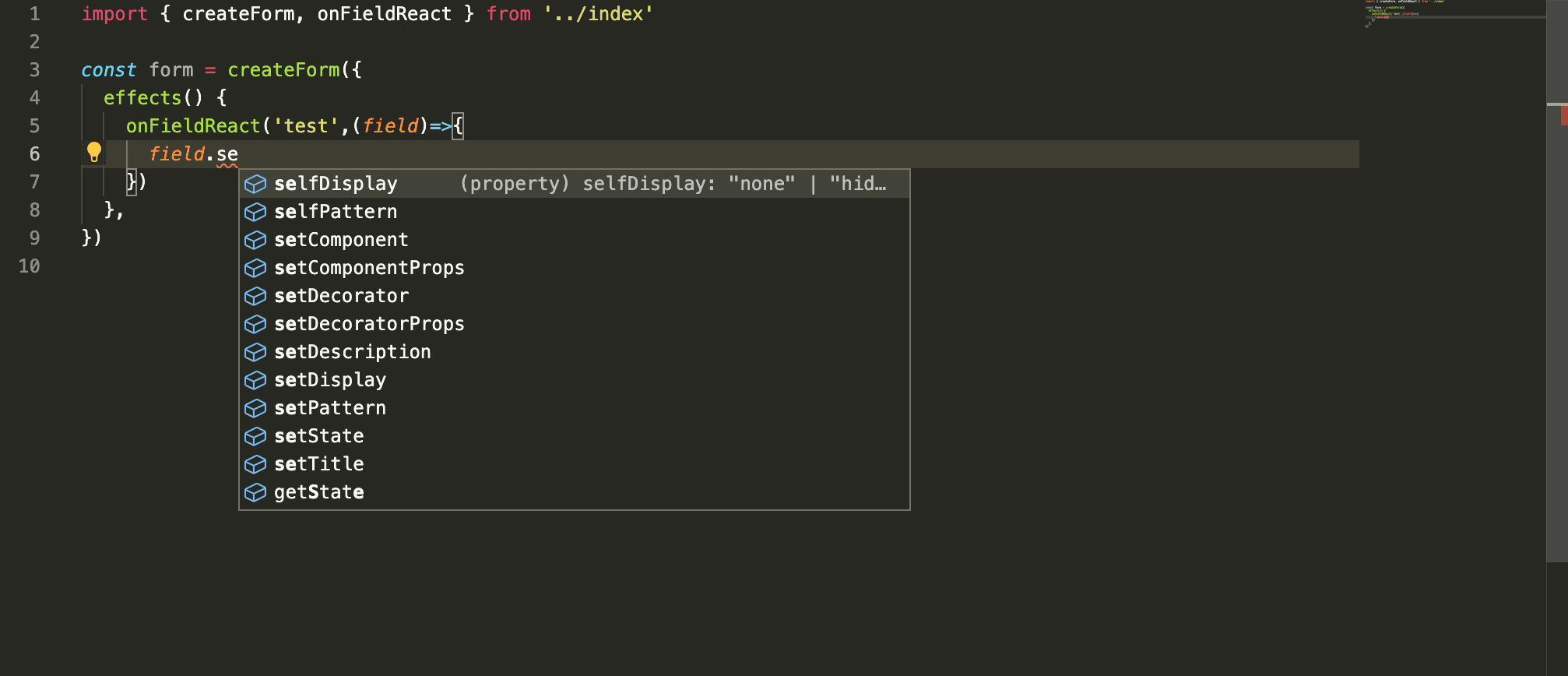 | |
| 31 | | |
| 32 | ## Status observable | |
| 33 | | |
| 34 | Install [FormilyDevtools](https://chrome.google.com/webstore/detail/formily-devtools/kkocalmbfnplecdmbadaapgapdioecfm?hl=zh-CN) to observe the model status changes in real time and troubleshoot problems | |
| 35 | | |
| 36 | 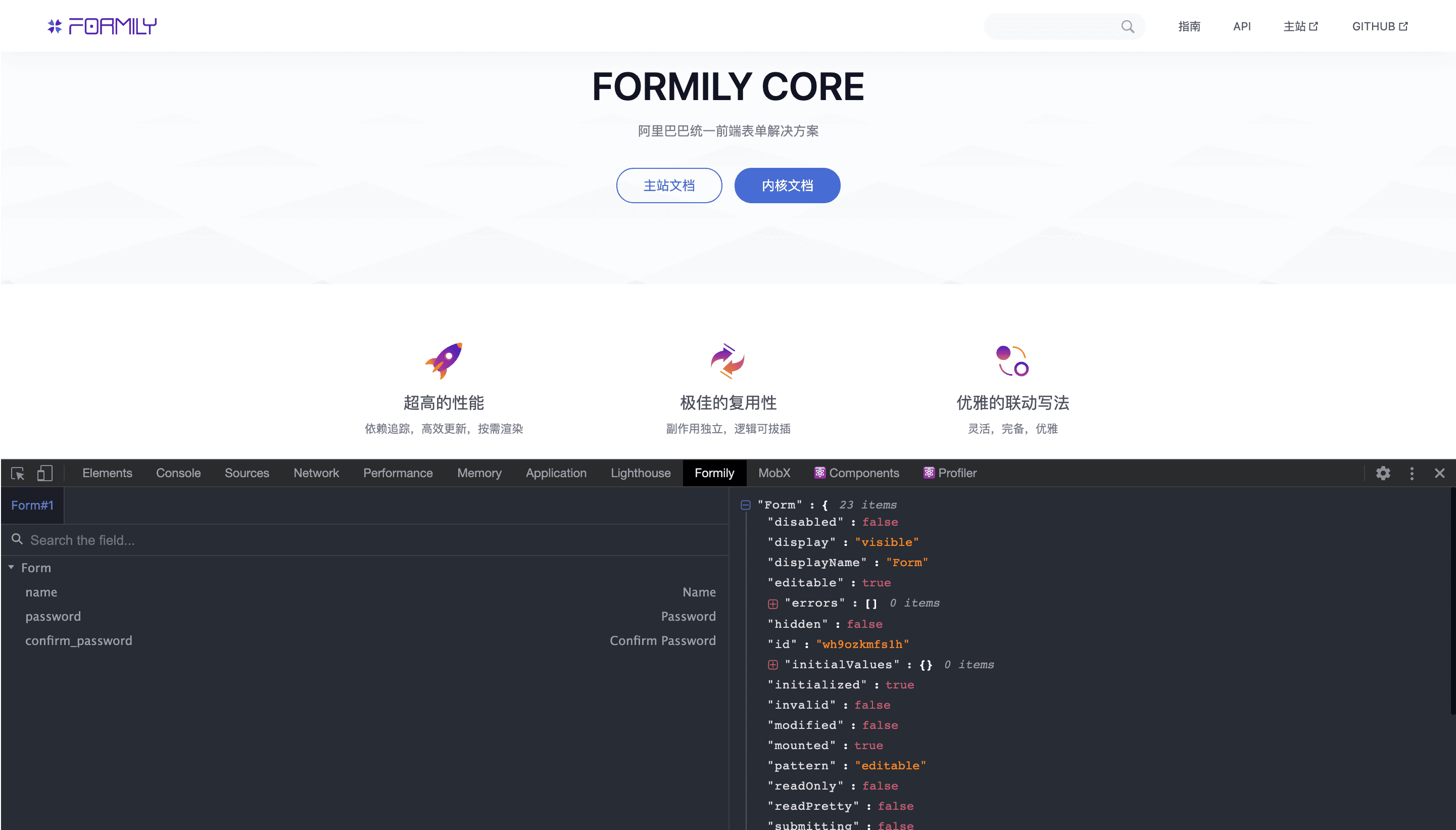 | |
| 37 | | |
| -------------------------------------------------------------------------------- | |
| /packages/core/docs/guide/index.zh-CN.md: | |
| -------------------------------------------------------------------------------- | |
| 1 | # 介绍 | |
| 2 | | |
| 3 | ## UI 无关 | |
| 4 | | |
| 5 | 因为 @formily/core 作为一个独立的包而存在,它的核心意义是将领域模型从 UI 框架中抽离出来,同时给开发者带来了以下两个直观收益: | |
| 6 | | |
| 7 | 1. 可以方便 formily 开发者从 UI 与逻辑的耦合关系中释放出来,提升代码可维护性; | |
| 8 | | |
| 9 | 2. 可以让 formily 拥有跨终端,跨框架的能力,不管你是 React 用户,Vue 用户还是 Angular 用户,都能享受到 formily 的领域模型带来的提效。 | |
| 10 | | |
| 11 | ## 超高性能 | |
| 12 | | |
| 13 | 借助 @formily/reactive,@formily/core 天然获得了依赖追踪,高效更新,按需渲染的能力,不管是在 React 下,还是 Vue/Angular 下,不管是字段频繁输入,还是字段联动,都能给用户带来 O(1)的性能体验,开发者无需关心性能优化的事情,只需要专注于业务逻辑实现即可。 | |
| 14 | | |
| 15 | ## 领域模型 | |
| 16 | | |
| 17 | 如果把表单问题做分解,其实我们可以分解出: | |
| 18 | | |
| 19 | - 数据管理问题 | |
| 20 | - 字段管理问题 | |
| 21 | - 校验管理问题 | |
| 22 | - 联动管理问题 | |
| 23 | | |
| 24 | 这几个方向的问题其实都可以作为领域级问题去解决,每一个领域问题,其实都是非常复杂的问题,在 Formily 中,全部一一给您突破解决了,所以您只需要专注于业务逻辑即可。 | |
| 25 | | |
| 26 | ## 智能提示 | |
| 27 | | |
| 28 | 因为 formily 是完全的 Typescript 项目,所以用户在 VSCode 或 WebStorm 等上开发可以获得最大化的智能提示体验 | |
| 29 | | |
| 30 |  | |
| 31 | | |
| 32 | ## 状态可观测 | |
| 33 | | |
| 34 | 安装 [FormilyDevtools](https://chrome.google.com/webstore/detail/formily-devtools/kkocalmbfnplecdmbadaapgapdioecfm?hl=zh-CN) 可以实时观测模型状态变化,排查问题 | |
| 35 | | |
| 36 |  | |
| 37 | | |
| -------------------------------------------------------------------------------- | |
| /packages/core/docs/guide/mvvm.md: | |
| -------------------------------------------------------------------------------- | |
| 1 | # MVVM | |
| 2 | | |
| 3 | ## OOP architecture | |
| 4 | | |
| 5 | **MVVM** (**Model–view–viewmodel**) is an OOP software architecture model. Its core is to separate the logic and view of our application to improve code maintainability and application robustness. We can use a picture to describe: | |
| 6 | | |
| 7 | 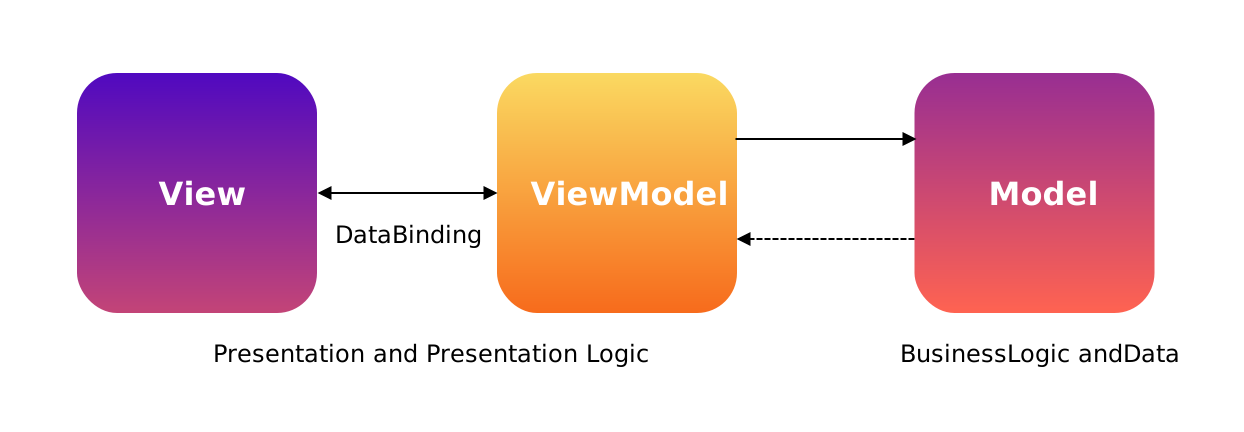 | |
| 8 | | |
| 9 | To explain, the View (view layer) is responsible for maintaining the UI structure and style, and is responsible for data binding with the ViewModel (view model). The data binding relationship here is two-way, that is, the ViewModel (view model) data occurs. Changes will trigger the update of the View (view layer), and at the same time changes in the data of the view layer will trigger the changes of the ViewModel (view model). Model is more biased towards the actual business data processing model. Both ViewModel and Model are congested models, and both are injected with business logic from different fields. For example, the business logic of ViewModel is more biased towards the domain logic of the view interaction layer, while the business logic of Model is more biased towards the processing logic of business data. | |
| 10 | | |
| 11 | So, what should the Formily solution be positioned in MVVM? | |
| 12 | | |
| 13 | Obviously, Formily provides two tiers of View and ViewModel capabilities. View is @formily/react @formily/vue, which is specifically used to bridge communication with @formily/core. Therefore, @formily/core is positioned at the ViewModel layer. , | |
| 14 | | |
| 15 | Where is the Model layer? | |
| 16 | | |
| 17 | Of course it is our actual business code layer, this layer formily will not manage, so at this layer, whether users maintain a Model in OOP mode or maintain a series of business logic function sets in FP mode, formily Don't care. | |
| 18 | | |
| 19 | Therefore, this also makes formily's intrusion into the business very low, because formily's goal is to reduce the cost of users designing ViewModels, allowing users to focus more on the realization of business logic. | |
| 20 | | |
| 21 | ## FP architecture | |
| 22 | | |
| 23 | Remember before the React team used the simplest expression **UI = fn(State)** to express the entire React system? Such a functional UI is very simple and clear. Will it conflict with the MVVM model? | |
| 24 | | |
| 25 | There is no conflict, because in the MVVM mode, the relationship between View and ViewModel is actually approximately equal to **UI = fn(State)**, because ViewModel is a congestion model injected with logic, which is related to **fn(State) ** can achieve the same goal, but it is a more OOP expression, but **fn(State)** is a more functional expression, the state exists as an anemia model, through one function after another, Immutable updates to the anemia model are finally reflected in the UI. | |
| 26 | | |
| 27 | Therefore, from the perspective of separation of logic and data, functional expression is clearer, but functional expression requires all data to be Immutable. Therefore, in scenarios with high performance requirements, the benefits of using a functional model will not be too great, of course, this is only the case in the js language. On the contrary, the MVVM model requires more data for Reactive data, that is, a responsive data model that can manipulate data by reference, so that data changes can be accurately monitored, and finally reflected on the UI. | |
| 28 | | |
| 29 | Therefore, in the form scenario, the performance advantage of the MVVM mode will be better. The most important thing is that most of the GUI products that have survived for decades almost all use MVVM coincidentally. It seems that in the front-end field, the function The type system will be more academic. In terms of the actual benefits to the business, MVVM is still the first choice. | |
| 30 | | |
| -------------------------------------------------------------------------------- | |
| /packages/core/docs/guide/mvvm.zh-CN.md: | |
| -------------------------------------------------------------------------------- | |
| 1 | # MVVM | |
| 2 | | |
| 3 | ## OOP 架构 | |
| 4 | | |
| 5 | **MVVM**(**Model–view–viewmodel**)是一种 OOP 软件架构模式,它的核心是将我们的应用程序的逻辑与视图做分离,提升代码可维护性与应用健壮性。我们可以用一张图来描述: | |
| 6 | | |
| 7 |  | |
| 8 | | |
| 9 | 解释一下就是,View(视图层)负责维护 UI 结构与样式,同时负责与 ViewModel(视图模型)做数据绑定,这里的数据绑定关系是双向的,也就是,ViewModel(视图模型)的数据发生变化,会触发 View(视图层)的更新,同时视图层的数据变化又会触发 ViewModel(视图模型)的变化。Model 则更偏实际业务数据处理模型。ViewModel 和 Model 都是充血模型,两者都注入了不同领域的业务逻辑,比如 ViewModel 的业务逻辑更偏视图交互层的领域逻辑,而 Model 的业务逻辑则更偏业务数据的处理逻辑。 | |
| 10 | | |
| 11 | 那么,Formily 解决方案在 MVVM 中应该是什么样的定位呢? | |
| 12 | | |
| 13 | 很明显,Formily 它提供了 View 和 ViewModel 两层能力,View 则是@formily/react @formily/vue,专门用来与@formily/core 做桥接通讯的,所以,@formily/core 的定位就是 ViewModel 层, | |
| 14 | | |
| 15 | 那 Model 层在哪里呢? | |
| 16 | | |
| 17 | 当然就是我们的实际业务代码层了,这一层 formily 就不会管了,所以这一层,用户到底是用 OOP 模式维护了一个 Model 还是用 FP 模式维护了一系列的业务逻辑函数集,formily 都不关心。 | |
| 18 | | |
| 19 | 所以,这也使得 formily 对业务的入侵性很低,因为 formily 的目标是减少用户设计 ViewModel 的成本,让用户更加专注于业务逻辑的实现。 | |
| 20 | | |
| 21 | ## FP 架构 | |
| 22 | | |
| 23 | 还记得之前 React 团队用了一个最简单的表达式 **UI = fn(State)** 来表达整个 React 体系吗?这样的函数式表达 UI,非常简单清晰,那会不会和 MVVM 模式产生冲突呢? | |
| 24 | | |
| 25 | 并不会冲突,因为在 MVVM 的模式中,View 和 ViewModel 的关系其实就约等于 **UI = fn(State)** ,因为 ViewModel 是一个注入逻辑的充血模型,它与 **fn(State)** 都能达到相同的目标,只是它是更 OOP 的表达,只是**fn(State)** 是一种更加函数式的表达,将状态作为贫血模型而存在,通过一个又一个的函数,对贫血模型做 Immutable 式的更新,最终反应到 UI 上。 | |
| 26 | | |
| 27 | 所以,从逻辑和数据分离的角度上来看,函数式表达更加清晰,只是函数式表达要求所有数据都是 Immutable 的。所以在性能要求高的场景上,采用函数式模型收益并不会太大,当然只是在 js 语言下是这样的。相反,MVVM 这种模式对数据的要求更多的是 Reactive 数据,也就是可以通过引用式操作数据的响应式数据模型,这样可以做到精确监控数据变化,最终反应到 UI 上。 | |
| 28 | | |
| 29 | 所以,在表单场景上,MVVM 模式性能优势会更好一些,最重要的是,目前大多数存活了几十年的 GUI 产品,几乎都是不约而同的使用 MVVM,这么看来,在前端领域,函数式体系会更偏学术化一些,从实际对业务的收益来看的话,MVVM 还是首选。 | |
| 30 | | |
| -------------------------------------------------------------------------------- | |
| /packages/core/docs/guide/values.md: | |
| -------------------------------------------------------------------------------- | |
| 1 | # Data Model | |
| 2 | | |
| -------------------------------------------------------------------------------- | |
| /packages/core/docs/guide/values.zh-CN.md: | |
| -------------------------------------------------------------------------------- | |
| 1 | # 数据模型 | |
| 2 | | |
| -------------------------------------------------------------------------------- | |
| /packages/core/docs/index.md: | |
| -------------------------------------------------------------------------------- | |
| 1 | --- | |
| 2 | title: Formily-Alibaba unified front-end form solution | |
| 3 | order: 10 | |
| 4 | hero: | |
| 5 | title: Core Library | |
| 6 | desc: Alibaba Unified Form Solution | |
| 7 | actions: | |
| 8 | - text: Home Site | |
| 9 | link: //formilyjs.org | |
| 10 | - text: Document | |
| 11 | link: /guide | |
| 12 | features: | |
| 13 | - icon: https://img.alicdn.com/imgextra/i1/O1CN01bHdrZJ1rEOESvXEi5_!!6000000005599-55-tps-800-800.svg | |
| 14 | title: High Performance | |
| 15 | desc: Efficient update, Demand rendering | |
| 16 | - icon: https://img.alicdn.com/imgextra/i3/O1CN0194OqFF1ui6mMT4g7O_!!6000000006070-55-tps-800-800.svg | |
| 17 | title: Excellent Reusability | |
| 18 | desc: Independent side effects, Pluggable | |
| 19 | - icon: https://img.alicdn.com/imgextra/i2/O1CN01QnfYS71E44I1ZpxU9_!!6000000000297-55-tps-800-800.svg | |
| 20 | title: Elegant Linkage Writing | |
| 21 | desc: Flexible, Complete, Elegant | |
| 22 | - icon: https://img.alicdn.com/imgextra/i2/O1CN01YqmcpN1tDalwgyHBH_!!6000000005868-55-tps-800-800.svg | |
| 23 | title: Complete domain model | |
| 24 | desc: Pure Core, No UI, No Framework | |
| 25 | - icon: https://img.alicdn.com/imgextra/i4/O1CN018vDmpl2186xdLu6KI_!!6000000006939-55-tps-800-800.svg | |
| 26 | title: Friendly debugging | |
| 27 | desc: Natural docking with Formily DevTools | |
| 28 | - icon: https://img.alicdn.com/imgextra/i4/O1CN01u6jHgs1ZMwXpjAYnh_!!6000000003181-55-tps-800-800.svg | |
| 29 | title: Smart Tips | |
| 30 | desc: Embrace Typescript | |
| 31 | footer: Open-source MIT Licensed | Copyright © 2019-present<br />Powered by self | |
| 32 | --- | |
| 33 | | |
| 34 | ## Installation | |
| 35 | | |
| 36 | ```bash | |
| 37 | $ npm install --save @formily/core | |
| 38 | | |
| 39 | ``` | |
| 40 | | |
| 41 | ## Quick start | |
| 42 | | |
| 43 | > The following case is to teach you step by step to implement a form from scratch | |
| 44 | > | |
| 45 | > @formily/core brings you the following capabilities: | |
| 46 | > | |
| 47 | > 1. Responsive computing capabilities | |
| 48 | > 2. Verification capability, verification internationalization capability | |
| 49 | > 3. Value Management Ability | |
| 50 | > 4. Linkage management capabilities | |
| 51 | > 5. Development tool debugging capabilities, [download Formily Devtools](https://chrome.google.com/webstore/detail/formily-devtools/kkocalmbfnplecdmbadaapgapdioecfm?hl=zh-CN) | |
| 52 | | |
| 53 | ```tsx | |
| 54 | /** | |
| 55 | * defaultShowCode: true | |
| 56 | */ | |
| 57 | import React, { createContext, useMemo, useContext, useEffect } from 'react' | |
| 58 | import { createForm, setValidateLanguage } from '@formily/core' | |
| 59 | import { observer } from '@formily/reactive-react' | |
| 60 | | |
| 61 | //Create a context to facilitate Field consumption | |
| 62 | const FormContext = createContext() | |
| 63 | //Create a context to facilitate the consumption of FormItem | |
| 64 | const FieldContext = createContext() | |
| 65 | | |
| 66 | //State bridge component | |
| 67 | const Field = observer((props) => { | |
| 68 | const form = useContext(FormContext) | |
| 69 | //Create a field | |
| 70 | const field = form.createField(props) | |
| 71 | useEffect(() => { | |
| 72 | //Mount field | |
| 73 | field.onMount() | |
| 74 | return () => { | |
| 75 | //Unload field | |
| 76 | field.onUnmount() | |
| 77 | } | |
| 78 | }) | |
| 79 | if (!field.visible || field.hidden) return null | |
| 80 | //Render the field, associate the field state with the UI component | |
| 81 | const component = React.createElement(field.component[0], { | |
| 82 | ...field.component[1], | |
| 83 | value: field.value, | |
| 84 | onChange: field.onInput, | |
| 85 | }) | |
| 86 | | |
| 87 | //Render field wrapper | |
| 88 | const decorator = React.createElement( | |
| 89 | field.decorator[0], | |
| 90 | field.decorator[1], | |
| 91 | component | |
| 92 | ) | |
| 93 | | |
| 94 | return ( | |
| 95 | <FieldContext.Provider value={field}>{decorator}</FieldContext.Provider> | |
| 96 | ) | |
| 97 | }) | |
| 98 | | |
| 99 | // FormItem UI component | |
| 100 | const FormItem = observer(({ children }) => { | |
| 101 | const field = useContext(FieldContext) | |
| 102 | return ( | |
| 103 | <div> | |
| 104 | <div style={{ height: 20 }}>{field.title}:</div> | |
| 105 | {children} | |
| 106 | <div style={{ height: 20, fontSize: 12, color: 'red' }}> | |
| 107 | {field.selfErrors.join(',')} | |
| 108 | </div> | |
| 109 | </div> | |
| 110 | ) | |
| 111 | }) | |
| 112 | | |
| 113 | // Input UI component | |
| 114 | const Input = (props) => { | |
| 115 | return ( | |
| 116 | <input | |
| 117 | {...props} | |
| 118 | value={props.value || ''} | |
| 119 | style={{ | |
| 120 | ...props.style, | |
| 121 | border: '2px solid rgb(186 203 255)', | |
| 122 | borderRadius: 6, | |
| 123 | width: '100%', | |
| 124 | height: 28, | |
| 125 | padding: '0 5px', | |
| 126 | }} | |
| 127 | /> | |
| 128 | ) | |
| 129 | } | |
| 130 | | |
| 131 | //Form management entrance | |
| 132 | const FormProvider = (props) => { | |
| 133 | useEffect(() => { | |
| 134 | //Mount form | |
| 135 | props.form?.onMount() | |
| 136 | return () => { | |
| 137 | //Uninstall the form | |
| 138 | props.form?.onUnmount() | |
| 139 | } | |
| 140 | }) | |
| 141 | return ( | |
| 142 | <FormContext.Provider value={props.form}> | |
| 143 | {props.children} | |
| 144 | </FormContext.Provider> | |
| 145 | ) | |
| 146 | } | |
| 147 | | |
| 148 | //Form response monitor | |
| 149 | const FormConsumer = observer((props) => { | |
| 150 | const form = useContext(FormContext) | |
| 151 | return <div>{props.children(form)}</div> | |
| 152 | }) | |
| 153 | | |
| 154 | /* | |
| 155 | * The above logic has been implemented in @formily/react or @formily/vue, and there is no need to rewrite it in actual use | |
| 156 | */ | |
| 157 | | |
| 158 | //Switch the built-in check internationalization copy to English | |
| 159 | setValidateLanguage('en') | |
| 160 | | |
| 161 | export default () => { | |
| 162 | const form = useMemo(() => createForm({ validateFirst: true })) | |
| 163 | | |
| 164 | const createPasswordEqualValidate = (equalName) => (field) => { | |
| 165 | if ( | |
| 166 | form.values.confirm_password && | |
| 167 | field.value && | |
| 168 | form.values[equalName] !== field.value | |
| 169 | ) { | |
| 170 | field.selfErrors = ['Password does not match Confirm Password.'] | |
| 171 | } else { | |
| 172 | field.selfErrors = [] | |
| 173 | } | |
| 174 | } | |
| 175 | | |
| 176 | return ( | |
| 177 | <FormProvider form={form}> | |
| 178 | <Field | |
| 179 | name="name" | |
| 180 | title="Name" | |
| 181 | required | |
| 182 | decorator={[FormItem]} | |
| 183 | component={[Input, { placeholder: 'Please Input' }]} | |
| 184 | /> | |
| 185 | <Field | |
| 186 | name="password" | |
| 187 | title="Password" | |
| 188 | required | |
| 189 | decorator={[FormItem]} | |
| 190 | component={[Input, { type: 'password', placeholder: 'Please Input' }]} | |
| 191 | reactions={createPasswordEqualValidate('confirm_password')} | |
| 192 | /> | |
| 193 | <Field | |
| 194 | name="confirm_password" | |
| 195 | title="Confirm Password" | |
| 196 | required | |
| 197 | decorator={[FormItem]} | |
| 198 | component={[Input, { type: 'password', placeholder: 'Please Input' }]} | |
| 199 | reactions={createPasswordEqualValidate('password')} | |
| 200 | /> | |
| 201 | <code> | |
| 202 | <pre> | |
| 203 | <FormConsumer> | |
| 204 | {(form) => JSON.stringify(form.values, null, 2)} | |
| 205 | </FormConsumer> | |
| 206 | </pre> | |
| 207 | </code> | |
| 208 | </FormProvider> | |
| 209 | ) | |
| 210 | } | |
| 211 | ``` | |
| 212 | | |
| -------------------------------------------------------------------------------- | |
| /packages/core/docs/index.zh-CN.md: | |
| -------------------------------------------------------------------------------- | |
| 1 | --- | |
| 2 | title: Formily - 阿里巴巴统一前端表单解决方案 | |
| 3 | order: 10 | |
| 4 | hero: | |
| 5 | title: Core Library | |
| 6 | desc: 阿里巴巴统一前端表单解决方案 | |
| 7 | actions: | |
| 8 | - text: 主站文档 | |
| 9 | link: //formilyjs.org | |
| 10 | - text: 内核文档 | |
| 11 | link: /zh-CN/guide | |
| 12 | features: | |
| 13 | - icon: https://img.alicdn.com/imgextra/i1/O1CN01bHdrZJ1rEOESvXEi5_!!6000000005599-55-tps-800-800.svg | |
| 14 | title: 超高的性能 | |
| 15 | desc: 依赖追踪,高效更新,按需渲染 | |
| 16 | - icon: https://img.alicdn.com/imgextra/i3/O1CN0194OqFF1ui6mMT4g7O_!!6000000006070-55-tps-800-800.svg | |
| 17 | title: 极佳的复用性 | |
| 18 | desc: 副作用独立,逻辑可拔插 | |
| 19 | - icon: https://img.alicdn.com/imgextra/i2/O1CN01QnfYS71E44I1ZpxU9_!!6000000000297-55-tps-800-800.svg | |
| 20 | title: 优雅的联动写法 | |
| 21 | desc: 灵活,完备,优雅 | |
| 22 | - icon: https://img.alicdn.com/imgextra/i2/O1CN01YqmcpN1tDalwgyHBH_!!6000000005868-55-tps-800-800.svg | |
| 23 | title: 完备的领域模型 | |
| 24 | desc: 跨终端,跨框架,UI无关 | |
| 25 | - icon: https://img.alicdn.com/imgextra/i4/O1CN018vDmpl2186xdLu6KI_!!6000000006939-55-tps-800-800.svg | |
| 26 | title: 友好的调试体验 | |
| 27 | desc: 天然对接Formily DevTools | |
| 28 | - icon: https://img.alicdn.com/imgextra/i4/O1CN01u6jHgs1ZMwXpjAYnh_!!6000000003181-55-tps-800-800.svg | |
| 29 | title: 完美的智能提示 | |
| 30 | desc: 拥抱Typescript | |
| 31 | footer: Open-source MIT Licensed | Copyright © 2019-present<br />Powered by self | |
| 32 | --- | |
| 33 | | |
| 34 | ## 安装 | |
| 35 | | |
| 36 | ```bash | |
| 37 | $ npm install --save @formily/core | |
| 38 | | |
| 39 | ``` | |
| 40 | | |
| 41 | ## 快速开始 | |
| 42 | | |
| 43 | > 以下案例是一步步教您从零实现一个表单 | |
| 44 | > | |
| 45 | > @formily/core 给您带来了以下几个能力: | |
| 46 | > | |
| 47 | > 1. 响应式计算能力 | |
| 48 | > 2. 校验能力、校验国际化能力 | |
| 49 | > 3. 值管理能力 | |
| 50 | > 4. 联动管理能力 | |
| 51 | > 5. 开发工具调试能力,[下载 Formily Devtools](https://chrome.google.com/webstore/detail/formily-devtools/kkocalmbfnplecdmbadaapgapdioecfm?hl=zh-CN) | |
| 52 | | |
| 53 | ```tsx | |
| 54 | /** | |
| 55 | * defaultShowCode: true | |
| 56 | */ | |
| 57 | import React, { createContext, useMemo, useContext, useEffect } from 'react' | |
| 58 | import { createForm, setValidateLanguage } from '@formily/core' | |
| 59 | import { observer } from '@formily/reactive-react' | |
| 60 | | |
| 61 | //创建上下文,方便Field消费 | |
| 62 | const FormContext = createContext() | |
| 63 | //创建上下文,方便FormItem消费 | |
| 64 | const FieldContext = createContext() | |
| 65 | | |
| 66 | //状态桥接器组件 | |
| 67 | const Field = observer((props) => { | |
| 68 | const form = useContext(FormContext) | |
| 69 | //创建字段 | |
| 70 | const field = form.createField(props) | |
| 71 | useEffect(() => { | |
| 72 | //挂载字段 | |
| 73 | field.onMount() | |
| 74 | return () => { | |
| 75 | //卸载字段 | |
| 76 | field.onUnmount() | |
| 77 | } | |
| 78 | }) | |
| 79 | if (!field.visible || field.hidden) return null | |
| 80 | //渲染字段,将字段状态与UI组件关联 | |
| 81 | const component = React.createElement(field.component[0], { | |
| 82 | ...field.component[1], | |
| 83 | value: field.value, | |
| 84 | onChange: field.onInput, | |
| 85 | }) | |
| 86 | | |
| 87 | //渲染字段包装器 | |
| 88 | const decorator = React.createElement( | |
| 89 | field.decorator[0], | |
| 90 | field.decorator[1], | |
| 91 | component | |
| 92 | ) | |
| 93 | | |
| 94 | return ( | |
| 95 | <FieldContext.Provider value={field}>{decorator}</FieldContext.Provider> | |
| 96 | ) | |
| 97 | }) | |
| 98 | | |
| 99 | // FormItem UI组件 | |
| 100 | const FormItem = observer(({ children }) => { | |
| 101 | const field = useContext(FieldContext) | |
| 102 | return ( | |
| 103 | <div> | |
| 104 | <div style={{ height: 20 }}>{field.title}:</div> | |
| 105 | {children} | |
| 106 | <div style={{ height: 20, fontSize: 12, color: 'red' }}> | |
| 107 | {field.selfErrors.join(',')} | |
| 108 | </div> | |
| 109 | </div> | |
| 110 | ) | |
| 111 | }) | |
| 112 | | |
| 113 | // Input UI组件 | |
| 114 | const Input = (props) => { | |
| 115 | return ( | |
| 116 | <input | |
| 117 | {...props} | |
| 118 | value={props.value || ''} | |
| 119 | style={{ | |
| 120 | ...props.style, | |
| 121 | border: '2px solid rgb(186 203 255)', | |
| 122 | borderRadius: 6, | |
| 123 | width: '100%', | |
| 124 | height: 28, | |
| 125 | padding: '0 5px', | |
| 126 | }} | |
| 127 | /> | |
| 128 | ) | |
| 129 | } | |
| 130 | | |
| 131 | //表单管理入口 | |
| 132 | const FormProvider = (props) => { | |
| 133 | useEffect(() => { | |
| 134 | //挂载表单 | |
| 135 | props.form?.onMount() | |
| 136 | return () => { | |
| 137 | //卸载表单 | |
| 138 | props.form?.onUnmount() | |
| 139 | } | |
| 140 | }) | |
| 141 | return ( | |
| 142 | <FormContext.Provider value={props.form}> | |
| 143 | {props.children} | |
| 144 | </FormContext.Provider> | |
| 145 | ) | |
| 146 | } | |
| 147 | | |
| 148 | //表单响应式监控器 | |
| 149 | const FormConsumer = observer((props) => { | |
| 150 | const form = useContext(FormContext) | |
| 151 | return <div>{props.children(form)}</div> | |
| 152 | }) | |
| 153 | | |
| 154 | /* | |
| 155 | * 以上逻辑都已经在 @formily/react 或 @formily/vue 中实现,实际使用无需重复编写 | |
| 156 | */ | |
| 157 | | |
| 158 | //切换内置校验国际化文案为英文 | |
| 159 | setValidateLanguage('en') | |
| 160 | | |
| 161 | export default () => { | |
| 162 | const form = useMemo(() => createForm({ validateFirst: true })) | |
| 163 | | |
| 164 | const createPasswordEqualValidate = (equalName) => (field) => { | |
| 165 | if ( | |
| 166 | form.values.confirm_password && | |
| 167 | field.value && | |
| 168 | form.values[equalName] !== field.value | |
| 169 | ) { | |
| 170 | field.selfErrors = ['Password does not match Confirm Password.'] | |
| 171 | } else { | |
| 172 | field.selfErrors = [] | |
| 173 | } | |
| 174 | } | |
| 175 | | |
| 176 | return ( | |
| 177 | <FormProvider form={form}> | |
| 178 | <Field | |
| 179 | name="name" | |
| 180 | title="Name" | |
| 181 | required | |
| 182 | decorator={[FormItem]} | |
| 183 | component={[Input, { placeholder: 'Please Input' }]} | |
| 184 | /> | |
| 185 | <Field | |
| 186 | name="password" | |
| 187 | title="Password" | |
| 188 | required | |
| 189 | decorator={[FormItem]} | |
| 190 | component={[Input, { type: 'password', placeholder: 'Please Input' }]} | |
| 191 | reactions={createPasswordEqualValidate('confirm_password')} | |
| 192 | /> | |
| 193 | <Field | |
| 194 | name="confirm_password" | |
| 195 | title="Confirm Password" | |
| 196 | required | |
| 197 | decorator={[FormItem]} | |
| 198 | component={[Input, { type: 'password', placeholder: 'Please Input' }]} | |
| 199 | reactions={createPasswordEqualValidate('password')} | |
| 200 | /> | |
| 201 | <code> | |
| 202 | <pre> | |
| 203 | <FormConsumer> | |
| 204 | {(form) => JSON.stringify(form.values, null, 2)} | |
| 205 | </FormConsumer> | |
| 206 | </pre> | |
| 207 | </code> | |
| 208 | </FormProvider> | |
| 209 | ) | |
| 210 | } | |
| 211 | ``` | |
| 212 | | |
| -------------------------------------------------------------------------------- |
Sign up for free
to join this conversation on GitHub.
Already have an account?
Sign in to comment