You signed in with another tab or window. Reload to refresh your session.You signed out in another tab or window. Reload to refresh your session.You switched accounts on another tab or window. Reload to refresh your session.Dismiss alert
// Create the EmbedBuilder instanceEmbedBuildereb = newEmbedBuilder();
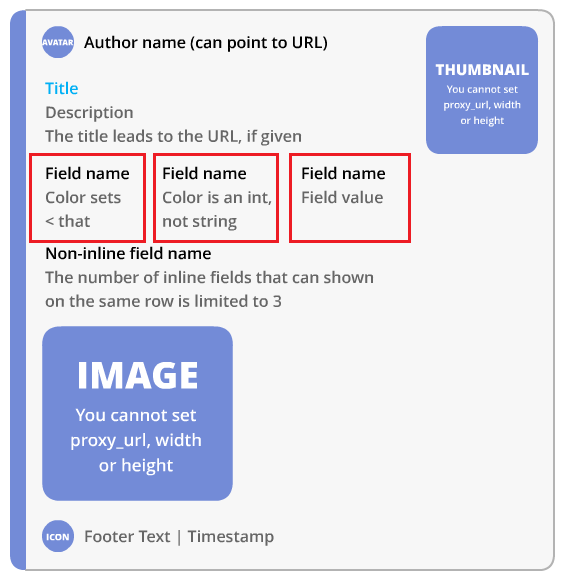
/* Set the title: 1. Arg: title as string 2. Arg: URL as string or could also be null */eb.setTitle("Title", null);
/* Set the color */eb.setColor(Color.red);
eb.setColor(newColor(0xF40C0C));
eb.setColor(newColor(255, 0, 54));
/* Set the text of the Embed: Arg: text as string */eb.setDescription("Text");
/* Add fields to embed: 1. Arg: title as string 2. Arg: text as string 3. Arg: inline mode true / false */eb.addField("Title of field", "test of field", false);
/* Add spacer like field Arg: inline mode true / false */eb.addBlankField(false);
/* Add embed author: 1. Arg: name as string 2. Arg: url as string (can be null) 3. Arg: icon url as string (can be null) */eb.setAuthor("name", null, "https://github.com/zekroTJA/DiscordBot/blob/master/.websrc/zekroBot_Logo_-_round_small.png");
/* Set footer: 1. Arg: text as string 2. icon url as string (can be null) */eb.setFooter("Text", "https://github.com/zekroTJA/DiscordBot/blob/master/.websrc/zekroBot_Logo_-_round_small.png");
/* Set image: Arg: image url as string */eb.setImage("https://github.com/zekroTJA/DiscordBot/blob/master/.websrc/logo%20-%20title.png");
/* Set thumbnail image: Arg: image url as string */eb.setThumbnail("https://github.com/zekroTJA/DiscordBot/blob/master/.websrc/logo%20-%20title.png");
Send the EmbedBuilder as message
//You need to build it to a string with ".build()" or it wont work.channel.sendMessage(eb.build()).queue();
@survivorhd You can just react to the message to which the Embed is attached.
e.g.: channel.sendMessage(eb.build()).queue(message -> message.addReaction(YOUR_REACTION).queue());
@Brokeos Yeah this is possible. I've done this with messageChannel.sendMessage("Test").setEmbeds(eb.build()).complete();
If you want to mention someone (in this example a role) you have to replace the "Test" with something like "<@&918236396496510986>" (a good chart for this)


You're not actually building it to a String but a MessageEmbed Object - consider changing that, please