

This article introduces a Google Apps Script-based Agent2Agent architecture to solve Tool Space Interference. While the provided demonstration utilizes a single server for testing purposes, the architecture is designed for distributed task execution. By running multiple category-specific A2A servers in parallel, users can achieve scalable, high-efficiency agent networks.
As the Model Context Protocol (MCP) standardizes LLM connectivity, the Agent2Agent (A2A) paradigm is becoming essential for executing complex, multi-step tasks. However, integrating a high volume of tools often triggers "Tool Space Interference (TSI)"—a phenomenon where verbose metadata saturates context windows and degrades reasoning accuracy. Ref Ref Current industry guidelines suggest a "soft limit" of 20 functions per agent; exceeding this threshold frequently results in hallucinations and logic failures.
To mitigate TSI, I previously proposed Nexus-MCP. Ref Nexus-MCP functions as a centralized gateway employing a deterministic four-phase workflow to map and filter tools. While effective, Nexus-MCP relies on a single AI agent acting as the client. This centralized nature makes it less suitable for true distributed task execution, where distinct categories of tools should ideally be handled by specialized agents.
In this article, I propose that complex tasks are executed more efficiently by dividing multiple tools into distinct A2A servers. While Nexus-MCP aggregates tools into one gateway, the A2A architecture allows us to group tools by category (e.g., an "Office Suite Server," a "Data Analysis Server") and execute tasks in a distributed manner.
This article also serves as an implementation test of an A2A server built with Google Apps Script (GAS). Consequently, the demonstration below uses a single A2A server to validate the core technology. However, in practice, loading multiple A2A servers and using them in parallel according to the task will lead to significantly more efficient processing.
GAS serves as an ideal foundation for A2A servers because its low-code environment is easily navigable by both human developers and generative AI. Furthermore, GAS is accessible to anyone with a Google account and offers native affinity with Google Workspace. It simplifies complex operations by facilitating seamless OAuth scope authentication and providing direct access to Google APIs via Advanced Google Services.
By utilizing GAS, developers can rapidly deploy lightweight, category-specific agents that communicate via the A2A protocol, forming a robust mesh of capabilities without the infrastructure overhead of traditional server environments.
Despite these advantages, a significant technical hurdle persists: standard A2A clients cannot natively interact with GAS-based servers due to GAS's dynamic deployment URLs and specific OAuth2 requirements. These characteristics conflict with the A2A discovery protocol, which expects a static /.well-known/agent-card.json endpoint. Furthermore, the official @a2a-js/sdk typically requires modification to handle Google’s specific redirection and authentication logic.
This article introduces a lightweight proxy designed to resolve these path and authentication conflicts. I also present an "all-in-one" GAS server architecture that ensures full compatibility with official A2A and MCP specifications without requiring SDK modifications.
https://github.com/tanaikech/a2a-for-google-apps-script
The core innovation here is the shift from a "Unified Gateway" to a "Distributed Capability" model.
- Nexus-MCP Approach: A single AI Agent connects to one Gateway. The Gateway holds all tools and filters them.
- A2A Approach (Ideal State): A primary AI Agent connects to multiple specialized Agents (Servers) running in parallel.
- A2A Approach (This Test): To verify the GAS implementation, I use a single A2A server containing the filtering logic.
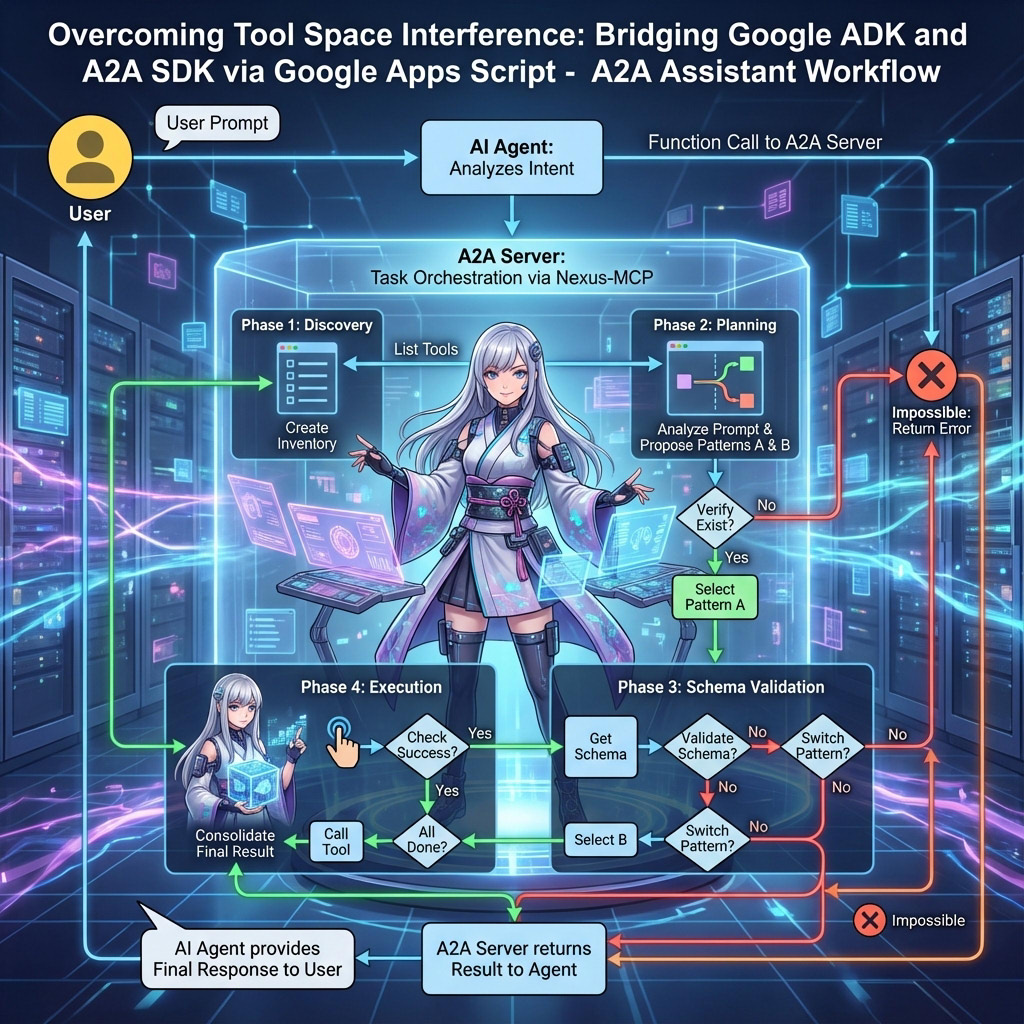
In this demonstration, I utilize the Nexus-MCP logic within a single A2A server to manage a library of 160+ tools. The workflow is as follows:
- The user provides an input prompt to the AI agent.
- The AI agent parses the prompt and calls the A2A server functions.
- The A2A server processes the prompt tasks. The server dynamically selects and "installs" only the specific tool required for the current task from the tool library.
- The A2A server returns the final result to the client.
Scalability Note: While this sample packs 160 tools into one server, the actual strategic advantage of A2A is that you can split these into, for example, 10 servers with 16 tools each. The client can then load these servers in parallel, routing tasks to the appropriate specialist without any single context window becoming overwhelmed.
- Node.js is installed on your local machine.
- A valid Gemini API Key. Get one here.
Use the following GAS code to copy the A2A server template to your Google Drive:
function myFunction() {
  const fileId = "1mylSOTzCuui95Amk-kRufA9ffMqcnjqk8HSaoatoxaSPwkv-hg1q7uRC";
  const file = DriveApp.getFileById(fileId);
  file.makeCopy(file.getName());
}
Run the function myFunction. By this, the sample A2A server is copied to the root folder on your Google Drive.
Alternatively, visit the GitHub Repository to manually copy the scripts. In this sample, a2a-server/sample2/a2a-server.js is used. This sample server uses the 160 tools of ToolsForMCPServer.
In this repository, one more sample server is prepared. It can be seen at a2a-server/sample1/a2a-server.js. This sample server can use the custom tools.
Important Note on TSI: To demonstrate TSI mitigation, this sample includes 160 tools (from ToolsForMCPServer). Like Nexus-MCP, the server dynamically filters these tools based on the prompt task, ensuring the LLM context never exceeds the safety threshold regardless of the total tool count.
- Open the script editor in your copied project.
- Click Deploy > New deployment.
- Select Web App as the type.
- Set "Execute as" to Me.
- Set "Who has access" to Anyone.
- Click Deploy and copy the Web App URL (
https://script.google.com/macros/s/###/exec).
Note: For updates, you must deploy a new version to reflect code changes. Reference.
When this Web Apps is used for only the A2A server, the value except for Anyone can also be used for Who has access to the app, because the A2A client requests this A2A server with the access token.
In your GAS project, locate the following script variables:
const object = {
  apiKey: "{apiKey}", // Your API key for using Gemini API.
  model: "models/gemini-3-flash-preview",
  accessKey: "sample", // If you want to use an access key for requesting Web Apps, please use this.
  webAppsUrl: "https://script.google.com/macros/s/###/exec", // Your deployed Web Apps URL.
  // logSpreadsheetId: "{spreadsheetId}", // If you use this, the logs are stored to Google Spreadsheet.
};- Set your Gemini API key in the
apiKeyvariable inobject. - Set your access key in the
accessKeyinobject. The default issample. - Set your Web App URL in the
webAppsUrlvariable inobject.
After updating the script, you must deploy the Web App again to reflect the latest changes.
Execute the following commands in your terminal:
git clone https://github.com/tanaikech/a2a-for-google-apps-script
cd a2a-for-google-apps-script/a2a-client
npm install
When you see the directory a2a-for-google-apps-script, you can see the following 2 directories:
a2a-client: Sample client scripts for Node.js.a2a-server: Sample A2A servers for Google Apps Script Web Apps.
The current @a2a-js/sdk version automatically strips query parameters and redirects to a /.well-known/ path. The provided clientGas.js resolves this by intercepting the fetch API, allowing the SDK to communicate with GAS's dynamic URLs.
Authentication: This script uses the Google Cloud SDK (gcloud CLI) to retrieve access tokens. Ensure you have the https://www.googleapis.com/auth/drive.readonly or https://www.googleapis.com/auth/drive scope authorized. The scope is used for accessing GAS Web Apps with the path /.well-known/agent-card.json.
Create a .env file in the a2a-client directory with the following content:
GEMINI_API_KEY="YOUR_KEY"
GEMINI_MODEL="gemini-3-flash-preview"
A2A_WEB_APPS_URL="https://script.google.com/macros/s/###/exec?accessKey=sample"
In this case, when you use the access key, A2A_WEB_APPS_URL is required to include it as the query parameter (e.g., accessKey=sample).
In this sample, as a simple sample, only one A2A server is used. So, A2A_WEB_APPS_URL is used. When you want to use multiple A2A servers, please add more variables for A2A servers and add functions using new FunctionTool in the A2A client script.
Run the sample script to verify basic connectivity:
npm run test1Expected output:
Prompt: How much is 10 yen in USD?
Response: 10 yen is approximately **0.0641 USD**...
Prompt: What is the weather forecast for Tokyo?
Response: The weather forecast for Tokyo... is clear sky.
This test uses the Agent Development Kit (ADK) to provide a chat interface:
npm run test2Open http://localhost:8000 to interact with the agent.
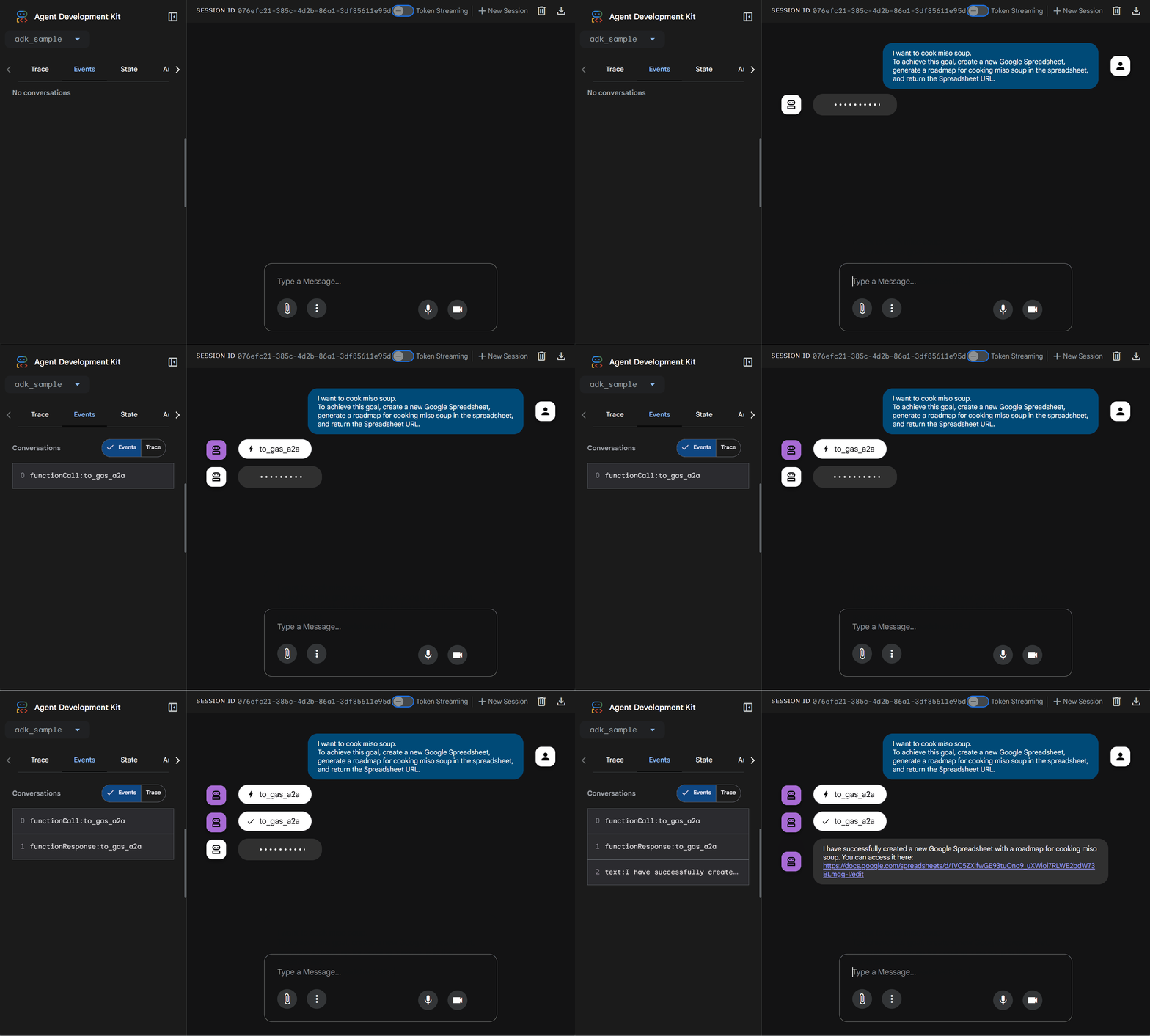
Example 1: Simple prompt
I want to cook miso soup.
To achieve this goal, create a new Google Spreadsheet,
generate a roadmap for cooking miso soup in the spreadsheet,
and return the Spreadsheet URL.
The actual situation on the browser is as follows. You can confirm that the prompt is correctly processed through the A2A server.
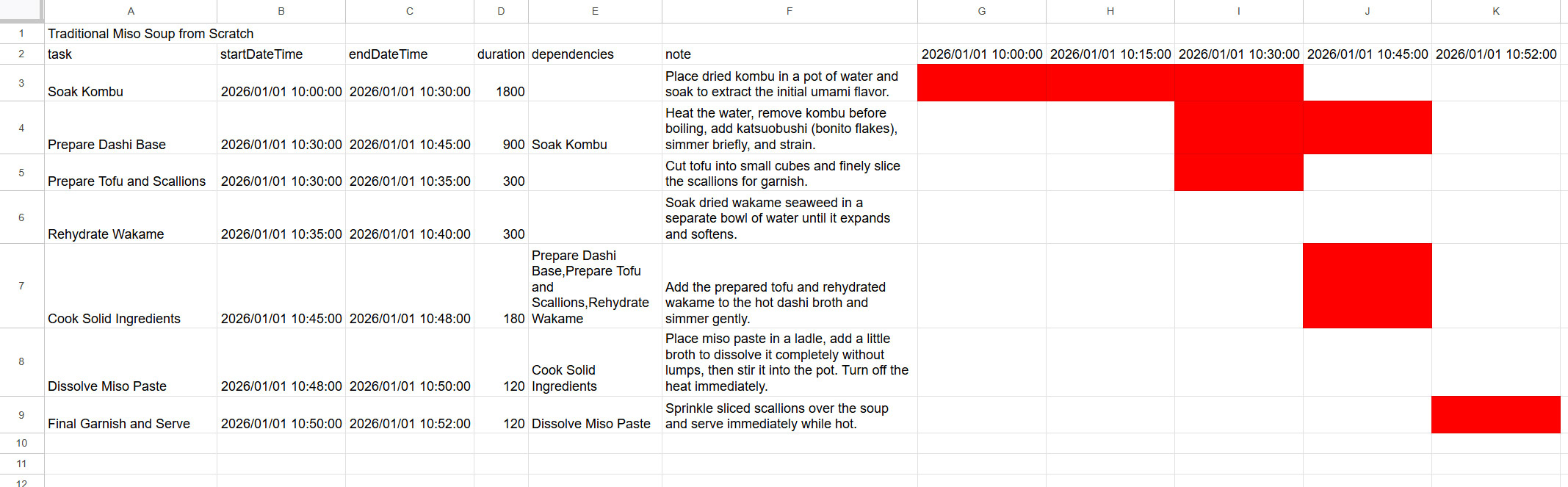
The created roadmap is as follows.
Example 2: Complex prompt
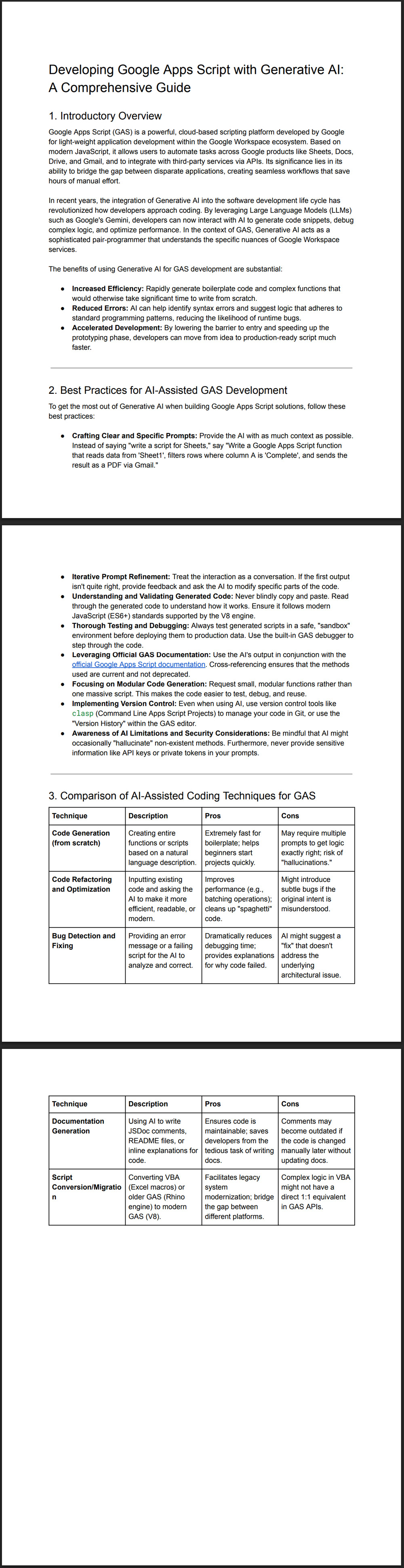
Write a comprehensive article about developing Google Apps Script (GAS) using generative AI.
The article should include an introductory overview, formatted lists for best practices,
and a table comparing different AI-assisted coding techniques.
Once generated, please create a new Google Document, insert the content, convert the Google Document to a PDF file,
and send an email to `tanaike@hotmail.com` including the shareable URL of the PDF file by giving a suitable title and email body.
The actual situation on the browser is as follows. You can confirm that the prompt is correctly processed through the A2A server.
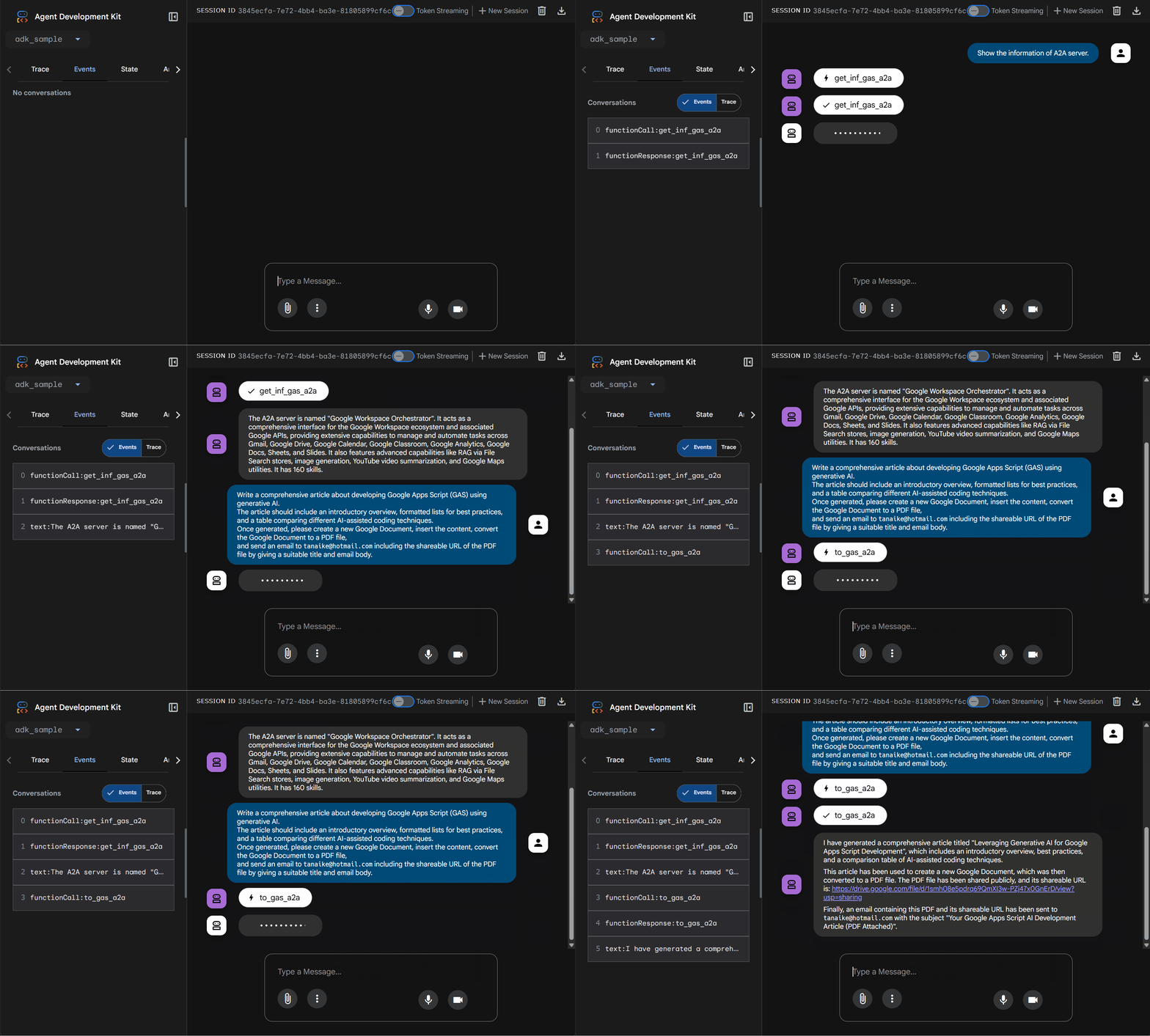
This requires multiple tools (Docs API, Drive API, Gmail API). In a standard environment, this might trigger TSI. However, using the Nexus-MCP-style deterministic selection, the GAS A2A server handles this seamlessly.
The created PDF is as follows.
And, the following email was correctly sent.
Dear Tanaike,

Please find attached the PDF document containing the comprehensive article on "Leveraging Generative AI for Google Apps Script Development". The shareable URL for the PDF is https://drive.google.com/file/d/###/view?usp=sharing.

Best regards,
Your AI Assistant
- Parallel Execution for Efficiency: While this test utilized a single server, the architecture's true strength lies in deploying multiple A2A servers in parallel, allowing tasks to be processed simultaneously by specialized agents rather than a single bottleneck.
- Distributed Architecture vs. Centralized Bottleneck: Moving beyond the Nexus-MCP single-agent model, A2A facilitates a distributed network where tools are grouped by category (e.g., Office, Data, Email) into separate servers.
- Mitigation of Tool Space Interference (TSI): By utilizing category-specific A2A servers, the context window remains uncluttered, preventing LLM confusion even when hundreds of tools are available.
- Google Apps Script as an Agent Platform: GAS provides a low-code, accessible, and authenticated environment for deploying agents that natively integrate with Google Workspace.
- Bridging Technical Gaps: The introduction of a custom proxy solves the incompatibility between standard A2A SDKs and GAS's dynamic URLs, enabling standard clients to discover and utilize GAS-based agents seamlessly.