Skip to content

Instantly share code, notes, and snippets.

@tanaikech
Created October 11, 2021 00:47
Show Gist options
  • Select an option

  • Save tanaikech/187863d97d2b5e60938d8316574a2850 to your computer and use it in GitHub Desktop.

Select an option

Save tanaikech/187863d97d2b5e60938d8316574a2850 to your computer and use it in GitHub Desktop.
Sending Gmail with Title and Body Including Emoji using Google Apps Script

Sending Gmail with Title and Body Including Emoji using Google Apps Script

This is a sample script for sending Gmail with the title and body including Emoji using Google Apps Script.
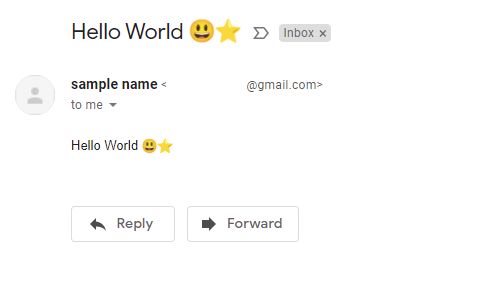
Sample script

This sample script uses Gmail API. So please enable Gmail API at Advanced Google services. Ref

const convert_ = ({ to, emailFrom, nameFrom, subject, textBody, htmlBody }) => {
  const boundary = "boundaryboundary";
  const mailData = [
    `MIME-Version: 1.0`,
    `To: ${to}`,
    nameFrom && emailFrom ? `From: "${nameFrom}" <${emailFrom}>` : "",
    `Subject: =?UTF-8?B?${Utilities.base64Encode(
      subject,
      Utilities.Charset.UTF_8
    )}?=`,
    `Content-Type: multipart/alternative; boundary=${boundary}`,
    ``,
    `--${boundary}`,
    `Content-Type: text/plain; charset=UTF-8`,
    ``,
    textBody,
    ``,
    `--${boundary}`,
    `Content-Type: text/html; charset=UTF-8`,
    `Content-Transfer-Encoding: base64`,
    ``,
    Utilities.base64Encode(htmlBody, Utilities.Charset.UTF_8),
    ``,
    `--${boundary}--`,
  ].join("\r\n");
  return Utilities.base64EncodeWebSafe(mailData);
};

// Please run this function.
function main() {
  const obj = {
    to: "###", // Please set the email for `to`.
    emailFrom: "###", // Please set the email for `from`.
    nameFrom: "sample name",
    subject: "Hello World πŸ˜ƒβ­",
    textBody: "sample text body πŸ˜ƒβ­",
    htmlBody: "<p>Hello World πŸ˜ƒβ­</p>",
  };
  Gmail.Users.Messages.send({ raw: convert_(obj) }, "me");
}
  • In order to use Emoji in the subject, the subject value is converted to the base64 data. And, it is used as =?UTF-8?B?###?=. Ref
  • About the method for including Emoji to the email body, I have answered it at this thread of Stackoverflow.

Reference

@rpratama-codes
Copy link

this is js version

const convert_ = ({ to, emailFrom, nameFrom, subject, textBody, htmlBody }) => {
  const boundary = "boundaryboundary";

  // Helper function for Base64 encoding
  const base64Encode = (str) => {
    try {
      // Use btoa for basic Base64 encoding
      return btoa(unescape(encodeURIComponent(str)));
    } catch (e) {
      console.error('Error in base64Encode:', e);
      return null;
    }
  };

  // Helper function for web-safe Base64 encoding
  const base64EncodeWebSafe = (str) => {
    const encoded = base64Encode(str);
    if (encoded === null) {
      return null;
    }
    return encoded.replace(/\+/g, '-').replace(/\//g, '_').replace(/=+$/, '');
  };

  const mailData = [
    `MIME-Version: 1.0`,
    `To: ${to}`,
    nameFrom && emailFrom ? `From: "${nameFrom}" <${emailFrom}>` : "",
    `Subject: =?UTF-8?B?${base64Encode(subject)}?=`,
    `Content-Type: multipart/alternative; boundary=${boundary}`,
    ``,
    `--${boundary}`,
    `Content-Type: text/plain; charset=UTF-8`,
    ``,
    textBody,
    ``,
    `--${boundary}`,
    `Content-Type: text/html; charset=UTF-8`,
    `Content-Transfer-Encoding: base64`,
    ``,
    base64Encode(htmlBody),
    ``,
    `--${boundary}--`,
  ].join("\r\n");

  return base64EncodeWebSafe(mailData);
};

Sign up for free to join this conversation on GitHub. Already have an account? Sign in to comment