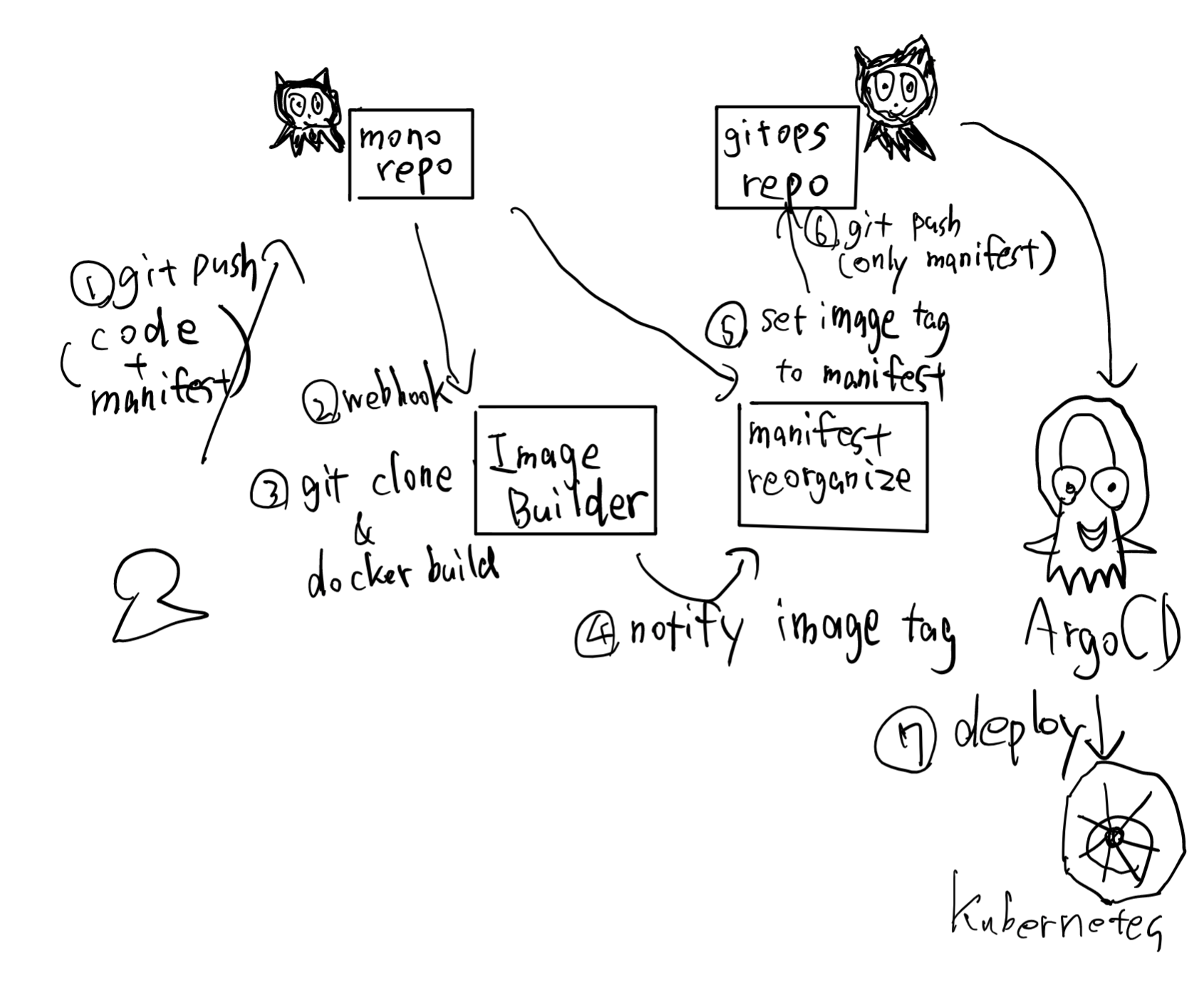
- アプリケーションは Mono Repo 上にサブディレクトリとして数十ほど存在
- 各アプリケーションは独立してリリース可能とする
- そのためにリリースブランチ等には
*/releaseといった形でそのアプリケーションの名前を持つ
- そのためにリリースブランチ等には
- 開発チームは self-contained な DevOps チームへの変化を目指している


| #!/usr/bin/env bash | |
| set -e -o pipefail; [[ -n "$DEBUG" ]] && set -x | |
| curl_opts=(--silent -L) | |
| if [[ -n "$PAT" ]]; then | |
| curl_opts+=(-H "Authorization: token $PAT") | |
| fi | |
| cat | while read line; do |

| #!/bin/bash | |
| [[ -z ${1} || ${1} =~ -h ]] && { printf "\n\e[2GUsage: ${0##*/} <ip_address>\n\n";exit 2; } || { export STUCK_IP=${1}; } | |
| # MAAS IP Address Allocation | |
| # Type Name | |
| # ━━━━ ━━━━ | |
| # 0 AUTO | |
| # 1 STICKY |


The goal of the service catalog cli (svcat) is to reduce the learning curve for developers and follow precedent set by kubectl when reasonable so that "finger memory" built-up from using kubectl translates to being able to use svcat without reading the help text much.
It isn't intended to be a replacement for kubectl, and instead users will jump back and forth between kubectl and svcat. As a plugin, it reinforces the mental model that svcat conforms to the way kubectl works, and makes the switch between the two less noticeable.

| #!/bin/bash | |
| DAYS=("2017-12-06" "2017-12-07" "2017-12-08") | |
| for DAY in "${DAYS[@]}"; do | |
| #Super shitty pipefest because of grep matched groups sadness | |
| LINKS=($(curl https://kccncna17.sched.com/${DAY}/overview | grep -oEi "f='(.*)' cl" | cut -d\' -f 2 | tr '\n' ' ')) | |
| for LINK in "${LINKS[@]}"; do | |
| echo "Requesting https://kccncna17.sched.com/${LINK}" | |
| #Find file link on event page | |
| FILE_URL=$(curl -s https://kccncna17.sched.com${LINK} | grep "file-uploaded" | cut -d\" -f 4) |


| # Adapted from solution provided by http://stackoverflow.com/users/57719/chin-huang http://stackoverflow.com/a/31465939/348868 | |
| # Scenario: You want to add a group to the list of the AllowGroups in ssh_config | |
| # before: | |
| # AllowGroups Group1 | |
| # After: | |
| # AllowGroups Group1 Group2 | |
| - name: Add Group to AllowGroups | |
| replace: | |
| backup: yes |

| #!/usr/bin/env bash | |
| # Link up docker network via IPSec VPN on docker-host. | |
| # | |
| # NOTE: This script can either be "sourced" into your .bashrc or executed directly. Be | |
| # it sourced or executed, the usage syntax below is the same. | |
| # | |
| # Usage: [dry_run=1] [debug=1] vpn-docker-fix [docker-network-1 [docker-network-2 ...]] | |
| # | |
| # Env Variables: |

Currently, there is an explosion of tools that aim to manage secrets for automated, cloud native infrastructure management. Daniel Somerfield did some work classifying the various approaches, but (as far as I know) no one has made a recent effort to summarize the various tools.
This is an attempt to give a quick overview of what can be found out there. The list is alphabetical. There will be tools that are missing, and some of the facts might be wrong--I welcome your corrections. For the purpose, I can be reached via @maxvt on Twitter, or just leave me a comment here.
There is a companion feature matrix of various tools. Comments are welcome in the same manner.

In order to enable oidc authenticator in kube-apiserver,
we need to have TLS enabled between kubectl and kube-apiserver, as well as between kube-apiserver and OpenID Provider(dex-worker here)
For simplicity, we will use cfssl to create the bundles.
Checkout and build dex