
Last active
May 22, 2025 10:30
-
-
Save stephane777/dab4797cb8876f0f625ef3af56d2c92b to your computer and use it in GitHub Desktop.
This file contains hidden or bidirectional Unicode text that may be interpreted or compiled differently than what appears below. To review, open the file in an editor that reveals hidden Unicode characters.
Learn more about bidirectional Unicode characters
| ```bash | |
| git checkout dev | |
| git pull origin | |
| git branch | |
| git checkout DEV-2136/fix/fix-validation-form-message | |
| git log --oneline | |
| git merge dev | |
| git push origin DEV-2136/fix/fix-validation-form-message | |
| git rebase -i HEAD~20 | |
| git config | |
| git config -l | |
| git push origin DEV-2136/fix/fix-validation-form-message | |
| git pull --ff-only | |
| git pull origin --ff-only DEV-2136/fix/fix-validation-form-message | |
| git pull --rebase origin DEV-2136/fix/fix-validation-form-message | |
| pwd | |
| git pull -f origin DEV-2136/fix/fix-validation-form-message | |
| git reset --hard | |
| git pull -f origin DEV-2136/fix/fix-validation-form-message | |
| git pull --rebase origin DEV-2136/fix/fix-validation-form-message | |
| git reset --hard 2e58f4b494c5fbe677295a944d79b9a05137e926 | |
| git log --oneline | |
| git pull --rebase origin DEV-2136/fix/fix-validation-form-message | |
| git status | |
| pwd | |
| git log --oneline | |
| git checkout dev | |
| git pull origin | |
| git checkout DEV-2136/fix/fix-validation-form-message | |
| git merge dev | |
| git log --oneline | |
| git status | |
| git push origin DEV-2136/fix/fix-validation-form-message | |
| git pull | |
| git pull origin DEV-2136/fix/fix-validation-form-message | |
| pwd | |
| git reset --hard 6679eab0066c3e0d2fcb3363de91ee4637190742 | |
| git pull origin DEV-2136/fix/fix-validation-form-message | |
| git reset --hard 6679eab0066c3e0d2fcb3363de91ee4637190742 | |
| git pull origin DEV-2136/fix/fix-validation-form-message | |
| git config -l | |
| git pull origin DEV-2136/fix/fix-validation-form-message | |
| git push origin DEV-2136/fix/fix-validation-form-message | |
| git checkout dev | |
| ``` |
This file contains hidden or bidirectional Unicode text that may be interpreted or compiled differently than what appears below. To review, open the file in an editor that reveals hidden Unicode characters.
Learn more about bidirectional Unicode characters
| Git memo | |
| git --version | |
| $ git config --global user.name "John Doe" | |
| $ git config --global user.email johndoe@example.com | |
| $ git config --global core.editor emacs --to configure a differtent text editor | |
| $ git config --list -- check the config file | |
| $ git config user.name -- get the user.name of one variable in the config file | |
| $ git help config -- get help of the config file | |
| $ git remote add origin https://github.com/stephane777/portfolio.git // it only create the remote set up locally | |
| $ curl -u "stephane777" https://api.github.com/user/repos -d '{"name":"weather"}'; | |
| $ git push -u origin master | |
| $ git pull request : the pull request is a request to validating modification made on a different version | |
| ( other branch than the master). Branch Master is the version used in production. | |
| $ cat .git/config -- check the config file | |
| /* try git at https://try.github.io*/ | |
| 1. git init : create a repository folder .git in the current folder | |
| 2. git status --short: display status (untracked file ??, ) | |
| 3. git add octocat.txt : add the file in the staging area ( ready to be commited ) | |
| git add '*.txt' | |
| git add -A --add all the untracked file from workspace to the local repository | |
| git rm --cached octocat.txt : in case this file needs to be removed from the staged area. | |
| 4. git commit -m "comment for the commit" : commit the staged files in repository | |
| git commit -am "updated Readme.md" // add and commit | |
| 5. git log : display all log | |
| 6. git remote add origin https://github.com/try-git/try_git.git : create an empty remote repository on the URL given | |
| 7. git push -u origin master : push data from local repository to the origin remote repository and local branch Master | |
| -u option : tells git to remember where to push, so next time we only need to run : git push | |
| 8. git pull origin master : pull down any new changes from remote repository origin to local repository | |
| 9. git diff HEAD : display difference between the last local commit and the pull which add a new commit in the local repository | |
| 10. git reset file_name : git will remvove the file added in the stage area | |
| 11. git checkout filename : get rid of all the change made since last commit | |
| 12. git branch toto : create a new branch toto | |
| git branch : display all the existing branch | |
| 13. git checkout toto : change the current branch from toto to master | |
| 14. git rm '*.txt' : remove all txt file from disk and stage the removal as well, to be commited | |
| 15. git checkout master: switch to the master branch | |
| 16. git merge toto : before doing this run the git checkout master command and the git merge toto will merge | |
| the modification in the master. | |
| 17. git branch -d toto : delete the toto branch | |
| 18. | |
| /* Creating a new branch, make modification and merge with master */ | |
| $ git branch toto -- created a new branch | |
| $ git checkout toto -- workspace will point to the toto branch from local repository | |
| => make any change on local files in the current folder which is tracked by git | |
| $ git status --checked files that needs to be staged to be ready to be commited | |
| $ git add -A --add all files that have been modified to the staging area | |
| $ git commit -m "commit message" --commit all the files in the stagin area | |
| $ git push -u origin toto | |
| $ git checkout master | |
| $ git pull origin master | |
| $ git merge toto | |
| $ git push origin master | |
| $ git branch -d gh-pages --delete local branch | |
| $ git push origin --delete gh-pages --delete the remote branch from server | |
| /* 2.2 Git Basics - Recording Changes to the Repository */ | |
| $ git clone https://github.com/libgit2/libgit2 -- clone the directory | |
| $ git clone https://github.com/libgit2/libgit2 myFolder -- clone and rename the source folder to myFolder | |
| $ git status | |
| $ git add filename --add the file to the stage area | |
| $ git reset HEAD filename --remove the filename from the stage area | |
| $ git reset --remove all files in the staging area | |
| $ git status -s or --short | |
| $ git status -s | |
| M README --modified file (needs to be added to the staging area ) | |
| MM Rakefile --one version needs to be added in the staging and one version is already ready to be commited | |
| A lib/git.rb --Added to the staging area | |
| M lib/simplegit.rb --modified file in the staging area (added) | |
| ?? LICENSE.txt --untracked file | |
| $ git diff --to see what you have changed but not staged | |
| $ git diff --staged --to to see what you’ve staged so far (--staged and --cached are synonyms) | |
| $ git commit --create a snapshot from the stage area comment need to be added in texteditor, vi, etc | |
| $ git commit -m "commit msg" --create a snapshot from the stage area with the comment inline | |
| $ git commit -a -m --create a snapshot from all modified files not staged ( git add ) | |
| $ git rm "filename" --delete the file from the tracked folder; next commit will delete it from the last snapshot | |
| $ git rm -f "filename" --delete the file and force the deletion (if this file has been modified and in stage area ) | |
| $ git rm -cached "filename" --keep the file on your hard drive but not have Git track it anymore | |
| $ git mv old_name new_name --Rename a filename in the tree and perform the git add command to stage the modification | |
| /* 2.3 Git Basics - Viewing the Commit History */ | |
| https://git-scm.com/book/en/v2/Git-Basics-Viewing-the-Commit-History | |
| $ git log --lists the commits made in that repository in reverse chronological order | |
| $ git log -p -2 -- -p or --patch ( patch output ) which show the difference between 2 commit and -2 show the 2 last entries | |
| $ git log --stat --show some abbreviated stat for each commit | |
| $ git log -p -2 --stat --all above combined | |
| $ git log --pretty=online --all commit in one line | |
| $ git log --pretty=short | |
| $ git log --pretty=full | |
| $ git log --pretty=fuller | |
| $ git log --pretty=format:"%h - %an, %ar : %s" | |
| ca82a6d - Scott Chacon, 6 years ago : changed the version number | |
| 085bb3b - Scott Chacon, 6 years ago : removed unnecessary test | |
| $ git log --since=2.weeks --log only from the last 2 weeks | |
| $ git log "2 month 2 days 2h ago" --ou can specify a specific date like "2008-01-15", | |
| or a relative date such as "2 years 1 day 3 minutes ago". | |
| /* 2.4 Git Basics - Undoing Things */ | |
| https://git-scm.com/book/en/v2/Git-Basics-Undoing-Things | |
| $ git commit --ammend --modify the previous commit with adding the new staged file | |
| $ git commit -m 'initial commit' | |
| $ git add forgotten_file | |
| $ git commit --amend | |
| $ git reset HEAD CONTRIBUTING.md --remove the last staged file added | |
| $ git checkout filename --discard the change in the modified file, will be the same as the commited one | |
| $ git reset --hard 3a8cc2fbbe2b512363bf5ca41849cdc7ad62a47d | |
| /* 2.5 Git Basics - Working with Remotes */ | |
| https://git-scm.com/book/en/v2/Git-Basics-Working-with-Remotes | |
| $ git remote | |
| origin | |
| $ git remote -v | |
| origin https://github.com/schacon/ticgit (fetch) | |
| origin https://github.com/schacon/ticgit (push) | |
| $ git remote add pb https://github.com/paulboone/ticgit | |
| $ git remote -v | |
| origin https://github.com/schacon/ticgit (fetch) | |
| origin https://github.com/schacon/ticgit (push) | |
| pb https://github.com/paulboone/ticgit (fetch) | |
| pb https://github.com/paulboone/ticgit (push) | |
| $ $ git fetch <remote> | |
| ## Remove branch | |
| 1. delete branch locally | |
| 2. | |
| git branch -d localBranchName | |
| 1. delete branch remotely | |
| 2. | |
| git push origin --delete remoteBranchName | |
| ## Checkout a PR | |
| https://blog.scottlowe.org/2015/09/04/checking-out-github-pull-requests-locally/ | |
| git fetch origin pull/1234/head:pr-1234 | |
| 1234 is the pr number ex: #1234 | |
| :pr-3431 is the branch name you want to create locally | |
| ## update branches from origin | |
| Run this command when you need to update your current branch with the latest commit | |
| from the origin. It will update all the branches locally | |
| git pull origin development | |
| ## update the last commit message | |
| git commit --amend -m "update commit message" | |
| ## Squash multiple commit in 1 commit before merge PR | |
| git rebase -i HEAD~3 | |
| ## Remove unwanted change staged since last commit | |
| git reset HEAD --hard | |
| ## Delete the last commit | |
| git reset --hard HEAD~1 | |
| The number after HEAD is the number of commit to remove from HEAD | |
| ## Change the url from origin | |
| git remote set-url origin https://github.com/stephane777/My-docs-markdown.git | |
| ## Amend the author and email from the last commit | |
| git commit --amend --author="Stephane Candelas <stephanecandelas@gmail.com>" --no-edit | |
| ## How to remove files form the last commit | |
| [how to remove files from commit](https://devconnected.com/how-to-remove-files-from-git-commit/) | |
| ## How to list all the remote branch | |
| git branch -r | |
| git checkout -b local_branch_name origin/remote_branch_name | |
| ## Amend the last commit message | |
| git commit --amend -m "update commit message" | |
| ## See the last commit | |
| git show HEAD | |
| ## When you want to push and the origin have diverged | |
| 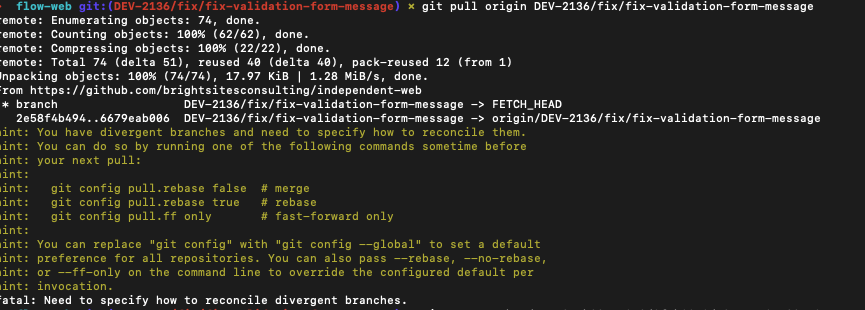 | |
| if you see this message: | |
| git pull --rebase origin DEV-2136/fix/branche-name | |
| ## Skip linting check when committing | |
| git commit -m "feat(PREM-2654): update manage sub link" -n | |
| ## How to get a file from dev to your local branch | |
| git checkout PREM-5333/feat/some-name | |
| git checkout dev ./stories/__storyshots__/section-content--indy-best-section-story-webkit-tablet-768x1024.png | |
| ## Working with on a separated worktree ( like git clone would do ) | |
| git worktree add ../../my_new_folder |
Sign up for free
to join this conversation on GitHub.
Already have an account?
Sign in to comment