
| name | description |
|---|---|
drawio-diagrams |
Generate professional enterprise architecture diagrams using draw.io CLI. Supports AWS, Azure, GCP cloud components, C4 model, microservices, data pipelines, system design, and network topology. Exports to PNG/SVG/PDF. Use when the user asks to create a diagram, visualize architecture, draw a system design, or generate cloud infrastructure diagrams. |
Generate professional enterprise architecture diagrams programmatically using draw.io's CLI export. Supports all major cloud providers (AWS, Azure, GCP), C4 model, microservices patterns, and standard architecture notation.
- draw.io desktop installed (free, all platforms)
| OS | Path |
|---|---|
| Windows | "C:\Program Files\draw.io\draw.io.exe" |
| macOS | /Applications/draw.io.app/Contents/MacOS/draw.io |
| Linux (snap) | drawio |
| Linux (AppImage) | ./drawio-x86_64.AppImage |
Auto-detect: Before running export commands, check which path exists on the current system and use that.
- Generate a
.drawioXML file using the templates and element reference below - Export to PNG/SVG/PDF using the draw.io CLI
- Return the exported image path
Replace DRAWIO with the correct path for the current OS (see table above).
# PNG at 2x resolution (best for presentations/docs)
DRAWIO --export --format png --scale 2 --border 10 --output diagram.png input.drawio

# SVG (best for web/embedding)
DRAWIO --export --format svg --border 10 --output diagram.svg input.drawio

# PDF (best for formal documentation)
DRAWIO --export --format pdf --crop --output diagram.pdf input.drawio

# Transparent background
DRAWIO --export --format png --transparent --scale 2 --output diagram.png input.drawio| Flag | Description |
|---|---|
--format |
png, svg, pdf, jpg |
--scale |
Scale factor (2 = retina quality) |
--border |
Padding in pixels around diagram |
--transparent |
Transparent background (PNG only) |
--crop |
Crop to diagram bounds (PDF only) |
--width |
Fit into width, preserving aspect ratio |
--height |
Fit into height, preserving aspect ratio |
--all-pages |
Export all pages (PDF only) |
--page-index |
Select specific page (1-based) |
Every .drawio file:
<mxfile>
  <diagram name="Diagram Name" id="d1">
    <mxGraphModel dx="1422" dy="794" grid="1" gridSize="10" guides="1" tooltips="1" connect="1" arrows="1" fold="1" page="1" pageScale="1" pageWidth="1169" pageHeight="827">
      <root>
        <mxCell id="0"/>
        <mxCell id="1" parent="0"/>
        <!-- Elements here, all with parent="1" (or parent of a container) -->
      </root>
    </mxGraphModel>
  </diagram>
</mxfile>
For larger diagrams, increase pageWidth and pageHeight.
<!-- App Service -->
<mxCell id="az1" value="App Service" style="image;aspect=fixed;html=1;points=[];align=center;fontSize=11;fontStyle=1;image=img/lib/azure2/app_services/App_Services.svg;" vertex="1" parent="1">
  <mxGeometry x="100" y="100" width="64" height="64" as="geometry"/>
</mxCell>

<!-- Azure Functions -->
<mxCell id="az2" value="Functions" style="image;aspect=fixed;html=1;points=[];align=center;fontSize=11;fontStyle=1;image=img/lib/azure2/compute/Function_Apps.svg;" vertex="1" parent="1">
  <mxGeometry x="100" y="100" width="68" height="60" as="geometry"/>
</mxCell>

<!-- Virtual Machine -->
<mxCell id="az3" value="VM" style="image;aspect=fixed;html=1;points=[];align=center;fontSize=11;fontStyle=1;image=img/lib/azure2/compute/Virtual_Machine.svg;" vertex="1" parent="1">
  <mxGeometry x="100" y="100" width="69" height="64" as="geometry"/>
</mxCell>

<!-- Container Instances -->
<mxCell id="az4" value="Containers" style="image;aspect=fixed;html=1;points=[];align=center;fontSize=11;fontStyle=1;image=img/lib/azure2/compute/Container_Instances.svg;" vertex="1" parent="1">
  <mxGeometry x="100" y="100" width="64" height="60" as="geometry"/>
</mxCell>

<!-- Kubernetes Service -->
<mxCell id="az5" value="AKS" style="image;aspect=fixed;html=1;points=[];align=center;fontSize=11;fontStyle=1;image=img/lib/azure2/compute/Kubernetes_Services.svg;" vertex="1" parent="1">
  <mxGeometry x="100" y="100" width="68" height="60" as="geometry"/>
</mxCell><!-- Blob Storage -->
<mxCell id="azs1" value="Blob Storage" style="image;aspect=fixed;html=1;points=[];align=center;fontSize=11;fontStyle=1;image=img/lib/azure2/storage/Storage_Accounts.svg;" vertex="1" parent="1">
<mxGeometry x="100" y="100" width="65" height="52" as="geometry"/>
</mxCell>
<!-- SQL Database -->
<mxCell id="azs2" value="SQL Database" style="image;aspect=fixed;html=1;points=[];align=center;fontSize=11;fontStyle=1;image=img/lib/azure2/databases/SQL_Database.svg;" vertex="1" parent="1">
<mxGeometry x="100" y="100" width="64" height="64" as="geometry"/>
</mxCell>
<!-- Cosmos DB -->
<mxCell id="azs3" value="Cosmos DB" style="image;aspect=fixed;html=1;points=[];align=center;fontSize=11;fontStyle=1;image=img/lib/azure2/databases/Azure_Cosmos_DB.svg;" vertex="1" parent="1">
<mxGeometry x="100" y="100" width="64" height="64" as="geometry"/>
</mxCell>
<!-- Cache for Redis -->
<mxCell id="azs4" value="Redis Cache" style="image;aspect=fixed;html=1;points=[];align=center;fontSize=11;fontStyle=1;image=img/lib/azure2/databases/Cache_Redis.svg;" vertex="1" parent="1">
<mxGeometry x="100" y="100" width="64" height="52" as="geometry"/>
</mxCell><!-- API Management -->
<mxCell id="azn1" value="API Management" style="image;aspect=fixed;html=1;points=[];align=center;fontSize=11;fontStyle=1;image=img/lib/azure2/integration/API_Management_Services.svg;" vertex="1" parent="1">
<mxGeometry x="100" y="100" width="65" height="60" as="geometry"/>
</mxCell>
<!-- Application Gateway -->
<mxCell id="azn2" value="App Gateway" style="image;aspect=fixed;html=1;points=[];align=center;fontSize=11;fontStyle=1;image=img/lib/azure2/networking/Application_Gateways.svg;" vertex="1" parent="1">
<mxGeometry x="100" y="100" width="64" height="64" as="geometry"/>
</mxCell>
<!-- Load Balancer -->
<mxCell id="azn3" value="Load Balancer" style="image;aspect=fixed;html=1;points=[];align=center;fontSize=11;fontStyle=1;image=img/lib/azure2/networking/Load_Balancers.svg;" vertex="1" parent="1">
<mxGeometry x="100" y="100" width="64" height="64" as="geometry"/>
</mxCell>
<!-- Virtual Network -->
<mxCell id="azn4" value="VNet" style="image;aspect=fixed;html=1;points=[];align=center;fontSize=11;fontStyle=1;image=img/lib/azure2/networking/Virtual_Networks.svg;" vertex="1" parent="1">
<mxGeometry x="100" y="100" width="67" height="40" as="geometry"/>
</mxCell>
<!-- Service Bus -->
<mxCell id="azn5" value="Service Bus" style="image;aspect=fixed;html=1;points=[];align=center;fontSize=11;fontStyle=1;image=img/lib/azure2/integration/Service_Bus.svg;" vertex="1" parent="1">
<mxGeometry x="100" y="100" width="64" height="64" as="geometry"/>
</mxCell>
<!-- Event Grid -->
<mxCell id="azn6" value="Event Grid" style="image;aspect=fixed;html=1;points=[];align=center;fontSize=11;fontStyle=1;image=img/lib/azure2/integration/Event_Grid_Domains.svg;" vertex="1" parent="1">
<mxGeometry x="100" y="100" width="64" height="64" as="geometry"/>
</mxCell><!-- Cognitive Services -->
<mxCell id="azai1" value="Cognitive
Services" style="image;aspect=fixed;html=1;points=[];align=center;fontSize=11;fontStyle=1;image=img/lib/azure2/ai_machine_learning/Cognitive_Services.svg;" vertex="1" parent="1">
<mxGeometry x="100" y="100" width="64" height="64" as="geometry"/>
</mxCell>
<!-- Azure OpenAI -->
<mxCell id="azai2" value="Azure OpenAI" style="image;aspect=fixed;html=1;points=[];align=center;fontSize=11;fontStyle=1;image=img/lib/azure2/ai_machine_learning/Azure_OpenAI.svg;" vertex="1" parent="1">
<mxGeometry x="100" y="100" width="64" height="64" as="geometry"/>
</mxCell>
<!-- Machine Learning -->
<mxCell id="azai3" value="ML Workspace" style="image;aspect=fixed;html=1;points=[];align=center;fontSize=11;fontStyle=1;image=img/lib/azure2/ai_machine_learning/Machine_Learning.svg;" vertex="1" parent="1">
<mxGeometry x="100" y="100" width="66" height="66" as="geometry"/>
</mxCell><!-- Key Vault -->
<mxCell id="azsec1" value="Key Vault" style="image;aspect=fixed;html=1;points=[];align=center;fontSize=11;fontStyle=1;image=img/lib/azure2/security/Key_Vaults.svg;" vertex="1" parent="1">
<mxGeometry x="100" y="100" width="64" height="64" as="geometry"/>
</mxCell>
<!-- Active Directory -->
<mxCell id="azsec2" value="Azure AD" style="image;aspect=fixed;html=1;points=[];align=center;fontSize=11;fontStyle=1;image=img/lib/azure2/identity/Azure_Active_Directory.svg;" vertex="1" parent="1">
<mxGeometry x="100" y="100" width="68" height="64" as="geometry"/>
</mxCell><!-- Application Insights -->
<mxCell id="azmon1" value="App Insights" style="image;aspect=fixed;html=1;points=[];align=center;fontSize=11;fontStyle=1;image=img/lib/azure2/devops/Application_Insights.svg;" vertex="1" parent="1">
<mxGeometry x="100" y="100" width="64" height="64" as="geometry"/>
</mxCell>
<!-- Monitor -->
<mxCell id="azmon2" value="Monitor" style="image;aspect=fixed;html=1;points=[];align=center;fontSize=11;fontStyle=1;image=img/lib/azure2/management_governance/Monitor.svg;" vertex="1" parent="1">
<mxGeometry x="100" y="100" width="64" height="64" as="geometry"/>
</mxCell><!-- Lambda -->
<mxCell id="aws1" value="Lambda" style="sketch=0;outlineConnect=0;fontColor=#232F3E;fillColor=#ED7100;strokeColor=#ffffff;dashed=0;verticalLabelPosition=bottom;verticalAlign=top;align=center;html=1;fontSize=11;fontStyle=1;aspect=fixed;shape=mxgraph.aws4.resourceIcon;resIcon=mxgraph.aws4.lambda" vertex="1" parent="1">
<mxGeometry x="100" y="100" width="60" height="60" as="geometry"/>
</mxCell>
<!-- EC2 -->
<mxCell id="aws2" value="EC2" style="sketch=0;outlineConnect=0;fontColor=#232F3E;fillColor=#ED7100;strokeColor=#ffffff;dashed=0;verticalLabelPosition=bottom;verticalAlign=top;align=center;html=1;fontSize=11;fontStyle=1;aspect=fixed;shape=mxgraph.aws4.resourceIcon;resIcon=mxgraph.aws4.ec2" vertex="1" parent="1">
<mxGeometry x="100" y="100" width="60" height="60" as="geometry"/>
</mxCell>
<!-- ECS -->
<mxCell id="aws3" value="ECS" style="sketch=0;outlineConnect=0;fontColor=#232F3E;fillColor=#ED7100;strokeColor=#ffffff;dashed=0;verticalLabelPosition=bottom;verticalAlign=top;align=center;html=1;fontSize=11;fontStyle=1;aspect=fixed;shape=mxgraph.aws4.resourceIcon;resIcon=mxgraph.aws4.ecs" vertex="1" parent="1">
<mxGeometry x="100" y="100" width="60" height="60" as="geometry"/>
</mxCell>
<!-- EKS -->
<mxCell id="aws4" value="EKS" style="sketch=0;outlineConnect=0;fontColor=#232F3E;fillColor=#ED7100;strokeColor=#ffffff;dashed=0;verticalLabelPosition=bottom;verticalAlign=top;align=center;html=1;fontSize=11;fontStyle=1;aspect=fixed;shape=mxgraph.aws4.resourceIcon;resIcon=mxgraph.aws4.eks" vertex="1" parent="1">
<mxGeometry x="100" y="100" width="60" height="60" as="geometry"/>
</mxCell><!-- S3 -->
<mxCell id="awss1" value="S3" style="sketch=0;outlineConnect=0;fontColor=#232F3E;fillColor=#3F8624;strokeColor=#ffffff;dashed=0;verticalLabelPosition=bottom;verticalAlign=top;align=center;html=1;fontSize=11;fontStyle=1;aspect=fixed;shape=mxgraph.aws4.resourceIcon;resIcon=mxgraph.aws4.s3" vertex="1" parent="1">
<mxGeometry x="100" y="100" width="60" height="60" as="geometry"/>
</mxCell>
<!-- DynamoDB -->
<mxCell id="awss2" value="DynamoDB" style="sketch=0;outlineConnect=0;fontColor=#232F3E;fillColor=#C925D1;strokeColor=#ffffff;dashed=0;verticalLabelPosition=bottom;verticalAlign=top;align=center;html=1;fontSize=11;fontStyle=1;aspect=fixed;shape=mxgraph.aws4.resourceIcon;resIcon=mxgraph.aws4.dynamodb" vertex="1" parent="1">
<mxGeometry x="100" y="100" width="60" height="60" as="geometry"/>
</mxCell>
<!-- RDS -->
<mxCell id="awss3" value="RDS" style="sketch=0;outlineConnect=0;fontColor=#232F3E;fillColor=#C925D1;strokeColor=#ffffff;dashed=0;verticalLabelPosition=bottom;verticalAlign=top;align=center;html=1;fontSize=11;fontStyle=1;aspect=fixed;shape=mxgraph.aws4.resourceIcon;resIcon=mxgraph.aws4.rds" vertex="1" parent="1">
<mxGeometry x="100" y="100" width="60" height="60" as="geometry"/>
</mxCell>
<!-- ElastiCache -->
<mxCell id="awss4" value="ElastiCache" style="sketch=0;outlineConnect=0;fontColor=#232F3E;fillColor=#C925D1;strokeColor=#ffffff;dashed=0;verticalLabelPosition=bottom;verticalAlign=top;align=center;html=1;fontSize=11;fontStyle=1;aspect=fixed;shape=mxgraph.aws4.resourceIcon;resIcon=mxgraph.aws4.elasticache" vertex="1" parent="1">
<mxGeometry x="100" y="100" width="60" height="60" as="geometry"/>
</mxCell><!-- API Gateway -->
<mxCell id="awsn1" value="API Gateway" style="sketch=0;outlineConnect=0;fontColor=#232F3E;fillColor=#E7157B;strokeColor=#ffffff;dashed=0;verticalLabelPosition=bottom;verticalAlign=top;align=center;html=1;fontSize=11;fontStyle=1;aspect=fixed;shape=mxgraph.aws4.resourceIcon;resIcon=mxgraph.aws4.api_gateway" vertex="1" parent="1">
<mxGeometry x="100" y="100" width="60" height="60" as="geometry"/>
</mxCell>
<!-- SQS -->
<mxCell id="awsn2" value="SQS" style="sketch=0;outlineConnect=0;fontColor=#232F3E;fillColor=#E7157B;strokeColor=#ffffff;dashed=0;verticalLabelPosition=bottom;verticalAlign=top;align=center;html=1;fontSize=11;fontStyle=1;aspect=fixed;shape=mxgraph.aws4.resourceIcon;resIcon=mxgraph.aws4.sqs" vertex="1" parent="1">
<mxGeometry x="100" y="100" width="60" height="60" as="geometry"/>
</mxCell>
<!-- SNS -->
<mxCell id="awsn3" value="SNS" style="sketch=0;outlineConnect=0;fontColor=#232F3E;fillColor=#E7157B;strokeColor=#ffffff;dashed=0;verticalLabelPosition=bottom;verticalAlign=top;align=center;html=1;fontSize=11;fontStyle=1;aspect=fixed;shape=mxgraph.aws4.resourceIcon;resIcon=mxgraph.aws4.sns" vertex="1" parent="1">
<mxGeometry x="100" y="100" width="60" height="60" as="geometry"/>
</mxCell>
<!-- CloudFront -->
<mxCell id="awsn4" value="CloudFront" style="sketch=0;outlineConnect=0;fontColor=#232F3E;fillColor=#8C4FFF;strokeColor=#ffffff;dashed=0;verticalLabelPosition=bottom;verticalAlign=top;align=center;html=1;fontSize=11;fontStyle=1;aspect=fixed;shape=mxgraph.aws4.resourceIcon;resIcon=mxgraph.aws4.cloudfront" vertex="1" parent="1">
<mxGeometry x="100" y="100" width="60" height="60" as="geometry"/>
</mxCell>
<!-- Step Functions -->
<mxCell id="awsn5" value="Step Functions" style="sketch=0;outlineConnect=0;fontColor=#232F3E;fillColor=#E7157B;strokeColor=#ffffff;dashed=0;verticalLabelPosition=bottom;verticalAlign=top;align=center;html=1;fontSize=11;fontStyle=1;aspect=fixed;shape=mxgraph.aws4.resourceIcon;resIcon=mxgraph.aws4.step_functions" vertex="1" parent="1">
<mxGeometry x="100" y="100" width="60" height="60" as="geometry"/>
</mxCell><!-- SageMaker -->
<mxCell id="awsai1" value="SageMaker" style="sketch=0;outlineConnect=0;fontColor=#232F3E;fillColor=#01A88D;strokeColor=#ffffff;dashed=0;verticalLabelPosition=bottom;verticalAlign=top;align=center;html=1;fontSize=11;fontStyle=1;aspect=fixed;shape=mxgraph.aws4.resourceIcon;resIcon=mxgraph.aws4.sagemaker" vertex="1" parent="1">
<mxGeometry x="100" y="100" width="60" height="60" as="geometry"/>
</mxCell>
<!-- Bedrock -->
<mxCell id="awsai2" value="Bedrock" style="sketch=0;outlineConnect=0;fontColor=#232F3E;fillColor=#01A88D;strokeColor=#ffffff;dashed=0;verticalLabelPosition=bottom;verticalAlign=top;align=center;html=1;fontSize=11;fontStyle=1;aspect=fixed;shape=mxgraph.aws4.resourceIcon;resIcon=mxgraph.aws4.bedrock" vertex="1" parent="1">
<mxGeometry x="100" y="100" width="60" height="60" as="geometry"/>
</mxCell><!-- Cloud Run -->
<mxCell id="gcp1" value="Cloud Run" style="shape=mxgraph.gcp2.cloud_run;fillColor=#4285F4;fontColor=#000000;strokeColor=none;verticalLabelPosition=bottom;verticalAlign=top;align=center;fontSize=11;fontStyle=1;" vertex="1" parent="1">
<mxGeometry x="100" y="100" width="50" height="45" as="geometry"/>
</mxCell>
<!-- Cloud Functions -->
<mxCell id="gcp2" value="Cloud Functions" style="shape=mxgraph.gcp2.cloud_functions;fillColor=#4285F4;fontColor=#000000;strokeColor=none;verticalLabelPosition=bottom;verticalAlign=top;align=center;fontSize=11;fontStyle=1;" vertex="1" parent="1">
<mxGeometry x="100" y="100" width="50" height="45" as="geometry"/>
</mxCell>
<!-- Cloud Storage -->
<mxCell id="gcp3" value="Cloud Storage" style="shape=mxgraph.gcp2.cloud_storage;fillColor=#4285F4;fontColor=#000000;strokeColor=none;verticalLabelPosition=bottom;verticalAlign=top;align=center;fontSize=11;fontStyle=1;" vertex="1" parent="1">
<mxGeometry x="100" y="100" width="50" height="45" as="geometry"/>
</mxCell>
<!-- BigQuery -->
<mxCell id="gcp4" value="BigQuery" style="shape=mxgraph.gcp2.bigquery;fillColor=#4285F4;fontColor=#000000;strokeColor=none;verticalLabelPosition=bottom;verticalAlign=top;align=center;fontSize=11;fontStyle=1;" vertex="1" parent="1">
<mxGeometry x="100" y="100" width="50" height="45" as="geometry"/>
</mxCell>
<!-- Pub/Sub -->
<mxCell id="gcp5" value="Pub/Sub" style="shape=mxgraph.gcp2.cloud_pubsub;fillColor=#4285F4;fontColor=#000000;strokeColor=none;verticalLabelPosition=bottom;verticalAlign=top;align=center;fontSize=11;fontStyle=1;" vertex="1" parent="1">
<mxGeometry x="100" y="100" width="50" height="45" as="geometry"/>
</mxCell>
<!-- Vertex AI -->
<mxCell id="gcp6" value="Vertex AI" style="shape=mxgraph.gcp2.vertex_ai;fillColor=#4285F4;fontColor=#000000;strokeColor=none;verticalLabelPosition=bottom;verticalAlign=top;align=center;fontSize=11;fontStyle=1;" vertex="1" parent="1">
<mxGeometry x="100" y="100" width="50" height="45" as="geometry"/>
</mxCell><!-- Rectangle -->
<mxCell id="s1" value="Label" style="rounded=0;whiteSpace=wrap;" vertex="1" parent="1">
<mxGeometry x="100" y="100" width="160" height="60" as="geometry"/>
</mxCell>
<!-- Rounded rectangle -->
<mxCell id="s2" value="Label" style="rounded=1;whiteSpace=wrap;" vertex="1" parent="1">
<mxGeometry x="100" y="100" width="160" height="60" as="geometry"/>
</mxCell>
<!-- Circle / Ellipse -->
<mxCell id="s3" value="Label" style="ellipse;whiteSpace=wrap;" vertex="1" parent="1">
<mxGeometry x="100" y="100" width="80" height="80" as="geometry"/>
</mxCell>
<!-- Diamond (decision) -->
<mxCell id="s4" value="Yes/No?" style="rhombus;whiteSpace=wrap;" vertex="1" parent="1">
<mxGeometry x="100" y="100" width="120" height="80" as="geometry"/>
</mxCell>
<!-- Cylinder (database) -->
<mxCell id="s5" value="Database" style="shape=cylinder3;whiteSpace=wrap;boundedLbl=1;size=15;strokeWidth=1;" vertex="1" parent="1">
<mxGeometry x="100" y="100" width="100" height="80" as="geometry"/>
</mxCell>
<!-- Cloud -->
<mxCell id="s6" value="Cloud" style="ellipse;shape=cloud;whiteSpace=wrap;" vertex="1" parent="1">
<mxGeometry x="100" y="100" width="160" height="100" as="geometry"/>
</mxCell>
<!-- Document -->
<mxCell id="s7" value="Document" style="shape=document;whiteSpace=wrap;boundedLbl=1;size=0.27;" vertex="1" parent="1">
<mxGeometry x="100" y="100" width="120" height="80" as="geometry"/>
</mxCell>
<!-- Person -->
<mxCell id="s8" value="User" style="shape=mxgraph.basic.person;whiteSpace=wrap;" vertex="1" parent="1">
<mxGeometry x="100" y="100" width="60" height="60" as="geometry"/>
</mxCell>
<!-- Hexagon -->
<mxCell id="s9" value="Service" style="shape=hexagon;perimeter=hexagonPerimeter2;whiteSpace=wrap;size=0.25;" vertex="1" parent="1">
<mxGeometry x="100" y="100" width="160" height="80" as="geometry"/>
</mxCell><!-- Standard arrow -->
<mxCell id="e1" style="edgeStyle=orthogonalEdgeStyle;" edge="1" source="n1" target="n2" parent="1">
<mxGeometry relative="1" as="geometry"/>
</mxCell>
<!-- Labeled arrow -->
<mxCell id="e2" value="HTTPS" style="edgeStyle=orthogonalEdgeStyle;fontSize=10;" edge="1" source="n1" target="n2" parent="1">
<mxGeometry relative="1" as="geometry"/>
</mxCell>
<!-- Dashed (async / optional) -->
<mxCell id="e3" style="edgeStyle=orthogonalEdgeStyle;dashed=1;" edge="1" source="n1" target="n2" parent="1">
<mxGeometry relative="1" as="geometry"/>
</mxCell>
<!-- Bidirectional -->
<mxCell id="e4" style="edgeStyle=orthogonalEdgeStyle;startArrow=classic;endArrow=classic;" edge="1" source="n1" target="n2" parent="1">
<mxGeometry relative="1" as="geometry"/>
</mxCell>
<!-- Thick (primary flow) -->
<mxCell id="e5" style="edgeStyle=orthogonalEdgeStyle;strokeWidth=2;" edge="1" source="n1" target="n2" parent="1">
<mxGeometry relative="1" as="geometry"/>
</mxCell>
<!-- Curved -->
<mxCell id="e6" style="curved=1;" edge="1" source="n1" target="n2" parent="1">
<mxGeometry relative="1" as="geometry"/>
</mxCell>
<!-- No arrow (association) -->
<mxCell id="e7" style="endArrow=none;" edge="1" source="n1" target="n2" parent="1">
<mxGeometry relative="1" as="geometry"/>
</mxCell><!-- Cloud boundary (e.g., Azure subscription, AWS VPC) -->
<mxCell id="g1" value="Azure Subscription" style="points=[[0,0],[0.25,0],[0.5,0],[0.75,0],[1,0],[1,0.25],[1,0.5],[1,0.75],[1,1],[0.75,1],[0.5,1],[0.25,1],[0,1],[0,0.75],[0,0.5],[0,0.25]];outlineConnect=0;gradientColor=none;html=1;whiteSpace=wrap;fontSize=14;fontStyle=1;container=1;collapsible=0;fillColor=#F0F4FF;strokeColor=#0078D4;strokeWidth=2;verticalAlign=top;align=left;spacingLeft=10;spacingTop=5;rounded=1;" vertex="1" parent="1">
<mxGeometry x="50" y="50" width="800" height="400" as="geometry"/>
</mxCell>
<!-- Service boundary (subnet, namespace, service group) -->
<mxCell id="g2" value="Backend Services" style="rounded=1;whiteSpace=wrap;container=1;collapsible=0;fillColor=#f5f5f5;strokeColor=#666666;strokeWidth=2;fontStyle=1;verticalAlign=top;fontSize=12;strokeDasharray=5 5;" vertex="1" parent="1">
<mxGeometry x="100" y="100" width="400" height="250" as="geometry"/>
</mxCell>
<!-- Child inside container — set parent to container id -->
<mxCell id="g2_child" value="API" style="rounded=1;whiteSpace=wrap;fillColor=#dae8fc;strokeColor=#6c8ebf;" vertex="1" parent="g2">
<mxGeometry x="20" y="40" width="120" height="50" as="geometry"/>
</mxCell>| Purpose | Fill | Stroke | When to use |
|---|---|---|---|
| Compute / Primary | #dae8fc |
#6c8ebf |
App servers, APIs, functions |
| Storage / Data | #d5e8d4 |
#82b366 |
Databases, file storage, caches |
| AI / ML | #e1d5e7 |
#9673a6 |
AI services, ML models, inference |
| Processing / Transform | #fff2cc |
#d6b656 |
ETL, queues, message buses, workflows |
| Error / Critical | #f8cecc |
#b85450 |
Alerts, errors, security, firewalls |
| Infrastructure / Boundary | #f5f5f5 |
#666666 |
VPCs, subnets, containers, groups |
| External / Client | #e6e6e6 |
#999999 |
External systems, users, third-party |
| Azure boundary | #F0F4FF |
#0078D4 |
Azure subscription/resource group |
| AWS boundary | #FFF8F0 |
#FF9900 |
AWS account/VPC |
| GCP boundary | #F0FFF0 |
#4285F4 |
GCP project |
Apply: style="rounded=1;whiteSpace=wrap;fillColor=#dae8fc;strokeColor=#6c8ebf;"
| Property | Values | Description |
|---|---|---|
fontStyle=0 |
normal | Default text |
fontStyle=1 |
bold | Labels, titles |
fontStyle=2 |
italic | Annotations, notes |
fontStyle=3 |
bold+italic | Emphasis |
fontSize=11 |
points | Standard label size |
fontSize=14 |
points | Group/boundary titles |
fontColor=#333333 |
hex | Dark text |
fontColor=#666666 |
hex | Muted/secondary text |
System context: actors → your system → external dependencies.
[Person] ——uses——> [Your System] ——calls——> [External API]
                                 ——stores——> [Database]
- Actors:
shape=mxgraph.basic.personwith light blue fill - Systems (yours): rounded rectangle, dark blue fill (
#1a73e8, white text) - Systems (external): rounded rectangle, grey fill (
#e6e6e6) - Databases: cylinder shape
Zoom into your system: web app, API, database, message queue.
- Each container = rounded rectangle with cloud icon + technology label
- Group boundary = dashed rounded rectangle as system boundary
- Show protocols on edges:
"HTTPS/JSON","SQL","AMQP"
[API Gateway] → [Service A] → [DB A]
              → [Service B] → [DB B]
              → [Service C] → [Queue] → [Worker]
- API Gateway: single entry point (hexagon or cloud icon)
- Each service: rounded rectangle in own colour
- Each service has its own database (database-per-service)
- Async communication: dashed arrows through message queue
- Service mesh boundary: dashed container
[Command API] → [Event Bus] → [Read Model Builder] → [Read DB]
                            → [Event Store]
                            → [Notification Service]
[Query API] → [Read DB]
- Event bus (SNS/SQS/Service Bus/Kafka): orange/yellow fill
- Command side: blue
- Query side: green
- Dashed arrows for async event flow
[Sources] → [Ingestion] → [Processing] → [Storage] → [Analytics]
  (S3/Blob)   (Functions)   (Spark/ETL)   (Data Lake)  (BI/Dashboard)
- Left-to-right flow
- Document shapes for source data
- Processing: orange fill
- Storage: green fill (cylinders)
- Analytics: purple fill
┌─ Region A (Primary) ──────┐    ┌─ Region B (DR) ──────────┐
│ [LB] → [App] → [DB Primary]│──→│ [LB] → [App] → [DB Replica]│
└────────────────────────────┘    └────────────────────────────┘
- Two cloud boundaries side by side
- Replication arrows (dashed, bidirectional)
- Primary: blue boundary; DR: grey boundary
| Layout | X increment | Y increment | Notes |
|---|---|---|---|
| Horizontal flow | 220px | — | 160px node + 60px gap |
| Vertical flow | — | 120px | 60px node + 60px gap |
| Cloud icons | 180px | — | 60px icon + 120px gap |
| Inside containers | 20px padding | 40px from top | Leave room for container title |
| Diagram type | pageWidth | pageHeight |
|---|---|---|
| Simple flow (3-5 nodes) | 1169 | 827 |
| Architecture (6-12 nodes) | 1400 | 900 |
| Detailed system (12+ nodes) | 1600 | 1100 |
| Wide pipeline | 1800 | 600 |
- Use
edgeStyle=orthogonalEdgeStyle;for clean right-angle connectors - Use
curved=1;only for feedback loops or non-linear flows - Use
strokeWidth=2;for primary data flows - Use
dashed=1;for async/optional/event-driven connections - Label edges with protocols or data descriptions:
value="HTTPS",value="events"
- Use official cloud icons — Azure
img/lib/azure2/, AWSmxgraph.aws4., GCPmxgraph.gcp2.— instant credibility - Group by boundary — VPCs, subscriptions, resource groups, namespaces as containers
- Show data flow direction — arrows should tell the story of how data moves
- Label edges with protocols —
HTTPS,gRPC,AMQP,SQL,events— reviewers need this - Distinguish sync vs async — solid arrows for synchronous, dashed for asynchronous
- One diagram = one abstraction level — don't mix C4 Context with Container detail
- Color by function, not by team — compute=blue, storage=green, AI=purple, messaging=orange
- Include security boundaries — show where firewalls, VNets, private endpoints sit
- Version your diagrams —
.drawiofiles are XML, commit them to git, diff them --scale 2always — retina-quality output for any screen

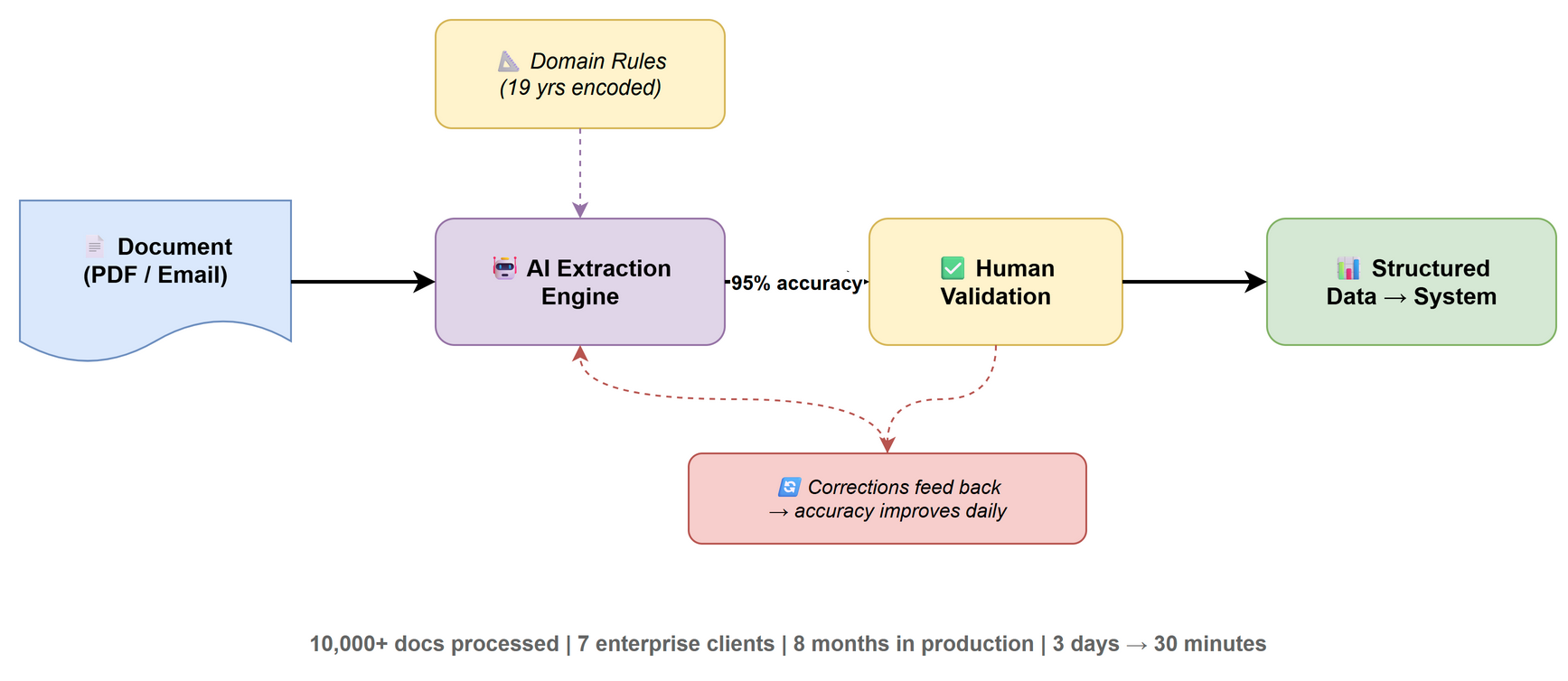
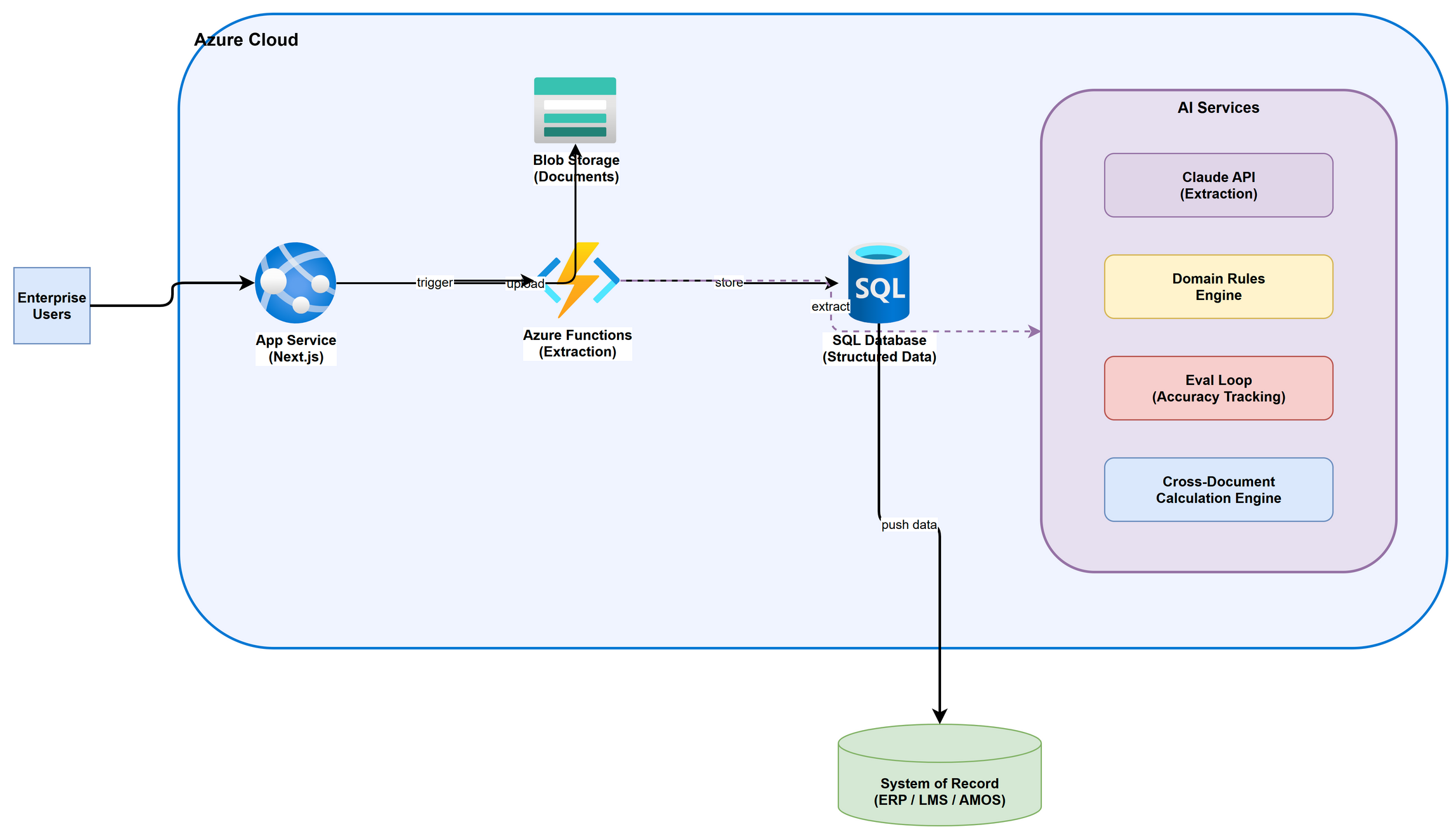
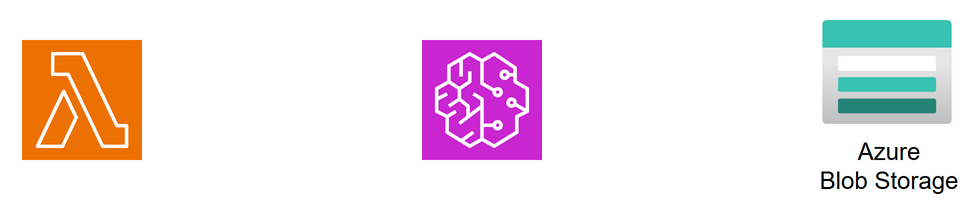
Example outputs generated by this skill
Document AI Pipeline
Enterprise Cloud Architecture (Azure)
Cloud Components (AWS, Azure)
All generated programmatically. No manual box-dragging. Describe the architecture → get a PNG.