The brief is to implement the following modal UI using React and inline styles
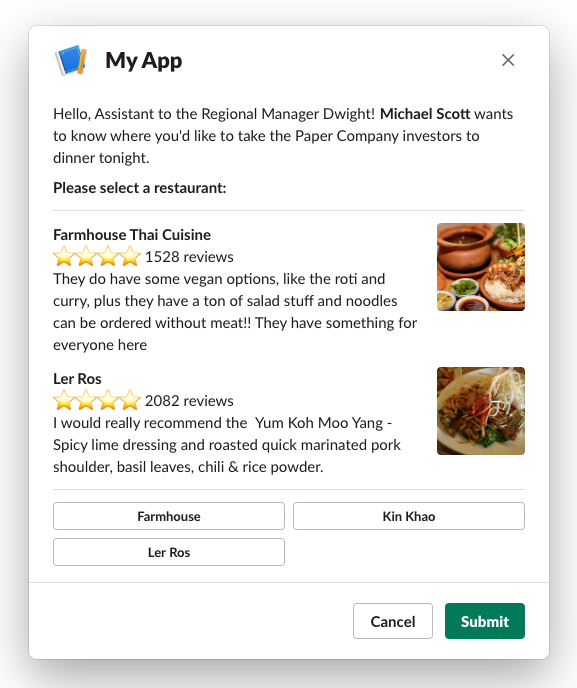
- You may use
create-react-appfor quick project setup - The center part of the modal is scrollable to accommodate multiple restaurant listings


| import React, {createContext, FC, ReactNode, useCallback, useMemo, useReducer} from 'react'; | |
| import {usePersistentRef} from '@shared/util/hooks'; | |
| export const CardListProviderStateContext = createContext(null); | |
| export const CardListProviderActionsContext = createContext(null); | |
| type Card = any; | |
| interface Query { | |
| channelId: number; |
| import {cardLayoutSchema} from '@shared/components/card/schema'; | |
| import Ajv from 'ajv'; | |
| describe('schema', () => { | |
| const ajv = new Ajv(); | |
| it('should validate', () => { | |
| const photoScheduleLayout = { | |
| blocks: [ | |
| {type: 'image', field: 'imageUri'}, |
| { | |
| "$id": "https://coastapp.com/card-layout.json", | |
| "$schema": "http://json-schema.org/draft-07/schema", | |
| "definitions": { | |
| "section": { | |
| "$id": "#section", | |
| "type": "object", | |
| "properties": { | |
| "type": { "type": "string", "enum": ["section"] }, | |
| "fields": { |
| import React, {Component, createRef} from 'react'; | |
| import PropTypes from 'prop-types'; | |
| export default class ConvertMe extends Component { | |
| ref = createRef(); | |
| state = { | |
| operator: '' | |
| }; |
| [ | |
| { | |
| "trigger": "click", | |
| "action": "share-pinterest", | |
| "targets": null | |
| }, | |
| { | |
| "trigger": "click", | |
| "action": "share-twitter", | |
| "targets": null |
| if(event.metaKey && event.keyCode == 86 /* V */) { | |
| var txt = $('<textarea></textarea>'); | |
| $('body').append(txt); | |
| txt.on('paste',function(e){ | |
| console.log(e.originalEvent.clipboardData.getData('text/plain')); | |
| txt.remove(); | |
| }).focus(); | |
| return; | |
| } |
| var cluster = require('cluster'); | |
| if(cluster.isMaster) { | |
| var numCPUs = require('os').cpus().length; | |
| var data = ['a','b','c','d','e','f','g','h','i','j','k','l','m','n','o','p','q','r','s','t','u','v','w','x','y','z']; | |
| var currentDataPos = 0; | |
| console.log(numCPUs+' CPUs detected'); | |
| var statusInterval = setInterval(function(){ |