
- Cloud Vendor Based NoOps
- Detect text in images
- Detect handwriting in images
- Detect text in files
- Detect faces in images
- Detect multiple objects in images
Detect web references to an imageN/A- Detect landmarks in images
Recognition of Face in imagesTODO
- Microsoft (Azure) Artificial Intelligence
- Azure Cognitive Services
- Azure Computer Vision Service
- Create a Cognitive Services resource using the Azure CLI
- az cognitiveservices
- Azure Cognitive Services Authentication
- Prerequisites are to have a valid and activated Azure account and an Azure Cognitive Services subscription within a Azure Resource Group
-
Sign in to Azure
$ az login Note, we have launched a browser for you to login. For old experience with device code, use "az login --use-device-code" You have logged in. Now let us find all the subscriptions to which you have access... [ { "cloudName": "AzureCloud", "id": "deadbeef-e904-4c8e-a3d8-5503f0e310e7", "isDefault": true, "name": "Free Trial", "state": "Enabled", "tenantId": "deadbeef-3411-4054-a56e-18809a214004", "user": { "name": "USER@FQDN", "type": "user" } } ] -
Choose resource group location
INSTANCE TRANSACTIONS PER SECOND (TPS) FEATURES Free 2 TPS Upload, training, and prediction transactions Up to 2 projects Up to 1 hour training per month 5,000 training images free per project 10,000 predictions per month $ az account list-locations --query "[].{Region:name}" --out table|grep euro northeurope westeurope $ az account list-locations --query "[].{Region:name}" --out table|grep -E "us\$|us[0-9]\$" centralus eastus eastus2 westus northcentralus southcentralus westcentralus westus2 -
Create a Azure Cognitive Services resource group
$ az group create --name cognitive-services-resource-group --location westus2 { "id": "/subscriptions/deadbeef-e904-4c8e-a3d8-5503f0e310e7/resourceGroups/cognitive-services-resource-group", "location": "westus2", "managedBy": null, "name": "cognitive-services-resource-group", "properties": { "provisioningState": "Succeeded" }, "tags": null, "type": null } $ az group create --name cognitive-services-resource-group --location westus { "id": "/subscriptions/deadbeef-e904-4c8e-a3d8-5503f0e310e7/resourceGroups/cognitive-services-resource-group", "location": "westus", "managedBy": null, "name": "cognitive-services-resource-group", "properties": { "provisioningState": "Succeeded" }, "tags": null, "type": null } -
Determine available Cognitive Service resources
$ az cognitiveservices account list-kinds --output table --subscription deadbeef-e904-4c8e-a3d8-5503f0e310e7 Result ----------------------- AnomalyDetector Bing.Autosuggest.v7 Bing.CustomSearch Bing.EntitySearch Bing.Search.v7 Bing.SpellCheck.v7 CognitiveServices ComputerVision ContentModerator CustomVision.Prediction CustomVision.Training Face ImmersiveReader InkRecognizer Internal.AllInOne LUIS LUIS.Authoring Personalizer QnAMaker SpeakerRecognition SpeechServices TextAnalytics TextTranslation -
Add a Cognitive Service resource to the resource group (F0 free)
$ az cognitiveservices account create --name computer-vision --kind ComputerVision --resource-group cognitive-services-resource-group --sku F0 --location westus2 --yes { "customSubDomainName": null, "endpoint": "https://westus2.api.cognitive.microsoft.com/", "etag": "\"0b0026c1-0000-0800-0000-5d92d59d0000\"", "id": "/subscriptions/deadbeef-e904-4c8e-a3d8-5503f0e310e7/resourceGroups/cognitive-services-resource-group/providers/Microsoft.CognitiveServices/accounts/computer-vision", "internalId": "deadbeef5739424698825e2192e2ed00", "kind": "ComputerVision", "location": "westus2", "name": "computer-vision", "networkAcls": null, "provisioningState": "Succeeded", "resourceGroup": "cognitive-services-resource-group", "sku": { "name": "F0", "tier": null }, "tags": null, "type": "Microsoft.CognitiveServices/accounts" } $ az cognitiveservices account create --name face-api --kind Face --resource-group cognitive-services-resource-group --sku F0 --location westus2 --yes { "customSubDomainName": null, "endpoint": "https://westus2.api.cognitive.microsoft.com/face/v1.0", "etag": "\"0b00c5d1-0000-0800-0000-5d9306f80000\"", "id": "/subscriptions/deadbeef-e904-4c8e-a3d8-5503f0e310e7/resourceGroups/cognitive-services-resource-group/providers/Microsoft.CognitiveServices/accounts/face-api", "internalId": "deadbeef5239498da16b3d615bfbf430", "kind": "Face", "location": "westus2", "name": "face-api", "networkAcls": null, "provisioningState": "Succeeded", "resourceGroup": "cognitive-services-resource-group", "sku": { "name": "F0", "tier": null }, "tags": null, "type": "Microsoft.CognitiveServices/accounts" }- If the required service is not added, a similar error message will be returned when requesting use of the service
{
  "error": {
    "code": "401",
    "message": "The Face - Detect Operation under Face API - V1.0 API is not supported with the current subscription key and pricing tier ComputerVision.F0."
  }
}
- If the required service is not added, a similar error message will be returned when requesting use of the service
-
Get the keys for the Cognitive Service resource.
$ az cognitiveservices account keys list --name computer-vision --resource-group cognitive-services-resource-group { "key1": "deadbeef3e5f4bd5a22501aff861d411", "key2": "deadbeef7084476a9b898d6cbe4fab54" } $ az cognitiveservices account keys list --name face-api --resource-group cognitive-services-resource-group { "key1": "deadbeef0acc1441e95017bb2a43a96a7", "key2": "deadbeef198d4e6590d1b70ec47b0145" } -
Set environment
COGNITIVE_SERVICE_KEYvariable with one of the keys for the resource$ export COGNITIVE_SERVICE_KEY=deadbeef3e5f4bd5a22501aff861d411 -
Cleanup (after temporary usage)
$ az group delete --name cognitive-services-resource-group
Are you sure you want to perform this operation? (y/n): y
- Verify the file content type of the input file (that it is an image)
$ file ../data/texttyped1.png
../data/texttyped1.png: PNG image data, 1290 x 856, 8-bit/color RGBA, non-interlaced
- Perform (input: "texttyped1.png"; output: JSON file "result$RANDOM.json)
$ ./run-request.sh vision-ocr ../data/texttyped1.png
result28340.json
- Review (text from output JSON)
$ jq -r '.regions[].lines[].words[].text' result28340.json |tr '\n' ' ' ;echo
Google is using deepfakes to fight deepfakes. With the 2020 US presidential election approaching, the race is on to figure out how to prevent widespread deepfake disinformation. On Tuesday, Google offered the latest contribution: an open-source database containing 3,000 original manipulated videos. The goal is to help train and test automated detection tools. The company compiled the data by working with 28 actors to record videos of them speaking, making common expressions, and doing mundane tasks. It then used publicly available deepfake algorithms to alter their faces. Google isn't the first to take this approach. As we covered in The Algorithm earlier this month, Facebook announced that it would be releasing a similar database near the end of the year. In January, an academic team led by a researcher from the Technical University of Munich also created another called FaceForensics++. The trouble is technical solutions like these can only go so far because synthetic media could soon become indistinguishable from reality. Read more here.
- Verify the file content type of the input file (that it is an image)
$ ./pre-request.sh vision-ink ../data/texthandwriting1.png
../data/texthandwriting1.png: PNG image data, 500 x 323, 8-bit/color RGB, non-interlaced
- Perform (input: "texthandwriting1.png"; output: JSON file "result$RANDOM.json)
$ ./run-request.sh vision-ocr-hand ../data/texthandwriting1.png
result22465.json
- Review (text from output JSON)
$ jq . result22465.json
{
  "language": "en",
  "textAngle": 0,
  "orientation": "NotDetected",
  "regions": []
}
-
Two step process:
- Batch Read File operation to submit the OCR operation, return "Operation-Location" with the URL for the next step
- Get Read Operation Result operation to access OCR results
-
Verify the file content type of the input file (that it is an image)
$ ./pre-request.sh vision-pdf http://www.africau.edu/images/default/sample.pdf
request.json

$ jq . request.json
{
  "url": "http://www.africau.edu/images/default/sample.pdf"
}
- Perform (input: JSON file "request.json"; 1st output: "Operation-Location"; 2nd output: JSON file "result$RANDOM.json)
$ ./run-request.sh vision-pdf request.json
***OCRBATCH  Operation-Location: deadbeef-37ee-419f-8709-007bf64a0c8a

$ ./run-request.sh vision-readop request.json deadbeef-37ee-419f-8709-007bf64a0c8a
***READOP Operation-Location: deadbeef-37ee-419f-8709-007bf64a0c8a
result16131.json
- Review (text from output JSON)
$ ./post-request.sh vision-pdf result16131.json
A Simple PDF File This is a small demonstration .pdf file - just for use in the Virtual Mechanics tutorials. More text. And more text. And more text. And more text. And more text. And more text. And more text. And more text. And more text. And more text. And more text. Boring, zzzzz. And more text. And more text. And more text. And more text. And more text. And more text. And more text. And more text. And more text. And more text. And more text. And more text. And more text. And more text. And more text. And more text. Even more. Continued on page 2 ... Simple PDF File 2 ...continued from page 1. Yet more text. And more text. And more text. And more text. And more text. And more text. And more text. And more text. Oh, how boring typing this stuff. But not as boring as watching paint dry. And more text. And more text. And more text. And more text. Boring. More, a little more text. The end, and just as well.
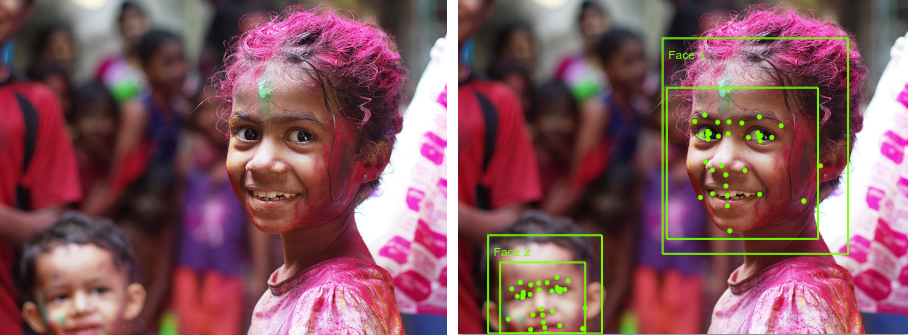
- Prepare (input: PNG file "URL/faces.png"; output: JSON file "request.json")
$ ./pre-request.sh vision-face-identify https://cloud.google.com/vision/docs/images/faces.png
request.json

$ jq . request.json
{
  "url": "https://cloud.google.com/vision/docs/images/faces.png"
}
- Perform (input: JSON file "request.json"; output: JSON file "result$RANDOM.json)
$ ./run-request.sh vision-face-identify request.json
result21321.json
- Review (text from output JSON) - for expanded view use
jq . <output JSON filename>
$ jq '.faces[],.metadata' result21321.json
{
  "age": 10,
  "gender": "Female",
  "faceRectangle": {
    "left": 208,
    "top": 98,
    "width": 128,
    "height": 128
  }
}
{
  "age": 7,
  "gender": "Female",
  "faceRectangle": {
    "left": 666,
    "top": 96,
    "width": 127,
    "height": 127
  }
}
{
  "age": 1,
  "gender": "Male",
  "faceRectangle": {
    "left": 41,
    "top": 269,
    "width": 81,
    "height": 66
  }
}
{
  "width": 910,
  "height": 336,
  "format": "Png"
}
-
The stored face features will expire and be deleted 24 hours after the original detection call.
-
Prepare (input: PNG file "URL/faces.png"; output: JSON file "request.json")
$ ./pre-request.sh face-detect https://cloud.google.com/vision/docs/images/faces.png
request.json

$ jq . request.json
{
  { "url" : "https://cloud.google.com/vision/docs/images/faces.png", recognitionModel: "recognition_02", detectionModel: "detection_02" }
}
- Perform (input: JSON file "request.json"; output: JSON file "result$RANDOM.json)
$ ./run-request.sh face-detect request.json
result2306.json
- Review (text from output JSON) - for compact view use
cat <output JSON filename>
jq . result2306.json # cat result2306.json
[
  {
    "faceId": "c44eb1c9-5f0a-4507-8f7e-8984a10899e3",
    "faceRectangle": {
      "top": 98,
      "left": 208,
      "width": 128,
      "height": 128
    }
  },
  {
    "faceId": "b5540f79-5fe2-4419-9e08-35817839a2b3",
    "faceRectangle": {
      "top": 96,
      "left": 666,
      "width": 127,
      "height": 127
    }
  },
  {
    "faceId": "4fd1bac1-b056-457a-a97f-d00184734b70",
    "faceRectangle": {
      "top": 269,
      "left": 41,
      "width": 81,
      "height": 66
    }
  }
]
-
The stored face features will expire and be deleted 24 hours after the original detection call.
-
Prepare (input: PNG file "URL/faces.png"; output: JSON file "request.json")
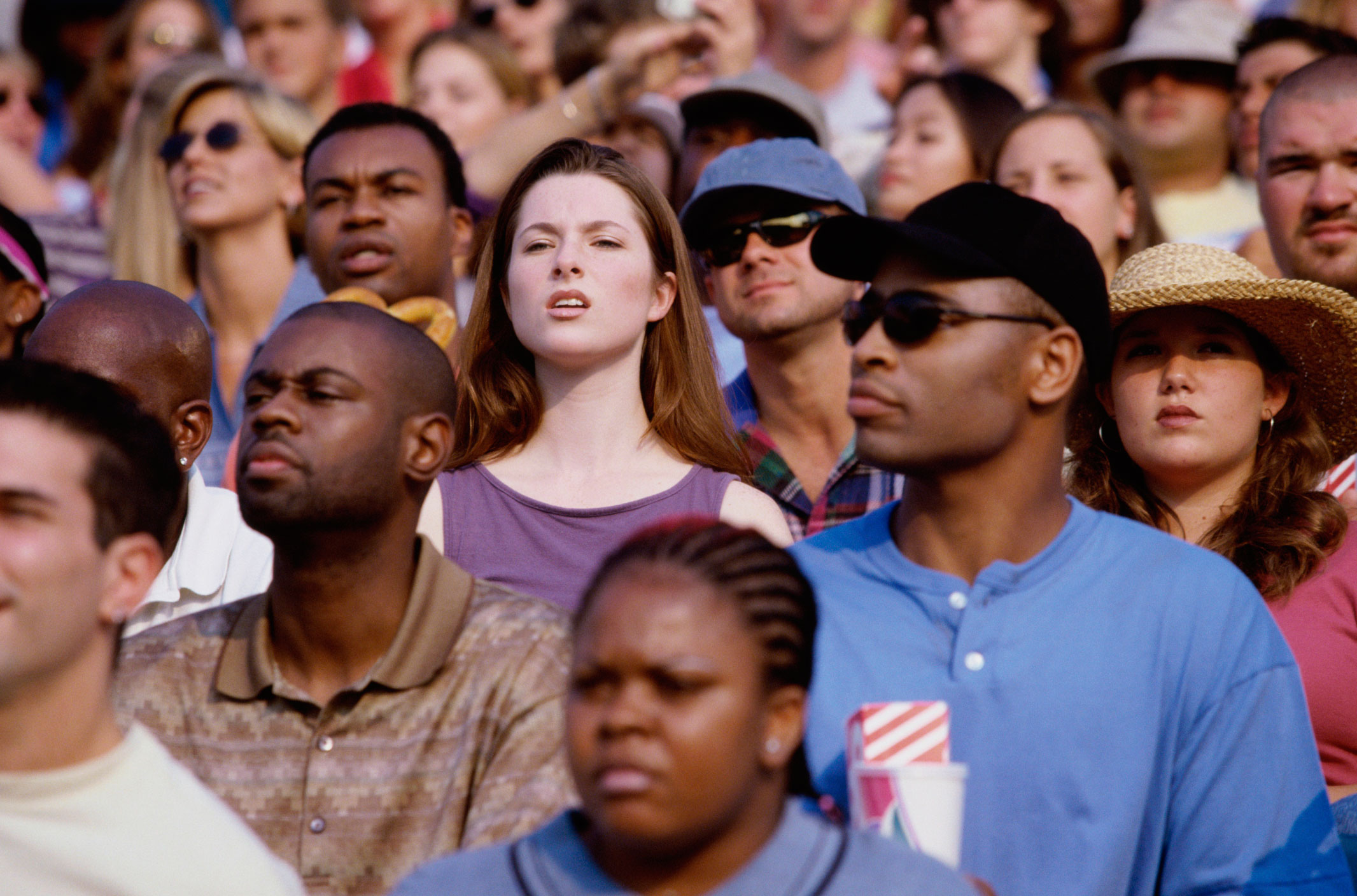
$ ./pre-request.sh face-detect https://www.nih.gov/sites/default/files/news-events/research-matters/2014/20140428-attention.jpg
request.json

$ jq . request.json
{
  "url": "https://www.nih.gov/sites/default/files/news-events/research-matters/2014/20140428-attention.jpg",
  "recognitionModel": "recognition_02",
  "detectionModel": "detection_02"
}
- Perform (input: JSON file "request.json"; output: JSON file "result$RANDOM.json)
$ ./run-request.sh face-detect request.json
result5214.json
- Review (text from output JSON) - for expanded view use
jq . <output JSON filename>
$ cat result5214.json # jq . result5214.json
[{"faceId":"d60422dd-13ff-4fe8-9220-4062635e7cd1","faceRectangle":{"top":992,"left":838,"width":298,"height":298}},{"faceId":"15952a36-6ac0-404e-9aaf-b877c7e694ab","faceRectangle":{"top":546,"left":327,"width":236,"height":236}},{"faceId":"1b4a6421-e8a1-455d-a87c-d03c4898adf2","faceRectangle":{"top":489,"left":1742,"width":221,"height":221}},{"faceId":"5774433f-0538-46ac-8d8f-94f45074aa84","faceRectangle":{"top":244,"left":467,"width":209,"height":209}},{"faceId":"3bf3ca92-fdbe-46e3-92e5-48c3b01be8b9","faceRectangle":{"top":326,"left":790,"width":207,"height":207}},{"faceId":"f81dd662-a7fa-47bb-affb-7e03d2d24e9d","faceRectangle":{"top":172,"left":234,"width":155,"height":155}},{"faceId":"40ae3733-28e8-497c-9c27-37d6fd80a22d","faceRectangle":{"top":165,"left":1337,"width":152,"height":152}},{"faceId":"7c0905a2-f679-4571-b921-44f6fd85c9a4","faceRectangle":{"top":3,"left":363,"width":137,"height":137}}]/Users/bjro/code/cloudactions/cognition/azure:
-
The stored face features will expire and be deleted 24 hours after the original detection call.
-
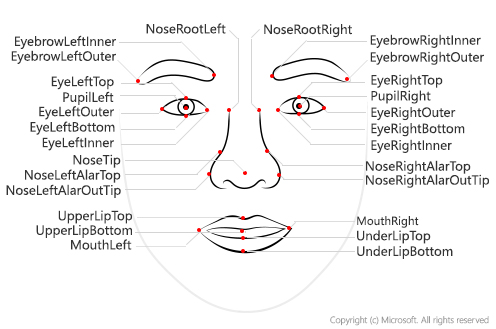
Optional parameters include faceId, landmarks, and attributes. Besides face rectangles and landmarks, the face detection API can analyze several conceptual attributes of a face. Attributes include age, gender, headPose, smile, facialHair, glasses, emotion, hair, makeup, occlusion, accessories, blur, exposure and noise. Some of the results returned for specific attributes may not be highly accurate.
-
Prepare (input: PNG file "URL/faces.png"; output: JSON file "request.json")

$ ./pre-request.sh face-detect-details https://cloud.google.com/vision/docs/images/faces.png
request.json

$ jq . request.json
{
  "url": "https://cloud.google.com/vision/docs/images/faces.png"
}
- Perform (input: JSON file "request.json"; output: JSON file "result$RANDOM.json)
$ ./run-request.sh face-detect-details request.json
result1651.json
- Review (text from output JSON) - for expanded view use
jq . <output JSON filename>
$ cat result1651.json # jq . result1651.json
[{"faceId":"22e3f84a-f030-4fbc-a9de-951be08cee3d","faceRectangle":{"top":98,"left":208,"width":128,"height":128},"faceAttributes":{"smile":0.998,"headPose":{"pitch":-5.4,"roll":0.1,"yaw":-15.7},"gender":"female","age":6.0,"facialHair":{"moustache":0.0,"beard":0.0,"sideburns":0.0},"glasses":"NoGlasses","emotion":{"anger":0.0,"contempt":0.0,"disgust":0.0,"fear":0.0,"happiness":0.998,"neutral":0.0,"sadness":0.0,"surprise":0.002},"blur":{"blurLevel":"low","value":0.11},"exposure":{"exposureLevel":"goodExposure","value":0.55},"noise":{"noiseLevel":"low","value":0.0},"makeup":{"eyeMakeup":false,"lipMakeup":false},"accessories":[],"occlusion":{"foreheadOccluded":false,"eyeOccluded":false,"mouthOccluded":false},"hair":{"bald":0.22,"invisible":false,"hairColor":[{"color":"brown","confidence":0.95},{"color":"red","confidence":0.86},{"color":"other","confidence":0.36},{"color":"blond","confidence":0.31},{"color":"black","confidence":0.28},{"color":"gray","confidence":0.08}]}}},
{"faceId":"c862af46-ec5e-4c20-92b8-e380791c1a49","faceRectangle":{"top":96,"left":666,"width":127,"height":127},"faceAttributes":{"smile":0.978,"headPose":{"pitch":0.0,"roll":0.1,"yaw":-15.0},"gender":"female","age":6.0,"facialHair":{"moustache":0.0,"beard":0.0,"sideburns":0.0},"glasses":"NoGlasses","emotion":{"anger":0.0,"contempt":0.001,"disgust":0.0,"fear":0.0,"happiness":0.978,"neutral":0.02,"sadness":0.0,"surprise":0.001},"blur":{"blurLevel":"low","value":0.0},"exposure":{"exposureLevel":"goodExposure","value":0.55},"noise":{"noiseLevel":"low","value":0.0},"makeup":{"eyeMakeup":false,"lipMakeup":false},"accessories":[],"occlusion":{"foreheadOccluded":false,"eyeOccluded":false,"mouthOccluded":false},"hair":{"bald":0.34,"invisible":false,"hairColor":[{"color":"brown","confidence":0.96},{"color":"black","confidence":0.67},{"color":"red","confidence":0.42},{"color":"blond","confidence":0.37},{"color":"other","confidence":0.23},{"color":"gray","confidence":0.16}]}}},
{"faceId":"dc844c91-b4d1-4606-8acc-7f34ea2646a1","faceRectangle":{"top":269,"left":41,"width":81,"height":66},"faceAttributes":{"smile":0.002,"headPose":{"pitch":-10.2,"roll":-13.4,"yaw":-14.5},"gender":"male","age":2.0,"facialHair":{"moustache":0.0,"beard":0.0,"sideburns":0.0},"glasses":"NoGlasses","emotion":{"anger":0.0,"contempt":0.001,"disgust":0.0,"fear":0.0,"happiness":0.002,"neutral":0.973,"sadness":0.024,"surprise":0.0},"blur":{"blurLevel":"high","value":1.0},"exposure":{"exposureLevel":"goodExposure","value":0.71},"noise":{"noiseLevel":"high","value":0.79},"makeup":{"eyeMakeup":false,"lipMakeup":false},"accessories":[],"occlusion":{"foreheadOccluded":false,"eyeOccluded":false,"mouthOccluded":false},"hair":{"bald":0.05,"invisible":false,"hairColor":[{"color":"brown","confidence":0.99},{"color":"blond","confidence":0.52},{"color":"black","confidence":0.51},{"color":"red","confidence":0.32},{"color":"gray","confidence":0.16},{"color":"other","confidence":0.1}]}}}]
- Prepare (input: PNG file "URL/Italian-Sign-Bogdan-Dada-Unsplash.jpg"; output: JSON file "request.json")
$ ./pre-request.sh vision-objects https://educationaltravelforlife.com/wp-content/uploads/2018/12/Italian-Sign-Bogdan-Dada-Unsplash.jpg
request.json

$ jq . request.json
{
  "url": "https://educationaltravelforlife.com/wp-content/uploads/2018/12/Italian-Sign-Bogdan-Dada-Unsplash.jpg"
}
- Perform (input: JSON file "request.json"; output: JSON file "result$RANDOM.json)
$ ./run-request.sh vision-objects request.json
result12311.json
- Review (text from output JSON)
$ jq -r '.objects[] | "\(.object) \(.confidence)"' result12311.json|sort -k2rn
bicycle 0.88
Wheel 0.674
Wheel 0.533
N/A
- Prepare (input: PNG file "URL/moscow_small.jpeg"; output: JSON file "request.json")
$ ./pre-request.sh vision-landmark https://cloud.google.com/vision/docs/images/moscow_small.jpeg
request.json

$ jq . request.json
{
  "url": "https://cloud.google.com/vision/docs/images/moscow_small.jpeg"
}
- Perform (input: JSON file "request.json"; output: JSON file "result$RANDOM.json)
$ ./run-request.sh vision-landmark request.json
result12922.json
- Review (text from output JSON)
$ jq -r '.categories[]|select(.name == "building_") | .detail.landmarks[] | "\(.name) \(.confidence)"' result29245.json
Saint Basil's Cathedral 0.9864403605461121

$ jq -r '.categories[].detail.landmarks[] | "\(.name) \(.confidence)"' result29245.json
Saint Basil's Cathedral 0.9864403605461121
Saint Basil's Cathedral 0.9864403605461121

$ jq -r '.categories[].detail.landmarks[] | "\(.name) \(.confidence)"' result29245.json|sort -u
Saint Basil's Cathedral 0.9864403605461121

$ jq . result29245.json
{
  "categories": [
    {
      "name": "building_",
      "score": 0.4453125,
      "detail": {
        "landmarks": [
          {
            "name": "Saint Basil's Cathedral",
            "confidence": 0.9864403605461121
          }
        ]
      }
    },
    {
      "name": "outdoor_",
      "score": 0.00390625,
      "detail": {
        "landmarks": [
          {
            "name": "Saint Basil's Cathedral",
            "confidence": 0.9864403605461121
          }
        ]
      }
    }
  ],
  "requestId": "f3672098-b016-4c16-b9f4-b939f10a654b",
  "metadata": {
    "width": 503,
    "height": 650,
    "format": "Jpeg"
  }
}
-
Generates a list of words, or tags based on objects, living beings, scenery or actions found in images
-
Verify the file content type of the input file (that it is an image)
$ ./pre-request.sh vision-tag ../data/multiple1.jpeg
../data/multiple1.jpeg: JPEG image data, JFIF standard 1.01, resolution (DPI), density 72x72, segment length 16, baseline, precision 8, 650x433, frames 3
- Perform (input: "multiple1.jpeg"; output: JSON file "result$RANDOM.json)
$ ./run-request.sh vision-tag ../data/multiple1.jpeg
result13960.json
- Review (text from output JSON)
$ jq -r '.tags[] | "\(.name) \(.confidence)"' result13960.json
bicycle 0.9988218545913696
building 0.9979211091995239
outdoor 0.9960430264472961
bicycle wheel 0.9315172433853149
bike 0.7868402004241943
wheel 0.7255246043205261
street 0.6894863247871399
land vehicle 0.645155668258667
vehicle 0.6149222254753113