- Language: TypeScript (
^5.0.0) - Framework: Next.js (App Router)
- Styling: Tailwind CSS
- Component Library: shadcn/ui
- Data Fetching: React Query (TanStack)
- Testing: Jest + React Testing Library
- Linting: ESLint with
@typescript-eslint - Formatting: Prettier

Peter WD piclez

gregsantos
/ CLAUDE.md
Created
June 6, 2025 17:35
CLAUDE.md – Next.js + TypeScript + Tailwind + shadcn + React Query Guide

lotif
/ upload_and_deploy_new_model_version.py
Last active
December 2, 2024 15:28
Upload and deploy new model version to Vertex AI endpoint
This file contains hidden or bidirectional Unicode text that may be interpreted or compiled differently than what appears below. To review, open the file in an editor that reveals hidden Unicode characters.
Learn more about bidirectional Unicode characters
| import sys | |
| import logging | |
| from google.cloud import aiplatform | |
| logging.basicConfig(level=logging.DEBUG, format="%(asctime)s - %(name)s - %(levelname)s: %(message)s") | |
| logger = logging.getLogger(__name__) | |
| model_id = sys.argv[1] | |
| artifact_uri = sys.argv[2] |

joschan21
/ gist:05137a74769c11117acdd448593c71f0
Created
July 29, 2023 14:08
This file contains hidden or bidirectional Unicode text that may be interpreted or compiled differently than what appears below. To review, open the file in an editor that reveals hidden Unicode characters.
Learn more about bidirectional Unicode characters
| // Chart.tsx example | |
| 'use client' | |
| import { AreaChart, Card, Title } from '@tremor/react' | |
| const generateData = () => { | |
| let dataset = [] | |
| const dates = [ | |
| 'Jun 30', |

peterc
/ embedding_store.rb
Last active
December 5, 2025 17:06
Using SQLite to store OpenAI vector embeddings from Ruby
This file contains hidden or bidirectional Unicode text that may be interpreted or compiled differently than what appears below. To review, open the file in an editor that reveals hidden Unicode characters.
Learn more about bidirectional Unicode characters
| # Example of using SQLite VSS with OpenAI's text embedding API | |
| # from Ruby. | |
| # Note: Install/bundle the sqlite3, sqlite_vss, and ruby-openai gems first | |
| # OPENAI_API_KEY must also be set in the environment | |
| # Other embeddings can be used, but this is the easiest for a quick demo | |
| # More on the topic at | |
| # https://observablehq.com/@asg017/introducing-sqlite-vss | |
| # https://observablehq.com/@asg017/making-sqlite-extension-gem-installable |

alexrudall
/ #ChatGPT Streaming.md
Last active
December 27, 2025 05:31
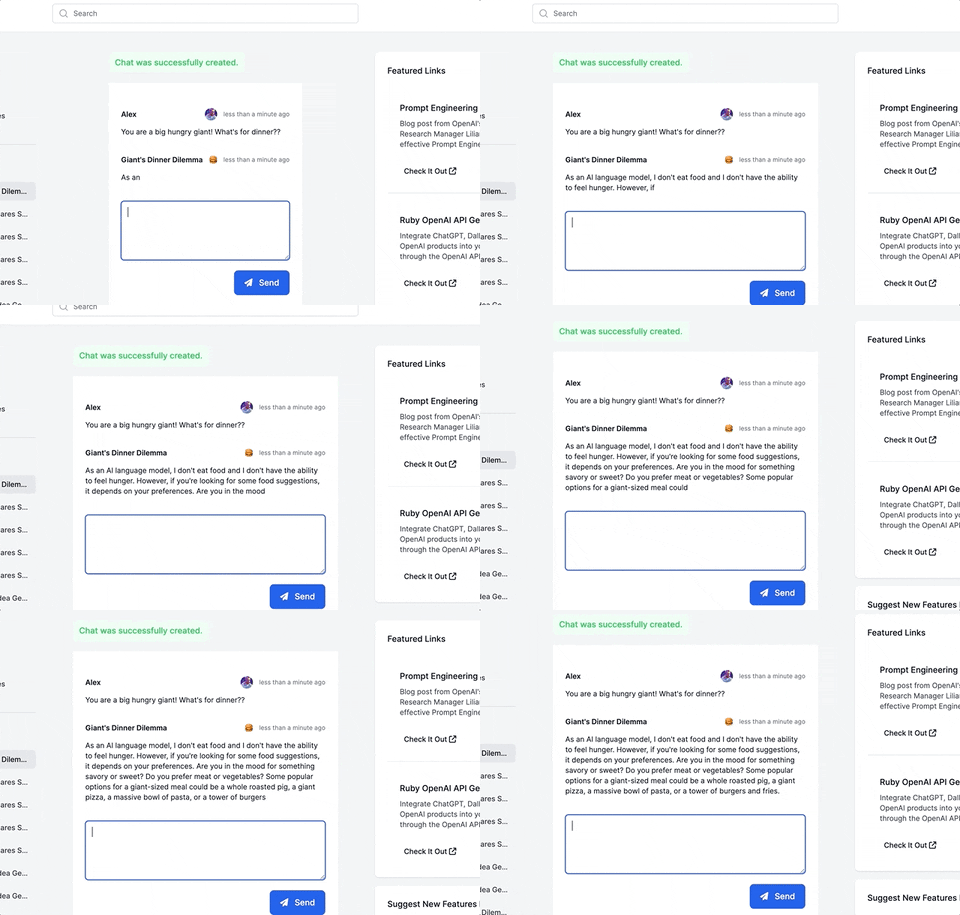
ChatGPT streaming with ruby-openai, Rails 7, Hotwire, Turbostream, Sidekiq and Tailwind!
This guide will walk you through adding a ChatGPT-like messaging stream to your Ruby on Rails 7 app using ruby-openai, Rails 7, Hotwire, Turbostream, Sidekiq and Tailwind. All code included below!
Want more content like this, for free? Check out my free book, RailsAI!
- Follow me on Twitter for more Ruby AI at https://twitter.com/alexrudall
- Released under the MIT License - use as you wish :)

andreibondarev
/ create_schema.rb
Last active
April 20, 2025 02:33
Code for "Adding Intelligent Search to a Rails application with Weaviate"
This file contains hidden or bidirectional Unicode text that may be interpreted or compiled differently than what appears below. To review, open the file in an editor that reveals hidden Unicode characters.
Learn more about bidirectional Unicode characters
| require "weaviate" | |
| client = Weaviate::Client.new( | |
| url: ENV['WEAVIATE_URL'], | |
| api_key: ENV['WEAVIATE_API_KEY'], | |
| # Configure Weaviate to use OpenAI to create vectors and use it for querying | |
| # You can also use Cohere or Hugging Face and pass their API key here instead | |
| model_service: :openai, | |
| model_service_api_key: ENV['OPENAI_API_KEY'] |

This file contains hidden or bidirectional Unicode text that may be interpreted or compiled differently than what appears below. To review, open the file in an editor that reveals hidden Unicode characters.
Learn more about bidirectional Unicode characters
| { | |
| "name": "setup-chat", | |
| "description": "the gist to setup Build your own AI-Powered chat app with Next.js and LangChain from blog.experienced.dev", | |
| "version": "0.3.0", | |
| "engines": { | |
| "node": ">=18" | |
| }, | |
| "bin": "./setup.js" | |
| } |

mabenson00
/ cheatsheet.rb
Last active
February 17, 2026 05:04
Rails Postgres ActiveRecord JSON cheatsheet
This file contains hidden or bidirectional Unicode text that may be interpreted or compiled differently than what appears below. To review, open the file in an editor that reveals hidden Unicode characters.
Learn more about bidirectional Unicode characters
| # Basic key operators to query the JSON objects : | |
| # #> : Get the JSON object at that path (if you need to do something fancy) | |
| # -> : Get the JSON object at that path (if you don't) | |
| # ->> : Get the JSON object at that path as text | |
| # {obj, n} : Get the nth item in that object | |
| # https://www.postgresql.org/docs/9.4/functions-json.html#FUNCTIONS-JSONB-OP-TABLE | |
| # Date | |
| # date before today |

This is a prompt that will make ChatGPT play a RPG adventure with you. Just paste the prompt into the input. You can also provide information like your name
To pause a game, save the JSON and paste it in the second file and paste that as the prompt. Optionally provide more information for the model like setting
To play original and very adaptive RPG games without friends. Obviously, I'm a redditor.

mattiaz9
/ blurhashDataURL.ts
Last active
October 29, 2025 01:56
Convert blurhash to a base64 DataURL string (no canvas or node-canvas)
This file contains hidden or bidirectional Unicode text that may be interpreted or compiled differently than what appears below. To review, open the file in an editor that reveals hidden Unicode characters.
Learn more about bidirectional Unicode characters
| import { decode } from "blurhash" | |
| export function blurHashToDataURL(hash: string | undefined): string | undefined { | |
| if (!hash) return undefined | |
| const pixels = decode(hash, 32, 32) | |
| const dataURL = parsePixels(pixels, 32, 32) | |
| return dataURL | |
| } |
NewerOlder