Skip to content

Instantly share code, notes, and snippets.

@nmagee
Last active November 10, 2025 20:40
Show Gist options
  • Select an option

  • Save nmagee/424123ef92b0ef1e71ecd7b694251254 to your computer and use it in GitHub Desktop.

Select an option

Save nmagee/424123ef92b0ef1e71ecd7b694251254 to your computer and use it in GitHub Desktop.
Learn about ways to aggregate data at rest (with GROUP BY) and streaming data (with WINDOWING)

Data Windowing

With endless streaming sources, how do we generate analytics? Windowing is a meaningful way of aggregating data into useful chunks. A consumer operation, not a producer operation. Think of it as a group_by operation for streaming data.

GROUP BY - for data at rest

Note the two attached python scripts that use the NYC Taxi Data and group results by either day or hour (of a single day). This is a way of getting simple aggregate counts, but can also serve as the basic "chunk" for deeper analytics within each chunk of time.

The GROUP BY SQL operation can aggregate data along any metric of the data, provided the data is already at rest in a table.

So the question becomes: How do you aggregate/count/analyze data as it continues to stream in?

Windowing - for streaming data

There are a few common windowing types:

  • Tumbling – fixed, non-overlapping chunks (every N minutes, etc.)
  • Sliding / Hopping – overlapping chunks (rolling 1-hr window updating every 5 mins)
  • Session – dynamic window based on activity gaps
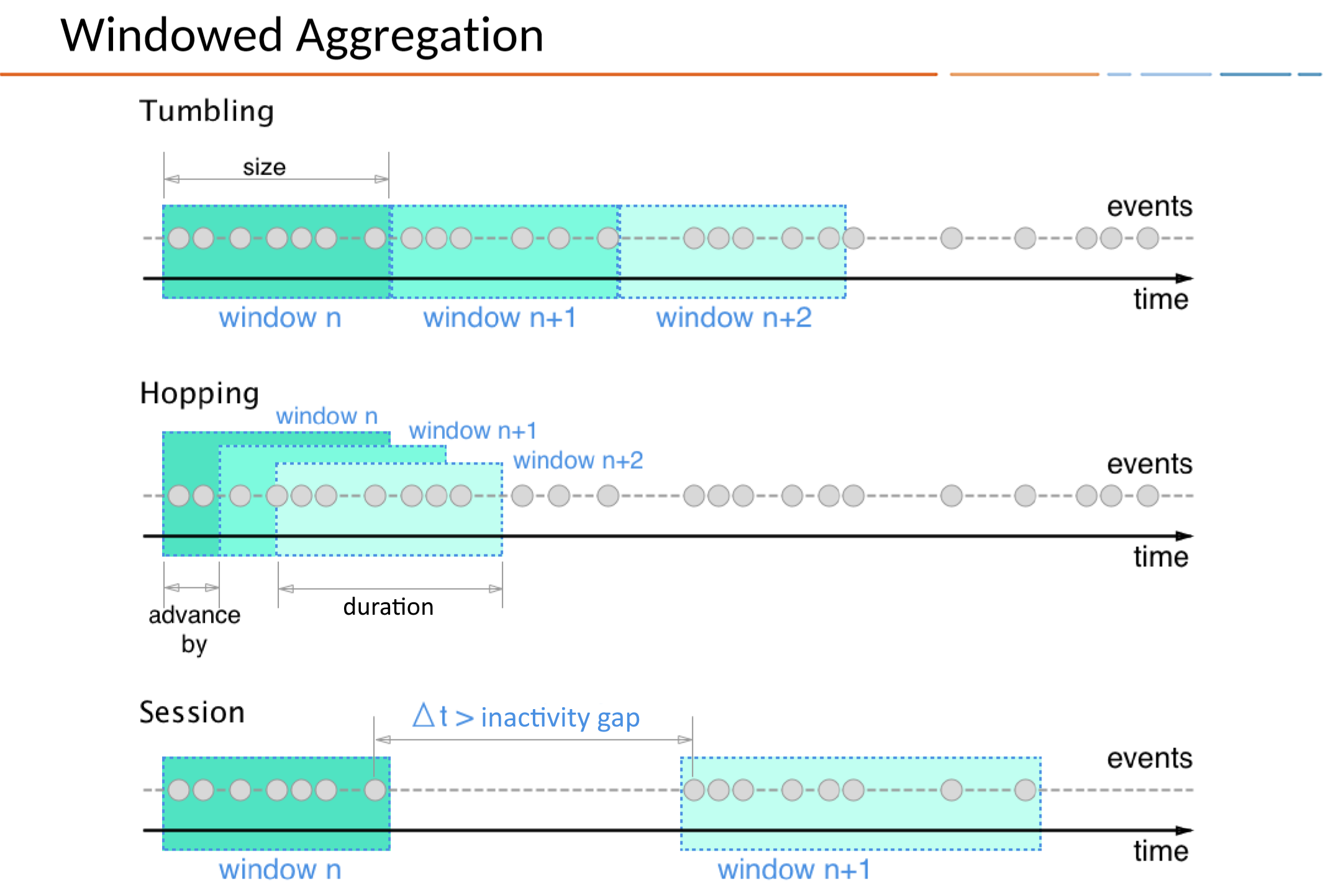
Image of window types

When consuming from Kafka we can do this in a few ways:

  • Kafka Streams
  • Apache Flink
  • Spark Structured Streaming

Windows are computed at the end of each iteration of a defined window.

See this page for an example. This script consumes Wikipedia edit events from a Kafka topic and counts how many events of each type (edit, new, log, etc.) occur within consecutive 3-minute tumbling windows. When each window completes, it prints the event type, the count of events, and the window's time range.

import duckdb
import os
import json
def import_daily():
try:
conn = duckdb.connect('daily.db')
conn.execute("CREATE TABLE IF NOT EXISTS daily AS SELECT * FROM read_parquet('https://d37ci6vzurychx.cloudfront.net/trip-data/yellow_tripdata_2025-08.parquet')")
except Exception as e:
print(e)
finally:
conn.close()
def generate_daily_summary():
try:
conn = duckdb.connect('daily.db')
# Extract day dynamically in the query
daily_summary = conn.execute("SELECT EXTRACT(DAY FROM tpep_pickup_datetime) AS day, count(*) AS count FROM daily GROUP BY day ORDER BY day")
# save the result to a JSON dict and pretty print it
print(json.dumps(daily_summary.fetchall(), indent=4))
# save the result to a new duckdb table named daily_summary
conn.execute("CREATE TABLE daily_summary AS SELECT EXTRACT(DAY FROM tpep_pickup_datetime) AS day, count(*) AS count FROM daily GROUP BY day ORDER BY day")
except Exception as e:
print(e)
finally:
conn.close()
if __name__ == "__main__":
import_daily()
generate_daily_summary()
import duckdb
import os
import json
def generate_hourly_summary():
try:
conn = duckdb.connect('daily.db')
# Extract day dynamically in the query
hourly_summary = conn.execute("""
SELECT EXTRACT(HOUR FROM tpep_pickup_datetime) AS hour, count(*) AS count
FROM daily
WHERE DATE(tpep_pickup_datetime) = '2025-08-10'
GROUP BY hour
ORDER BY hour
""")
# save the result to a JSON dict and pretty print it
print(json.dumps(hourly_summary.fetchall(), indent=4))
# save the result to a new duckdb table named daily_summary
conn.execute("""
CREATE OR REPLACE TABLE hourly_summary AS
SELECT EXTRACT(HOUR FROM tpep_pickup_datetime) AS hour, count(*) AS count
FROM daily
WHERE DATE(tpep_pickup_datetime) = '2025-08-10'
GROUP BY hour
ORDER BY hour
""")
except Exception as e:
print(e)
finally:
conn.close()
if __name__ == "__main__":
generate_hourly_summary()
Sign up for free to join this conversation on GitHub. Already have an account? Sign in to comment