
This document provides a comprehensive overview of all available configuration options for OpenCode, including command-line flags, environment variables, and configuration file settings.

thoroc
/ CONFIGURATION.md
Created
November 6, 2025 21:41
OpenCode config - shamelessly lifted from the Discord server

peterc
/ openai-openrouter-multiple-models.rb
Last active
December 10, 2025 10:52
How to call an OpenRouter LLM with the official Ruby OpenAI gem
This file contains hidden or bidirectional Unicode text that may be interpreted or compiled differently than what appears below. To review, open the file in an editor that reveals hidden Unicode characters.
Learn more about bidirectional Unicode characters
| require "openai" | |
| client = OpenAI::Client.new( | |
| api_key: ENV.fetch("OPENROUTER_API_KEY"), | |
| base_url: "https://openrouter.ai/api/v1" | |
| ) | |
| models = %w{ | |
| google/gemma-2b-it | |
| anthropic/claude-sonnet-4 |

Hotrod369
/ 1_Sieve_Script_Cheatsheet.md
Last active
March 11, 2026 11:02
This Gist provides a comprehensive cheatsheet for Sieve scripts, covering various objects, attributes, parameters, and their possible values. Sieve is a powerful scripting language for filtering and organizing emails, commonly used with email clients and servers. This cheatsheet includes tests, actions, comparators, and extensions to help you cr…
peterc
/ CONVENTIONS.md
Last active
March 8, 2026 00:42
CONVENTIONS.md file for AI Rails 8 development
- You MUST NOT try and generate a Rails app from scratch on your own by generating each file. For a NEW app you MUST use
rails newfirst to generate all of the boilerplate files necessary. - Create an app in the current directory with
rails new . - Use Tailwind CSS for styling. Use
--css tailwindas an option on therails newcall to do this automatically. - Use Ruby 3.2+ and Rails 8.0+ practices.
- Use the default Minitest approach for testing, do not use RSpec.
- Default to using SQLite in development.
rails newwill do this automatically but take care if you write any custom SQL that it is SQLite compatible. - An app can be built with a devcontainer such as
rails new myapp --devcontainerbut only do this if requested directly. - Rails apps have a lot of directories to consider, such as app, config, db, etc.
- Adhere to MVC conventions: singular model names (e.g., Product) map to plural tables (products); controllers are plural.
- Guard against incapable browsers accessing controllers with `allo

schappim
/ deep_research.rb
Created
February 9, 2025 09:39
A recreation of OpenAI's Deep Research feature in Ruby
This file contains hidden or bidirectional Unicode text that may be interpreted or compiled differently than what appears below. To review, open the file in an editor that reveals hidden Unicode characters.
Learn more about bidirectional Unicode characters
| #!/usr/bin/env ruby | |
| # deep_research.rb | |
| require 'openai' | |
| require 'json' | |
| require 'net/http' | |
| require 'uri' | |
| require 'timeout' | |
| require 'time' |

hackermondev
/ zendesk.md
Last active
February 5, 2026 09:19
1 bug, $50,000+ in bounties, how Zendesk intentionally left a backdoor in hundreds of Fortune 500 companies
hi, i'm daniel. i'm a 15-year-old with some programming experience and i do a little bug hunting in my free time. here's the insane story of how I found a single bug that affected over half of all Fortune 500 companies:
If you've spent some time online, you’ve probably come across Zendesk.
Zendesk is a customer service tool used by some of the world’s top companies. It’s easy to set up: you link it to your company’s support email (like support@company.com), and Zendesk starts managing incoming emails and creating tickets. You can handle these tickets yourself or have a support team do it for you. Zendesk is a billion-dollar company, trusted by big names like Cloudflare.
Personally, I’ve always found it surprising that these massive companies, worth billions, rely on third-party tools like Zendesk instead of building their own in-house ticketing systems.

This file contains hidden or bidirectional Unicode text that may be interpreted or compiled differently than what appears below. To review, open the file in an editor that reveals hidden Unicode characters.
Learn more about bidirectional Unicode characters
| # Additional reference here: | |
| # https://strftime.org | |
| require 'active_support/core_ext/integer/inflections' # To use .ordinalize() outside of rails | |
| date = Time.now | |
| date.strftime('%a %d %b %Y') | |
| # => Sun 08 Sep 2024 |

coderberry
/ create_with_callbacks.rb
Last active
July 21, 2024 11:56
FactoryBot#create with ActiveRecord Callbacks
This file contains hidden or bidirectional Unicode text that may be interpreted or compiled differently than what appears below. To review, open the file in an editor that reveals hidden Unicode characters.
Learn more about bidirectional Unicode characters
| # freeze_string_literal: true | |
| module CreateWithCallbacks | |
| extend ActiveSupport::Concern | |
| # Mimic the FactoryBot `create` method but with callbacks. All traits and overrides are applied. | |
| # | |
| # @example with traits and attributes | |
| # source_course = create_with_callbacks!( | |
| # :course, |

alexrudall
/ #ChatGPT Streaming.md
Last active
December 27, 2025 05:31
ChatGPT streaming with ruby-openai, Rails 7, Hotwire, Turbostream, Sidekiq and Tailwind!
This guide will walk you through adding a ChatGPT-like messaging stream to your Ruby on Rails 7 app using ruby-openai, Rails 7, Hotwire, Turbostream, Sidekiq and Tailwind. All code included below!
Want more content like this, for free? Check out my free book, RailsAI!
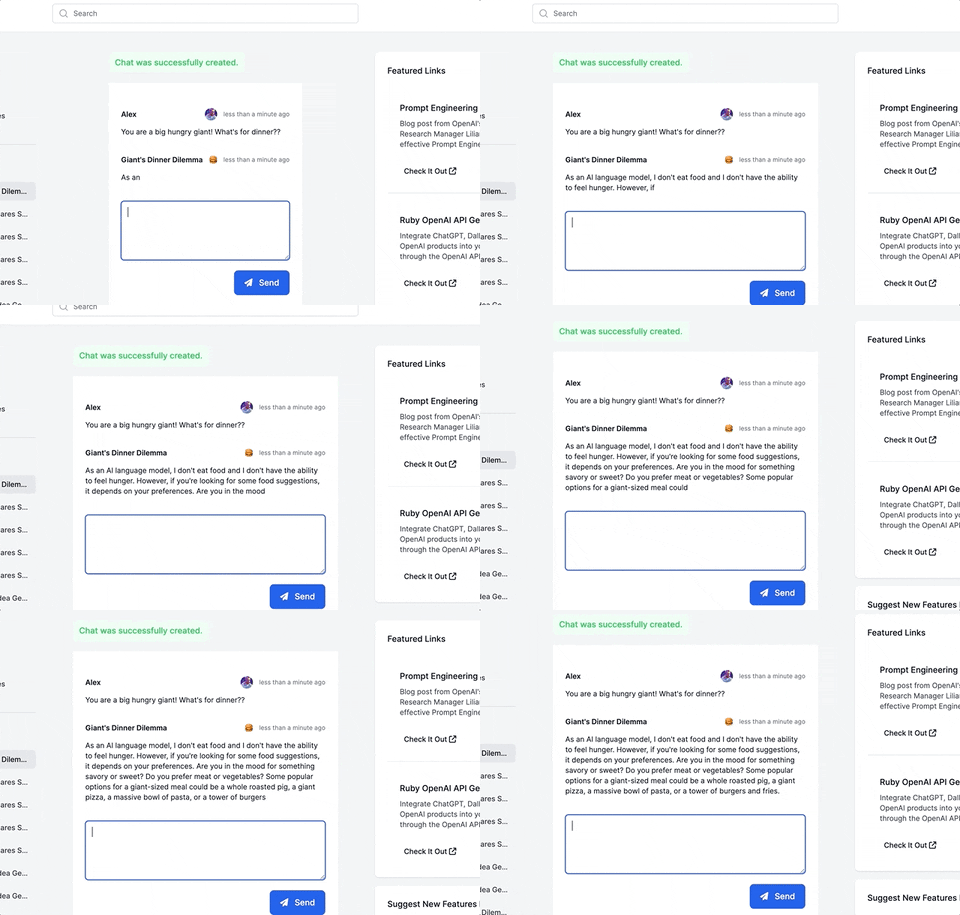
- Follow me on Twitter for more Ruby AI at https://twitter.com/alexrudall
- Released under the MIT License - use as you wish :)

henryivesjones
/ postgresql_date_timestamp_interval_cheat_sheet.md
Created
February 14, 2023 16:56
PostgreSQL DATE, TIMESTAMP, and INTERVAL cheat sheet
Working with DATE, TIMESTAMP, and INTERVAL in PostgreSQL can be confusing. In this article I will go over the three date/time related data types, and the two most useful date/time functions: DATE_PART and DATE_TRUNC. Finally, I will provide some real life examples of how these types and functions can be used within queries.
PostgreSQL Date/Time Documentation
The DATE type contains the year, month, and day of a date. It is not possible to do any type of time related functions on a DATE without first converting it to a TIMESTAMP. Subtracting two DATE values from one another results in an INT representing the # of days between.
The TIMESTAMP type contains a year, month, day, hour, minute, second, and microsecond. This is the type that I most often use.
NewerOlder