
- Create your bot with botfather
- Make you bot an admin of your channel
Go to Telegram web and open a channel, get the ID from -[channel id] from hash in the path
https://web.telegram.org/k/#-9999999999999
-9999999999999 is the channel ID.
- Go to https://web.telegram.org
- Click on your channel
- Look at the URL and find the part that looks like
c12112121212_17878787878787878 - Remove the underscore and after
c12112121212 - Remove the prefixed letter
12112121212 - Prefix with a
-100so-10012112121212 - That's your channel id.
- Make your channel public
- Create a public link
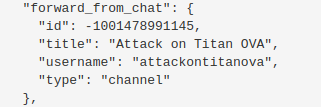
- Send a message from console to
@[your_public_link_text] - Copy chat id from response in console as the channel id




Just right click on channel post and select
Copy Post Link, you will get something looks like to thishttps://t.me/c/123456789/137Then do
-100+123456789=-100123456789is your Channel id.