
OpenTracing   == traces            ( jaeger/tokio-tracing )
OpenCensus    == metrics           ( grafana/prometheus   )
OpenTelemetry == traces && metrics ( et al.               )
- The
?sigil is shorthand that specifies a field should be recorded using itsfmt::Debugimplementation. - The
%sigil operates similarly, but indicates that the value should be recorded using itsfmt::Displayimplementation.
From the docs: tracing - Rust
The
?sigil is shorthand that specifies a field should be recorded using itsfmt::Debugimplementation:#[derive(Debug)] struct MyStruct { field: &'static str, } let my_struct = MyStruct { field: "Hello world!" }; // `my_struct` will be recorded using its `fmt::Debug` implementation. event!(Level::TRACE, greeting = ?my_struct); // is equivalent to: event!(Level::TRACE, greeting = tracing::field::debug(&my_struct));The
%sigil operates similarly, but indicates that the value should be recorded using itsfmt::Displayimplementation:// `my_struct.field` will be recorded using its `fmt::Display` implementation. event!(Level::TRACE, greeting = %my_struct.field); // is equivalent to: event!(Level::TRACE, greeting = tracing::field::display(&my_struct.field));The
%and?sigils may also be used with local variable shorthand:// `my_struct.field` will be recorded using its `fmt::Display` implementation. event!(Level::TRACE, %my_struct.field);Additionally, a span may declare fields with the special value
Empty, which indicates that that the value for that field does not currently exist but may be recorded later. For example:use tracing::{trace_span, field}; // Create a span with two fields: `greeting`, with the value "hello world", and // `parting`, without a value. let span = trace_span!("my_span", greeting = "hello world", parting = field::Empty); // ... // Now, record a value for parting as well. span.record("parting", &"goodbye world!");Finally, events may also include human-readable messages, in the form of a format string and (optional) arguments, after the event’s key-value fields. If a format string and arguments are provided, they will implicitly create a new field named
messagewhose value is the provided set of format arguments.
preferred method of reporting events is to use the macros and key-value pairs.
the most common macros include debug!() info!(). debug is more verbose and info is meant for emitting important happy path events.
use key value pairs. so when reporting an info you want to do it like this: info!(key1 = value1, key2 = value2, message = "this transaction is done!")
The tokio/tracing crate uses the environmental variable RUST_LOG to pass in a “Directive” string for log filtering: target[span{field=value}]=level for all workspace members:
- To show all errors:
RUST_LOG=error - To show errors from
workspace-member1target:RUST_LOG="workspace_member1=error" - To show errors from
workspace-member2on thedataspan (correlating to this method:RUST_LOG="workspace_member2[data]=error" - To show errors for all above and filter where the
senderisbob:RUST_LOG='workspace_member2[data{sender="bob"}]=error'
More info here
warn_span!("warn").in_scope(|| {
    info_span!("info").in_scope(|| {
        warn!("I AM WARN");
        info!("I AM INFO");
    });
});
Setting trace level to INFO preserves both the the info span and event:
$ RUST_LOG=info cargo run

 WARN warn:info: I AM WARN
 INFO warn:info: I AM INFO
To only run something during cargo run rather than form the binary:
#[cfg(debug_assertions)]
{
    use opentelemetry::trace::TraceContextExt;
    if !parent_ctx.span().span_context().is_valid() {
        warn!("invalid span context, unable to get parent context");
    }
}
But setting the trace level to WARN has the "info" span omitted and the event inherited by the parent span:
$ RUST_LOG=warn cargo run

WARN warn: I AM WARN
Context is an object that contains the information for the sending and receiving service, or execution unit, to correlate one signal with another. When Service A calls Service B, Service A includes a trace ID and a span ID as part of the context. Service B uses these values to create a new span that belongs to the same trace, setting the span from Service A as its parent. This makes it possible to track the full flow of a request across service boundaries.
Baggage is contextual information that resides next to context. Baggage is a key-value store, which means it lets you propagate any data you like alongside context.
Baggage means you can pass data across services and processes, making it available to add to traces, metrics, or logs in those services.
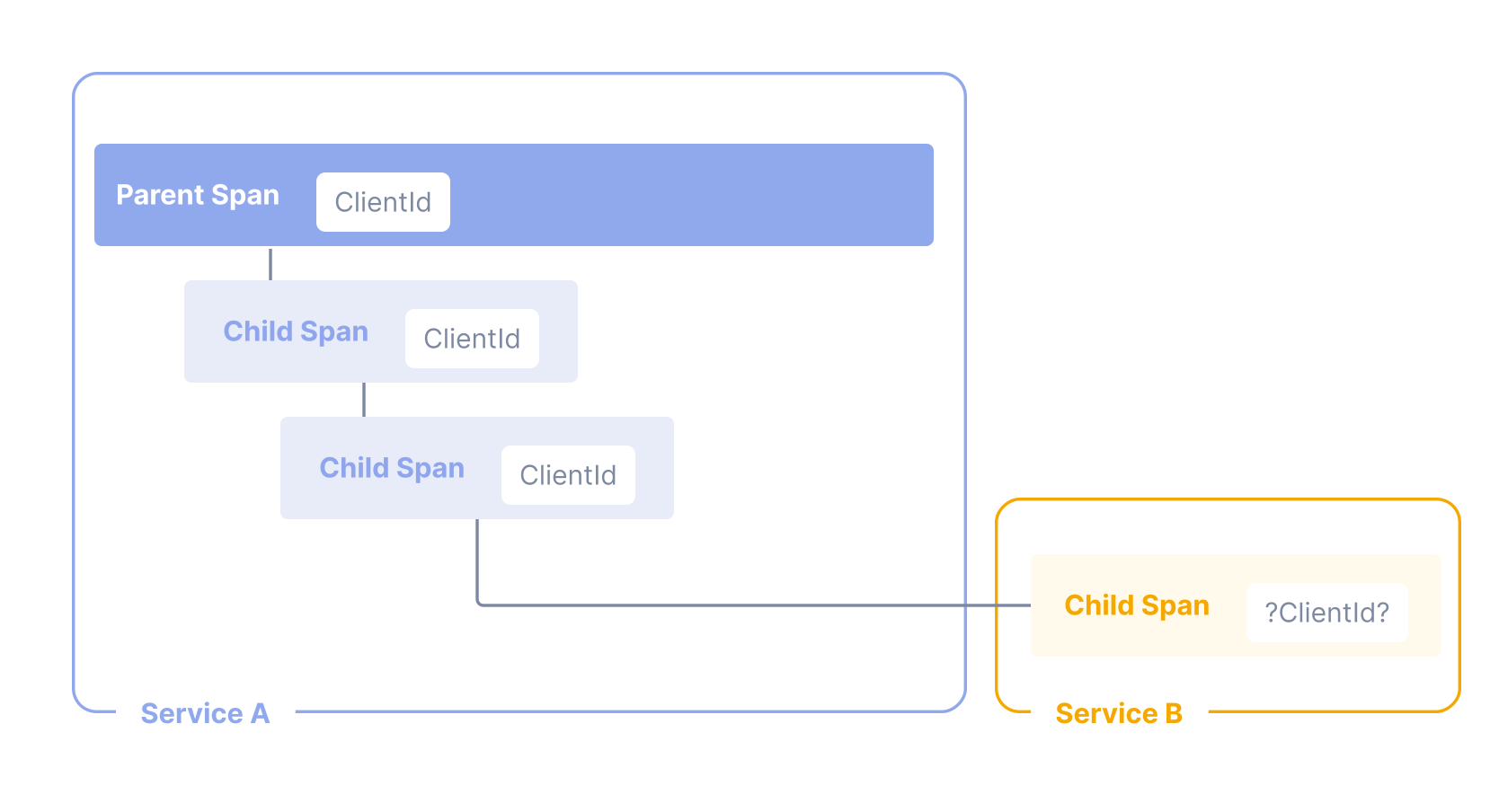
OpenTelemetry uses Propagators to serialize and deserialize cross-cutting concern values such as Spans (usually only the SpanContext portion) and Baggage. Different Propagator types define the restrictions imposed by a specific transport and bound to a data type.
The Propagators API currently defines one Propagator type:
TextMapPropagatorinjects values into and extracts values from carriers as text.
A span represents an operation within a transaction. Each Span encapsulates the following state:
- An operation name
- A start and finish timestamp
- Attributes: A list of key-value pairs.
- A set of zero or more Events, each of which is itself a tuple (timestamp, name, Attributes). The name must be strings.
- Parent’s Span identifier.
- Links to zero or more causally-related Spans (via the SpanContext of those related Spans).
- SpanContext information required to reference a Span. See below.
Represents all the information that identifies Span in the Trace and MUST be propagated to child Spans and across process boundaries. A SpanContext contains the tracing identifiers and the options that are propagated from parent to child Spans.
- TraceId is the identifier for a trace. It is worldwide unique with practically sufficient probability by being made as 16 randomly generated bytes. TraceId is used to group all spans for a specific trace together across all processes.
- SpanId is the identifier for a span. It is globally unique with practically sufficient probability by being made as 8 randomly generated bytes. When passed to a child Span this identifier becomes the parent span id for the child Span.
- TraceFlags represents the options for a trace. It is represented as 1 byte (bitmap).
- Sampling bit - Bit to represent whether trace is sampled or not (mask
0x1).
- Sampling bit - Bit to represent whether trace is sampled or not (mask
- Tracestate carries tracing-system specific context in a list of key value pairs. Tracestate allows different vendors propagate additional information and inter-operate with their legacy Id formats. For more details see this.
https://docs.rs/tracing-opentelemetry/latest/tracing_opentelemetry/#traits
-
tracing::Spanmaps toopentelemetry::Context -
https://docs.rs/opentelemetry/latest/opentelemetry/trace/struct.SpanContext.html
-
tracing::instrumenthttps://docs.rs/tracing/latest/tracing/attr.instrument.html