
This is a suite of custom commands for vetting people into a discord server using yagpdb's ticket system.
- [no role] - Can only see
#start-hereand#rules. - admin - Can do everything.
- approver - Can approve or deny vetting tickets but shouldn't have other permissions.
- anti-liberal aktion - Can see vetting and talk to applicants but can't approve.
- vetted - Applicants who have been approved. Gives them access to
#rolesand#general - liberal in the walls - Additional role for applicants who have been approved but need some restrictions added (we add a role icon to tell people they're a lib)
- chattanoogan - Selectable in
#rolesto get access to the rest of the server. We make people take this as a self-role in the hope that while they're there they'll select a pronoun role too.
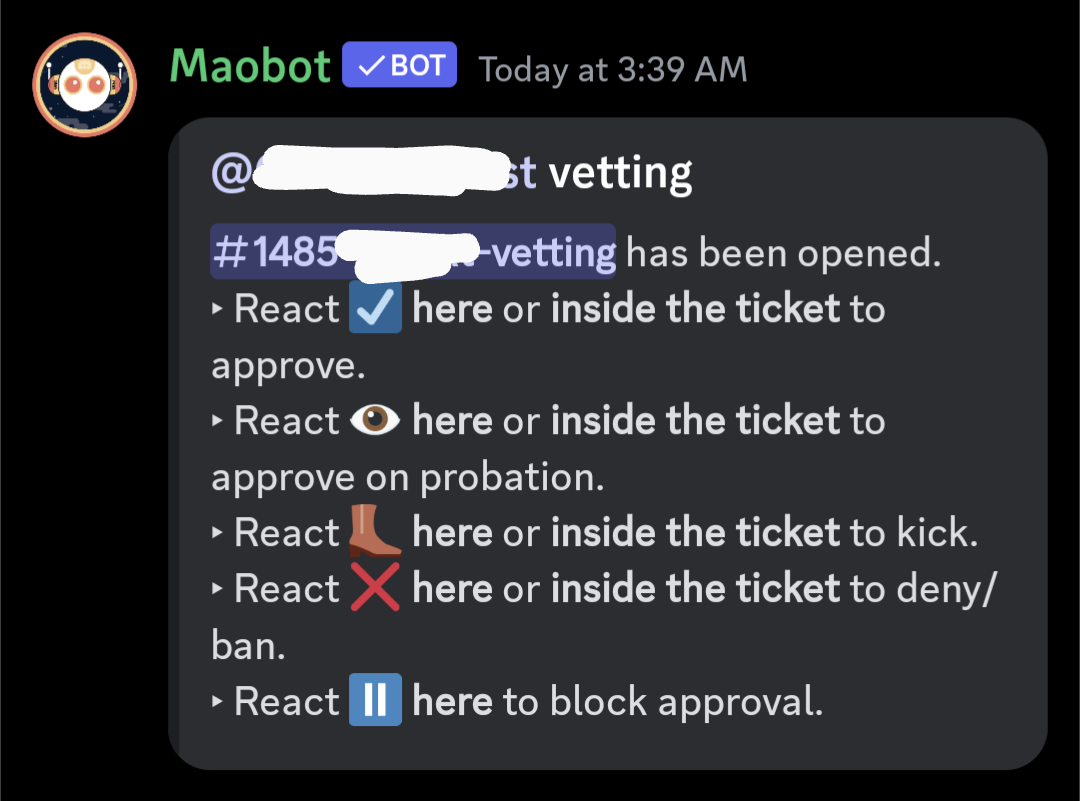
#start-here- Contains a single welcome message with a reaction that triggers opening a new vetting ticket. Not visible to vetted.#vetting-logs- Has a log message for each person in vetting. When their vetting status changes, the log message is edited to show their current status. Also, when a vetting ticket is closed a transcript of the ticket channel is dumped and uploaded here as an attachment. This channel is only visible to admins/approvers/antiliberalaktion.#[num]-[username]-vetting- This is a different channel for every user so that only the applicant and admins/approvers/antiliberalaktion can see the channel. This is the vetting ticket itself. (Username is sanitized and truncated to 20 characters.)
- Click the react in
#start-hereto open a new channel. - The bot sends the vetting questions in the channel. It also sends a new log message in
#vetting-logs, which will be updated with the vetting ticket status. - The applicant has 3 days to answer the questions to approvers' satisfaction. (After 3 days with no messages from the applicant, the ticket auto-closes.)
- Approvers can react ☑️ to any message in the ticket, or to the log message, in order to approve the applicant. Alternatively they can react with 👁️, which approves while additionally giving the "liberal in the walls" role.
- Approvers can react ⏸️ to the log message in order to block any other approver from approving. This doesn't work in the channel itself because we don't want the applicant to see that they've been put on hold.
- Approvers can react 👢 to any message in the ticket, or to the log message, in order to kick the applicant.
- Approvers can react ❌ to any message in the ticket, or to the log message, in order to ban the applicant for 6 months. This is the typical way we deny now that vetting activity has picked up to the point of being a serious load on approvers.
- User 0, key "vet-user-%" where % is the int64 user ID of the applicant
- User 0, key "vet-chan-%" where % is the int64 channel ID of the ticket
- User 0, key "vet-log-%" where % is the int64 message ID of the log message in
#vetting-logs
In all cases the db entries are stored under the "user" 0 but this has nothing to do with users, it's just a database namespacing thing.
The same map is stored under all three keys:
(sdict
  "UserID" $userID
  "ChannelID" $channelID
  "LogMessageID" $logMessageID
  "QsMessageID" $qsMessageID
)
This use of the database means that when we're given any one piece of info by the trigger context for an event, we can obtain everything that we need. For example, if the applicant reacts to the #start-here message, we only know their user ID but we can query "vet-user-%" to find out if there's already an open vetting ticket for them. Or if someone approves inside the vetting channel then we only know the channel ID, but we can query "vet-chan-%" to find out the log message ID in order to update the ticket status.
QsMessageID is the message ID of the vetting questions message inside their ticket. This is necessary so that we can update the expiration time inside the ticket every time the applicant sends a message there.
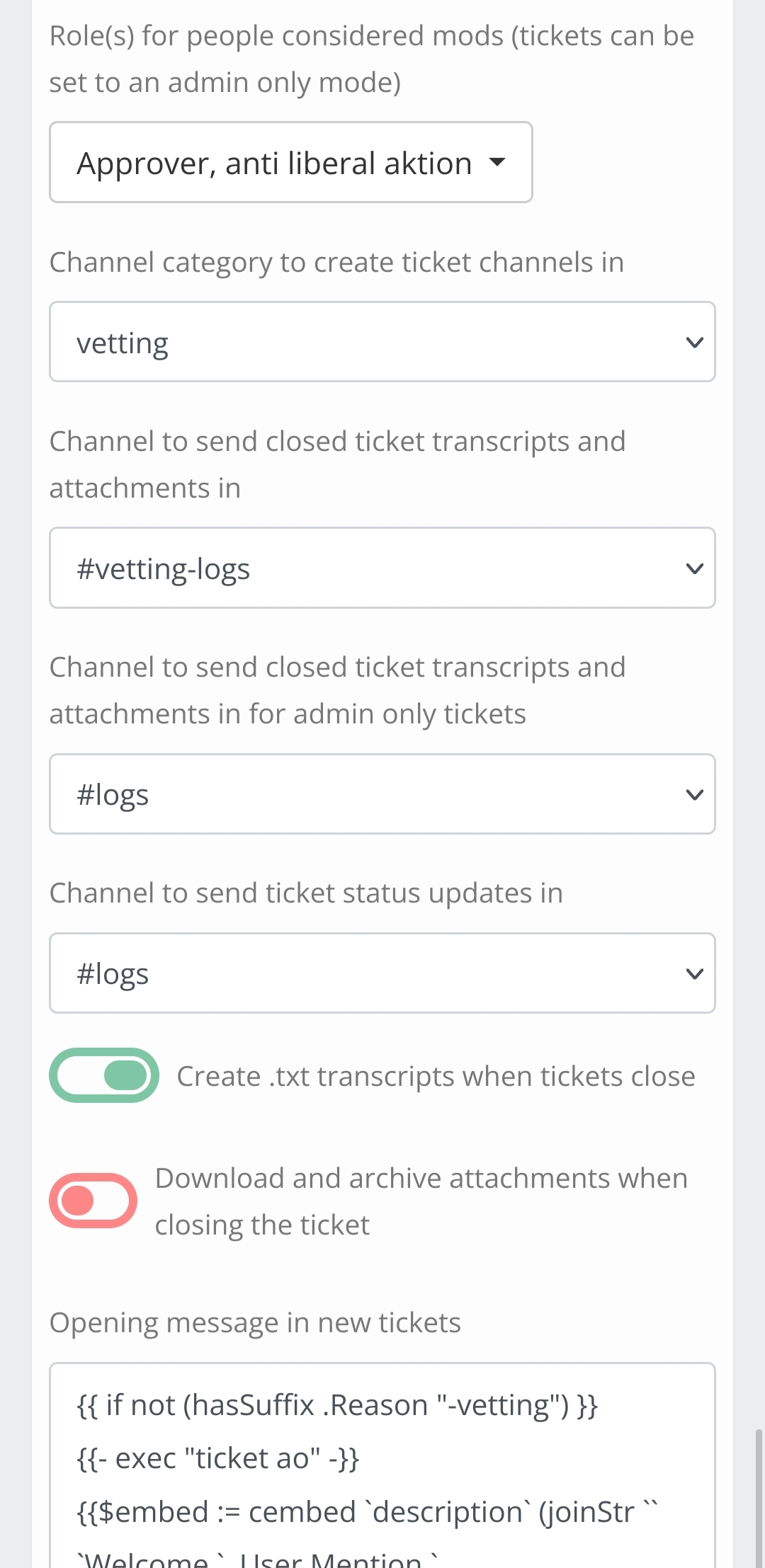
We still want to let people open normal tickets to communicate with admins about server issues. In this case we don't want approvers to be able to see those ticket channels. Fortunately yag lets us do this. Just set the "moderator" option to the approver role, and then set all new tickets to admin only ("ao") mode unless they're vetting tickets. The tickets ao command removes mod permissions from the channel but leaves other users.
An applicant (non-admin non-approver non-antiliberalaktion) clicking the reaction in #start-here begins the process. We remove the reaction so that nobody can see how many have been vetted. We check "vet-user-%" to make sure the user doesn't already have an open vetting ticket.
If they don't already have an open vetting ticket, we create a new one. Their name goes through a normalization step to determine the channel name: first romanize it with the sanitizeText function, then pick out all of the alphanumeric characters, then truncate it to 20 characters. It turns out that Discord channel names have a lot more restrictions on them than user names, and this is about the best we can do to try to make the vetting channel names identifiable. Be aware though that this is incompatible with server discovery because it checks for NSFW channel names, and anyone with a NSFW name can just open a vetting ticket and delist you...
Once the vetting channel is open, we send the vetting questions inside the new channel, send a log message in #vetting-logs, populate the three database entries, and schedule the timeout execCC for 3 days.
The database entries are set to expire slightly later than the proper timeout handler so that they don't take up limit space forever if admins are meddling (e.g. someone closes the ticket manually).
An applicant (non-admin non-approver non-antiliberalaktion) sending a message inside a vetting channel should reset the 3-day inactivity timeout. Because there's no fixed set of vetting channels, we have to trigger on every such message sent in the whole server. To ease load on yag we first check if the channel name ends in "-vetting" and then (since users can actually create arbitrarily-named channels with the ticket system) we query "vet-chan-%" to make sure it's a valid vetting channel.
Once we have the ticket info we need from the database we just reinsert the database entries (so that they don't expire), reschedule the timeout execCC, and update the "ticket expires at" footer in the vetting questions message.
If an approver sees red flags they can add a ⏸️ react to the log message in #vetting-logs. This is mainly a holdover from the old vetting system but it's still occasionally useful. With a ⏸️ reaction in place, nobody can approve that ticket. You can then discuss in approver chat without worrying about them getting through.
An approver can deny with ❌ to ban or 👢 to kick.
| Kick DM | Ban DM |
|---|---|
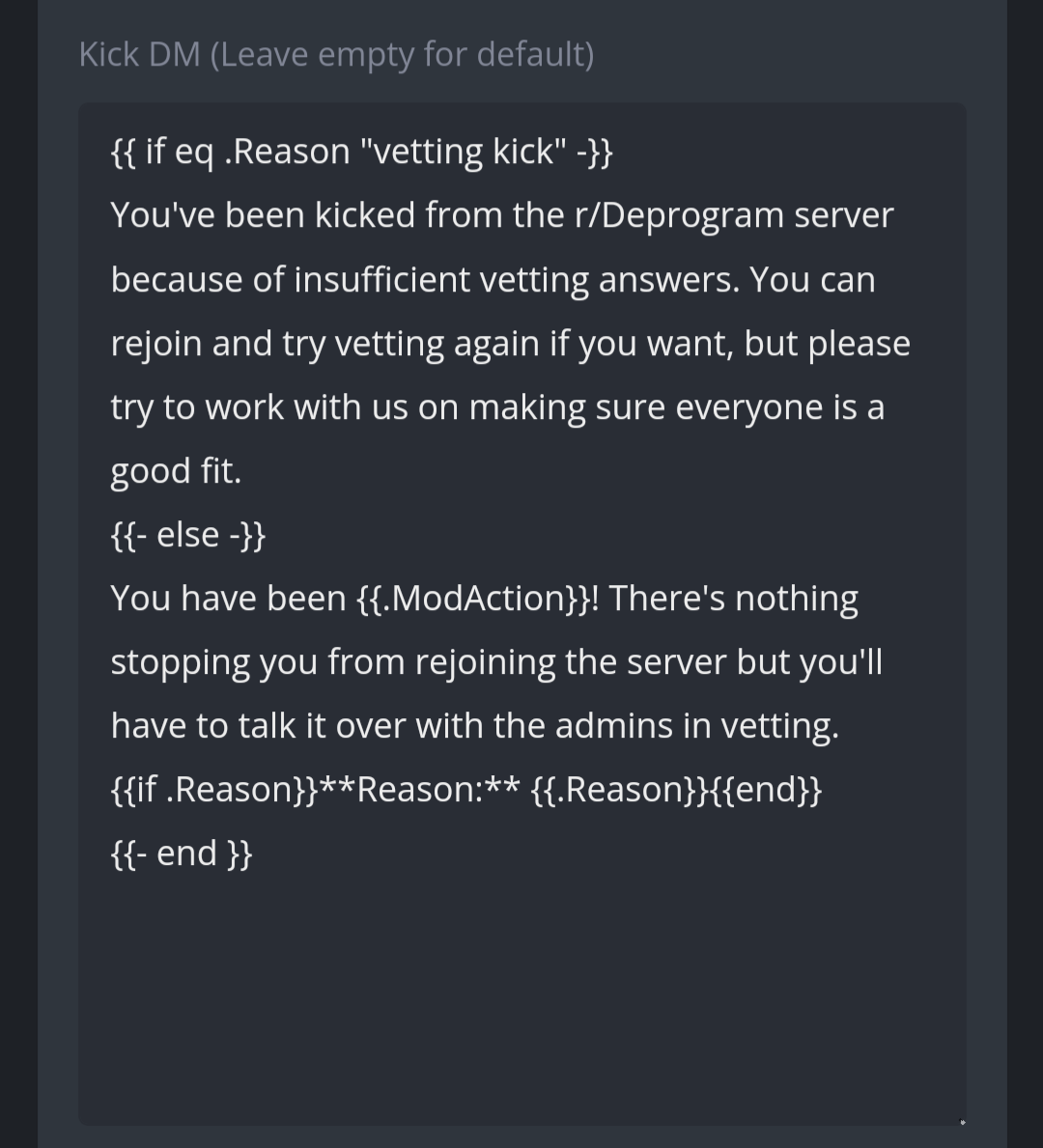 |
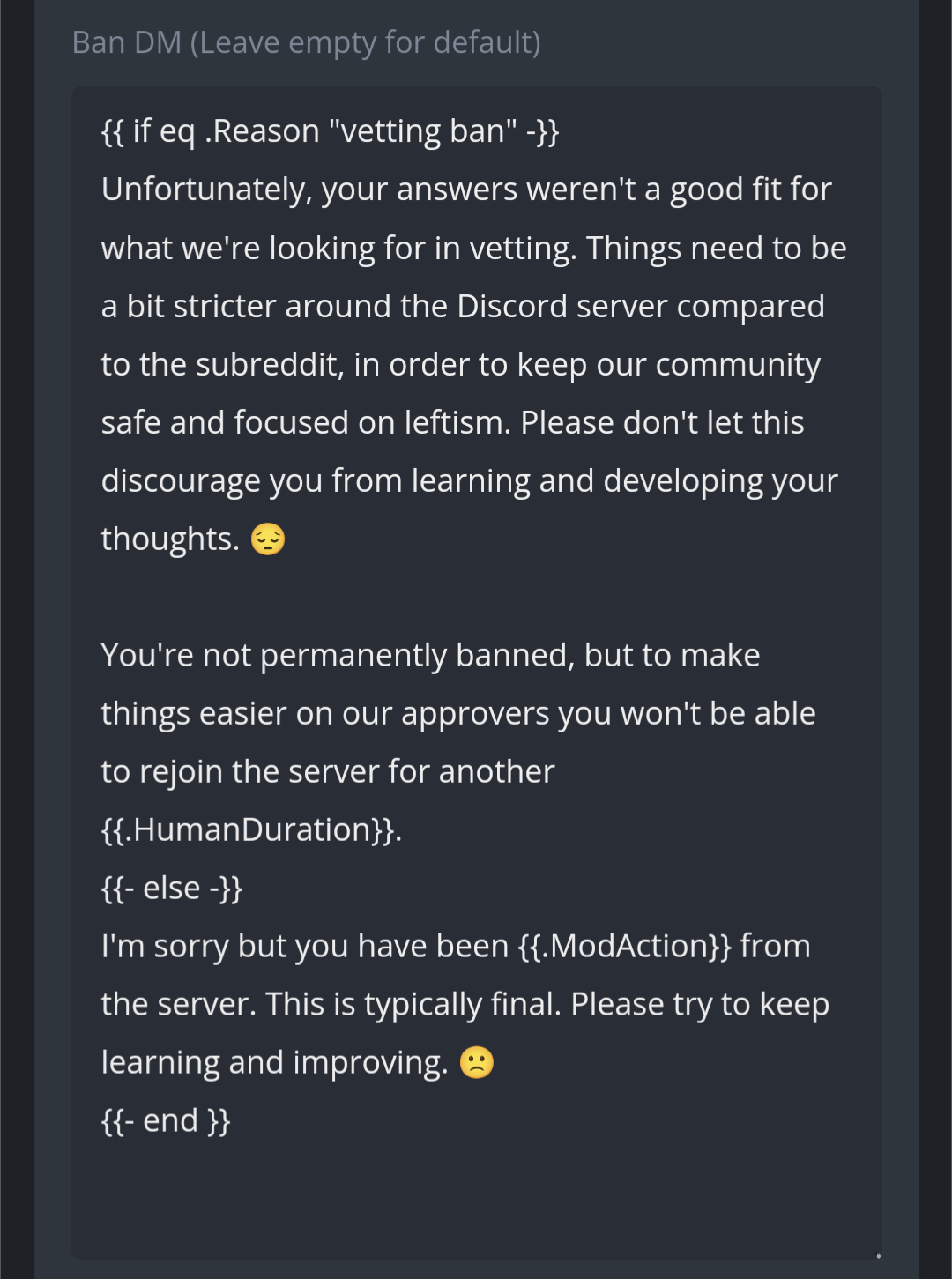 |
Ticket approval can happen either with the ☑️ or 👁️ reacts. They do the same thing except for the additional "liberal in the walls" role granted by 👁️.
Approval updates the log message, closes the ticket, unschedules the timeout cc, deletes the database entries, grants the vetted/liberal role(s), and sends a welcome message in #general which tells the new member to set their self-roles.
These approve/deny reactions can be given by an approver in two different ways: either inside the ticket (on any message) or to the log message in #vetting-logs. Because there's no fixed set of vetting channels we have to trigger on every approver/admin reaction in the entire server and then check the channel name to see if it looks vetting-related. Then we look up the ticket info sdict that we need by checking "vet-chan-%" (where % is the reaction's channel ID) and "vet-log-%" (where % is the reaction's message ID) - this handles the two cases.
Tickets can also be closed by timeout (currently 3 days) or by an admin/approver executing -close in the ticket channel. This latter option is better than using /tickets close because it updates the #vetting-log message and cleans up the database. If you manually close an empty ticket then they won't be able to create a new one until the database entries expire on their own.
A CC runs on an interval to make sure that everyone with an open vetting ticket is still in the server. A ticket will be closed when its owner is no longer around. This is difficult though, because ticket close must be performed with execCC to change the channel context to the correct channel first, but on free tier we're limited to only a single invocation of execCC every time the scheduled task triggers! Currently it just attempts to close everything it needs to close, and on free tier it will fail after the first one. It just works its way through one closed ticket at a time.
If someone manually calls -ticket close then the pruning task won't be able to close the ticket again so it handles this case specially to make sure that the database entries still get cleaned up.