
- Displays volume discounts that are added on a Fastspring product. This occurs on the buy page, before items are added to the shopping cart.
- Updates the
fastspring_products.rbseeds to include a product with a volume discount - There's also a small update to
app/views/layouts/_profile_navigation.html.erbdue to a version update of the SBL script.
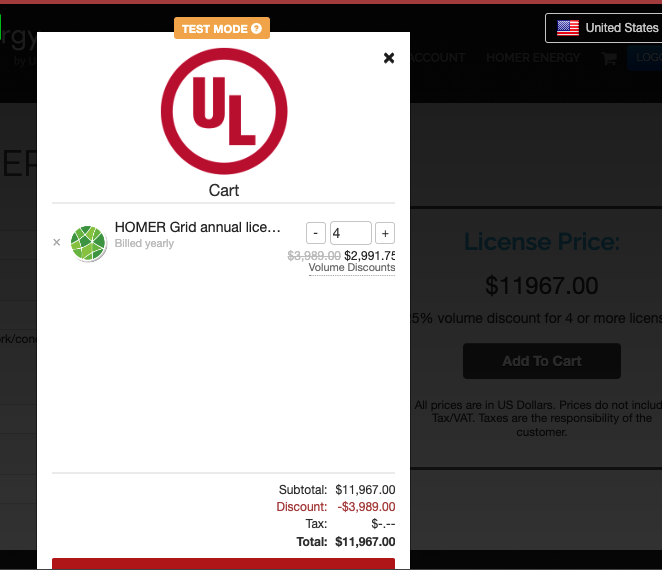
While Fastspring handles volume discounts within the cart, we aren't reflecting those on our buy page
double check your ENV
see the project wiki for instructions on creating a user, if you need one
- If you have previously pulled FastSpring products, you should get rid of the old stuff using -
FastspringProduct.destroy_allin rails console - get the current set of products-
bundle exec rake cron:refresh_fastspring_products - set up the test db with the current products
bundle exec rails RAILS_ENV=test setup_test_db - Log in as a user
- From the navbar, go to
download/purchase -> homer grid -> purchase license - Select
quantity - 4customer type - standardterm - annual - Confirm that
25% volume discount for 4 or more licensesappears under the price - Click
add to cart - Click the shopping cart icon in the header
- Under the email field, click
continue - Confirm that the total listed in the shopping cart is the same number that was displayed on the buy form (see screenshot)
Tracker #182872999
Remove inapplicable DoD items
- This PR has appropriate test coverage.
- This PR has been manually tested by another developer.