
Configure Docker for Windows (Docker Desktop)
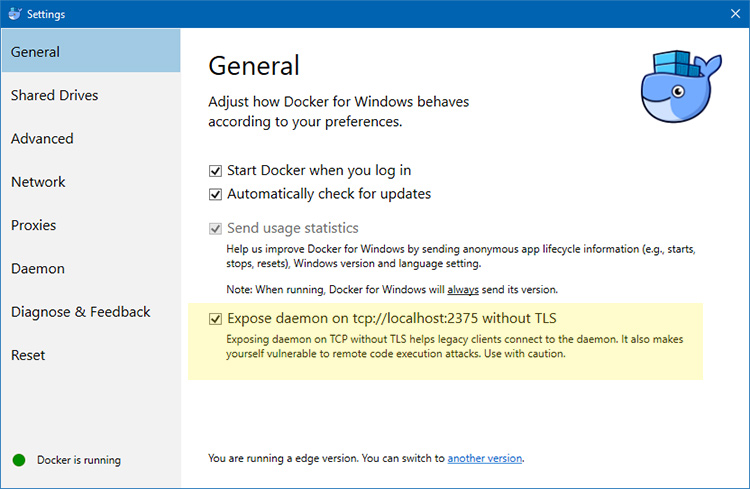
Update the apt package list
sudo apt-get update -yInstall Docker's package dependencies
sudo apt-get install -y \
    apt-transport-https \
    ca-certificates \
    curl \
    software-properties-common
Download and add Docker's official public PGP key.
curl -fsSL https://download.docker.com/linux/ubuntu/gpg | sudo apt-key add -Verify the fingerprint.
sudo apt-key fingerprint 0EBFCD88Add the stable channel's Docker upstream repository.
sudo add-apt-repository \
   "deb [arch=amd64] https://download.docker.com/linux/ubuntu \
   $(lsb_release -cs) \
   stable"
Update the apt package list (for the new apt repo)
sudo apt-get update -yInstall the latest version of Docker CE.
sudo apt-get install -y docker-ceAllow your user to access the Docker CLI without needing root access.
sudo usermod -aG docker $USERecho "export DOCKER_HOST=tcp://localhost:2375" >> ~/.bashrc && source ~/.bashrcsource: https://nickjanetakis.com/blog/setting-up-docker-for-windows-and-wsl-to-work-flawlessly