Skip to content

Instantly share code, notes, and snippets.

function ScreenScalar(props = { p1:1, p2:1 }) {
const compute = () => this.value = 1 - Object.values(props).reduce((r, v) => r * (1 - v), 1)
compute()
for (const key of Object.keys(props)) {
Object.defineProperty(this, key, {
get: () => props[key],
set: value => {
@Allov
Allov / Dutch.md
Last active October 21, 2025 17:41
Règles du jeu Dutch

Dutch

Dutch

Le Dutch est un jeu de cartes qui se joue avec un paquet de cartes standards (sans les jokers). Il est recommandé d’utiliser deux paquets (104 cartes au total) pour des parties plus dynamiques.

  • Nombre de joueurs : 2 à 10
  • Durée moyenne d’une partie : environ 30 minutes

@smkplus
smkplus / UnityShaderCheatSheet.md
Last active October 22, 2024 12:19
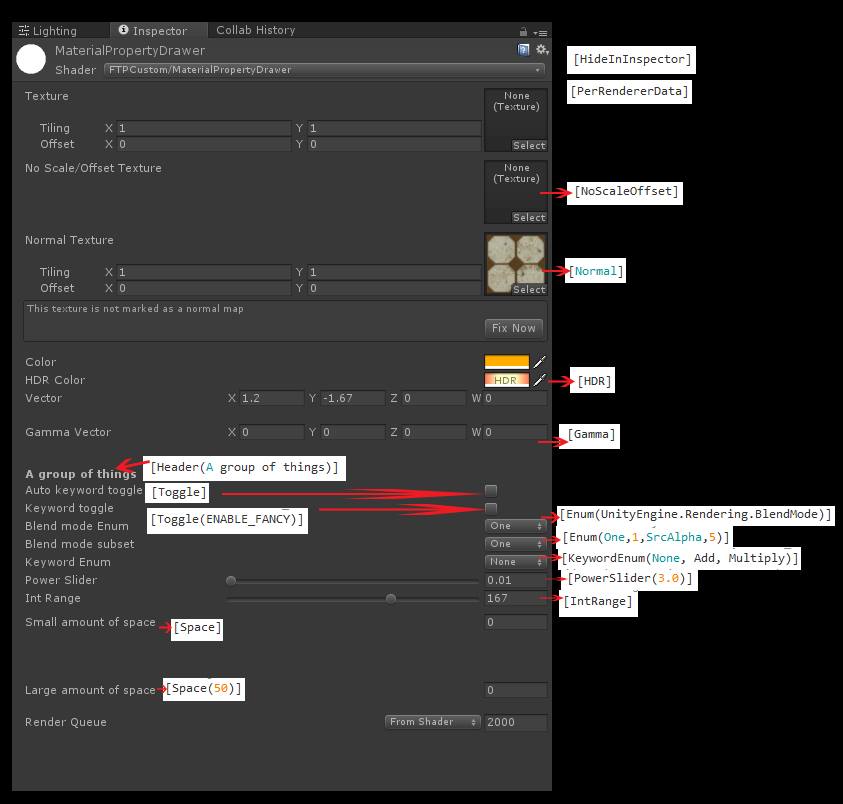
Controlling fixed function states from materials/scripts in Unity

16999105_467532653370479_4085466863356780898_n

Shader "MaterialPropertyDrawer"
{
Properties
{
_MainTex("Texture", 2D) = "white" {}
 
[HideInInspector] _MainTex2("Hide Texture", 2D) = "white" {}
#version 130
uniform float opacity;
uniform bool invert_color;
uniform sampler2D tex;
const float cornerRadius = 10.0;
void main() {
vec4 c = texture2D(tex, gl_TexCoord[0].xy);
@kodai100
kodai100 / Toggle.shader
Created August 8, 2017 03:01
Unity Shader Bool Property Example
Shader "Custom/ToggleTest" {
Properties{
_BackgroundTex("Background Texture", 2D) = "white"{}
[Toggle(USE_TEXTURE)] _UseTexture("Use Texture", Float) = 0
}
SubShader{
Tags{ "Queue" = "Transparent" "RenderType" = "Transparent" }
@keijiro
keijiro / ToggleTest.shader
Last active November 9, 2025 04:56
Shows how to use the Toggle material property drawer in a shader. See the reference manual for further details: http://docs.unity3d.com/ScriptReference/MaterialPropertyDrawer.html
Shader "ToggleTest"
{
Properties
{
[Toggle(FILL_WITH_RED)]
_FillWithRed ("Fill With Red", Float) = 0
}
SubShader
{
Pass
@joshwyatt
joshwyatt / how_to_make_a_script.md
Last active October 10, 2024 17:28
How to make scripts you can access globally from the terminal

How to make a globally available executable script in the scripting language of your choice

  • Locate the path to the interpreter for the language you are writing in with the which command.

      which node
      which python
      which bash
      which ruby
    
  • Add that path as an interpreter directive (using #!) on the first line of your script. For example if you want to write a node script and which node returned /usr/local/bin/node, the first line of your script should be:

@blixt
blixt / prng.js
Last active March 30, 2025 04:16
A very simple, seedable JavaScript PRNG. NOTE: Please read comments on why this is not a good choice.
// NOTICE 2020-04-18
// Please see the comments below about why this is not a great PRNG.
// Read summary by @bryc here:
// https://github.com/bryc/code/blob/master/jshash/PRNGs.md
// Have a look at js-arbit which uses Alea:
// https://github.com/blixt/js-arbit
/**
@patriciogonzalezvivo
patriciogonzalezvivo / GLSL-Noise.md
Last active December 7, 2025 11:08
GLSL Noise Algorithms

Please consider using http://lygia.xyz instead of copy/pasting this functions. It expand suport for voronoi, voronoise, fbm, noise, worley, noise, derivatives and much more, through simple file dependencies. Take a look to https://github.com/patriciogonzalezvivo/lygia/tree/main/generative

Generic 1,2,3 Noise

float rand(float n){return fract(sin(n) * 43758.5453123);}

float noise(float p){
	float fl = floor(p);
  float fc = fract(p);
@frarees
frarees / MinMaxSliderAttribute.cs
Last active November 12, 2025 12:04
MinMaxSlider for Unity
// https://frarees.github.io/default-gist-license
using System;
using UnityEngine;
[AttributeUsage(AttributeTargets.Field, Inherited = true, AllowMultiple = false)]
public class MinMaxSliderAttribute : PropertyAttribute
{
public float Min { get; set; }
public float Max { get; set; }