

infomaven
/ soapui_cheatsheet_index.md
Last active
November 23, 2025 07:46
Cheat sheet Index - SoapUI OSS
infomaven
/ RAILS_CHEATSHEET.md
Created
January 28, 2022 03:11
— forked from mdang/RAILS_CHEATSHEET.md
Ruby on Rails Cheatsheet
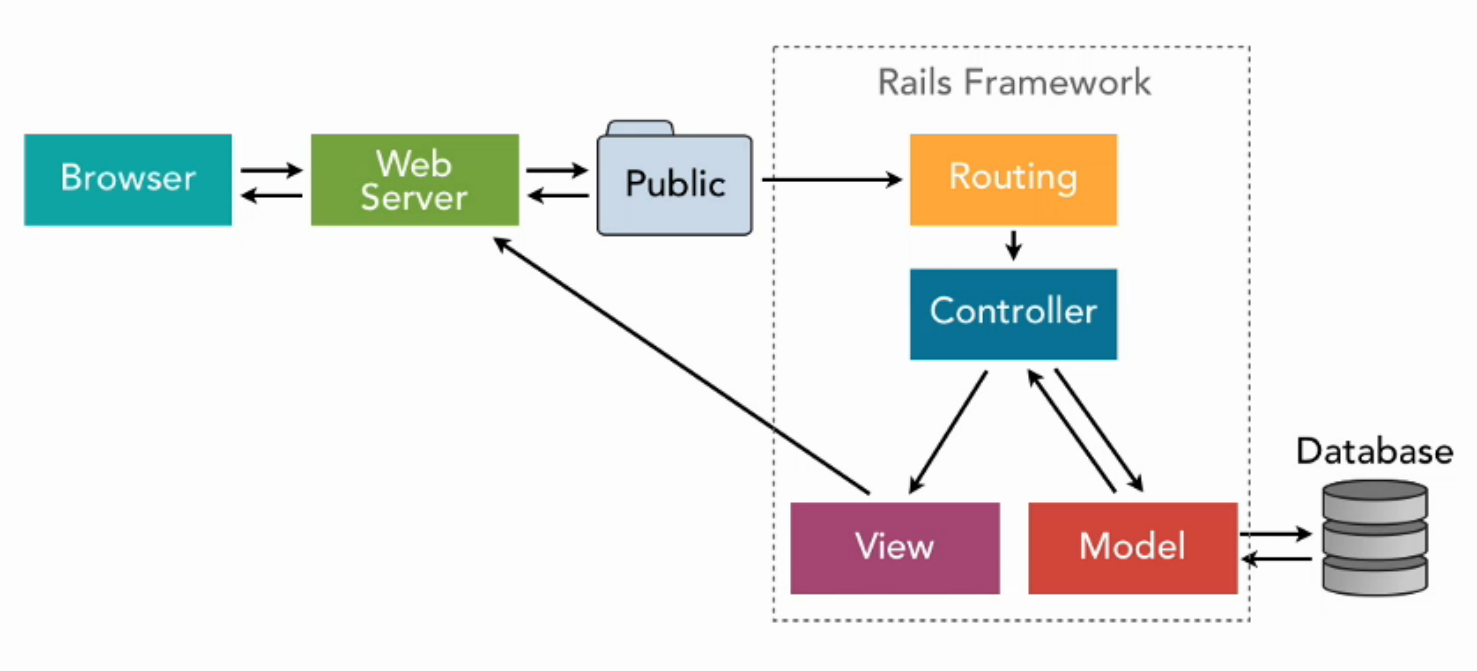
CSV FILE DIFF SCRIPT
- Uses standard Python3 modules
- Finds diff between 2 CSV files & prints results to HTML
- Finds and prints list of items found in both files
- Does NOT find duplicates in same file
USAGE:
- Download script file and sample CSVs to a directory on your computer
- Run script with this command>>
python3 compare_csv_files.py
- Script will generate html report in same directory
This file contains hidden or bidirectional Unicode text that may be interpreted or compiled differently than what appears below. To review, open the file in an editor that reveals hidden Unicode characters.
Learn more about bidirectional Unicode characters
| #!bin/bash | |
| yum install httpd -y | |
| yum update -y | |
| aws s3 cp s3://mywebbucket-cloudguru /var/www/html/ --recursive | |
| service httpd start | |
| chkconfig httpd on | |
infomaven
/ gatlingGeneratedFeeder.scala
Last active
January 29, 2023 17:57
Create a Gatling feeder file using REST calls
This file contains hidden or bidirectional Unicode text that may be interpreted or compiled differently than what appears below. To review, open the file in an editor that reveals hidden Unicode characters.
Learn more about bidirectional Unicode characters
| /* | |
| Basic blocks of code that will build a CSV file using repsonse data from API calls | |
| This is a "one-off" process, meaning you will | |
| 1. run Gatling script to generate CSV file using REST calls (usually POSTS, but GETS or datbase queries could work ) | |
| 2. copy the file into your project | |
| 3. compile and run Gatling | |
| */ | |
| class MySimulation extends Simulation { |
This file contains hidden or bidirectional Unicode text that may be interpreted or compiled differently than what appears below. To review, open the file in an editor that reveals hidden Unicode characters.
Learn more about bidirectional Unicode characters
| What is the difference between "express": "^4.13.3" and "express": "~4.13.3" ? | |
| What happens if I use `npm install <package> --save` instead of `npm install <package> --save-dev` ? |
infomaven
/ gist:783c39cbddaf65c5a4c261d9c9ab9ae0
Created
December 20, 2016 18:58
String array manipulations
This file contains hidden or bidirectional Unicode text that may be interpreted or compiled differently than what appears below. To review, open the file in an editor that reveals hidden Unicode characters.
Learn more about bidirectional Unicode characters
| /* | |
| Take note of length - it is used as a String[] property > strings.length AND as a method for a String | |
| array element > strings[i].length(). | |
| */ | |
| public Map<String, String> pairs(String[] strings) { | |
| Map<String,String> map = new HashMap<String,String>(); | |
| for (int i = 0; i < strings.length; i++ ) { | |
| if (strings[i].length() == 1 ) { | |
| Character first = strings[i].charAt(0); |
infomaven
/ gist:b68be75d6634bb91c6bc26c0f766bb26
Created
December 19, 2016 20:02
HowTo: convert Maven to Gradle && Gradle to Maven
This file contains hidden or bidirectional Unicode text that may be interpreted or compiled differently than what appears below. To review, open the file in an editor that reveals hidden Unicode characters.
Learn more about bidirectional Unicode characters
| /* MAVEN TO GRADLE */ | |
| - Navigate to directory where the POM is located | |
| - Run gradle init | |
| > this will convert the Maven build to Gradle build (new settings.gradle & one or more build.gradle files) | |
| /* GRADLE TO MAVEN */ | |
| - Add Maven plugin to build.gradle file | |
| ex. | |
| apply plugin: 'java' |
This file contains hidden or bidirectional Unicode text that may be interpreted or compiled differently than what appears below. To review, open the file in an editor that reveals hidden Unicode characters.
Learn more about bidirectional Unicode characters
| // create an alternative method for getting a list of defined enums to avoid system creating a clone of the String array | |
| // this is the .values() method | |
| public enum Car { | |
| TESLA, VOLVO, TOYOTA; | |
| } | |
| // normally what would happen | |
| public static Car[] values() { | |
| return (Car[])$VALUES.clone(); |
This file contains hidden or bidirectional Unicode text that may be interpreted or compiled differently than what appears below. To review, open the file in an editor that reveals hidden Unicode characters.
Learn more about bidirectional Unicode characters
| package src.main.java; | |
| import java.util.Collections; | |
| import java.util.List; | |
| /** | |
| * Created by nwhit8 on 11/1/15. | |
| */ | |
| public class Day { |
NewerOlder