
- http://vimcasts.org/
- http://www.vimgenius.com/
- http://yannesposito.com/Scratch/en/blog/Learn-Vim-Progressively/
- http://mislav.uniqpath.com/2011/12/vim-revisited/
- http://stevelosh.com/blog/2010/09/coming-home-to-vim/
- http://walking-without-crutches.heroku.com/ Video
- http://sontek.net/blog/detail/turning-vim-into-a-modern-python-ide
- https://github.com/shawncplus/vim-classes
- http://tnerual.eriogerg.free.fr/vimqrc.html
- http://www.fprintf.net/vimCheatSheet.html
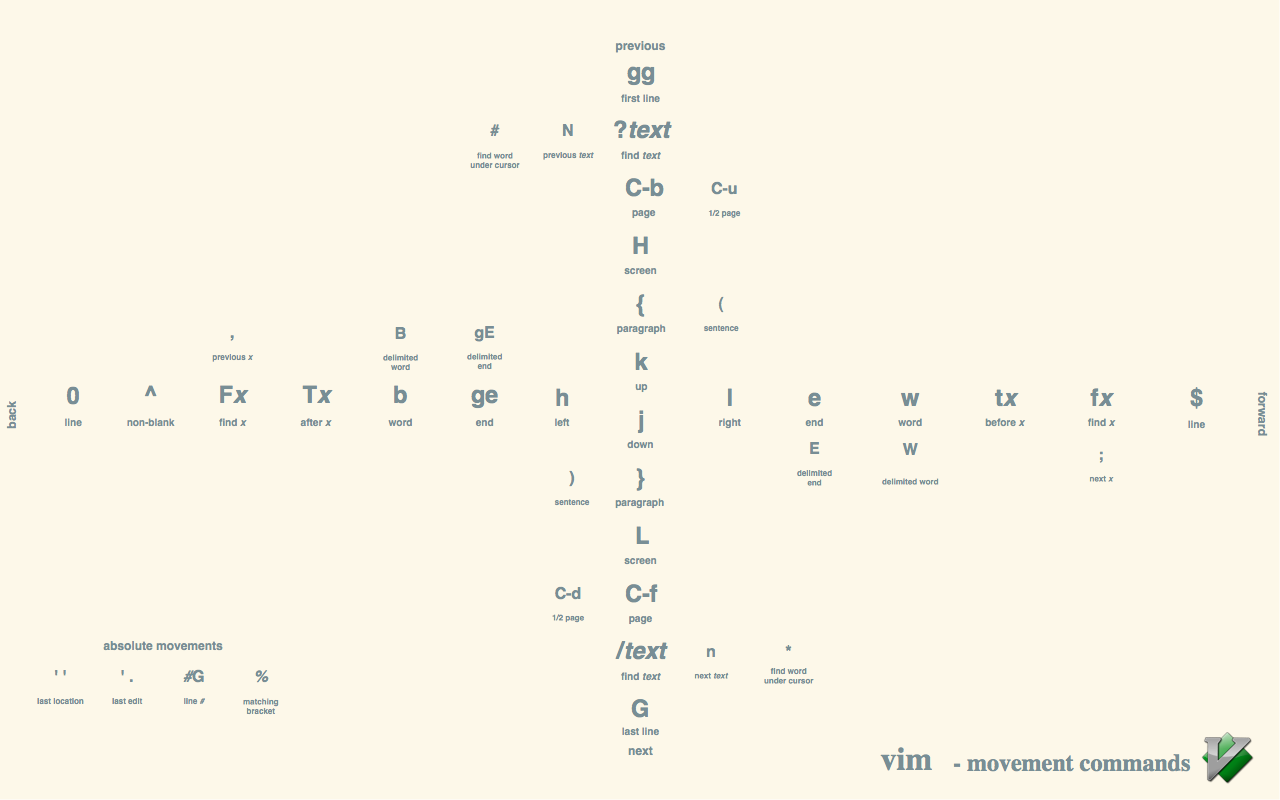
- https://raw.githubusercontent.com/LevelbossMike/vim_shortcut_wallpaper/master/vim-shortcuts_1280x800.png
- http://kmandla.files.wordpress.com/2010/12/vi-vim-cheat-sheet.gif
- http://tnerual.eriogerg.free.fr/vimqrc.html

- open vims built-in vimtutor from the command line
- http://vimdoc.sourceforge.net/htmldoc/
The following work on normal and visual modes:
]]: go to next header.<Plug>(Markdown_MoveToNextHeader)[[: go to previous header. Contrast with]c.<Plug>(Markdown_MoveToPreviousHeader)][: go to next sibling header if any.<Plug>(Markdown_MoveToNextSiblingHeader)[]: go to previous sibling header if any.<Plug>(Markdown_MoveToPreviousSiblingHeader)]c: go to Current header.<Plug>(Markdown_MoveToCurHeader)]u: go to parent header (Up).<Plug>(Markdown_MoveToParentHeader)
The following commands currently only work for atx style headers (#). Pull request are welcome to extend them to Setext style headers (===).
-
:Toc: create a quickfix vertical window navigable table of contents with the headers.Hit
<Enter>on a line to jump to the corresponding line of the markdown file. -
:Toch: Same as:Tocbut in an horizontal window. -
:Toct: Same as:Tocbut in a new tab. -
:Tocv: Same as:Tocfor symmetry with:TochandTocv.