Skip to content

Instantly share code, notes, and snippets.

@davidteren
davidteren / nerd_fonts.md
Last active December 4, 2025 07:16
Install Nerd Fonts via Homebrew [updated & fixed]
@pbrocks
pbrocks / install-phpcs-with-homebrew.md
Last active November 21, 2025 07:41
Install phpcs with Homebrew

Install phpcs with Homebrew

To set up php linting, you’ll want to install this PHP CodeSniffer repo and configure with this WordPress Coding Standards repo: . There are a number of ways to do this, whether direct download, Composer, Homebrew, Pear, etc. The following is what works for me on MacOS using Homebrew:

In a terminal window on your Mac, start by updating your Homebrew.

brew doctor

Then install the Code Sniffer:

@KATT
KATT / favourite-ts-tricks.md
Last active April 8, 2025 01:25
🧙‍♂️ Favourite non-obvious TS tricks

Record<string, x | undefined>

Represent maps

// rather than 
const map: {[ key: string ]: string} = {
  foo: 'bar',
}
@whoisryosuke
whoisryosuke / adding-prettier-to-projects.md
Last active August 30, 2021 10:27
Workflow - Adding ESLint (Airbnb) + Prettier to projects
# Install ESLint and Babel ESLint
# Make sure to install at least v5.1.0 of ESLint
npm install --save-dev eslint babel-eslint

# Install the Airbnb configs (3 of them, listed below)
npx install-peerdeps --dev eslint-config-airbnb

# Install Prettier + ESLint config
npm install --save-dev --save-exact prettier eslint-config-prettier
@jessfraz
jessfraz / boxstarter.ps1
Last active November 15, 2025 02:44
Boxstarter Commands for a new Windows box.
# Description: Boxstarter Script
# Author: Jess Frazelle <jess@linux.com>
# Last Updated: 2017-09-11
#
# Install boxstarter:
# . { iwr -useb http://boxstarter.org/bootstrapper.ps1 } | iex; get-boxstarter -Force
#
# You might need to set: Set-ExecutionPolicy RemoteSigned
#
# Run this boxstarter by calling the following from an **elevated** command-prompt:
@sadikay
sadikay / google_fonts.css
Created April 26, 2017 22:34
All Google Fonts In One CSS File
@font-face {
font-family: 'ABeeZee';
font-style: normal;
font-weight: 400;
src: local('ABeeZee'), local('ABeeZee-Regular'), url(http://fonts.gstatic.com/s/abeezee/v9/JYPhMn-3Xw-JGuyB-fEdNA.ttf) format('truetype');
}
@font-face {
font-family: 'Abel';
font-style: normal;
font-weight: 400;
@EricBusch
EricBusch / product_discount_sorting_and_displaying.php
Last active November 6, 2022 11:05
This code adds a "discount" to catalog ordering args. It makes it possible for a user to order products on WooCommerce category pages and the main shop page by the product's discount amount. It also adds a "'Sort by discount" to sorting menus on shop page and category pages. Finally it displays the percentage you save on a discounted item. This …
<?php
/**
* Add "discount" to catalog ordering args.
*
* This makes it possible for a user to order products on category pages and the main shop
* page by the product's discount amount.
*
* @see wc_clean()
* @link http://docs.woothemes.com/document/custom-sorting-options-ascdesc/
@epixoip
epixoip / 8x1080.md
Last active November 7, 2025 09:47
8x Nvidia GTX 1080 Hashcat Benchmarks
@dropmeaword
dropmeaword / browser_history.md
Last active August 18, 2025 15:34
Playing around with Chrome's history

Browser histories

Unless you are using Safari on OSX, most browsers will have some kind of free plugin that you can use to export the browser's history. So that's probably the easiest way. The harder way, which seems to be what Safari wants is a bit more hacky but it will also work for other browsers. Turns out that most of them, including Safari, have their history saved in some kind of sqlite database file somewhere in your home directory.

The OSX Finder cheats a little bit and doesn't show us all the files that actually exist on our drive. It tries to protect us from ourselves by hiding some system and application-specific files. You can work around this by either using the terminal (my preferred method) or by using the Cmd+Shft+G in Finder.
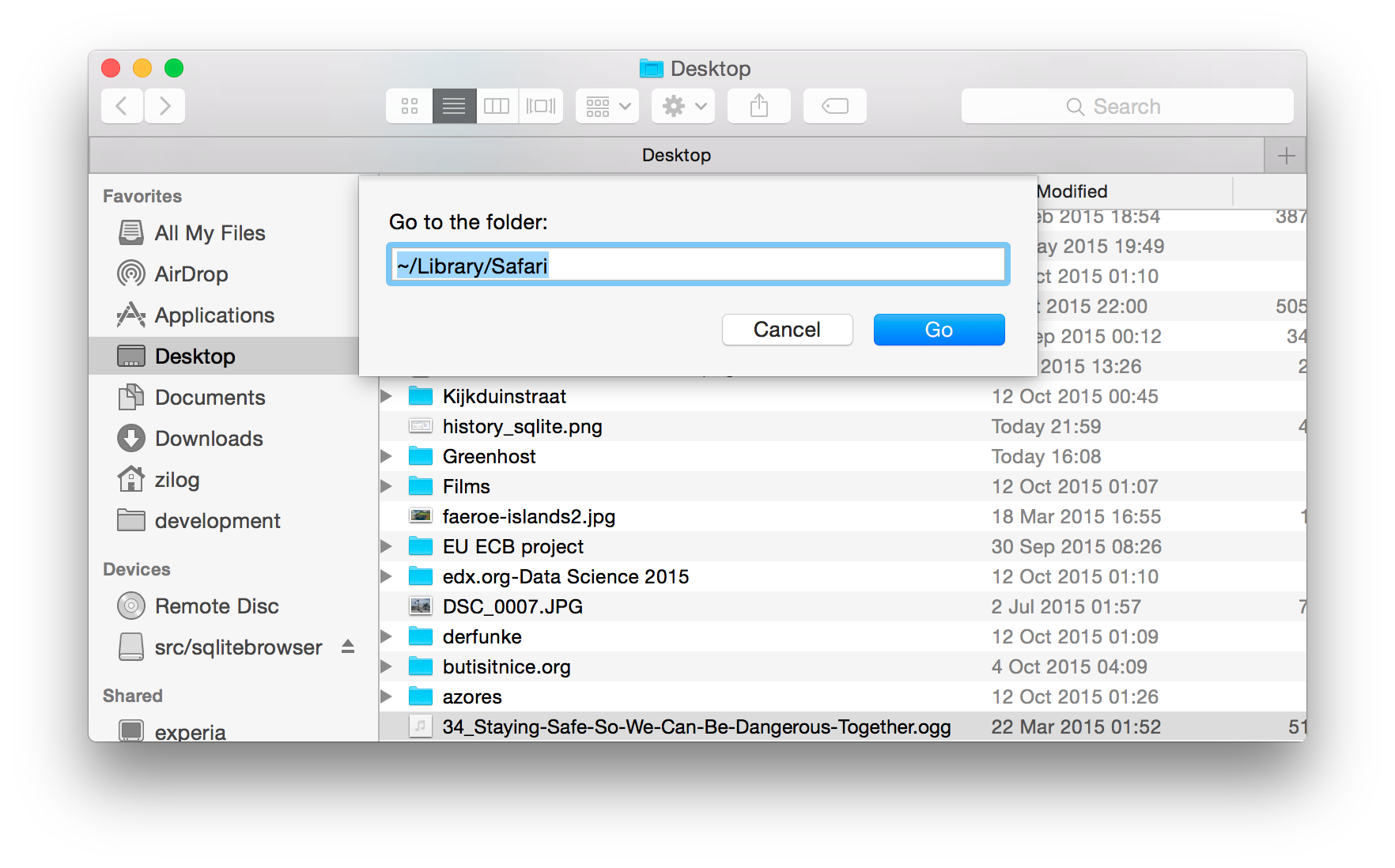
Finder

Once you locate the file containing the browser's history, copy it to make a backup just in case we screw up.

@gwillem
gwillem / magento-nginx.conf
Last active July 29, 2023 10:13
Battle-tested Nginx configuration for Magento (source: www.hypernode.com)
# This is an annotated subset of the Nginx configuration from our Magento production platform @ www.hypernode.com
# See https://www.byte.nl/blog/magento-cacheleak-issue
# !!!! If you are a Hypernode customer, do not use this config as it will result in duplicate statements. !!!!!
user app;
worker_processes 4;
pid /var/run/nginx.pid;
events {