| Key/Command | Description |
|---|---|
| Tab | Auto-complete files and folder names |
| Ctrl + A | Go to the beginning of the line you are currently typing on |
| Ctrl + E | Go to the end of the line you are currently typing on |
| Ctrl + U | Clear the line before the cursor |
| Ctrl + K | Clear the line after the cursor |
| Ctrl + W | Delete the word before the cursor |
| Ctrl + T | Swap the last two characters before the cursor |

Elikem Adadevoh elikem

elikem
/ gist:54c06b8e520051d92b291937e3bd5ec3
Created
January 21, 2026 15:45
— forked from joshuapekera/gist:fa4d168d6e9467b1b964faf419a46841
Mac Terminal Cheat Sheet
elikem
/ git-cheatsheet.md
Created
April 21, 2024 18:26
— forked from eashish93/git-cheatsheet.md
My Git Cheatsheet
- http://stackoverflow.com/questions/804115 (
rebasevsmerge). - https://www.atlassian.com/git/tutorials/merging-vs-rebasing (
rebasevsmerge) - https://www.atlassian.com/git/tutorials/undoing-changes/ (
resetvscheckoutvsrevert) - http://stackoverflow.com/questions/2221658 (HEAD^ vs HEAD~) (See
git rev-parse) - http://stackoverflow.com/questions/292357 (
pullvsfetch) - http://stackoverflow.com/questions/39651 (
stashvsbranch) - http://stackoverflow.com/questions/8358035 (
resetvscheckoutvsrevert)
elikem
/ rails_model_template.rb
Created
April 14, 2023 22:59
— forked from metalelf0/rails_model_template.rb
A rails model template to better organize your code
This file contains hidden or bidirectional Unicode text that may be interpreted or compiled differently than what appears below. To review, open the file in an editor that reveals hidden Unicode characters.
Learn more about bidirectional Unicode characters
| # provided by https://www.zmwolski.com/Organizing-Ruby-on-Rails-Models | |
| class User < ActiveRecord::Base | |
| # == Constants ============================================================ | |
| # == Attributes =========================================================== | |
| # == Extensions =========================================================== |
elikem
/ vim-shortcuts.md
Created
January 18, 2023 13:52
— forked from tuxfight3r/vim-shortcuts.md
VIM SHORTCUTS
elikem
/ gist:29b3b77c4d0984c3ffba2d470e07329d
Created
January 9, 2023 06:37
— forked from iangreenleaf/gist:b206d09c587e8fc6399e
Rails naming conventions
elikem
/ SpaceVim.md
Created
August 19, 2022 03:35
— forked from bespokoid/SpaceVim.md
SpaceVim cheatsheet #tools
elikem
/ git_cheat-sheet.md
Created
September 12, 2020 22:25
— forked from davfre/git_cheat-sheet.md
git commandline cheat-sheet
The git command-line utility has plenty of inconsistencies http://steveko.wordpress.com/2012/02/24/10-things-i-hate-about-git/
A GUI like http://sourcetreeapp.com is often helpful, but staying on the command line usually quicker. This is a list of the commands I use most frequently, listed by functional category:
git status list which (unstaged) files have changed
elikem
/ RAILS_CHEATSHEET.md
Created
June 3, 2020 22:06
— forked from mdang/RAILS_CHEATSHEET.md
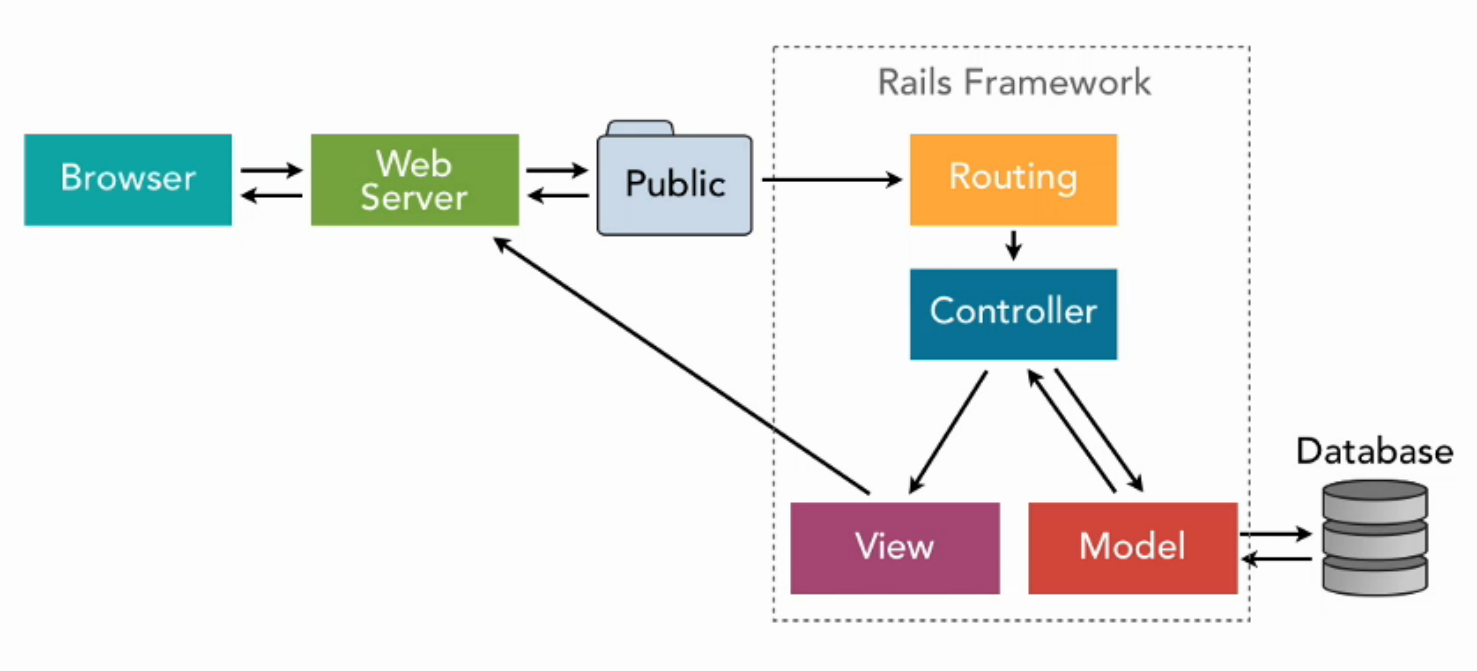
Ruby on Rails Cheatsheet
elikem
/ RAILS_CHEATSHEET.md
Created
June 3, 2020 22:06
— forked from mdang/RAILS_CHEATSHEET.md
Ruby on Rails Cheatsheet
elikem
/ friendly_urls.markdown
Created
July 2, 2019 04:18
— forked from cdmwebs/friendly_urls.markdown
Friendly URLs in Rails
By default, Rails applications build URLs based on the primary key -- the id column from the database. Imagine we have a Person model and associated controller. We have a person record for Bob Martin that has id number 6. The URL for his show page would be:
/people/6
But, for aesthetic or SEO purposes, we want Bob's name in the URL. The last segment, the 6 here, is called the "slug". Let's look at a few ways to implement better slugs.
NewerOlder