nginx is a reverse proxy supported by Authelia
https://www.authelia.com/integration/proxies/nginx/
Note
Updated 22/08/2025 using nginx docs


nginx is a reverse proxy supported by Authelia
https://www.authelia.com/integration/proxies/nginx/
Note
Updated 22/08/2025 using nginx docs

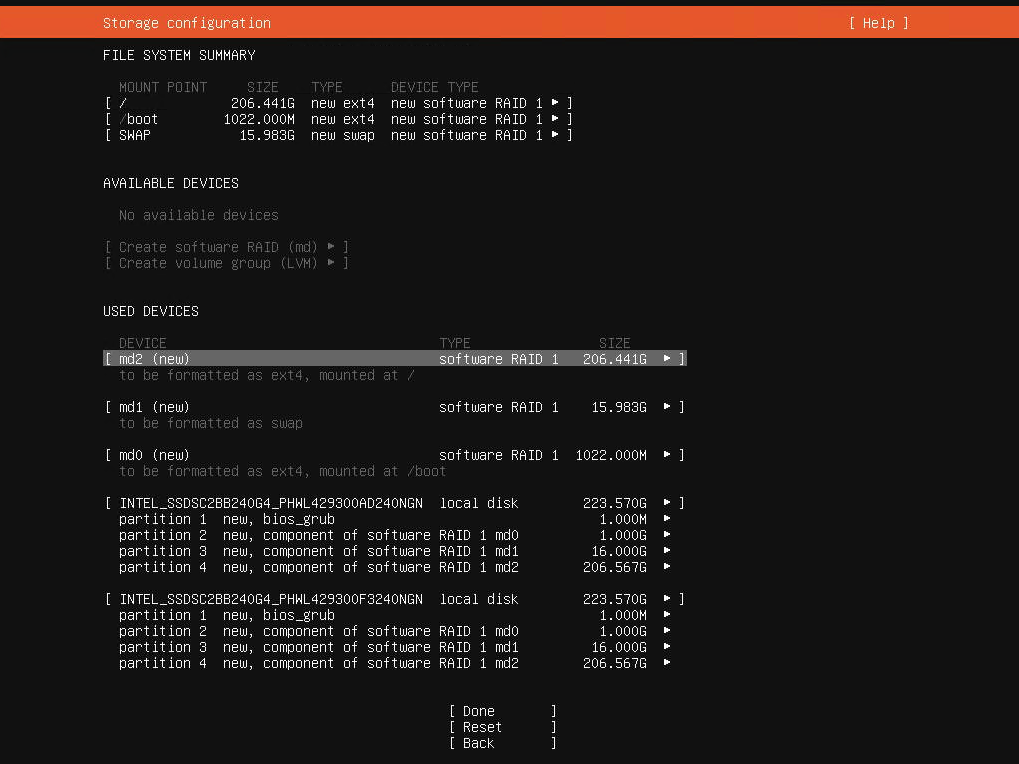
Let's start with the basics: the official guide by Ubuntu (https://ubuntu.com/server/docs/install/storage) is outdated/wrong. And as of March 2021 it's possible that there's a bug as well with how the bios_grub partitions are created when using multiple disks.
Now on to the solution:

These are the steps I followed enable VirtualBox on my laptop without disabling UEFI Secure Boot. They're nearly identical to the process described on [Øyvind Stegard's blog][blog], save for a few key details. The images here are borrowed from the [Systemtap UEFI Secure Boot Wiki][systemtap].
src='https://download.virtualbox.org/virtualbox/rpm/fedora/virtualbox.repo'

| #Run As Administrator | |
| if (!([Security.Principal.WindowsPrincipal][Security.Principal.WindowsIdentity]::GetCurrent()).IsInRole([Security.Principal.WindowsBuiltInRole] "Administrator")) { Start-Process powershell.exe "-NoProfile -ExecutionPolicy Bypass -File `"$PSCommandPath`"" -Verb RunAs; exit } | |
| $code = @" | |
| [DllImport("user32.dll")] | |
| public static extern bool BlockInput(bool fBlockIt); | |
| "@ | |
| $userInput = Add-Type -MemberDefinition $code -Name UserInput -Namespace UserInput -PassThru |

| # -*- mode: ruby -*- | |
| # vi: set ft=ruby : | |
| # All Vagrant configuration is done below. The "2" in Vagrant.configure | |
| # configures the configuration version (we support older styles for | |
| # backwards compatibility). Please don't change it unless you know what | |
| # you're doing. | |
| Vagrant.configure("2") do |config| | |
| # The most common configuration options are documented and commented below. | |
| # For a complete reference, please see the online documentation at |