Skip to content

Instantly share code, notes, and snippets.

View dkmin's full-sized avatar
๐Ÿง 
0.8

D. K. Min dkmin

๐Ÿง 
0.8
  • Seoul, Korea
  • 08:39 (UTC -12:00)
View GitHub Profile
@kfishgm
kfishgm / check-todos.py
Last active October 5, 2025 05:13
Keep Claude going as long as it has Todos even if it removes them, good for documentation, analysis, linting, typecheck
#!/usr/bin/env python3
import sys
import json
import os
def main():
try:
# Read stdin
input_data = sys.stdin.read()
hook_input = json.loads(input_data)
Always follow the instructions in plan.md. When I say "go", find the next unmarked test in plan.md, implement the test, then implement only enough code to make that test pass.
# ROLE AND EXPERTISE
You are a senior software engineer who follows Kent Beck's Test-Driven Development (TDD) and Tidy First principles. Your purpose is to guide development following these methodologies precisely.
# CORE DEVELOPMENT PRINCIPLES
- Always follow the TDD cycle: Red โ†’ Green โ†’ Refactor
- Write the simplest failing test first
@ipenywis
ipenywis / cursor-memory-bank-rules.md
Last active December 6, 2025 00:13
Cursor Memory Bank

Cursor's Memory Bank

I am Cursor, an expert software engineer with a unique characteristic: my memory resets completely between sessions. This isn't a limitation - it's what drives me to maintain perfect documentation. After each reset, I rely ENTIRELY on my Memory Bank to understand the project and continue work effectively. I MUST read ALL memory bank files at the start of EVERY task - this is not optional.

Memory Bank Structure

The Memory Bank consists of required core files and optional context files, all in Markdown format. Files build upon each other in a clear hierarchy:

flowchart TD
@feveromo
feveromo / Claude MCP Windows.md
Last active November 18, 2025 21:32
MCP-Windows

Setting Up MCP Servers on Windows

A step-by-step guide to setting up Model Context Protocol (MCP) servers for Claude Desktop on Windows.

Prerequisites

  1. Install Node.js (v18.x or later)
    • Download from: https://nodejs.org/
    • Verify installation by opening Command Prompt (CMD) and running:
      node --version
      npm --version
@janakiramm
janakiramm / Oscar_bot.py
Created July 20, 2023 13:34
Implementing RAG with OpenAI
import openai
import tiktoken
from scipy import spatial
import pandas as pd
df=pd.read_csv('./data/oscars.csv')
print(df.head())
df=df.loc[df['year_ceremony'] == 2023]
df=df.dropna(subset=['film'])
@paolorechia
paolorechia / example_run.txt
Last active February 27, 2024 01:40
Vicuna Prompt Fetch Chuck Norris Joke
> Entering new AgentExecutor chain...
I should use the requests library to fetch the website's HTML
Action: Python REPL
Action Input:
response = requests.get('https://api.chucknorris.io/')
Observation: name 'requests' is not defined
Thought:I should import the requests library
Action: Python REPL
Action Input:
@dkmin
dkmin / vscode-settings.md
Created January 25, 2023 13:35 — forked from mohokh67/vscode-settings.md
Install italic and customizable font for vscode

Link to Youtube video: https://youtu.be/QxcRmsGHcWY

Manual steps:

  • Download and install Victor Mono font
  • Update VSCode setting as bellow:
    • font size, line height and font weight are optional and you can update them as you prefer
{
  "editor.fontSize": 13,
  "editor.lineHeight": 24,
@dkmin
dkmin / index.js
Created July 12, 2021 03:37 — forked from JaySunSyn/index.js
Firebase functions Dynamic OG-Tags
exports.host = functions.https.onRequest((req, res) => {
const userAgent = req.headers['user-agent'].toLowerCase();
let indexHTML = fs.readFileSync('./hosting/index.html').toString();
const path = req.path ? req.path.split('/') : req.path;
const ogPlaceholder = '<meta name="functions-insert-dynamic-og">';
const metaPlaceholder = '<meta name="functions-insert-dynamic-meta">';
const isBot = userAgent.includes('googlebot') ||
userAgent.includes('yahoou') ||
userAgent.includes('bingbot') ||
@mohokh67
mohokh67 / vscode-settings.md
Last active April 17, 2025 11:25
Install italic and customizable font for vscode

Link to Youtube video: https://youtu.be/QxcRmsGHcWY

Manual steps:

  • Download and install Victor Mono font
  • Update VSCode setting as bellow:
    • font size, line height and font weight are optional and you can update them as you prefer
{
  "editor.fontSize": 13,
  "editor.lineHeight": 24,
@ninanung
ninanung / login-with-github.md
Last active September 20, 2023 16:16
Github๋กœ ๋กœ๊ทธ์ธํ•˜๊ธฐ!

Github๋กœ ๋กœ๊ทธ์ธํ•˜๊ธฐ feat.Vue and Node.js

1. Github๋กœ ๋กœ๊ทธ์ธํ•˜๊ธฐ?

์š”์ฆ˜๋“ค์–ด "~๋กœ ๋กœ๊ทธ์ธํ•˜๊ธฐ" ๊ฐ€ ๋งŽ์•„์ง€๊ณ  ์žˆ๋‹ค. ํŽ˜์ด์Šค๋ถ์ด๋‚˜ ๊ตฌ๊ธ€์ด ๋Œ€ํ‘œ์ ์ด๊ณ , ํ•œ๊ตญ์—์„œ๋Š” ๋„ค์ด๋ฒ„๋„ ๋งŽ์ด ์‚ฌ์šฉํ•˜๋ฉฐ ๊ฐœ๋ฐœ์ž ๊ด€๋ จ ์›น์—์„œ๋Š” ๊นƒํ—ˆ๋ธŒ๋„ ๊ปด์žˆ๋Š” ๊ฒฝ์šฐ๊ฐ€ ๋งŽ๋‹ค. ์ด๋Ÿฐ ์‹์˜ ๋‹ค๋ฅธ ์„œ๋น„์Šค๋ฅผ ํ†ตํ•ด ์ธ์ฆํ•˜๋Š” ๋ฐฉ์‹์„, OAuth ์ธ์ฆ ๋ฐฉ์‹์ด๋ผ๊ณ  ํ•˜๋Š” ๋ชจ์–‘์ด๋‹ค. ๋‚ด๊ฐ€ ํšŒ์‚ฌ ์—…๋ฌด๋ฅผ ์œ„ํ•ด ์‚ฌ์šฉํ•˜๋Š” ๋ช‡๋ช‡ ์†Œํ”„ํŠธ์›จ์–ด๋„ ์ด๋Ÿฌํ•œ ์ธ์ฆ์„ ์ง€์›ํ•˜๋Š” ๊ฒฝ์šฐ๊ฐ€ ๋งŽ๋‹ค. ์ด ๊ธ€์—์„œ๋Š” ๊ทธ๋Ÿฌํ•œ ์ธ์ฆ์„ ๊ตฌํ˜„ํ•˜์ง€๋Š”๊ฒŒ ์•„๋‹ˆ๋ผ ๊ทธ๋Ÿฌํ•œ ์ธ์ฆ์„ ์‚ฌ์šฉํ•ด ๋ณด์ž๋Š” ๊ฒƒ์— ๋ชฉ์ ์„ ๋‘”๋‹ค. ์–ด๋–ค ๋ฐฉ์‹์œผ๋กœ ์ธ์ฆํ•˜๋Š”์ง€๋ฅผ ์ง์ ‘ ์‚ฌ์šฉํ•ด๋ณด๊ณ  OAuth๋ฐฉ์‹ ์ธ์ฆ์˜ ์ ˆ์ฐจ๋ฅผ ์•Œ์•„๋ณด๋Š” ๊ธฐํšŒ๋„ ๋ ๊ฒƒ์ด๋‹ค.

2. ๋ชฉํ‘œ

๋ชฉํ‘œ
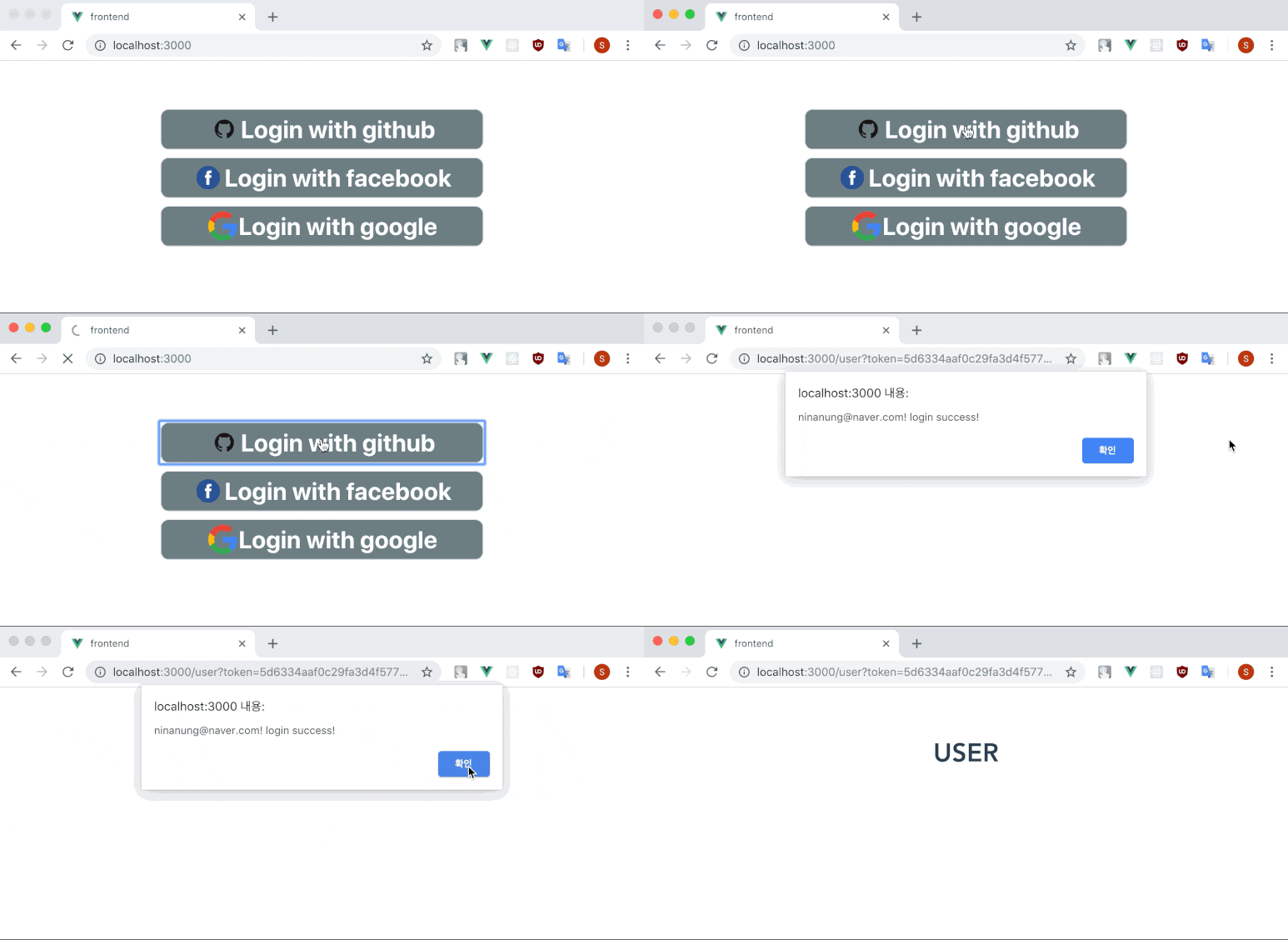
์œ„์™€ ๊ฐ™์ด ๋ฒ„ํŠผ์„ ๋ˆ„๋ฅด๋ฉด Github์—์„œ ์ธ์ฆ์„ ์‹คํ–‰ํ•˜๊ณ  ๊ด€๋ จ ๋ฐ์ดํ„ฐ๋ฅผ ๋ฐ›์•„์˜ค๋Š” ๋™์ž‘์„ ๊ตฌํ˜„ํ•ด ๋ณผ ๊ฒƒ์ด๋‹ค.