
To play Dawn of the Tiberium Age on Linux, follow these steps:
Download latest version fo DTA https://www.moddb.com/mods/the-dawn-of-the-tiberium-age/downloads
Unzip it somewhere.
Ensure you have Wine installed on your Linux system. Wine is required to run Windows applications on Linux.
Debian sudo apt install wine
To create a new 32-bit WINEPREFIX, use the WINEARCH environment variable while setting up a new prefix.
For example:
WINEARCH=win32 WINEPREFIX=~/.wine32 winecfg
This directory must not already exist or you will get an error! Please do not manually create it in Nautilus or with mkdir./
Move unzipped DTA files to ~/.wine32/drive_c
To make installing .NET Framework easier, use Winetricks, a handy tool for managing Wine components.
Run Winetricks with the 32-bit Wine prefix and install dotnet 4.5:
WINEPREFIX=32 winetricks dotnet45
Manually download the XNA Framework from Microsoft's official website:
https://www.microsoft.com/en-us/download/details.aspx?id=27598
Don't forget to install it using the 32-bit Wine prefix: WINEPREFIX=32 wine xnafx40_redist.msi
Download the latest version of the game, ccnc-draw, from Github.
https://github.com/FunkyFr3sh/cnc-ddraw/releases
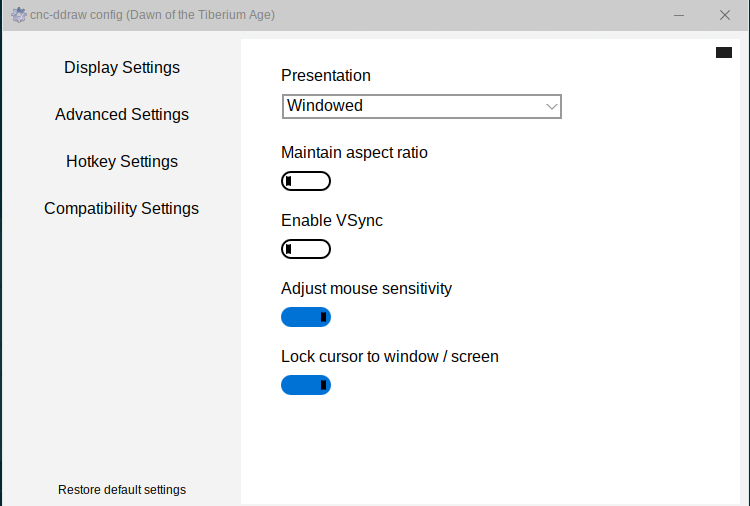
Run cnc-ddraw confg.exe using Wine WINEPREFIX=32 wine cnc-ddraw\ config.exe
Accept any prompts to override Wine DLL settings.
In the configuration window, change the screen mode to Windowed
WINEPREFIX=32 wine DTA.exe
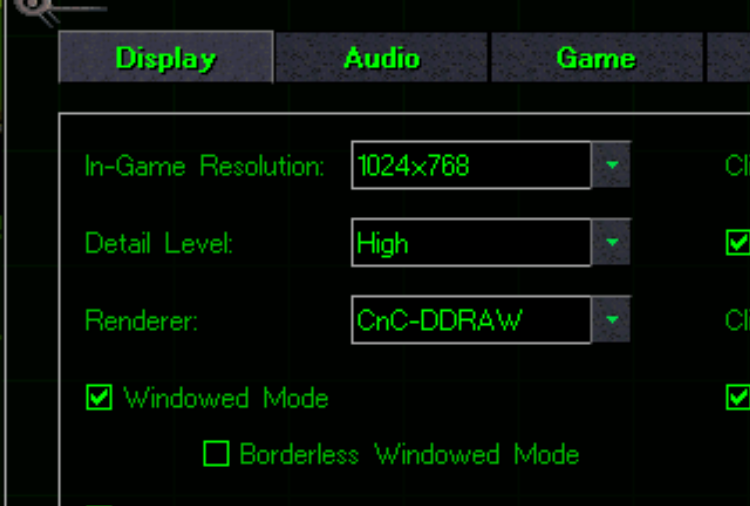
In the game's options:
Locate the render method setting (my default was Stock).
Change it to cnc-ddraw
You're now ready to enjoy Dawn of the Tiberium Age on your Linux system. Have fun!