|
################################################################################################################# |
|
# |
|
# Modified by: talzcloning |
|
# |
|
# Originally from v1.4 @ https://gallery.technet.microsoft.com/Password-Expiry-Email-177c3e27 |
|
# Robert Pearman (WSSMB MVP) |
|
# TitleRequired.com |
|
# Script to Automated Email Reminders when Users Passwords due to Expire. |
|
# |
|
# Requires: Windows PowerShell Module for Active Directory |
|
# |
|
################################################################################################################## |
|
# Please Configure the following variables.... |
|
$SearchBase="DC=domain,DC=com" |
|
$smtpServer="smtp.office365.com" |
|
$SMTPPort = "587" |
|
$SMTPUsername = "talzcloning@mydomain.com" |
|
$GetPassword = Get-Content "C:\temp\password.txt" #File with password has restricted access |
|
$SMTPPassword = $GetPassword | ConvertTo-SecureString -AsPlainText -Force |
|
$SMTPCredentials = new-object Management.Automation.PSCredential ($SMTPUsername,$SMTPPassword) |
|
$expireindays = 10 #number of days of soon-to-expire paswords. i.e. notify for expiring in X days (and every day until $negativedays) |
|
$negativedays = -1 #negative number of days (days already-expired). i.e. notify for expired X days ago |
|
$from = "Password Expiry <talzcloning@mydomain.com>" |
|
$logging = $true # Set to $false to Disable Logging |
|
$logNonExpiring = $false |
|
$logFile = "C:\Logs\PS-pwd-expiry.csv" # ie. c:\mylog.csv |
|
$testing = $true # Set to $false to Email Users |
|
$adminEmailAddr = "Admin@mydomain.com" #multiple addr allowed but MUST be independent strings separated by comma |
|
$sampleEmails = 1 #number of sample email to send to adminEmailAddr when testing ; in the form $sampleEmails="ALL" or $sampleEmails=[0..X] e.g. $sampleEmails=0 or $sampleEmails=3 or $sampleEmails="all" are all valid. |
|
# |
|
################################################################################################################### |
|
|
|
# System Settings |
|
$textEncoding = [System.Text.Encoding]::UTF8 |
|
$date = Get-Date -format yyyy-MM-dd |
|
|
|
$starttime=Get-Date #need time also; don't use date from above |
|
|
|
Write-Host "Processing `"$SearchBase`" for Password-Expiration-Notifications" |
|
|
|
#set max sampleEmails to send to $adminEmailAddr |
|
if ( $sampleEmails -isNot [int]) { |
|
if ( $sampleEmails.ToLower() -eq "all") { |
|
$sampleEmails=$users.Count |
|
} #else use the value given |
|
} |
|
|
|
if (($testing -eq $true) -and ($sampleEmails -ge 0)) { |
|
Write-Host "Testing only; $sampleEmails email samples will be sent to $adminEmailAddr" |
|
} elseif (($testing -eq $true) -and ($sampleEmails -eq 0)) { |
|
Write-Host "Testing only; emails will NOT be sent" |
|
} |
|
|
|
# Create CSV Log |
|
if ($logging -eq $true) { |
|
#Always purge old CSV file |
|
Out-File $logfile |
|
Add-Content $logfile "`"Date`",`"SAMAccountName`",`"DisplayName`",`"Created`",`"PasswordSet`",`"DaystoExpire`",`"ExpiresOn`",`"EmailAddress`",`"Notified`"" |
|
} |
|
|
|
# Get Users From AD who are Enabled, Passwords Expire |
|
Import-Module ActiveDirectory |
|
$users = get-aduser -SearchBase $SearchBase -Filter {(enabled -eq $true) -and (passwordNeverExpires -eq $false)} -properties sAMAccountName, displayName, PasswordNeverExpires, PasswordExpired, PasswordLastSet, EmailAddress, lastLogon, whenCreated |
|
$DefaultmaxPasswordAge = (Get-ADDefaultDomainPasswordPolicy).MaxPasswordAge |
|
|
|
$countprocessed=${users}.Count |
|
$samplesSent=0 |
|
$countsent=0 |
|
$countnotsent=0 |
|
$countfailed=0 |
|
|
|
# Process Each User for Password Expiry |
|
foreach ($user in $users) { |
|
$dName = $user.displayName |
|
$sName = $user.sAMAccountName |
|
$emailaddress = $user.emailaddress |
|
$whencreated = $user.whencreated |
|
$passwordSetDate = $user.PasswordLastSet |
|
$sent = "" # Reset Sent Flag |
|
|
|
$PasswordPol = (Get-AduserResultantPasswordPolicy $user) |
|
# Check for Fine Grained Password |
|
if (($PasswordPol) -ne $null) { |
|
$maxPasswordAge = ($PasswordPol).MaxPasswordAge |
|
} else { |
|
# No FGPP set to Domain Default |
|
$maxPasswordAge = $DefaultmaxPasswordAge |
|
} |
|
|
|
#If maxPasswordAge=0 then same as passwordNeverExpires, but PasswordCannotExpire bit is not set |
|
if ($maxPasswordAge -eq 0) { |
|
Write-Host "$sName MaxPasswordAge = $maxPasswordAge (i.e. PasswordNeverExpires) but bit not set." |
|
} |
|
|
|
$expiresOn = $passwordsetdate + $maxPasswordAge |
|
$today = (get-date) |
|
|
|
if ( ($user.passwordexpired -eq $false) -and ($maxPasswordAge -ne 0) ) { #not Expired and not PasswordNeverExpires |
|
$daystoexpire = (New-TimeSpan -Start $today -End $expiresOn).Days |
|
} elseif ( ($user.passwordexpired -eq $true) -and ($passwordSetDate -ne $null) -and ($maxPasswordAge -ne 0) ) { #if expired and passwordSetDate exists and not PasswordNeverExpires |
|
# i.e. already expired |
|
$daystoexpire = -((New-TimeSpan -Start $expiresOn -End $today).Days) |
|
} else { |
|
# i.e. (passwordSetDate = never) OR (maxPasswordAge = 0) |
|
$daystoexpire="NA" |
|
#continue #"continue" would skip user, but bypass any non-expiry logging |
|
} |
|
|
|
#Write-Host "$sName DtE: $daystoexpire MPA: $maxPasswordAge" #debug |
|
|
|
# Set verbiage based on Number of Days to Expiry. |
|
Switch ($daystoexpire) { |
|
{$_ -ge $negativedays -and $_ -le "-1"} {$messageDays = "has expired"} |
|
"0" {$messageDays = "will expire today"} |
|
"1" {$messageDays = "will expire in 1 day"} |
|
default {$messageDays = "will expire in " + "$daystoexpire" + " days"} |
|
} |
|
|
|
# Email Subject Set Here |
|
$subject="$sName Windows Login password $messageDays" |
|
|
|
# Email Body Set Here, Note You can use HTML, including Images. |
|
$body=" |
|
<p>Your Active Directory password for your <b>$sName</b> account $messageDays. After expired, you will not be able to login until your password is changed.</p> |
|
|
|
<p>Please visit selfservice.example.com to change your password. Alternatively, on a Windows machine, you may press Ctrl-Alt-Del and select `"Change Password`".</p> |
|
|
|
<p>If you do not know your current password, <a href='https://selfservice.example.com/?action=sendtoken'>click here to email a password reset link</a>.</p> |
|
|
|
<p>Thank you,<br> |
|
|
|
Example.com Administrator<br> |
|
Administrator@example.com<br> |
|
www.example.com/support/<br> |
|
|
|
</p> |
|
" |
|
|
|
# If testing-enabled and send-samples, then set recipient to adminEmailAddr else user's EmailAddress |
|
if (($testing -eq $true) -and ($samplesSent -lt $sampleEmails)) { |
|
$recipient = $adminEmailAddr |
|
} else { |
|
$recipient = $emailaddress |
|
} |
|
|
|
#if in trigger range, send email |
|
if ( ($daystoexpire -ge $negativedays) -and ($daystoexpire -lt $expireindays) -and ($daystoexpire -ne "NA") ) { |
|
# Send Email Message |
|
if (($emailaddress) -ne $null) { |
|
if ( ($testing -eq $false) -or (($testing -eq $true) -and ($samplesSent -lt $sampleEmails)) ) { |
|
try { |
|
Send-Mailmessage -smtpServer $smtpServer -from $from -to $recipient -subject $subject -body $body -bodyasHTML -priority High -Encoding $textEncoding -ErrorAction Stop -ErrorVariable err -port $SMTPPort -UseSsl -Credential $SMTPCredentials |
|
} catch { |
|
write-host "Error: Could not send email to $recipient via $smtpServer" |
|
$sent = "Send fail" |
|
$countfailed++ |
|
} finally { |
|
if ($err.Count -eq 0) { |
|
write-host "Sent email for $sName to $recipient" |
|
$countsent++ |
|
if ($testing -eq $true) { |
|
$samplesSent++ |
|
$sent = "toAdmin" |
|
} else { $sent = "Yes" } |
|
} |
|
} |
|
} else { |
|
Write-Host "Testing mode: skipping email to $recipient" |
|
$sent = "No" |
|
$countnotsent++ |
|
} |
|
} else { |
|
Write-Host "$dName ($sName) has no email address." |
|
$sent = "No addr" |
|
$countnotsent++ |
|
} |
|
|
|
# If Logging is Enabled Log Details |
|
if ($logging -eq $true) { |
|
Add-Content $logfile "`"$date`",`"$sName`",`"$dName`",`"$whencreated`",`"$passwordSetDate`",`"$daystoExpire`",`"$expireson`",`"$emailaddress`",`"$sent`"" |
|
} |
|
} else { |
|
#if ( ($daystoexpire -eq "NA") -and ($maxPasswordAge -eq 0) ) { Write-Host "$sName PasswordNeverExpires" } elseif ($daystoexpire -eq "NA") { Write-Host "$sName PasswordNeverSet" } #debug |
|
# Log Non Expiring Password |
|
if ( ($logging -eq $true) -and ($logNonExpiring -eq $true) ) { |
|
if ($maxPasswordAge -eq 0 ) { |
|
$sent = "NeverExp" |
|
} else { |
|
$sent = "No" |
|
} |
|
Add-Content $logfile "`"$date`",`"$sName`",`"$dName`",`"$whencreated`",`"$passwordSetDate`",`"$daystoExpire`",`"$expireson`",`"$emailaddress`",`"$sent`"" |
|
} |
|
} |
|
|
|
} # End User Processing |
|
|
|
$endtime=Get-Date |
|
$totaltime=($endtime-$starttime).TotalSeconds |
|
$minutes="{0:N0}" -f ($totaltime/60) |
|
$seconds="{0:N0}" -f ($totaltime%60) |
|
|
|
Write-Host "$countprocessed Users from `"$SearchBase`" Processed in $minutes minutes $seconds seconds." |
|
Write-Host "Email trigger range from $negativedays (past) to $expireindays (upcoming) days of user's password expiry date." |
|
Write-Host "$countsent Emails Sent." |
|
Write-Host "$countnotsent Emails skipped." |
|
Write-Host "$countfailed Emails failed." |
|
|
|
if ($logging -eq $true) { |
|
#sort the CSV file |
|
Rename-Item $logfile "$logfile.old" |
|
import-csv "$logfile.old" | sort ExpiresOn | export-csv $logfile -NoTypeInformation |
|
Remove-Item "$logFile.old" |
|
Write-Host "CSV File created at ${logfile}." |
|
|
|
#email the CSV and stats to admin(s) |
|
if ($testing -eq $true) { |
|
$body="<b><i>Testing Mode.</i></b><br>" |
|
} else { |
|
$body="" |
|
} |
|
|
|
$body+=" |
|
CSV Attached for $date<br> |
|
$countprocessed Users from `"$SearchBase`" Processed in $minutes minutes $seconds seconds.<br> |
|
Email trigger range from $negativedays (past) to $expireindays (upcoming) days of user's password expiry date.<br> |
|
$countsent Emails Sent.<br> |
|
$countnotsent Emails skipped.<br> |
|
$countfailed Emails failed. |
|
" |
|
|
|
try { |
|
Send-Mailmessage -smtpServer $smtpServer -from $from -to $adminEmailAddr -subject "Password Expiry Logs" -body $body -bodyasHTML -Attachments "$logFile" -priority High -Encoding $textEncoding -ErrorAction Stop -ErrorVariable err -port $SMTPPort -UseSsl -Credential $SMTPCredential |
|
} catch { |
|
write-host "Error: Failed to email CSV log to $adminEmailAddr via $smtpServer" |
|
} finally { |
|
if ($err.Count -eq 0) { |
|
write-host "CSV emailed to $adminEmailAddr" |
|
} |
|
} |
|
} |
|
|
|
# End |


Amazing, thank you very much!
So, I've tried with the updated script you've provided and filled in the configuration requirements:
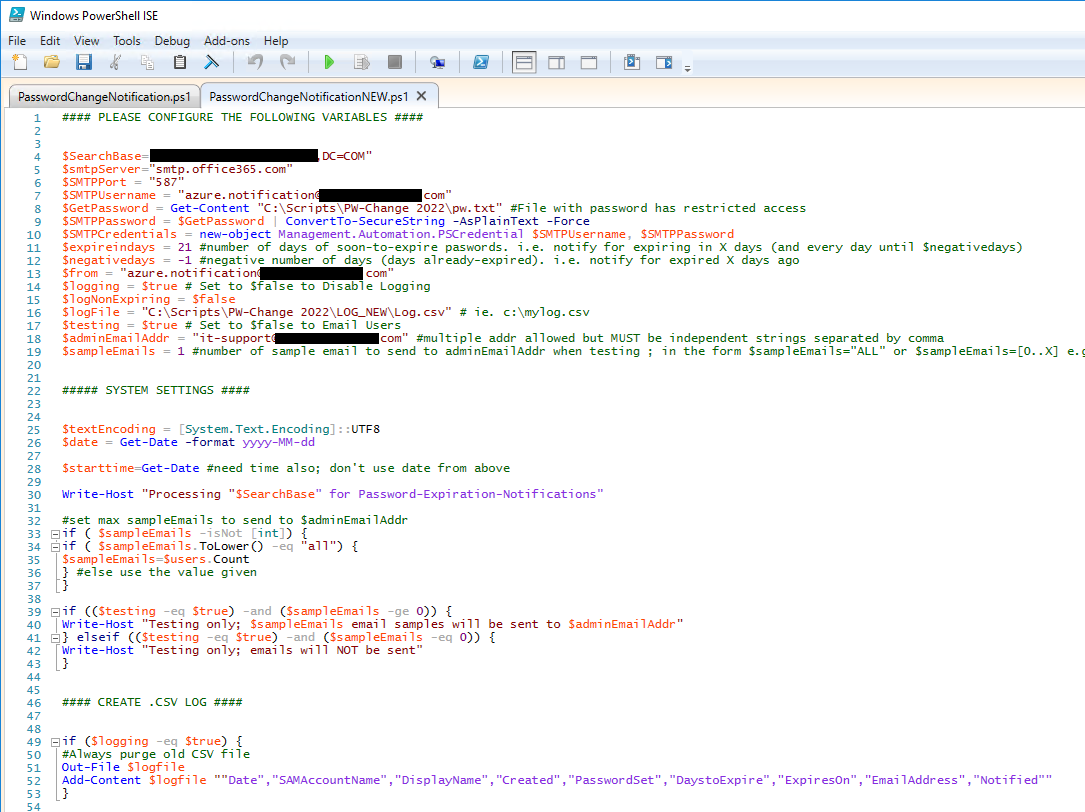
However, it seems to me that although the credentials are being used as intended, my user account somehow is still unable to send mails via smtp.office365.com (for whatever reason).
Additionally, it seems there's an issue with line #52 in the code as the results suggests:
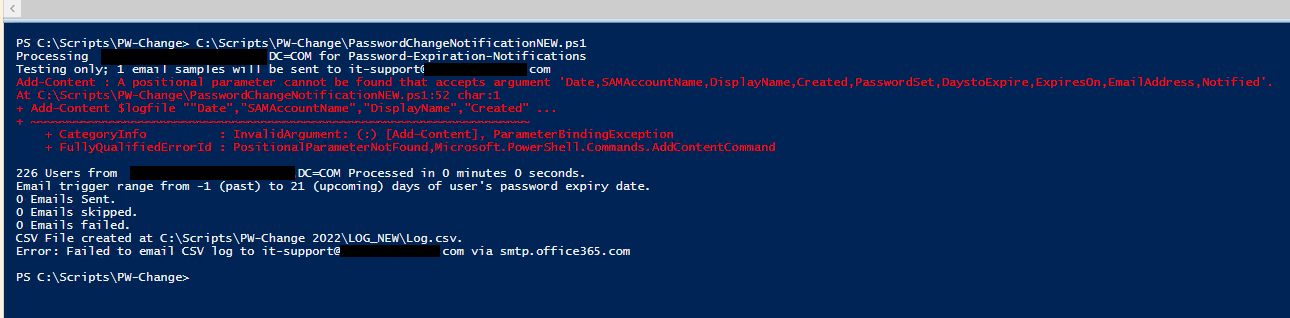
The log file is created successfully, but it remains empty.
Any ideas? Sorry for being a pain in the ass... I'm not sure what I'm missing here.