Skip to content

Instantly share code, notes, and snippets.

@fevangelou
fevangelou / Software RAID 1 setup on Ubuntu Server 20.04.md
Last active October 28, 2025 03:25
Software RAID 1 setup on Ubuntu Server 20.04 (or newer)

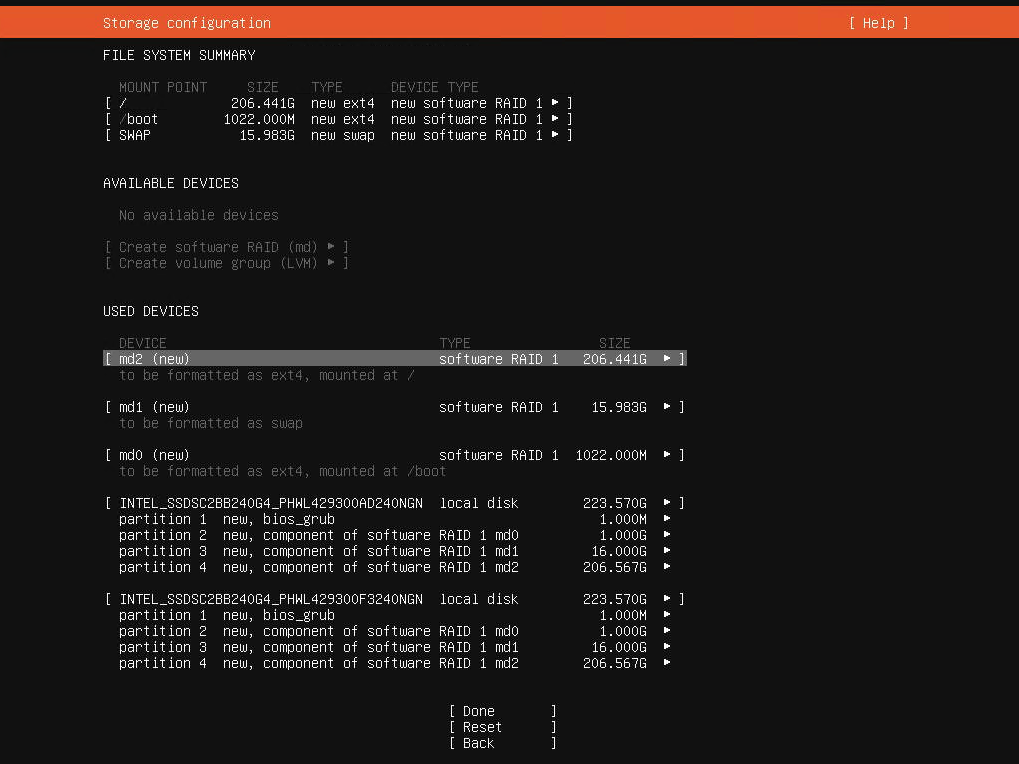
Looking to create a Software RAID 1 setup for your 2-disk server on Ubuntu Server 20.04?

Screen Shot 2020-06-05 at 20 55 31

Let's start with the basics: the official guide by Ubuntu (https://ubuntu.com/server/docs/install/storage) is outdated/wrong. And as of March 2021 it's possible that there's a bug as well with how the bios_grub partitions are created when using multiple disks.

Now on to the solution:

  • Select "Custom storage layout" when you reach the storage configuration step of the installer.
  • If the disks have existing partitions, click on each disk under AVAILABLE DEVICES and then select REFORMAT. This will (temporarily) wipe out the partitions.
@alexshpilkin
alexshpilkin / README
Last active June 15, 2023 21:46
Convert the RKN list to a Mikrotik firewall address list
Download the RKN list from https://github.com/zapret-info/z-i, massage it into
a Mikrotik script that manages a firewall address list, and put it up on a web
server. Note well that the list is gigantic---more than 80,000 entries as of
2018-04-28---so be sure to check if your router can handle it in advance (for
example, hAP Lite, with its measly 32M of memory, can’t).
On the router side, do something like
/tool fetch url="https://sheaf.site/rkn.rsc" dst-path=rkn.rsc
:import rkn.src
@piotr1212
piotr1212 / grafana-backup.sh
Created November 16, 2015 10:10
Grafana sqlite backup script
cat /usr/share/grafana/grafana-backup.sh
#!/bin/bash
DB="/var/lib/grafana/grafana.db"
BACKUP="/data/backup/grafana/grafana.db-$(date +%Y%m%d).bck"
SQLITE=/usr/bin/sqlite3
ZIP=/bin/gzip
${SQLITE} ${DB} ".backup ${BACKUP}"
${ZIP} ${BACKUP}