
- For your local dev, create a
Dockerfilethat is based on your production image and simply installxdebuginto it. Exemple:
FROM php:5

RUN yes | pecl install xdebug \
    && echo "zend_extension=$(find /usr/local/lib/php/extensions/ -name xdebug.so)" > /usr/local/etc/php/conf.d/xdebug.ini \
    && echo "xdebug.remote_enable=on" >> /usr/local/etc/php/conf.d/xdebug.ini \
    && echo "xdebug.remote_autostart=off" >> /usr/local/etc/php/conf.d/xdebug.ini
- Get you local IP address (
ifconfigor such) - Start your container with the following environment variable:
XDEBUG_CONFIG="remote_host={{YOUR_IP_ADDRESS}}"
-
Simple
dockerrun:docker run -e XDEBUG_CONFIG="remote_host={{YOUR_IP_ADDRESS}}" your-image -
With
docker-compose:# docker-compose.yml foo: build: path/to/Dockerfile environment: XDEBUG_CONFIG: remote_host={{YOUR_IP_ADDRESS}}
- In Intellij/PHPStorm go to:
Languages & Frameworks>PHP>Debug>DBGp Proxyand set the following settings:
Host: your IP addressPort: 9000
Then you're all set and can start listening for PHP Debug connections from your IDE. On the first run it will ask you to map
your local directoryies to the docker directories, but after that nothing will be required anymore!
Happy debugging!


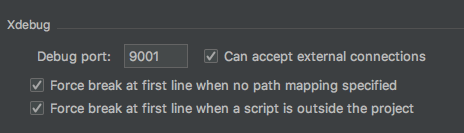


After that I still got error
But tried to changing ports in docker-compose.yml to - "8080:80" and now error is gone. To load page have to go to http://localhost:8080/
And after fixing those errors, I can confirm - that works :) I have not tested with curl, but I have tested running in chrome.