
Web portal for monitoring and controlling solar energy systems. you can contact us by mail at office@codershyve.com Or use Discord for direct contact: https://discord.gg/eUZv7SJfUc
- Government Sectors (Required by Law)
- U.S. Federal Agencies (all agencies protecting sensitive unclassified info)
- State and Local Governments
- Military and Defense (DoD, contractors)
- Intelligence Agencies (NSA, CIA, FBI)
- Examples: Healthcare.gov, IRS, Social Security, VA, NASA, DoE
- Regulated Industries
- Healthcare: Hospitals (HIPAA), insurance, EHR systems, medical devices
- Financial: Banks (PCI DSS, GLBA), payment processors, investment firms, crypto exchanges
- Critical Infrastructure: Energy sector (power grids, utilities), solar companies, oil/gas, water, telecom, transportation
- Enterprise & Technology
- SaaS/Cloud: AWS GovCloud, Azure Government, Google Cloud
- Enterprise Software: SAP, Oracle, IBM, Cisco
- Security vendors and IAM providers
- Education & Research
- Universities with government contracts
- Federal funding recipients
- National labs and research facilities
- International
- NATO members
- Five Eyes alliance
- Multinational corporations
- International financial institutions
Why Sungrid Portal is FIPS Compliant
Specific to the energy sector:
- Regulatory compliance for critical infrastructure
- Utility integration requirements
- Government incentives (tax credits, grants)
- Future-proofing for tightening regulations
Use cases:
- Solar on buildings
- Utility-scale solar farms
- Government facility installations
- Military base energy systems
- Smart grid integrations
- What Your Energy Data Reveals
- Home Users: Sleep schedules, occupancy, appliances, vulnerabilities
- Commercial Users: Operating hours, production schedules, competitive intelligence
- Industrial Users: Proprietary processes, trade secrets, capacity planning
- The Threat Landscape
State-Level Surveillance:
- Foreign adversaries (China, Russia, North Korea, Iran)
- Domestic overreach (NSA, warrantless collection)
- Corporate surveillance and data monetization
Real-World Consequences:
- Burglary rings, stalking, discrimination, political targeting, industrial espionage
- Documented attacks: Ukraine power grid (2015), Colonial Pipeline (2021)
- Why FIPS Protects Privacy
- No backdoors (public, peer-reviewed algorithms)
- Government-strength (NSA-grade)
- Independent verification (third-party labs)
- Future-proof (quantum-resistant roadmap)
- Legal protection in breach litigation
Release Histroy - January 11th, 2026
- Dedicated authentication and authorization microservice
- Centralizes all security and user access management
- Built with Go 1.25.4 and FIPS 140-3 compliance
Why We Added It
- Security Centralization: Consolidates distributed auth logic into a single auditable service
- Compliance: FIPS 140-3 certified for enterprise deployments
- Scalability: Separates auth concerns from business logic
- Modern Standards: Supports WebAuthn/FIDO2 passwordless authentication
Key Features
- Core Authentication: Password-based login, JWT sessions, token refresh
- Multi-Factor Authentication:
- TOTP (Google Authenticator, Authy)
- Email-based codes
- Passwordless (Passkeys): YubiKey, Touch ID, Face ID, Windows Hello
- Password Management: Change, reset flows with secure tokens
- Service-to-Service: Internal API for token introspection
- Operational: Health checks for Kubernetes deployments
Architecture
- FIPS Compliant: All cryptographic operations use certified modules
Fix History - December 27th, 2025
Issue 1: Prometheus Panic on Startup
Error: panic: Unable to create mmap-ed active query log Error opening query log file /prometheus/data/queries.active: no such file or directory
Root Cause:
- Prometheus container runs as user nobody (UID 65534)
- Volume mount ./prometheus_data:/prometheus had incorrect permissions
- Container couldn't create required data directory and queries.active file
Solution:
sudo chown -R 65534:65534 ./prometheus_data docker compose restart prometheus
https://drive.codeops.ro/d/s/16LTOmSZlTeQs3Wv5ahKRd09cl3Ea6k1/1WmyDHGNfxuU2U8baTEApF5_EkJtIuvI-zb0AgV0C1ww
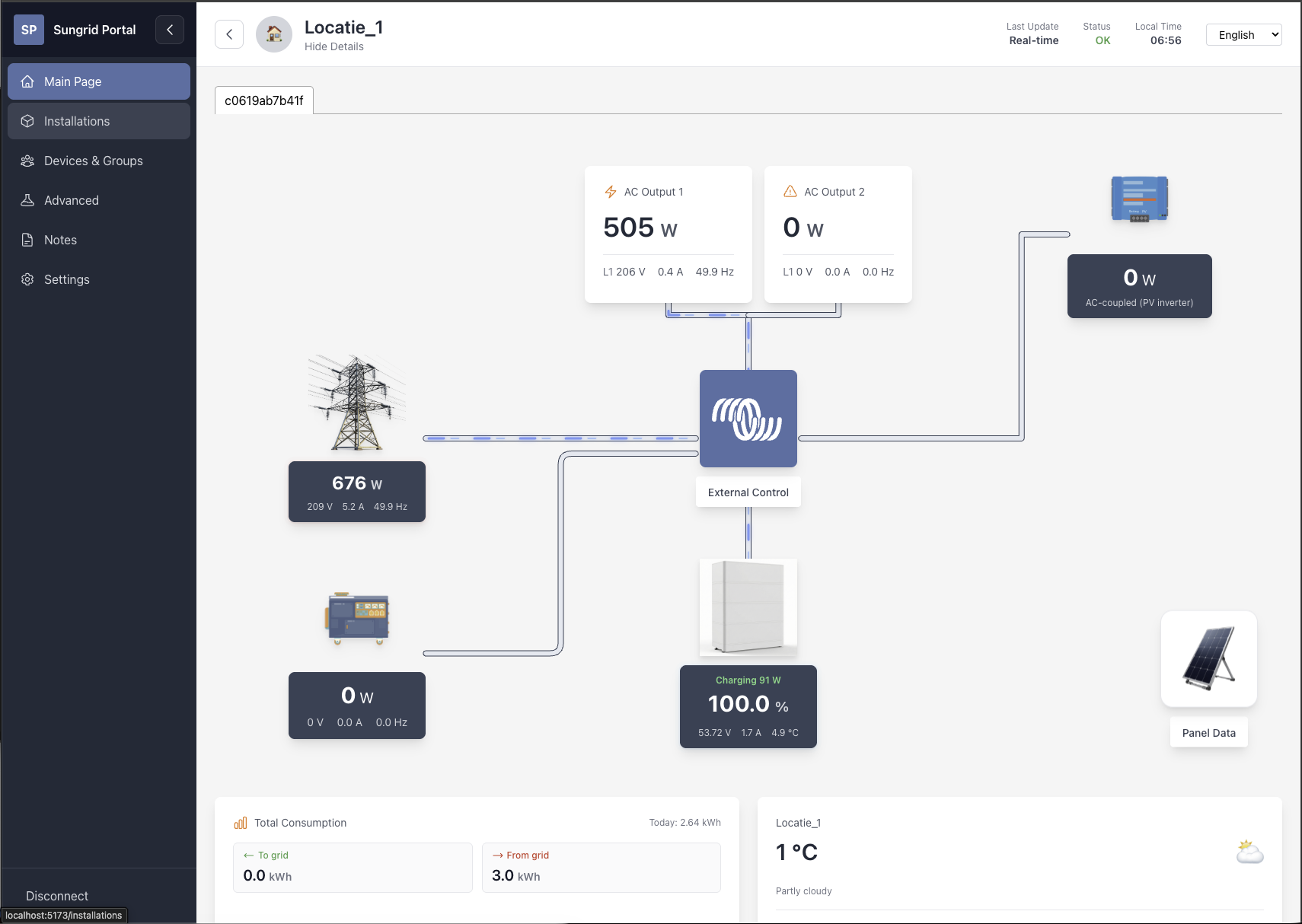
Download and unzip this image it is already fully configured, you just run it retrieve your VM ip and access it like this:
http://your_vm_ip:5173 for example if your VM ip is 192.168.1.10 then you should use http://192.168.1.10:5173
Create a file docker-compose.yaml on your computer and copy this content:
---
services:
  postgres:
    image: postgres:16-alpine
    container_name: sungrid-postgres
    env_file:
      - .env
    volumes:
      - ./postgres_data:/var/lib/postgresql/data
    ports:
      - "5432"
    networks:
      - sungrid-network

  redis:
    image: redis:7-alpine
    container_name: sungrid-redis
    volumes:
      - ./redis_data:/data
    ports:
      - "6379"
    networks:
      - sungrid-network
    restart: unless-stopped

  nats:
    image: nats:2.10-alpine
    container_name: sungrid-nats
    command: ["-js", "-sd", "/data/nats", "--http_port=8222"]
    volumes:
      - ./nats_data:/data/nats
    ports:
      - "4222:4222"   # NATS client port
      - "8222:8222"   # NATS monitoring port
    networks:
      - sungrid-network
    restart: unless-stopped

  pushgateway:
    image: prom/pushgateway:v1.9.0
    container_name: sungrid-pushgateway
    ports:
      - "9091:9091"
    networks:
      - sungrid-network
    restart: unless-stopped

  prometheus:
    image: prom/prometheus:v2.54.1
    container_name: sungrid-prometheus
    command:
      - "--config.file=/etc/prometheus/prometheus.yml"
      - "--storage.tsdb.retention.time=90d"
    volumes:
      - ./prometheus_data:/prometheus
      - ./prometheus.yml:/etc/prometheus/prometheus.yml:ro
    ports:
      - "9090:9090"
    networks:
      - sungrid-network
    restart: unless-stopped

  apprise-api:
    image: lscr.io/linuxserver/apprise-api:latest
    container_name: sungrid-apprise-api
    env_file:
      - .env
    volumes:
      - ./apprise-api/config:/config
      - ./apprise-api/attachments:/attachments
    ports:
      - "8000:8000"
    networks:
      - sungrid-network
    restart: unless-stopped

  mqtt-service:
    image: ghcr.io/bolchisb/sungrid-portal/mqtt-service:develop
    container_name: sungrid-mqtt-service
    env_file:
      - .env
    ports:
      - "8080:8080"
    networks:
      - sungrid-network
    restart: unless-stopped

  modbus-service:
    image: ghcr.io/bolchisb/sungrid-portal/modbus-service:develop
    container_name: sungrid-modbus-service
    env_file:
      - .env
    ports:
      - "8084:8084"
    networks:
      - sungrid-network
    restart: unless-stopped

  telemetry-worker:
    image: ghcr.io/bolchisb/sungrid-portal/telemetry-worker:develop
    container_name: sungrid-telemetry-worker
    env_file:
      - .env
    networks:
      - sungrid-network
    restart: unless-stopped

  data-service:
    image: ghcr.io/bolchisb/sungrid-portal/data-service:develop
    container_name: sungrid-data-service
    env_file:
      - .env
    ports:
      - "8082:8082"
    networks:
      - sungrid-network
    restart: unless-stopped

  config-panel:
    image: ghcr.io/bolchisb/sungrid-portal/config-panel:develop
    container_name: sungrid-config-panel
    env_file:
      - .env
    ports:
      - "8081:8081"
    networks:
      - sungrid-network
    restart: unless-stopped

  pvgis-service:
    image: ghcr.io/bolchisb/sungrid-portal/pvgis-service:develop
    container_name: sungrid-pvgis-service
    env_file:
      - .env
    ports:
      - "8083:8083"
    networks:
      - sungrid-network
    restart: unless-stopped

  device-gateway-service:
    image: ghcr.io/bolchisb/sungrid-portal/device-gateway-service:develop
    container_name: sungrid-device-gateway-service
    env_file:
      - .env
    ports:
      - "8085:8085"
    networks:
      - sungrid-network
    restart: unless-stopped

  automation-service:
    image: ghcr.io/bolchisb/sungrid-portal/automation-service:develop
    container_name: sungrid-automation-service
    env_file:
      - .env
    ports:
      - "8086:8086"
    networks:
      - sungrid-network
    restart: unless-stopped

  auth-service:
    image: ghcr.io/bolchisb/sungrid-portal/auth-service:develop
    container_name: sungrid-auth-service
    env_file:
      - .env
    ports:
      - "8087:8087"
    networks:
      - sungrid-network
    restart: unless-stopped

  frontend:
    image: ghcr.io/bolchisb/sungrid-portal/frontend:develop
    container_name: sungrid-frontend
    env_file:
      - .env
    ports:
      - "5173:3000"
    networks:
      - sungrid-network
    restart: unless-stopped

  watchtower:
    image: nickfedor/watchtower:latest
    container_name: sungrid-watchtower
    command: --interval 3600 --cleanup
    volumes:
      - /var/run/docker.sock:/var/run/docker.sock
    networks:
      - sungrid-network
    restart: unless-stopped


networks:
  sungrid-network:
    driver: bridge
Then create the .env file. You need the dot in front of the name.
# App-layer encryption (AES-256-GCM)
# Optional. When unset/empty, encryption is disabled (plaintext pass-through).
# To enable, generate a 32-byte key and set it like:
#   SUNGRID_ENCRYPTION_KEYS=v1:<base64-32-byte-key>
# Example generator:
#   openssl rand -base64 32
# If you set this, do NOT wrap the base64 in quotes.
# Example: SUNGRID_ENCRYPTION_KEYS=v1:BASE64_VALUE
SUNGRID_ENCRYPTION_KEYS=v1:NcHkIR8OJlckpXwGocfr/ma5CPmq+Vc+6jF0rIIICpE=
SUNGRID_ENCRYPTION_REQUIRED=false
# SUNGRID_ENCRYPTION_KEYS_FILE=

# CORS (backend APIs)
# - localhost / 127.0.0.1 / ::1 are always allowed
# - SUNGRID_HOST_IP (when set) is allowed (use update-env-ip.sh)
# - SUNGRID_CORS_ALLOWED_ORIGINS is a comma-separated list of additional origins to allow
SUNGRID_HOST_IP=10.100.10.157
SUNGRID_CORS_ALLOWED_ORIGINS= # TODO: we need to add a feature to set this from the UI.

# Apprise API
APPRISE_API_PORT=8000
APPRISE_ATTACH_SIZE=0
APPRISE_STATEFUL_MODE=simple
PGID=1000
PUID=1000
TZ=Etc/UTC

# Config Panel Service
CONFIG_API_ENABLE_CORS=true
CONFIG_API_HOST=0.0.0.0
CONFIG_API_PORT=8081
CONFIG_NOTIFICATIONS_ENABLED=true
CONFIG_PANEL_MTLS_ENABLED=false

# Data Service (Read API)
DATA_API_ENABLE_CORS=true
DATA_API_HOST=0.0.0.0
DATA_API_PORT=8082
DATA_PROMETHEUS_RETENTION_DAYS=90
DATA_SERVICE_MTLS_ENABLED=false

# Device Gateway Service
DEVICE_GATEWAY_API_ENABLE_CORS=true
DEVICE_GATEWAY_API_HOST=0.0.0.0
DEVICE_GATEWAY_API_PORT=8085
DEVICE_GATEWAY_DB_CONNECT_RETRIES=60
DEVICE_GATEWAY_DB_CONNECT_DELAY=2s
DEVICE_GATEWAY_DB_CONNECT_MAX_DELAY=30s
DEVICE_GATEWAY_DB_CONNECT_JITTER_PCT=20
DEVICE_GATEWAY_MTLS_ENABLED=false
DEVICE_GATEWAY_TUYA_QR_BASE_URL=https://apigw.iotbing.com
DEVICE_GATEWAY_TUYA_QR_CLIENT_ID=HA_3y9q4ak7g4ephrvke
DEVICE_GATEWAY_TUYA_QR_SCHEMA=haauthorize

# Automation Service
AUTOMATION_API_ENABLE_CORS=true
AUTOMATION_API_HOST=0.0.0.0
AUTOMATION_API_PORT=8086
AUTOMATION_DB_CONNECT_RETRIES=60
AUTOMATION_DB_CONNECT_DELAY=2s
AUTOMATION_DB_CONNECT_MAX_DELAY=30s
AUTOMATION_DB_CONNECT_JITTER_PCT=20
AUTOMATION_MTLS_ENABLED=false
AUTOMATION_TELEMETRY_SUBJECT_PREFIX=mqtt.telemetry
AUTOMATION_TELEMETRY_STREAM_NAME=MQTT_TELEMETRY
AUTOMATION_CONSUMER_NAME=automation-service
AUTOMATION_BATCH_SIZE=50
AUTOMATION_FETCH_TIMEOUT=2s
AUTOMATION_COMMANDS_SUBJECT=automation.commands
AUTOMATION_EXECUTIONS_SUBJECT=automation.executions
AUTOMATION_EXECUTION_WS_SUBJECT=ws.automation.execution_status

# Auth Service
AUTH_ACCESS_TOKEN_TTL=5m
AUTH_APPRISE_API_URL=http://apprise-api:8000
AUTH_BOOTSTRAP_EMAIL=admin@localhost
AUTH_BOOTSTRAP_PASSWORD=admin
AUTH_CONFIG_PANEL_API_URL=http://config-panel:8081
AUTH_DB_MIGRATIONS_DELAY=2s
AUTH_DB_MIGRATIONS_RETRIES=30
AUTH_INTERNAL_API_ENABLE_CORS=false
AUTH_INTERNAL_API_HOST=0.0.0.0
AUTH_INTERNAL_API_PORT=9087
AUTH_MFA_CHALLENGE_TTL=10m
AUTH_MFA_MAX_ATTEMPTS=5
AUTH_PUBLIC_API_ENABLE_CORS=true
AUTH_PUBLIC_API_HOST=0.0.0.0
AUTH_PUBLIC_API_PORT=8087
AUTH_REFRESH_TOKEN_TTL=720h
AUTH_SERVICE_MTLS_ENABLED=false
AUTH_TOTP_ISSUER=Sungrid Portal
AUTH_WEBAUTHN_ALLOWED_ORIGINS=http://localhost:5173,http://127.0.0.1:5173
AUTH_WEBAUTHN_RP_ID=localhost
AUTH_WEBAUTHN_RP_NAME=Sungrid Portal

# Database (PostgreSQL)
DB_HOST=postgres
DB_NAME=sungrid_portal
DB_PASSWORD=changeme
DB_PORT=5432
DB_SSL_MODE=disable
DB_USER=sungrid
POSTGRES_DB=sungrid_portal
POSTGRES_PASSWORD=changeme
POSTGRES_USER=sungrid

# Frontend
FRONTEND_PORT=5173
VITE_API_BASE_URL=http://localhost:8082
VITE_AUTH_API_BASE_URL=http://localhost:8087
VITE_CONFIG_API_BASE_URL=http://localhost:8081
VITE_DATA_API_BASE_URL=http://localhost:8082
VITE_GEOCODER_BASE_URL=https://nominatim.openstreetmap.org
VITE_MQTT_API_BASE_URL=http://localhost:8080
VITE_DEVICE_GATEWAY_API_BASE_URL=http://localhost:8085
VITE_AUTOMATION_API_BASE_URL=http://localhost:8086
VITE_WS_URL=ws://localhost:8080
API_BASE_URL=http://localhost:8082
AUTH_API_BASE_URL=http://localhost:8087
CONFIG_API_BASE_URL=http://localhost:8081
DATA_API_BASE_URL=http://localhost:8082
GEOCODER_BASE_URL=https://nominatim.openstreetmap.org
MQTT_API_BASE_URL=http://localhost:8080
WS_URL=ws://localhost:8080

# MQTT Service (Backend)
MQTT_API_ENABLE_CORS=true
MQTT_API_HOST=0.0.0.0
MQTT_API_PORT=8080
MQTT_DATA_RETENTION_DAYS=90
MQTT_DEBUG=false
MQTT_ENABLE_TOPIC_DISCOVERY=true
MQTT_LOG_LEVEL=info
MQTT_NOTIFICATIONS_ENABLED=true
MQTT_PROMETHEUS_JOB_NAME=mqtt-service
MQTT_PUSH_INTERVAL=15s
MQTT_REALTIME_SUBJECT=mqtt.realtime.updates
MQTT_SERVICE_MTLS_ENABLED=false
MQTT_STORE_HISTORICAL_DATA=true


# NATS
NATS_TELEMETRY_SUBJECT_PREFIX=mqtt.telemetry
NATS_URL=nats://nats:4222

# Prometheus & Pushgateway
PROMETHEUS_URL=http://prometheus:9090
PUSHGATEWAY_URL=http://pushgateway:9091

# PVGIS Service
PVGIS_API_ENABLE_CORS=true
PVGIS_API_HOST=0.0.0.0
PVGIS_API_PORT=8083
PVGIS_CONFIG_API_URL=http://config-panel:8081

# Redis Cache
REDIS_CACHE_ENABLED=true
REDIS_CACHE_TTL_DAILY=300
REDIS_CACHE_TTL_HOURLY=30
REDIS_ENABLED=true
REDIS_HOST=redis
REDIS_PORT=6379

# Telemetry Worker
TELEMETRY_PROMETHEUS_JOB_NAME=telemetry-worker
TELEMETRY_PUSH_INTERVAL=15s
TELEMETRY_STORE_HISTORICAL_DATA=true
Create the file prometheus.yml it is need for prometheus to scrape the pushgateway.
global:
  scrape_interval: 15s
  evaluation_interval: 15s

scrape_configs:
  - job_name: "pushgateway"
    honor_labels: true
    static_configs:
      - targets: ["pushgateway:9091"]
All these files are needed in the same directory as docker-compose.yaml
Centralized configuration management for MQTT connections, application settings, and notification preferences. Provides RESTful API for managing teams, installation groups, and system settings.
ghcr.io/bolchisb/sungrid-portal/config-panel:developRead-only REST API for device listings, topic data, and aggregated metrics. Serves dashboard, installations, and advanced analytics pages with unified PostgreSQL and Prometheus data.
ghcr.io/bolchisb/sungrid-portal/data-service:developReal-time Cerbo GX integration handling MQTT ingestion, control API, and WebSocket streaming. Publishes telemetry events to NATS for downstream processing.
ghcr.io/bolchisb/sungrid-portal/mqtt-service:developBackground NATS consumer that persists telemetry to PostgreSQL and updates Prometheus Pushgateway with latest-value metrics for monitoring.
ghcr.io/bolchisb/sungrid-portal/telemetry-worker:developReact-based web interface for monitoring and controlling Sungrid Portal systems. Built with TypeScript, Vite, and Tailwind CSS.
ghcr.io/bolchisb/sungrid-portal/frontend:developIf you installed the old docker-compose use these commands.
#Starting Images
docker-compose up -d

# Stoping images
docker-compose down --remove-orphans

# pulling images
docker-compose pull
If you installed the new docker-compose-plugin use these commands.
#Starting Images
docker compose up -d

# Stoping images
docker compose down --remove-orphans

# pulling images
docker compose pull