Skip to content

Instantly share code, notes, and snippets.

View Qyriad's full-sized avatar

Qyriad Qyriad

View GitHub Profile
@mcat
mcat / implementing-external-link-icons.md
Created March 5, 2025 01:41
A guide to implementing external link icons, generated after multiple turns with claude 3.7
@kennypete
kennypete / navigating_the_modes_of_Vim.md
Created April 18, 2024 20:46
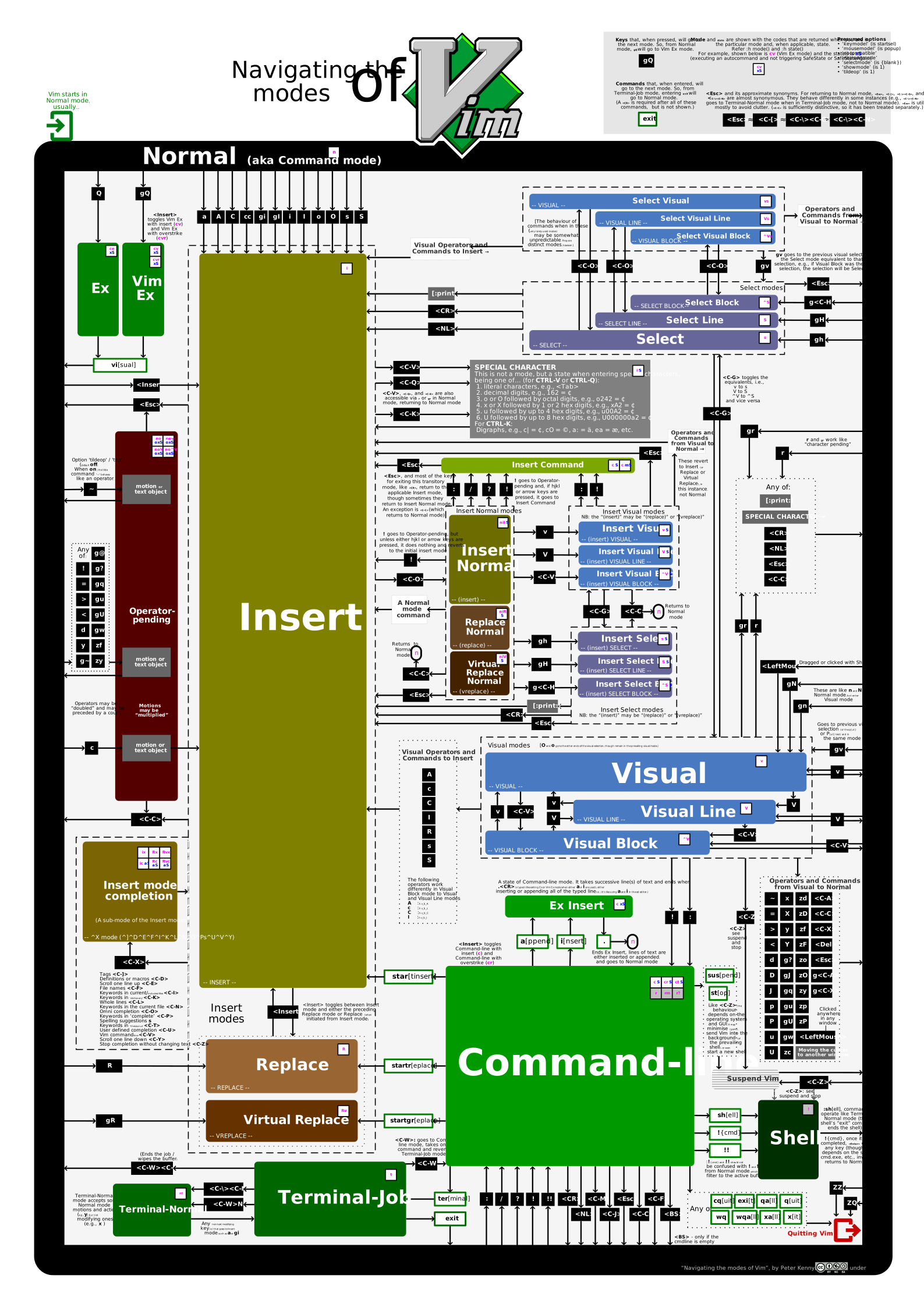
Navigating the modes of Vim

Navigating the modes of Vim

This diagram illustrates navigating through Vim’s modes. It was built factoring Vim 9 (i.e., all its modes, including up to two new modes, cr and cvr, in November 2023). Information about the state() and 'showmode' is provided too.

SVG version

Some features are only available in the SVG version. It is not provided directly from within this gist’s files because SVGs do not always play nicely in GitHub (particularly, refusing to display embedded fonts).

The SVG version includes hover text help, which shows pertinent information about the underlying key, command, mode, etc.

@aamiaa
aamiaa / RevertNewLayout.md
Last active December 3, 2025 22:54
Revert New Discord Layout

The original snippet no longer works!

On 02/09/2024 at around 8pm UTC, Discord flipped an experiment (2023-09_mobile_redesign_override_toggles) which ignores the layout toggle that this script relied on.

If you want to continue using the old layout, you can either use a modded mobile client (such as Vendetta) to disable that experiment, or downgrade to an old version of the app.

Method 1 - Downgrading (Android)

Tip

Use this one if you want a fast, beginner-friendly solution and don't mind using a version from November 2023

  1. Download version 205.15 of Discord mobile app from ApkMirror
{
pkgs ? import (fetchTarball "https://github.com/NixOS/nixpkgs/archive/refs/tags/22.11-beta.tar.gz") {},
} :
with pkgs;
let
init = pkgs.writeScript "init.sh" ''
#!${pkgs.runtimeShell}
/activate
exec /run/current-system/systemd/lib/systemd/systemd $*
@ryancdotorg
ryancdotorg / wzip.py
Last active January 25, 2025 22:46
Partial/streaming zip downloader
#!/usr/bin/env python3
# SPDX-License-Identifier: 0BSD or CC0-1.0 or MIT-0 or Unlicense
# Copyright (c) 2023, Ryan Castellucci, No Rights Reserved
import io, sys
import datetime
import argparse
import requests
import operator
import struct
@christianparpart
christianparpart / terminal-synchronized-output.md
Last active December 1, 2025 06:46
Terminal Spec: Synchronized Output

This page has moved!

Please see here: contour-terminal/vt-extensions

Synchronized Output

Synchronized output is merely implementing the feature as inspired by iTerm2 synchronized output, except that it's not using the rare DCS but rather the well known SM ? and RM ?. iTerm2 has now also adopted to use the new syntax instead of using DCS.

Semantics

@iconmaster5326
iconmaster5326 / terraria_player.ksy
Last active May 12, 2024 05:11
This is a Kaitai Struct description file for Terraria .plr files. Do note that some things, such as creative powers, are not yet implemented.
meta:
id: terraria_player
file-extension: plr
endian: le
bit-endian: be
imports:
- vlq_base128_le
doc: |
The format for Terraria player files. This format has only been tested on
Terraria 1.4 (version 234). Note that you must decrypt the file first before
@miguelmota
miguelmota / external_link_arrow.txt
Last active November 25, 2025 17:04
Unicode UTF-8 external link arrow symbol (closest thing to it)
@MeguminSama
MeguminSama / Discord Experiments.js
Last active December 8, 2025 20:34
Discord Experiments.js
let cache; webpackChunkdiscord_app.push([["wp_isdev_patch"], {}, r => cache=r.c]);
var UserStore = Object.values(cache).find(m => m?.exports?.default?.getUser).exports.default;
var actions = Object.values(UserStore._dispatcher._actionHandlers._dependencyGraph.nodes);
var user = UserStore.getCurrentUser();
actions.find(n => n.name === "ExperimentStore").actionHandler.CONNECTION_OPEN({
type: "CONNECTION_OPEN", user: {flags: user.flags |= 1}, experiments: [],
});
actions.find(n => n.name === "DeveloperExperimentStore").actionHandler.CONNECTION_OPEN();
webpackChunkdiscord_app.pop(); user.flags &= ~1; "done";
@AngelicosPhosphoros
AngelicosPhosphoros / main.rs
Last active February 18, 2025 17:56
How to print enabled cpu target features in Rust
#![recursion_limit="512"]
// This script prints all cpu features which active in this build.
// There are 3 steps in usage of script:
// 1. get list of features using `rustc --print target-features`
// 2. put it into script (it has values actual for 2020-12-06 for x86-64 target).
// 3. run script.
fn pad_name(s: &str)->String{
let mut res = s.to_string();