
When attempting to authenticate using a Microsoft Entra email address, the following error is presented.
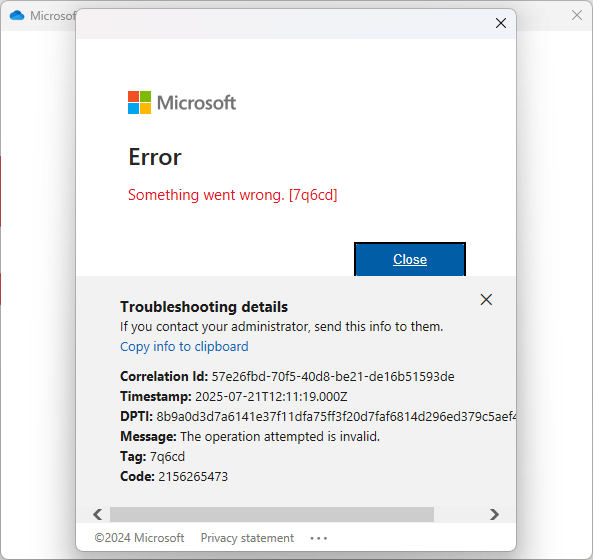
IMPORTANT The Correlation Id does not exist in the tenant for the given User principal name because the request was NOT made to the tenant.
| Message | Type | Tag | Code | Description |
|---|---|---|---|---|
| Something went wrong. | StatusInternal::ApiContractViolation | 7q6cd | 2156265473 | Failure to fetch token for UserID |
(if the personal Microsoft account login was successful, at any time)
- Microsoft 365 applications will be signed into with the personal Microsoft account.
- Microsoft OneDrive (personal) will be used instead of Microsoft OneDrive for Business. If group policy is enabled to block Microsoft OneDrive (the personal version), this error can occur.
- Windows will be registered and show under Devices in the personal Microsoft account.
- Windows Network Credentials will contains entries for the Microsoft Entra email address (but are really for the personal Microsoft email address)
- Open https://login.live.com
- Enter Microsoft Entra email address
- If prompted for additional actions, such as password or authenticator, the Microsoft Entra email address is associated with a personal Microsoft account
- If not, and an error stating We couldn't find a Microsoft account. Try entering your details again, or create an account. is presented, the Microsoft Entra email address is not associated with a personal Microsoft account.
The Microsoft Entra email address is also registered as a personal Microsoft account.
- Log into https://login.live.com using the personal Microsoft account
- Create an email address (if another does not exist)
- Make the other (non-conflicting) email address primary
- Remove the Microsoft Entra email address
- Log out of any Microsoft applications
- Log into applications using Microsoft Entra email address.