
Hello, my name is Lemon. I am a maintainer at /tg/, and I have taken it on myself to document/update the atmos subsystem. I have been supported in this goal by Dunc and Aranclanos, the atmos maintainers who came before me.
I have stolen adapted this document from the work of Duncathan, an off and on maintainer who is responsible for the majority of the quality of the current atmos system. He pushed through several code cleanliness and sanity refactors to the system, and wrote the rundown of gas mixtures you'll find in this document. See the original for his draft.
Now then, onto the purpose of this document.
I am the only active coder who understands all the components of the environmental atmospherics system. This in and of itself isn't a huge issue, as there are separate threads of development in progress as I write this, and others who understand the theory behind gas simulation far better then I. The real issue is not that none knows how it works, it's that none knows what functioning atmos looks like. This has caused 2 main components of the system to majorly break, and because understanding of what should be is so low, none even noticed.
My goal here is to solve that problem once and for all. Not everything will be documented here, I won't go over every line. I will however describe how things ought to work, and how some of the more complex stuff is meant to run.
Atmospherics is a very complicated and intimidating system of SS13, and as such very few contributors have ever made changes to it. Even fewer is the number of contributors who have made changes to the more fundamental aspects of atmos, such as Environmental Atmos or gas mixtures. There are several other factors for this, of course. In the case of Environmental, its arcane nature coupled with its extremely important gameplay effects leave it a very undesirable target for even the least sane coder. As for gas mixtures, they were virtually untouchable without extensive reworks of the code. This pastebin is a good example; it lists all the files one would need to make changes in order to add a new type of gas in the old system. As you can imagine, the sheer bulk of work one would need to do to accomplish this essentially invalidated any such attempts. However, my primary goal is to bring atmos to a state where any coder will be able to understand how and why it works, as well as cleanly and relatively easily make changes or additions to the system. While much progress to this end has been achieved, still very few have taken advantage of the new frameworks to try to implement meaningful features or changes. The purpose of this document is to lay out the inner workings of the entire atmos system, such that someone who does not have an intimate understand of the system like myself will be able to contribute to the system nonetheless.
Recognizing this desire, I hope and believe that you who are reading this are willing to learn and contribute.
Thank you.
Hello! So glad you could join us.
This document serves as documentation of the atmos part of our codebase, primarily gasmixtures and environmental atmos, as they are the most pertinent and misunderstood.
Whether you're here for the meme, to attempt to powergame reactions, or to add a new sort of equalization, I hope this is helpful to you, and I look forward to what you make.
If you'd like to understand more about how environmental atmos works after reading the relevant subsection, go to Appendix B. It discusses how to properly visualize the system, and what different behavior looks like.
Now then, here we go.
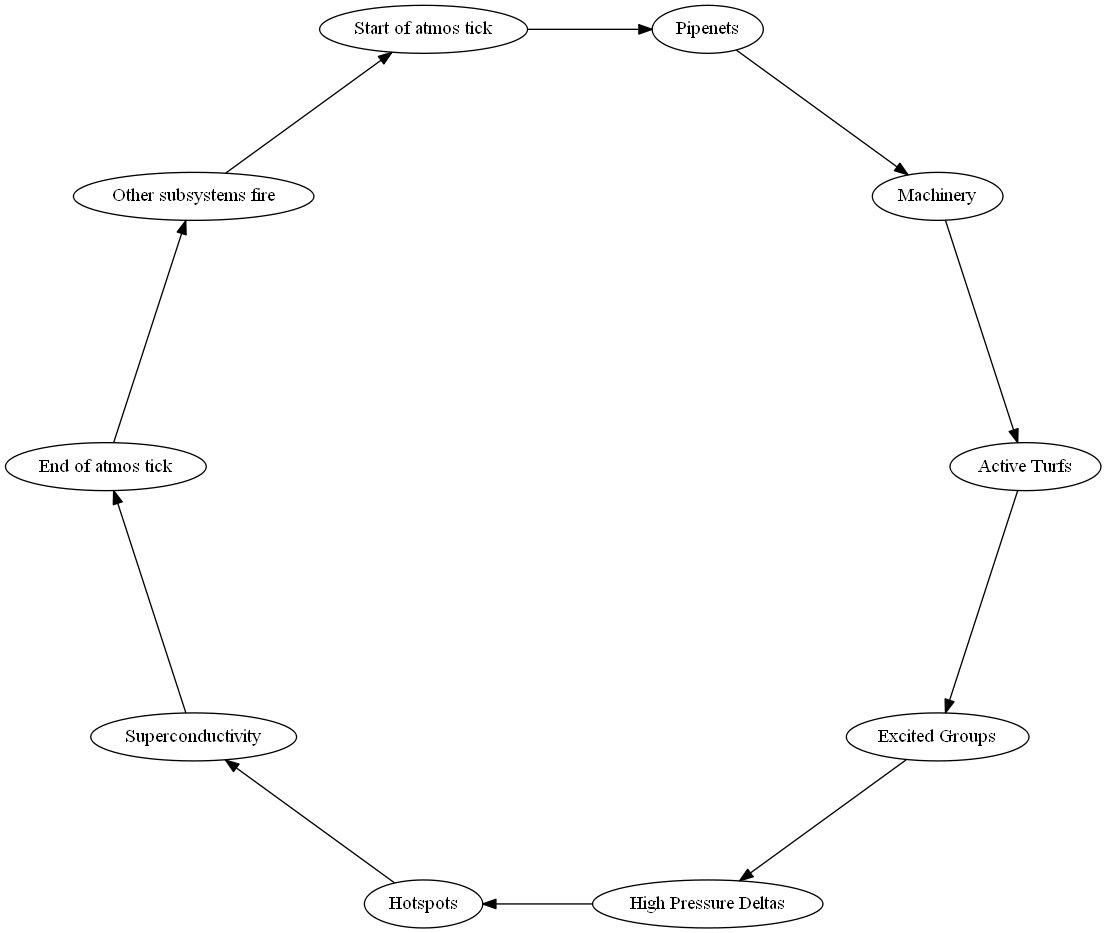
Figure 3.1: the structure of one air controller tick. Not totally accurate, but it will do
The air controller is, at its core, quite simple, yet it is absolutely fundamental to the atmospheric system. The air controller is the clock which triggers all continuous actions within the atmos system, such as vents distributing air or gas moving between tiles. The actions taken by the air controller are quite simple, and will be enumerated here. Much of the substance of the air ticker is due to the game's master controller, whose intricacies I will not delve into for this document. As such, this is a simplified list of the air controller's actions in a single tick:
- Rebuild Pipenets
- Runs each time SSAir processes, ensures that no pipenets sit unresolved
- Calls
build_network()on each/obj/machinery/atmosphericsin thepipenets_needing_rebuiltlist
- Pipenets
- Updates the internal gasmixes of attached pipe machinery, and reacting the gases in a pipeline
- Calls
process()on each/datum/pipenetin thenetworkslist
- Machinery
- Handles machines that effect atmospherics, think vents, the supermatter, pumps, all that
- Calls
process_atmos()on each/obj/machinery(typically/obj/machinery/atmospherics) in theatmos_machinerylist - May remove the machinery from said list if
process_atmos()returnsPROCESS_KILL
- Active turfs
- This is the heart and soul of environmental atmos, see more details below
- All you need to know right now is it manages moving gas from tile to tile
- Calls
process_cell()on each/turf/openin theactive_turfslist
- Excited group cleanup
- Rebuilds excited groups when the structure of their contents changes
- Calls
cleanup_group()on each/turf/openin thecleanup_ex_groupslist
- Excited groups
- Manages excited groups, which are core to working flow simulation
- ore details to come, they handle equalizing groups when active turfs can't do the job
- Increases the
breakdown_cooldownanddismantle_cooldownfor each/datum/excited_groupin theexcited_groupslist - If either cooldown for a given excited group has passed its threshold
- Calls
self_breakdown()ordismantle()appropriately on the excited group.
- High pressure deltas
- Takes the gas movement from Active Turfs and uses it to move objects on said turfs
- Calls
high_pressure_movements()on each/turf/openin thehigh_pressure_deltalist. - Sets each turf's
pressure_differenceto 0
- Hotspots
- These are what you might know as fire, at least the effect of it.
- They deal with burning things, and color calculations, lots of color calculations
- Calls
process()on each/obj/effect/hotspotin thehotspotslist
- Superconductivity
- Moves heat through turfs that don't allow gas to pass
- Deals with heating up the floor below windows, and some other more painful heat stuff
- Calls
super_conduct()on each/turfin theactive_super_conductivitylist
- Atoms
- Processes things in the world that should know about gas changes, used to account for turf sleeping, I'll get into that in a bit
- Calls
process_exposure()on each/atomin theatom_processlist
If the air controller is the heart of atmos, then gas mixtures make up its blood. The bulk of all atmos calculations are performed within a given gas mixture datum (an instance of /datum/gas_mixture), be it within a turf or within an emergency oxygen tank or within a pipe. In particular, /datum/gas_mixture/proc/share() is the cornerstone of atmos simulation, as it and its stack perform all the calculations for equalizing two gas mixtures.
Gas mixtures contain some of the oldest code still in our codebase, and it is remarkable that overall, the logic behind the majority of gas mixture procs has gone unchanged since the days of Exadv1. Despite being in some sense "oldcode", the logic itself is quite robust and based in real world physics. Thankfully, gas mixtures already are quite well documented in terms of their behavior. Their file is well commented and kept up to date. I will, however, elaborate on some of the less obvious operations here. Additionally, I will document the structure of gas lists, and how one should interface with a gas mixture should you choose to use one in other code.
//transfer of thermal energy (via changed heat capacity) between self and sharer
		if(new_self_heat_capacity > MINIMUM_HEAT_CAPACITY)
			temperature = (old_self_heat_capacity*temperature - heat_capacity_self_to_sharer*temperature_archived + heat_capacity_sharer_to_self*sharer.temperature_archived)/new_self_heat_capacity
Snippet 4.1: excerpt from /datum/gas_mixture/proc/share()
The snippet above is an example of one particularly strange looking calculation. This part of share() is updating the temperature of a gas mixture to account for lost or gained thermal energy as gas moves to/from the mixture, since gases themselves carry heat. To understand this snippet, it is important to understand the difference between heat and temperature. For the most part, the average coder need only concern himself with temperature, as it is a familiar experience for anybody. However, internally in atmos, heat (thermal energy) is the truly important quantity. Heat is defined as temperature multiplied by heat capacity, and is measured in joules. Typically within atmos, we are more concerned with manipulating heat than temperature; however, temperature is tracked rather than heat largely to make interfacing with the system simpler for the average coder. Thus, this snippet modifies heat in terms of temperature - it adds/subtracts three terms, each of which measure heat, to determine the new heat in the gas mixture. This heat is then divided by the mixture's heat capacity in order to determine temperature.
One trick to understanding passages like this is to do some simple dimensional analysis. Look only at the units, and ensure that whenever a variable is assigned that it is being assigned the appropriate unit. The snippet previously discussed can be represented with the following units: temperature = ((J/K)*K - (J/K)*K + (J/K)*K)/(J/K). Simplified, you get (J-J+J)K/J and then simply JK/J and K, verifying that temperature is being set to a value in kelvins. This trick has proven invaluable to me when debugging the inner workings of gas mixtures.
The true beauty of the gas mixture datum is how it represents the gases it contains. A bit of history: gas mixtures used to represent gas in two ways - there were the four primary gases (oxygen, nitrogen, carbon dioxide, and plasma) which were hardcoded. Each gas mixture had two vars (moles and archived moles, a concept to be explained later) to represent each of these gases. Calculations such as thermal energy made use of predefined constants for these hardcoded gases. The benefit of this was that they were extremely quick - only a single datum var access was needed for each one. In contrast, there were trace gases, for which there were a list of gas datums. The only trace gas available in normal gameplay was nitrous oxide (N2O or sleeping agent), though through adminnery it was possible to create oxygen agent B and volatile fuel, curious gases which will be described later for historical reasons. Trace gases, in contrast to hardcoded gases, were quite modular. To add a new trace gas one needed only to define a new subtype of /datum/gas and add appropriate behavior wherever desired, such as breath code. Unfortunately, of course, trace gases were slooooow. Calculations on trace gases were significantly more costly than hardcoded gases. The problem was obvious - it seemed impossible to have a gas definition which shared the modularity of trace gases without sacrificing too much of the performance of the hardcoded gases.
What then to do? There was no option to port an improvement from another codebase. As far as I am aware, there have been no significant downstream improvements to gas mixtures. The other major upstream codebase, Baystation12, uses a very different atmos system; in particular, their XGM gas mixtures have their own solution to this problem. To summarize XGM, there is a singleton which has associative lists of gas metadata (information such as specific heat, or which overlay to display when the gas is present) which gets accessed whenever such information is needed. To count moles, each gas mixture has an associative list of gas ids mapped to mole counts. There were a couple of problems with this approach: 1. There was no measure of archived moles. While it would be easy to simply add a second associative list, this has non-trivial memory implications as well as a potential increase to total datum var accesses within internal atmos calculations. 2. The singleton used for storing metadata helps with the memory impact that using full datums would have, but does not properly address the cost of datum var accesses, as to access metadata you must still access a datum var on the singleton.
For some time, without a clear solution, we simply stuck to the status quo and left gases non-modular. Eventually, however, there was an idea.
Enter Listmos.
The solution we came to was beautifully simple, but founded on some unintuitive principles. While datum var accesses are quite slow, proc var accesses are acceptable. If we use a reference for a given var, this can be exploited by "caching" the reference inside of a proc var. How can we take advantage of this without using a datum, thus nullifying the benefit?
The answer was to use a list. The critical realization was that a gas datum functioned moreso as a struct than as a class. There were no procs attached to gas datums; only vars. While DM lacks a true struct with quick lookup times, a list works very well to perform the same function. Thus, the current structure of gas was created, under the name Listmos.
Each gas mixture has an associative list, gases, which maps according to a key to a particular gas. This gas is itself a list (not an associative list, mind) with three elements; these elements correspond to the moles, archived moles, and to another list. This final list is a singleton - only one instance of it exists per gas, and all gas instances of a particular type point to this same list as their third element. The final list contains the metadata for the gas, such as specific heat or the name of the gas. The structure of the metadata list varies according to how many attributes are defined overall for all gases, but it is also non-associative since the structure can never change post-compile, so we save a little bit of performance by avoiding associative lookups.
Each type of gas is defined by defining a new subtype of /datum/gas. These datums do not get instantiated; they merely serve as a convenient and familiar means for a coder unfamiliar with the inner workings of listmos to define a new gas. Additionally, the type paths serve a second use as the keys used to access a particular gas within the gases list. It is easiest to demonstrate the manipulation of gas, including these list accesses, with an example.
var/datum/gas_mixture/air = new
air.assert_gas(/datum/gas/oxygen)
air.gases[/datum/gas/oxygen][MOLES] = 100
world << air.gases[/datum/gas/oxygen][GAS_META][META_GAS_NAME] //outputs "Oxygen"
world << air.gases.heat_capacity() //outputs 2000 (100 mol * 20 J/K/mol)
air.gases[/datum/gas/oxygen][MOLES] -= 110
air.garbage_collect() //oxygen is now removed from the gases list, since it was empty
Snippet 4.2: gas mixture usage examples
Of particular note in this snippet are the two procs assert_gas() and garbage_collect(). These procs are very important while interfacing with gas mixtures. If you are uncertain about whether a given mixture has a particular gas, you must use assert_gas() before any reads or writes from the gas. If you fail to use assert_gas() then there will be runtime errors when you try to access the inner lists. When you remove any number of moles from a given gas, be sure to call garbage_collect(). This proc removes all gases which have mole counts less than or equal to 0. This is a memory and performance enhancement to list accesses by reducing the size of the list, and also saves us from having to do sanity checks for negative moles whenever gas is removed. As a quick reference, here is a list of common procs/vars/list indices which the average coder may wish to use when interfacing with a gas mixture.
/datum/gas_mixture/proc/assert_gas()- Used before accessing a particular type of gas./datum/gas_mixture/proc/assert_gases()- Shorthand for calling assert_gas() multiple times./datum/gas_mixture/proc/garbage_collect()- Used after removing any number of moles from a mixture./datum/gas_mixture/proc/return_pressure()- Pressure is what should be displayed to players to quanitfy gas; measured in kilopascals./datum/gas_mixture/var/temperature- Measured in kelvins. Useful constants are T0C and T20C for 0 and 20 degrees Celsius respectively, and TCMB,the temperature of space and the lower bound for temperature in atmos./datum/gas_mixture/var/volume- Measured in liters.
gases[path][MOLES]- Quantity of a particular gas within a mixture.gases[path][GAS_META][META_GAS_NAME]- The long name of a gas, ex. "Oxygen" or "Hyper-noblium"gases[path][GAS_META][META_GAS_ID]- The internal ID of a given gas, ex. "o2" or "nob"
While defining a new gas on its own is very simple, there is no gas-specific behavior defined within /datum/gas. This behavior gets defined in a few places, notably breath code (to be discussed later) and in reactions. The most important and well known reaction in SS13 is fire - the combustion of plasma. Reactions are used for several things - in particular, it is conventional (though by no means enforced) that to form a gas, a reaction must occur. Creating a new reaction is fairly simple, this is the area of atmos that has received the most attention over the last few years, and the best place to start. Don't be scared of the size of reactions.dm, it's not that complex.
There are two procs needed when defining a new reaction, /datum/gas_reaction/proc/init_reqs() and /datum/gas_reaction/proc/react(). init_reqs() initializes the requirements for the reaction to occur. There are two lists, min_reqs and max_reqs, which map gas paths to number of moles. They also map three specific strings ("TEMP", "MAX_TEMP" and "ENER") to temperature in kelvins and thermal energy in joules. It is important to note that, currently, max_reqs is not enabled. The code to handle it is commented out in /datum/gas_mixture/proc/react() for the sake of improving performance while no reactions have a maximum mole requirement. Should you wish to enable max_reqs() simply uncomment the code.
As for react(), it is where all the behavior of the reaction is defined. The proc must return one of NO_REACTION, REACTING, or STOP_REACTIONS. The proc takes one or optionally two arguments. The first, mandatory, argument is a gas mixture on which to perform calculations; this mixture is what is reacting. The second, optional, argument is a turf or pipenet, specifically the thing which contains the gas mixture. You may choose for the reaction to affect the object in some way. Note that it is conventional for constants within reactions to be #define'd at the top of the file and #undef'd at the end.
This is a rather large subject, we will need to cover how gas flows, turf sleeping, superconduction, and much more. Strap in and enjoy the ride!
Active turfs are the backbone of how gas moves from one tile to another. Most of process_cell() should be easy ish to understand, but I am going to hit one of the more annoying points before going into theory.
archived_cyclethis var stores the last cycle of the atmos loop that the turf processed on. The key point to notice here is that when processing a turf, we don't share with all its neighbors, we only talk to those who haven't processed yet. This is because the remainder of process_cell() and especially share() are similar in form to addition. We can add in any order we like, and we only need to add once. This is what archived gases are for by the way, they store the state of the relevant tile before any processing occurs.
Alright then, with that out of the way, what is an active turf.
This is actually the main point of LINDA by the way, the math for gas movement is r4407 goon code or older, but at the time we had a large issue. All turfs processed, or rather, all /simulated turfs processed. There was a separate type for /unsimulated turfs, but that was mostly things like centcom or space. Aside from that all the turfs that could in theory have gas on them needed to process each tick. process_cell() didn't quite look how it does now mind, but this was a horrible state of affairs.
This system is called FEA, and like I said we use most of the same logic.
The major difference is our turfs sleep. They sit idle most of the round, process until no major changes are happening, and then go to sleep.
Active turfs also poke all the listening objects sitting on them, and start to process them so they can react to heat or molar changes.
If we just used active turfs this would be easy as pie, but we don't.
I didn't mention this above, but active turfs, or really share(), has a fatal flaw. The amount of gas moved per tick goes down exponentially the further away a turf is from the source of changes, or diffs.
With only active turfs breaches would never settle, and as soon as a tile becomes active it would never rest again. (This is one of the reasons I wrote this document by the way, excited groups nearly totally broke about 4 years ago, and none at the time noticed)
So then, active turfs are bad at evening out diffs. What can we do to solve this?
Enter the excited group. Holds a list of all turfs that have shared with each-other, given infinite diffs and time it fills the space available to it.
Its main job is to equalize the turfs inside it. When all the active turfs in a group fail to make large changes, it simply evens them all out.
This is self_breakdown()
They have secondary roles as the grim reaper of active turfs. When a group is totally inactive, and nothing whatsoever is going on, it will dismantle(), putting all of the turfs inside it to sleep, and killing itself.
As for how excited groups form, they're built out of active turfs who share corners.
Excited groups can tell the amount of diff being shared by hooking into a value share() sets on gasmixes, the absolute amount of gas shared by each tile. The issue is this isn't pressure, it's molar count. So heat being shared in a sealed room causes excited groups to break down, then reform from sources. This isn't a major issue due to how breakdown evens things out quite often
Now this would all be fine, but as I'm sure you've noticed, there's a crouching pile of lag hiding here. What happens if the excited groups is doing something over in cargo, but the flow of gas started in medical? There's no point processing the majority of the tiles, but we stil want to keep the group aspect.
Originally LINDA only had the above 2 constructions, but we ran into a problem when making planetary turfs. The old implementation was mutable, but shared with a copy of its initial mix each tick. This lead to problems. In essence, the groups never stopped spreading so long as a source of diffs existed. This is because the job of excited groups is to move the diffs from the source, to the edges of the group. But in this case every single turf was an "edge". Not good.
To combat this, a timer was added to each turf. It reset when a significant share was made, but otherwise if enough time passed the turf was forcibly removed from the active_turfs list. Unfortunately for us, this had unintended side effects.
When a turf is removed from active, the excited group is broken down, as it's assumed that the proc will only be called when the landscape of the map itself has changed. You begin to see the issue. With large enough space, excited groups broke, totally. Constant rebuilds into dismantles, cycling forever.
Now this issue here is we'd like to keep this napping, but we don't want to garbage_collect() the excited group.
So, I added a new proc sleep_active_turf(). It removes the active turf from processing, but doesn't garbage_collect(). This has some additional costs however.
Excited group garbage_collects() are the real issue here. When the landscape of the map changes, we need to rebuild the groups, but we wouldn't want to rebuild them across a wall or something.
Thus, we have excited group cleanup, which takes all the old turfs, and reaches out to their neighbors to see if they're there. This allows us to rebuild excited groups without relying on active turfs.
There's another issue here too, how do we deal with things that react to heat? A firelock shouldn't just open because the turf that the alarm is on went to sleep. Thus, atom_process, a list of atoms with requirements and things to do. It processes them until their requirements are not met, then it kills them.
Now there's one more major aspect of environmental atmos to cover
Superconduction, an odd name really, doesn't really describe what it is meant to do does it. It gets worse trust me.
Superconduction is the system that makes heat move through solid objects, so in theory walls, windows, airlocks, so on. This is another one that just broke one day, and none noticed cause none knew what it was meant to do.
There's another issue with it, the var names don't mean what you think, and it is very old code, so it's hard to grasp. You can do it, you've made it this far.
So then, what does superconduction do, and what do those damn vars mean.
As I mentioned above, superconduction shares heat where heat can't normally travel. It does this by heating up the turf whatever heat source is on, not the gasmix, the turf itself. This temp is then shared with adjacent turfs, based on thermal_conductivity, a value between 0 and 1 that slows the heatshare. Turfs also have heat_capacity, which is the heat capacity of the material in question, so how hard it is to heat.
There's one more, and it's a doozy. atmos_supeconductivity is a set of directions that we cannot share with.
Oh, and heat_capacity is also used for dealing with melting turfs. Don't worry about it.
So then, a review.
thermal_conductivityRanges from 0 to 1, effects how easy it is for a turf to receive heatheat_capacityLarge numbers mean it's harder to heat, but cools slower. You get itatmos_supeconductivityBitfield of directions we can't share in, this is often set by firelocks and such
One more thing, turfs will superconduct until they either run out of heat, or temp. This is a stable system because turfs "conduct" with space, which is why floods of heat will equalize to about 600k over time.
This will require/impart a light understanding of the master controller, I will go over what makes the atmos subsystem slow, what can be done, and what it effects.
First some new vocab.
waitSubsystem var, it is the amount of time to "wait" between each fire, or process. Measured in decisecondsMC_TICK_CHECKA define that checks to see if the subsystem has taken more then it's allotted time. In the case of SSAir we use it to allow for dynamic scaling
And now, an object lesson.
The MC entry for SSAir is very helpful for debugging, and it is good to understand before I talk about cost.

As you can see here, SSAir is a bit of a jumble, don't worry, it'll make sense in a second. The first line is in this order: cost, tick_usage, tick_overrun, ticks
costCost is the raw time required to run the subsystem in millisecondstick_usage[Insert info from bothering mso here]tick_overrunThis is a percentage of how far past our allotted time we ran. This is what causes Time Dialation, it's bad.ticksThis is the average amount of subsystem fires it takes to run through once.
The second line is the cost each subprocess contributed per process, this is a rolling average. It'll give you a good feel for what is misbehaving.
The third line is the amount of "whatever" in each subprocess. Handy for noticing dupe bugs and crying at active turf cost. Speaking of, the last entry is the active turfs per overall cost. Not a great metric, but larger is better.
Now then, what the hell is going on in that image.
SSAir has a wait of 5 deciseconds, or 50ms. This means it wants to fire roughly twice a second. You'll see in a moment why this hardly ever happens.
See that image from before? Notice how the cost of SSAir at rest is about 40ms? yeahhhhh.
The atmos subsystem was used as a testing ground for the robustness of the master-controller. It used to have a wait of 2 seconds, but that was lowered to 0.5 as it was thought that the system could handle it. It can! But this can have annoying side effects. As you can see, we pass where we want to be just sitting at rest, and if we start to make diffs...

As you can see, active turfs can be really slow. Oh but it gets so much worse.
Active turf cost is mostly held up in share(), compare() and react() share() and compare() scale directly with the amount of gas in the air. compare() does better, but share() has a really bad time.
For this reason, and because excited groups spread gas out so much, we want to keep the variation of gastypes in the air relatively low.
react() is called for every active turf, and every pipenet. On each react call for reasons I don't want to go into right now, we need to iterate over every reaction and do a preliminary test. Therefor, the more datum reactions we have, the slower those two processes go.
 It's hard to tell here cause I took the picture right as it happen, but when large excited groups go through self_breakdown() they can overtime by a significant deal. This is because
 self_breakdown can't be delayed, we can't let an older gasmix that's already been collected have say 10000 mols of plasma added, then go into breakdown and delete it all. Thus, the overtime cost. This was with a excited group 900 tiles large tho, so it isn't nearly ever this bad. It also scales with the amount of gases.
On the whole excited groups are the only major source of overrun, consider this a treatise on why that 900ms cost number next to atmos isn't making the server die.
I am going to share a secret here, if you think the game is a gas simulator and wish to continue to think that, turn back now.
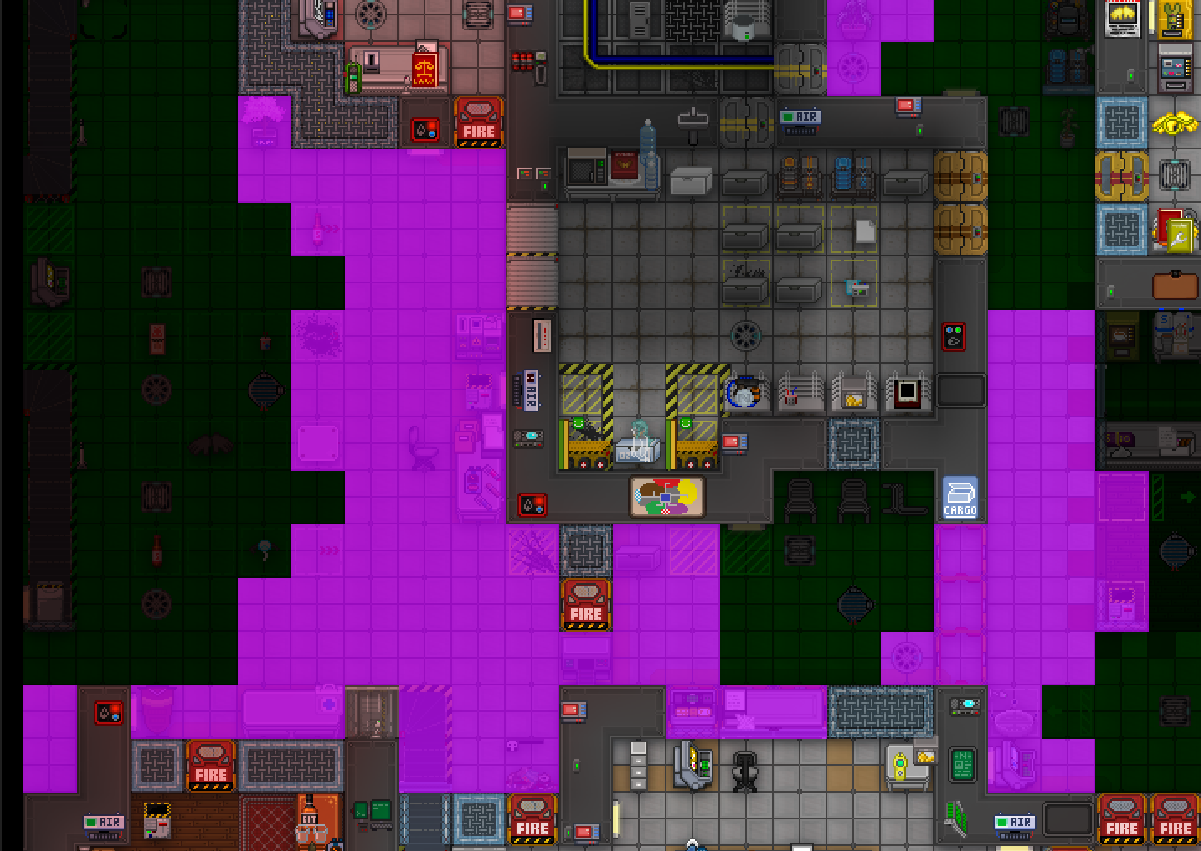
Our goal is not to simulate real life atmospherics. It is instead to put on a show of doing so. To sleep wherever we can, and fake it as hard as we can.
This is primarily relevant in environmental atmos.
The goal of active turfs, excited groups, and sleeping is to isolate the processing that needs to happen, and move diffs from their source to a consumer as much as we can.
Performance and gameplay are much more important then realism. In all your work on the subsystem, keep this in mind.
I will not go into detail on each of these right now due to time concerns. This should be updated with atmos machines and the meaning behind the pipenet classifications.
- Carbon dioxide - What the fuck is this?]
- LINDA - Created by Aranclanos, Beautiful in spanish.
- Naps - A healthy pastime
- Diffs - A difference between gasmixes. We want to get rid of these over time, and clump them up with their sources
If you really want to get a feeling for how flow works you'll need to load up the game and make some diffs. What follows is a short description of how to set up testing.
To start with, you should enable the TESTING define in compile_options.dm, this toggles VISUALIZE_ACTIVE_TURFS and TRACK_MAX_SHARE. These two debug methods are very helpful for understanding flow, but they aren't cheap, so we make them a compile time option. Active turfs will show up as green, don't worry about the second define, it's coming right up.
Past that you'll want to turn on excited group highlighting, to do this open the atmos control panel in the debug tab and toggle both personal view and display all. Display all makes turfs display their group and personal view shows/hides the groups from you, it's faster to toggle this, and this way you don't piss off the other debugger on live.
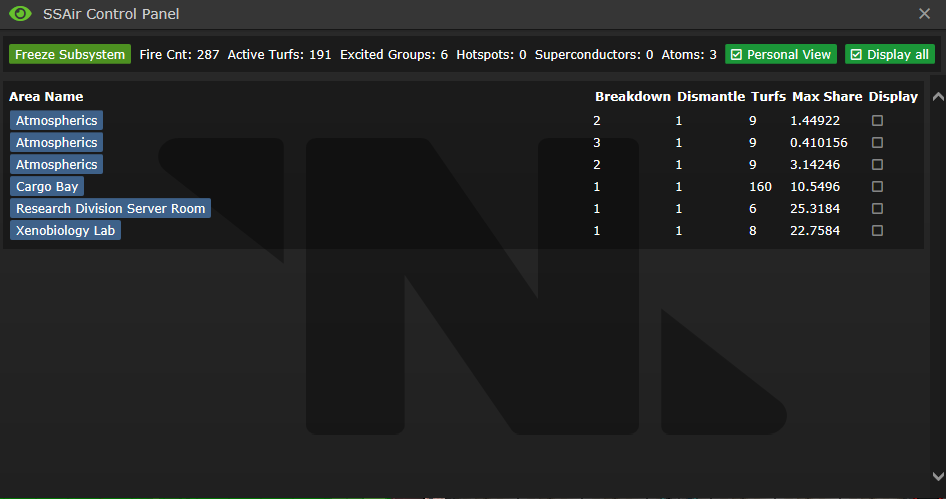 To go into more detail about the control panel, it is split into two parts. At the top there's a readout of some relevant stats, the amount of active turfs, how many times the subsystem has fired, etc. You can get the same information from the SSAir MC entry, but it's a bit harder to read. I'll get into that in a bit. There's a button that turns the subsystem on/off in the top left, it's handy for debugging and seeing how things work step by step, use it if you need to slow things down.
The rest of the panel is where things get more interesting, it's a readout of excited groups, sorted by area name. Most of it ought to be obvious, this is where TRACK_MAX_SHARE comes into effect. If it's defined, excited groups will have an extra entry which displays the largest molar diff in the group. This is useful for diagnosing group breakdown issues, and getting a feel for when a group will next breakdown. You can also toggle the visibility of each individual group here, and teleport to the group by clicking on the area name.
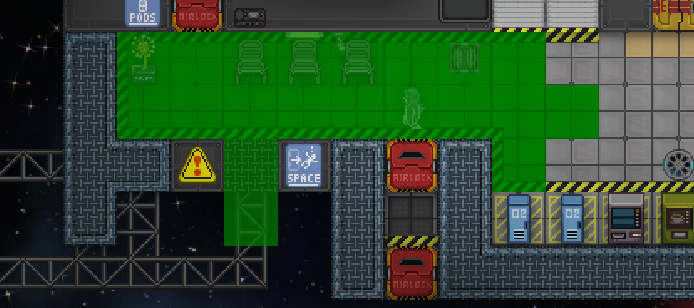
An excited group can contain 2 things, sources of diffs, and dead tiles.
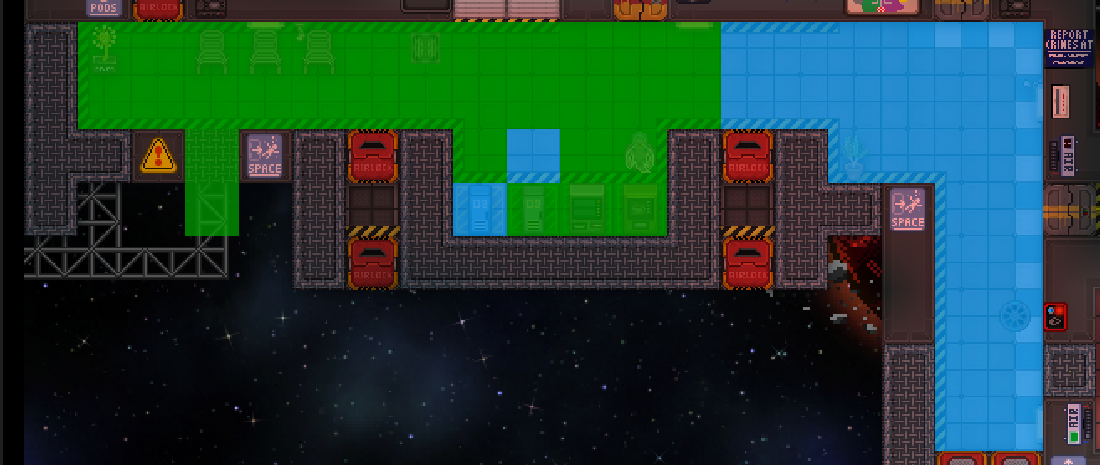
Of course, if left unchecked active turfs will spread further and further out, slowly lowering the amount of dead tiles.
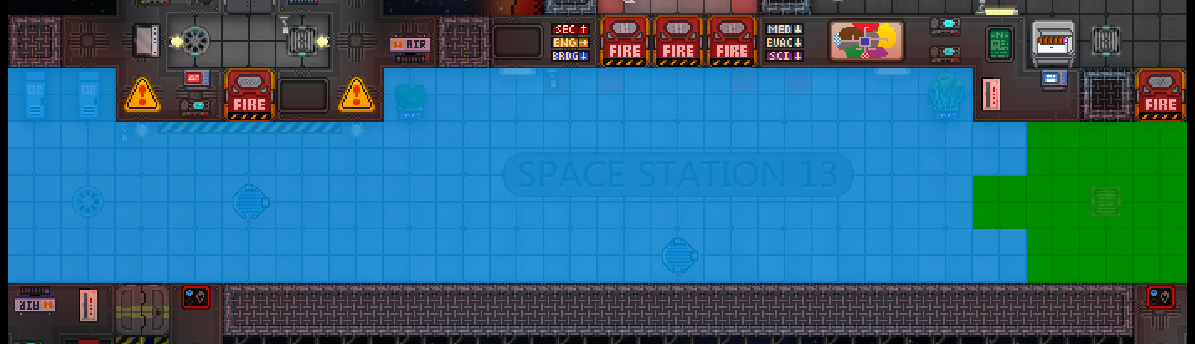
Excited group breakdown causes them to recede and wrap around the things causing them
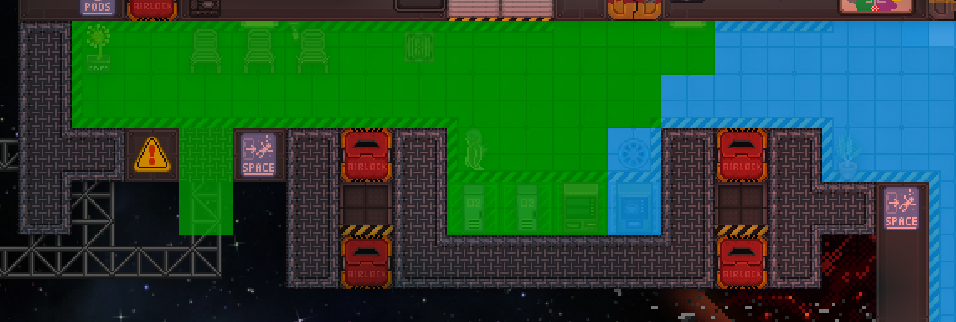
Cleanup causes a major recession due to turfs becoming suddenly no longed excited
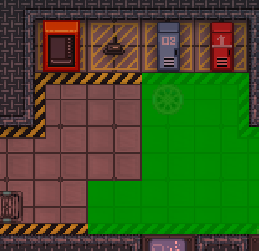
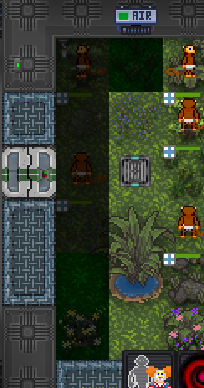
Due to how process_cell() works, active turfs will spread strangely when low on difs
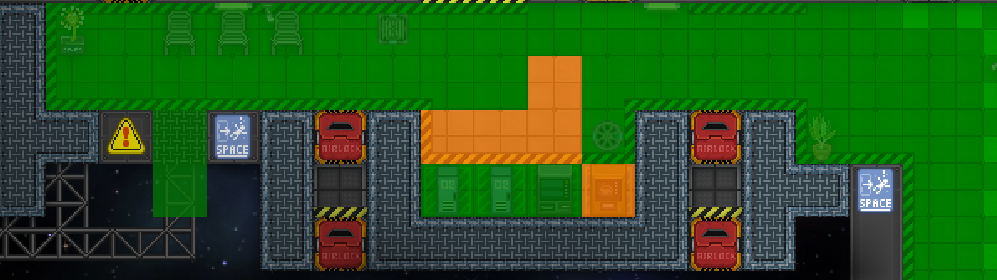
Active turfs will occasionally nap, then immediately wake back up. This is either because of a discrepancy between compare() and LAST_SHARE_CHECK, or just a result of sleeping being a thing.