Skip to content

Instantly share code, notes, and snippets.

@LABCAT
Forked from dribnet/.block
Last active September 9, 2019 04:39
Show Gist options
  • Select an option

  • Save LABCAT/a14e8ec6660813fd3db1bb6525500e42 to your computer and use it in GitHub Desktop.

Select an option

Save LABCAT/a14e8ec6660813fd3db1bb6525500e42 to your computer and use it in GitHub Desktop.
17.1.MDDN242 PS2
license: mit
// note: this file is poorly named - it can generally be ignored.
// helper functions below for supporting blocks/purview
function saveBlocksImages(doZoom) {
if(doZoom == null) {
doZoom = false;
}
// generate 960x500 preview.jpg of entire canvas
// TODO: should this be recycled?
var offscreenCanvas = document.createElement('canvas');
offscreenCanvas.width = 960;
offscreenCanvas.height = 500;
var context = offscreenCanvas.getContext('2d');
// background is flat white
context.fillStyle="#FFFFFF";
context.fillRect(0, 0, 960, 500);
context.drawImage(this.canvas, 0, 0, 960, 500);
// save to browser
var downloadMime = 'image/octet-stream';
var imageData = offscreenCanvas.toDataURL('image/jpeg');
imageData = imageData.replace('image/jpeg', downloadMime);
p5.prototype.downloadFile(imageData, 'preview.jpg', 'jpg');
// generate 230x120 thumbnail.png centered on mouse
offscreenCanvas.width = 230;
offscreenCanvas.height = 120;
// background is flat white
context = offscreenCanvas.getContext('2d');
context.fillStyle="#FFFFFF";
context.fillRect(0, 0, 230, 120);
if(doZoom) {
// pixelDensity does the right thing on retina displays
var pd = this._pixelDensity;
var sx = pd * mouseX - pd * 230/2;
var sy = pd * mouseY - pd * 120/2;
var sw = pd * 230;
var sh = pd * 120;
// bounds checking - just displace if necessary
if (sx < 0) {
sx = 0;
}
if (sx > this.canvas.width - sw) {
sx = this.canvas.width - sw;
}
if (sy < 0) {
sy = 0;
}
if (sy > this.canvas.height - sh) {
sy = this.canvas.height - sh;
}
// save to browser
context.drawImage(this.canvas, sx, sy, sw, sh, 0, 0, 230, 120);
}
else {
// now scaledown
var full_width = this.canvas.width;
var full_height = this.canvas.height;
context.drawImage(this.canvas, 0, 0, full_width, full_height, 0, 0, 230, 120);
}
imageData = offscreenCanvas.toDataURL('image/png');
imageData = imageData.replace('image/png', downloadMime);
p5.prototype.downloadFile(imageData, 'thumbnail.png', 'png');
}

Color Glyphs

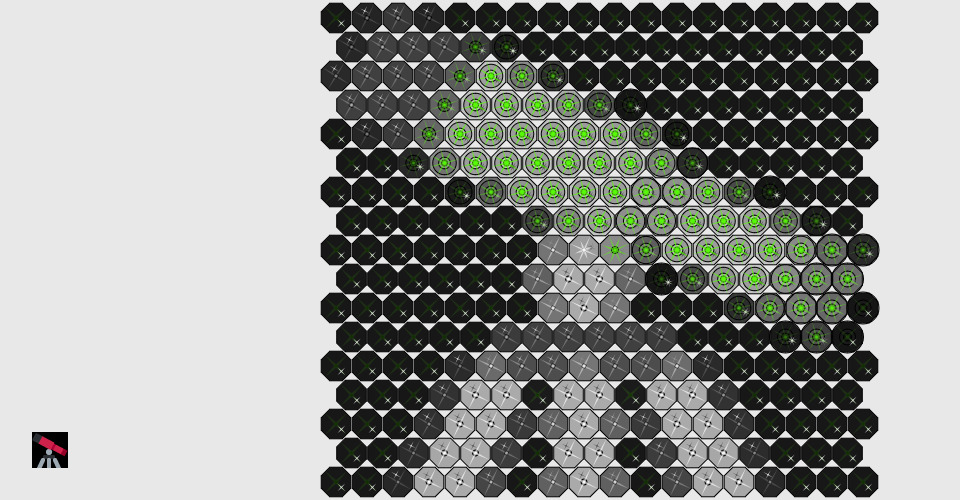
alt text

The most satisfying part of this project is how the glyph has evolved from the initial sketch. At first I was unsure of how to represent the colour red and initially used a danger symbol. However I wasn't satisfied so kept looking for inspiration which I found in Japan's Rising Sun flag. The resulting glyph has served as the inspiration for all parts of the project even though it has evolved into something quite different than the original sketch.

As part of the assignment we learnt about colour models. A key takeaway for me was that the saturation dimension determines the purity of a colour. I decided I wanted my glyph to represent this and have designed my glyphs so they are in their most pure form when the saturation level is set to 100%.

I also wanted to ensure that all 360 hues had a different appearance regardless of the size of the glyph. I did achieve this in the glyph_system part of the assignment but wasn't totally satisfied. It wasn't until toward the end of the glyph_object part of the assignment that I came up with solution that truly has 360 different possibilities for the hue dimension.

My representation of the hue dimension was also inspired by the work in progress reviews. Someone mentioned how the dimension wraps around itself and that a value of 360 is the same as a value of 0. I really liked this idea and decided my glyph should also behave like this.

For the final part of the assignment I wanted to use the colour splash effect but I also wanted all images to have a touch of colour. So I implemented some functionality that determined if their would be a decent colour splash using my chosen hue. If not it then determined which hue was most commonly used which then becomes the basis for creating a colour splash but always using my chosen hue as the splash.

/*
* val4 is an array of 3 numbers that range from [0,1000]
* size is the number of pixels for width and height
* use p5.js to draw a round grawscale glpyh within the bounding box
*/
function gray_glyph(values, size) {
//determine the center of the circle
var center = size/2;
//draw a black background for the glyphs area
fill(0);
ellipse(center, center, size);
//hue dimension
var hueDegree = floor(values[0]);
//a modulo variable used to provide slight variation in the transparency levels of the ellipses that represent the hue dimension
var hueModulo = (hueDegree % 12) * 4;
var hue = map(hueDegree, 0, 360, size, 0 + size/16);
//saturation dimension
//saturationMin and saturationMax are values that determine the positions for the alternating points (between the center of a circle and its edge) of the triangles representing the saturation dimension
var saturationMin = map(values[1], 0, 100, center, 0);
var saturationMax = map(values[1], 0, 100, center, size);
//brightness dimension
//brightnessMin and brightnessMax are values that determine the position for the alternating points (between the center of a circle and its edge) of the triangles representing the brightness dimension
var brightnessMin = map(values[2], 0, 100, center, (0 + size/8 + size/32));
var brightnessMax = map(values[2], 0, 100, center, (size - size/8 - size/32));
//draw the circles that represent the hue dimension
stroke(255);
//outer circle
fill(255, 255, 255, 47 + hueModulo);
ellipse(center, center, hue);
//middle circle
fill(255, 255, 255, 159 + hueModulo);
ellipse(center, center, hue / 2);
//inner circle
fill(0);
ellipse(center, center, hue / 4);
//JSON objects used to store all the x and y positions of the triangles that represent the saturation and brightness dimensions
var positions = {
'x1': [
center - size/32,
center - size/32,
center,
center + size/32,
center - size/32,
center - size/32,
center,
center + size/32,
],
'y1': [
center,
center - size/32,
center - size/32,
center - size/32,
center,
center - size/32,
center - size/32,
center - size/32
],
'x2': [
center,
brightnessMax,
saturationMax,
brightnessMax,
center,
brightnessMin,
saturationMin,
brightnessMin
],
'y2': [
saturationMin,
brightnessMin,
center,
brightnessMax,
saturationMax,
brightnessMax,
center,
brightnessMin
],
'x3': [
center + size/32,
center + size/32,
center,
center - size/32,
center + size/32,
center + size/32,
center,
center - size/32
],
'y3': [
center,
center + size/32,
center + size/32,
center + size/32,
center,
center + size/32,
center + size/32,
center + size/32
]
}
//draw the 8 triangles that represnt the saturation and brightness dimensions
fill(255, 255, 255, 127);
noStroke();
for($i = 0; $i < 8; $i++){
triangle(positions['x1'][$i], positions['y1'][$i], positions['x2'][$i], positions['y2'][$i], positions['x3'][$i], positions['y3'][$i]);
}
}
function GrayGlyph() {
/*
* values is an array of 3 numbers: [hue, saturation, brightness]
* + hue ranges from 0..360
* + saturation ranges from 0..100
* + brightness ranges from 0..100
* this matches the default range for p5.js colorMode(HSB) as describe at:
* https://p5js.org/reference/#/p5/colorMode
*
* size is the number of pixels for width and height
*
* use p5.js to draw a round grayscale glpyh
* the glyph should stay within the bounding box [0, 0, width, height]
* this is a grayscale glyph, so only brighness can be adjusted.
* the range for brighness is 0..100
*
* the color mode will be HSB, so you can either:
* + use a one argument grayscale call; this is easiest. examples:
* - fill(50); // ranges from 0-100
* - stroke(100); // white
* + use a three arguement HSB call with values but set both H and S to 0. examples:
* - fill(0, 0, 51); // equivalent to above
* - stroke(0, 0, 100); //
*/
/*
* I have added additional parameters to this functionality so this function can also be used in the draw function of the SpotGlyph object
* The additional parameters I have added are as follows:
* @param {Number} spot_hue - value of the hue - a number between 0 and 359
* @param {Number} spotMin - minimum hue value that determines whether or not to use the spot_hue - a number between 0 and 359
* @param {Number} spotMax - maximum hue value that determines whether or not to use the spot_hue - a number between 0 and 359
*/
this.draw = function(values, size, spot_hue = 0, spotMin = 0, spotMax = 0) {
//determine the center of the circle
var center = size/2;
//value of the hue dimension
var hueDegree = floor(values[0]) % 360;
//horiVertMin and horiVertMax are values that determine the positions for the alternating points (between the center of a circle and its edge)
//of the vertical and horizontal triangles used to represent the hue dimension
var horiVertMin = map(hueDegree, 0, 179, center, 0);
var horiVertMax = map(hueDegree, 0, 179, center, size);
if(hueDegree > 179) {
horiVertMin = 0;
horiVertMax = size;
}
//diagonalMin and diagonalMax are values that determine the position for the alternating points (between the center of a circle and its edge)
//of the diagonal triangles representing the hue dimension
var diagonalMin = map(hueDegree, 359, 180, (0 + size/8 + size/32), center);
var diagonalMax = map(hueDegree, 359, 180, (size - size/8 - size/32), center);
//variables created by the saturation dimension
var circleSize = map(values[1], 100, 0, size, 0 + size/16);
//JSON object containing the different values for the three circles drawn to represent the saturation dimension
var satCircles = {
'brightness' : [
0,
100,
0
],
'alpha' : [
0.1875,
0.625,
0.375
],
'size' : [
circleSize,
circleSize/2,
circleSize/4,
]
}
//variables created by the brightness dimension
var brightnessTrans = map(values[2], 0, 100, 0.9, 0);
var hueColour = map(values[2], 0, 100, 100, 0);
var hueTrans = map(values[2], 100, 0, 0.9, 0.1);
//set up the JSON objects used to store all the x and y positions of the triangles that will be drawn when this is passed to the drawStar function
var positions = {
'x1': [
center - size/32,
center - size/32,
center,
center + size/32,
center - size/32,
center - size/32,
center,
center + size/32,
],
'y1': [
center,
center - size/32,
center - size/32,
center - size/32,
center,
center - size/32,
center - size/32,
center - size/32
],
'x2': [
center,
diagonalMax,
horiVertMax,
diagonalMax,
center,
diagonalMin,
horiVertMin,
diagonalMin
],
'y2': [
horiVertMin,
diagonalMin,
center,
diagonalMax,
horiVertMax,
diagonalMax,
center,
diagonalMin
],
'x3': [
center + size/32,
center + size/32,
center,
center - size/32,
center + size/32,
center + size/32,
center,
center - size/32
],
'y3': [
center,
center + size/32,
center + size/32,
center + size/32,
center,
center + size/32,
center + size/32,
center + size/32
]
}
//draw the circles that represent the saturation dimension
stroke(0);
for(var i = 0; i < 3; i++){
fill(0, 0,satCircles['brightness'][i], satCircles['alpha'][i]);
ellipse(center, center, satCircles['size'][i]);
}
//draw the hexagon that represents the brightness dimension
fill(0, 0, 0, brightnessTrans);
hexagon(center, center, size/2);
//draw the stars that represent the hue dimension
noStroke();
angleMode(DEGREES);
translate(center, center);
rotate(hueDegree);
var hsba = Array(0, 0, 100, hueTrans);
//if the draw function has been passed a value for spot_hue we may want to change the values of the hsba array
if(spot_hue){
//if hueDegree is within the required range then use it as the hue value in the hsba array
if(hueDegree <= spotMax && hueDegree >= spotMin){
hsba = Array(spot_hue, 100, 100, hueTrans);
}
//if spotMin is greater than spotMax then the above comparison won't work
//instead compare if the hueDegree is greater than spotMax or less than spotMin
if(spotMin > spotMax){
if(hueDegree <= spotMax || hueDegree >= spotMin) {
hsba = Array(spot_hue, 100, 100, hueTrans);
}
}
}
drawStar(Array(0, 0, hueColour, 0.9), positions, 3);
translate(-center, -center);
drawStar(hsba, positions);
}
}
/*
* function to draw a hexagon shape
* adapted from: https://p5js.org/examples/form-regular-polygon.html
* @param {Number} x - x-coordinate of the hexagon
* @param {Number} y - y-coordinate of the hexagon
* @param {Number} radius - radius of the hexagon
*/
function hexagon(x, y, radius) {
angleMode(RADIANS);
var angle = TWO_PI / 8;
beginShape();
for (var a = TWO_PI/16; a < TWO_PI + TWO_PI/16; a += angle) {
var sx = x + cos(a) * radius;
var sy = y + sin(a) * radius;
vertex(sx, sy);
}
endShape(CLOSE);
}
/*
* function to draw the 8 triangles that repressnt the hue dimension
* the colour and transparency level of the triangles is also affected by the brightness dimension
* @param {Array} hsba - Array of values used to set the values for the fill function
* @param {Object} positions - Object containing all the x and y positions of the 8 triangles that make up the star
* @param {Number} sizeReducer - Variable that allows the star to drawn at smaller size, should be greater than 1
*/
function drawStar(hsba, positions, sizeReducer = 1) {
fill(hsba[0], hsba[1], hsba[2], hsba[3]);
for($i = 0; $i < 8; $i++){
triangle(positions['x1'][$i]/sizeReducer, positions['y1'][$i]/sizeReducer, positions['x2'][$i]/sizeReducer, positions['y2'][$i]/sizeReducer, positions['x3'][$i]/sizeReducer, positions['y3'][$i]/sizeReducer);
}
}
<head>
<script src="http://cdnjs.cloudflare.com/ajax/libs/p5.js/0.5.7/p5.js"></script>
<script src="http://cdnjs.cloudflare.com/ajax/libs/p5.js/0.5.7/addons/p5.dom.js"></script>
<script language="javascript" type="text/javascript" src=".purview_helper.js"></script>
<script language="javascript" type="text/javascript" src="grayglyph.js"></script>
<script language="javascript" type="text/javascript" src="spotglyph.js"></script>
<script language="javascript" type="text/javascript" src="sketch.js"></script>
<style>
body { padding: 0; margin: 0; }
.inner { position: absolute; }
#controls {
font: 300 12px "Helvetica Neue";
padding: 5;
margin: 5;
background: #f0f0f0;
opacity: 0.0;
-webkit-transition: opacity 0.2s ease;
-moz-transition: opacity 0.2s ease;
-o-transition: opacity 0.2s ease;
-ms-transition: opacity 0.2s ease;
}
#controls:hover { opacity: 0.9; }
</style>
</head>
<body style="background-color:white">
<div class="outer">
<div class="inner">
<div id="canvasContainer"></div>
</div>
<div class="inner" id="controls" height="500px">
<table>
<tr>
<td>hue</td>
<td id="slider1Container"></td>
</tr>
<tr>
<td>saturation</td>
<td id="slider2Container"></td>
</tr>
<tr>
<td>brightness</td>
<td id="slider3Container"></td>
</tr>
<tr>
<td>
<hr>
</td>
</tr>
<tr>
<td>Mode</td>
<td id="selector1Container"></td>
</tr>
<tr>
<td>Glyph</td>
<td id="selector2Container"></td>
</tr>
<tr>
<td>Size</td>
<td id="selector3Container"></td>
</tr>
<tr>
<td>Show Guide</td>
<td id="checkContainer"></td>
</tr>
<tr>
<td></td>
<td id="buttonContainer"></td>
</tr>
</div>
</div>
</table>
</body>
{
"commits": [
{
"sha": "55fc6e3ba84036ebbfcac5429a6afbb0154c64c6",
"name": "final"
},
{
"sha": "c60e241019edccf50f0f2c2ddea4ac010826f81e",
"name": "spot_color"
},
{
"sha": "0655c36db68acd5b592d8d7f81498d68c1a78109",
"name": "glyph_object"
},
{
"sha": "44a7595d95dc3d7a641c3899261b97f90f34a756",
"name": "glyph_system"
},
{
"sha": "6b1fc72b7011177aeb16ffd750ca9ed41ca2e36d",
"name": "interpolate"
},
{
"sha": "c12ebcae1ccd8a70d212519c010afee24ef861c8",
"name": "sketch"
}
]
}
<head>
<script src="http://cdnjs.cloudflare.com/ajax/libs/p5.js/0.5.7/p5.js"></script>
<script src="http://cdnjs.cloudflare.com/ajax/libs/p5.js/0.5.7/addons/p5.dom.js"></script>
<script language="javascript" type="text/javascript" src=".purview_helper.js"></script>
<script language="javascript" type="text/javascript" src="sketch2.js"></script>
</head>
<body style="background-color:white">
<div class="outer">
<div class="inner">
<div id="canvasContainer"></div>
</div>
</div>
</table>
</body>
var canvasWidth = 960;
var canvasHeight = 500;
var glyphSelector;
var modeSelector;
var sizeSelector;
var show_oddball = false;
var oddball_row = 0;
var oddball_col = 0;
var val_sliders = [];
var max_vals = [360, 100, 100];
var curEmoji = 551;
var NUM_EMOJI = 872;
var EMOJI_WIDTH = 38;
var lastKeyPressedTime;
var secondsUntilSwapMode = 10;
var secondsPerEmoji = 5;
var isSwappingEmoji = false;
var emojiSwapLerp = 0;
var prevEmoji = 0;
var lastEmojiSwappedTime;
var emojiImg;
var curEmojiImg;
var curEmojiPixels;
var curEmojiColors, nextEmojiColors, prevEmojiColors;
function preload() {
emojiImg = loadImage("twemoji36b_montage.png");
}
function setup() {
// create the drawing canvas, save the canvas element
var main_canvas = createCanvas(canvasWidth, canvasHeight);
main_canvas.parent('canvasContainer');
var now = millis();
lastKeyPressedTime = now;
lastEmojiSwappedTime = now;
// create two sliders
for (i=0; i<3; i++) {
var slider = createSlider(0, 10*max_vals[i], 10*max_vals[i]/2);
slider.parent("slider" + (i+1) + "Container")
slider.changed(sliderUpdated);
slider.mouseMoved(sliderUpdated);
slider.touchMoved(sliderUpdated);
val_sliders.push(slider);
}
modeSelector = createSelect();
modeSelector.option('drive');
modeSelector.option('gradient');
modeSelector.option('random_grid');
modeSelector.option('oddball');
modeSelector.option('image');
modeSelector.changed(modeChangedEvent);
modeSelector.value('image');
modeSelector.parent('selector1Container');
glyphSelector = createSelect();
glyphSelector.option('show_color');
glyphSelector.option('gray');
glyphSelector.option('spot');
glyphSelector.changed(modeChangedEvent);
glyphSelector.value('spot');
glyphSelector.parent('selector2Container');
sizeSelector = createSelect();
sizeSelector.option('32');
sizeSelector.option('64');
sizeSelector.option('128');
sizeSelector.option('256');
sizeSelector.parent('selector3Container');
sizeSelector.value('32');
sizeSelector.changed(sizeChangedEvent);
guideCheckbox = createCheckbox('', false);
guideCheckbox.parent('checkContainer');
guideCheckbox.changed(guideChangedEvent);
button = createButton('redo');
button.mousePressed(buttonPressedEvent);
button.parent('buttonContainer');
curEmojiImg = createImage(36, 36);
// create an array for HSB values: [18][18][3]
curEmojiPixels = Array(18);
curEmojiColors = Array(18);
for(var i=0; i<18; i++) {
curEmojiPixels[i] = Array(18);
curEmojiColors[i] = Array(18);
for(var j=0; j<18; j++) {
curEmojiPixels[i][j] = Array(3);
}
}
gray_glyph = new GrayGlyph();
spot_glyph = new SpotGlyph();
colorMode(HSB);
refreshGridData();
modeChangedEvent();
}
function sliderUpdated() {
redraw();
}
function mouseClicked() {
if (mouseX > width/4) {
refreshGridData();
}
redraw();
}
function dataInterpolate(data1, data2, val) {
var d = new Array(8);
for(var i=0; i<8; i++) {
d[i] = lerp(data1[i], data2[i], val);
}
return d;
}
var numGridRows;
var numGridCols;
var gridValues; // row, col order
var gridOffsetX, gridOffsetY;
var gridSpacingX, gridSpacingY;
// Generate data for putting glyphs in a grid
function clamp(num, min, max) {
return Math.min(Math.max(num, min), max);
}
function refreshGridData() {
var mode = modeSelector.value();
var glyphSize = parseInt(sizeSelector.value(), 10);
if (mode == "image") {
if(glyphSize == 32) {
numGridCols = 18;
numGridRows = 17;
gridOffsetX = 320;
gridSpacingX = 31;
gridOffsetY = 2;
gridSpacingY = 29;
}
else if(glyphSize == 64) {
numGridCols = 10;
numGridRows = 9;
gridOffsetX = 280;
gridSpacingX = 66;
gridOffsetY = -18;
gridSpacingY = 59;
}
else if(glyphSize == 128) {
numGridCols = 6;
numGridRows = 5;
gridOffsetX = 164;
gridSpacingX = 132;
gridOffsetY = -50;
gridSpacingY = 118;
}
else if(glyphSize == 256) {
numGridCols = 3;
numGridRows = 3;
gridOffsetX = 172;
gridSpacingX = 262;
gridOffsetY = -100;
gridSpacingY = 234;
}
}
else if(glyphSize == 128) {
numGridCols = 7;
numGridRows = 3;
gridOffsetX = 10;
gridSpacingX = 136;
gridOffsetY = 20;
gridSpacingY = 166;
}
else if(glyphSize == 256) {
numGridCols = 3;
numGridRows = 1;
gridOffsetX = 20;
gridSpacingX = 320;
gridOffsetY = 100;
gridSpacingY = 500;
}
else if(glyphSize == 64) {
numGridCols = 14;
numGridRows = 7;
gridOffsetX = 3;
gridSpacingX = 68;
gridOffsetY = 6;
gridSpacingY = 71;
}
else if(glyphSize == 32) {
numGridCols = 24;
numGridRows = 13;
gridOffsetX = 4;
gridSpacingX = 40;
gridOffsetY = 4;
gridSpacingY = 38;
}
gridValues = new Array(numGridRows);
for (var i=0; i<numGridRows; i++) {
gridValues[i] = new Array(numGridCols);
for (var j=0; j<numGridCols; j++) {
gridValues[i][j] = new Array(8);
}
}
if (mode == "gradient" || mode == 'oddball') {
var top_left = Array(3);
var top_right = Array(3);
var bottom_left = Array(3);
var bottom_right = Array(3);
for (var k=0; k<3; k++) {
top_left[k] = random(max_vals[k]);
top_right[k] = random(max_vals[k]);
bottom_left[k] = random(max_vals[k]);
bottom_right[k] = random(max_vals[k]);
}
for (var i=0; i<numGridRows; i++) {
if(numGridRows == 1) {
var frac_down = 0;
}
else {
var frac_down = i / (numGridRows - 1.0);
}
d_left = dataInterpolate(top_left, bottom_left, frac_down);
d_right = dataInterpolate(top_right, bottom_right, frac_down);
for (var j=0; j<numGridCols; j++) {
if(numGridCols == 0) {
var frac_over = 0;
}
else {
var frac_over = j / (numGridCols - 1.0);
}
gridValues[i][j] = dataInterpolate(d_left, d_right, frac_over);
}
}
if (mode == 'oddball') {
// replace an entry at random
oddball_row = Math.floor(random(numGridRows))
oddball_col = Math.floor(random(numGridCols))
for (var k=0; k<3; k++) {
gridValues[oddball_row][oddball_col][k] = random(max_vals[k]);
}
}
}
else if(mode == "image") {
for (var i=0; i<numGridRows; i++) {
for (var j=0; j<numGridCols; j++) {
for (var k=0; k<3; k++) {
gridValues[i][j][k] = curEmojiPixels[i][j][k];
}
}
}
}
else {
for (var i=0; i<numGridRows; i++) {
for (var j=0; j<numGridCols; j++) {
for (var k=0; k<3; k++) {
gridValues[i][j][k] = random(max_vals[k]);
}
}
}
}
}
function sizeChangedEvent() {
var mode = modeSelector.value();
if (mode != "drive") {
refreshGridData();
}
redraw();
}
function guideChangedEvent() {
show_oddball = guideCheckbox.checked();
redraw();
}
function modeChangedEvent() {
var mode = modeSelector.value();
// enable/disable sliders
if (mode === "drive") {
// disable the button
// button.attribute('disabled','');
// enable the size selector
sizeSelector.removeAttribute('disabled');
// enable the first four sliders
for(var i=0; i<3; i++) {
val_sliders[i].removeAttribute('disabled');
}
}
else {
// enable the button
// button.removeAttribute('disabled');
// disable the sliders
for(var i=0; i<3; i++) {
val_sliders[i].attribute('disabled','');
}
// enable the size selector
// sizeSelector.removeAttribute('disabled');
// refresh data
refreshGridData();
}
if (mode === "image") {
// get current emoji image
var offsetX = 36 * (curEmoji % 38);
var offsetY = 36 * Math.floor(curEmoji / 38);
var squareOffsets = [ [0,0], [0,1], [1,1], [1, 0] ];
curEmojiImg.copy(emojiImg, offsetX, offsetY, 36, 36, 0, 0, 36, 36);
curEmojiImg.loadPixels();
colorMode(RGB);
for(var i=0; i<17; i++) {
// i is y
var maxX = 18;
var offsetX = 0;
if (i%2 == 1) {
maxX = 17;
offsetX = 1;
}
for(var j=0; j<maxX; j++) {
// j is x
var sumColor = [0, 0, 0];
for(var k=0; k<4; k++) {
// k is summing over 4 adacent pixels
var curColor = curEmojiImg.get(j*2 + squareOffsets[k][0] + offsetX, 1 + i*2 + squareOffsets[k][1]);
for(var l=0; l<3; l++) {
sumColor[l] += curColor[l] / 4.0;
}
}
var curColor = color(sumColor);
curEmojiColors[i][j] = curColor;
curEmojiPixels[i][j][0] = curColor._getHue();
curEmojiPixels[i][j][1] = curColor._getSaturation();
curEmojiPixels[i][j][2] = curColor._getBrightness();
}
}
colorMode(HSB);
// refresh data
refreshGridData();
}
redraw();
}
function buttonPressedEvent() {
refreshGridData();
redraw();
}
var colorBack = "rgb(232, 232, 232)"
var colorFront = "rgb(192, 192, 255)"
function ColorGlyph() {
this.draw = function(values, size) {
fill(values[0], values[1], values[2]);
stroke(0);
var s2 = size/2;
ellipse(s2, s2, size);
}
}
var color_glyph = new ColorGlyph();
function highlightGlyph(glyphSize) {
halfSize = glyphSize / 2.0;
stroke(0, 0, 255, 128);
noFill();
strokeWeight(4);
ellipse(halfSize, halfSize, glyphSize+4);
fill(0);
strokeWeight(1);
}
function getGyphObject() {
var glyphMode = glyphSelector.value();
var glyph_obj = color_glyph;
if(glyphMode == "gray")
glyph_obj = gray_glyph;
else if(glyphMode == "spot")
glyph_obj = spot_glyph;
return(glyph_obj);
}
function drawDriveMode() {
var glyph_obj = getGyphObject();
var glyphSize = parseInt(sizeSelector.value(), 10);
var halfSize = glyphSize / 2;
background(colorBack);
var halfSize = glyphSize / 2;
var middle_x = canvasWidth / 2;
var middle_y = canvasHeight / 2;
var val = [0,0,0];
for(i=0; i<3; i++) {
val[i] = val_sliders[i].value() / 10.0;
}
resetMatrix();
translate(middle_x - halfSize, middle_y - halfSize);
glyph_obj.draw(val, glyphSize);
if (show_oddball) {
resetMatrix();
translate(middle_x - halfSize, middle_y - halfSize);
highlightGlyph(glyphSize)
}
resetMatrix();
translate(middle_x + halfSize + 32, middle_y - halfSize);
color_glyph.draw(val, glyphSize);
}
function drawGridMode() {
var mode = modeSelector.value();
var glyph_obj = getGyphObject();
var glyphSize = parseInt(sizeSelector.value(), 10);
background(colorBack);
if (show_oddball && mode == 'oddball') {
resetMatrix();
translate(gridOffsetX + oddball_col * gridSpacingX, gridOffsetY + oddball_row * gridSpacingY);
highlightGlyph(glyphSize)
}
var hexOffset = (mode == "image");
for (var i=0; i<numGridRows; i++) {
var tweakedNumGridCols = numGridCols;
var offsetX = 0;
if (hexOffset && i%2 == 1) {
offsetX = gridSpacingX / 2;
tweakedNumGridCols = numGridCols - 1;
}
for (var j=0; j<tweakedNumGridCols; j++) {
resetMatrix();
translate(gridOffsetX + j * gridSpacingX + offsetX, gridOffsetY + i * gridSpacingY);
glyph_obj.draw(gridValues[i][j], glyphSize);
resetMatrix();
}
}
}
function colorCopyArray(c) {
d = Array(18);
for(var i=0; i<18; i++) {
d[i] = Array(18);
for(var j=0; j<18; j++) {
d[i][j] = c[i][j];
}
}
return d;
}
function checkImageUpdate() {
var mode = modeSelector.value();
isSwappingEmoji = false;
if (mode == "image") {
now = millis();
if(lastKeyPressedTime + 1000 * secondsUntilSwapMode < now) {
// key not pressed recently
if(lastEmojiSwappedTime + 1000 * secondsPerEmoji < now) {
prevEmoji = curEmoji;
prevEmojiColors = colorCopyArray(curEmojiColors);
// no swaps recently
updateEmoji(1);
nextEmojiColors = colorCopyArray(curEmojiColors);
lastEmojiSwappedTime = now;
}
colorMode(RGB);
if(now - lastEmojiSwappedTime < 1000) {
isSwappingEmoji = true;
emojiSwapLerp = (now - lastEmojiSwappedTime) / 1000.0;
// print("LERP: " + emojiSwapLerp);
for (var i=0; i<numGridRows; i++) {
for (var j=0; j<numGridCols; j++) {
// var curColor = lerpColor(prevEmojiColors[i][j], nextEmojiColors[i][j], emojiSwapLerp);
var curColor = prevEmojiColors[i][j];
if (curColor) {
curColor = lerpColor(prevEmojiColors[i][j], nextEmojiColors[i][j], emojiSwapLerp);
curEmojiPixels[i][j][0] = curColor._getHue();
curEmojiPixels[i][j][1] = curColor._getSaturation();
curEmojiPixels[i][j][2] = curColor._getBrightness();
}
}
}
refreshGridData();
}
else {
for (var i=0; i<numGridRows; i++) {
for (var j=0; j<numGridCols; j++) {
var curColor = nextEmojiColors[i][j];
if (curColor) {
curEmojiPixels[i][j][0] = curColor._getHue();
curEmojiPixels[i][j][1] = curColor._getSaturation();
curEmojiPixels[i][j][2] = curColor._getBrightness();
}
}
}
refreshGridData();
}
colorMode(HSB);
}
}
}
var is_drawing = false;
function draw () {
if (is_drawing) {
return;
}
is_drawing = true;
colorMode(HSB);
var mode = modeSelector.value();
checkImageUpdate();
if (mode == "drive") {
drawDriveMode();
}
else {
drawGridMode();
}
resetMatrix();
if (mode == "image") {
image(curEmojiImg, 32, height-32-36);
}
is_drawing = false;
}
function keyTyped() {
if (key == '!') {
saveBlocksImages();
}
else if (key == '@') {
saveBlocksImages(true);
}
else if (key == ' ') {
refreshGridData();
redraw();
}
else if (key == 'f') {
var curGlyph = glyphSelector.value()
if(curGlyph == "show_color") {
glyphSelector.value('gray');
}
else if(curGlyph == "gray") {
glyphSelector.value('spot');
}
else if(curGlyph == "spot") {
glyphSelector.value('show_color');
}
redraw();
}
else if (key == 's') {
var old_value = guideCheckbox.checked();
guideCheckbox.checked(!old_value);
guideChangedEvent();
}
else if (key == '1') {
sizeSelector.value('32');
sizeChangedEvent()
}
else if (key == '2') {
sizeSelector.value('64');
sizeChangedEvent()
}
else if (key == '3') {
sizeSelector.value('128');
sizeChangedEvent()
}
else if (key == '4') {
sizeSelector.value('256');
sizeChangedEvent()
}
else if (key == 'd') {
modeSelector.value('drive');
modeChangedEvent()
}
else if (key == 'g') {
modeSelector.value('gradient');
modeChangedEvent()
}
else if (key == 'r') {
modeSelector.value('random');
modeChangedEvent()
}
else if (key == 'o') {
modeSelector.value('oddball');
modeChangedEvent()
}
else if (key == 'i') {
modeSelector.value('image');
modeChangedEvent()
}
}
function updateEmoji(offset) {
curEmoji = (curEmoji + NUM_EMOJI + offset) % NUM_EMOJI;
modeChangedEvent()
}
function keyPressed() {
lastKeyPressedTime = millis();
if (keyCode == LEFT_ARROW) {
updateEmoji(-1);
}
else if (keyCode == RIGHT_ARROW) {
updateEmoji(1);
}
else if (keyCode == UP_ARROW) {
updateEmoji(-38);
}
else if (keyCode == DOWN_ARROW) {
updateEmoji(38);
}
}
function mouseMoved() {
lastKeyPressedTime = millis();
}
function mouseDragged() {
lastKeyPressedTime = millis();
}
var canvasWidth = 960;
var canvasHeight = 500;
function setup () {
// create the drawing canvas, save the canvas element
var main_canvas = createCanvas(canvasWidth, canvasHeight);
main_canvas.parent('canvasContainer');
colorMode(HSL, 100); // Use HSB with scale of 0-100
// this means draw will only be called once
noLoop();
}
function draw_shape(column, row, size, cur_color) {
// replace this with your own logic
var half_size = size/2;
// defaults
fill(60);
strokeWeight(2);
var rect_width = 60;
//this array will be used to set the level of opacity for the trianles and largest ellipse
var opacityLevel = [47, 47, 47, 47, 47];
//this variable will be used to reduce the width of triangles that create the rays of the sun
var triWidthReducer = 2;
//this variable will be used to increase the size of the elipses in the center
var scaleMultiplier = 2;
if (row === 0) {
// hue
opacityLevel = [15, 31, 47, 63, 79];
triWidthReducer = 2;
scaleMultiplier = 2;
}
else if (row === 1) {
// saturation
opacityLevel = [47, 47, 47, 47, 47];
triWidthReducer = 2;
scaleMultiplier = map(column, 0, 4, 6, 2);
}
else {
// lightness
opacityLevel = [47, 47, 47, 47, 47];
triWidthReducer = map(column, 0, 4, 6, -2);
scaleMultiplier = 2;
}
//x and y positions for the 16 triangles
var positions = {
'x1': [6 + triWidthReducer, 35.5 + triWidthReducer, 65 + triWidthReducer, 94.5 + triWidthReducer, 120, 120, 120, 120, 94.5 + triWidthReducer, 65 + triWidthReducer, 35.5 + triWidthReducer, 6 + triWidthReducer, 0, 0, 0, 0],
'x3': [25.5 - triWidthReducer, 55 - triWidthReducer, 84.5 - triWidthReducer, 114 - triWidthReducer, 120, 120, 120, 120, 114 - triWidthReducer, 84.5 - triWidthReducer, 55 - triWidthReducer, 25.5 - triWidthReducer, 0, 0, 0, 0],
'y1': [0, 0, 0, 0, 6 + triWidthReducer, 35.5 + triWidthReducer, 65 + triWidthReducer, 94.5 + triWidthReducer, 120, 120, 120, 120, 94.5 + triWidthReducer, 65 + triWidthReducer, 35.5 + triWidthReducer, 6 + triWidthReducer],
'y3': [0, 0, 0, 0, 25.5 - triWidthReducer, 55 - triWidthReducer, 84.5 - triWidthReducer, 114 - triWidthReducer, 120, 120, 120, 120, 114 - triWidthReducer, 84.5 - triWidthReducer, 55 - triWidthReducer, 25.5 - triWidthReducer]
}
//circles to represent the sun
noStroke();
//outer circle
fill(255, 255, 255, opacityLevel[column]);
ellipse(60, 60, 12 * scaleMultiplier, 12 * scaleMultiplier);
//middle circle
fill(255);
ellipse(60, 60, 6 * scaleMultiplier, 6 * scaleMultiplier);
//inner circle
fill(0);
ellipse(60, 60, 3 * scaleMultiplier, 3 * scaleMultiplier);
//triangles to represent the sun rays
//draw 16 triangles from the center of the square to the edge
fill(255, 255, 255, opacityLevel[column]);
for($i = 0; $i < 16; $i++){
triangle(positions['x1'][$i], positions['y1'][$i], 60, 60, positions['x3'][$i], positions['y3'][$i]);
}
}
// some examples of how to specify a base color
// var my_color = "#d24632"
// var my_color = "rgb(245, 225, 50)"
//var my_color = "rgb(20%, 47%, 67%)"
//the base colour I have chosen, a slight variation
//of the red colour from the previous part of the assignment
var my_color = "rgb(208, 11, 11)"
var shapes_should_draw = true;
// draw five colors and then five glyphs
function draw () {
var size=120;
var xsteps = 5;
var xdiff = (width - xsteps * size) / xsteps;
var xstep = size + xdiff;
var ysteps = 3;
var ydiff = (height - ysteps * size) / ysteps;
var ystep = size + ydiff;
var bg_color = color("#ffffdc");
var base_color = color(my_color);
var base_hue = hue(base_color);
var base_sat = saturation(base_color);
var base_lgt = lightness(base_color);
background(bg_color);
noStroke();
for (var x=0; x<xsteps; x++) {
for (var y=0; y<ysteps; y++) {
var cur_color = base_color;
if (y == 0) {
// hue
var cur_hue = (85 + base_hue + 100 * 0.3 * x / xsteps) % 100;
cur_color = color(cur_hue, base_sat, base_lgt);
}
else if (y == 1) {
// saturation
var cur_sat = (5 + 90 * x / xsteps);
cur_color = color(base_hue, cur_sat, base_lgt);
}
else if (y == 2) {
// lightness
var cur_lgt = (5 + 90 * x / xsteps);
cur_color = color(base_hue, base_sat, cur_lgt);
}
fill(cur_color);
noStroke();
rect(xdiff/2 + xstep * x - 10, ydiff/2 + ystep * y - 10, size, size);
strokeWeight(2);
stroke(0);
fill(0);
var curx = xdiff/2 + xstep * x + 10;
var cury = ydiff/2 + ystep * y + 10;
rect(curx, cury, size, size);
if (shapes_should_draw) {
push();
translate(curx, cury);
draw_shape(x, y, size, cur_color);
pop();
}
}
}
}
function keyTyped() {
if (key == '!') {
saveBlocksImages();
}
else if (key == '@') {
saveBlocksImages(true);
}
}
function SpotGlyph() {
this.spot_hue = 100;
this.spot_range = 60;
/*
* values is an array of 3 numbers: [hue, saturation, brightness]
* + hue ranges from 0..360
* + saturation ranges from 0..100
* + brightness ranges from 0..100
* this matches the default range for p5.js colorMode(HSB) as describe at:
* https://p5js.org/reference/#/p5/colorMode
*
* size is the number of pixels for width and height
*
* use p5.js to draw a round grayscale glpyh
* the glyph should stay within the bounding box [0, 0, width, height]
*
* this glyph can utilize changes in brightness and saturation, but only
* using the spot_hue set above. So:
*
* + hue will always be set to spot_hue (a value from 0-360)
* + saturation can vary from 0-100
* + brighness can vary from 0-100
*
* examples:
* - fill(this.spot_hue, 25, 50); // desaturated. middle brightness.
* - stroke(this.spot_hue, 100, 100); // fully saturated and maximum brightness
*/
this.draw = function(values, size) {
//variables for the min and max values of our range
var spotMin = this.spot_hue - this.spot_range / 2;
var spotMax = this.spot_hue + this.spot_range / 2;
//build an array of all the hue values from the curEmojiPixels array
var hues = Array();
for(var i = 0; i < 18; i++){
for(var j = 0; j < 18; j++){
hues.push(floor(curEmojiPixels[i][j][0]));
}
}
//create a new GrayGlyph
var glyph = new GrayGlyph();
//find out how many values in the hues array are within the desired range
var frequency = rangeFrequency(hues, spotMin, spotMax);
if(frequency < 12){
//if hueFrequency is not high enough find out what the most common value is in the hues array
var mostCommon = mostCommonHue(hues);
//use this value to create new values for the desired range
spotMin = mostCommon - this.spot_range / 2;
spotMax = mostCommon + this.spot_range / 2;
}
//if spotMin is less than 0 add 360 so it stays within the range of acceptable values for the hue dimension
if(spotMin < 0){
spotMin = spotMin + 360;
}
//if spotMax is greater than 359 subtract 360 so it stays within the range of acceptable values for the hue dimension
if(spotMax > 359){
spotMax = spotMax - 360;
}
//draw the glpyh, using some colour if it is with the desired range
glyph.draw(values, size, this.spot_hue, spotMin, spotMax);
}
}
/*
* function to determine how many values are within the desired range
* any value >= spotMin or <= spotMax meets the requirements
* @param {Array} hues - Array of values to compare against
* @param {Number} spotMin - lowest value of the desired range
* @param {Number} spotMax - highest value of the desired range
* @return {Number} count - the number of elements in the hues array that are within the desired range
*/
function rangeFrequency(hues, spotMin, spotMax){
var count = 0;
for (var i = 0; i < hues.length; i++) {
if (hues[i] >= spotMin && hues[i] <= spotMax) {
count++;
}
}
return count;
}
/*
* function to determine which hue occurs most frequently in an array
* adapted from: http://stackoverflow.com/questions/3783950/get-the-item-that-appears-the-most-times-in-an-array
* @param {Array} hues - Array of hue values
* @return {Number} result - The value that appears most frequently in the hues array
*/
function mostCommonHue(hues){
var frequency = {}; // array of frequency.
var max = 0; // holds the max frequency.
var result; // holds the max frequency element.
for(var v in hues) {
frequency[hues[v]]=(frequency[hues[v]] || 0)+1; // increment frequency.
if(frequency[hues[v]] > max) { // is this frequency > max so far ?
max = frequency[hues[v]]; // update max.
result = hues[v]; // update result.
}
}
return result;
}
Sign up for free to join this conversation on GitHub. Already have an account? Sign in to comment