
Discover why API security is essential for modern applications. Explore the unique challenges, including business logic vulnerabilities, API evolution, and the difficulty of manual testing. At a Glance: 🛡️ API security is essential as APIs expose sensitive data and business functions. Traditional security measures can't keep up with their complexity, requiring automated, continuous and specialized tools like Pynt. APIs are crucial for modern applications but are also prime targets for attackers. Without proper security, APIs can expose sensitive data and business functions, leading to serious breaches. 🛠️
- Business Logic Vulnerabilities: 💡 APIs often handle critical business functions, making them vulnerable to misuse.
- Constant Evolution: 🔄 APIs are frequently updated, introducing potential new vulnerabilities.
- Public Exposure: 🌐 APIs are often accessible online, providing easy access for attackers to backend systems.
The OWASP API Security Top 10 highlights the most critical security risks specific to APIs. These risks include broken object-level authorization, inadequate rate limiting, and insufficient logging and monitoring, all of which can lead to severe breaches. APIs require dedicated security measures that address the unique ways APIs handle data and user interactions. 👉 Learn more from the OWASP API Security Top 10.
The rise of Large Language Models (LLMs) like GPT-4 has introduced new risks for APIs. Attackers can use LLMs to generate malicious API calls at scale or identify patterns in API structures that could be exploited. APIs connected to LLMs are increasingly targeted due to the valuable data they process. This growing attack vector emphasizes the need for proactive, real-time API security to safeguard against AI-driven threats. 👉 Learn more from the OWASP LLM Security Top 10. The growing complexity of APIs and the introduction of LLM-based attack vectors make continuous, automated API security essential for modern businesses.
- Manual Testing is Inefficient: ⏳ Manually testing APIs is slow and can't keep up with evolving APIs.
- False Positives Overload Teams: 🧠 Traditional tools overwhelm security teams with false alerts.
- Business Logic Focus: 🔍 Many vulnerabilities come from how APIs handle business logic rather than technical flaws.
- Shadow APIs: 🕵️♂️ Undocumented APIs are often left unmonitored, presenting high risks.
Automated, context-aware and dedicated tools are essential for keeping up with the fast-paced, evolving API security landscape.
Learn how Pynt automates API security with contextual analysis, real-world attack simulations, API discovery, and continuous monitoring. At a Glance: 🚀 Pynt automates API security testing with real-world attack simulations, contextual analysis for accurate vulnerability detection, discovers undocumented APIs, and integrates seamlessly into your CI/CD pipeline for continuous protection. Pynt is a cutting-edge API security platform that automates vulnerability detection using context-aware attack simulations. Its contextual analysis makes it more precise by understanding how APIs function within specific environments, leading to fewer false positives and more relevant findings.
- Shift-Left Security: 🕒 Introduces security early in the development lifecycle, enabling developers to detect vulnerabilities before production.
- Contextual Analysis for Attack Simulation: 🔍 Pynt analyzes the context of your API traffic, understanding the unique behavior of your APIs. This results in more accurate attack simulations tailored to your specific environment.
- Business Logic Security: 🔒 Pynt identifies vulnerabilities related to business logic that conventional tools often miss.
- Continuous Monitoring: 🔄 Integrates with CI/CD pipelines for ongoing, automated API security checks.
- Comprehensive API Discovery: 📚 Automatically discovers shadow and undocumented APIs through the API catalog feature, ensuring no API endpoint is left unmonitored.
Pynt consists of two main components:
- Pynt Security Tests: These are deployed via a container and can be run locally or in the CI/CD pipeline. This is part of Pynt's free Starter Plan and is accessible via www.pynt.io. Designed for running automated security scans.
- Pynt SaaS: A centralized platform that allows security owners to manage all APIs and scans in one place. Available with the Business Plan, this component is accessible via app.pynt.io.
Who Should Use It? 💡 Pynt Security Tests: Ideal for security owners but also developers, testers, DevSecOps teams who need to run automated API security scans, either locally leveraging Pynt from their existing tools or within CI/CD pipelines. 💡 Pynt SaaS: Designed for security owners who want a unified view of all APIs, scan results, and the ability to manage and monitor the security testing process across their organization.
Pynt captures and analyzes your API traffic to simulate real-world attacks. Using its contextual analysis, Pynt verifies the success of attacks, ensuring highly accurate results with minimal false positives. This tailored approach helps to catch real vulnerabilities while avoiding unnecessary alerts. Coverage Includes:
- OWASP API Security Top 10: Targeting critical risks in APIs like broken object-level authorization and excessive data exposure. Learn more
- OWASP Top 10 for Web Applications: Identifying common web vulnerabilities, including injection and broken authentication. Learn more
- OWASP Top 10 for LLMs: Addressing new risks posed by large language models interacting with APIs. Learn more
By automating both security testing and API discovery with contextual analysis, Pynt provides comprehensive coverage, ensuring that your APIs meet industry-standard security benchmarks. 👉 Get started with integrating Pynt into your CI/CD.
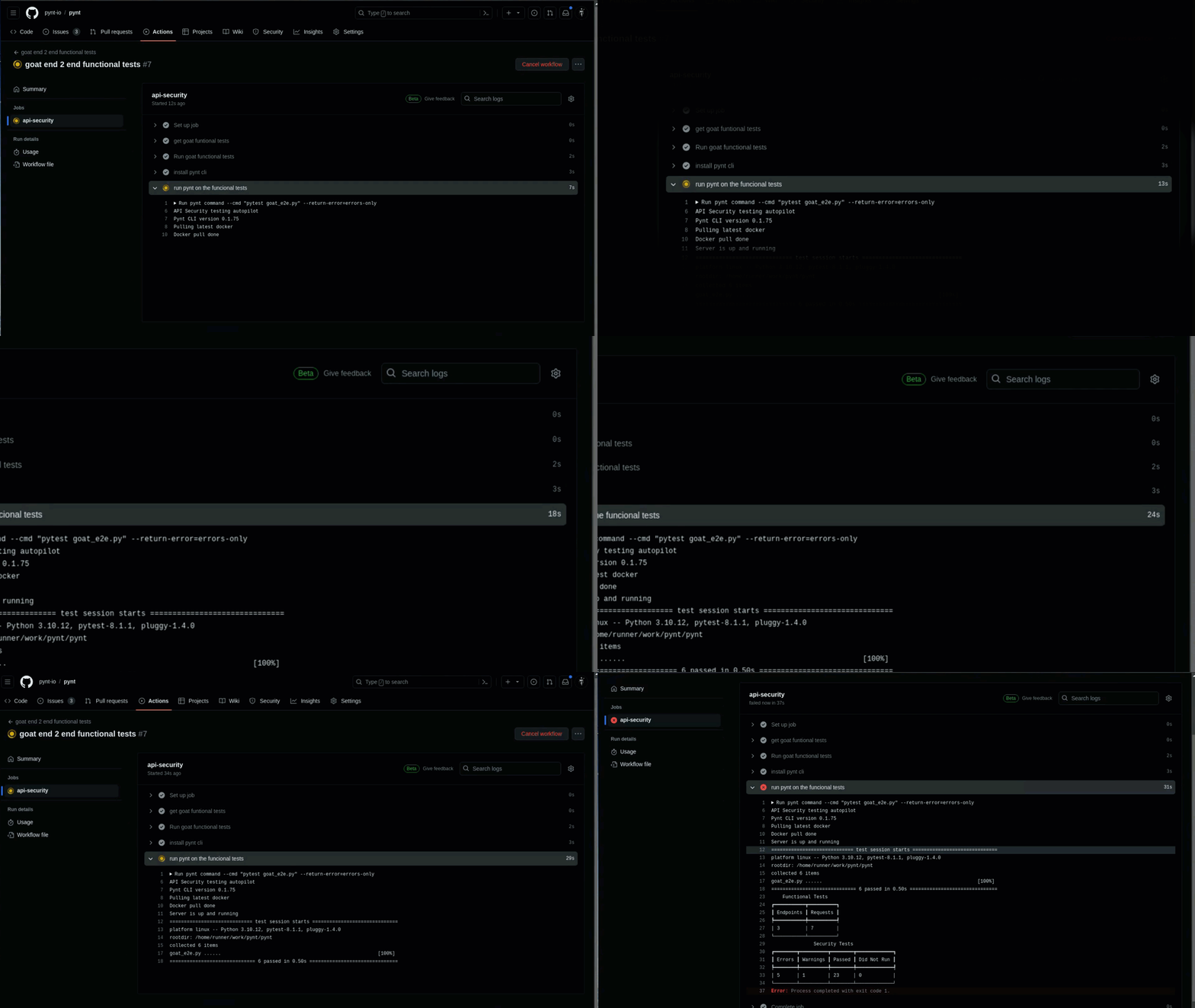
- Title: Pynt GitHub Actions Workflow
- Description: This image showcases a GitHub Actions workflow where Pynt is integrated to run functional API tests. The workflow demonstrates how Pynt is used in a CI/CD pipeline.
- Use Cases:
- Automated API security testing in CI/CD.
- Running Pynt tests on pull requests.
- Tags: CI/CD, GitHub Actions, automation, testing
Github Actions example 👉 Get started with building your API Catalog

- Title: Pynt API Dashboard
- Description: This image displays the Pynt API dashboard. The dashboard provides insights into API risks, methods, URLs, authentication, technology, sources, and applications.
- Use Cases:
- Quickly identify and prioritize API risks.
- Provides a clear overview of all APIs.
- Tags: API dashboard, risk assessment, API inventory, security
Pynt's Catalog
Pynt is designed for Application Security Engineers, Developers, and DevSecOps teams. Automate API security testing, discover undocumented APIs, and reduce false positives. At a Glance: 👩💻 Pynt is designed for Application Security Engineers, Developers, and DevSecOps teams. Automate API security testing, reduce false positives, and discover undocumented APIs to ensure complete coverage. Pynt is a versatile tool for teams responsible for API security throughout the development lifecycle, especially in Application Security, Development, and DevSecOps roles. 🛠️
Security engineers tasked with protecting APIs benefit from Pynt’s automated, context-aware testing capabilities. Pynt allows them to:
- Automate Manual Processes: 🔧 Reduce the workload by automating vulnerability detection with Pynt.
- Focus on Verified Vulnerabilities: 🔍 Minimize false positives, enabling teams to focus on real threats.
- Tool Integration: ⚙️ Pynt works with tools AppSec engineers already use, such as Burp Suite.
With API security shifting left, developers are increasingly responsible for securing the code they write. Pynt helps developers by:
- Integrating Security into CI/CD: 🧑💻 Seamlessly integrate API security testing into your CI/CD workflows.
- Tool Integration: ⚙️ Pynt integrates easily with Postman, Selenium, and many other API testing tools.
DevSecOps teams need continuous security testing across the entire development lifecycle. Pynt supports DevSecOps by:
- Automating Security: 🔄 Continuous security testing without disrupting the development process.
- Cross-Team Collaboration: 🤝 Pynt facilitates collaboration between development, security, and operations teams by integrating into the CI/CD pipeline.
Get a comprehensive overview of security testing in Pynt. Understand how Pynt's advanced tools help identify vulnerabilities, assess risks, and secure your APIs effectively. 🔥 Pynt's API Security Testing is fully available for Business plan users, and limited for Starter plan users (up to 10 API endpoints) 🆓.
Pynt leverages an integrated shift-left approach and unique hack technology using home-grown attack scenarios to:
- Detect real vulnerabilities 🔍
- Discover APIs 📚
- Suggest fixes for verified vulnerabilities 🛠️
Pynt acts like a hacker: It deeply analyses normal API traffic to build a model and then generates simulated attacks, verifies if the attack succeeds, and determines whether your API is vulnerable.
Unlike other platforms (e.g., fuzzing), Pynt uses traffic from your functional tests to create real attack scenarios. This approach allows Pynt to:
- Perform tests with no configuration, running in minutes ⚡.
- Provide an accurate overview of vulnerabilities with near-zero false positives 🎯.
- Leverage functional tests for maximum API coverage, as tests evolve with your APIs 🔄.

- Title: Pynt Security Process
- Description: This image shows Pynt's core workflow: Analyze API traffic, Attack with context-aware attacks, and Fix with clear remediation.
- Use Cases:
- Understanding Pynt's core security process
- Visualize the steps involved in securing APIs.
- Tags: API security, attack, analyze, fix
Pynt's testing flow
🔗 Get started with Pynt’s API Security Testing: Pynt’s security engine goes beyond conventional measures, leveraging your existing API functional tests for proactive testing. To get started quickly with Pynt, we recommend the following steps:
- Follow the Prerequisites 📋
- Run a single scan - start directly from here or choose from the supported integrations below🔍
- Integrate Pynt with your CI/CD pipeline for continuous coverage 🔄
Available integrations Pynt leverages a sophisticated context-aware security engine that goes beyond conventional measures. By leveraging your existing tools and functional tests, it conducts proactive API security tests directly from your local machine:
- Get started with API testing tools 🛠️
- Get started with API testing CLIs 🖥️
- Get started with API testing frameworks ⚙️
- Get started with Burp Suite 🔍
- Get started with Browser testing 🌐
Integrate API Security Testing Into Your CI/CD 🔐 Power of Continuous API Pentesting in CI/CD: Integrating API security testing into your CI/CD pipeline ensures vulnerabilities are detected early in the development lifecycle. We recommend to add Pynt into your CI/CD for continuous monitoring for API Security vulnerabilities. Pynt API security testing suite seamlessly integrates into existing development tools and CI/CD workflows. 👉 Get started with integrating Pynt into your CI/CD.
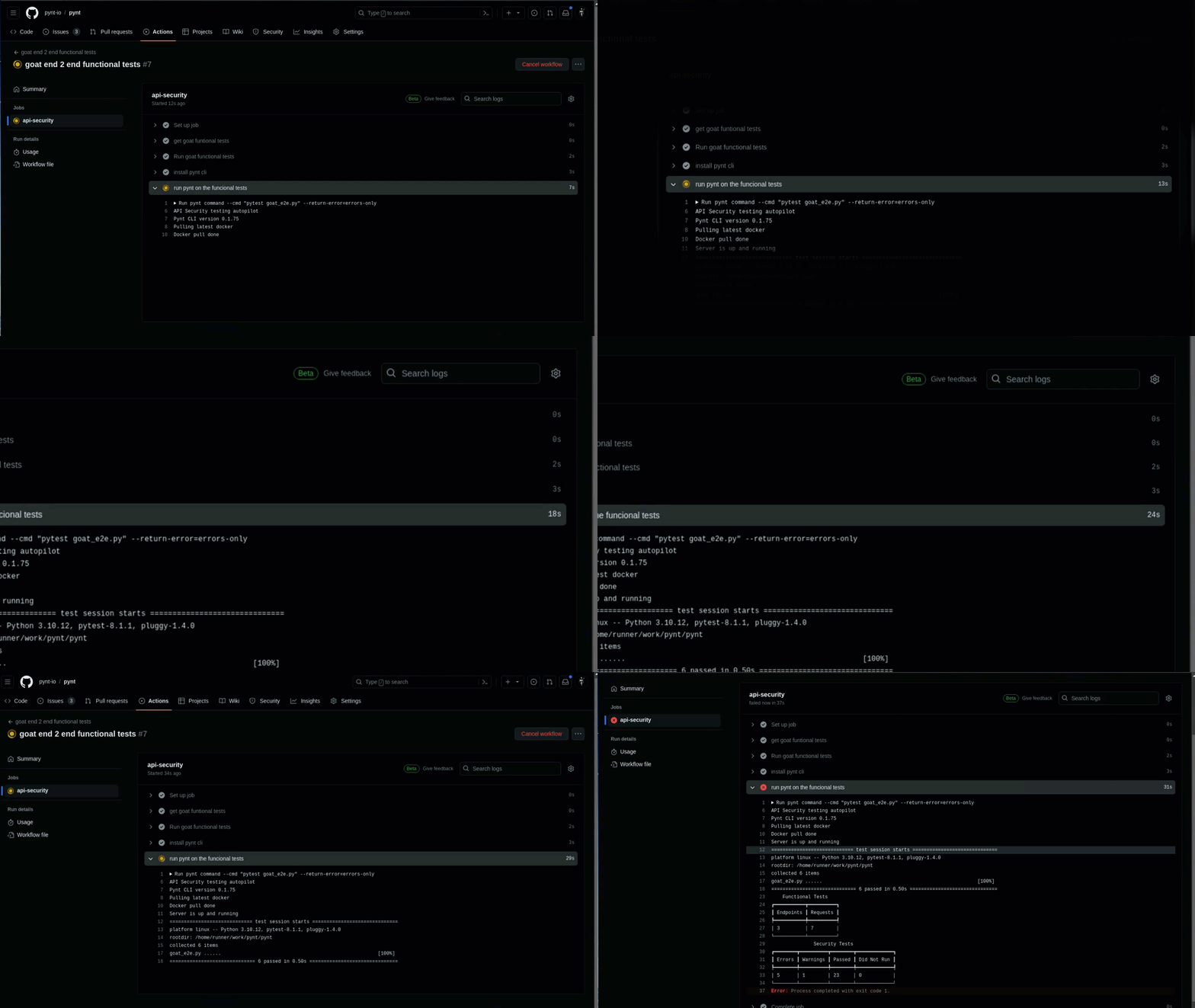
- Title: Pynt GitHub Actions Workflow (Detail)
- Description: This image showcases a GitHub Actions workflow. Pynt is integrated to run functional API tests. It details the Pynt command being executed.
- Use Cases:
- Automated API security testing in CI/CD.
- Example of a Pynt test command in the workflow.
- Tags: CI/CD, GitHub Actions, automation, testing
Discover the prerequisites needed to seamlessly onboard with Pynt. At a Glance: 🛠️ Before running Pynt scans, ensure your environment is correctly set up with the required system configurations, permissions, and tools for a smooth and successful API security scan.
- Docker Installed & Running: If you're running Pynt locally, ensure Docker is installed and running. Install Docker here.
- Python Installed: If using Pynt locally, make sure Python is installed on your machine. minimum Python version: 3.9
- GHCR Image Access: Ensure you can pull images from the GHCR repository.
If you have trouble pulling images, follow the steps provided in the guide for accessing the public registry.
- Pynt Domain Accessible: Verify that app.pynt.io is reachable from the machine running Pynt.
- Postman Installed: If you're integrating Pynt with Postman, ensure you're using the Postman app (note: Pynt requires Docker access and doesn’t support the Postman web interface).
- Functional Tests Required: For several integrations, Pynt uses your existing functional tests (Postman, Newman, CLI) to drive its security scans. Ensure your functional test collection is available, your environment variables are set, and the target application is running.
- Ensure everything is working by running your functional tests against the target application before executing Pynt’s security tests.
🔧 Pro tip: Pynt utilizes your functional tests to inform the security tests it runs. The broader and more comprehensive your functional tests, the more security coverage Pynt will provide. More APIs, users, and requests mean richer security testing!
Learn how to install the Pynt container for seamless API security testing. Follow our quick guide to set up and deploy Pynt in your environment. At a Glance: 🚀 Learn how to install the Pynt container for seamless API security testing in a few simple steps. This guide covers everything from setting up Pynt CLI to running your first Pynt scan.
Installing the Pynt container is a straightforward process, enabling you to set up and deploy comprehensive API security testing in your environment. Whether you're integrating Pynt into CI/CD pipelines or running it standalone, follow these steps to get Pynt up and running smoothly. 💡 Why Pynt's Container is Needed: Pynt's container allows you to run Pynt from any location, supporting deployment in local or on-premises. It ensures Pynt is available for API security testing in flexible setups. However, for Postman, there’s an option to run Pynt directly from the SaaS platform, eliminating the need to install a container. If you prefer this option, you may skip this section.
Pynt is deployed as a Python-based CLI. To install the Pynt CLI, simply use pip:
Copy
python3 -m pip install pyntcli
📥 Tip: Ensure Python 3 is installed before running the above command!
On the first time running Pynt CLI you will need to authenticate with Pynt:

- Title: Pynt Login Screen
- Description: The image shows Pynt's login screen, allowing users to sign in with Google, GitHub, or LinkedIn. It also shows the Azure AD option for enterprise users.
- Use Cases:
- Signing into Pynt
- Login options
- Tags: login, Google, GitHub, LinkedIn
First login with Pynt CLI Once authenticated, the CLI will not ask for authentication again. You won’t need to log in again unless your session expires.
No. Pynt will handle anything for you! 🛠️ No manual docker operations are needed! The Pynt CLI automatically manages all Docker operations, including pulling the latest image and running the container.
Learn how to install the Pynt binary for seamless API security testing. Follow our quick guide to set up and deploy Pynt in your environment. Pynt Binary can be used in Linux based CI/CD environments where docker cannot be used, its syntax compatible to Pynt CLI. PYNT_ID must be exported as an environment variable as Pynt authentication is not implemented yet How to get PYNT_ID
- Get the install script:
Copy
wget https://cdn.pynt.io/binary-release/install.sh
chmod +x install.sh
- Run the Install Script:
- Execute the
install.shscript to installpynt: - Copy ./install.sh
- Execute the
- Installation Steps:
- The
install.shscript performs the following steps:- Creates the
.pynt/binand.pynt/resultsdirectories in the user's home directory. - Copies the
pynt,newman,mitmdump, andcustom_har.pyfiles to the.pynt/bindirectory. - Creates a symlink to the
pyntbinary in/usr/local/binfor easy access.
- Creates the
- The
Note: Ensure you run the install.sh script as a non-root user. If the symlink creation fails, you may need to create it manually or run pynt from the .pynt/bin directory.
Explore Pynt's CLI modes for API security testing, learn how these modes integrate with your tools and workflows to perform comprehensive security scans. Pynt offers two powerful modes within its CLI for conducting API security tests: Pynt Command and Pynt Listen. Each mode is designed to integrate with various tools and workflows, ensuring flexibility in how API security tests are performed.
Pynt Command 💡 Pynt Command Mode: Pynt Command allows users to wrap their existing CLI-based functional tests with Pynt’s security testing capabilities. It seamlessly integrates into your current workflow, enabling automatic API security testing alongside functional tests. Pynt Command supports a wide range of configurations and optional arguments to tailor the tests to specific needs, making it adaptable for various testing environments.
Pynt Listen 💡 Pynt Listen Mode: Pynt Listen operates as an interactive proxy, listening on a specified port and capturing network traffic for security analysis. It is designed for tools that can direct their traffic through a proxy, providing flexibility for API security testing in various scenarios. With Pynt Listen, users can capture traffic from a variety of sources and initiate security tests by triggering the scan, making it ideal for capturing real-time data from browsers, testing suites, and more.
For additional support, visit Pynt Community Support.
Leverage Pynt in Command CLI mode for efficient, automated API security testing. Run comprehensive security scans directly from your command-line interface. 🚀 At a Glance:
- Pynt Command Mode: Run automated API security tests alongside your CLI-based functional tests, integrating security seamlessly into your workflow.
Pynt command is a mode of Pynt CLI that runs API security tests from any CLI based functional tests . To run Pynt command, simply wrap the command line you use for the functional test with pynt command:
Copy
pynt command --cmd <your command line>
Copy
    --cmd - The command that runs the functional tests
    --captured-domains - Pynt will scan only these domains and subdomains. For all domains write "*"
    --test-name - A name for your Pynt scan
    --port - Set the port pynt will listen to (DEFAULT: 5001)
    --allow-errors - If present will allow command to fail and continue execution
    --ca-path - The path to the CA file in PEM format
    --proxy-port - Set the port proxied traffic should be routed to (DEFAULT: 6666)
    --report - If present will save the generated report in this path.
    --insecure - Use when target uses self signed certificates
    --self-signed - Use when the functional test verify SSL
    --no-proxy-export - Pynt will not export the proxy settings to the environment
    --application-id - Attach the scan to an application, you can find the ID in your applications area at app.pynt.io
    --host-ca - Path to a CA file (PEM format) to enable SSL certificate verification for pynt when running through VPN.
    --severity-level - 'all', 'medium', 'high', 'critical', 'none' (default)
    --verbose - Use to get more detailed information about the run
How Pynt command works
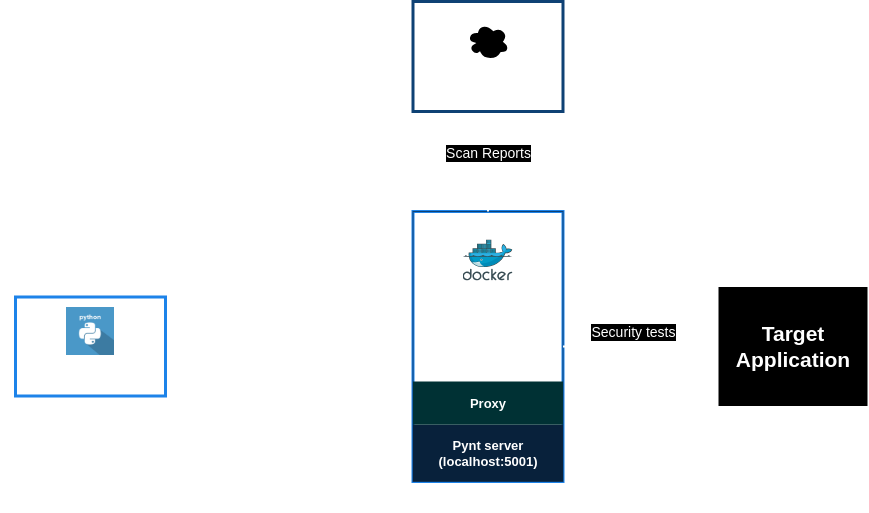
- Title: Pynt Command Execution Flow
- Description: This image shows the execution flow of a Pynt security command. Starting from the
pyntcli, the container executes security tests on the target application. - Use Cases:
- Understanding the Pynt command execution process.
- Visualizing the interaction between Pynt components.
- Tags: architecture, container, execution, security
Pynt command architecture
For additional support, visit Pynt Community Support.
Leverage Pynt in Listen CLI mode to monitor and secure your API traffic in real-time. Automate security testing directly from your command-line interface. 🚀 At a Glance:
- Pynt Listen Mode: Capture real-time API traffic through a proxy for in-depth security analysis, perfect for tools that generate network requests.
Pynt Listen is an interactive feature in Pynt that acts as a listening proxy on a chosen port. It's designed to capture network traffic when users redirect it to this port. Pynt stays in listening mode, waiting for the user's cue. A scan on the captured traffic starts when the user presses enter, moving Pynt from waiting to actively analyzing the traffic. Pynt can be integrated with nearly any tool that generates API traffic, provided the tool can direct its traffic through Pynt's proxy.
Copy
pynt listen --captured-domains <domains to scan>
Copy
--captured-domains - Pynt will scan only these domains and subdomains. For all domains write "*"
Specifying a captured domain is crucial when using pynt listen, particularly for web applications. Web browsers often generate a vast amount of unrelated traffic, which can clutter the scan results. By focusing on a specific domain, pynt listen can more effectively monitor relevant network activity.
Copy
    --port - Set the port pynt will listen to (DEFAULT: 5001)
    --ca-path - The path to the CA file in PEM format
    --proxy-port - Set the port proxied traffic should be routed to (DEFAULT: 6666)
    --report - If present will save the generated report in this path.
    --insecure - use when target uses self signed certificates
    --host-ca - path to the CA file in PEM format to enable SSL certificate verification for pynt when running through a VPN.
    --return-error - 'all-findings' (warnings, or errors), 'errors-only', 'never' (default),
Examples
For additional support, visit Pynt Community Support.
The following page describe the updated security test coverage by Pynt At a Glance: 🔐 Pynt offers comprehensive API security testing by leveraging real-world attack simulations and homegrown tests. It addresses key risks highlighted in the OWASP Top 10 while continuously enhancing its security scope.
Pynt's security tests cover a wide range of vulnerabilities using real-world attack simulations and homegrown attack scenarios, ensuring robust API security. These tests align with:
- OWASP Top 10 for APIs: Tackling API-specific risks like broken authentication and data exposure.
- OWASP Top 10 for Web Applications: Covering general web vulnerabilities such as injection attacks.
- OWASP Top 10 for LLMs: Addressing emerging threats in large language models.
Pynt goes beyond the OWASP Top 10, offering homegrown tests that identify gaps often missed by standard tools. These unique tests bolster your API's security by providing extra protection against potential threats. Learn more at Pynt vs OWASP: Pynt’s Top-10 Focus, for detailed insights.
Pynt continuously evolves to provide maximum security coverage. Pynt integrates seamlessly into your CI/CD pipeline, ensuring high accuracy and minimal false positives while safeguarding critical endpoints.
🛠️ Note: This list might be partial as it grows rapidly, so stay updated for expanded coverage! Test case Category [BL001] User data leakage to other users - Resource-ID authorization Business Logic [BL002] ****User data leakage to other users - User-ID authorization Business Logic [BL003] ****User data leakage to other users - Resource-ID and User-ID authorization Business Logic [BL004] ****User data leakage to other users - credentials authorization Business Logic [BL005] ****User data manipulation by other users - Resource-ID authorization Business Logic [BL006] ****User data manipulation by other users - User-ID authorization Business Logic [BL007] User data manipulation by other users - Resource-ID and User-ID authorization Business Logic [BL008] ****User data manipulation by other users - credentials authorization Business Logic [BL009] Guessable resource identifier Business Logic [INJ001] SQL Injection Injections [INJ002] ****MS-SQL Injection Injections [INJ003] ****MySQL Injection Injections [INJ004] SQLite Injection Injections [INJ005] PostgreSQL Injection Injections [INJ006] ****NoSQL Injection Injections [INJ007] ****Command Injection Injections [INJ008] ****Server-side template injection Injections [AB001] ****Ignored authentication token Authentication bypass [AB002] ****No signature validation in JWT Authentication bypass [AB003] ****JWT hashed without secret Authentication bypass [AB004] No signature in JWT Authentication bypass [AB005] ****Unsigned JWT Authentication bypass [MA001] ****Mass assignment by manipulation of hidden attributes Mass Assignment [MA002] ****Mass assignment by flag overloading Mass Assignment [SSRF001] Local file access Server-Side request forgery [ST001] ****Stack trace in response Stack trace in response [RES001] ****Resources limiting Lack of Resources and Rate Limiting [FM001] File path manipulation File path manipulation [GQL001] ****GraphQL introspection GraphQL introspection Vulnerability ****[GQL002] GraphQL Alias Overloading GraphQL Alias Overloading [LLM001] Direct prompt injection LLM APIs Vulnerabilities [LLM002] Prompt injection, alignment LLM APIs Vulnerabilities [LLM003] LLM Insecure output handling, type: XSS LLM APIs Vulnerabilities [LLM004] LLM Insecure output handling, type: SSRF LLM APIs Vulnerabilities [LLM005] LLM Insecure output handling, type: Markdown LLM APIs Vulnerabilities [TLS001] Insecure transport scheme Insecure transport scheme [AB006] Basic Authentication Basic Authentication
Uncover the details of Pynt's security tests for business logic vulnerabilities in our documentation! Learn how Pynt safeguards against critical business logic threats.
At a Glance:
In most cases Business logic issues happen when authorization is not enforced through all the flows of the application. Modern applications usually assign a non guessable identifiers to users and resources. Consider the following example: Copy
def get_profile(self, getprofile_request, context):
    cursor, conn = connection_to_sql(f"GET_PROFILE_BL {getprofile_request}")
    cursor.execute('select * from profiles where uid=?',(getprofile_request.uid,))
    p = cursor.fetchone()
The function get_profile accepts the User ID as uid and directly querying the database to get this user's profile without any validation that the logged in user is the same user that is represented by the uid.
Ensure that only authorized users can access the API and that access is granted on a need-to-know basis. Use strong authentication methods such as multi-factor authentication and implement authorization checks at the API endpoint level.
These test cases test the enforce of authorization between user identifiers, resource identifiers and the actual logged in users on APIs that read user related data Test case OWASP CWE [BL001] User data leakage to other users - Resource-ID authorization API1 OWASP API Top 10 CWE-285, CWE-284, CWE-639 [BL002] User data leakage to other users - User-ID authorization API1 OWASP API Top 10 CWE-285, CWE-284, CWE-639 [BL003] User data leakage to other users - Resource-ID and User-ID authorization API1 OWASP API Top 10 CWE-285, CWE-284, CWE-639 [BL004] User data leakage to other users - credentials authorization API1 OWASP API Top 10 CWE-285, CWE-284, CWE-639 These test cases test the enforce of authorization between user identifiers, resource identifiers and the actual logged in users on APIs that write user related data Test case OWASP CWE [BL005] User data manipulation by other users - Resource-ID authorization API5 OWASP Top 10 CWE-285 [BL006] User data manipulation by other users - User-ID authorization API5 OWASP Top 10 CWE-285 [BL007] User data manipulation by other users - Resource-ID and User-ID authorization API5 OWASP Top 10 CWE-285 [BL008] User data manipulation by other users - credentials authorization API5 OWASP Top 10 CWE-285 This test case try to guess values of user Identifiers with a numeric structure Test case OWASP CWE [BL009] Guessable resource identifier API1 OWASP Top 10
Discover Pynt's documentation on security tests for injections! Learn how Pynt fortifies your APIs against injection vulnerabilities.
At a Glance:
Injection attacks happen when input from an API request is used directly in an operation such as DB query, system call, or a template without validating whether the input includes unwanted characters.
SQL Injection To prevent SQL injection attacks, consider the following measures:
- Use parameterized queries: Parameterized queries allow you to separate the SQL query logic from the user-supplied data. Instead of concatenating user input directly into the SQL statement, you use placeholders in the SQL statement and pass the user input as parameters to the query. This prevents attackers from injecting malicious code into the SQL statement.
Example of parameterized query in Python: Copy
cursor.execute("SELECT * FROM users WHERE username = %s AND password = %s", (username, password))
- Sanitize user input: Even with parameterized queries, it's important to sanitize user input to ensure that it conforms to expected values. This can include validating input format, data type, and length, as well as removing potentially harmful characters.
NoSQL Injection here's an example of a NoSQL injection vulnerability in a Node.js API that uses MongoDB as the database: Copy
const express = require('express');
const bodyParser = require('body-parser');
const mongodb = require('mongodb');

const app = express();
const mongoClient = mongodb.MongoClient;
const mongoUrl = 'mongodb://localhost:27017/mydb';

app.use(bodyParser.json());

app.post('/login', (req, res) => {
  const username = req.body.username;
  const password = req.body.password;

  mongoClient.connect(mongoUrl, (err, db) => {
    if (err) throw err;

    const users = db.collection('users');
    users.findOne({ username: username, password: password }, (err, user) => {
      if (err) throw err;

      if (user) {
        res.status(200).json({ message: 'Login successful' });
      } else {
        res.status(401).json({ message: 'Invalid username or password' });
      }

      db.close();
    });
  });
});

app.listen(3000, () => {
  console.log('API server started on port 3000');
});
In this example, the POST /login route accepts a JSON request body with a username and password field. The route queries the users collection in MongoDB to find a user with the specified credentials. If a matching user is found, the route returns a 200 OK response with a success message. If no matching user is found, the route returns a 401 Unauthorized response with an error message.
However, this API has a NoSQL injection vulnerability because it does not properly sanitize or validate the user input. An attacker can craft a specially-crafted JSON request body that bypasses the username and password check and allows them to log in as any user in the database.
For example, an attacker can send the following request body:
Copy
{
  "username": { "$ne": "" },
  "password": { "$ne": "" }
}
This request body contains MongoDB operators ($ne) that instruct MongoDB to return any user document that has a non-empty username and password field. By doing so, the attacker can bypass the username and password check and log in as any user in the database.
To prevent NoSQL injection vulnerabilities, you should always sanitize and validate user input before using it in database queries.
Command Injection
Here is an example of a command injection vulnerability in a Python Flask API:
Copy
import subprocess
from flask import Flask, request

app = Flask(__name__)

@app.route('/ping')
def ping():
    host = request.args.get('host')
    result = subprocess.check_output(['ping', '-c', '1', host])
    return result

if __name__ == '__main__':
    app.run(debug=True)
In this example, the GET /ping route accepts a query parameter host and uses the subprocess.check_output() method to run the ping command on the specified host. However, this API has a command injection vulnerability because it does not properly validate or sanitize the user input. An attacker can craft a specially-crafted query parameter that injects arbitrary commands into the ping command and executes them on the server.
For example, an attacker can send the following request:
Copy
GET /ping?host=127.0.0.1; ls -la
This request injects the ls -la command into the ping command and lists the contents of the current directory on the server.
To prevent command injection vulnerabilities, you should always sanitize and validate user input before using it in command-line or shell operations.
Template Injection
Here's an example of how template injection vulnerability can occur in an API:
Let's say you have an API that takes user input to generate a report. The report is generated using a template engine that allows users to inject their own variables into the template.
An attacker could exploit this vulnerability by injecting malicious code into the template engine. For example, suppose the attacker injects the following code into the template:
Copy
{{7*'7'}}
If the template engine doesn't properly sanitize the input, it will execute the expression and return the result, which is 49. However, if the attacker injects something more malicious, such as:
Copy
{{config.items()}}
This could allow the attacker to access and retrieve sensitive information about the server's configuration. To prevent template injection vulnerabilities, it's important to always sanitize and validate user input before using it to generate templates. Additionally, it's important to limit the privileges of any code that executes within the context of the template engine to prevent attackers from executing arbitrary code on the server-side.
Test case OWASP CWE [INJ001] SQL Injection (Generic) API8 OWASP API Top 10 CWE-89 [INJ002] MS-SQL Injection API8 OWASP API Top 10 CWE-89 [INJ003] MySQL Injection API8 OWASP API Top 10 CWE-89 [INJ004] SQLite Injection API8 OWASP API Top 10 CWE-89 [INJ005] PostgreSQL Injection API8 OWASP API Top 10 CWE-89 [INJ006] NoSQL Injection API8 OWASP API Top 10 CWE-943 [INJ007] Command Injection API8 OWASP API Top 10 CWE-77 [INJ008] Server-side template injection API8 OWASP API Top 10 CWE-77 💡 To learn more about injection flaws and how to prevent them, visit the OWASP Injection Flows Page.
Delve into Pynt's documentation on authentication bypass security tests! Learn how Pynt ensures robust protection against authentication vulnerabilities. At a Glance: 🚪 Authentication Bypass Tests focus on identifying vulnerabilities that allow unauthorized access to resources by bypassing authentication mechanisms. These tests ensure that API endpoints enforce proper authentication checks and prevent attackers from accessing sensitive data or functions without valid credentials.
Authentication bypass in API refers to a security vulnerability where an attacker is able to access an API endpoint or functionality without providing the necessary authentication credentials. This can happen due to various reasons such as:
- Weak authentication mechanisms: If an API uses a weak authentication mechanism such as storing passwords in plain text, an attacker may be able to easily guess or obtain the credentials and bypass authentication.
- Improper access control: If an API does not properly enforce access control rules, an attacker may be able to access sensitive resources or functionality without providing the required authentication credentials.
- Exploiting vulnerabilities: If an API has vulnerabilities such as injection flaws or buffer overflows, an attacker may be able to exploit these vulnerabilities to bypass authentication and gain access to the API.
Authentication bypass can be a serious security risk as it allows attackers to access sensitive information or perform unauthorized actions.
A very common case for broken authentication is when the Authentication token validation is disabled for testing purposes and find its way to production code.
While JSON web tokens (JWTs) are widely used in modern application, sometimes developers use a weak validation function from the JWT library or even worse, implement the JWT validation function themselves.
Consider the following vulnerability found and fixed in jwt-simple library:
The function jwt_decode accepted the JWT token and the key but not the expected hash algorithm, allowing an attacker to craft his own JWT with "alg": "none" in the algorithm header and the function will accept his token.

- Title: Code Differencing
- Description: The most significant change for Pynt is the introduction of the algorithm parameter. Pynt's static analysis capabilities would identify this signature change. Its dynamic analysis and fuzzing modules would then be updated.
- Tags: code, diff, change, comparison
jwt-simple vulnerability and the fix More info about this vulnerability
To prevent authentication bypass, APIs should implement strong authentication mechanisms, and enforce proper access control
This test case test the enforce of authentication token in authenticated request: Test case OWASP CWE [AB001] Ignored authentication token API2 OWASP API Top 10 CWE-425, CWE-287, CWE-284, CWE-303 These test cases test for common flaws when JWTs are used for authentication: Test case OWASP CWE [AB002] No signature validation in JWT API2 OWASP API Top 10 CWE-287, CWE-284, CWE-303 [AB003] JWT hashed without secret API2 OWASP API Top 10 CWE-287, CWE-284, CWE-303 [AB004] No signature in JWT API2 OWASP API Top 10 CWE-287, CWE-284, CWE-303 [AB005] Unsigned JWT API2 OWASP API Top 10 CWE-287, CWE-284, CWE-303
Dive into Pynt's documentation on security tests for mass assignment vulnerabilities! Discover how Pynt safeguards against unauthorized access and manipulation of sensitive data. At a Glance: 🛡️ Mass Assignment Vulnerability occurs when attackers manipulate or inject unexpected data into an API request, allowing them to modify data they shouldn’t have access to. This security issue arises when APIs accept and process more data fields than intended, often due to improper validation or filtering of input, leading to unauthorized data manipulation.
This vulnerability typically arises when an API allows a client to submit multiple parameters in a single request, and those parameters can be used to update or create database records without validating that the request includes only the expected parameters. The attacker can exploit this by submitting additional parameters to the request, which are not validated by the API, allowing them to modify or create data in unintended ways. One of the most well-known cases occurred in 2012, when a vulnerability was discovered in the Ruby on Rails web application framework, which allowed attackers to exploit mass assignment vulnerabilities in Rails-based applications. The vulnerability was caused by the default behavior of Rails' mass assignment feature, which allowed developers to easily assign multiple attributes to a model object at once.
Validate all input data, only accept the data that is necessary for the request, and ensure that the data is consistent with the intended operation, do not use one liners to blindly load all the parameters to an object. APIs can also use data binding techniques to map only the data that is explicitly allowed to be updated to the corresponding database fields, while ignoring the rest of the data in the request
This test case manipulates object properties from requests which the user should not have access to: Test case OWASP CWE [MA001] Mass assignment by manipulation of hidden attributes API6 OWASP API Top 10 CWE-915 This test case manipulates boolean flags from requests that should not have access to these flags: Test case OWASP CWE [MA002] Mass assignment by flag overloading API6 OWASP API Top 10 CWE-915
Explore Pynt's documentation on security tests for server-side request forgery! Learn how Pynt protects your APIs against this critical vulnerability. At a Glance: 🌐 SSRF (Server-Side Request Forgery) occurs when an attacker tricks a server into making requests to unintended locations, such as internal systems or external third-party services. This vulnerability allows attackers to bypass firewall restrictions, access sensitive data, or execute malicious actions on behalf of the compromised server.
SSRF occurs when an attacker can manipulate the input parameters of a web application that requests resources from other servers, such as databases, web services, or other APIs. The attacker can exploit this vulnerability to send forged requests to internal servers that are not meant to be exposed to the internet, such as backend systems or databases. This can result in unauthorized access, data theft, or other malicious activities that can compromise the security of the entire web application or the network it is hosted on.
SSRF vulnerabilities occur due to a lack of input validation and inadequate access controls. Specifically, when applications allow untrusted input to be used in making requests to other servers, they can be exploited by attackers to manipulate these requests and send them to unintended targets Copy
import requests
from flask import Flask, request

app = Flask(__name__)

@app.route('/')
def index():
    url = request.args.get('url')
    response = requests.get(url)
    return response.text

if __name__ == '__main__':
    app.run(debug=True)
In this example, the Flask web application takes a URL parameter from the user and makes a GET request to that URL using the requests library. However, there is no input validation or sanitization being performed on the URL parameter, which means an attacker can pass in a malicious URL that points to an internal server or other restricted resource.
For example, an attacker could make a request like this:
Copy
http://localhost:5000/?url=http://192.168.0.1/secret
This would cause the web application to make a request to an internal server at IP address 192.168.0.1, which may contain sensitive data or be otherwise restricted. By exploiting this SSRF vulnerability, the attacker could potentially gain access to this internal resource and compromise the security of the network.
Validate and sanitize user input before using it to make requests to external resources. One approach would be to use a whitelist of allowed URLs, or to restrict the URLs that can be accessed based on the user's permissions or role.
This test case tries to manipulate a URL to access a local file on the server Test case OWASP CWE [SSRF001] Local file access A10 OWASP top 10 CWE-918 PreviousMass Assignment Tests
Discover Pynt's documentation on security tests for stack trace in response vulnerabilities! Learn how Pynt secures your APIs against potential exposure of sensitive information. At a Glance: 🛠️ Stack Trace in Response occurs when an application exposes its internal stack trace in the API response, revealing sensitive implementation details to attackers. This can give attackers valuable information about the application’s structure, libraries, and environment, making it easier to exploit vulnerabilities. It’s essential to remove or sanitize stack traces from responses in production environments to prevent exposing critical details.
A stack trace is a list of function calls that shows the flow of execution of a program. It can contain information about the names and locations of functions, variables, and parameters used in the code. If a stack trace is returned in an API response, it can reveal details about the server-side implementation of the API, including the programming language, framework, and libraries used, as well as the file path and line numbers of the code that threw the error. Returning stack traces in API responses is generally not a good idea because it can expose sensitive information about your server and potentially compromise its security.
There could be a few reasons why you are seeing stack traces returned by your API:
- Some programming languages and frameworks have a "debug mode" which is used during development to help diagnose issues. When debug mode is enabled, stack traces may be returned in API responses. However, it's important to disable debug mode in production environments to prevent sensitive information from being exposed.
- Error Handling: If your API is not handling errors correctly, it may be returning stack traces to clients. This can happen if your API is not configured to catch and handle exceptions in a way that prevents stack traces from being displayed.
It's important to ensure that your API is properly configured to handle errors and that stack traces are not returned to clients in production environments. You should also consider implementing custom error messages that provide enough information for clients to understand the problem without revealing sensitive information. This can help improve the security of your API and prevent potential attacks.
For example: to disable stack traces returned by Flask, you can set the debug configuration option to False in your Flask application. Here's an example:
Copy
from flask import Flask

app = Flask(__name__)
app.config['DEBUG'] = False

# Your Flask routes and application code here
When debug is set to True, Flask will return detailed error messages including stack traces. By setting it to False, Flask will return a simpler error message that does not include a stack trace.
It's important to note that you should disable debug mode in production environments to prevent sensitive information from being exposed. In development environments, you can still use the stack trace for debugging purposes, but it should not be exposed to clients.
This test case checks for stack traces returned in responses Test case OWASP CWE [ST001] Stack trace in response API7 OWASP API Top 10 CWE-388
Explore Pynt's comprehensive documentation on security tests for mitigating lack of resources and rate-limiting vulnerabilities! Learn how Pynt ensures robust protection against resource exhaustion. At a Glance: 🛡️ Resource Limit Vulnerability occurs when an attacker causes an API to consume excessive resources, such as CPU, memory, or network bandwidth, beyond its intended capacity. This can lead to Denial of Service (DoS) attacks, where the API becomes unavailable or unresponsive due to resource exhaustion. Proper rate limiting and resource management are essential to prevent such attacks and ensure the stability of the API.
Resource-limiting vulnerabilities in APIs can happen due to various reasons. Here are some common causes:
- Lack of access controls: APIs may not have proper access controls in place to limit the number of requests per user or per IP address. This can allow attackers to send a large number of requests to the API and cause it to consume excessive resources.
- Insufficient input validation: APIs may not properly validate input data from users, allowing attackers to send maliciously crafted data that can cause the API to consume excessive resources. For example, an attacker could send a request with a very large search query that causes the API to perform an extensive search operation.
- Lack of resource allocation controls: APIs may not have controls in place to limit the amount of resources that can be consumed by each request. For example, an API endpoint may allow users to download large files without any restrictions on the file size or download speed.
API designers should implement appropriate access controls, input validation, resource allocation controls, and optimize the code to reduce resource consumption. Additionally, they should monitor the API usage patterns and implement measures to handle unexpected traffic spikes and usage patterns.
This test case queries excessive number of elements Test case OWASP CWE [RES001] Resources limiting API4 OWASP API Top 10 CWE-770
Explore Pynt's documentation on file path manipulation security tests! Understand how Pynt safeguards against file path vulnerabilities, ensuring robust security for your APIs. At a Glance: 🗂️ File Path Manipulation occurs when an attacker alters the file path in an API request to access unauthorized files or directories on the server. This vulnerability, often called directory traversal, allows attackers to read, write, or execute files outside the intended directory. To prevent this, always validate and sanitize file paths, ensuring that only authorized files are accessed.
File path manipulation (sometimes called LFI - local file inclusion) is a type of security vulnerability that occurs when a cloud application allows an attacker to include files located on the server's local file system. This vulnerability typically arises when the application processes user-supplied input without proper validation or sanitization. This vulnerability can have serious consequences as it allows an attacker to read sensitive files on the server. Some of the files that may be accessible through this vulnerability include configuration files, sensitive user data, and even system files, depending on the application's configuration and permissions.
- Insufficient input validation: Failing to properly validate user-supplied input allows attackers to manipulate file paths and inject malicious data that leads to file path attacks.
- Using user-controlled input directly: Including user-controlled input, such as file names or paths, directly in file inclusion functions without proper sanitization can enable attacks.
- Not using absolute file paths: Relying on relative file paths in file inclusion functions can create vulnerabilities, as attackers may manipulate the relative paths to access unauthorized files.
- Allowing directory traversal: Failing to restrict access to specific directories can enable attackers to traverse the directory structure and access sensitive files outside the intended scope.
- Input Validation and Sanitization:
- Always validate and sanitize user input before using it in file inclusion functions. Use whitelisting or regular expressions to ensure that input adheres to expected patterns.
- Avoid using user-controlled input directly in file paths without proper validation.
- Use Absolute File Paths:
- Instead of relying on relative file paths, use absolute file paths when including files. This ensures that files are loaded from specific, predefined locations and prevents directory traversal attacks.
- Implement Access Controls:
- Enforce access controls to restrict access to sensitive files and directories. Only allow access to files that are essential for the application's functionality and deny access to others.
- Disable Remote File Inclusion:
- If your application doesn't require it, disable the option to include files from remote servers. Remote file inclusion can be a security risk and should be avoided if not necessary.
- Secure File Inclusion Functions:
- If possible, use safer alternatives to file inclusion functions that provide additional security features. For example, some programming languages offer functions that automatically handle input sanitization and file inclusion securely.
This test case queries excessive number of elements: Test case OWASP CWE [FM001] File path manipulation
Explore Pynt's documentation on GraphQL Introspection security tests! Understand how Pynt safeguards your APIs against unintended exposure of schema details, ensuring robust security for your APIs. At a Glance: GraphQL Introspection allows clients to query the schema of a GraphQL API, revealing types, fields, queries, and mutations available on the backend. While this feature is beneficial during development, leaving introspection enabled in production can expose sensitive information to attackers. They can use this information to map out your API, discover hidden functionalities, deprecated fields, or potential weaknesses to exploit. To mitigate this risk, disable introspection in production or restrict it to authenticated and authorized users.
GraphQL Introspection is a powerful feature that enables clients to explore and understand the schema of a GraphQL API dynamically. By making special introspection queries, clients can retrieve detailed information about types, fields, arguments, and relationships within the API. Although this feature is highly beneficial during development, leaving introspection enabled in production environments accessible to untrusted users can introduce significant security risks. Attackers can leverage introspection to gain deep insights into your API's structure, uncovering sensitive data or functionalities intended to be private or internal. This information can be used to craft targeted attacks, exploit vulnerabilities, or perform unauthorized operations.
- Leaving Introspection Enabled in Production: Developers often forget to disable introspection in production environments, allowing anyone to query the schema and discover sensitive details.
- Lack of Authentication and Authorization: Allowing unauthenticated or unauthorized users to perform introspection queries exposes your API schema to potential malicious actors.
Disable Introspection in Production Configure Your Server: Adjust your GraphQL server settings to disable introspection queries in production environments. Most GraphQL server implementations provide options to toggle this feature based on the environment. Restrict Access to Introspection Implement Access Controls: If disabling introspection entirely isn't feasible, restrict it to authenticated and authorized users.
This test case detect if GraphQL introspection is enabled: Test case OWASP CWE [GQL001] GraphQL introspection API8 OWASP API Top 10 CWE-200
Explore Pynt's documentation on GraphQL Alias Overloading security tests! Understand how Pynt safeguards against alias overloading vulnerabilities, ensuring robust security for your APIs. At a Glance: GraphQL Alias Overloading occurs when an attacker abuses the alias feature in GraphQL queries to execute the same query multiple times within a single request by assigning different names to each. While aliases are designed for legitimate use cases, overloading them can lead to Denial of Service (DoS) attacks by overwhelming the server with redundant operations. To prevent this, implement query complexity limiting, depth limiting, and proper validation to ensure that only safe and efficient queries are processed
GraphQL Alias Overloading is a security vulnerability that arises when a client exploits the aliasing feature in GraphQL to execute the same query multiple times in a single request. By assigning different aliases to the same field or operation, an attacker can force the server to perform excessive processing, leading to high CPU and memory usage. This can ultimately result in a Denial of Service (DoS) attack, where legitimate users are denied access due to server overload. For example, an attacker might send a query like: Copy
{
  user1: user(id: "123") { name }
  user2: user(id: "123") { name }
  user3: user(id: "123") { name }
  // ...repeated hundreds of times
}
In this scenario, the server processes the same user query multiple times under different aliases, consuming significant resources.
- No Query Complexity Limitation: Developers may fail to implement limits on query depth or complexity, allowing excessively nested or large queries to be processed.
- Unlimited Alias Usage: Not restricting the number of aliases in a single query enables attackers to overload the server with redundant operations.
- Lack of Rate Limiting: Without rate limiting, attackers can send numerous requests in a short time frame, exacerbating the impact of alias overloading.
- Restrict Alias Usage: Set limitations on the number of aliases permitted in a single request to minimize the potential for Denial of Service (DoS) attacks.
- Enforce Rate Limiting: Implement controls to cap the number of requests a client can make within a certain time frame, thereby reducing the likelihood and impact of DoS attacks.
By implementing these measures, you can protect your GraphQL API from alias overloading attacks, ensuring it remains robust and reliable for legitimate users.
This test case detect if GraphQL introspection is enabled: Test case OWASP CWE [GQL002] GraphQL Alias Overloading API8 OWASP API Top 10 CWE-200
Discover Pynt's documentation on security tests for LLM (Large Language Model) injections! Learn how Pynt fortifies your APIs against LLM-based vulnerabilities. At a Glance: LLM vulnerabilities, such as Prompt Injection and Insecure Output Handling, occur when untrusted data is sent to or from a language model without proper validation or sanitization. Attackers can exploit these vulnerabilities to manipulate the behavior of the LLM, extract sensitive data, or execute malicious commands in downstream systems.
LLM-based attacks happen when input from an API request is used directly in an LLM prompt or when outputs from an LLM are used directly in operations such as rendering HTML content, executing system calls, or interfacing with other services, without validating whether the input or output includes unwanted content.
Prompt Injection To prevent prompt injection attacks, consider the following measures:
- Input Sanitization: Always sanitize and validate user input before incorporating it into LLM prompts. Remove or escape any tokens or phrases that could alter the intended behavior of the LLM.
- Use Contextual Prompts: Structure prompts to minimize the impact of injected content. For example, clearly separate system instructions from user-provided content.
- Limit LLM Instructions: Avoid including system-level instructions in prompts that can be manipulated by user input.
Insecure Output Handling Insecure Output Handling refers to the lack of adequate validation, sanitization, and management of outputs generated by large language models before they are passed downstream to other components and systems. Exploiting an Insecure Output Handling vulnerability can lead to XSS, CSRF, and Markdown injection attacks in web browsers, as well as SSRF, privilege escalation, or remote code execution on backend systems. Example of Insecure Output Handling: Consider an API that uses an LLM to generate HTML content based on user input: Copy
from flask import Flask, request, render_template_string
from some_llm_library import generate_text

app = Flask(__name__)

@app.route('/generate', methods=['POST'])
def generate():
    topic = request.form.get('topic')
    prompt = f"Write an article about {topic}"
    content = generate_text(prompt)
    html = f"<html><body>{content}</body></html>"
    return render_template_string(html)

if __name__ == '__main__':
    app.run()
If the LLM generates malicious JavaScript code within content, it could lead to an XSS attack when rendered in the user's browser.
How to Fix Insecure Output Handling:
- Sanitize LLM Outputs: Use libraries to escape or remove potentially harmful content before rendering.
- Set Content Security Policies: Implement CSP headers to restrict the execution of scripts and other potentially dangerous content.
Fixed Code Example: Copy
from flask import Flask, request, render_template_string
from markupsafe import escape
from some_llm_library import generate_text

app = Flask(__name__)

@app.route('/generate', methods=['POST'])
def generate():
    topic = request.form.get('topic')
    prompt = f"Write an article about {escape(topic)}"
    content = generate_text(prompt)
    safe_content = escape(content)
    html = f"<html><body>{safe_content}</body></html>"
    return render_template_string(html)

if __name__ == '__main__':
    app.run()
Markdown Injection Markdown content generated by LLMs can include embedded HTML or JavaScript, leading to XSS attacks when rendered. Vulnerable Example: Copy
from flask import Flask, request, Markup
import markdown
from some_llm_library import generate_text

app = Flask(__name__)

@app.route('/post', methods=['POST'])
def post():
    topic = request.form.get('topic')
    prompt = f"Write a detailed post about {topic}"
    markdown_content = generate_text(prompt)
    html_content = markdown.markdown(markdown_content)
    return f"<html><body>{html_content}</body></html>"

if __name__ == '__main__':
    app.run()
An attacker could manipulate the LLM to generate malicious Markdown that includes scripts. Fixing Markdown Injection:
- Use Safe Markdown Renderers: Utilize Markdown libraries that sanitize HTML content.
- Sanitize After Rendering: Escape or remove any HTML tags after converting from Markdown.
Fixed Code Example: Copy
from flask import Flask, request
import markdown
from bleach import clean
from some_llm_library import generate_text

app = Flask(__name__)

@app.route('/post', methods=['POST'])
def post():
    topic = request.form.get('topic')
    prompt = f"Write a detailed post about {topic}"
    markdown_content = generate_text(prompt)
    html_content = markdown.markdown(markdown_content)
    safe_html = clean(html_content)
    return f"<html><body>{safe_html}</body></html>"

if __name__ == '__main__':
    app.run()
Server-Side Request Forgery (SSRF) via LLM An LLM might generate URLs or network requests based on user input, potentially leading to SSRF attacks. Vulnerable Example: Copy
import requests
from flask import Flask, request, jsonify
from some_llm_library import generate_text

app = Flask(__name__)

@app.route('/fetch', methods=['POST'])
def fetch():
    query = request.json.get('query')
    prompt = f"Provide the URL for {query}"
    url = generate_text(prompt)
    response = requests.get(url)
    return jsonify({'data': response.text})

if __name__ == '__main__':
    app.run()
An attacker could manipulate the LLM to generate internal URLs, causing the server to make requests to internal services. Preventing SSRF:
- Validate and Sanitize URLs: Ensure that the generated URLs point to allowed domains.
- Implement Network Policies: Restrict the server's network access to prevent unauthorized requests.
Fixed Code Example: Copy
import requests
from flask import Flask, request, jsonify
from urllib.parse import urlparse
from some_llm_library import generate_text

app = Flask(__name__)

ALLOWED_DOMAINS = ['example.com']

def is_allowed(url):
    domain = urlparse(url).netloc
    return domain in ALLOWED_DOMAINS

@app.route('/fetch', methods=['POST'])
def fetch():
    query = request.json.get('query')
    prompt = f"Provide the URL for {query} on example.com"
    url = generate_text(prompt).strip()
    if not is_allowed(url):
        return jsonify({'error': 'Disallowed domain'}), 400
    response = requests.get(url)
    return jsonify({'data': response.text})

if __name__ == '__main__':
    app.run()
By implementing these measures, you can significantly reduce the risk of LLM-related vulnerabilities in your APIs. Always treat both the input to and output from LLMs with the same caution as you would with any untrusted data.
These test cases detect LLM APIs vulnerabilities: Test case OWASP CWE [LLM001] Direct prompt injection LLM01 OWASP LLM Top 10 CWE-1426 [LLM002] Prompt injection, alignment LLM01 OWASP LLM Top 10 CWE-1426 [LLM003] Insecure output handling, type: XSS LLM02 OWASP LLM Top 10 CWE-1426, CWE-94 [LLM004] Insecure output handling, type: SSRF LLM02 OWASP LLM Top 10 CWE-1426, CWE-94 [LLM005] Insecure output handling, type: Markdown LLM02 OWASP LLM Top 10 CWE-1426, CWE-94
Explore Pynt's documentation on insecure transport scheme vulnerabilities! Understand how Pynt safeguards against unsecured communication protocols, ensuring robust security for your APIs. At a Glance: 🔓 Insecure Transport Scheme vulnerabilities occur when an API or service communicates over unsecured protocols like HTTP instead of enforcing secure alternatives like HTTPS. This vulnerability allows sensitive data to be transmitted in an unencrypted format, making it susceptible to interception, tampering, and eavesdropping. To prevent this, always enforce secure protocols for all communications to protect data integrity and confidentiality.
An insecure scheme vulnerability arises when a cloud application, web application or API uses unsecured communication protocols, such as HTTP, which do not encrypt data transmitted between the client and the server. This lack of encryption means that any data sent over the network—including sensitive information like authentication tokens, personal data, and API keys—can be intercepted and read by malicious actors. Insecure schemes not only compromise confidentiality but also the integrity of the data. Attackers can perform man-in-the-middle attacks, intercepting communications between the client and server to modify or inject malicious content. This can lead to unauthorized access, data breaches, and other security incidents.
- Not Enforcing HTTPS:
- Failing to enforce the use of HTTPS, allowing clients to connect over unsecured HTTP by default.
- Mixed Content:
- Including resources (like scripts, images, or stylesheets) over HTTP in an HTTPS page, leading to mixed content vulnerabilities.
- Lack of HTTP Strict Transport Security (HSTS):
- Not implementing HSTS headers to enforce HTTPS connections, allowing attackers to downgrade connections to HTTP.
- Using Outdated Protocols and Cipher Suites:
- Employing outdated encryption protocols like SSLv2, SSLv3, or weak cipher suites that are vulnerable to attacks.
Enforce HTTPS:
- Redirect HTTP to HTTPS:
- Configure your server to automatically redirect all HTTP requests to HTTPS.
Secure Resource Loading:
- Use HTTPS for All Resources:
- Ensure that all resources (images, scripts, stylesheets) are loaded over HTTPS to prevent mixed content warnings and vulnerabilities.
- Avoid Protocol-Relative URLs:
- Use absolute HTTPS URLs instead of
//example.com/resource.js.
- Use absolute HTTPS URLs instead of
Implement HSTS (HTTP Strict Transport Security):
- Add HSTS Headers:
- Include the
Strict-Transport-Securityheader in your server responses to enforce HTTPS connections for all future requests.
- Include the
- Preload HSTS:
- Submit your domain to HSTS preload lists used by browsers for added security.
Proper Certificate Management:
- Use Valid SSL/TLS Certificates:
- Obtain certificates from trusted Certificate Authorities (CAs).
- Regular Renewal:
- Monitor certificate expiration dates and renew them timely.
Disable Insecure Protocols and Cipher Suites:
- Update Server Configuration:
- Disable outdated protocols like SSLv2, SSLv3, and TLS 1.0.
- Enable Strong Cipher Suites:
- Use modern cipher suites that support forward secrecy.
This test case queries excessive number of elements: Test case OWASP CWE [TLS001] Insecure transport scheme A02 Cryptographic Failures CWE-319, CWE-523, CWE-720, CWE-818
Explore Pynt's documentation on Basic Authentication! Understand how Pynt safeguards against insecure authentication methods, ensuring robust security for your APIs. At a Glance: Basic Authentication poses a security risks because it transmits credentials encoded in Base64, which is not encryption but merely encoding. Moreover, the credentials (username and password) are sent with every API request, increasing the risk of interception and exposure. Basic Authentication also lacks permissions granularity, making it difficult to enforce fine-grained access control. To prevent these issues, avoid using Basic Authentication and adopt more secure authentication methods like OAuth2 or token-based authentication to protect sensitive data and user accounts.
Basic Authentication is an HTTP authentication method where user credentials (username and password) are concatenated with a colon, encoded in Base64, and included in the Authorization header of every HTTP request. This means that the credentials are repeatedly transmitted over the network, increasing the chances that they could be intercepted if the connection is not secure.
The primary concern with Basic Authentication is that Base64 encoding is not a secure way to transmit sensitive information. Base64 can be easily decoded, meaning that if the HTTP request is intercepted—especially over an insecure connection like HTTP—the credentials can be read by anyone monitoring the network traffic. This vulnerability can lead to unauthorized access, data breaches, and other security incidents.
Furthermore, Basic Authentication lacks permissions granularity. It does not support fine-grained access control, making it challenging to assign different permissions or roles to different users. This can result in users having more access than necessary, violating the principle of least privilege and increasing the potential impact of compromised credentials.
- Using Basic Authentication over Insecure Channels:
- Sending credentials over HTTP instead of HTTPS, making them susceptible to interception.
- Assuming Base64 Encoding is Secure:
- Believing that Base64 encoding provides security when it's merely an encoding scheme, not encryption.
- Transmitting Credentials with Every Request:
- Including the username and password in every API call increases the risk of credential exposure.
- Lack of Permissions Granularity:
- Failing to implement fine-grained access controls, leading to overly broad permissions for users.
- Storing Credentials Insecurely:
- Saving encoded credentials in insecure locations like logs or configuration files without proper protection.
- Lack of Multi-Factor Authentication (MFA):
- Relying solely on Basic Authentication without additional authentication factors increases risk.
- Not Rotating Credentials:
- Failing to change passwords regularly, which can lead to prolonged exposure if credentials are compromised.
- Ignoring Account Lockout Policies:
- Not implementing lockout mechanisms after multiple failed login attempts, making brute-force attacks easier.
- Insufficient Monitoring and Logging:
- Not adequately monitoring authentication attempts, which can delay the detection of unauthorized access.
Avoid Using Basic Authentication:
- Adopt More Secure Methods:
- Use authentication protocols like OAuth2, OpenID Connect, or JWT (JSON Web Tokens) that offer enhanced security features and support for permissions granularity.
Use HTTPS for All Communications:
- Encrypt Data in Transit:
- Ensure all API calls are made over HTTPS to encrypt the data between the client and server.
- Enforce HTTPS:
- Configure the server to redirect all HTTP requests to HTTPS and use HSTS (HTTP Strict Transport Security).
This test case queries excessive number of elements: Test case OWASP CWE [AB006] Basic Authentication API8:2023 CWE-309
Explore Pynt's documentation on HTTP desynchronization security tests! Understand how Pynt identifies and mitigates desync vulnerabilities to ensure robust protection for your APIs.
At a Glance: 🔄 HTTP De-synchronization (Desync) Attack
A de-synchronization vulnerability occurs when servers or components in an API ecosystem interpret HTTP requests inconsistently, especially regarding headers like Content-Length and Transfer-Encoding. This mismatch allows attackers to "smuggle" malicious requests through the front-end server to the back-end server without detection. These attacks can lead to unauthorized actions, data leakage, or even denial of service. To mitigate these risks, ensure strict validation and uniform interpretation of HTTP headers across all components.
HTTP de-synchronization (commonly known as HTTP request smuggling) is a security vulnerability that exploits inconsistencies in how HTTP requests are parsed by front-end and back-end servers. When a server interprets the boundaries of HTTP requests differently, attackers can inject a malicious payload that is processed by one server but hidden from another. This vulnerability can lead to various outcomes, such as bypassing security controls, extracting sensitive data, or disrupting the application's normal behavior. It typically arises in API gateways, proxies, or load balancers that handle HTTP traffic between components.
- Inconsistent Parsing of HTTP Headers:
- Failing to enforce uniform interpretation of HTTP headers like
Content-LengthandTransfer-Encodingbetween front-end and back-end servers. - Allowing Ambiguous Headers:
- Accepting ambiguous or conflicting headers, such as requests containing both
Content-LengthandTransfer-Encoding, without resolving conflicts. - Neglecting Request Queue Validation:
- Overlooking how request queues are processed by intermediary components, enabling attackers to smuggle additional requests.
- Trusting User-Supplied Input:
- Allowing unvalidated input in headers or payloads increases the risk of maliciously crafted requests.
Header Validation
- Reject requests with ambiguous or conflicting headers (e.g., both
Content-LengthandTransfer-Encodingheaders). - Enforce strict validation of HTTP headers to ensure compliance with RFC standards.
Uniform Parsing Rules
- Ensure consistent interpretation of headers and request boundaries across all API components, including proxies, gateways, and back-end servers.
Disable Chunked Encoding (if unnecessary)
- If your application does not require
Transfer-Encoding: chunked, disable it to minimize parsing complexity.
This test case queries excessive number of elements: Test case OWASP CWE [MC001] HTTP Desync Attack API8:2023 CWE-444
Detect and prevent sensitive data exposure with Pynt’s AI-powered analysis. Identify PII and data leaks across API environments with automated security testing and flow tracking.
At a Glance 🕵️♂️ Pynt automatically detects, tracks, and mitigates sensitive data exposure in APIs by leveraging heuristic analysis, AI-driven pattern recognition, and contextual flow analysis. 🚀 Key Capabilities:
- ✅ AI-powered sensitive data detection (PII, credentials, API keys, etc.)
- 🔗 End-to-end data flow tracking to highlight exposure risks
- 🛡 Automated security testing for improper data leaks
- 📊 Actionable insights for compliance & security hardening
🔎 How Pynt Detects Sensitive Data 🧠 1. AI + Heuristics for Detection Pynt automatically classifies sensitive data during API security scans using: 🛠 Predefined Heuristics – Recognizing emails, credit card numbers, SSNs, API keys, tokens, etc. 🤖 AI-Driven Pattern Recognition – Identifying variations of sensitive data that may pose risks. 📡 Contextual Understanding – Analyzing API requests & responses to detect exposure. 💡 Hint: Sensitive data isn't just about what is exposed—it's also about where and how it's used!
📡 2. Mapping Sensitive Data Flows Beyond detection, Pynt evaluates how sensitive data is processed & transmitted: 🔍 Traffic Analysis – Monitoring API traffic (live & recorded) for leaks. 🛤 End-to-End Flow Tracking – Mapping how sensitive data moves across endpoints. 🚨 Security Tests for Data Leaks – Identifying misconfigurations & access control failures. 💡 Hint: API responses sometimes expose more data than needed. Pynt helps reduce exposure proactively! 🚀
🛠 3. Shift-Left: Early Detection in Dev Pynt integrates into CI/CD pipelines & API testing frameworks to catch data leaks early:
- 🔄 Detects sensitive data exposure in Postman, Newman CLI, Burp, and CI/CD pipelines.
- 📝 Generates detailed reports with exposed data types (PII, HIPAA, PCI, financial data).
- ⚡ Provides actionable remediation insights for dev & security teams.
💡 Hint: Shift-left security means fixing issues before they reach production! 🏗
🏆 Real-World Example: OWASP crAPI Scan 📌 Case Study: Pynt scanned OWASP crAPI (a vulnerable API application) and found: 📧 Sensitive data leaks in API responses (emails, full names, VINs). 🔓 Endpoints exposing private data due to missing access controls. 📊 Unnecessary data exposure that could be minimized for security. 🔗 Example from Pynt Scan Report:

- Title: API Data
- Description: The image displays an API table with various data points, including email, person name, and VIN. Each entry is accompanied by an endpoint and request method.
- Use Cases:
- Display of API data
- Reviewing captured data
- Tags: api, data, requests, endpoints
🎯 Why It Matters 🔹 Protect user data & prevent compliance violations (GDPR, HIPAA, PCI DSS). 🔹 Detect sensitive data leaks before attackers do! 🛑 🔹 Integrate into your existing security & testing workflows.
The following section refers to troubleshooting for running Pynt scans At a Glance: 🛠️ This troubleshooting guide helps resolve common issues encountered during API security scans with Pynt. From unreachable endpoints to missing test results and unexpected errors, follow these steps to resolve problems swiftly.
- Unreachable Endpoints: Ensure that the API endpoint is accessible and properly configured.
- Authentication Issues: Verify API authentication credentials.
- Server-side Issues: check server logs for details.
- Missing Test Results: Verify that all functional tests are set up correctly and integrated.
- Unexpected Errors: Check the error code explanations below for quick diagnosis.
To ensure complete API security coverage:
- Review Functional Tests: More extensive tests mean broader security coverage.
- Check API Visibility: Ensure all endpoints are included in the scan.
- Validate Test Inputs: Confirm that all necessary environment variables and configurations are set.
For more detailed solutions, check the detailed guide and to maximize your API security scans. Pynt CLI TroubleshootingPynt for Postman Troubleshooting
Troubleshoot Pynt CLI effectively! Explore our documentation for insights and solutions to common issues you might encounter with Pynt's command-line interface. At a Glance: 🛠️ Encountering issues with Pynt CLI? This guide provides step-by-step solutions for resolving common problems from installation errors to scan execution issues, ensuring the smooth operation of your Pynt CLI.
When you install Pynt CLI using pip, the output will show the path to the script folder. To prevent the "Pynt not recognized" error when running Pynt, ensure that the Python scripts folder is added to your PATH environment variable. This issue usually arises when the pip scripts folder is not included in your PATH.

- Title: Pynt CLI Installation Warning
- Description: This image shows the warning displayed after installing the Pynt CLI. The warning says the pynt.exe is not on PATH and recommends adding it.
- Use Cases:
- Troubleshooting CLI Installation.
- Explaining the PATH setup.
- Tags: CLI, installation, path, warning
Installing Pynt CLI To find Pynt location path after installation: Copy
pip show pyntcli

- Title: Pynt CLI Details
- Description: This image displays the details of the Pynt CLI, including name, version, summary, author, license, and dependencies like certifi and Docker.
- Use Cases:
- Showing CLI information
- Identifying dependencies
- Tags: CLI, version, dependencies, Docker
Path Location Add to PATH: Instructions on how to add a variable to PATH for Win Mac and Linux
Getting the following message means that there is a conflict with another package named Pynt installed on your machine.

- Title: Missing Build File Error
- Description: This screenshot shows the error message you receive when running a
pyntcommand without specifying a build file (build.py) or when the build file is missing. - Use Cases:
- Diagnosing initial configuration problems.
- Troubleshooting failed Pynt command executions.
- Tags: Pynt, error, build file, configuration
Wrong Pynt ! To remove the unwanted Pynt installation: Copy
pip uninstall pynt
If you're unable to pull the Pynt image from Docker: Copy
docker pull ghcr.io/pynt-io/pynt
Possible Issue: This might be due to organizational policies or using a private registry. In such cases, override the registry URI: Copy
export IMAGE=<Your Private Registry URI>
Visit Pynt Docker Images for available tags and more information.
For additional support, visit Pynt Community Support.
Resolve Postman integration hiccups with ease! Check out our troubleshooting guide for Pynt Postman integration. At a Glance: 🛠️ If you're facing challenges using Pynt with Postman, this troubleshooting guide will help you resolve common issues for seamless integration and effective API security testing in your Postman environment.

- Title: Pynt Postman Flow
- Description: This diagram outlines the typical workflow when using Pynt with Postman, highlighting potential issues that might arise during setup, target reaching, and the scan completion.
- Use Cases:
- Guiding the user through the Postman/Pynt integration process.
- Troubleshooting integration.
- Tags: Pynt, Postman, workflow, integration
Issue
Error Message
Pynt container not running
Pynt container is not running
Empty API key
The API key provided is empty, please provide a valid API key
Unauthorized API key
The API key provided was unauthorized, either your API key is invalid or we encountered a network issue.
Collection not found
Unable to fetch collection, please make sure a valid collection/environment was provided
Non-unique collection name
More than one collection with the same name was found - please provide a unique collection name or collection id
Empty collection identifier
The collection identifier provided in the Pynt configuration under "YOUR-COLLECTION" is malformed
Unreachable target
We identified that your target is unreachable. Please make sure your target is up and running.
Target responds with errors
All responses from your functional test collection run returned with errors, please check your collection vs. the target
Unresolved Target Domain
The target domain was unresolved. Please make sure your functional tests use the correct domain
Unresolved Variable
The functional tests had an unresolved variable. Check that the environment file is included
TLS Handshake Fail
TLS handshake failed because your target uses a self-signed certificate.
Issue Warning message Few requests We identified only X requests. Adding more requests will provide better security test coverage One user only The functional tests included only one user. Adding more users will allow Pynt to run more accurate tests Failed assertions The functional tests had assertions that failed, which affected the security tests. Fixing these assertions will improve the security tests
Troubleshoot issues with your Pynt container not running. Learn common causes and solutions to get your Pynt container up and running smoothly. At a Glance: 🚀 If your Pynt container isn't running as expected, this guide helps identify and resolve the most common issues. Follow these steps to ensure your Pynt container is operational for smooth API security testing.
What Happened? Pynt container was not able to run. How to Resolve?
- Check Docker: Ensure Docker Desktop is installed, available, and running on your machine.
- Install Pynt CLI: If not already installed, use
pipto install Pynt CLI: - Copy python -m pip install pyntcli
- Run Pynt in Postman Mode: Start Pynt in Postman mode:
- Copy pynt postman
For additional support, visit Pynt Community Support.
Resolve issues related to an empty API key in Pynt. Learn how to identify and fix problems with missing or unconfigured API keys. At a Glance: 🔑 Encountering an empty API key in Pynt can prevent scans from running properly. This guide helps troubleshoot and resolve issues related to missing or unconfigured API keys, ensuring your Pynt setup is ready for secure API testing.
What Happened? Pynt Postman API key provided to Pynt is empty. How to Resolve?
- Get Your API Key: Retrieve your API key from Postman here.
- Configure Pynt Collection: Copy and paste the key into the current value column in Pynt collection variables.
- Save Your Configuration: Click Save or use
Ctrl + S.
Make sure the API key is correctly configured before running scans to ensure proper functionality.
For additional support, visit Pynt Community Support.
Fix unauthorized API key issues in Pynt. Learn how to troubleshoot and resolve problems with API key permissions to ensure smooth operation. At a Glance: ❌ Receiving an "Unauthorized API Key" error in Pynt means your API key lacks the necessary permissions. Follow these steps to resolve the issue and ensure your API key is properly authorized for API testing.
What Happened? The API key you supplied was rejected by Postman. How to Resolve?
- Use a Valid API Key: Ensure the API key has not expired by checking here.
- Check for Whitespace: Ensure no trailing white spaces (e.g., carriage returns) are left at the end of the key.
- Network Restrictions: This error may occur if your network passes through a TLS-terminating VPN, preventing Pynt from reaching Postman.
For additional support, visit Pynt Community Support.
Troubleshoot "Collection Not Found" errors in Pynt. Learn how to identify and resolve issues related to missing or incorrectly referenced collections.
At a Glance:
What Happened? Pynt was not able to find a test collection with this name. How to Resolve?
- Verify Collection Exists: Ensure the collection with the supplied name or ID exists in your workspace.
- Check for Whitespace: Make sure there is no extra whitespace (such as a carriage return) in the collection name.
- Save Changes: Confirm that all changes were saved using the "Save" button in the Postman UI.
For additional support, visit Pynt Community Support.
Resolve non-unique collection name issues in Pynt. Learn how to troubleshoot and correct duplicate collection names to avoid conflicts in API testing.
At a Glance:
What Happened? Your Postman workspace has multiple collections with the same name, making it unclear which one to use. How to Resolve?
- Make Collection Name Unique: Rename the collection in Postman to ensure it's unique.
- Use Collection ID: Alternatively, provide Pynt with the collection ID instead of the name. The collection ID can be found in the collection properties in Postman UI.
For additional support, visit Pynt Community Support.
Fix empty collection identifier issues in Pynt. Learn how to troubleshoot and resolve problems related to missing or unrecognized collection identifiers. At a Glance: 🚫 An "Empty Collection Identifier" error in Pynt indicates that a collection is missing its identifier, preventing proper recognition during testing. Follow this guide to ensure collections are correctly identified for API security scans.
Error: The collection identifier provided in the Pynt configuration under "YOUR-COLLECTION" is malformed.
What Happened? Pynt was not able to detect the provided test collection ID. How to Resolve?
- Verify Collection: Ensure the collection with the supplied name or ID exists in your workspace.
- Check for Whitespace: Make sure no trailing whitespace (like carriage returns) was added to the collection name or ID.
- Save Changes: Confirm that all changes were saved by clicking the "Save" button in the Postman UI.
For additional support, visit Pynt Community Support.
Troubleshoot unreachable target issues in Pynt. Learn how to identify and fix problems preventing Pynt from accessing your API targets. At a Glance: 🌐 If Pynt reports an unreachable API endpoint, it means the specified target is not accessible. Follow this guide to resolve the issue and ensure your API endpoints are reachable for security scans.
What Happened? The host for the test is not reachable from Pynt’s container. How to Resolve?
- Correct Environment File: Ensure the correct environment file is selected in the Postman UI.
- Server Status: Verify that the server under testing is up and running.
- Postman Accessibility: Run your functional tests in Postman to ensure the server is accessible.
- Localhost Usage: If your target is deployed locally, use localhost instead of 127.0.0.1 in your functional tests.
- Check Docker Container Access: Use the following steps to check if the server is accessible from a Docker container:
Copy
docker run -it alpine:latest /bin/sh
apk add curl
curl <SERVER_URL>
Replace <SERVER_URL> with the URL of your server.
For additional support, visit Pynt Community Support.
Resolve issues when a target responds with errors in Pynt. Learn how to troubleshoot and address problems causing API targets to return errors during security scans.
At a Glance:
What Happened? Pynt was not able to perform its analysis as the responses from the test collection run returned with errors. How to Resolve?
- Run Functional Tests Again: Re-run the functional tests in Postman.
- Verify Requests: Ensure all requests and tests are executed correctly.
- Check for Errors: Look for unexpected authentication errors (e.g., 401, 403 responses) or infrastructure errors (e.g., 502, bad gateway).
For additional support, visit Pynt Community Support.
Fix unresolved target domain issues in Pynt. Learn how to troubleshoot and resolve problems with domain name resolution to ensure successful API security scans. At a Glance: 🌐 This error in Pynt indicates that the domain name of your API target cannot be resolved, preventing the security scan from running. Use this guide to troubleshoot and resolve domain name resolution issues, ensuring your scans can be completed successfully.
What Happened? The host for the test is not reachable from Pynt’s container. Pynt couldn’t resolve the test target’s domain name to an IP or otherwise couldn’t communicate with the server. How to Resolve?
- Use "localhost" instead of IP (e.g., "127.0.0.1") for a server running locally.
- Select Correct Environment: Ensure the correct environment is selected in Postman UI.
- Verify Domain Reachability: Run the test collection in Postman and confirm there are no "DNS Lookup Failed" errors.
- Check from Docker: Run the following commands in a terminal to check if the domain is accessible from the Docker container:
Copy
docker run -it alpine:latest /bin/sh
ping <THE TEST DOMAIN>
Ensure no "Name or service not known" error messages are received.
For additional support, visit Pynt Community Support.
Resolve unresolved variable issues in Pynt. Learn how to troubleshoot and fix problems with unrecognized or undefined variables in your API testing.
At a Glance:
What Happened? Pynt was not able to run the test collections they had an unresolved variable/s. How to Resolve?
- Select Correct Environment: Ensure the correct environment file is selected in the Postman UI.
- Resolve Variables: Verify that all variables in the test collection are correctly defined and resolved.
For additional support, visit Pynt Community Support.
Fix TLS handshake failures in Pynt. Learn how to troubleshoot and resolve issues preventing successful TLS connections during API security scans. At a Glance: 🔒 TLS handshake failures in Pynt indicate that a secure connection to your API target couldn’t be established. This guide will help you resolve these issues for secure API scans.
- TLS handshake failed because of an unauthorized certificate.
- TLS handshake failed because your target uses a self-signed certificate.
What Happened? The SSL certificate used to identify the site is not trusted. This may be due to a self-signed certificate, an untrusted CA, or an SSL stripping mechanism. How to Resolve?
- Use the
--insecureflag when running Pynt’s Docker container:
Copy
docker run --insecure ...
For additional support, visit Pynt Community Support.
Resolve few requests errors in Pynt. Learn how to troubleshoot and fix issues related to insufficient API requests as an input to the security scans. At a Glance: 🛠️ A "Few Requests Error" in Pynt occurs when there are not enough API requests to perform a comprehensive security scan. This guide helps resolve the issue, ensuring sufficient data for accurate security assessments.
Error: We identified only X requests. Adding more requests will provide better security test coverage
What Happened? Only a few requests were provided as part of the collection, which might limit the coverage of the security tests. How to Resolve?
- Add More Requests: Increase the number of requests by adding more API endpoints or more test cases for existing endpoints.
- Broaden Test Coverage: Ensure that your functional tests cover as many API requests and scenarios as possible.
For additional support, visit Pynt Community Support.
Fix one user only errors in Pynt. Learn how to troubleshoot and resolve issues related to single-user testing limitations during API security scans. At a Glance: 👤 This error in Pynt indicates that only one user is interacting with the API during testing, limiting the scope of the security assessment. Follow this guide to involve more users for a more comprehensive API security scan.
What Happened? Only a single user was provided as part of the collection, which might limit the coverage of the security tests in terms of the ability to perform business logic tests. How to Resolve?
- Add More Users: Include additional users in the test, preferably with varying privileges (e.g., admin and regular users).
- Business Logic Testing: More users allow Pynt to conduct better business logic-related security tests, providing a more thorough assessment.
For additional support, visit Pynt Community Support.
Resolve failed assertions errors in Pynt. Learn how to troubleshoot and address issues causing your API tests to fail during security scans. At a Glance: ❌ This error in Pynt occurs when your API tests do not meet the expected conditions or outcomes, leading to failed assertions. This guide helps resolve failed assertions, improving the accuracy and reliability of your security scans.
What Happened? Pynt has encountered assertions while running the provided functional tests, which might effect the coverage of the security tests. How to Resolve?
- Run Functional Tests: Run your functional tests through Postman.
- Fix Assertion Errors: Identify and fix all assertion errors in your tests before running Pynt’s security scans.
For additional support, visit Pynt Community Support.
How to Run Business Logic Tests with Pynt How to associate a Pynt scan to an Application in Pynt Dashboard How to tag a scan in Pynt
Business logic tests are essential for identifying vulnerabilities like those in the OWASP API Top 10. Pynt simplifies this process but may require specific inputs to test certain vulnerabilities. This guide explains how to provide the necessary input and run business logic tests effectively. Understanding Input Requirements If your scan results indicate that vulnerabilities like OWASP 2023:API1 or OWASP 2023:API5 were not tested due to a lack of input, it often means that Pynt needs API traffic from at least two different authenticated users. This diversity in traffic enables Pynt to analyze multi-user interactions, which are critical for detecting certain vulnerabilities.
About OWASP 2023:API1 - Broken Object Level Authorization This vulnerability occurs when an API improperly verifies if a user is authorized to access a particular object. Attackers can exploit this by manipulating object identifiers to access data they shouldn’t have access to, such as another user’s personal information or sensitive business data. Testing for this vulnerability requires multiple authenticated users to demonstrate whether proper object-level authorization checks are in place. About OWASP 2023:API5 - Broken Function Level Authorization This vulnerability arises when APIs fail to enforce function-level restrictions properly. Users with lower privileges may exploit this to execute unauthorized actions by invoking high-privilege API endpoints. To test for this, Pynt requires requests from users with different privilege levels to evaluate whether function-level authorization is enforced consistently.
Providing Input for Business Logic Tests Example 1: Using Postman Collections with Requests from Two Users

- Title: Postman Collection Example
- Description: This image shows an example Postman collection named "goat" with a set of API requests, demonstrating the structure needed for Pynt to run security tests.
- Use Cases:
- Illustrating a proper Postman collection setup for Pynt.
- Creating an example Postman collection.
- Tags: Postman, collection, APIs, Pynt
- Create a Postman collection containing requests from two authenticated users.
- For example, in the
Goatexample application, include login and activity requests fromUser AandUser Bin the same collection.
- For example, in the
- Run the scan using the Postman collection with Pynt.
- Copy pynt newman --collection collection.json
Example 2: Using Postman Environments for Multiple Users
- Create two Postman environment files, each containing the credentials of one authenticated user: env1.json for User A env2.json for User B
- Run Pynt with both environment files:
- Copy pynt newman --collection collection.json --environment env1.json env2.json
- In this setup:
- Pynt runs the collection twice, once per user.
- This provides the required multi-user traffic for testing.
Example 3: Using Browser with Pynt Listen

- Title: Logging in to the Application with Credentials
- Description: This image shows two users logging in to the application using the credentials you have set up. This allows for verification of user access and authentication flows.
- Use Cases:
- Simulating user actions for security testing.
- Validating authentication.
- Tags: login, authentication, user, application
Testing crAPI for business Logic issues with two browser windows
- Start Pynt in listen mode to capture API traffic:
- Copy pynt listen --captured-domains
- Open a browser and log in to the tested web application using two different users:
- Open two separate browser tabs or windows.
- Log in as
User Ain one tab. - Log in as
User Bin the other tab.
- Perform relevant actions for both users to generate API traffic.
- Stop Pynt after capturing the traffic by pressing
Enterin the terminal. - Run the scan with the captured traffic.
Checking Captured Users in the Traffic

- Title: Functional Tests by Endpoints
- Description: This image presents a table displaying the results of functional tests performed on different API endpoints. It shows the method, URL, number of users, longest duration, requests per endpoint and status codes.
- Use Cases:
- Demonstrating the output of Pynt's functional testing.
- Analyzing API performance and status.
- Tags: functional tests, API, results, endpoints
To see how many users Pynt captured in the API traffic:
- Open the Pynt HTML report generated after the scan.
- Navigate to the Functional Tests By Endpoints section at the end of the report.
- Review the number of users discovered for each endpoint in the traffic.
This information helps verify if sufficient multi-user traffic was captured for comprehensive testing. Verification After running the business logic tests:
- Verify that vulnerabilities like OWASP 2023:API1 and OWASP 2023:API5 are now tested.
By ensuring diverse, authenticated traffic, Pynt can effectively test for business logic vulnerabilities. Let me know if you need further clarification or additional examples!
To ensure your Pynt scans are linked to the appropriate application in the Pynt Dashboard, follow the steps outlined below. Proper association ensures better organization and relevance of the findings. Using the Pynt CLI
- Locate the Application ID:
- Navigate to the
Applicationspage in the Pynt Dashboard. - Find the desired application and note its
Application ID.
- Navigate to the
- Run the Pynt Scan with
--application-id:- Include the
--application-idflag in your Pynt CLI command. - Replace
<application-id>with the actual ID obtained from the dashboard.
- Include the
- Example Command:
- Copy pynt [COMMAND] [OPTIONS] --application-id
- Parameters: [COMMAND]: The specific Pynt integration you wish to run. [OPTIONS]: Any additional options required for the command. : The ID of the application to associate the scan with.
Configuring Postman Integration If you are using Postman integration with Pynt, you need to set the application ID in the Pynt Postman collection variables.
- Open the Pynt Postman Collection:
- Download and import the Pynt Postman collection from the Pynt Postman workspace.
- Set the Application ID:
- Open the
Variablessection of the collection. - Locate the
PYNT-ENTERPRISE-APP-IDvariable. - Replace its value with the
Application IDof the target application from the Pynt Dashboard.
- Open the

- Title: Postman Variables Configuration
- Description: This image shows the 'Variables' tab in Postman, where environment variables (like API keys and ports) are configured for use within the Postman collection.
- Use Cases:
- Setting up dynamic values for API calls.
- Managing API keys and settings.
- Tags: Postman, variables, configuration, API key
- Save the Changes:
- Save the updated collection.
- Proceed with the Postman workflows, ensuring scans are properly associated.
Verification

- Title: Pynt Application Scan History
- Description: This image shows the "Scan History" section of the Pynt application dashboard, providing a list of previous scans, their status, errors, and other relevant data.
- Use Cases:
- Reviewing scan results over time.
- Tracking security improvements.
- Tags: scan history, dashboard, results, vulnerabilities
After running the scan:
- Navigate to the
Applicationspage in the Pynt Dashboard. - Open the target application.
- Verify that the scan results appear under the correct application.
By following these steps, you can ensure that your Pynt scans are correctly associated with the desired applications in the Pynt Dashboard, both through the CLI and Postman integration.
Adding tags to your Pynt scans allows for better organization and traceability. These tags are visible in the Pynt Dashboard and can help identify scans based on context, such as the current Git commit or branch.
Using the Pynt CLI to Add Tags
To tag a scan, use the --tag option with your Pynt CLI command. You can add multiple tags by repeating the --tag option.
Example 1: Add the Current Git Short Hash as a Tag
You can include the current Git commit hash as a tag to track the scan's association with a specific code state.
Copy
pynt \[COMMAND\] [OPTIONS] --tag $(git rev-parse --short HEAD)
In this example:
$(git rev-parse --short HEAD) dynamically retrieves the short hash of the current Git commit.
- The hash is added as a tag to the scan.
Example 2: Add the Git Branch Name as a Tag Similarly, you can tag a scan with the name of the current Git branch to reflect the source branch of the code. Copy
pynt \[COMMAND\] [OPTIONS] --tag $(git rev-parse --abbrev-ref HEAD)
In this example:
$(git rev-parse --abbrev-ref HEAD) retrieves the name of the current branch.
- The branch name is added as a tag to the scan.
General Syntax Copy
pynt \[COMMAND\] [OPTIONS] --tag <tag> --tag <another-tag>
[COMMAND]: The specific Pynt command you wish to execute.
[OPTIONS]: Additional options for the command.
<tag>: The tag you wish to add. Replace with a meaningful label or value.
You can add multiple tags by including the --tag option multiple times. All tags will be displayed in the Pynt Dashboard.
Viewing Tags in the Pynt Dashboard
After running a scan with tags:

- Title: Pynt Application Scan History - Tagging
- Description: This image shows how the "Tags" are located within the "Scan History" section of the Pynt application dashboard after completing a scan.
- Use Cases:
- Help the user locate the scan's tags.
- Tags: tag, application, scan history, dashboard
- Go to the
Scans Historysection in the Pynt Dashboard. - Locate the relevant scan in the scan history.
- Tags will be displayed alongside the scan details.
Additionally, you can view the tags in the Last Scan area of the application page.
Using tags effectively can greatly enhance your ability to organize and track scans in Pynt.
        -
        - [Troubleshoot TLS Handshake Fail Error](https://docs.pynt.io/documentation/api-security-testing/pynt-scans-troubleshooting/pynt-for-postman-troubleshooting/troubleshoot-tls-handshake-fail-error)
        - [Troubleshoot Few Requests Error](https://docs.pynt.io/documentation/api-security-testing/pynt-scans-troubleshooting/pynt-for-postman-troubleshooting/troubleshoot-few-requests-error)
        - [Troubleshoot One User Only Error](https://docs.pynt.io/documentation/api-security-testing/pynt-scans-troubleshooting/pynt-for-postman-troubleshooting/troubleshoot-one-user-only-error)
        - [Troubleshoot Failed Assertions Error](https://docs.pynt.io/documentation/api-security-testing/pynt-scans-troubleshooting/pynt-for-postman-troubleshooting/troubleshoot-failed-assertions-error)
- [How To](https://docs.pynt.io/documentation/api-security-testing/how-to)
    - [How to Run Business Logic Tests with Pynt](https://docs.pynt.io/documentation/api-security-testing/how-to/how-to-run-business-logic-tests-with-pynt)
    - [How to associate a Pynt scan to an Application in Pynt Dashboard](https://docs.pynt.io/documentation/api-security-testing/how-to/how-to-associate-a-pynt-scan-to-an-application-in-pynt-dashboard)
    - [How to tag a scan in Pynt](https://docs.pynt.io/documentation/api-security-testing/how-to/how-to-tag-a-scan-in-pynt)
- [Benchmarks](https://docs.pynt.io/documentation/api-security-testing/benchmarks)
    - [**Pynt vs OWASP crAPI**](https://docs.pynt.io/documentation/api-security-testing/benchmarks/pynt-vs-owasp-crapi)
- 🤲Security Testing Integrations
- 🈸Applications View
- 📚API Catalog
- ⏪Scan History
- Account Management
OWASP crAPI (Completely Ridiculous API) is an intentionally vulnerable API designed to help security professionals and developers learn about API security risks. It simulates real-world API security flaws, including:
- Broken Object Level Authorization (BOLA)
- Broken User Authentication
- Excessive Data Exposure
- Security Misconfigurations
- Injection Attacks
crAPI provides a hands-on environment for practicing API security testing, exploiting vulnerabilities, and learning how to secure APIs effectively. It's useful for penetration testers, security engineers, and developers looking to improve their API security skills. How to scan crAPI with Pynt ? First we will need to setup crAPI as described here: https://github.com/OWASP/crAPI Or just use prebuilt images: Linux machines: Copy
curl -o docker-compose.yml https://raw.githubusercontent.com/OWASP/crAPI/main/deploy/docker/docker-compose.yml

docker-compose pull

docker-compose -f docker-compose.yml --compatibility up -d
Windows machines: Copy
curl.exe -o docker-compose.yml https://raw.githubusercontent.com/OWASP/crAPI/main/deploy/docker/docker-compose.yml

docker-compose pull

docker-compose -f docker-compose.yml --compatibility up -d
Get the official crAPI postman collection and environment files: Copy
wget https://raw.githubusercontent.com/OWASP/crAPI/refs/heads/main/postman_collections/crAPI.postman_collection.json
wget https://raw.githubusercontent.com/OWASP/crAPI/refs/heads/main/postman_collections/crAPI.postman_environment.json
wget -O crAPI.postman_environment2.json https://raw.githubusercontent.com/OWASP/crAPI/refs/heads/main/postman_collections/crAPI.postman_environment.json
The second environment file will make Pynt run the collection twice, simulating traffic for two users. This enables Pynt to perform Business Logic Attacks. Install Pynt CLI
python3 -m pip install pyntcli
Run Pynt with crAPI postman collection: Copy
pynt newman --collection crAPI.postman_collection.json --environment crAPI.postman_environment.json crAPI.postman_environment2.json
Enhance your API security testing with Pynt's seamless integration into popular API testing tools like Postman, ReadyAPI, and Insomnia. Secure your APIs effortlessly within your favorite tools.
🔧 Seamless Integration: Pynt integrates directly with leading API testing tools like Postman, ReadyAPI, and Insomnia, allowing developers and testers to enhance API security testing without switching platforms.
By embedding security into existing testing tools, developers and testers can easily integrate API security checks into their regular workflows. There’s no need to learn new tools or disrupt existing processes. Pynt’s automation ensures security scans are performed alongside functional tests, catching vulnerabilities early and minimizing delays.
🚨 Pain Point: Developers and testers are not security experts and typically won’t use standalone security tools. By embedding security testing directly into their familiar tools, Pynt ensures that security becomes part of their daily workflow without needing additional expertise.
For AppSec teams, Pynt’s integration with testing tools offloads much of the manual security work, allowing them to focus on managing the security program rather than conducting complex API security tests. 💼 AppSec Focus: AppSec teams can focus on overseeing and managing the security program, while Pynt automates the heavy lifting of running complex API security tests, ensuring continuous protection without requiring direct involvement.
For more details on how Pynt integrates with specific tools, visit:
Run API security testing from Postman desktop application.
💡 Postman is a powerful API development tool that simplifies the design, testing, and documentation of APIs. With its intuitive interface, developers can easily create HTTP requests, inspect responses, and automate workflows, making it essential for API testing.

- Title: Postman logo
- Description: This image is the Postman logo. It's an astronaut wearing a helmet, positioned against an orange circle.
- Tags: Postman, API, collection
As part of its API security testing suit, Pynt allows seamless integration with Postman. Pynt helps you analyze API traffic, run security tests, and identify risks early in the development process - all within Postman. The integration is seamless, making security testing a natural extension of your API testing process. 🔒 Pynt + Postman: Integrating Pynt with Postman allows you to automatically generate context-aware security tests from your existing Postman collections. Enhance your security without disrupting your workflow. 🚀 Most Popular: Pynt is the most popular application security tool on the Postman API Network, making it a top choice for developers and testers looking to embed security into their API testing!
There are two quick ways to start running Pynt with Postman:
Local Scan Running Pynt locally within Postman (requires installing Pynt's container) using Pynt's Postman wizard. This option is free and available as part of Pynt's free starter plan. Use this option if you can't access your APIs from the cloud or prefer the integrated experience. It's free under Pynt's Starter Plan and ideal if your APIs aren’t accessible from the cloud or if you prefer an integrated local experience. Start now from here.
Cloud Scan Integrating Pynt with Postman and running it from Pynt SaaS platform. This option is available via Pynt’s business plan under a free trial. Use this option if you prefer not to install Pynt's container and have public access to your APIs. It's available under Pynt’s Business Plan with a free trial. Ideal for cloud setups with easier configuration. Start now from here.
How to Choose 💡 Local Scan: Choose this if you prefer to run Pynt directly from Postman with a local setup (requires installing Pynt's container). 💡 Cloud Scan: Choose this if you want to run Pynt from the SaaS platform (no container needed) with public API access.
Our Pynt for Postman tutorial video walks you through the process of integrating Pynt with Postman for effective API security testing. In this video, you'll learn how to set up Pynt within your Postman environment, run security scans, and analyze the results to ensure your APIs are protected from vulnerabilities. Whether you're new to Pynt or looking to enhance your API security practices, this tutorial provides clear, step-by-step instructions to get you started. 🎥 Watch the tutorial video now - secure your APIs in just a few minutes: Pynt for Postman Video: Pynt for Postman Video
https://www.youtube.com/watch?v=lkQam7zeZD0&
🚨 Stay Secure: With Pynt for Postman, you can ensure your APIs are protected from emerging threats, all within the familiar Postman interface.
Effortlessly integrate Pynt with Postman! Follow our onboarding guide to learn how to fork Pynt's Postman collection, enabling you to harness advanced API security features seamlessly. 🚀 Quick Start: The fastest way to begin running Pynt from Postman is by using Pynt's Postman Wizard. It simplifies the process and gets you started in just a few steps! This will allow you to skip the manual steps below.
If you prefer to run Pynt locally and wish to manually setup the integration, fork the Pynt collection from Postman's public API network.
- Go to the Pynt public workspace.
- Fork the 'Pynt' collection to your workspace.
- Optionally, fork the 'goat' collection for a reference app.
- Open your workspace in the Postman desktop app.
- Click on Pynt’s collection documentation and follow the instructions.
- Title: Forking a Pynt Postman Collection
- Description: This image shows the "Fork Collection" feature in Postman, allowing users to create a copy of a collection to experiment with changes without affecting the original.
- Use Cases:
- Collaborating on Postman collections.
- Testing changes to collections.
- Tags: Postman, fork, collection, collaboration
- Title: Selecting Pynt Collection in Postman
- Description: The image shows how to access a specific collection in Postman. It highlights the steps: selecting the desired workspace and collection.
- Use Cases: Accessing specific collections and finding information about it.
- Tags: Postman, Collection, Documentation, API, Development
- Title: Viewing Pynt Documentation within Postman
- Description: This image showcases accessing the Pynt API security collection documentation within Postman. It demonstrates finding important information, such as a detailed description and prerequisite set up instructions.
- Use Cases: Understanding Pynt's purpose and setting up the integration properly.
- Tags: Pynt, Postman, Documentation, Security, API.
💡 Need Help? For any questions or troubleshooting, reach out to the Pynt Community Support.
Learn why running the Pynt container is crucial for local tests and how the Postman CLI facilitates communication for seamless security scans. 💡 Running Pynt Container: The Pynt container is needed to perform API security tests locally. It acts as the engine that executes the security scans, processing API traffic in real-time and applying context-aware tests to detect vulnerabilities.
- First, make sure Pynt's prerequisites are met.
- Follow the instructions to install Pynt container here.
💡 Postman CLI Command: Running Pynt for Postman CLI command is required to allow Pynt's container to communicate with the Postman application. This ensures that security tests generated by Pynt can be executed efficiently within the Postman environment. Basic usage Copy
pynt postman
Optional arguments Copy
    --port - set the port pynt will listen to (DEFAULT: 5001)
    --insecure - use when target uses self signed certificates
    --host-ca - path to the CA file in PEM format to enable SSL certificate verification for pynt when running through a VPN.
💡 Pynt CLI Troubleshooting: If you're encountering issues with Pynt's CLI, visit the Pynt CLI Troubleshooting Guide for solutions and troubleshooting tips. 💡 Still Need Help? For any questions or troubleshooting, reach out to the Pynt Community Support.
Run Pynt's Postman collection effortlessly! Explore our onboarding guide to learn how to execute the Pynt collection within Postman, ensuring a smooth integration of Pynt's API security features with 🚀 Quick Start: The easiest way to begin running Pynt in Postman is by using the Pynt Postman Wizard, which guides you through the integration step-by-step. Running the Pynt collection in Postman is a straightforward process that allows you to perform comprehensive API security testing. This guide will walk you through the steps to execute a Pynt collection, helping you identify vulnerabilities and assess the security posture of your APIs.
💡 Postman API Key and Collection Setup: Configuring the Pynt collection with the Postman API key and the reference collection name/ID is necessary for Pynt to access your Postman workspace and generate security tests. The API key grants permission for Pynt to interact with your collections, and the collection name/ID ensures that Pynt applies the security tests to the correct API set. Fill in the required parameters in Pynt's collection:
- API-KEY: Enter your Postman API key under the 'Current Value' column. Generate a key if necessary at Postman API Keys.
- port: The port number used in the Docker run command (default: 5001).
- YOUR-COLLECTION: The functional test collection name or UID (UID is preferred).
- scanId: Output variable (ignore).
💡 Reference App: Pynt provides a vulnerable app example called 'goat', which you can fork from the Pynt public workspace for testing purposes.
- After filling in the parameters, click 'Save'.
- If you modify your test collection, re-run the Pynt collection.
- To test another collection, update the YOUR-COLLECTION variable and re-run the Pynt collection.

- Title: Generating and Copying an API Key
- Description: This image walks through the process of generating and copying an API key. It shows the "Generate API Key" button, and then the copied API key to the clipboard.
- Use Cases: Integrating Pynt into CI/CD and for authentication purposes.
- Tags: API Key, Generation, Copy, Authentication, Security.

- Title: Defining Postman Variables for Pynt
- Description: The image shows how to define and view variables in Postman, specifically for the Pynt collection. This is a crucial step to define variables that are relevant to Pynt.
- Use Cases: Configuring Pynt with collection-specific variables.
- Tags: Postman, Variables, Configuration, Pynt, Environment

- Title: Running a Postman Collection with Pynt
- Description: This image illustrates the process of running a Pynt-integrated Postman collection. It showcases accessing the run collection from the drop down, selecting the "run Pynt" button, and saving responses.
- Use Cases: Initiating Pynt API scans within a Postman environment.
- Tags: Postman, Collection Runner, Execution, Security, Pynt
💡 Pynt for Postman Troubleshooting: For problems with Pynt’s Postman integration, check the Pynt for Postman Troubleshooting Guide for step-by-step troubleshooting assistance. 💡 Still Need Help? For any questions or troubleshooting, reach out to the Pynt Community Support.
Analyze your results with ease! Explore our onboarding guide to learn how to view the results of Pynt's Postman collection. Gain valuable insights into your API security testing.
Pynt scan report provides detailed insights into the security of your APIs. This guide will help you access and analyze scan results, enabling you to identify vulnerabilities, assess risk levels, and take action to secure your APIs. Understanding scan results is essential for maintaining strong API security.
📊 Quick View: Pynt will automatically open the scan report in your browser once the scan completes. If you prefer, you can always view the report within Postman by following the instructions below.
- OWASP-10 Results: The security results categorized by OWASP-10 will appear on the main console screen.
- View Summary: Click on 'View Summary' to access a high-level overview of the results.
- Full Report: To view the full report:
- Uncollapse the 'Pynt' collection.
- Go to the last request, 'Show Report'.
- Click on 'Send' and select the 'Visualize' tab in the lower section to view the full report.

- Title: Postman Collection Runner Test Results
- Description: The image displays the results of a Postman Collection Runner after running API Security tests. It will show the number of failed and passed test results and the "view summary" button.
- Use Cases: Reviewing the outcome of API Security Tests.
- Tags: Postman, Collection, Results, Security, API.

- Title: Viewing Test Summary After Scan
- Description: This image shows the location of the "view summary" button to find more details after the scan has completed. It also provides the status of each scan performed.
- Use Cases: Helps the user see the results of a scan.
- Tags: Test Summary, Results, Security, Scan

- Title: Pynt Scan Results
- Description: This image illustrates a sample of the scan results. It shows the error count, warning count, pass count and the number of endpoints tested.
- Use Cases: Gives the user a comprehensive view of the security of each endpoint.
- Tags: Test Summary, Results, Security, Scan, Endpoints
💡 Pynt for Postman Troubleshooting: For problems with Pynt’s Postman integration, check the Pynt for Postman Troubleshooting Guide for step-by-step troubleshooting assistance.
Run Pynt API security tests from Insomnia API testing application
💡 Insomnia by Kong is a powerful API client and design tool known for its sleek, intuitive interface. It supports REST, GraphQL, and WebSockets, and offers features like environment variables, authentication helpers, and code generation to streamline API development.

- Title: Insomnia API Testing Tool
- Description: This is the logo of the Insomnia API testing tool. This tool is frequently used for testing REST APIs.
- Tags: REST, API, Testing, Insomnia, Tool
Insomnia
As part of its API security testing suit, Pynt allows seamless integration with any Insomnia tests. By integrating Pynt with Insomnia, you can leverage the power of this vast platform while enhancing your API security. Pynt automatically generates context-aware security tests based on your Insomnia tests, enabling you to identify vulnerabilities early in the development cycle and reduce the risk of security issues in production.
- First, make sure Pynt's prerequisites are met.
- Follow the instructions to install Pynt container here.
- Download
[insomnia_goat.json](https://raw.githubusercontent.com/pynt-io/pynt/main/goat_functional_tests/Insomnia_goat.json)functional test and import it into Insomnia.
In this example, we will use [pynt listen](https://docs.pynt.io/documentation/api-security-testing/pynt-cli-modes/pynt-listen-cli-mode) and set it to capture all domains (no filter)
Copy
pynt listen --captured-domains "*"
- Open Insomnia.
- Navigate to the settings by clicking on "Preferences" or use the shortcut
Ctrl+,(Cmd+,on macOS). - In the Preferences window, go to the "Proxy" tab.
- Check the option "Enable HTTP Proxy".
- Set the "HTTP Proxy" field to
127.0.0.1and the "Port" to6666, which matches the Pynt listening address and port. - If you're working with HTTPS requests, also check "Enable HTTPS Proxy" and use the same proxy settings.
- Close the Preferences window and proceed with your API requests as usual.
We will see the following output, meaning Pynt is listening on port 6666 for incoming traffic

- Title: Configuring the Pynt Scanner
- Description: Shows the initial text and configurations set up for the Pynt Scanner. It also showcases the ports that it is configured to listen for.
- Use Cases: When setting up Pynt and starting the scanner.
- Tags: CLI, Console, Scanner, Security, Configuration
Pynt listen mode Run the goat tests on Insomnia, All the HTTP and HTTPS requests from Insomnia will now be routed through Pynt. When done, return to the terminal and hit Enter to start Pynt scan on the traffic generated by Insomnia

- Title: Pynt CLI Security Scan Results
- Description: The image displays the results of a Pynt CLI security scan, showing the number of functional test endpoints/requests, as well as the errors, warnings, and passed/did not run counts.
- Use cases:
- Understanding the outcomes of security scans and identifying potential vulnerabilities.
- Tags: Pynt CLI, Security, Test Results, API
Pynt for Insomnia example When the scan is complete the Pynt report will open in the browser.
💡 Pynt CLI Troubleshooting: If you're encountering issues with Pynt's CLI, visit the Pynt CLI Troubleshooting Guide for solutions and troubleshooting tips. 💡 Still Need Help? For any questions or troubleshooting, reach out to the Pynt Community Support.
Run Pynt API security tests from ReadyAPI testing application
💡 ReadyAPI by SmartBear is a comprehensive API testing tool designed for functional, security, and performance testing. Known for its powerful features, ReadyAPI allows developers to automate and streamline API testing workflows. The tool supports REST, SOAP, and GraphQL, making it versatile for various API types.

- Title: SmartBear ReadyAPI Logo
- Description: This image showcases the SmartBear ReadyAPI logo, featuring a yellow gear with a checkmark inside and the text "SMARTBEAR ReadyAPI" in blue.
- Tags: SmartBear, ReadyAPI, Logo
ReadyAPI
As part of its API security testing suit, Pynt allows seamless integration with any ReadyAPI tests. By integrating Pynt with ReadyAPI, you can leverage the power of this vast platform while enhancing your API security. Pynt automatically generates context-aware security tests based on your ReadyAPI tests, enabling you to identify vulnerabilities early in the development cycle and reduce the risk of security issues in production.
- First, make sure Pynt's prerequisites are met.
- Follow the instructions to install Pynt container here.
For this example, we will use [pynt listen](https://docs.pynt.io/documentation/api-security-testing/pynt-cli-modes/pynt-listen-cli-mode) and set it to capture all domains:
Copy
pynt listen --captured-domains "*"
We will see the following output, meaning Pynt is listening on port 6666 for incoming traffic
- Title: Configuring the Pynt Scanner
- Description: Shows the initial text and configurations set up for the Pynt Scanner. It also showcases the ports that it is configured to listen for.
- Use Cases: When setting up Pynt and starting the scanner.
- Tags: CLI, Console, Scanner, Security, Configuration
Pynt listen mode Now on ReadyAPI, click on:
ReadyAPI preferences -> Proxy -> Manual HTTP -> Host: 127.0.0.1, Port: 6666

- Title: ReadyAPI Proxy Preferences Setup
- Description: This image displays the ReadyAPI "Proxy Preferences" window, showing configuration options such as proxy type, host, and port, allowing users to customize proxy settings.
- Use cases:
- Configuring ReadyAPI to route API traffic through a proxy server.
- Tags: ReadyAPI, Proxy, Configuration, Settings
ReadyAPI proxy setup Run the functional tests on ReadyAPI, when done return to the terminal and hit Enter to start Pynt scan on the traffic generated by ReadyAPI
- Title: Pynt CLI Security Scan Results
- Description: The image displays the results of a Pynt CLI security scan, showing the number of functional test endpoints/requests, as well as the errors, warnings, and passed/did not run counts.
- Use cases:
- Understanding the outcomes of security scans and identifying potential vulnerabilities.
- Tags: Pynt CLI, Security, Test Results, API
Pynt for ReadyAPI example When scan is complete the Pynt report will open in the browser.
💡 Pynt CLI Troubleshooting: If you're encountering issues with Pynt's CLI, visit the Pynt CLI Troubleshooting Guide for solutions and troubleshooting tips. 💡 Still Need Help? For any questions or troubleshooting, reach out to the Pynt Community Support. PreviousPynt for InsomniaNextPynt with API Testing CLIs
Pynt integrates effortlessly with API testing CLI tools, providing developers with powerful, automated security testing directly from the command line.
Pynt integrates with API testing tools like Postman and ReadyAPI through their CLIs, enabling automated API security tests directly from the command line. This makes testing across environments and CI/CD pipelines more efficient by automating test executions.
🚀 Automation and Efficiency: Running Pynt via CLI automates security tests as part of your CI/CD pipeline, ensuring that every API change is tested for vulnerabilities, reducing the risk of security flaws reaching production.
📈 Scalability: Easily scale your security testing across environments (development, staging, production). Pynt runs in parallel with existing tests, ensuring full coverage without slowing down processes.
⚙️ Flexibility: Customize test parameters, schedule scans, and integrate with various automation tools, all from the command line, giving you complete control over your security testing strategy.
💡 Seamless Integration: Pynt integrates smoothly with popular API testing CLI tools, allowing you to add security testing to your workflows without extra setup or configuration.
💡 Need Help? For any questions or troubleshooting, reach out to the Pynt Community Support. PreviousPynt for ReadyAPINextPynt for Newman (Postman CLI)
Run Pynt API security tests on a locally stored postman collection from a terminal
💡 Newman is the CLI tool for running Postman collections. It enables you to automate and integrate API tests directly into your CI/CD pipelines.

- Title: Newman CLI Robot Head Logo
- Description: This image displays a stylized robot head icon, primarily orange, with a white outline. The face features a command-line prompt symbol (">_"), clearly representing its function as a CLI tool.
- Tags: Newman, CLI, Robot, Icon, Command Line, Automation, Postman
As part of its API security testing suit, Pynt allows seamless integration with Newman. Pynt for Newman allows you to integrate advanced API security testing directly into your command-line workflows. By combining the power of Newman with Pynt, you can automate security scans alongside your regular API tests, ensuring that each API run is thoroughly tested for vulnerabilities. With Pynt’s context-aware security testing capabilities, you can enhance your Postman collections with automated security checks, all executed via Newman. This integration is perfect for teams looking to streamline their security testing within their existing CI/CD processes, providing a seamless way to ensure that your APIs are protected against potential threats. After each run, Pynt generates detailed reports that highlight any security risks found during testing, giving you the insights needed to address vulnerabilities promptly. By integrating Pynt with Newman, you can maintain the flexibility and efficiency of your command-line testing while significantly boosting your API security.
- First, make sure Pynt's prerequisites are met.
- Follow the instructions to install Pynt container here.
Basic usage Copy
pynt newman --collection <path to collection>
Required arguments Copy
--collection - Postman collection file name
Optional arguments Copy
--environment - Postman environment file name (support multiple files)
--reporters output results to json
--host-ca - path to the CA file in PEM format to enable SSL certificate verification for pynt when running through a VPN.
--return-error - 'all-findings' (warnings, or errors), 'errors-only', 'never' (default),
Copy
wget https://raw.githubusercontent.com/pynt-io/pynt/main/goat_functional_tests/goat.postman_collection.json
pynt newman --collection goat.postman_collection.json
Pynt newman supports testing APIs that require mutual TLS (mTLS), allowing you to validate security for endpoints that enforce client certificate authentication.
To run a security test on an mTLS-protected API using Pynt and Newman, use the --ssl-client-cert, --ssl-client-key, and --ssl-ca-cert flags to provide the necessary certificates.
Example
Copy
pynt newman --collection collection/goat-mtls.postman_collection.json \
  --tls-client-cert certs/client-bundle.pem \
  --tls-client-key certs/client.key \
  --host-ca certs/root.crt \
Arguments
--tls-client-cert — Path to the client certificate (PEM format, can include full chain)
--tls-client-key— Path to the client private key
--host-ca— Path to the CA certificate used to validate the server certificate
💡 Pynt CLI Troubleshooting: If you're encountering issues with Pynt's CLI, visit the Pynt CLI Troubleshooting Guide for solutions and troubleshooting tips. 💡 Still Need Help? For any questions or troubleshooting, reach out to the Pynt Community Support.
Run Pynt API security tests from the ReadyAPI TestRunner
💡 ReadyAPI testrunner is the command-line utility for running API tests in ReadyAPI. It allows you to execute functional, security, and performance tests directly from the CLI.
- Title: SmartBear ReadyAPI Logo
- Description: This image is the SmartBear ReadyAPI logo. It shows a graphic with two gears and a checkmark, alongside the product name "ReadyAPI".
- Tags: ReadyAPI, SmartBear, Logo
ReadyAPI
As part of its API security testing suit, Pynt allows seamless integration with any ReadyAPI tests. Pynt can leverage the traffic generated by the ReadyAPI functional tests to perform a comprehensive API security test.
- First, make sure Pynt's prerequisites are met.
- Follow the instructions to install Pynt container here.
- Then, continue with the below example.
In this example, we will use [pynt command](https://docs.pynt.io/documentation/api-security-testing/pynt-cli-modes/pynt-command-cli-mode) to wrap the testrunner command. the proxy parameters must be added to route testrunner through Pynt: -Dhttp.proxyHost and -DhttpProxyPort
See the following example:
Copy
$ pynt command --cmd './testrunner.sh -r -a -j -I /tmp/Project-1-readyapi-project.xml -Dhttp.proxyHost=127.0.0.1 -Dhttp.proxyPort=6666'
💡 Pynt CLI Troubleshooting: If you're encountering issues with Pynt's CLI, visit the Pynt CLI Troubleshooting Guide for solutions and troubleshooting tips. 💡 Still Need Help? For any questions or troubleshooting, reach out to the Pynt Community Support.
Enhance your security testing with Pynt’s seamless integration into popular frameworks like Go, Pytest, Jest, RestAssured, and Selenium. 🚀 At a Glance: Pynt integrates effortlessly with popular testing frameworks like Selenium, RestAssured, and Pytest, allowing security tests to run alongside functional tests in any environment.
Pynt is agnostic to the testing framework, meaning it fits seamlessly into your existing workflows, whether you're testing APIs, backend services, or frontend components.
💡 Automation Across Frameworks: No matter the framework you use, Pynt automates security testing in your CI/CD pipeline, ensuring that all APIs are tested for vulnerabilities alongside functionality. 🔍 Adaptable to Any Tool: Pynt integrates with any testing framework, so you don’t need to change your development process. Whether it's Selenium, RestAssured or, Pytest, Pynt adds security testing seamlessly.
- Selenium for UI testing
- RestAssured for API testing
- Jest for JavaScript testing
- Pytest for API testing
- Go for backend services
- JMeter ****for API performance testing
Pynt’s flexibility ensures security tests run without disrupting your current workflows.
Integrate Pynt with xUnit to enhance API security testing in .NET environments. Automate security scans within your test suites to detect and mitigate vulnerabilities as part of your CI/CD pipeline. What is xUnit? 💡 xUnit is a widely-used testing framework for .NET applications, known for its extensibility, simplicity, and integration with Visual Studio. It supports async tests, shared context, and rich assertions—making it ideal for unit, integration, and functional testing. xUnit helps ensure code correctness and reliability through automated and structured test execution.
xUnit and Pynt Integration Pynt integrates seamlessly with .NET test projects using xUnit. By observing traffic from your functional test executions, Pynt generates security tests that simulate real-world attacks and help identify critical vulnerabilities in your APIs. This enables your .NET team to shift security testing left—during development—not after deployment.
Quick Start
- Prepare your .NET environment
- Ensure you have the .NET SDK installed (version 6 or later is recommended).
- Install Pynt container
- Follow the Pynt installation guide to install and run the Pynt container.
- Clone or write your xUnit-based functional tests
- You can use your existing API test suite, or follow the example below.
Example We’ve created a sample vscode project that tests login and transaction access for goat sample APIs. Download it here: ApiTest.cs ApiTests.csproj Run the tests normally with: Copy
dotnet test
To run Pynt on this test suite: Copy
pynt command --cmd "dotnet test"
This will:
- Intercept traffic from your functional tests
- Automatically generate security test cases
- Report vulnerabilities like Broken Auth, IDOR, and more
SSL Support 🔐 Manually Providing Certificates If your HttpClient configuration requires a specific CA certificate: Copy
pynt command --cmd "dotnet test" --ca-path <path to certificate file>
If no certificate exists, generate one: Generate a certificate (Linux/macOS)
- Download
[make_certificate.sh](https://raw.githubusercontent.com/pynt-io/pynt/main/command/make_certificate.sh) - Download
[openssl.cnf](https://raw.githubusercontent.com/pynt-io/pynt/main/command/openssl.cnf) - Make the script executable:
- Copy chmod +x make_certificate.sh
- Run the script:
- Copy ./make_certificate.sh
Then run your test with the generated certificate: Copy
pynt command --cmd "dotnet test" --ca-path rootCA.pem
💡 Pynt CLI Troubleshooting If you're encountering issues with Pynt's CLI, visit the Pynt CLI Troubleshooting Guide for solutions and tips.
💬 Still Need Help? For questions or help, reach out to the Pynt Community Support or join our Slack workspace.
Integrate Pynt with Selenium to enhance API security testing. Automate security scans within your Selenium test suites to detect and mitigate vulnerabilities effectively.
💡 Selenium is a widely-used framework for automating web browsers. It allows developers to automate browser interactions, making it ideal for testing web applications. With Selenium, you can simulate user actions and verify UI functionality across different browsers.

- Title: Selenium Logo
- Description: A green square shows the Selenium's logo: white letters 'Se' with a checkmark. Selenium is an open-source web automation tool.
- Tags: Selenium, logo, testing
As part of its API security testing suit, Pynt allows seamless integration with Selenium. Using Selenium for UI testing in combination with Pynt for automated API security testing is a powerful approach to enhance the security of your web applications. Here’s a step-by-step guide on how you can integrate Selenium with Pynt to create automated API security tests: Pynt with Selenium
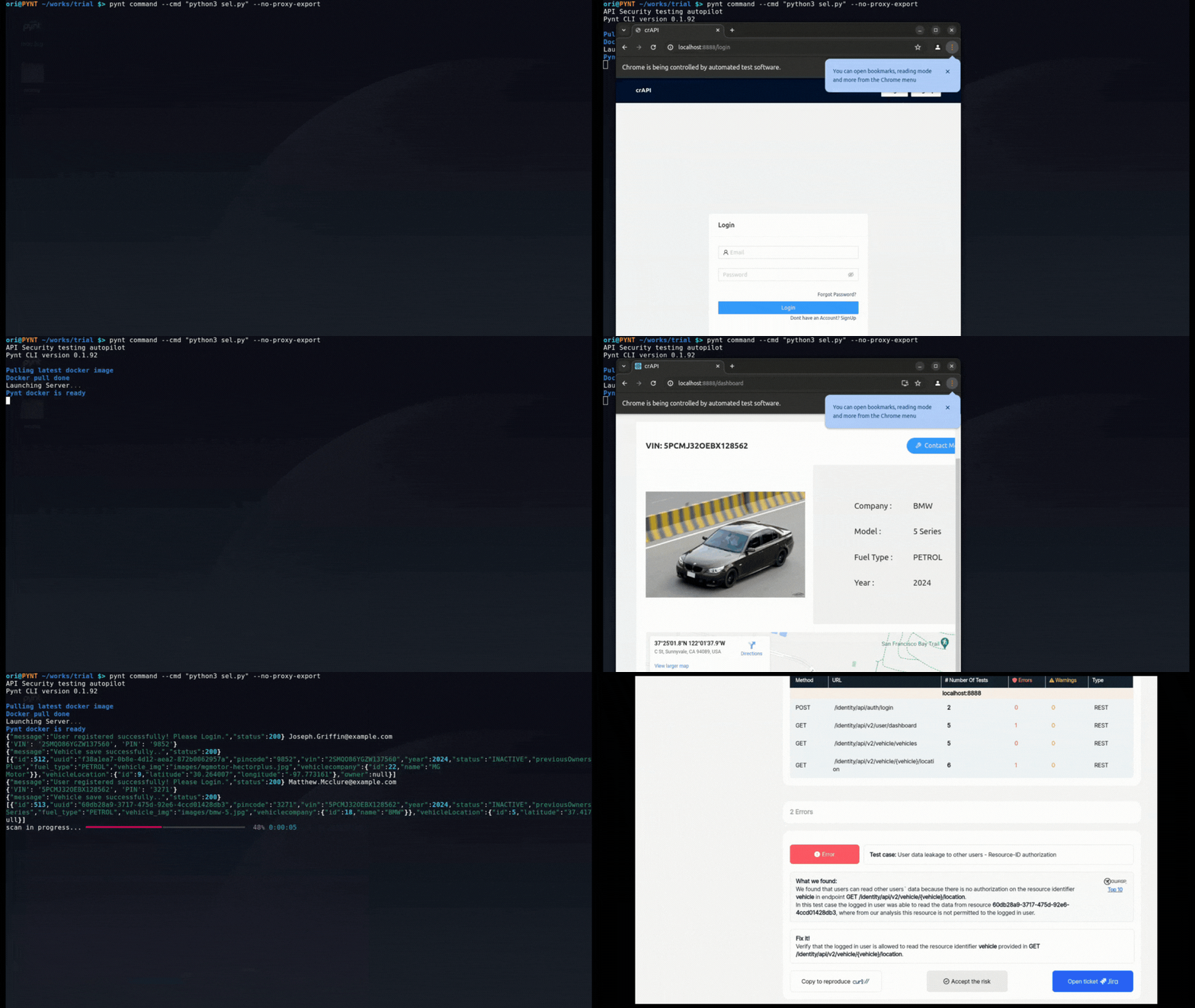
- Title: Running Pynt Command
- Description: The animation showcases a user running a 'pynt' command in the terminal, specifying a command and Python version. The command is executed immediately in the terminal.
- Uses: Shows the basic syntax of running a Pynt command directly from the command line.
- Tags: Pynt, CLI, command line
- First, make sure Pynt's prerequisites are met.
- Follow the instructions to install Pynt conainer here.
- This integration is based on
[pynt command](https://docs.pynt.io/documentation/api-security-testing/pynt-cli-modes/pynt-command-cli-mode)in which Pynt is running the command given in the--cmdargument through a proxy, captures the traffic and runs API security tests on the APIs seen in the traffic. Continue with the below example.
Since the Chromium browser does not honor the HTTPS_PROXY environment variables set by Pynt, you need to manually configure your Selenium test to use the Pynt proxy.
To configure Selenium chrome web driver to go through a Proxy, add the following lines to your webdriver setup:
Copy
chrome_options.add_argument('--proxy-server=http://127.0.0.1:6666')
chrome_options.add_argument('--proxy-bypass-list=<-loopback>')
chrome_options.add_argument("--ignore-certificate-errors")
Here's an example of a Python function that creates a Chrome WebDriver with a proxy, utilizing the RUNNING_FROM_PYNT environment variable set by the Pynt CLI to conditionally apply the proxy settings:
Copy
def get_webdriver(browser):
    if browser == "CHROME":
        chrome_options = webdriver.ChromeOptions()
        pynt = os.environ.get("RUNNING_FROM_PYNT", "")
        if pynt == "True":
            # This section is only when running with Pynt
            chrome_options.add_argument('--proxy-server=http://127.0.0.1:6666')
            chrome_options.add_argument('--proxy-bypass-list=<-loopback>')
            chrome_options.add_argument("--ignore-certificate-errors")

        return webdriver.Chrome(options=chrome_options)
Here's a detailed guide to setting up and running a Selenium test with crAPI (Completely Ridiculous API), a vulnerable web application created by OWASP, and then using this test to run Pynt API Security tests to find Business Logic vulnerabilities in crAPI. Setting up our target (crAPI) This link includes instructions for setting up crAPI on Windows, Mac, or Linux. For example in linux the install flow is: Copy
curl -o docker-compose.yml https://raw.githubusercontent.com/OWASP/crAPI/main/deploy/docker/docker-compose.yml

docker-compose pull

docker-compose -f docker-compose.yml --compatibility up -d
Wait for crAPI to start, verify by going to [http://localhost:8888](http://localhost:8888/)
Setting up the Selenium test Download crapi_selenium.py from here: Copy
wget https://raw.githubusercontent.com/pynt-io/pynt/main/goat_functional_tests/selenium/crapi_selenium.py
wget https://raw.githubusercontent.com/pynt-io/pynt/main/goat_functional_tests/selenium/requirements.txt
pip install requirements.txt
Running the Selenium test
python3 crapi_selenium.py
Flow of the selenium test:
- Setup the chrome driver
- Register a new user
- Register a new vehicle for that user
- Login
- Go to dashboard and view vehicle location
- Close the chrome driver
- Repeat the same process for another user
Running the Selenium test with Pynt Now that the selenium test is setup we can run Security tests: Copy
pynt command --cmd "python3 sel.py" --no-proxy-export
You should see the Selenium test executes and then Pynt will begin to scan the APIs and show the report once its done, the flag --no-proxy-export is telling Pynt not to export HTTPS_PROXY environment variables as it will cause Selenium configuration traffic to also be captured by Pynt.
Understanding the results The UI test focuses solely on the login and dashboard pages, rather than covering the entire crAPI application. Despite this limitation, it provides sufficient data for Pynt to detect a Business Logic vulnerability (BOLA) related to vehicle location. This specific vulnerability enables an attacker to query the locations of vehicles owned by other users.

- Title: Pynt Test Results Overview
- Description: This screenshot displays a Pynt test result overview, showing summary metrics for API Security Tests (errors, warnings, passed, not run) and Functional Test Collection (endpoints, requests).
- Uses: Illustrates the summary dashboard for the test results in Pynt and their description.
- Tags: Pynt, dashboard, results
Results summary example

- Title: Vulnerability Details with Suggested Fix
- Description: The image displays the vulnerability details for the vehicle location endpoint. It shows that users can read other users' data due to missing resource ID authorization, with a suggested fix.
- Use Cases:
- Understanding vulnerability reports.
- Troubleshooting errors.
- Tags: Vulnerability, API Security, Resource ID, Authorization
API vulnerabilities example
Integrate Pynt with Rest Assured to enhance API security testing. Automate security scans within your Rest Assured test suites to detect and mitigate vulnerabilities effectively.
💡 RestAssured is a popular Java-based library for testing RESTful APIs. It simplifies the process of validating and verifying API responses by providing an easy-to-use syntax for making API calls. With RestAssured, you can test APIs seamlessly in your Java projects.

- Title: Rest Assured Logo
- Description: Rest Assured is an open-source Java library that simplifies the process of testing and validating RESTful APIs by providing a domain-specific language (DSL) for writing clear and maintainable API tests.
- Tags: RestAssured, Integration, API Testing
As part of its API security testing suit, Pynt allows seamless integration with any RestAssured test. By integrating Pynt with RestAssured, you can leverage the power of this vast platform while enhancing your API security. Pynt automatically generates context-aware security tests based on your RestAssured test scripts, enabling you to identify vulnerabilities early in the development cycle and reduce the risk of security issues in production. If your functional tests are based on Java Rest Assured, you can use pynt command to run API Security tests from these functional tests.
- First, make sure Pynt's prerequisites are met.
- Follow the instructions to install Pynt container here.
- Then, continue with the below example.
goat-rest-assured is a Rest Assured based project of a functional test of goat vulnerable application. we run it with: Copy
mvn test
Now, to run Pynt on it, we run: Copy
pynt command --cmd "mvn -Dhttp.proxyHost=127.0.0.1 -Dhttp.proxyPort=6666 test"
If your functional test is enforcing SSL certificate verification (e.g. https) you will need to provide Pynt a certificate, If your client need a specific certificate, provide the path to it with --ca_path
Copy
pynt command --cmd "<your test command> -Dhttp.proxyHost=127.0.0.1 -Dhttp.proxyPort=6666 -Dhttps.proxyHost=127.0.0.1 -Dhttps.proxyPort=6666" --ca-path <path to certificate file>
If your client does not use a specific certificate you will need to generate a certificate file and provide it to Pynt:
Generate a certificate (Linux)
-
Download make_certificate.sh
-
Download openssl.cnf
-
chmod +x make_certificate.sh -
Generate the certificate:
./make_certificate.sh -
create a trust-store, you will be prompted with entering a password for the key store (from now on we will assume the trust-store is called test.jks and the password is test123456): Copy
keytool -importcert -file ./rootCA.crt -keystore test.jks
Run Pynt with generated certificate Copy
pynt command --cmd "mvn test -Dhttp.proxyHost=127.0.0.1 -Dhttp.proxyPort=6666 -Dhttps.proxyHost=127.0.0.1 -Dhttps.proxyPort=6666 -Djavax.net.ssl.trustStore=./test.jks -Djavax.net.ssl.trustStorePassword=test123456" --ca-path rootCA.pem
💡 Pynt CLI Troubleshooting: If you're encountering issues with Pynt's CLI, visit the Pynt CLI Troubleshooting Guide for solutions and troubleshooting tips. 💡 Still Need Help? For any questions or troubleshooting, reach out to the Pynt Community Support.
Integrate Pynt with jest to enhance API security testing. Automate security scans within your jest test suites to detect and mitigate vulnerabilities effectively.
💡 Jest is a popular JavaScript testing framework designed for testing React and other JavaScript applications. It offers features like snapshot testing, mocking, and coverage reports to simplify and enhance your testing workflows.

- Title: Jest Logo
- Description: A logo displaying the word "Jest", where the "J" is stylized with three red circles connected by red lines forming a sort of abstract circuit diagram.
- Tags: Jest, Logo, Testing Framework, JavaScript
As part of its API security testing suite, Pynt integrates seamlessly with Jest, allowing automated security testing in JavaScript environments. If your functional tests are based on java script framework like jest, you can use Pynt command to run API Security tests from these functional tests.
- First, make sure Pynt's prerequisites are met.
- Follow the instructions to install Pynt container here.
- Then, continue with the below example.
jest.test.py is a javascript-based tester for goat (our vulnerable application) that we use to test the functionality of goat, we run it with: Copy
npm test
Now, to run Pynt on it, we run: Copy
pynt command --cmd "npm test"

- Title: Running Functional Tests with Jest
- Description: The image shows the output of running Jest functional tests in a terminal. It displays passed tests, test suites, and summarized information about performance and tests executed.
- Use Cases:
- Functional and security testing.
- CI/CD Pipeline
- Tags: Jest, Functional Tests, Terminal, Testing Output
Pynt for Jest example
💡 Pynt CLI Troubleshooting: If you're encountering issues with Pynt's CLI, visit the Pynt CLI Troubleshooting Guide for solutions and troubleshooting tips. 💡 Still Need Help? For any questions or troubleshooting, reach out to the Pynt Community Support.
Integrate Pynt with pytest to enhance API security testing. Automate security scans within your pytest test suites to detect and mitigate vulnerabilities effectively.
💡 pytest is a powerful testing framework for Python applications, designed for simple unit tests as well as complex functional testing. It supports fixtures, parameterized testing, and assertions, making it highly adaptable for a variety of testing needs. With its easy-to-read syntax and extensive plugin ecosystem, pytest helps streamline the testing process for Python developers, ensuring robust and maintainable test suites.

- Title: Python and Pytest Logos
- Description: The image displays both Python and Pytest logos. They are included together as Pytest is a popular testing framework for Python applications.
- Tags: Python, Pytest, Testing, Integration
As part of its API security testing suit, Pynt allows seamless integration with any Pytest API testing. By integrating Pynt with pytest, you can leverage the power of this vast platform while enhancing your API security. Pynt automatically generates context-aware security tests based on your pytest test scripts, enabling you to identify vulnerabilities early in the development cycle and reduce the risk of security issues in production.
- First, make sure Pynt's prerequisites are met.
- Follow the instructions to install Pynt container here.
- Then, continue with the below example.
goat_functional_test.py is a python based tester for goat (our vulnerable application) that we use to test the functionality of goat, we run it with: Copy
pytest goat_functional_test.py
Now, to run Pynt on it, we run: Copy
pynt command --cmd "pytest goat_functional_test.py"
Automatic Self-signed certificates
Pynt can automatically set your pytest to use self signed certificate. use the flag --self-signed
Copy
pynt command --cmd "<your test command>" --self-signed
If your functional test is enforcing SSL certificate verification (e.g. https) you will need to provide Pynt a certificate, If your client need a specific certificate, provide the path to it with --ca_path
Manually providing certificates Copy
pynt command --cmd "<your test command>" --ca-path <path to certificate file>
If your client does not use a specific certificate you will need to generate a certificate file and provide it to Pynt:
Generate a certificate (Linux)
- Download make_certificate.sh
- Download openssl.cnf
chmod +x make_certificate.sh- Generate the certificate:
./make_certificate.sh
Run Pynt with the generated certificate Use the export REQUESTS_CA_BUNDLE before your command to instruct your functional test to use the new certificate and provide the path ti the certificate with --ca-path to instruct Pynt to use the generated certificate. Copy
pynt command --cmd "export REQUESTS_CA_BUNDLE=rootCA.crt && python3 <your command here>" --ca-path rootCA.pem
💡 Pynt CLI Troubleshooting: If you're encountering issues with Pynt's CLI, visit the Pynt CLI Troubleshooting Guide for solutions and troubleshooting tips. 💡 Still Need Help? For any questions or troubleshooting, reach out to the Pynt Community Support.
Integrate Pynt with Go to enhance API security testing. Automate security scans within your Go test suites to detect and mitigate vulnerabilities effectively.
💡 Go is a statically typed, compiled programming language designed for simplicity, reliability, and efficiency. Popular for building scalable web services, Go's concurrency features make it ideal for large-scale applications. It’s used extensively in cloud infrastructure, microservices, and API development. With its performance and ease of use, Go is a top choice for backend developers looking to build high-performance APIs and systems.

- Title: Go Logo
- Description: This is the logo for the Go programming language, represented by the letters "GO" in a blue sans-serif font, with lines on the left to suggest speed.
- Tags: Go, Logo, Programming Language
Pynt’s API security testing suite integrates seamlessly with Go, enabling secure, high-performance development and testing of APIs in Go applications. If your functional tests are written in Go, you can use Pynt command to run API Security tests from these functional tests.
- First, make sure Pynt's prerequisites are met.
- Follow the instructions to install Pynt container here.
- Then, continue with the below example.
test_goat.go is a go based tester for goat (our vulnerable application) that we use to test the functionality of goat, here is how to run it:
- Get test_goat.go
Copy
curl https://raw.githubusercontent.com/pynt-io/pynt/main/goat_functional_tests/goat_test.go -o goat_test.go
- Get testify
Copy
go get github.com/stretchr/testify
- go mod
Copy
go mod init goat_test.go
go mod tidy
- Check that functional test works
Copy
go test
- Run Pynt on functional test
Copy
pynt command --cmd "go test"
Automatic Self-signed certificates
Pynt can automatically set your go test to use self signed certificate. use the flag --self-signed
Copy
pynt command --cmd "<your test command>" --self-signed
💡 Pynt CLI Troubleshooting: If you're encountering issues with Pynt's CLI, visit the Pynt CLI Troubleshooting Guide for solutions and troubleshooting tips. 💡 Still Need Help? For any questions or troubleshooting, reach out to the Pynt Community Support.
Integrate Pynt with Go to enhance API security testing. Automate security scans within your JMeter test suites to detect and mitigate vulnerabilities effectively.
💡 JMeter is a widely-used open-source tool for load testing and performance measurement of web applications and APIs. It simulates a high number of users interacting with an application, helping developers assess scalability and performance. JMeter supports various protocols, including HTTP, FTP, JDBC, and more, making it a versatile tool for testing the robustness and stability of applications under heavy load conditions.

- Title: Apache JMeter Logo
- Description: The image shows the Apache JMeter logo, featuring the text "Apache JMeter" with a stylized feather. JMeter is a popular tool for performance and load testing.
- Tags: JMeter, Logo, Performance Testing, Load Testing
As part of its API security testing suite, Pynt integrates seamlessly with JMeter, enabling automated security testing alongside performance assessments. If you use JMeter for your API performance tests, you can utilize pynt command to run API Security tests from these performance tests.
- First, make sure Pynt's prerequisites are met.
- Follow the instructions to install Pynt container here.
- To integrate Pynt with JMeter, use the following command:
Copy
pynt command --cmd "./jmeter -E http -H 127.0.0.1 -P 6666 -n -t <your jmx file>"
This command directs JMeter to execute the specified test plan (test.jmx) in non-GUI mode and logs the results to results.jtl.
The -E http -H 127.0.0.1 -P 6666 parameters tell JMeter to direct its traffic to the proxy started by the pynt command during scanning.
Continue with the below example.
- Download goat.jmx example from here or get it:
Copy
wget https://raw.githubusercontent.com/pynt-io/pynt/main/goat_functional_tests/goat.jmx
- Run it with Pynt:
Copy
pynt command --cmd "jmeter -E http -H 127.0.0.1 -P 6666 -n -t goat.jmx"
Pynt for JMeter Example
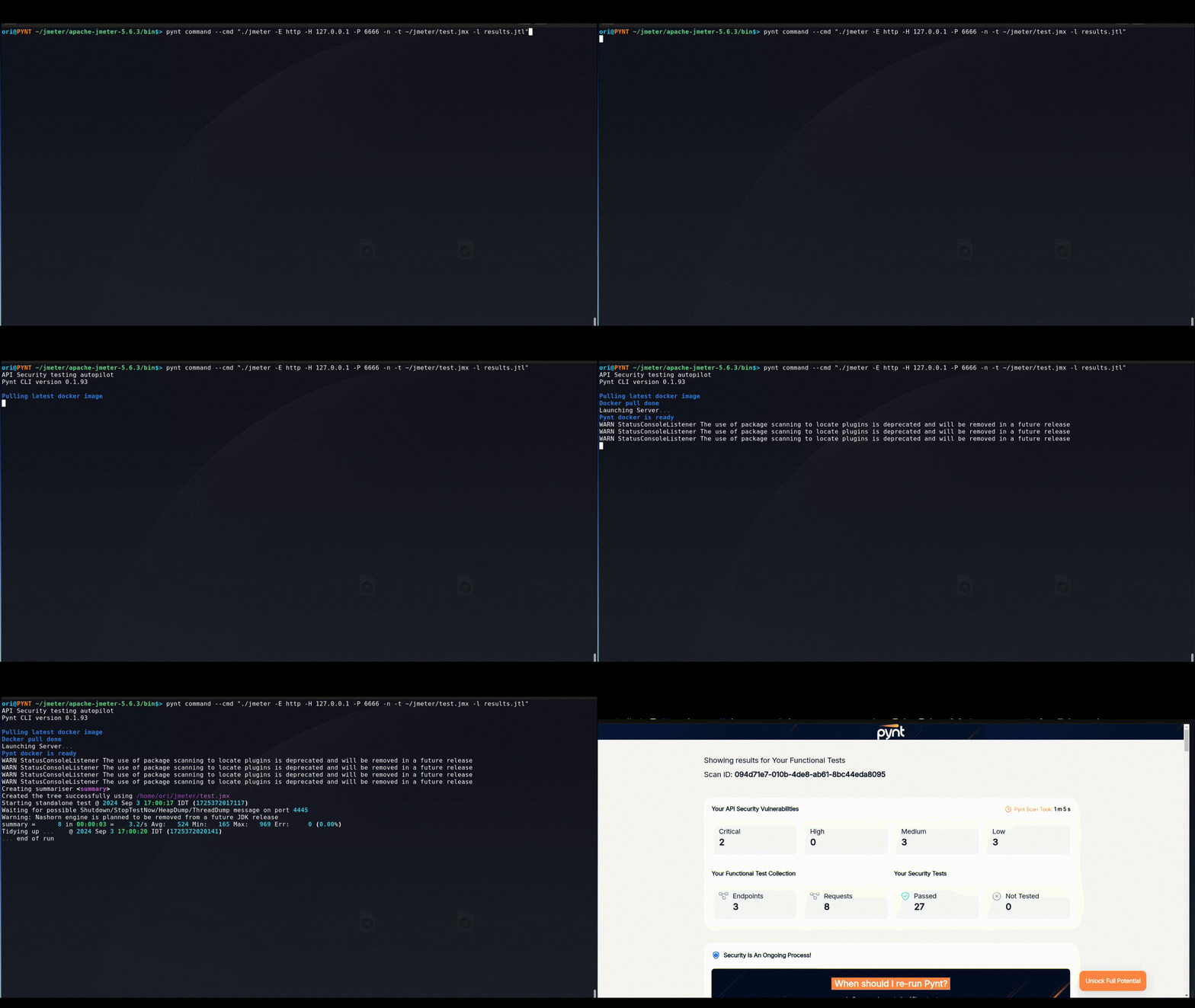
- Title: Running JMeter Test via the Pynt CLI
- Description: The image depicts running a JMeter test using the Pynt command-line interface (CLI). It shows the command entered to execute the JMeter test and specify configurations.
- Use Cases:
- Performance testing with JMeter.
- Using Pynt command with performance tool
- Tags: JMeter, Pynt, CLI, Performance Test
💡 Pynt CLI Troubleshooting: If you're encountering issues with Pynt's CLI, visit the Pynt CLI Troubleshooting Guide for solutions and troubleshooting tips. 💡 Still Need Help? For any questions or troubleshooting, reach out to the Pynt Community Support.
Integrate Pynt with your CI/CD pipelines for automated API security testing. Ensure robust protection by seamlessly incorporating Pynt's security scans into your continuous integration and delivery wo 🚀 At a Glance: Pynt is a breakthrough technology that performs contextual, automated, and continuous PenTesting as part of your CI/CD pipeline. By seamlessly integrating with your workflow, Pynt ensures real-time security testing for your APIs as they evolve. Pynt integrates seamlessly into any CI/CD pipeline, enabling automated API security testing at every stage of the development process. Pynt supports Jenkins, GitLab, GitHub Actions, and AzureDevOps as verified examples but is agnostic to the CI/CD tool being used.
Benefits of CI/CD Integration Automated Security Scans With Pynt, you can run automated security scans triggered by various actions:
- Following API changes
- Following a code change that affects API calls
- Following a functional test change
Pynt dynamically learns your application behavior, expanding security tests as your functional tests grow, with no need for manual adjustments.
DevSecOps Integration Pynt allows DevSecOps teams to implement automated PenTests within the CI/CD pipeline in just a few clicks. Once configured, Pynt detects and addresses vulnerabilities in real-time, offering flexible options to either stop the build or reflect results.
Continuous PenTesting Pynt provides continuous PenTesting, reducing the risk of deploying insecure code by expanding the test suite automatically as your functional tests evolve.
Learn how to obtain your Pynt ID for CI/CD authentication. Follow these simple steps to integrate Pynt into your CI/CD pipelines and secure your APIs effectively. 💡 Getting Your Pynt ID: To set up authentication in CI/CD pipelines, you'll need your Pynt ID. Ensure that this ID is securely stored for use in automation and pipeline configurations.
Pynt-Id is your authentication token to Pynt platform it is needed to integrate Pynt into your CI/CD pipeline.
There are two ways to get Pynt ID:
Via Pynt platform Go to Settings -> General -> Pynt ID and copy it.

- Title: Settings Page for Configuration
- Description: The image displays the Settings page of the Pynt platform. It shows options for general settings such as organization name and ID.
- Use Cases:
- Configuring security platform
- Setting up a new organization.
- Tags: Settings, Configuration, Pynt, Platform
Via Pynt CLI In Pynt CLI, Run: Copy
pynt pynt-id
(You will be asked to login on your first time running Pynt)

- Title: Copy Access Token
- Description: This image shows a blurred API response with the highlighted "access token" key. It shows a red box around the token, instructing the user to copy it.
- Use Cases:
- Authentication of APIs
- Accessing user-specific data
- Tags: Access Token, API, Authentication, Key
Copy PyntID from Pynt CLI
Integrate Pynt with GitHub Actions for automated API security testing. Enhance your CI/CD pipeline by adding Pynt’s robust security scans to your GitHub Actions workflows.
💡 GitHub Actions allows you to automate workflows for building, testing, and deploying code. With native integration into GitHub repositories, you can trigger workflows based on events like pushes, pull requests, and schedule automation tasks.

- Title: GitHub Logo
- Description: The official GitHub logo, featuring a cat-octopus hybrid (Octocat) in white silhouette, set against a black circular background.
- Tags: GitHub, Octocat, logo, version control.
GitHub Actions
As part of its API security testing, Pynt allows seamless integration with GitHub Actions. Pynt for GitHub Actions enables you to seamlessly integrate powerful API security testing into your GitHub Actions CI/CD pipelines. By incorporating Pynt into your GitHub Actions workflows, you can automate comprehensive security scans with every build, ensuring that your APIs are protected from vulnerabilities throughout the development process. Pynt’s integration with GitHub Actions is designed to be straightforward, allowing you to enhance your security posture without disrupting your existing CI/CD practices.
- Copy your Pynt ID into action secrets in your GitHub:

- Title: Creating a Secret in GitHub Actions
- Description: A screenshot showing the interface for creating a new secret within GitHub Actions, requiring a secret name and value. The settings control the repository access.
- Use cases:
- Demonstrating how to store sensitive data.
- Illustrating the GitHub Actions secret setup.
- Tags: GitHub Actions, secrets, security, CI/CD.
Add pynt-id to a Github secret
- Make sure Python installed on the agent.
- Add Pynt to your workflow, see the following example of a job in a Github workflow that runs Pynt on our goat vulnerable application:
Copy
name: Example pynt yml
on:
  workflow_dispatch:
    inputs:
      comment:
        type: string
        default: "API Security tests"

env:
  PYNT_ID: ${{ secrets.YOURPYNTID }}

jobs:
 api-security:
  runs-on: ubuntu-latest

  steps:
    - name: install pynt cli
      run: |
        python3 -m pip install --upgrade pyntcli
    - name: get goat collection
      run: |
        curl https://raw.githubusercontent.com/pynt-io/pynt/main/goat_functional_tests/goat.postman_collection.json -o goat.json
    - name: run pynt with newman integration
      run: |
        pynt newman --collection goat.json --reporters
pynt newman and pynt command have an optional flag --severity-level
With this flag, you have granular control over whether Pynt returns an error code (non zero) in the event of findings. Use this flag to control when Pynt will break the CI/CD run, allowed values are: Copy
'all', 'medium', 'high', 'critical', 'none' (default)
Integrate Pynt with Azure DevOps for automated API security testing. Enhance your CI/CD pipeline by adding Pynt’s robust security scans to your Azure DevOps workflows.
💡 Azure DevOps is a suite of development tools that provide CI/CD capabilities, version control, and project management. It supports building, testing, and deploying applications across cloud and on-premises environments.

- Title: Azure DevOps Logo
- Description: The official logo for Azure DevOps, featuring a stylized blue arrow forming a shape next to the text "Azure DevOps," also in blue.
- Tags: Azure DevOps, Microsoft, CI/CD, logo.
Azure DevOps
As part of its API security testing, Pynt allows seamless integration with Azure DevOps. Pynt for Azure DevOps enables you to seamlessly integrate powerful API security testing into your Azure DevOps CI/CD pipelines. By incorporating Pynt into your Azure DevOps workflows, you can automate comprehensive security scans with every build, ensuring that your APIs are protected from vulnerabilities throughout the development process. Pynt’s integration with Azure DevOps is designed to be straightforward, allowing you to enhance your security posture without disrupting your existing CI/CD practices.
- Copy your Pynt ID into the pipeline variable and store it as a secret:

- Title: Azure DevOps Pipeline Variable Configuration for Pynt ID.
- Description: A screenshot showing the configuration of variables within an Azure DevOps pipeline. Shows the variable names, values, and options to keep the value secret.
- Use cases:
- Showing the steps to define variables.
- Illustrating how to set a variable as secret in a pipeline.
- Tags: Azure DevOps, variables, pipeline, configuration.
Storing Pynt ID
- Make sure Python installed on the agent.
- Add Pynt to your pipeline. See the following example of a job in an Azure pipeline that runs Pynt on our goat vulnerable application:
Copy
trigger:
- main

pool:
  name: test

steps:
- script: python3 -m pip install --upgrade pyntcli
  displayName: 'Install pynt cli'

- script: curl https://raw.githubusercontent.com/pynt-io/pynt/main/goat_functional_tests/goat.postman_collection.json -o goat.json
  displayName: 'Get goat collection'

- script: |
    export PYNT_ID = $(PYNT_ID)
    pynt newman --collection goat.json --reporters --severity-level critical
  displayName: 'Run pynt with newman integration '
Pynt command not found If you get pynt command not found error it means that pip install folder is not in your path. add the following to the last step: Copy
- script: |
    export PYNT_ID = $(PYNT_ID)

    # Get the user base bin directory
    BIN_PATH=$(python -m site --user-base)/bin

    # Add it to the PATH
    export PATH=$BIN_PATH:$PATH

    # Verify that it's been added
    echo "Updated PATH: $PATH"

    pynt newman --collection goat.json --reporters --severity-level critical
  displayName: 'Run pynt with newman integration '
pynt newman and pynt command have an optional flag --severity-level
With this flag, you have granular control over whether Pynt returns an error code (non zero) in the event of findings. Use this flag to control when Pynt will break the CI/CD run, allowed values are: Copy
'all', 'medium', 'high', 'critical', 'none' (default)
Integrate Pynt with GitLab for automated API security testing. Enhance your CI/CD pipeline by adding Pynt’s robust security scans to your GitLab workflows.
💡 GitLab is a comprehensive DevOps platform that provides a unified CI/CD solution, enabling teams to plan, develop, and deploy applications seamlessly. GitLab’s built-in CI/CD tools allow for automation, version control, and monitoring.

- Title: GitLab Logo
- Description: The official GitLab logo, featuring an abstract, fox-like shape in shades of orange and yellow.
- Tags: GitLab, logo, DevOps, CI/CD.
GitLab
As part of its API security testing, Pynt allows seamless integration with GitLab. Pynt for GitLab enables you to seamlessly integrate powerful API security testing into your GitLab CI/CD pipelines. By incorporating Pynt into your GitLab workflows, you can automate comprehensive security scans with every build, ensuring that your APIs are protected from vulnerabilities throughout the development process. Pynt’s integration with GitLab is designed to be straightforward, allowing you to enhance your security posture without disrupting your existing CI/CD practices.
Copy your Pynt ID into a variable in your GitLab variables Settings -> CICD -> Variables

- Title: GitLab Pipeline Variable Setting
- Description: A screenshot demonstrating how to configure variables in a GitLab pipeline, including setting variable value, masking the variable, and expanding variable references.
- Use cases:
- Explaining variable configuration in GitLab CI/CD.
- Illustrating masking for sensitive information.
- Tags: GitLab, CI/CD, variables, pipeline, secrets.
Add Pynt-ID to a GitLab variable Add Pynt to you workflow, see following example of a job in GitLab workflow that runs Pynt on our goat vulnerable application: Copy
stages:
  - security_scan

run_pynt:
  stage: security_scan
  image: python:3.11
  script:
    # Get and install Pynt Binary
    - wget https://cdn.pynt.io/binary-release/install.sh
    - chmod +x install.sh
    - ./install.sh
    - cd ~/.pynt/bin/
    # Get sample pytest
    - wget https://raw.githubusercontent.com/pynt-io/pynt/main/goat_functional_tests/goat_functional_test.py
    - python3 -m pip install --upgrade pip
    - pip install pytest
    - pip install requests
    # Run Pynt on the pytest file
    - export PYNT_ID=$pyntid
    - ./pynt command --cmd "python3 -m pytest goat_functional_test.py" --severity-level none

  artifacts:
    paths:
      - ~/.pynt/results
    expire_in: 1 hour
pynt newman and pynt command have an optional flag --severity-level
With this flag, you have granular control over whether Pynt returns an error code (non zero) in the event of findings. Use this flag to control when Pynt will break the CI/CD run, allowed values are: Copy
'all', 'medium', 'high', 'critical', 'none' (default)
💡 Need Help? For any questions or troubleshooting, reach out to the Pynt Community Support.
Integrate Pynt with Jenkins for automated API security testing. Enhance your CI/CD pipeline by adding Pynt’s robust security scans to your Jenkins workflows.
💡 Jenkins is an open-source automation server used for continuous integration and delivery. Jenkins allows developers to build, test, and deploy software by automating tasks in customizable pipelines.

- Title: Jenkins Logo
- Description: The official Jenkins logo, featuring a butler-like figure with a red bow tie holding a white document.
- Tags: Jenkins, logo, CI/CD, automation.
Jenkins
As part of its API security testing, Pynt allows seamless integration with Jenkins. Pynt for Jenkins enables you to seamlessly integrate powerful API security testing into your Jenkins CI/CD pipelines. By incorporating Pynt into your Jenkins workflows, you can automate comprehensive security scans with every build, ensuring that your APIs are protected from vulnerabilities throughout the development process. Pynt’s integration with Jenkins is designed to be straightforward, allowing you to enhance your security posture without disrupting your existing CI/CD practices.
Add Pynt ID to Jenkins environment variables:

- Title: Configuring Global Properties in Jenkins
- Description: A screenshot of the Jenkins Global Properties page, showing how to configure global environment variables, including name and value. Illustrating how to store secrets.
- Use cases:
- Demonstrating how to set environment variables globally.
- Showing how to store sensitive credentials in Jenkins.
- Tags: Jenkins, environment variables, global, configuration.
- Make sure Python installed on the agent.
- An example for a Jenkins job running Pynt newman against goat collection:
Copy
echo "Pynt API Security testing"

# Using venv is a good practice
python3 -m venv myenv
. myenv/bin/activate

pip install pyntcli
export PATH=$PATH:/var/lib/jenkins/.local/lib/python3.10/site-packages

curl https://raw.githubusercontent.com/pynt-io/pynt/main/goat_functional_tests/goat.postman_collection.json -o goat.json
pynt newman --collection goat.json --reporters
cat pynt_results.json

deactivate
pynt newman and pynt command have an optional flag --severity-level
With this flag, you have granular control over whether Pynt returns an error code (non zero) in the event of findings. Use this flag to control when Pynt will break the CI/CD run, allowed values are: Copy
'all', 'medium', 'high', 'critical', 'none' (default)
💡 Need Help? For any questions or troubleshooting, reach out to the Pynt Community Support.
Enhance Burp Suite with Pynt for advanced API security testing. Integrate Pynt to automate and extend your security testing capabilities within Burp Suite.
💡 Burp Suite is a leading web vulnerability scanner used by security professionals for penetration testing of web applications. It provides tools for scanning, testing, and analyzing vulnerabilities, and supports both manual and automated security testing workflows. Burp Suite is widely used for identifying issues such as injection flaws, authentication vulnerabilities, and other security concerns in web applications.

- Title: Burp Suite Logo
- Description: The Burp Suite logo, consisting of a hexagon with a lightning bolt symbol on one face and a grayscale tone on the other face.
- Tags: Burp Suite, logo, CI/CD, agent-based.
As part of its API security testing, Pynt allows seamless integration with Burp. Integrating Pynt with Burp Suite enhances your API security testing by adding automated context-aware security scans to your testing process. With Pynt, you can automate vulnerability assessments within Burp Suite, ensuring that your APIs are continuously monitored and protected against emerging threats. Pynt's integration with Burp Suite provides detailed security reports, helping you quickly identify and address critical vulnerabilities in your APIs. This powerful combination of tools enables you to maintain a secure and resilient API environment, streamline your testing workflow, and deliver secure applications with confidence.
Two ways of integrating Pynt with Burp Suite:
One of the most straightforward ways to leverage Pynt for efficient API security testing with Burp Suite is by saving the web application's traffic as an XML file. This process involves capturing the traffic using Burp Suite and then exporting it to an XML format. Once you have the XML file, you can then run Pynt against this file to analyze the captured traffic for potential security issues. Copy
To do this, follow these steps within Burp Suite:

1. Go to the **Proxy** tab and then to the **HTTP history** tab.
2. Select the traffic you are interested in analyzing.
3. Make sure that the requests are ordered correctly, Burp tend to sort by params
4. Right-click the selected traffic and choose **Save items**.
5. In the Save dialog, select Base64-encode requests and responses
6. In the Save dialog, select **XML** as the file format and choose a location to save your file.
7. Run Pynt by specifying the saved XML file as input.

- Title: Burp Suite Interface with Captured Transactions
- Description: A screenshot of the Burp Suite interface, displaying intercepted HTTP requests and responses. Showing a list of URLs, requests and responses in the interface.
- Use cases:
- Illustrating security testing with Burp Suite.
- Demonstrating interception of web traffic.
- Tags: Burp Suite, security, proxy, HTTP, test.
Burp XML output Basic usage Copy
pynt burp --xml <burp_output_file.xml>
Required arguments Copy
--captured-domains - Pynt will scan only these domains and subdomains. For all domains write "*"
Optional arguments Copy
    --port - Set the port pynt will listen to (DEFAULT: 5001)
    --ca-path - The path to the CA file in PEM format
    --proxy-port - Set the port proxied traffic should be routed to (DEFAULT: 6666)
    --report - If present will save the generated report in this path.
    --insecure - use when target uses self signed certificates
    --host-ca - path to the CA file in PEM format to enable SSL certificate verification for pynt when running through a VPN.
    --return-error - 'all-findings' (warnings, or errors), 'errors-only', 'never' (default),
Example Here is an example of running Pynt against XML output of traffic to goat application: Download goat_burp.xml file and run: Copy
pynt burp --xml goat_burp.xml

- Title: Example Burp XML Report Execution Result
- Description: The image presents the final test results from running Pynt against a Burp XML report, providing a summary of functional and security test outcomes.
- Usefulness: This visualizes the summary output after using Pynt to test from a Burp XML report.
- Tags: Burp, XML, Report, Test results, Summary
Pynt for Burp
Run pynt listen and set it to capture the domains of the traffic that you want Pynt to scan:
pynt listen --captured-domains <domains>
Setting Upstream Proxy in Burp Suite To configure Burp Suite to use an upstream proxy, follow these steps:
- Open Burp Suite and navigate to the Proxy tab.
- Click on the Options sub-tab.
- Scroll down to the Upstream Proxy Servers section.
- Click on the Add button.
- In the dialog that appears, enter the details of the upstream proxy:
- Destination host: Leave this as
*to apply to all destinations, or specify specific hosts. - Proxy host: Enter the IP address of Pynt listen
127.0.0.1 - Proxy port: Enter the port number of Pynt listen
6666
- Destination host: Leave this as
- Click OK to save your upstream proxy configuration.
Now, Burp Suite will route all external traffic through Pynt proxy. Hit enter to trigger Pynt scan.
💡 Pynt CLI Troubleshooting: If you're encountering issues with Pynt's CLI, visit the Pynt CLI Troubleshooting Guide for solutions and troubleshooting tips.
Secure your APIs with Pynt's browser integration. Automate API security testing directly from your web browser for seamless and effective protection against vulnerabilities. 🚀 At a Glance: Pynt’s browser integration allows you to conduct real-time API security tests directly from your browser with just a few clicks. It monitors API traffic, automatically generating security tests to identify vulnerabilities as you interact with APIs.
Pynt integrates effortlessly with your web browsers, providing a powerful way to conduct API security testing directly from your browsing environment. Whether developing, testing, or interacting with APIs, Pynt’s browser integration allows you to run comprehensive security scans with just a few clicks.
Pynt’s browser integration is user-friendly and efficient, allowing you to identify and address vulnerabilities in real-time without leaving your browser. It automatically generates security tests based on live API traffic, ensuring continuous monitoring and protection against emerging threats.
- Developers: Seamless testing during development.
- Testers: Easy integration with API testing tools.
- Security Professionals: Immediate security insights and reports.
Integrate Pynt with Firefox for seamless API security testing. Automate and enhance your API protection directly within the Firefox browser. 🚀 At a Glance: Pynt integrates directly with Firefox, enabling real-time API security testing as you browse. This seamless integration monitors API traffic, automatically generating context-aware security tests.
Pynt can also conduct an API security scan on traffic generated from Firefox in an interactive mode, following these steps:
- Configure Firefox to route traffic through Pynt.
- Run Pynt using the command:
pynt listen --captured-domains <domain of the APIs that need to be tested>. - Browse the site that will be tested by Pynt.
- Press Enter on Pynt to start the scan.
Use the following steps to integrate Pynt with Firefox browser:
Configure Firefox to Record Traffic
- Open Firefox and go to the settings to configure the proxy through which Pynt can capture the traffic.

- Title: Firefox Manual Proxy Configuration
- Description: This image demonstrates how to configure a manual proxy in Firefox, setting the HTTP and HTTPS proxy to 127.0.0.1 and port 6666.
- Usefulness: Needed to setup your browser when using an intercepting proxy for API traffic analysis.
- Tags: Firefox, Proxy, Configuration, Manual, Setting
Configure Proxy in Firefox
If your target is localhost as in the example, go to about:config and modify the network.proxy.allow_hijacking_localhost parameter to True

- Title: Firefox Configuration localhost Hijacking
- Description: This image demonstrates how to configure a manual proxy in Firefox configuration in the
about:configfor localhost Hijacking - Usefulness: Required to setup your browser for localhost hijacking.
- Tags: Firefox, localhost, hijacking, config
Enable Firefox to route localhost traffic to proxy
Configure Firefox to Import Pynt's proxy certificate
- The first time you execute
pynt listen, Pynt stores the certificates in~/.pynt/cert. - Import the
mitmproxy-ca-cert.cerinto Firefox

- Title: Certificate Manager Authorities Tab
- Description: This image shows the "Authorities" tab in the Certificate Manager, where trusted Certificate Authorities are listed.
- Usefulness: Important step to install a CA for intercepting HTTPS traffic.
- Tags: Certificate, Authority, CA, HTTPS, Security
Import Pynt's proxy certificate

- Title: Trusting the mitmproxy Certificate Authority
- Description: This image displays the dialog prompt for trusting the mitmproxy Certificate Authority (CA), confirming that the CA will be trusted for identifying websites.
- Usefulness: Required to trust a man-in-the-middle proxy for secure communication analysis.
- Tags: mitmproxy, Certificate, Authority, Trust, HTTPS
Download certificate
For this example we will use [Pynt listen](https://docs.pynt.io/documentation/api-security-testing/pynt-cli-modes/pynt-listen-cli-mode) and set it to capture localhost traffic:
Copy
pynt listen --captured-domains localhost

- Title: Capturing Traffic to localhost
- Description: The image shows the Pynt CLI initiating traffic capture, specifically targeting traffic to the 'localhost' domain on port 6666.
- Usefulness: Demonstrates how to start capturing traffic to your localhost for security testing.
- Tags: Capture, Traffic, localhost, CLI, Pynt
For this example we will test with traffic to OWASPs crAPI application running locally on localhost:8888 Now on Firefox set the url to http://localhost:8888 and do various actions on crAPI web pages

- Title: Car API dashboard display
- Description: This image shows an example of a car API dashboard, presenting vehicle details such as VIN, company, model, fuel type, and year.
- Usefulness: Example of Car API.
- Tags: API, Traffic, dashboard, web
Firefox examle After finishing browsing the site, return to the terminal where Pynt is running and press Enter to start the Pynt scan.

- Title: Example Traffic Execution Result
- Description: The image presents the final test results from running Pynt against traffic that was captured, providing a summary of functional and security test outcomes.
- Usefulness: This visualizes the summary output after using Pynt to test from capturing API traffic.
- Tags: Capturing Traffic, Report, Test results, Summary
Pynt for Firefox example
Enhance API security testing and discovery with Pynt’s seamless Live Traffic integrations. Capture real-time API traffic effortlessly for deeper security insights 🚀 At a Glance: Pynt seamlessly integrates with Live Traffic sources like eBPF in Kubernetes and AWS Traffic Mirroring, enabling real-time API security testing and discovery without modifying your application.
💡 Automated Security from Live Traffic: Pynt passively captures real-time API traffic using connectors, enabling continuous security testing and discovery without modifying your application or CI/CD pipeline. 🔍 Works with Any Environment: Whether running in Kubernetes, AWS, or hybrid cloud, Pynt integrates seamlessly with your existing infrastructure—no changes to your application code or testing frameworks required.
- eBPF for K8s
- Traffic mirroring for AWS ALB
Pynt’s flexibility ensures security tests run without disrupting your current workflows.
This document provides a technical overview of how Pynt leverages eBPF to capture real-time HTTP traffic, generate HAR files, and seamlessly integrate with Pynt’s SaaS platform for deep API security insights. By implementing eBPF-based live traffic, Pynt enables comprehensive API visibility—identifying both known and shadow APIs while ensuring minimal system overhead.

- Title: Pynt Services Flow
- Description: This is a diagram illustrating the flow of data between services in a customer's environment (Kubernetes) and the Pynt SaaS platform.
- Usefulness: Explaining the flow of data between the user's infrastructure and Pynt.
- Tags: Architecture, Data flow, SaaS, Kubernetes, Pynt
Access to Deployment Manifests To deploy Pynt’s eBPF Live Traffic integration, please contact our team. We will provide:
- Kubernetes manifests for seamless installation.
- A detailed README with setup instructions.
Guided Deployment Support Our security experts are available to assist you with:
- Customizing filters, storage limits, and network configurations.
- Ensuring smooth integration into your Kubernetes environment.
Purpose: Intercepts HTTP traffic by hooking into key system calls (accept, read, write, close) at the kernel level.
Deployment: Runs as a DaemonSet in Kubernetes, ensuring coverage across all nodes.
Value: Captures API traffic in near real-time with low overhead and no code instrumentation.
Purpose: Acts as a scalable message broker between the Sniffer and Aggregator. Deployment: Runs as a Kubernetes Deployment in the same cluster.
Purpose: Collects, filters, and deduplicates HTTP session data before generating HAR files. Deployment: Runs as a Kubernetes Deployment, pulling data from the Sniffer via RabbitMQ. Responsibilities:
- Filtering irrelevant traffic.
- Deduplicating repeated sessions.
- Storing the last X sessions in memory.
- Providing an API to generate HAR files on demand.
Purpose: Accesses generated HAR files for automated security scanning and API testing. Deployment: Runs as a sidecar container within the Aggregator pod. Benefit: Enables seamless vulnerability testing without extra network hops.
Minimal System Footprint eBPF operates in a sandboxed environment at the kernel level, ensuring system stability with minimal overhead. Controlled Access & Compliance Strict access controls allow only authenticated users and designated microservices to request HAR files. Filtered storage policies prevent the retention of unnecessary or sensitive data. End-to-End Data Protection All communication is encrypted between the Sniffer, Aggregator, and RabbitMQ. Data remains contained within your Kubernetes cluster, ensuring isolation and security compliance.
Pynt Traffic Capture is a powerful solution for real-time application traffic monitoring. This infrastructure automatically captures traffic from your Application Load Balancers (ALBs), providing an API catalog of your application's behavior and security.
- Real-time Traffic Analysis: Capture and analyze traffic in real-time without impacting your application performance
- High Availability: Deployed across multiple Availability Zones for maximum reliability
- Secure by Design:
- Runs in your network
- Minimal required permissions
- Secure parameter handling
- Easy Deployment: One-click deployment using AWS CloudFormation
- Automatic Recovery: Auto Scaling Group ensures continuous operation
- Flexible Configuration: Customize instance types, security settings, and upload intervals
The Pynt Traffic Capture infrastructure consists of:
- Traffic Capture Components:
- Sniffer (Suricata): Captures and processes network traffic
- Traffic Mirroring: Manages traffic mirroring sessions with ALBs
- Pynt's service aggregates and uploads the traffic metadata to Pynt's SaaS platform
- Infrastructure Components:
- Auto Scaling Group: Ensures high availability and automatic recovery
- Security Groups: Controls access to the capture infrastructure
- IAM Roles: Provides necessary permissions with least privilege
Before deploying, ensure you have:
- An AWS account with appropriate permissions
- A VPC with at least two private subnets in different Availability Zones
- An EC2 key pair for SSH access
- The following information:
- VPC ID
- List of subnet IDs (at least 2 recommended for high availability)
- Pynt API key, please ask Pynt's team!
- Application ID
- CIDR block for allowed UDP traffic
- CloudFormation template (
pynt-traffic-capture.yaml). Please ask Pynt's team!
Option 1: AWS Console (Recommended for First-Time Users)
- Go to the AWS CloudFormation console.
- Click "Create stack"
- Choose "Template is ready"
- Upload the template file
- Fill in the required parameters
- Click through to create the stack
Option 2: AWS CLI
- Create a parameters file (
parameters.json):
Copy
[
  {
    "ParameterKey": "VpcId",
    "ParameterValue": "vpc-xxxxxxxx"
  },
  {
    "ParameterKey": "SubnetIds",
    "ParameterValue": "subnet-xxxxxxxx,subnet-yyyyyyyy"
  },
  {
    "ParameterKey": "KeyName",
    "ParameterValue": "your-key-pair"
  },
  {
    "ParameterKey": "AllowedIPs",
    "ParameterValue": "0.0.0.0/0"
  },
  {
    "ParameterKey": "AllowedCidr",
    "ParameterValue": "0.0.0.0/0"
  },
  {
    "ParameterKey": "ApiKey",
    "ParameterValue": "your-api-key"
  },
  {
    "ParameterKey": "ApplicationId",
    "ParameterValue": "your-application-id"
  }
]
- Deploy using AWS CLI:
Copy
aws cloudformation create-stack \
  --stack-name pynt-traffic-capture \
  --template-body file://pynt-traffic-capture.yaml \
  --parameters file://parameters.json \
  --capabilities CAPABILITY_IAM
Parameter Description Default VpcId The VPC ID where resources will be created and where your application to monitor will exist.
AllowedIPs IP range allowed for SSH access 0.0.0.0/0 AllowedCidr A CIDR block for UDP traffic. The CIDR block should be from the VPC you specified. 0.0.0.0/0 InstanceType EC2 instance type t3a.medium ApiKey Your Pynt API key
InitialUploadDelaySeconds Initial delay before data upload 60 UploadIntervalSeconds Interval between data uploads 60
- Network Security:
- Instances run in your network
- SSH access is restricted to a specific IP range
- UDP traffic is restricted to a specific CIDR block
- IAM Security:
- Minimal required permissions
- Role-based access control
- Secure handling of sensitive parameters
- Instance Security:
- Automatic security updates
- Secure bootstrapping process
- Encrypted EBS volumes
Updating the Stack To update the stack with new parameters or configuration: Copy
aws cloudformation update-stack \
  --stack-name pynt-traffic-capture \
  --template-body file://pynt-traffic-capture.yaml \
  --parameters file://parameters.json \
  --capabilities CAPABILITY_IAM
Deleting the Stack To remove the Pynt Traffic Capture infrastructure: Copy
aws cloudformation delete-stack --stack-name pynt-traffic-capture
For assistance with deployment or troubleshooting, please get in touch with Pynt Support at support@pynt.io.
Explore advanced Pynt examples including integration with HAR files, Standalone containers, and cURL. Enhance your API security testing with these powerful use cases.
Advanced Pynt examples showcase the versatility and power of Pynt’s API security testing capabilities across different scenarios and tools. By integrating Pynt with HAR files, Standalone containers, and cURL, you can tailor your security testing workflows to fit your specific needs.
Integration with Standalone Containers 💡 Standalone Containers: Running Pynt without the CLI allows for use in non-traditional Docker environments, enabling you to scale and automate security tests across multiple instances with ease.
Integration with HAR Files 💡 HAR Files: Import HAR (HTTP Archive) files directly into your testing suite to analyze captured API traffic and run security tests based on real-world data, ensuring a comprehensive assessment.
Integration with cURL 💡 cURL Integration: Incorporate Pynt into your command-line workflows with cURL, enabling automatic security testing for HTTP requests made in your scripts or automation processes.
These advanced Pynt examples demonstrate how Pynt’s flexibility enhances API security testing across various tools and environments.
Run Pynt as a standalone container without the CLI for isolated and scalable API security testing. Ensure consistent and efficient protection across your development environments. 🚀 At a Glance: Pynt’s standalone container mode allows you to run the Pynt container without the CLI, making it ideal for systems like Kubernetes or container orchestration platforms. In this mode, you control Pynt through its APIs and route HTTP traffic through the container for security testing.
Pynt container can run without the CLI, facilitating its use in various deployment scenarios beyond traditional Docker-based environments. This mode is particularly useful for systems leveraging Kubernetes or similar container orchestration platforms. This mode is based on Pynt command, but here the user is required to run the Pynt container, control it through APIs, and route the http traffic through the container. There are two step needed for this integration: Run the Pynt Container: This involves setting up and running the Pynt container. Pynt can operate as a stand-alone server, as long as it setup correctly. Control via APIs & Route HTTP Traffic: After deploying the Pynt container, you will need to manage it through its APIs. Additionally, route your HTTP traffic through the container to have Pynt scan the traffic.
Image:
ghcr.io/pynt-io/pynt:v1-latest
Ports:
6666 - Pynt proxy port
5001 - port for API commands to Pynt server
Environment variables:
PYNT_ID="$PYNT_ID" - Pynt credentials, how to get it
PYNT_SAAS_URL="https://api.pynt.io/v1" - Pynt Platform's URL
Flags:
When the application identifier is not provided, the scan results will not be saved in any application, and you can see it in the global views. The best practice is to provide the identifier.
--application-id - Where can I find the application ID?
--application-name - Your existing application name or a new one. (the application will be created automatically if it does not exist)
Here is an example of running Pynt server using docker: Copy
docker run -e PYNT_ID="$PYNT_ID" -p 6666:6666 -p 5001:5001 --rm ghcr.io/pynt-io/pynt:v1-latest proxy --application-name my-app

- Title: Pynt Scan Step by Step
- Description: This is a diagram illustrating the different steps required to run a Pynt scan from the CLI.
- Usefulness: Explaining the different step of the security scan.
- Tags: Architecture, Data flow, CLI, Scan, Pynt
Running Pynt as standalone container
Once the Pynt container is running in your environment, run the Pynt scan by the following these steps:
- Set a few environment variables pointing to the container (or to your local machine when exposing the ports):
- Copy export PYNT_SERVER_BASE=http://127.0.0.1 export PYNT_SERVER_URL=$PYNT_SERVER_BASE:5001
- To activate the Pynt proxy, make a call to the
/api/proxy/startendpoint. Once activated, Pynt will listen on port 6666 for incoming traffic. For example, you can use curl as follows: - Copy scan_output=$(curl -X PUT $PYNT_SERVER_URL/api/proxy/start)
- Run your functional tests through the Pynt proxy. Pynt will read and analyze the traffic. For example, using Python Pytest:
- Copy export HTTP_PROXY=$PYNT_SERVER_BASE:6666 export HTTPS_PROXY=$PYNT_SERVER_BASE:6666 pytest goat.py
- To start a Pynt scan, you need to call the
/api/proxy/stopendpoint, providing thescan_idin the message body. For example, you can use the followingcurlcommand: - Copy curl -X PUT $PYNT_SERVER_URL/api/proxy/stop -d "$scan_output" -H "Content-Type: application/json"
- Optionally, you can pass the Application ID and Test Name for improved management of this scan in the Pynt platform. For example:
- Copy
scanId=$(echo
$scan_output | jq -r .scanId) applicationId=xxxx testName="My Test Name" json_payload=$ (printf '{"scanId": "%s", "applicationId": "%s", "testName": "%s"}' "$scanId" "$applicationId" "$testName") curl -X PUT $PYNT_SERVER_URL/api/proxy/stop -d "$json_payload" -H "Content-Type: application/json"
Retrieving Scan Reports
After running a Pynt scan, you can retrieve the scan report by polling the /api/report endpoint using the scan ID. This process ensures that you get the final report once the scan is complete.
Polling for Report Completion
Since scans take time to process, you must continuously check the report status until the scan completes. The server returns:
- 202 (Accepted): The scan is still in progress.
- 200 (OK): The scan is complete, and the report is available.
Retrieving the HTML Report
The HTML report provides a human-readable summary of the scan results.
Example using **curl**
Copy
scanId=$(echo $scan_output | jq -r .scanId)
status_code=$(curl -o "pynt_report.html" -s -w "%{http_code}\n" "$PYNT_SERVER_URL/api/report?scanId=$scanId&format=html")
This command saves the report as pynt_report.html
Pynt container have an optional flag --severity-level
With this flag, you have granular control over whether Pynt returns an error code (3) in the event of findings. Use this flag to control when Pynt will break the CI/CD run, allowed values are:
Copy
'all', 'medium', 'high', 'critical', 'none' (default)
Retrieving the JSON Report
The JSON report contains structured data about vulnerabilities, making it useful for integrations with other tools.
Example using **curl**
Copy
scanId=$(echo $scan_output | jq -r .scanId)
status_code=$(curl -o "pynt_report.json" -s -w "%{http_code}\n" "$PYNT_SERVER_URL/api/report?scanId=$scanId&format=json")
This command retrieves the scan results in JSON format and saves them as pynt_report.json

- Title: GitHub Octocat Logo
- Description: This is the official logo for GitHub, featuring the Octocat, a cat-octopus hybrid. It's a recognizable symbol for the popular web-based platform for version control and collaboration.
- Tags: GitHub, Octocat, Logo, Version Control
pynt/goat_functional_tests/k8s at main · pynt-io/pyntGitHub
Use Pynt with prerecorded HAR files to analyze and secure your APIs based on traffic data. Enhance your API security testing with detailed, traffic-based assessments. 🚀 At a Glance: Pynt allows you to use Prerecorded HAR Files for API security testing, providing a powerful way to assess testing environments or real-world API traffic. By importing HAR files into Pynt, you can run comprehensive security scans on captured traffic data, ensuring the Pynt's security tests leverages actual API usage.
A HAR (HTTP Archive) file is a JSON-formatted file that logs a web browser's interaction with a site. It records all web requests and responses, including URLs, headers, body content, and the timing information for each resource. HAR files are used for analyzing network performance issues and troubleshooting website errors.

- Title: HAR File Icon
- Description: This is a simple black and white icon representing a HAR (HTTP Archive) file. It shows a document shape with the ".HAR" file extension prominently displayed.
- Tags: HAR, File, Icon, HTTP Archive
Recording HAR files can be done using various methods, depending on the browser or tool you are using. Here are the most common ways:
Using Google Chrome
- Open the Chrome menu (three dots) and select More tools > Developer tools.
- Go to the Network tab.
- Check the Preserve log box to save all interactions.
- Reproduce the issue you are encountering.
- Right-click within the Network tab and choose Save all as HAR with content.
Using Mozilla Firefox
- Open the menu (three horizontal bars) and select Web Developer > Network, or press
Ctrl+Shift+E. - Reproduce the issue on the site.
- Click the Save all as HAR icon to export the HAR file.
Using Safari
- Go to Safari > Preferences > Advanced and check the Show Develop menu in menu bar.
- From the Develop menu, select Show Web Inspector.
- Click the Network tab and reproduce the issue.
- Right-click the network items and select Export HAR.
Using Other Tools
- WebPageTest: When running a test, select the Chrome tab and check the Capture Network Log option.
- Fiddler: Can capture network traffic and export it as a HAR file.
- Charles Proxy: Can also be used to generate HAR files from captured network traffic.
Each method varies slightly but ultimately serves the purpose of capturing web interactions to troubleshoot or analyze website performance issues.
- First, make sure Pynt's prerequisites are met.
- Follow the instructions to install Pynt container here.
Basic usage Copy
pynt har --har <path to har file> --captured-domains <domain>
Required arguments Copy
--har - Path to har file
--captured-domains - Pynt will scan only these domains and subdomains. For all domains write "*"
Optional arguments Copy
--reporters - Output results to json
--application-id - Attach the scan to an application, you can find the ID in your applications area at app.pynt.io
--host-ca - Path to the CA file in PEM format to enable SSL certificate verification for pynt when running through a VPN.
For example, running Pynt on a HAR file of goat:
get the goat.har file here
Run Pynt:
Copy
pynt har --har goat.har --captured-domains "*"

- Title: Pynt Test Results Summary
- Description: The image displays a summary of the functional and security tests performed by Pynt. It shows the number of endpoints, requests, errors, warnings, passed tests, and tests that did not run.
- Use Cases:
- Understanding the results of an API security test.
- Identifying potential vulnerabilities in an API.
- Tags: API, security, testing, results.
Pynt with HAR example
💡 Pynt CLI Troubleshooting: If you're encountering issues with Pynt's CLI, visit the Pynt CLI Troubleshooting Guide for solutions and troubleshooting tips.
Integrate Pynt with cURL for seamless API security testing from the command line. Automate security scans directly within your cURL workflows. 🚀 At a Glance: Pynt integrates effortlessly with cURL, allowing you to incorporate API security testing into your command-line workflows. By making HTTP requests with cURL, Pynt can automatically generate security tests and execute them without additional setup. This integration is perfect for users looking to automate security checks directly from scripts or command-line tools, ensuring that all requests are thoroughly tested for vulnerabilities.
cURL is a widely used command-line tool that enables data transfer over various network protocols, including HTTP, HTTPS, FTP, and more. Developers and system administrators frequently use cURL to send requests, test APIs, download files, and debug network services. It supports a vast range of options for handling headers, authentication, and data formats, making it a flexible and powerful tool for network communication.

- Title: cURL logo
- Description: This is the logo for cURL, a command-line tool and library used for transferring data with URLs. It's frequently used for testing APIs, downloading files, and scripting HTTP requests.
- Tags: cURL, logo, command-line, tool, URL
cURL
- First, make sure Pynt's prerequisites are met.
- Follow the instructions to install Pynt container here.
Pynt can work even on a single curl line, just add the following:
--proxy 127.0.0.1:6666
--insecure
escape all " to '/"
For example running on one request to goat application: Copy
pynt command --cmd 'curl --location '\''http://44.202.3.35:6000/account'\'' \
--header '\''Authorization: Bearer eyJ0eXAiOiJKV1QiLCJhbGciOiJIUzI1NiJ9.eyJ1c2VySWQiOiJhYTc4NmI5ZS03NDZiLTQ4M2EtYTI2YS0xMDVlZjBmNDY2ZTYifQ.5wiIckUlguqJRUY36szfN0K3FLsfT34tXey_K4JPYIk'\'' \
 --insecure --proxy 127.0.0.1:6666'
💡 Pynt CLI Troubleshooting: If you're encountering issues with Pynt's CLI, visit the Pynt CLI Troubleshooting Guide for solutions and troubleshooting tips. 💡 Still Need Help? For any questions or troubleshooting, reach out to the Pynt Community Support.
Uncover the power of Pynt's API Catalog! Explore our comprehensive overview to understand how Pynt enables seamless API discovery, risk assessment, and security testing. Pynt's Applications View is part of Pynt's enterprise plan. The applications view serves as a central hub for managing your applications to meet your API security needs. From API discovery to security testing, the application view provides a user-friendly interface for viewing your applications and their API sources, such as API gateway, documentation, and testing. This view allows you to understand their associated risks, and drill down to the individual application dashboard. Customize your Pynt experience according to your applications and projects, set up integrations seamlessly, and ensure that your API security strategy aligns with your organization's requirements. Access the applications view conveniently from the left menu pane. Application ID The Application ID serves as a unique identifier for your application on the Pynt platform. It is utilized for various operations and information retrieval within the platform, such as linking scans and APIs to the application. Where can I find the application ID?

- Title: Pynt App ID
- Description: This screenshot displays the Pynt dashboard, highlighting the "Copy App ID" button on a specific application's page. This provides a quick way to access and share the application's identifier.
- Use cases:
- To show how to copy an application ID in Pynt.
- Tags: Pynt, application ID, dashboard, security
Effortlessly manage applications in your API Catalog with Pynt! Explore our guide on setting up and efficiently overseeing applications within your API Catalog. Pynt's applications view is a comprehensive interface designed to facilitate efficient management of applications within an organization's API landscape. An application in Pynt represents a logical grouping of one or more APIs, each connected by a shared application login. Let's consider a logistics and transportation organization managing two applications within Pynt:
- Application: Route Planning
- APIs:
- Geolocation API: Provides real-time geolocation data for vehicles and delivery points.
- Traffic Information API: Offers up-to-date traffic conditions to optimize route planning.
- Route Optimization API: Calculates the most efficient delivery routes based on various factors.
- APIs:
- Application: Fleet Management
- APIs:
- Vehicle Health API: Monitors and reports the health and status of each vehicle in the fleet.
- Fuel Efficiency API: Provides data on fuel consumption and efficiency for each vehicle.
- Maintenance Scheduling API: Helps schedule and track routine maintenance for the fleet.
- APIs:
In this context, the 'Route Planning' application focuses on APIs related to optimizing delivery routes and ensuring timely and efficient transportation. On the other hand, the 'Fleet Management' application deals with APIs that monitor the health and performance of the organization's vehicles. By managing these distinct sets of APIs under different applications, the logistics organization can maintain a well-organized and specialized API landscape to support its diverse operational needs. The logistics organization benefits from the flexibility of Pynt, allowing it to integrate APIs from different sources, including API gateways and documentation. This enables efficient management and organization of APIs across separate products and projects, enhancing overall transparency and control within the organization's logistics and transportation services. You should be able to add and delete applications, edit the application's name, enter an individual application dashboard view, and view the list of added applications from this view, as in the below example.

- Title: Accessing the Applications Tab
- Description: This image shows how to access the Applications tab from the left navigation panel on the Pynt platform. The Applications tab provides a comprehensive view of all applications.
- Use Cases: Navigating to the application dashboard and finding all of the relevant applications to your project.
- Tags: Applications, Navigation, Dashboard, Access
Applications list example
Effortlessly add applications with Pynt's intuitive setup. Streamline API discovery and security seamlessly. Effortlessly add applications with Pynt's intuitive setup, making API security management easier than ever. Pynt's streamlined process guides you through adding your applications, ensuring that API discovery and security testing are seamlessly integrated into your workflow. Whether you're working with a single application or managing multiple APIs across different environments, Pynt's setup is designed to be user-friendly and efficient. As soon as you add an application, Pynt automatically begins mapping and cataloging your APIs, providing a clear overview of your API landscape. This intuitive setup reduces the time and effort needed to get started, allowing you to focus on securing your APIs without the hassle of complex configurations. With Pynt, you can ensure that your applications are protected from the moment they are added, leveraging powerful security testing tools that run in the background. Whether you're a developer, security professional, or part of a larger team, Pynt's seamless application setup helps you maintain robust API security effortlessly.
Create new applications by clicking on the 'Add' button and entering your application name:

- Title: Adding a New Application
- Description: This image showcases the location of the "+ Add" button in the top right corner of the Applications page, which allows you to create a new application within the platform.
- Use Cases: Creating a new application, adding your data, and seeing data within the Pynt platform.
- Tags: Add Application, Create App, Button
Add Application
Effortlessly delete applications with Pynt's intuitive setup. Streamline API discovery and security seamlessly. Easily delete applications in Pynt with a few simple steps, ensuring your API security setup stays clean and organized. Pynt’s intuitive interface allows you to quickly remove any application from your dashboard, streamlining your workflow and keeping your focus on active projects. This efficient process helps maintain an up-to-date API security environment, free from outdated or unnecessary applications.
Remove applications with ease by clicking on the 'Delete' from the 'Actions' menu. Please note that removing an application will also unlink all connected sources and associated scans, if any. You will be prompted to approve the operation for confirmation.

- Title: Deleting an Application
- Description: The image demonstrates how to delete an application. Click on the three dots under the Actions tab, then select "Delete" from the dropdown menu to remove the application.
- Use Cases: Removing unwanted data, application cleanup, and maintaining a clean workspace.
- Tags: Delete, Application, Remove, Action
Delete application
Effortlessly rename the application with Pynt's intuitive setup. Quickly rename applications in Pynt with ease, helping you maintain a clear and organized API management system. Pynt's straightforward renaming feature allows you to update application names without disrupting your security setup, ensuring that your dashboard accurately reflects your active projects and API environment. This simple process keeps your workflow efficient and your API management tidy.
Rename applications with ease by clicking on the 'Edit' from the 'Actions' menu.

- Title: Editing an Application
- Description: This image shows how to access the options to edit an application. Click on the three dots under the Actions tab, then select "Edit" from the dropdown menu.
- Use Cases: Editing your data, altering an application, and keeping your application updated.
- Tags: Edit, Application, Change, Action
Rename the application
Streamline your API Catalog with Pynt by efficiently managing sources! Explore our guide on setting up and overseeing sources within your API Catalog. The sources management functionality empowers organizations to continuously update their API catalog by integrating various sources, ensuring an up-to-date and accurate security posture. Each API source is associated with a specific application, allowing for a tailored and focused approach to catalog management. API sources can include diverse options such as API documentation, API gateways, live traffic, **code repositories, or Pynt API security testing sources (discovered automatically by executring a scan). The flexibility extends further, enabling users to assign multiple sources of the same type to a single application. For example, an organization can link Swagger as a documentation API source and AWS Gateway as a production source to the same application. This enhances adaptability in managing their API landscape and enables Pynt to identify API security posture gaps effectively. By leveraging 'Manage API Sources,' organizations can streamline the process of cataloging APIs, enhancing security, and ensuring that their API catalog remains dynamic and responsive to the evolving needs of their applications. For each application, you can add sources directly from to application view or from the individual application page.
Effortlessly enhance your API catalog with Pynt! Add sources seamlessly using the 'Add Source' feature in the setup. Easily add sources in Pynt to enhance your API security management. Pynt’s intuitive interface allows you to quickly integrate new data sources, providing a more comprehensive view of your API landscape. Whether it's adding a new scan, API documentation, or API catalog, Pynt makes it simple to bring in additional sources for security scanning and analysis. This streamlined process ensures that your API security is thorough and up-to-date, allowing you to monitor and protect your applications effectively.
Link a new source to any application by clicking 'Add Source' from the 'Actions' menu or by clicking on the '+' icon of any one of the individual sources associated with the relevant application.

- Title: Adding a New Source to an Application
- Description: The image demonstrates how to add a new source to an application. Click on the three dots under the Actions tab, then select "Add Source" from the dropdown menu.
- Use Cases: Adding a source for application data, and getting your data into the platform.
- Tags: Add Source, Application, Action
Add source PreviousManage Sources for API Discovery
Effortlessly enhance your API catalog with Pynt! Delete sources seamlessly using the 'Delete Source' feature in the setup. Easily delete sources in Pynt, to keep your API security management clean and organized. Pynt’s user-friendly interface allows you to quickly remove any unnecessary sources, ensuring your focus remains on the most relevant data. This efficient process helps maintain an up-to-date and clutter-free security environment, allowing you to manage and protect your APIs more effectively.
Unlink a source from any application by clicking on the relevant source in the table and clicking on 'Delete Source' on the opened form.

- Title: Deleting Application Source in Pynt
- Description: The screenshot shows the Pynt application screen where users can delete an application's source. This action is performed from the application detail page, with the delete button at the bottom.
- Use cases:
- Documenting the process of removing an application source.
- Tags: Pynt, application, delete, source, security
Delete source
    -
    - [Add Application](https://docs.pynt.io/documentation/applications-view/manage-applications/add-application)
    - [Delete Application](https://docs.pynt.io/documentation/applications-view/manage-applications/delete-application)
    - [Rename Application](https://docs.pynt.io/documentation/applications-view/manage-applications/rename-application)
- [Manage Sources for API Discovery](https://docs.pynt.io/documentation/applications-view/manage-sources-for-api-discovery)
    - [Add Source](https://docs.pynt.io/documentation/applications-view/manage-sources-for-api-discovery/add-source)
    - [Delete Source](https://docs.pynt.io/documentation/applications-view/manage-sources-for-api-discovery/delete-source)
    - [**View Source Info**](https://docs.pynt.io/documentation/applications-view/manage-sources-for-api-discovery/view-source-info)
    - [Source Categories](https://docs.pynt.io/documentation/applications-view/manage-sources-for-api-discovery/source-categories)
- [Application Dashboard](https://docs.pynt.io/documentation/applications-view/application-dashboard)
- [Generate Pentest Report](https://docs.pynt.io/documentation/applications-view/generate-pentest-report)
- 📚API Catalog
- ⏪Scan History
- Account Management
Effortlessly enhance your API catalog with Pynt! View source information using the 'View Source' feature in the setup. Effortlessly view source information in Pynt to gain detailed insights into your API security setup. With Pynt’s intuitive interface, you can quickly access and review data from your integrated sources, such as scans, documentation, or gateways. This feature allows you to monitor and analyze the status of your API security, ensuring that you have the most accurate and up-to-date information at your fingertips. Whether you need to check on a specific source or get a comprehensive overview, Pynt makes it easy to stay informed and in control of your API security environment.
View source info for any application by clicking on the relevant source in the table. You should be access detailed information about a source, including its category, specific integration, source type, and other source-specific details.

- Title: Adding a Swagger Link to an Application
- Description: This screenshot displays how to add a Swagger link to an application within the Pynt platform. It shows the application dashboard and the steps to link new documentation.
- Use Cases:
- Connecting documentation sources to an application in Pynt.
- Integration with Swagger definitions.
- Tags: Swagger, Documentation, Integration, Application
View source info
Optimize your API catalog with Pynt! Explore source types, tailoring your API discovery for enhanced security. Explore source categories in Pynt to tailor your API discovery and enhance security. Pynt allows you to categorize and manage different source types, such as scans, documentation, and gateways, providing a more structured and focused approach to your API security management. By organizing your sources into specific categories, you can easily navigate and prioritize your security efforts, ensuring that each aspect of your API environment is thoroughly monitored and protected. This feature helps you customize your API discovery process, making your security management more efficient and effective.
API source categories refer to the classification of different types of sources based on their characteristics or functionalities. In Pynt, these categories help organize and distinguish the various sources used for API discovery and security testing. Here are some common source categories in Pynt:
Each category serves a specific purpose in enhancing the API catalog and security posture within Pynt.
Refine your API catalog with Pynt! Explore the 'API Documentation' source type, ensuring comprehensive and up-to-date API discovery for advanced security. The Documentation source category enables smooth integration with popular API documentation formats, providing a clear alignment for documented APIs within the catalog. Pynt actively monitors the gateway for any changes, ensuring that the API catalog remains up-to-date with the latest information. The supported API documentation integrations can be found here. To add an API documentation source, select the 'Documentation' category when adding a new source from the application Actions, or simply click on '+' directly from the applications table.

- Title: Connecting a New Source to Flatpay App
- Description: The screenshot shows how to connect a new data source, like Swagger/Postman collections, to the "flatpay" application within the Pynt dashboard. It shows the options for integration and saving.
- Use Cases:
- Connect documentation source.
- Connect Swagger/Postman collections.
- Tags: Integration, Source, Swagger, Connect, Application
API documentation source
Explore our guide on integrating Pynt with Swagger to seamlessly enhance your API discovery, risk assessment, and gap analysis capabilities. Swagger from SmartBear Software is an open-source framework that provides a comprehensive set of rules, specifications, and tools for developing, documenting, and describing RESTful APIs. It has become one of the most widely adopted standards for API documentation due to its ability to create interactive, machine-readable, and human-readable API definitions. Swagger simplifies the process of designing APIs by providing a standard way to describe endpoints, operations, parameters, request/response models, and authentication methods. The Swagger framework includes a variety of tools that enhance API development and documentation, such as Swagger Editor for writing and editing OpenAPI Specifications, Swagger UI for creating interactive documentation, and Swagger Codegen for generating client libraries, server stubs, and API documentation in multiple programming languages. These tools make it easier for developers to create, visualize, and share API documentation that is both accurate and accessible. Swagger’s compatibility with the OpenAPI Specification (OAS) means that it can be used to document APIs in a way that is both standardized and widely recognized across the industry. This not only facilitates better communication between API developers and consumers but also ensures that APIs are easy to integrate and maintain. As part of its API Catalog Pynt allows seamless integration with Swagger for API documentation.
By integrating Pynt with Swagger, you can enhance the discovery and security of your APIs. Pynt automatically discovers APIs defined in your Swagger documentation, providing real-time risk assessments and insights.

- Title: Swagger Integration Icon
- Description: This image is the icon representing Swagger integration within the Pynt platform. It features a code snippet symbol in green, indicative of API documentation.
- Tags: Swagger, Icon, Integration, API, Documentation 2
Swagger
Explore our guide on integrating Pynt with Postman Collection to seamlessly enhance your API discovery, risk assessment, and gap analysis capabilities. Postman Collections are a powerful way to organize, document, and share APIs, providing a structured format to define API requests, parameters, tests, and workflows. Widely used by developers and teams for API development, testing, and collaboration, Postman Collections allow you to bundle multiple API calls into a single, organized structure, making it easier to manage complex API environments. Postman also offers features like environment variables, pre-request scripts, and test scripts, which can be included in collections to automate and streamline API testing. Postman Collections serve as both a documentation tool and a testing suite, enabling developers to easily share API workflows with others, including detailed descriptions, examples, and expected responses. This makes them invaluable for API onboarding, testing, and collaboration across teams. As part of its API Catalog Pynt allows seamless integration with Postman collection for API documentation.
By integrating Pynt with Postman Collections, you can automatically discover and catalog the APIs defined within your collections. Pynt enhances your API management by continuously monitoring these APIs for security vulnerabilities and compliance issues, providing real-time insights and detailed security assessments. This integration ensures that every API documented in your Postman Collections is securely managed and protected against potential threats.

- Title: Postman mascot exploring a Universe of Integrations
- Description: This image shows an astronaut reaching into a toolbox containing different types of integrations like coding elements, plugins, and communication features. It symbolizes the diverse integration options available.
- Tags: Integrations, API, Plugins, Development.
Refine your API catalog with Pynt! Explore the 'API Gateway' source type, ensuring comprehensive and up-to-date API discovery for advanced security. The API Gateway source category facilitates seamless Integration with external API gateways for centralized API management. Pynt continuously monitors the gateway for any changes, ensuring that the API catalog stays up-to-date with the latest information. The supported API gateways integrations can be found here. To add an API Gateway source, select the 'Production' category when adding a new source, then choose 'API Gateway'.

- Title: Connecting a New Source to a Flatpay App
- Description: The image shows how to connect a new source to a "flatpay" app within the Pynt application. It highlights selecting the application and choosing the desired integration source (API Gateway, HAR File, Log File).
- Use Cases:
- Adding data sources for a specific application.
- Configuring integrations to enable vulnerability scanning.
- Tags: New Source, Integration, Flatpay, App
Optimize your API security with Pynt and AWS! Explore our guide on integrating Pynt with AWS API Gateway for advanced API discovery, risk assessment, and gap analysis capabilities. Amazon API Gateway is a fully managed service provided by Amazon Web Services (AWS) that enables developers to create, publish, maintain, monitor, and secure APIs at any scale. It acts as a front door for applications to access data, business logic, or functionality from your backend services, whether they are running on AWS, on-premises, or in other clouds. AWS API Gateway supports RESTful APIs, WebSocket APIs, and HTTP APIs, offering flexible and efficient ways to build and manage APIs. One of the key benefits of AWS API Gateway is its ability to handle all the tasks associated with accepting and processing up to hundreds of thousands of concurrent API calls, including traffic management, authorization and access control, monitoring, and API version management. This allows developers to focus on writing the code for their applications, while AWS API Gateway takes care of the heavy lifting involved in managing the APIs. AWS API Gateway integrates seamlessly with other AWS services, such as AWS Lambda, Amazon EC2, and Amazon S3, allowing you to create APIs that leverage the full power of the AWS cloud. It also offers built-in security features, such as AWS Identity and Access Management (IAM), API keys, and AWS WAF (Web Application Firewall), ensuring that your APIs are secure and protected from threats. As part of its API Catalog, Pynt allows seamless integration with Amazon API gateway.
By integrating Pynt with AWS API Gateway, you can further enhance the discovery, monitoring, and security of your APIs. Pynt automatically discovers and catalogs your APIs as they are managed through AWS API Gateway, providing real-time security assessments and insights. This integration helps you maintain a secure and well-managed API environment, ensuring that your APIs are fully protected as they scale with your applications.

- Title: Amazon Web Services Logo
- Description: This is the official logo for Amazon Web Services (AWS). It consists of the word "aws" in black font above a curved orange arrow shape.
- Tags: AWS, Amazon, Cloud, Logo
Optimize your API security with Pynt and Azure! Explore our guide on integrating Pynt with Azure API Gateway for advanced API discovery, risk assessment, and gap analysis capabilities. Azure API Management gateway Azure API Gateway (often referred to as Azure API Management) is a fully managed service by Microsoft Azure that allows developers to create, publish, secure, and analyze APIs in a scalable and reliable environment. Azure API Gateway acts as a central hub through which APIs are exposed, enabling you to manage all your API traffic, monitor performance, enforce security policies, and ensure seamless connectivity between your APIs and backend services. Azure API Gateway supports various API protocols, including REST, SOAP, and WebSocket, and it integrates seamlessly with other Azure services, such as Azure Functions, Logic Apps, and Azure Kubernetes Service (AKS). This integration enables you to create powerful, flexible API architectures that leverage the full capabilities of the Azure cloud. The service also provides advanced features like API versioning, rate limiting, and throttling to help you manage API consumption and maintain consistent performance. Security is a key focus of Azure API Gateway, offering features such as OAuth 2.0, Azure Active Directory (AAD) integration, and built-in threat protection to ensure that your APIs are secure from unauthorized access and threats. Additionally, Azure API Gateway provides comprehensive analytics and monitoring tools, giving you deep insights into API usage and performance. As part of its API Catalog Pynt allows seamless integration with Azure API gateway. By integrating Pynt with Azure API Gateway, you can enhance the discovery, security, and management of your APIs within the Azure ecosystem. Pynt automatically discovers and catalogs your APIs as they are managed through Azure API Gateway, providing real-time security assessments and insights. This integration helps you identify and address vulnerabilities early, maintain compliance, and ensure that your APIs are protected as they scale alongside your applications. With Pynt and Azure API Gateway working together, you can manage and secure your API environment with confidence and efficiency.
Optimize your API security with Pynt and Kong! Explore our guide on integrating Pynt with Kong API Gateway for advanced API discovery, risk assessment, and gap analysis capabilities. Kong API Gateway is an open-source API gateway and microservices management layer that provides a scalable and flexible platform for managing, securing, and optimizing your APIs and microservices. Designed to handle high-performance API traffic, Kong sits in front of your APIs and handles requests from clients, directing them to the appropriate backend services. Kong is built on top of NGINX, a high-performance web server, which enables it to manage millions of API calls per second with low latency. Kong offers a wide range of features, including load balancing, caching, request and response transformation, and more, making it a powerful tool for enhancing the reliability and performance of your APIs. One of Kong’s standout features is its extensive plugin ecosystem, which allows you to easily extend the functionality of the API gateway with plugins for authentication, logging, rate limiting, security, and more. Kong supports both RESTful and gRPC APIs, providing flexibility for different API architectures. Security is a critical aspect of Kong, with built-in features such as OAuth2, JWT authentication, and IP filtering to protect your APIs from unauthorized access and threats. Kong also integrates seamlessly with service meshes, like Kuma or Istio, allowing you to manage and secure your microservices architecture with ease. As part of its API Catalog Pynt allows seamless integration with Kong API Gateway. Integrating Pynt with Kong enhances your API discovery, security, and management capabilities. Pynt automatically discovers and catalogs your APIs as they pass through Kong, providing real-time security assessments and insights. This integration ensures that vulnerabilities are identified and addressed early, helping you maintain a secure API environment. With Pynt and Kong working together, you can manage, scale, and protect your APIs and microservices with confidence, ensuring they are resilient against threats while maintaining high performance.
Optimize your API security with Pynt and GCP! Explore our guide on integrating Pynt with GCP API Gateway for advanced API discovery, risk assessment, and gap analysis capabilities. Google Cloud API Gateway (often referred to as GCP API Gateway) is a fully managed service provided by Google Cloud Platform (GCP) that enables developers to create, secure, and manage APIs for their applications. GCP API Gateway acts as a central entry point for your APIs, handling the processing and routing of API requests to backend services running in Google Cloud or other environments. It is designed to provide scalability, reliability, and security for your APIs, ensuring they perform well under various loads and conditions. GCP API Gateway supports RESTful APIs and integrates seamlessly with other Google Cloud services, such as Cloud Functions, Cloud Run, App Engine, and GKE (Google Kubernetes Engine). This allows you to build and deploy modern, serverless applications with ease. The service also provides features like request validation, rate limiting, and API key management to help you control access to your APIs and maintain consistent performance. Security is a key focus of GCP API Gateway, offering robust features such as OAuth 2.0, JWT authentication, and IAM (Identity and Access Management) integration. These security features ensure that your APIs are protected from unauthorized access and that you can manage user permissions effectively. Additionally, GCP API Gateway offers detailed monitoring and logging through Google Cloud’s operations suite, giving you deep insights into API usage and performance. As part of its API Catalog Pynt allows seamless integration with GCP API gateway. Integrating Pynt with GCP API Gateway enhances the discovery, security, and management of your APIs within the Google Cloud ecosystem. Pynt automatically discovers and catalogs your APIs as they are managed through GCP API Gateway, providing real-time security assessments and insights. This integration helps you identify and address vulnerabilities early, maintain compliance with security standards, and ensure that your APIs are protected as they scale. With Pynt and GCP API Gateway working together, you can confidently manage and secure your API environment, leveraging the full power of Google Cloud.
Optimize your API security with Pynt and Gravitee! Explore our guide on integrating Pynt with Gravitee API Gateway for advanced API discovery, risk assessment, and gap analysis capabilities. Gravitee API Gateway is an open-source API management platform that provides comprehensive tools for managing, securing, and monitoring APIs throughout their lifecycle. Gravitee API Gateway is the core component of the platform, acting as a high-performance gateway that sits between your clients and backend services, managing all API traffic. Gravitee offers a flexible and scalable solution for organizations looking to manage their APIs efficiently, whether on-premises or in the cloud. Gravitee's API Gateway supports a wide range of features, including load balancing, caching, rate limiting, and advanced request/response transformations. It also offers a robust plugin system that allows you to extend its functionality with additional security, monitoring, and logging capabilities. Gravitee’s API management suite includes tools for API design, publishing, documentation, and analytics, providing a complete solution for API lifecycle management. Security is a cornerstone of Gravitee, with built-in features such as OAuth2, OpenID Connect, JWT authentication, and IP filtering. These features help protect your APIs from unauthorized access and ensure that your services remain secure and compliant with industry standards. Gravitee also provides detailed analytics and monitoring tools, allowing you to track API performance, usage, and security events in real-time. As part of its API Catalog Pynt allows seamless integration with Gravitee API Gateway. Integrating Pynt with Gravitee enhances your API discovery, security, and management capabilities. Pynt automatically discovers and catalogs your APIs as they pass through Gravitee, providing real-time security assessments and insights. This integration ensures that vulnerabilities are identified and addressed early, helping you maintain a secure API environment. With Pynt and Gravitee working together, you can manage, scale, and protect your APIs with confidence, ensuring they are resilient against threats while maintaining optimal performance.
Refine your API catalog with Pynt! Explore the 'Testing' source type, ensuring comprehensive and up-to-date API discovery for advanced security. The API Security Testing source category is automatically discovered during Pynt's security testing process. This source contributes to comprehensive API discovery and security posture within Pynt, allowing organizations to proactively manage and secure their APIs. The supported API testing integrations can be found here. To associate a scan with an application, there are two options: manual and automatic. For manual association, select the relevant application in the Scan History view. For automatic association:
- Add the relevant App ID to the scan. Click on 'Copy App ID' from the 'Actions' menu, as illustrated in the example below.

- Title: Copying App ID from Pynt's Application Dashboard
- Description: This image shows how to access the actions menu for a given application in the Pynt dashboard, and specifically highlights the option to copy the application ID.
- Use Cases:
- Obtaining the unique identifier for an application.
- Utilizing the ID for API calls or integrations.
- Tags: App ID, Actions, Copy, Dashboard
Coping the App ID
- Before running a scan, ensure to include the App ID in the scan parameters by adding it as follows:
- include the App ID as the current value for the PYNT-ENTERPRISE-APP-ID parameter in Pynt's collection.
- include the App ID as the current value for the PYNT-ENTERPRISE-APP-ID parameter in Pynt's collection.

- Title: Postman with App ID
- Description: Shows how the App ID is reflected in Postman after being configured. After obtaining App ID from the Pynt Application Dashboard, add it in the Postman under variable
PYNT-ENTERPRISE-APP-ID. - Use Cases:
- Setting App ID in Postman
- Using App ID for API calls or integrations.
- Tags: Postman, App ID, API, Variables
- Updating App-ID for Pynt collection
-
-
For Newman integration or any other integration running via the Pynt command, add the parameter: --application-id="MY_APP_ID"
  -
  - [API Gateways](https://docs.pynt.io/documentation/applications-view/manage-sources-for-api-discovery/source-categories/api-gateways)
      - [AWS API Gateway](https://docs.pynt.io/documentation/applications-view/manage-sources-for-api-discovery/source-categories/api-gateways/aws-api-gateway)
      - [Azure API Gateway](https://docs.pynt.io/documentation/applications-view/manage-sources-for-api-discovery/source-categories/api-gateways/azure-api-gateway)
      - [Kong API Gateway](https://docs.pynt.io/documentation/applications-view/manage-sources-for-api-discovery/source-categories/api-gateways/kong-api-gateway)
      - [GCP API Gateway](https://docs.pynt.io/documentation/applications-view/manage-sources-for-api-discovery/source-categories/api-gateways/gcp-api-gateway)
      - [Gravitee API Gateway](https://docs.pynt.io/documentation/applications-view/manage-sources-for-api-discovery/source-categories/api-gateways/gravitee-api-gateway)
  - [Testing (API Security Scans)](https://docs.pynt.io/documentation/applications-view/manage-sources-for-api-discovery/source-categories/testing-api-security-scans)
  - [**Live Traffic**](https://docs.pynt.io/documentation/applications-view/manage-sources-for-api-discovery/source-categories/live-traffic)
      - [Data Collection with eBPF](https://docs.pynt.io/documentation/applications-view/manage-sources-for-api-discovery/source-categories/live-traffic/data-collection-with-ebpf)
      - [ALB Traffic Capture with AWS Traffic Mirroring](https://docs.pynt.io/documentation/applications-view/manage-sources-for-api-discovery/source-categories/live-traffic/alb-traffic-capture-with-aws-traffic-mirroring)
  - [Code Repository](https://docs.pynt.io/documentation/applications-view/manage-sources-for-api-discovery/source-categories/code-repository)
-
- 📚API Catalog
- ⏪Scan History
- Account Management
Learn how to integrate Pynt with live traffic sources like eBPF and AWS Traffic Monitor for real-time API discovery and security testing. Live Traffic Integrations Pynt supports live traffic integrations to continuously discover and assess APIs in real-time. By connecting to traffic sources like eBPF and AWS Traffic Monitor, Pynt detects active API endpoints and security risks without requiring manual input. Key Capabilities:
- Real-Time API Discovery – Identify APIs dynamically based on actual usage.
- Context-Aware Security Testing – Automatically validate API behavior and security posture.
- Seamless Integration – Connect with live traffic sources for automated monitoring.
Supported Integrations:
- eBPF – Capture and analyze API calls directly from running workloads.
- AWS Traffic Monitor – Monitor API traffic from AWS environments for comprehensive visibility.
And more. For specific inquiries regarding this feature, please reach out to support@pynt.io.
Learn how Pynt uses eBPF to collect live traffic data for real-time API discovery and security testing, enabling seamless monitoring without performance impact. Introduction & Purpose This page provides a concise overview of how Pynt leverages eBPF and AWS Traffic Mirroring (where relevant) to capture real-time HTTP traffic, generate HAR files, and integrate with Pynt’s SaaS for deeper API security insights. The goal is to deliver comprehensive API visibility, uncovering both known and shadow endpoints while maintaining minimal overhead.
1. Why Live Traffic Capture?
- Full Visibility: By monitoring raw network activity, you discover all real-time API calls - including shadow or undocumented endpoints.
- Low Overhead: eBPF operates at the Linux kernel level with minimal performance impact and runs seamlessly in cloud environments.
- Actionable Insights: Generating accurate HAR files enables quick integration into security workflows, identifying risks you might otherwise miss with static or manual discovery methods.
2. Key Components eBPF Sniffer
- Purpose: Intercepts HTTP traffic by hooking into system calls (accept, read, write, close) at the kernel level.
- Deployment: Runs as a DaemonSet in Kubernetes, ensuring continuous coverage across all nodes.
- Value: Near real-time data capture with minimal system overhead or code instrumentation.
Aggregator
- Purpose: Collects, filters, and deduplicates HTTP session data; generates HAR files on demand.
- Deployment: A Kubernetes Deployment that pulls data from the Sniffer through RabbitMQ.
- Responsibilities:
- Filtering irrelevant traffic
- Deduplicating repeated sessions
- Storing the last X sessions in memory
- Exposing an API to produce HAR files
RabbitMQ
- Purpose: Acts as a message queue for seamless, scalable communication between the Sniffer and the Aggregator.
- Deployment: A Kubernetes Deployment in the same cluster.
- Benefit: Decouples the data capture from processing, improving reliability and scalability.
Attacker Container (Sidecar)
- Purpose: Shares a volume with the Aggregator to access generated HAR files for subsequent scanning or analysis.
- Deployment: A sidecar container within the Aggregator pod.
- Benefit: Automates vulnerability testing (e.g., a “har-based” approach) without extra network hops.
- Architecture Diagram

- Title: Kubernetes Cluster Illustration
- Description: This is a hand-drawn diagram depicting a Kubernetes cluster. It shows nodes with sniffer, RabbitMQ, and aggregator components, illustrating data flow and vulnerability detection.
- Use Cases:
- Illustrating a Kubernetes deployment environment.
- Visualizing vulnerability scanning within a cluster.
- Tags: Kubernetes, Cluster, Diagram, Vulnerability
eBPF Data Collection
4. Data Flow & High-Level Steps
- Syscall Interception: The eBPF Sniffer hooks system calls (accept, read, write, close), capturing HTTP requests/responses in real time.
- Queue & Transport: Captured session data is sent to RabbitMQ.
- Aggregation & Storage: The Aggregator consumes these sessions, applying filtering and deduplication rules.
- HAR Request: An API endpoint on the Aggregator lets you request an HAR file for the last X sessions.
- HAR File Generation: The Aggregator writes the HAR file to a shared volume.
- Attacker Container: If needed, the sidecar container accesses the HAR file for security tests or other usage.
- Pynt SaaS Upload: Session metadata is also uploaded to Pynt’s SaaS for broader API cataloging and vulnerability analysis.
5. Security & Trust Considerations
- Minimal Footprint: eBPF runs in a sandboxed environment at the kernel layer, ensuring system stability and performance.
- Controlled Access: Only authenticated users and designated microservices can request HAR files, reducing risk.
- Filtered Storage: The Aggregator’s filtering rules ensure sensitive or irrelevant data is not stored beyond the configured retention.
- Encryption in Transit: Data from the Sniffer to the Aggregator is protected via secure protocols and contained within your Kubernetes cluster.
6. Next Steps & Additional Resources
- Setup Guidelines: We can provide a private repository or documentation detailing the exact deployment steps for your cluster.
- Configuration Examples: Sample YAML manifests for deploying the DaemonSet, Aggregator, RabbitMQ, and sidecar containers.
- Integration Support: Our team is available to guide you through customizing filters, storage limits, and any specialized network settings.
For specific inquiries regarding this feature, please reach out to support@pynt.io.
Discover how Pynt leverages AWS Traffic Mirroring to capture live traffic for API discovery and security testing, providing deep visibility without impacting performance. Introduction & Purpose This document provides a concise overview of how Pynt leverages AWS Traffic Mirroring and Suricata to capture real-time HTTP traffic from ALB target groups. The captured traffic is converted into HAR files, serving as an additional source for API testing - just like our eBPF approach. By analyzing real traffic, we uncover both known and shadow endpoints with minimal impact to production workloads, enabling continuous API discovery and robust security testing.
1. Why Live Traffic Capture?
- Full Visibility: By mirroring raw traffic from your ALB target groups, you discover all real-time API calls, including hidden or undocumented endpoints.
- Low Overhead: AWS Traffic Mirroring has a minimal performance impact on production instances, as only a copy of the packets is sent to a separate target instance.
- Actionable Insights for Testing: Generating HAR files from actual network activity enables integration into security workflows—including fuzzing, pen-testing, or uploading to Pynt’s SaaS. This approach reveals vulnerabilities that static or manual discovery might miss.
2. Key Components Mirror Manager
- Purpose: Automates discovery/configuration of AWS Traffic Mirroring for ALB target groups.
- Deployment: Typically runs on a dedicated Target Instance or with Pynt’s internal services.
- Value: Eliminates manual overhead by identifying relevant instances and setting up mirroring seamlessly.
Target Instance (Suricata)
- Purpose: Receives mirrored traffic, uses Suricata to parse HTTP flows, and hands off data to the Aggregator.
- Deployment: An EC2 instance in the customer’s AWS account.
- Benefit: Centralized environment for analyzing mirrored packets, leaving production nodes unaffected.
Aggregator
- Purpose: Collects, filters, deduplicates Suricata’s session data, and generates HAR files.
- Deployment: Can run on the same Target Instance or in a separate container environment.
- Responsibilities:
- Filtering noise or irrelevant traffic
- Deduplicating repeated sessions
- Storing recent sessions (configurable limit)
- Generating HAR files on demand
- Enabling further testing (local or SaaS)
Attacker Container (Sidecar)
- Purpose: Accesses generated HAR files for automated security testing (e.g., DAST/fuzzing).
- Deployment: A sidecar within the Aggregator’s pod (if containerized).
- Value: Allows immediate, in-cluster usage of HAR files for rapid testing without manual file transfers.
3. Architecture Diagram

- Title: ALB Traffic Mirroring in AWS
- Description: The image displays the flow of traffic from an Application Load Balancer (ALB) to a target group of EC2 instances within AWS, with a mirrored copy sent to an EC2 instance running Suricata and an aggregator.
- Use cases:
- Monitoring network traffic
- Intrusion detection and prevention.
- Tags: AWS, ALB, Traffic Mirroring, Suricata
AWS Traffic Mirroring
4. Data Flow & High-Level Steps
- Mirroring Setup (Mirror Manager): Discover ALB target group instances and configure AWS Traffic Mirroring.
- Packet Capture (Suricata):
- Suricata inspects mirrored packets in real time, logging HTTP request/response details.
- Logs are stored locally for the Aggregator to process.
- Aggregation & Storage
- The Aggregator collects Suricata’s session data, filtering and deduplicating.
- Recent sessions remain in memory; a request to the Aggregator API produces an HAR file.
- HAR Generation & Testing
- The Aggregator saves an HAR file.
- (Optional) Upload or stream the HAR to Pynt’s SaaS for advanced scanning (fuzzing, vulnerability detection, API inventory creation).
- API Discovery & Inventory
- The captured sessions reveal all encountered endpoints, including shadow APIs.
- This inventory can be maintained locally or synced to Pynt’s SaaS for continuous analysis.
5. Security & Trust Considerations
- Minimal Footprint: Traffic mirroring offloads analysis to a separate Target Instance, preserving performance on production ALB instances.
- Controlled Access: IAM roles govern who can configure mirroring.
- Filtered Storage: Aggregator rules ensure that only relevant or necessary HTTP data is retained, protecting sensitive information from overexposure.
6. Next Steps & Additional Resources
- Setup Guidelines: The EC2 and Pynt’s services are deployed by applying Pynt’s Terraform module on your AWS account.
- Integration Support
- Our team is available to help tailor filtering rules, memory limits, or advanced Suricata settings.
- We’ll also advise on piping HAR files to Pynt’s SaaS or local scanners for robust vulnerability testing.
- Documentation Request
- Because these details are not publicly available, we’ll share them directly or schedule a walkthrough based on your environment specifics.
Refine your API catalog with Pynt! Explore the 'Code Repository' source type, ensuring comprehensive and up-to-date API discovery for advanced security. The Code Repository source category facilitates seamless integration with code repositories, allowing you to detect and govern APIs during the development phase, ensuring comprehensive and proactive API security control within Pynt. The Code Repository source category will be officially supported 🔜. For specific inquiries regarding this feature, please reach out to support@pynt.io.
Discover Application Dashboard: your essential guide for API security management, offering detailed documentation on monitoring, securing, and optimizing your APIs Pynt's single application dashboard is a comprehensive view designed for robust API security management. It provides a user-friendly interface that delivers crucial insights into the security status of your APIs. The view is accessible by simply clicking on the relevant application from the applications view. The view includes the following components:
- Summary View
- APIs by Risk
- Last Associated Scan
- Detailed Views of APIs, Vulnerabilities, Tests, Scan History and Logs, associated with the application.
Using the Dashboard:
- Navigate through the tabs to view different sections.
- Click on individual APIs or vulnerabilities for in-depth details.
- Utilize filters and search functions for efficient data management.
- Regularly review the dashboard for updated risk assessments and scan results.

- Title: Application Dashboard Overview
- Description: The image displays the application dashboard in a web application, providing an overview of the application's critical risk, vulnerabilities, tests, and APIs, along with the list of discovered APIs.
- Use cases: Assessing the security risk, monitoring the status of APIs.
- Tags: Dashboard, Application, APIs, Vulnerabilities
Application dashboard
Empower your API security with Pynt's penetration testing report! Explore our guide on generating a comprehensive penetration test report through your API Catalog. Pynt's Auto-Generate Penetration Test Report feature simplifies the security assessment process for your API Catalog. This section guides you through leveraging Pynt to automatically generate a penetration test report for the current snapshot of your API catalog. Uncover security insights, identify vulnerabilities, and streamline the reporting process for an efficient and secure API ecosystem. To create the Pentest report, simply click on 'Create Pentest Report' from the relevant application dashboard. Before doing so, it is recommended to add all sources to the application including documentation, testing, and production, for a full coverage report.

- Title: Creating a Pentest Report
- Description: The image shows the "Application" dashboard with the "Create Pentest Report" button. By clicking this button, you can create a report that summarizes the security posture of an application.
- Use cases: Security reporting, pentest documentation.
- Tags: Pentest, Report, Application, Security
Create Pentest report
Leverage Pynt to automate API discovery, uncover undocumented APIs, shadow API and new APIs in development. Pynt's API Catalog is available for Pynt's Business Plan users only. Pynt's API catalog is a powerful solution designed to streamline API discovery, risk assessment, and security testing. Using automated discovery of APIs, organizations can easily manage their API landscape, including applications and sources, ensuring a comprehensive understanding of their API ecosystem. The API Catalog empowers users to bridge security gaps, generate detailed penetration test reports, and achieve robust API security.
-
Start from Setup to add your applications and API sources.
-
Navigate through the API catalog
-
Manage API security gaps
-
View detailed endpoint information
-
Generate a comprehensive pentest report
Explore the contents of your API Catalog with Pynt! Dive into our guide to learn how to view and navigate your API Catalog seamlessly. The API catalog view empowers you to effortlessly explore, understand, and manage your organization's API security posture. Gain clear insights into your API landscape, aiding in effective decision-making and security assessments. Access the API catalog view conveniently from the left menu pane.

- Title: Accessing the API Catalog
- Description: The image displays the left-side navigation in the web application, highlighting the "API Catalog" menu item, which allows users to browse and manage the discovered APIs.
- Use cases: API discovery, API inventory management.
- Tags: API Catalog, Navigation, APIs, Discovery
API Catalog view
Enhancement 1 - Pynt pytest integration:
Efficiently navigate the API catalog by applying filters based on specific applications, streamlining the view to display only relevant APIs associated with a chosen application. Easily filter your API catalog by application in Pynt to quickly locate and manage specific APIs within your environment. This powerful filtering feature allows you to focus on the APIs that matter most, streamlining your workflow and enhancing your ability to monitor and secure your applications. By narrowing down your view to a particular application, you can efficiently review its associated APIs, assess their security status, and take any necessary actions. Pynt’s intuitive filtering capabilities make it simple to maintain a clear and organized overview of your API landscape, ensuring that your security management remains targeted and effective.
Firstly, you have the capability to filter the view by application, displaying only the APIs associated with a specific application or viewing all APIs collectively.

- Title: Filtering API Catalog by Application
- Description: The image displays the API Catalog with the "All applications" dropdown menu opened, allowing users to filter the API list based on the specific application.
- Use cases: Focus on application's APIs, easier analysis of specific APIs.
- Tags: API Catalog, Filter, Application, APIs
Filtering the API Catalog by app
Customize your API catalog experience with features like sorting, filtering by column, and hiding columns. Customize your API catalog in Pynt to fit your specific security and management needs. Pynt’s flexible customization options allow you to organize and display your API data in the way that best suits your workflow. This customization capability ensures that you have a clear and relevant view of your API landscape, making it easier to monitor, manage, and secure your APIs effectively. By personalizing your API catalog, you can focus on the most critical aspects of your API security, enhancing your overall management process.
You have the option to sort the view by column, empowering you to organize and view data according to your specific needs. Additionally, you can filter data by column, allowing for a more focused and streamlined view. Enhance your view customization by managing columns - pinning important ones and hiding those not immediately relevant. This creates a personalized and efficient workspace tailored to your preferences, optimizing your overall catalog experience. Access the customization options by clicking on the three dots located in the column header you wish to customize.

- Title: API Catalog Interface with Column Management Menu
- Description: The screenshot displays the API Catalog interface in Pynt. It highlights the menu available when clicking the three dots icon in a column header, including sorting, pinning, filtering, and managing columns.
- Use cases: This is useful for learning how to manage and sort the API catalog. Also shows how to filter API listings.
- Tags: API Catalog, Interface, Column Management, Sorting
API Catalog customization
        -
        - [Code Repository](https://docs.pynt.io/documentation/applications-view/manage-sources-for-api-discovery/source-categories/code-repository)
- [Application Dashboard](https://docs.pynt.io/documentation/applications-view/application-dashboard)
- [Generate Pentest Report](https://docs.pynt.io/documentation/applications-view/generate-pentest-report)
- 📚API Catalog
- ⏪Scan History
- Account Management
Explore security-related API information in Pynt's API catalog for informed decisions and efficient management. Access API-related information in Pynt to gain a comprehensive understanding of your APIs and their attributes. Pynt provides in-depth details about each API, including security status, endpoint information, risk levels, and associated documentation. This thorough overview allows you to assess and manage your APIs effectively, ensuring that you have all the necessary information at your fingertips. By understanding the attributes of each API, you can make informed decisions about security measures, monitor changes, and prioritize actions based on risk levels. Pynt’s detailed API-related info helps you maintain a well-organized and secure API environment, keeping you in control of your API management process.
Each API entry in the 'API Catalog' main view provides essential information:
- Method: The HTTP method used by the API (e.g., GET).
- URL: The specific endpoint URL for the API (e.g., /users/{id}).
- Authenticated Flag: Indicates whether authentication is required for the endpoint.
- Technology: Specifies the technology employed (e.g., REST).
- Source Category: Identifies the API source category, such as API Documentation.
- Insight: Offers insights into the API's functionality or purpose. See more here.
- Risk Score: Quantifies the security risk associated with the API, categorized as High, Medium, or Low.
- Application: Indicates the associated application.
- Last Scanned: Displays the date of the last security scan.
Pynt's system automatically assigns risk score for each endpoint, the risk scoring is calculated based on the likelihood and impact of the detected vulnerabilities, using the below matrix. Identify and manage APIs at risk with Pynt’s automated risk scoring system. Pynt assigns a risk score to each API endpoint based on the likelihood and impact of detected vulnerabilities, using a sophisticated risk matrix. This scoring system helps you quickly identify which APIs are most at risk, allowing you to prioritize security efforts where they are needed most. The risk score is calculated by analyzing the vulnerabilities found during security scans, considering both the probability of exploitation and the potential damage they could cause. By understanding the risk levels of your APIs, you can take targeted actions to mitigate threats and protect your critical assets. Pynt’s risk scoring system provides a clear and actionable overview of your API security posture, helping you maintain a secure and resilient API environment. Likelihood The likelihood of occurrence is determined through a systematic evaluation of the potential that a threat actor can successfully exploit a specific vulnerability or a combination thereof. Impact The Impact score for a threat signifies the potential extent of harm resulting from the exploitation of a detected vulnerability. This includes unauthorized information disclosure, unauthorized information alteration, unauthorized information destruction, or the loss of both information and information system availability. The below table shows the impact and likelihood assigned for each of the vulnerabilities category* Category Impact Likelihood Business Logic 2 4 Injections 4 4 Authentication bypass 2 4 Mass Assignment 2 1 Server-Side request forgery 3 3 Stack trace in response 2 1 Lack of Resources and Rate Limiting 2 4 File path manipulation 3 3
- When the endpoint processes Personally Identifiable Information (PII), it amplifies the impact score of the vulnerabilities.
- The presence of multiple vulnerabilities within a single endpoint can elevate the impact, such as when Broken Object Level Authorization (BOLA) and insufficient rate limiting co-occur, leading to the highest impact score. In other cases the maximum score in applied
- Should our system lack sufficient details regarding the endpoint, such as absent documentation and tests not executed on the endpoint, the risk will be indicated as N/A.
Risk Matrix Each finding's risk level is determined from four possible categories: Critical, High, Medium, or Low risk level. This determination was made by assessing the potential impact magnitude and the likelihood of exposure exploitation, with reference to the provided table.

- Title: Risk Matrix for Prioritizing Security Vulnerabilities
- Description: The image is a risk matrix demonstrating how to prioritize vulnerabilities based on the potential impact and likelihood of exploitation. Different risk levels (low, medium, high, critical) are shown.
- Use cases: Helps users to prioritize security remediation efforts. Also use it to allocate resources for mitigating the most critical risks.
- Tags: Risk Matrix, Vulnerability, Prioritization, Security
Risk Matrix Open API/Swagger based risk calculation When risk is assessed using API documentation only, it is determined as follows: Likelihood: Likelihood is derived from factors such as the attack surface (e.g., parameter count), authentication methods or their absence and parameter types The likelihood score is calculated based on the attack surface (e.g. number of parameters), the authentication method or lack there of and the type of the handled parameters Impact: The impact score is calculated based on the endpoint's sensitivity, such as its handling of PII
Bridge the gaps in your API security with Pynt! Explore our guide on managing gaps within your API Catalog to ensure comprehensive coverage. In various scenarios, attention is warranted when gaps exist between your API sources. Consider the following situations: New APIs, Untested APIs, Shadow API in Production or Undocumented APIs. Each scenario has unique implications, requiring individualized handling for a comprehensive workflow. To ensure a robust API security strategy, it is crucial to address and rectify such gaps by adding all available sources. This approach allows Pynt to proactively track APIs, ensuring both security and operational insights are comprehensive and accurate. Gain valuable insights into your API landscape with the API Catalog Insights, empowering you to effectively manage and bridge gaps within your API ecosystem.

- Title: Accessing the API Catalog
- Description: The image shows the process of accessing the API Catalog within the Pynt platform. It highlights the "API Catalog" option in the sidebar menu under "Setup," providing an overview of available APIs.
- Use Cases:
- Navigating to the API catalog page
- Viewing existing APIs and their details
- Tags: API Catalog, navigation, dashboard, Pynt
Effectively address security blind spots by managing new APIs. When new APIs are on the verge of deployment or are about to arrive in the production environment, there are notable considerations:
- Visibility Challenges: New APIs may not be immediately visible in the catalog, particularly if they are yet to be officially deployed. This may require prompt integration into the API tracking system.
- Security Gaps: Until officially added to the security testing regimen, new APIs may contain potential security gaps, necessitating swift assessment before they become operational.
- Operational Impact: Developers may not be aware of newly introduced APIs, especially if they are in the pre-production phase. This lack of awareness can lead to potential operational challenges without comprehensive documentation.
- Ensuring Documentation Completeness: New APIs may lack complete documentation until they are officially deployed. Proactively addressing documentation gaps ensures that developers have the necessary information for successful integration.
Managing Implications: prioritize documentation, and collaboration to smoothly integrate new APIs into your ecosystem.

- Title: Identifying new APIs in the API Catalog
- Description: This image shows how to identify recently discovered APIs in the API Catalog. The "New API" badge clearly indicates APIs recently added. The badge can be found under the "Insights" column.
- Use Cases:
- Monitoring new API additions
- Prioritizing newly added APIs for analysis
- Tags: New APIs, discovery, API catalog, Insights
New API
Effectively address security blind spots by managing untested APIs. If an API exists but hasn't undergone security testing, it introduces specific challenges:
- Security Blind Spots: Untested APIs may harbor vulnerabilities or weaknesses that remain undetected, posing a security risk.
- Inaccurate Risk Assessment: Without security testing, the risk assessment may lack crucial insights, potentially leading to misinformed decisions.
- Compliance Challenges: Regulatory compliance often requires thorough security assessments. Untested APIs may create compliance challenges.
Managing Implications: Prioritize security assessments, documentation, and collaboration to ensure comprehensive testing and mitigate potential vulnerabilities.

- Title: Examining APIs Insights in the API Catalog
- Description: The image showcases how to check the insights regarding the safety and security of an API in the API Catalog. This can be done via the “insights” column and the risk score column.
- Use Cases:
- Analyzing risk score for API security
- Viewing security assessments of each API.
- Tags: API, insights, risk, security, catalog
Untested API
Effectively address security blind spots by managing shadow APIs. Suppose an API appears in the production environment but is absent in the documentation. This 'shadow API' scenario poses several challenges:
- Incomplete Security Assessments: The API may not undergo necessary security assessments, leading to incomplete security coverage and potential vulnerabilities going unnoticed.
- Limited Visibility: The absence of documentation restricts visibility, making it challenging to monitor and manage the complete API landscape.
- Risk of Undetected Changes: Without comprehensive coverage, changes made to the API in the production environment may go unnoticed, posing a risk of undetected alterations.
- Operational Challenges: Incomplete documentation hinders efficient operation, as developers may lack crucial information required for successful integration.
- Compliance Risks: The presence of 'shadow APIs' may impact regulatory compliance efforts, as documentation completeness is crucial for assessments.
Managing Implications: Conduct thorough audits, document shadow APIs, and implement governance to align production with intended API landscapes.

- Title: API Catalog Overview
- Description: This image displays the Pynt API Catalog, showing a list of APIs with details like method, URL, authentication, technology, risk score, and application information.
- Use cases: Review the list of the organization's API endpoints and understand its risk posture.
- Tags: API Catalog, API inventory, REST API, Risk Score
Effectively address challenges posed by undocumented APIs in your API catalog. Undocumented APIs ****can introduce significant challenges and implications that require careful consideration and management:
- Operational Ambiguity: The lack of comprehensive documentation leads to operational ambiguity, making it challenging for developers to understand and utilize the API effectively.
- Developer Frustration: Developers working with undocumented APIs may face hurdles, resulting in frustration and hampering the development workflow. Clear documentation is crucial for a smooth development process.
- Security Risks: Undocumented APIs can inadvertently introduce security risks by lacking proper scrutiny and testing. This poses a potential threat to the overall security posture of the application.
- Dependency Disruptions: Applications relying on undocumented APIs may encounter disruptions when changes occur, as there's a higher risk of unintentional modifications without proper documentation.
Managing Implications: Elevate documentation priorities, conduct regular audits, and foster collaboration to address the challenges associated with undocumented APIs.

- Title: API Catalog with Undocumented API
- Description: The Pynt API Catalog highlights an API endpoint marked as "Undocumented API" under the insights column. This indicates a potential security or documentation gap.
- Use cases: Quickly identify APIs that need immediate attention for documentation and security purposes.
- Tags: API Catalog, Undocumented API, API Inventory, Security
Access detailed insights, perform critical evaluations, and optimize your API security posture with the detailed view in Pynt's API catalog. The detailed view of the API catalog provides an in-depth exploration of each API, offering a comprehensive understanding of its specifications, security posture, associated details, ****and related scans. This feature empowers users to make informed decisions, conduct thorough assessments, and efficiently manage their API landscape. The API Catalog detailed view will be officially supported 🔜. For specific inquiries regarding this feature, please reach out to support@pynt.io.
-
- [Manage API Source Gaps](https://docs.pynt.io/documentation/api-catalog/manage-api-source-gaps)
    - [New APIs](https://docs.pynt.io/documentation/api-catalog/manage-api-source-gaps/new-apis)
    - [Untested APIs](https://docs.pynt.io/documentation/api-catalog/manage-api-source-gaps/untested-apis)
    - [Shadow APIs](https://docs.pynt.io/documentation/api-catalog/manage-api-source-gaps/shadow-apis)
    - [Undocumented APIs](https://docs.pynt.io/documentation/api-catalog/manage-api-source-gaps/undocumented-apis)
- [View Detailed Endpoint Info](https://docs.pynt.io/documentation/api-catalog/view-detailed-endpoint-info)
- ⏪Scan History
- Account Management
Delve into the history of your API security scans with Pynt! Explore our overview guide to understand how Pynt keeps track of your scan history, providing valuable insights. Pynt's API Catalog is part of Pynt's enterprise plan. Navigate Pynt's 'Scan History' view to gain insights into the historical records of your API security scans. This guide provides an overview of how Pynt effectively tracks and maintains a detailed history, offering valuable information about your API security posture. Understand the nuances of the 'Scan History' view to extract meaningful data, identify trends, and make informed decisions to fortify your API landscape. From the Scan History view you should be able to navigate your scans and to view detailed info for a specific scan. Access the 'Scan History' view conveniently from the left menu pane.

- Title: Navigating to Scans History
- Description: This image shows the Pynt user interface, specifically how to navigate to the "Scans History" section from the left-hand navigation menu.
- Use cases: Access historical scan data for analysis, reporting, and trend identification.
- Tags: Scans History, UI Navigation, Pynt, Scan data
Review and analyze your API security scan history with Pynt! Explore our guide on viewing scan history to gain insights into past scans. Easily navigate your scan history in Pynt to review past security assessments and track the progress of your API security over time. Pynt’s intuitive interface allows you to access detailed records of previous scans. By examining your scan history, you can identify trends, monitor the effectiveness of your security measures, and ensure that vulnerabilities are consistently addressed. This feature provides a comprehensive view of your API security journey, helping you maintain a continuous improvement process. Whether you need to revisit a specific scan or analyze the overall security progress of your APIs, Pynt makes it simple to navigate and utilize your scan history for informed decision-making and enhanced security management.
Connect scans to specific applications for better organization and tracking. In Pynt's Scan History, you have the powerful capability to associate scans with specific applications, enhancing the organization and categorization of your security assessments. This feature allows you to seamlessly link a scan to its relevant application, providing a streamlined and efficient way to manage and track your security testing initiatives. By associating applications with scans, you gain a clearer and more structured overview of your security posture, making it easier to prioritize and address potential vulnerabilities. Easily link an existing application to a specific scan or add a new application for association by clicking on "Select" in the application column of the relevant scan.

- Title: Scan History Details
- Description: The Scans History page in Pynt displays a list of past scans, including timestamp, user, integration, status, application, number of endpoints, errors, and warnings.
- Use cases: Track scan execution, analyze scan results, and identify errors and warnings.
- Tags: Scans History, Scan Results, Error Tracking, Reporting
Associate application to scan
You can also associate the application with the scan when you run a scan.
In the CLI, simply add --application-name (the application will be created automatically if it does not exist).
Efficiently navigate the scan history by applying filters based on specific applications, streamlining the view to display only relevant APIs associated with a chosen application. Effortlessly filter scan results by application in Pynt to focus on the security assessments that matter most to you. This feature allows you to narrow down your scan history and results to specific applications, making it easier to review and manage the security status of individual apps within your environment. By filtering scans by application, you can quickly identify vulnerabilities, track remediation efforts, and prioritize actions based on the risk associated with each application.
Firstly, you have the capability to filter the view by application, displaying only the APIs associated with a specific application or viewing all APIs collectively.

- Title: Filtering Applications in Scans History
- Description: This shows how to filter the Scans History table by selecting an application from the 'All applications' dropdown.
- Use cases: Narrow down the data shown and simplify the display, in order to analyze a specific application.
- Tags: Scan History, Filter, Applications, View data
Filtering the Scan History by app
Explore security-related API information in Pynt's scan history for informed decisions and efficient management. Access detailed scan-related information in Pynt to gain a comprehensive understanding of your API security assessments. Pynt provides in-depth details for each scan, including fields such as scan date, duration, risk scores, vulnerabilities detected, and specific endpoints tested. This detailed overview allows you to thoroughly analyze each scan’s results, understand the security posture of your APIs, and track the progress of remediation efforts. By reviewing the scan fields, you can identify patterns, prioritize vulnerabilities based on their severity, and ensure that your security measures are effective and up-to-date. Pynt’s scan-related info helps you maintain a clear and organized record of your security assessments, empowering you to make informed decisions and take targeted actions to protect your APIs.
Each entry in the 'Scan History' View provides comprehensive details about the security scans:
-
Timestamp: The date and time when the scan occurred.
-
User: Identifies the user who initiated the security scan.
-
Integration: Specifies the integration or tool used for conducting the scan.
-
Functional Test Name: Indicates the name of the functional test associated with the security scan.
-
Scan Duration: Displays the time taken for the scan to complete.
-
Status: Reflects the outcome of the security scan, whether it was successful or encountered issues.
-
Application: Identifies the application associated with the scan.
-
Endpoints Num.: The total number of endpoints tested during the scan.
-
Errors Num.: Indicates the number of errors detected in the API endpoints.
-
Warnings Num.: Specifies the number of warnings identified during the security scan.
-
Report: Allows to view and download the comprehensive report associated with the scan.
Customize your scan history experience with features like sorting, filtering by column, and hiding columns. Customize your scan history in Pynt to better manage and review your API security assessments. Pynt offers flexible options to organize and display your scan history according to your specific needs, allowing you to sort, filter, and categorize scans based on various criteria such as application, date, risk score, or specific vulnerabilities. This customization feature helps you maintain a clear and relevant view of your security progress, making it easier to track remediation efforts, identify trends, and focus on the most critical aspects of your API security. By tailoring your scan history, you can ensure that your security management process is efficient, organized, and aligned with your priorities, giving you greater control over your API protection efforts.
You have the option to sort the view by column, empowering you to organize and view data according to your specific needs. Additionally, you can filter data by column, allowing for a more focused and streamlined view. Enhance your view customization by managing columns - pinning important ones and hiding those not immediately relevant. This creates a personalized and efficient workspace tailored to your preferences, optimizing your overall catalog experience. Access the customization options by clicking on the three dots located in the column header you wish to customize.

- Title: Options in Scan History
- Description: This shows sorting options such as sorting by ASC, Pin to left, Hide Columns and Manage Columns in scan history.
- Use cases: It's used to change and sort data view based on the user's needs.
- Tags: Scan History, Sort, Manage columns, view data
Scan History customization
Effortlessly browse for a specific API security scan with Pynt! Explore our guide on navigating through scan history to find and review particular scan. The detailed view of the Scan History in Pynt provides an in-depth exploration of each scan, offering crucial details such as the scan ID, a comprehensive list of API endpoints subjected to testing (with direct links to the API catalog), and quick access to associated scan reports. This feature allows users to delve into the specifics of each security assessment, ensuring a thorough understanding of the scan's scope, results, and related documentation. To access this view, simply click on the arrow located on the right side of the relevant scan entry.

- Title: Completed Scan Details
- Description: A line in the scan history shows the scan has been completed and indicates errors.
- Use cases: Review errors, warnings, and overall status of a specific past scan.
- Tags: Scan History, Scan Details, Completed Scan, Error tracking
Access Detailed Scan Info

- Title: View Scan Report
- Description: A pop up is opened and it shows the APIs scanned including the methods and endpoints. User can view a report for a specific endpoint.
- Use cases: Users can use this report to see the vulnerabilities of each scanned API.
- Tags: Scan Report, View Scan Report, Endpoints, APIs
Detailed scan history
Simplify API security management with Pynt's integration into Jira! Explore our guide on seamlessly incorporating Pynt into Jira for efficient issue tracking and resolution. Jira is a powerful project management and issue-tracking tool developed by Atlassian, widely used by software development teams around the world. Originally designed for bug tracking, Jira has evolved into a versatile platform that supports various aspects of project management, from agile development methodologies like Scrum and Kanban to more traditional project management approaches. Jira provides a flexible framework that allows teams to create, assign, and track tasks, bugs, and feature requests, ensuring that projects stay on schedule and meet their objectives. The platform is highly customizable, enabling teams to tailor workflows, dashboards, and reporting to suit their specific needs. This adaptability has made Jira a go-to solution for teams managing everything from small projects to large, complex development cycles. Pynt allows seamless integration with JIRA for API vulnerability reporting.

- Title: Jira Logo
- Description: The Jira logo, a blue stylized square with a curved corner, represents Atlassian's project management and issue tracking software.
- Tags: Jira, Atlassian, Project Management, Integration
Jira
Using Pynt’s integration with Jira, you can effectively manage API security vulnerabilities as part of your broader project management activities, ensuring that your APIs remain secure while maintaining alignment with your development goals. This approach fosters collaboration between teams, helping to ensure that security is a continuous priority throughout the development lifecycle.
Single Sign-On is only available for customers with a paid plan. Pynt supports most SAML 2.0-based identity providers, including:
- G Suite
- JumpCloud
- Microsoft Entra ID (formerly Azure Active Directory)
- Office 365
- Okta
- PingFederate
- Sharepoint Apps
- Set up your identity provider with values from Pynt's User Management page.
- Send the metadata file from your identity provider to Pynt to complete the setup.
Navigate to Settings -> User Management. Using the values from the Single Sign-On (SSO) section, create a new SAML 2.0 application in your Identity Provider:

- Title: User Management Settings
- Description: The user management tab is open under settings to show the user's information, role and status. User can configure SAML SSO.
- Use cases: Adding new users and managing user permissions.
- Tags: User Management, SAML SSO, Permissions, Users
Single Sign-On (SSO) setup details
Once your identity provider is set up, send the Identity Provider Metadata XML to Pynt (support@pynt.io) to complete the setup.
Just-in-time Role setting
Pynt supports controlling users roles with SAML assertions. You can setup the role assertion with one of the following values:
user - sets the user's role as an User.
admin- sets the user's role as an Admin.
Once set, the user should Log out and Log in again to Pynt to see the changes applied.
Once set, your users could sign up and login to Pynt via your dedicated Login URL or the SSO login option in the login page. Dedicated Login URL Your Dedicated Login URL can be found in the User Management page, under the Single Sign-On (SSO) section:

- Title: Pynt User Management with SSO
- Description: This screenshot displays the Pynt user management settings, highlighting that SSO is enforced and providing the login link. It also shows the user's role and status.
- Use Cases:
- Illustrating how SSO is enabled for user accounts.
- Demonstrating where to find the SSO login URL.
- Tags: SSO, User Management, Settings, Security
Sign in with Single Sign-On (SSO) Pynt's login page contains an option to sign in with SSO -

- Title: Pynt Login Screen with SSO Option
- Description: This image shows the Pynt login screen with the various authentication methods available, including "Sign In With Google", "Sign In With Github", and "Sign In With LinkedIn" and the "Single Sign-On(SSO)"
- Use Cases:
- Showing users where to access the SSO login option.
- Illustrating the available login methods.
- Tags: Login, SSO, Authentication, Security

- Title: Pynt SSO Login via Work Email
- Description: This screenshot demonstrates the Pynt login page when SSO is enabled. Users are prompted to enter their work email to log in via their organization's identity provider.
- Use Cases:
- Visualizing the SSO login process for users.
- Demonstrating the workflow for logging in through a work email.
- Tags: SSO, Login, Email, Authentication
Pynt supports setting up external identity provider (IdP) for authentication, such as Okta. This allows organizations using Okta to control how their employees access Pynt and remove their need to manage any credentials. The high-level steps to set SSO (Single Sign-On) with Okta are:
- Add Pynt as an application in Okta
- Set up SSO in Pynt
- Add users to the Pynt application in Okta
- Verify you have administrator privileges for your Okta instance.
- Your role should include Application Administration
- Verify you are an admin on Pynt and your organization has an active Enterprise license.
Pynt supports only SP (Service Provider) initiated login, hence we'll add both a hidden SAML application and a visible Bookmark pointing to login. Add a SAML app
- Go to Okta's Admin Console, then Applications > Applications. Click Create App Integration, select SAML 2.0 as the Sign-in method and click Next.

- Title: Selecting SAML 2.0 as Sign-In Method
- Description: The screenshot highlights SAML 2.0 as the chosen sign-in method while creating a new app integration. SAML is an XML-based standard for Single Sign-On.
- Use Cases:
- Guiding users on selecting the SAML 2.0 sign-in method.
- Showing the different sign-in options.
- Tags: SAML, SSO, Integration, Authentication
- Choose
Pynt SAMLfor the App Name, and check Do not display application icon to users

- Title: Configuring General SAML App Settings
- Description: This image illustrates the initial configuration steps for creating a SAML app integration, including the app name and logo settings. It also shows hiding the app icon from users.
- Use Cases:
- Showing how to set the application name.
- Explaining app icon visibility settings.
- Tags: SAML, App, Settings, Configuration
- Obtain the SAML settings from the Single Sign-On (SSO) section of Pynt's User Management page:
- Single sign-on URL -
Assertion Consumer Services (ACS) URL - Audience URI (SP Entity ID) -
Audience - Name ID Format
- Application Username
- Single sign-on URL -

- Title: SAML Settings Configuration
- Description: This image highlights the SAML settings screen, focusing on the Single sign-on URL and Audience URI (SP Entity ID). Also displaying Name ID format and Application username.
- Use Cases:
- Showing where to configure SAML settings.
- Illustrating how to set URLs and name ID formats.
- Tags: SAML, Configuration, URL, SSO
- Fill out the Attribute Statements:
http://schemas.xmlsoap.org/ws/2005/05/identity/claims/givenname - user.firstName
http://schemas.xmlsoap.org/ws/2005/05/identity/claims/surname - user.lastName
http://schemas.xmlsoap.org/ws/2005/05/identity/claims/emailaddress - user.email

- Title: Attribute Statements Configuration
- Description: This image highlights the Attribute Statements settings screen, focusing on the user attribute mapping configuration. It displays user properties such as firstName, lastName and email.
- Use Cases:
- Showing how to configure Attribute Statements settings.
- Illustrating how to configure user attribute mapping.
- Tags: Attribute, Settings, Configuration, Mapping
- In the Feedback screen, you can decide to fill the feedback or skip (by clicking Finish).
- In the new app's Sign On tab, open the Metadata URL and save the contents as
metadata.xml(or similar) in your computer (we'll use it in Step 2).

- Title: Metadata Details
- Description: The screenshot highlights the metadata details screen, with a focus on copying the metadata URL used for SAML configuration.
- Use Cases:
- Showing how to copy the metadata URL.
- Demonstrating the location of metadata details.
- Tags: Metadata, SAML, URL, SSO

- Title: XML SAML Metadata
- Description: This image shows the SAML Metadata, including information such as the SingleSignOnService Binding location and the certificate.
- Use Cases:
- Showing SAML metadata to users.
- Tags: SAML, XML, Metadata
Create a Bookmark App
- Go to Okta's Admin Console, then Applications > Applications. Click Browse App Catalog and search for Bookmark App. Click on Add Integration.

- Title: Add Integration Button
- Description: This image displays the "Add Integration" button located in the Applications > Catalog > All Integrations page.
- Use Cases:
- Showing where to add an integration.
- Tags: Integration, Application, Catalog
- Choose an Application Label (e.g., Pynt) and fill
https://app.pynt.io/loginas the URL

- Title: Pynt General Settings Configuration
- Description: The image shows the "General Settings" configuration screen for the Pynt application. It highlights the fields for "Application label" and "URL" that need to be configured during setup.
- Use Cases: Configuring the application label and the URL allows users to access the Pynt application.
- Tags: Application, Settings, URL, Label, Configuration
Mail support@pynt.io the metadata.xml file from the first step and ask to finalize the setup on Pynt's side.
If you want to limit specific domains for your organization (such as @company.com), include the list of these domains in your request.
Pynt allows Just-in-time role setting by passing the role SAML attribute during the login.
- Search for the Pynt SAML profile in the Directory -> Profile Editor page

- Title: Okta Profile Editor for Pynt
- Description: This screenshot displays the Okta Profile Editor after selecting the Pynt SAML user. This allows administrators to manage and configure attributes for Pynt users in Okta.
- Use Cases: This screen is used to set up Okta to allow a user to sign in to Pynt.
- Tags: Okta, Profile Editor, SAML, User Attributes
- Add an attribute of type string, with the following set of values -
userandadmin

- Title: Adding Custom Attributes for Pynt in Okta
- Description: This image demonstrates how to add a custom attribute, specifically "Pynt Role," with enumerated values (user, admin) within Okta for the Pynt application.
- Use Cases: Custom attributes enable fine-grained access control and personalization for Pynt users.
- Tags: Okta, Attribute, Customization, Roles
- Once saved, head to the Pynt SAML application page, and click Edit on the SAML Settings

- Title: SAML Settings in Okta
- Description: This screenshot shows the Okta admin console's "App Settings" for a SAML application. The arrow points to the "Edit" button to modify SAML settings.
- Use Cases: This screen enables the configuration of SAML settings for the Pynt application within Okta.
- Tags: Okta, SAML, Settings, Application, Edit
- Move to the Configure SAML step by clicking Next. Under Attribute Statements add a new attribute named
rolewhich maps toappuser.role(therolesuffix should match the name of the attribute you added earlier in the profile). Continue to save the changes.

- Title: Okta Attribute Statements Configuration
- Description: This image illustrates the "Attribute Statements" section in Okta, where you define how user attributes are mapped from Okta to the Pynt application.
- Use Cases: This allows information about a user to transfer when logging into the Pynt app.
- Tags: Okta, SAML, Attributes, Mapping, App User Role
- When assigning users, you can choose which role to assign (the default will be
userin Pynt, unless explicitly assigned.)
Because our setup includes both a hidden SAML application and a visible bookmark app, the easiest setup will be to create a new group of Pynt users, assign both apps to the newly created group, and assign users to the group as needed. Read more about users management in Okta's documentation.

- Title: Pynt App Icon in Okta Dashboard
- Description: The image displays the Pynt application icon within the Okta dashboard. Users can launch the Pynt application directly from their Okta portal.
- Use Cases: This indicates that the set up of SSO is complete, allowing users to use the integration.
- Tags: Okta, Dashboard, Application, SSO, User Access
How your employees will see the bookmark
Pynt supports setting up external identity provider (IdP) for authentication, such as Microsoft Entra ID. This allows organizations using Entra ID to control how their employees access Pynt and remove their need to manage any credentials. The high-level steps to set SSO (Single Sign-On) with Entra ID are:
- Add Pynt as an enterprise application in Entra
- Set up SSO in Pynt
- Assign users/groups the Pynt application
- Verify you have administrator privileges in your Microsoft Entra subscription.
- Verify you are an admin on Pynt and your organization has an active Enterprise license.
- Login to Entra ID Admin Center, and navigate to Applications > Enterprise applications.
- Click on New Application and then choose Create your own application:

- Title: Create Your Own Application in Entra Gallery
- Description: This image shows the "Create your own application" button in the Microsoft Entra application gallery, used when an app is not available in the gallery.
- Use Cases: This button is used to start the creation process of the Pynt app.
- Tags: Entra ID, Gallery, Application, Custom
- Use
Pyntfor the app name, and choose the Integrate any other application you don't find in the gallery (Non-gallery) option. Click Create:

- Title: Naming the Application in Microsoft Entra ID
- Description: This screenshot shows naming an application "Pynt" during the "Create your own application" flow. It shows selecting the "Non-gallery" integration.
- Use Cases: This is one of the beginning steps to setting up the integration between Microsoft Entra ID and Pynt.
- Tags: Entra ID, Application, Name, Non-gallery
- In your new app's overview, navigate to Single sign-on and choose SAML as the single sign-on method:

- Title: Microsoft Entra ID Pynt Overview
- Description: This screenshot of Microsoft Entra ID shows the "Single Sign-On" button on the left side that is used to set up the Pynt app integration.
- Use Cases: This is the beginning step in enabling users to use Microsoft Entra ID to log in to Pynt.
- Tags: Entra ID, Single Sign-on, Overview, Application

- Title: Select a Single Sign-on Method
- Description: This image shows the method selection in Microsoft Entra ID. The SAML option is highlighted.
- Use Cases: The user will select SAML to integrate with Pynt.
- Tags: Entra ID, SAML, SSO, Single Sign-on
-
Edit the Basic SAML Configuration and use the details from Pynt's User Management page. Once finished, click Save.
- Title: Accessing Basic SAML Configuration
- Description: This image shows the 'Basic SAML Configuration' section, highlighting the required fields (Identifier, Reply URL) and indicating where to click to edit the SAML settings.
- Use Cases: Guides users on how to locate and modify SAML settings.
- Tags: SAML, Configuration, SSO, Setup, Edit

- Identifier (Entity ID) -
Audience - Reply URL (Assertion Consumer Service URL) -
Assertion Consumer Services (ACS) URL
- Once saved, scroll to SAML Certificates, Download and save the Federation Metadata XML in your computer (we will use it in Step 2).
Mail support@pynt.io the Pynt.xml file (Federation Metadata XML) from the first step and ask to finalize the setup on Pynt's side.
If you want to limit specific domains for your organization (such as @company.com), include the list of these domains in your request.
Once the setup is finalized, you can assign users/groups to the newly created Pynt application. Read more about assigning users/groups to applications in Microsoft's documentation.